AdGuard for Android 2.9
This is arguably the biggest we’ve changed our app since v2.5 or even since the introduction of the new design back in Adguard v2.0. Some of these changes were meant to be introduced only in the 3.0 version, but we couldn’t wait any longer :) Significant changes to UI, the long hoped-for filtering log feature, other new options — all this and much more awaits you in this update.
What’s new?
This time I’d like to make a couple of exceptions from the usual way of putting every single task under a category because these two are so huge I want to tell about them right away.
[Improved] New app navigation system #969
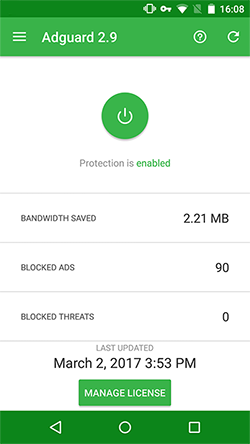 | 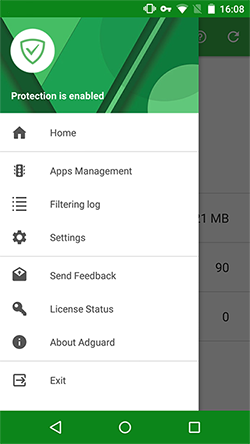 |
Alright, I realize that when it comes to changing the design, there’s always going to be a controversy. There will always be those who find it better than the old one, and there will always be those who don’t. Our hope is that the majority of users will find the new navigation system more convenient.
What exactly has changed? There is now a side menu, which will help to navigate through the app more easily. Besides that, we can finally utilize the context menu in the top-right corner, you can find an example of this in ’Apps Management’ section. By the way, ’Apps management’ will now include all Firewall settings as well. Having these two sections together at the same time felt excessive and confusing.
[Added] Filtering Log #11
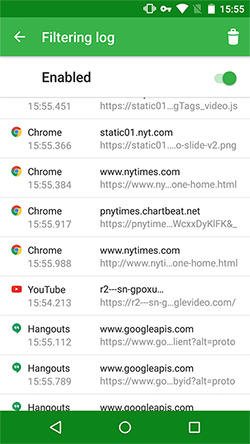 | 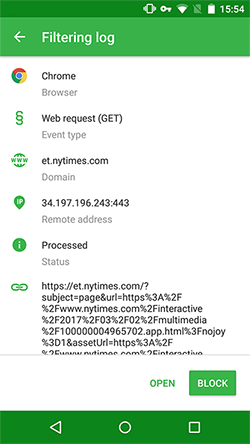 | 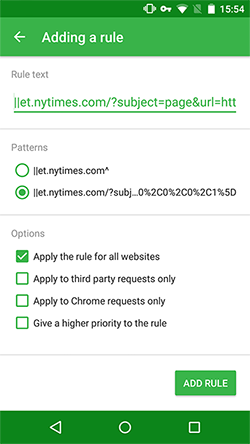 |
Oh, boy. Anyone who has ever tried to check what’s being filtered/blocked knows the struggle of inspecting Adguard’s log file. It was the only way, and I doubt there is a single user who found it convenient. No surprise, as it was initially meant to be used by filters developers only. We were thinking: ’Why would anyone want to see on such deep level what do their apps do?’. We had been completely ignoring tech savvy people who do care about it and do want to have a complete control of what is going on on their device.
I’d like to apologize for this. We should have implemented filtering log functionality a long time ago. Well, better late than never. The filtering log has arrived, come and see for yourself. We don’t expect to hit the nail on the head on the first try, so your feedback on what’s lacking and what you can live without is invaluable.
Ad Blocking
- [Added] $network basic rules modifier #1032
- [Added] Support for exception rules #815
- [Changed] The behavior of the third-party modifier #891
- [Changed] Websites cache is now suppressed after filters change #946
- [Fixed] $replace rules aren’t applied to .m3u8 files content #1060
- [Fixed] Regular expressions with $ symbol aren’t processed properly #1027
Networking
[Added] An option to not filter HTTPS on websites with ’Extended Validation’ certificate #934
Adguard for Windows users are familiar with this option already. Extended Validation SSL certificates grant that the owner of the certificate went through a very strict process of verification. The trust for such certificate owners is much higher — those are usually banks, other financial organizations etc. Often times there are zero or close to zero ads on their websites, and filtering them is excessive anyway — it only increases the chance to break something useful.
[Changed] VPN autopause is now disabled by default for new Android devices (Pixel, Nexus with Nougat): #1000
From the beginning, the VPN autopause functionality was not a ’feature’. It is a workaround for some known Android issues and bugs. For example, tethering could not work along with a VPN, or Adguard’s network access could be denied in power saving mode.
It seems that all these issues are sorted out in the newest Android devices, so we have disabled autopause functionality for them. You can turn it back ON in Adguard’s low-level settings if needed.
- [Fixed] HTTPS filtering in Nougat-targeted apps #979
- [Fixed] Amazon license check hangs while doing the background check #1121
- [Improved] Active proxy connections closing time was reduced #990
- [Imporved] AG styles are protected from disabling now #947
UI
[Added] Bulk change functionality for the Apps Management section #1063
Available from the context menu that we already mentioned above, it grants a fast and easy access to the most common settings that can be applied to all apps at once.
[Added] A new advanced preference: a list of networks which LAN should be filtered for #1154
Initially, there was just a bug that prevented Adguard from filtering ads in Moscow subway Wi-Fi network. Turned out that wi-fi.ru is located inside of a LAN, which we exclude by default. Rather than making an exception for this particular network, we decided to choose a more broad approach and create a new preference.
- [Changed] Aggregate all removed apps stats in one item #806
- [Changed] ’Blocked’ pages markup was updated #1029
- [Changed] Translations were updated #1138
- [Changed] ’Notification without icon’ mode is made default for ’Notification icon’ setting #988
- [Changed] Locale-specific number format is used now on the main screen #1117
- [Changed] ’Removed apps’ package icons now appear inactive in the apps list #1105
- [Fixed] Data stats are shown for Adguard app in Apps Management #889
- [Fixed] ’Learn more’ button link resolves to an undefined page #1113
- [Fixed] FAQ UI is broken on Android 5.1.1 when you highlight the text #1097
- [Fixed] The quick settings tile doesn’t highlight/shade when you toggle the protection #1100
- [Improved] ’App details’ activity is sped up considerably #1099
- [Improved] pref.filtered.ports setting now can understand port ranges #830
Other
[Added] ’Watchdog period’ advanced setting #1067
Depending on the firmware, Android might be very aggressive to background services, killing them really frequently. In Adguard case this aggressive behavior may be truly destructive. This feature starts a special ’watchdog’ service that keeps Adguard’s main process alive. However, it is disabled by default as most of the Android devices do not suffer from the ’random process killing’ issue.
- [Added] ABVPN filter #1015
- [Added] Hungarian filter #1011
- [Added] Adguard French filter #1127
- [Changed] Default HTTPS exclusions list was updated #1116
- [Changed] ’Update only over WiFi’ option is grayed out when automatic filters update is disabled #953
- [Fixed] Crash while updating Adguard #1086
- [Fixed] ’Filters autoupdate period’ graying out bug #956
- [Fixed] Premium license expiration notification is shown after the first installation #1062
- [Fixed] Cannot send MMS when Adguard is in Proxy+Auto filtering mode #1058
- [Fixed] VpnService.prepare crashes due to XPosed module #1084
- [Fixed] An attempt to get a license from within the app makes Adguard crash when there’s no browser installed #1112
- [Fixed] Compatibility issues
- [Improved] UDP connections handling was reworked #906
This is quite a list already, and I decided against including some of the minor issues here. Imagine what the v3.0 release notes will look like! :) By the way, what would you like to see there? Make sure to read our sneak peek article first, and then post your suggestions in the comments.


















































