A peek in the future: AdGuard for Android v3.0

With Adguard for Android v3.0 just around the corner, we have some early spoilers for you. Today I am going to talk big about new design, but will also touch upon some new features, as well as new approach to the old ones.

New color scheme

This is, no doubt, the first thing you will notice when you update to the version 3.0. Adguard is going to switch to the dark theme. We heard many users ask for it, and, after doing some mockups, ultimately we decided that it was a good idea. It really looks nice, you can see for yourself (note that this may be not the final look, but just a mockup):
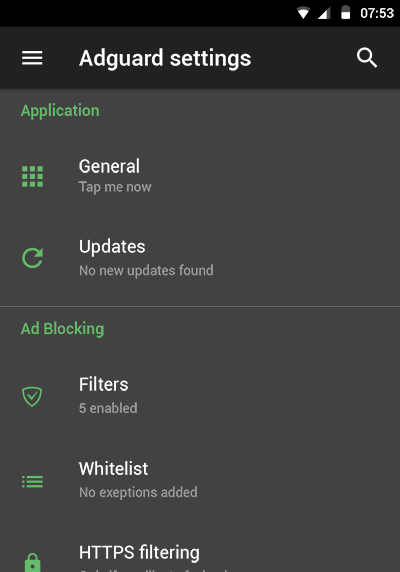
Adguard new design

We here at Adguard are all hyped about the new design, but we understand that there surely will be users who prefer the old version. If you relate yourself to those users, let me reassure you - there will still be an option to keep the old colors:
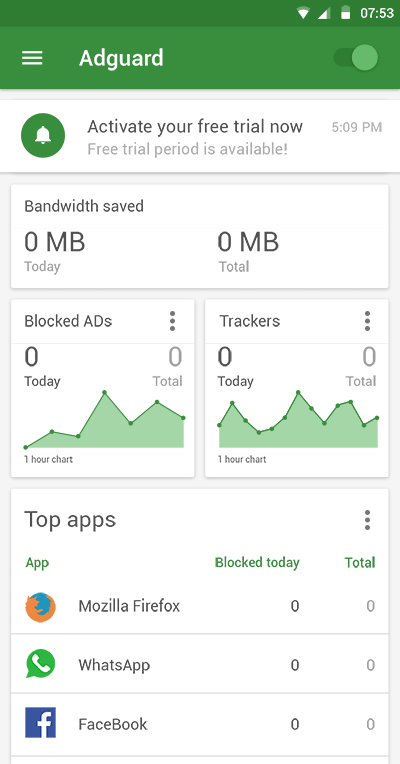
Adguard new design

Looks familiar enough, doesn't it? The dark theme will be the default one, though, so don't freak out if everything suddenly looks different :)

Layout changes

But new design will not be a simple recoloring. We took into consideration mistakes of the past and made some changes to the layout. For example, many users complain (and rightfully so) that the main screen currently is much less functional than it could have been. We heard you, so in the new version it will be composed of a number of 'cards', each card showing some useful information (e.g. general stats, license status, firewall's top apps etc.).
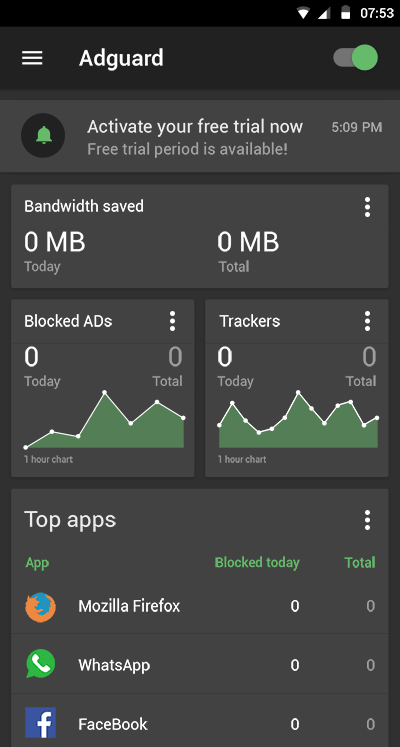
Adguard new design

Another drastic change is menu accessibility. No more awkward top-right corner button. After the redesign, the global menu will always be reachable as a left sidebar, and standard menu will be reserved for context-depending purposes. This way the app will become more intuitive and easy to navigate through.
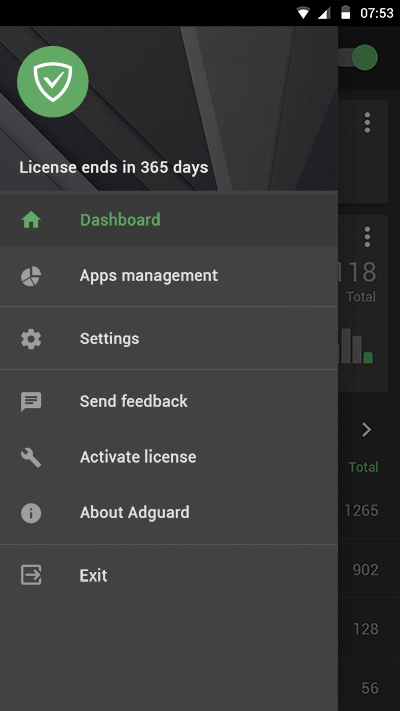
Adguard new design

On top of that, Apps Management section will be reworked. This was another popular subject for users' criticism, and we listened to it. No specific details yet, but it will also become much more user-friendly.
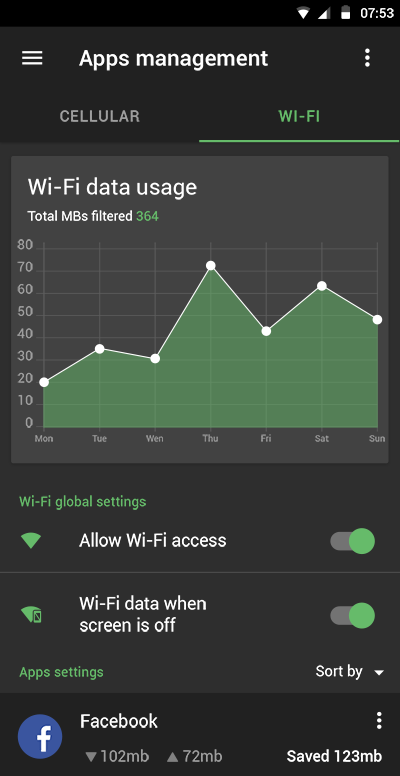
Adguard new design

Mind that the development process is still going, so this means anything can still possibly change before the release.

New features

Ok, new design is a huge thing, I think you got the idea. But there's more to v3.0 than just it. Without listing every single thing we are going to implement, let me tell about just one more, but a truly important one. I am talking about Filtering log.
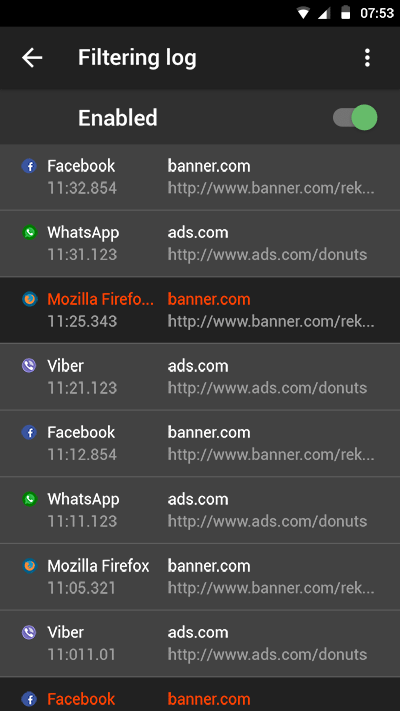
Adguard new design

Countless times we've been asked about filtering log for Android version. Finally, we will deliver. If you are familiar with filtering log concept, you probably don't need a lot of explaining. For all the others: filtering log is a tool that allows you to monitor all requests on the go and easily see which were blocked, by what rule etc. A useful tool overall, especially for those who create their own filtering rules.

To sum it up

Sorry if this got you excited - new version is not ready yet, even for beta release. We still have things to polish, so expect the first alpha to come out in January 2017.

What do you think, is it worth the waiting? Do you like the new design? Are you going to stick to the 'old classics' theme, or maybe you even have your own vision of how Adguard should look like? Tell us in the commentary section!


喜歡這篇文章嗎?
AdGuard DNS AdGuard Mail AdGuard Wallet
AdGuard Windows 版主畫面
AdGuard Windows 版的防護畫面,顯示防護功能與設定。
AdGuard Windows 版的統計畫面,顯示已封鎖的廣告與追蹤器資料。
AdGuard Windows 版的應用程式管理畫面,顯示裝置上已安裝應用程式的防護管理選項
21,756 21756 使用者評論
極好的!

AdGuard Windows 版:PC 廣告阻擋器

Windows 版 AdGuard 不只是廣告封鎖程式,它是集成所有讓您享受最佳網路體驗的主要功能的多用途工具。其可封鎖廣告和危險網站,加速網頁載入速度,並且保護兒童的線上安全。
透過下載該程式,您接受授權協定的條款
Microsoft Store
透過下載該程式,您接受授權協定的條款
AdGuard for Windows 8.0 版本,14 天的試用期
AdGuard Mac 版主畫面
AdGuard Mac 版的隱身模式介面
21,756 21756 使用者評論
極好的!

AdGuard Mac 版:全系統廣告攔截器

Mac 版 AdGuard 是一款獨一無二的專為 MacOS 設計的廣告封鎖程式。除了保護使用者免受瀏覽器和應用程式裡惱人廣告的侵擾外,應用程式還能保護使用者免受追蹤、網路釣魚和詐騙。
透過下載該程式,您接受授權協定的條款
閱讀更多
AdGuard for Mac 2.19 版本,14 天的試用期
AdGuard Android 版主畫面
AdGuard Android 版的追蹤保護畫面
AdGuard Android 版的應用程式管理畫面,顯示裝置上已安裝應用程式的防護管理選項
AdGuard Android 版的統計畫面,顯示已封鎖的廣告與追蹤器資料。
AdGuard Android 版隱私瀏覽器主畫面
下載 AdGuard Android 版的 QR 碼
21,756 21756 使用者評論
極好的!

Android 版 AdGuard —廣告封鎖器

在所有瀏覽器、遊戲及其他應用中封鎖廣告和追蹤器。保護個人隱私,並讓您控制應用如何使用網路。通過 APK 安裝。
透過下載該程式,您接受授權協定的條款
閱讀更多
掃描下載
可以使用任何一款 QR 碼閱讀器
AdGuard for Android 4.14 版本,14 天的試用期
AdGuard iOS 版主畫面
AdGuard iOS 版的防護畫面,顯示防護功能與設定。
AdGuard iOS 版的統計畫面,顯示已封鎖的廣告與追蹤器資料。
下載 AdGuard iOS 版的 QR 碼
21,756 21756 使用者評論
極好的!

iOS 版 AdGuard —廣告封鎖器

適用於 iPhone 和 iPad 的最佳 iOS 廣告攔截器。AdGuard 可在 Safari 中消除各種廣告與追蹤器,並在 DNS 層級保護您在所有應用程式中的隱私。
透過下載該程式,您接受授權協定的條款
閱讀更多
掃描下載
可以使用任何一款 QR 碼閱讀器
AdGuard for iOS 版本 4.5
AdGuard 內容阻擋器主畫面
AdGuard 內容阻擋器的過濾器畫面
AdGuard 內容阻擋器的設定畫面
21,756 21756 使用者評論
極好的!

AdGuard 內容阻擋器

AdGuard 內容阻擋器可以全面阻止所有支援內容封鎖技術的行動瀏覽器中的廣告,目前包括 Samsung Internet 瀏覽器和 Yandex 瀏覽器。雖然其功能相比 Android 版 AdGuard 有所限制,但它完全免費、安裝簡單且封鎖高效。
透過下載該程式,您接受授權協定的條款
閱讀更多
AdGuard 內容阻擋器 版本 2.8
AdGuard 瀏覽器擴充功能的主畫面
AdGuard 瀏覽器擴充功能的追蹤防護畫面
21,756 21756 使用者評論
極好的!

AdGuard 瀏覽器擴充功能

AdGuard 是有效地封鎖於全部網頁上的所有類型廣告之最快的和最輕量的廣告封鎖擴充功能!為您使用的瀏覽器選擇 AdGuard,然後取得無廣告的、快速的和安全的瀏覽。
安裝
透過下載該程式,您接受授權協定的條款
安裝
透過下載該程式,您接受授權協定的條款
安裝
透過下載該程式,您接受授權協定的條款
安裝
透過下載該程式,您接受授權協定的條款
安裝
透過下載該程式,您接受授權協定的條款
閱讀更多
安裝
透過下載該程式,您接受授權協定的條款
閱讀更多
AdGuard 瀏覽器擴充功能 版本 5.5
AdGuard 助理主畫面
21,756 21756 使用者評論
極好的!

AdGuard 助理

AdGuard 桌面應用的配套瀏覽器擴充套件。支援封鎖網頁特定內容、將網站新增至允許清單,並直接從瀏覽器提交報告。
AdGuard 助理 版本 1.4
21,756 21756 使用者評論
極好的!

AdGuard Home

AdGuard Home 是一款以網路為基礎的解決方案,用於封鎖廣告和追蹤器。只需在您的路由器上安裝一次,即可涵蓋家庭網路上的所有裝置——無需另外安裝客戶端軟體。這對於經常威脅您隱私的各類物聯網裝置來說尤為重要。
AdGuard Home 版本 0.107
AdGuard Pro iOS 版主畫面
AdGuard Pro iOS 版的保護畫面,顯示保護功能與設定
AdGuard Pro iOS 版的統計畫面,顯示已封鎖的廣告和追蹤器資料
21,756 21756 使用者評論
極好的!

AdGuard Pro iOS 版

AdGuard Pro iOS 版預置全部進階廣告封鎖防護功能,提供與 AdGuard iOS 版付費版完全相同的工具集。其卓越之處在於:不僅能精準封鎖 Safari 瀏覽器內的廣告,更支援自訂的 DNS 設定以精細化防護策略。該產品具備跨瀏覽器與應用的全方位廣告封鎖能力,有效防護兒童遠離不良內容,並全面保障個人資料安全。
透過下載該程式,您接受授權協定的條款
閱讀更多
AdGuard Pro iOS 版 版本 4.5
AdGuard Mini Mac 版主畫面
AdGuard Mini Mac 版的 Safari 保護畫面
AdGuard Mini Mac 版的建立規則畫面
21,756 21756 使用者評論
極好的!

AdGuard Mini Mac 版:Safari 廣告封鎖程式

AdGuard Mini Mac 版是一款強大的 Safari 廣告攔截程式。這款輕量級應用不僅能移除廣告、封鎖追蹤器,還能顯著提升網頁載入速度。它讓您在 Safari 中專注瀏覽、免受干擾,同時確保個人資料安全私密。
安裝
透過下載該程式,您接受授權協定的條款
閱讀更多
AdGuard Mini Mac 版 版本 2.3
開啟防護狀態下的 AdGuard Android TV 版本主畫面
AdGuard Android TV 版本的廣告封鎖畫面,顯示其功能與設定
AdGuard Android TV 版本的設定畫面
AdGuard Android TV 版本的應用程式管理畫面,顯示已封鎖廣告與追蹤器的應用程式。
21,756 21756 使用者評論
極好的!

AdGuard Android TV 版

Android TV 版 AdGuard 是唯一一款能封鎖廣告、保護隱私並充當智慧電視防火墻的應用程式。取得網路威脅警告,使用安全 DNS,並受益於加密流量。有了安全性和零廣告的使用體驗,使用者就可以盡情享受最喜愛的節目了!
AdGuard Android TV 版 4.14 版本,14 天的試用期
AdGuard 吉祥物 Agnar 懷抱 Linux 的企鵝吉祥物
21,756 21756 使用者評論
極好的!

AdGuard Linux 版

AdGuard Linux 版是世界上第一個系統級廣告封鎖器。封鎖廣告和追蹤器,選擇預設過濾器或新增自己的過濾器。管理流程通過命令行介面實現。
AdGuard Linux 版 版本 1.4
21,756 21756 使用者評論
極好的!

AdGuard Temp Mail

免費的臨時電子郵件地址產生器,保持匿名性並保護個人隱私。您的主收件匣中沒有垃圾郵件!
21,756 21756 使用者評論
極好的!

AdGuard DNS

AdGuard DNS 是一種不需要安裝任何的應用程式而封鎖網際網路廣告之極簡單的方式。它易於使用,完全地免費,被輕易地於任何的裝置上設置,並向您提供封鎖廣告、計數器、惡意網站和成人內容之最少必要的功能。
21,756 21756 使用者評論
極好的!

AdGuard Mail

保護個人身份,避免垃圾郵件,並使用我們的別名和臨時電子郵件地址保護收件箱。享受我們的免費電子信箱轉發服務和適用於所有作業系統的應用程式使用體驗。
21,756 21756 使用者評論
極好的!

AdGuard Wallet

一個安全且私密的加密貨幣錢包,讓您完全掌控資產。管理多個錢包,探索上千種加密貨幣以儲存、傳送及兌換。
已開始下載 AdGuard 點擊箭頭所指示的檔案開始安裝 AdGuard。 選擇"開啟"並點擊"確定",然後等待該檔案被下載。在被打開的視窗中,拖曳 AdGuard 圖像到"應用程式"檔案夾中。感謝您選擇 AdGuard! 選擇"開啟"並點擊"確定",然後等待該檔案被下載。在被打開的視窗中,點擊"安裝"。感謝您選擇 AdGuard!
在行動裝置上安裝 AdGuard















































