New AdGuard browser extension release: version 2.1
We are finally ready to officially release this major update of Adguard browser extension! We have made a lot of improvements and important fixes since the first beta version.
TL;DR
- You can now use “optimized” filters, which makes Adguard even lighter on CPU and memory and still shows high quality ad blocking.
- Adguard has became first full-scaled ad blocker using new Safari Content Blocker API.
- We have reworked browsing security feature, made it much better in terms of user privacy.
- Tons of bugs fixed and lots of minor improvements made.
Read further if you want to learn the details.
First of all, let us recall about Content Blocker API, as it is the most important update of our extension.
Safari Content Blocker API #16
We have already told you hat Safari has introduced a new API designed specifically for ad blockers. It works for both OS X and iOS and thanks to this API you can now use Adguard for iOS. Now it’s time to use it in our extensions as well. If you use Safari 9 or later, Adguard will use a new API instead of the old one. Users of Safari 7-8: please don’t worry, we still support these browsers.
New API has some pros and cons.
Pros:
- We are now able to block any web request. With an old API (due to the nature of that API) we could miss some video ads.
- It seems faster than the old API. Safari developers were focused on performance while developing that API.
Cons:
- Content Blocker rules syntax is not 100% equivalent to Adguard filters syntax. This means that a small part of our rules won’t work. That’s why we have added new Adguard Safari Filter, which single purpose is to fix the issues with missing rules.
- Filtering Log and blocked items counter cannot be implemented using new API: https://github.com/AdguardTeam/AdguardBrowserExtension/issues/160.
- There is a weird limitation on the rules number. You can’t use more than 50000 rules. Due to that limitation we have implemented the “optimized” filters option (you can learn more about it below).
Back to old API
Some of you may want to stick to old API because of these cons. It is possible with a special setting switching Adguard back to old API: #143
To change this setting go to “Safari” – “Preferences…” – “Extensions” and select Adguard. Switching between APIs require browser restart.
Old API is deprecated and will be removed in one of the future Safari versions!
An option to use “optimized” filters #68
A long time ago we have added an option (turned off by default) that allows you to send us ad filters usage statistics. This statistics allows us to optimize existing filters and clean up redundant rules. But what’s more important, it allowed us to use special “optimized” filters in Adguard for iOS and Android. App performance and memory usage depends on the filters size, so it is essential to use smaller filters there.
Now you can use the same optimized filters in Adguard browser extension. If you are concerned about extension performance and memory usage it is highly recommended to try this new option.
Just look at the screenshot below. One memory snapshot is done with default filters and the other with “optimized filters”. The difference is astounding. With “optimized” filters memory usage is almost 40% lower.
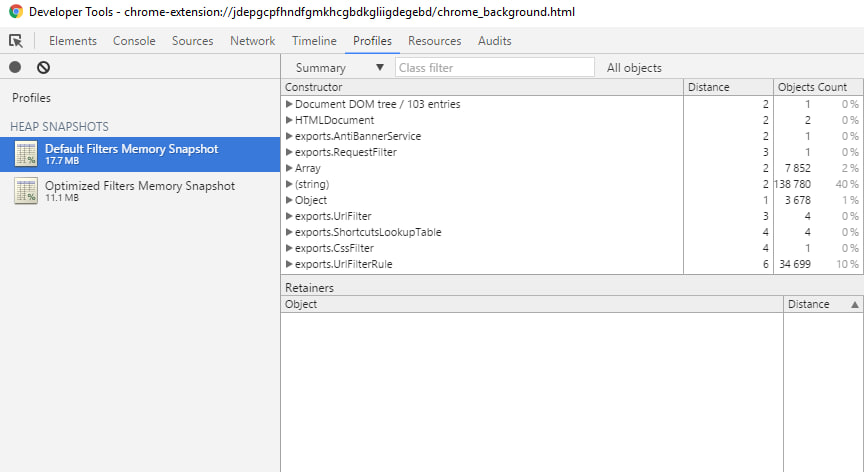
Memory snapshots are made in Chromium. First shows, that AG uses 17.7MB with default filters. Second, that AG uses 11.1MB with “optimized” filters.
Domain security check in a “private” way #50
Do you know how the check was done in the previous versions? For checking if domain is phishing or malware, Adguard sent domain name to a special web service. This is a very simple and straightforward way, but it has a serious flaw. We could see the websites you visit. Of course we didn’t use or save this information, but anyway, it does not look good, eh? From now on we use a new way that does not hurt your privacy in any way.
Now, instead of sending the whole domain name:
- Adguard calculates a 256-bit hash of the domain name.
- Then it sends first 32 bits of that hash to a web service and gets all matching hashes in response.
- Adguard checks if any of these hashes matches the domain hash.
As you can see, no sensitive information is being sent.
Other changes
[Added] Add “Allow useful ads” item to the “thank you” page #113
[Added] Add $genericblock modifier support: #30
[Added] Add $generichide modifier support: #31
[Changed] $elemhide rules should be applied to “Documents” only: #60
[Changed] $popup rules must be applied to “document” only: #79
[Changed] Display the actual number of the rules used by the extension: #78
[Changed] Increment “blocked items” counter every time: #83
[Changed] Refactor UI and background services communication: #26
[Changed] Update copyrights to 2016 everywhere: #125
[Fixed] Invalid rule is constructed by “Block ad on this website” feature: #122
[Fixed] User filter should be loaded first (before other filters): #117
Firefox
[Changed] Avoid blocking UI thread while initializing filter rules: #131
[Fixed] “Unsafe CPOW usage” in Firefox Nightly because of getTabForContentWindow method: #130
[Fixed] Avoid blocking UI thread while initializing filter rules: #131
[Fixed] Cannot disable ad blocking for a website in Tor Browser: #96
[Fixed] Error in FF console: Unable to run script because scripts are blocked internally: #45
[Fixed] Filter stats collection is broken when e10s is enabled: #36
[Fixed] Filtering log “Source” column is null for newly opened website: #38
[Fixed] Filtering Log in Firefox 38 ESR: Referrer is null for EACH request: #47
[Fixed] Filtering log is very slow on websites with 1k+ images: #137
[Fixed] No Adguard logs in Browser Console: #135
[Fixed] Sometimes preferences are not saved in Firefox for Android: #105
[Fixed] User filter export no more exports it to a new file: #136
Safari
[Fixed] Content script does not receive events from background page when page is preloaded by “Safari top hit”: #159
[Fixed] The enabled property of SafariPrivateBrowsing is deprecated. Use the private property of SafariBrowserTab instead: #65
Chromium
[Changed] Use shadow DOM for CSS injections: #44
Minor issues
[Changed] Use higher resolution favicon on extension pages: #40
[Fixed] Sanitize “host” parameter on the “Access Denied” page: #72
How to install Stable version
Chromium
Firefox (version 30 or newer)
Updated version is waiting for review
Opera
We want to thank everyone who helped us with testing of this release. Thanks for your contribution, guys!
Best regards,
Adguard team


















































