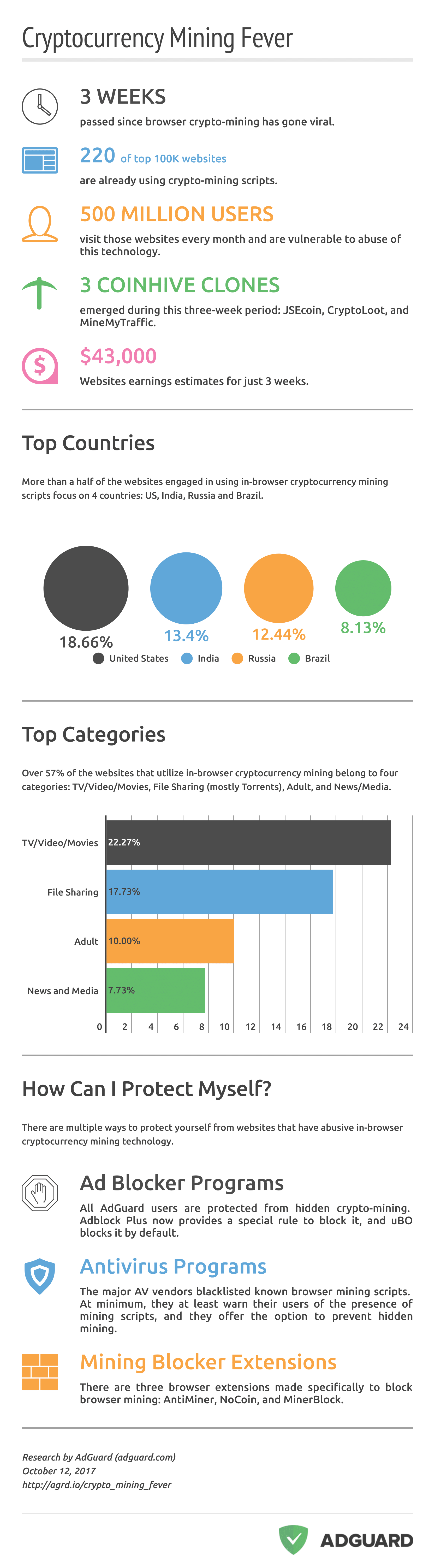
Cryptocurrency mining affects over 500 million people. And they have no idea it is happening.
This autumn the news spread that some websites had been making money by mining cryptocurrencies in their users’ browsers. We have been among the first to add protection from this hidden activity. AdGuard users now receive warnings if a website has been trying to mine, and the users are given the option to let it continue or to block the mining script from running.
We decided to research the issue more so that we could understand its scale and impact. On the Alexa list of the top one hundred thousand websites, we looked for the codes for CoinHive and JSEcoin, the most popular solutions for browser mining in use now.
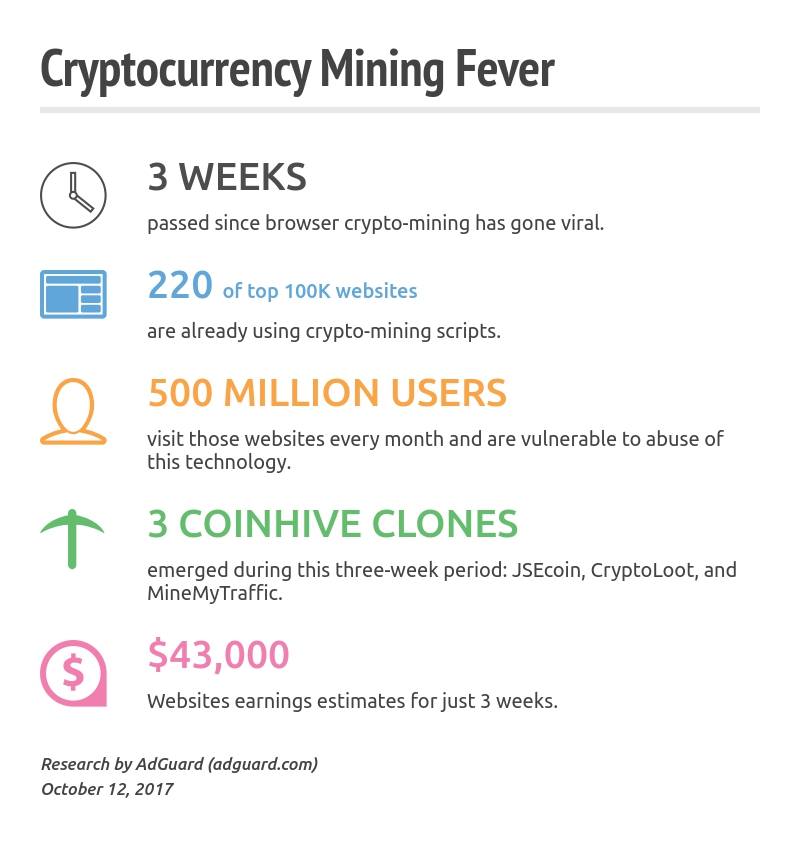
We found 220 sites that launch mining when a user opens their main page, with an aggregated audience of 500 million people. These people live all over the world; there are sites with users from the USA, China, South American and European countries, Russia, India, Iran… and the list goes on.
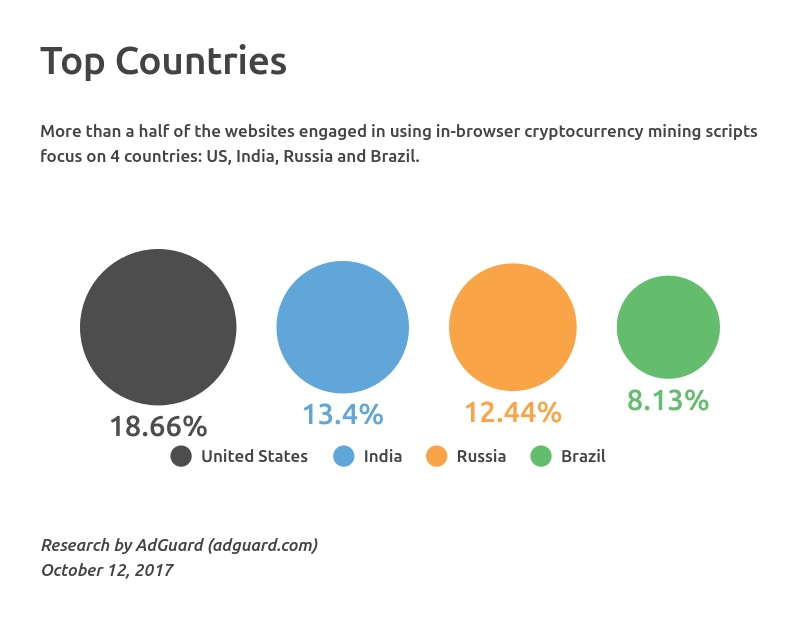
220 sites may not seem like a lot. But CoinHive was launched less than one month ago, on the 14th of September.
How much money have these websites made? We estimate their joint profit at over US $43,000. Again, right now it’s not millions, but this money has been made in three weeks at almost zero cost.
Examining the website list more closely, we discovered that many of them are from the “gray zone”, mostly pirate TV and video sites, Torrent trackers and porn websites. Judging from these characteristics, we begin to wonder if browser mining is a bad thing and if it should be banned from the Internet.
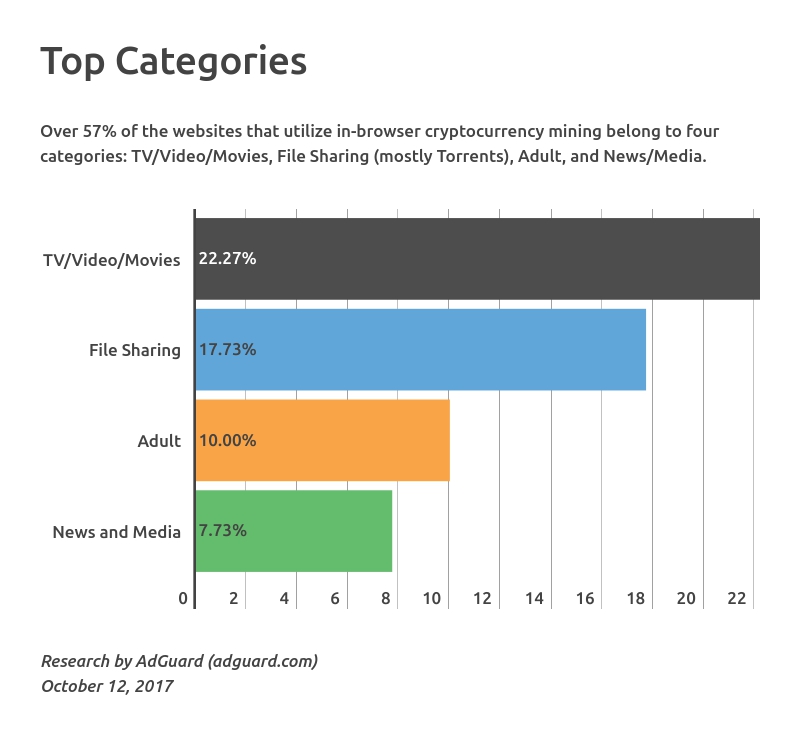
There may be a further explanation for the fact that browser mining is found mostly on websites with a shady reputation. These sites traditionally have trouble making money through advertising, so they are open to experiments and innovation. Porn sites have always been early adopters; a lot of new tech solutions were actually invented by porn site developers and later copied by other webmasters.
In fact, it was the largest torrent search engine, The Pirate Bay, that made CoinHive famous by being caught using it. But among the “early adopters” of CoinHive were the Web properties of CBS’s Showtime network, Showtime.com and Showmeanytime.com. CoinHive disappeared from the CBS sites shortly after media coverage of this activity began to break out. The assumption was made that the mining had been a private initiative of some adventurous Webmaster within the Showtime network.
The company’s video streaming platforms are the exact type of websites that are good for mining: They boast a huge audience that keeps their site open in their browsers for a long time.
The problem with in-browser mining is not that it’s a bad thing by itself. There are no good and bad tools and technologies, but there are good and bad ways to use them.
The ethical way for a website to earn money by mining through its audience’s computers is to ask the audience for permission first, and to allow them the possibility to opt out. Actually, such a practice could make mining even more ethical than ads. After all, nobody asks us if we would like to see ads on a website. Mining parasitizes the user’s CPU, where ads parasitize the user’s attention, emotions, bandwidth, and often, their laptop or smartphone battery, and supports an industry of personal data harvesting that is a big headache in of itself.
The CoinHive team has issued a statement calling on website operators to inform their users about the mining operations and to ask for user permission to do this. However, we believe that it is very hard for them to force this recommendation into action; for example, they cannot forbid stealth mining.
But there are other ways to get miners to behave themselves. A popular CDN service called Cloudflare recently started to suspend accounts and deny service to sites that mine without user permission. A number of ad blockers and antivirus programs also added features that block browser mining.
We at AdGuard have also updated our apps in order to restrict mining. But we do not accomplish this by simply silently blocking it. Instead, we offer our users the choice to let a site mine, or to forbid it to launch mining in their browsers. With this approach, we achieve two goals at the same time: prevent hidden mining and expose websites attempts to abuse the technology.

Cryptocurrency mining on websites honestly does promise great possibilities. But these could be lost if abusive practices continue.
Why exactly is it so promising? Experts presently say that only sites with really huge audiences can make even somewhat substantial money on mining. Is this then just a game for a few, who actually don’t need any new monetization tools, since a big audience pays off perfectly with ads?
We see several reasons to believe in a big future for mining on sites:
- Cryptocurrencies are growing rapidly; existing currencies grow in value and new ones appear. Mining will eventually become more profitable.
- Mining may not promise huge profits, but neither do ads. An audience of a website might be big, but not “expensive” from the marketing point of view.
- Any alternative to advertising is a good thing. Ads annoy, so more and more people use ad blockers and simply do not see ads. Ads, after all, abuse users’ device resourсes -- the same thing mining is criticized for. But what do we have besides ads, if we want a non-ecommerce website to feed us or at least to feed itself? We know that ideas like paid subscriptions and donations are truly at the end of the list. Of course, there are vehicles like crowdfunding, investments, and IPOs, but to put it mildly, these sources of capital are not accessible for everyone.
This is why we propose not to relegate cryptocurrency mining to the dark side by blocking it. We should harness this young and vigorous beast for our own common good.
- UPDATE 1: Initially, the article contained a mistake - 220 of 100k is 0.22%, not 2.2%.
- UPDATE 2: CTO of the largest website detected, uptobox.com (60M monthly visitors) said that they had removed the CoinHive code.
- Full infographics image is here.
- We used SimilarWeb to analyze web traffic for each site.