First, but not the last? Discord suffers hack resulting in age verification IDs leak
We’ve never exactly been fans of the rising wave of age verification laws cropping up around the world, most recently and arguably prominently in the US and the UK. Over there, the Online Safety Act now forces platforms to verify the ages of their users, with some pretty harsh penalties for non-compliance.
Our issue — and that of many other privacy and security experts — with these age verification checks (and the platforms rolling them out) is simple: they force users to hand over even more of their highly sensitive personal information. We're talking ID images like driver’s licenses or passports. And when platforms storing this kind of sensitive data get hacked, especially if they’re hosting adult content, the consequences can be flat-out disastrous.
The UK’s Online Safety Act, which mandates “robust” age checks for online platforms, came into effect on July 25 this year. Discord, anticipating the deadline, started rolling out its age verification system early, beginning as far back as April 2025. That rollout started with a limited test that included face scanning to estimate users’ ages. When the law kicked in, the policy quickly expanded to cover all UK-based users.
A ticking time bomb
And — as you might’ve guessed — it was a ticking time bomb. Last week, Discord confirmed that a trove of users’ personal data handled by its third-party customer service provider had been breached. According to Discord, the attackers gained access to “a small number of government‑ID images (e.g., driver’s license, passport) from users who had appealed an age determination”.
Other data that fell into the hands of the hackers included:
- Names, Discord usernames, emails, and other contact details (if provided to customer support)
- Limited billing info, like the type of payment method, last four digits of credit cards, and purchase history (if linked to your account)
- IP addresses
- Messages exchanged with Discord’s customer service team
- Some internal corporate docs (training material, internal presentations)
Discord said that this data was exposed in the September 20 attack, saying that the hackers demanded a ransom from Discord so that they did not leak the data. According to BleepingComputer, the third-party support provider in question was Zendesk, a popular customer service platform used by many large companies.
In the aftermath of the attack, Discord said that it revoked the support provider’s access to the ticketing system, engaged computer forensics experts, and launched an internal investigation.
It’s unclear how many users exactly were affected in the incident, but Discord has about 250 million monthly active users. At the same time, the age verification checks fully apply only to the UK-based users, where they are mandatory. Discord itself has been testing what it calls “age assurance” in other regions, such as reportedly Australia. That means that while this is still limited for now, age verification is on track to become a widespread practice — and that’s exactly why we want to zero in on it.
Play by the rules, get your ID leaked
Normally, to create an account on an online platform, you don’t hand over your government ID — so how did ID photos end up in the hands of Discord’s third-party provider, and, eventually, hackers?
To blame is the newly-installed age verification system in place in Discord. According to Discord’s guidelines, there are only two ways to prove your “age group”: either scan your face, or upload a scan of your ID document. Faced with picking the lesser of two evils, most users likely go for the selfie over handing in a government-issued ID. Some go even more creative — like trying to bypass Discord’s checks with screenshots from Death Stranding’s in-game photo mode. But if you’re trying to play by the book, you’ll end up submitting either your face or your ID.
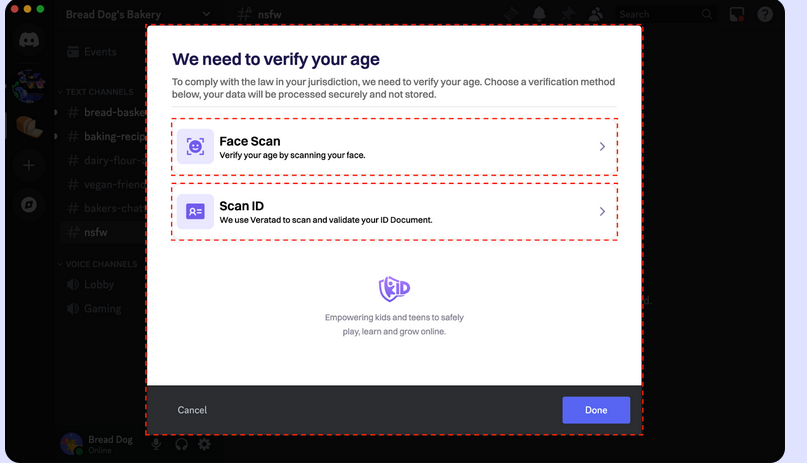
And it’s those law-abiding users — the ones who did what they were told — that ended up in the crosshairs of the latest breach. Discord claims the system is built with privacy in mind, and that no identification documents or video selfies are permanently stored:
“Discord and k-ID (Discord’s verification service provider) do not permanently store personal identity documents or your video selfies. The image of your identity document and the ID face match selfie are deleted directly after your age group is confirmed, and the video selfie used for facial age estimation never leaves your device.”
We have to take them at their word here: that the data is deleted immediately after use. But there’s a catch: if the system fails to verify your age (which, let’s be real, isn’t that rare — age estimation tech isn’t exactly foolproof), users are directed to contact Discord’s Trust and Safety team. And that’s when they’re asked to submit their ID or a selfie again. Those are the photos and IDs that were leaked.
The real cost of compliance
Unfortunately for Discord — and for every other platform being pushed to roll out similar systems — this is just the beginning. The more personal data platforms are forced to collect just so users can log in, the more opportunities there will be for leaks, breaches, and exploitation. The attack surface keeps growing.
The rule of thumb (as always) is this: minimize how much personal data you hand over online. Whether it’s a website, app, or platform, the less you give them, the less can be leaked.
In this case, that might mean using a workaround like connecting to a VPN server in a country where age verification laws aren’t mandatory (yet). But how long that trick will work is anyone’s guess.
Hopefully, incidents like this serve as a wake-up call. Hopefully big tech and other platforms will start pushing back instead of just rolling over and complying. Because right now, the price of compliance is starting to look dangerously high.


















































