Everything about HTTPS filtering in AdGuard
This post is intended for more technically advanced users and meant to provide a detailed description on the HTTPS filtering and why it is essential in Adguard. The thing is, HTTPS is a very serious and sensitive subject, and we want to be as open here as possible.
What is HTTPS?
HTTPS (HyperText Transfer Protocol Secure) is an extension of the HTTP protocol that supports encryption to increase security. This protocol is used to securely transmit valuable information like personal data, credit card details, etc.
Using HTTPS is strictly advantageous, since encrypted traffic is protected from ‘eavesdropping’ by third parties, and we can only welcome this. HTTPS spread has been on the rise in the recent years, mostly because it is being encouraged by Google, and also due to the emergence of a free certification center Let’s Encrypt.
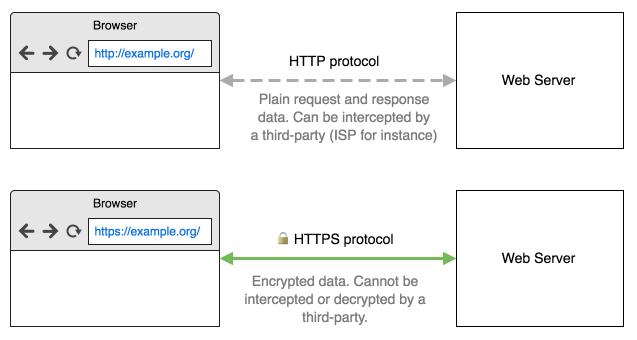
The diagram below describes the difference between plain HTTP protocol and secure HTTPS protocol.
What is a security certificate?
Simply put, HTTPS means data encryption. But there’s still a problem: how can you be sure you’ve established an encrypted connection with exactly the website you intended to? That’s where security certificates come into play. The certificate is proof that the website is actually what it tells you it is. If a website doesn’t have such certificate, or the certificate contains incorrect information, the browser won’t let you establish a secure connection. It is important that the certificate a website uses was issued by a certification authority (CA) trusted by your browser. Such CA guarantees that the SSL certificate is, indeed, issued to the website’s owner.
Why does Adguard need to be able to filter HTTPS?
The thing is, more and more websites, blogs, social media, etc. switch to HTTPS every day. And besides blogs and websites, more ad networks switch to HTTPS too, because it becomes necessary to display ads on the HTTPS-based website. Here are few examples of popular websites, where you can’t remove ads without filtering the HTTPS: youtube.com, facebook.com, twitter.com.
Adguard versions for Windows and Mac have HTTPS filtering enabled by default. In case of Android you'll need to enable it manually.
How does HTTPS filtering work?
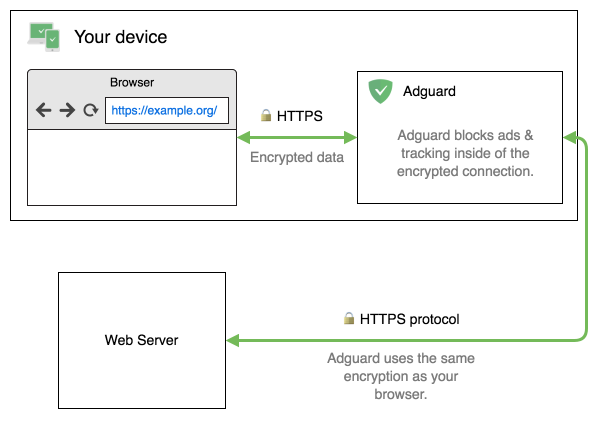
If it were easy, HTTPS wouldn’t be that secure. Upon browser’s attempt to connect to a server, Adguard establishes two secure connections: one with the browser (or another app), and the other with the server. It is crucial that browser trusts Adguard and the connections created by it. For this purpose, Adguard generates a special (and unique) root certificate and installs it into the system and, when it is required, into some browsers too (e.g. Firefox). Thus, Adguard can see what is happening inside of the secure connection and do its job - block ads and tracking.
For better understanding we depicted this process:
Does my traffic remain encrypted and secure?
Of course! Your connection with a remote server remains encrypted and secure. Adguard, just as your browser, checks the server’s certificate before deciding whether to filter it or not.
Nevertheless, HTTPS filtering has its drawbacks. The most important of them is the fact that it hides from the browser the real certificate that the website uses. Instead, the browser sees the certificate issued by Adguard.
Because of this, we undertake several additional measures to improve the connection’s security.
Financial websites and websites with sensitive personal data
By default, Adguard doesn’t filter any information for the bank websites, websites of the payment systems and websites with valuable personal data. We maintain a list of more than 1300 such exclusions.
If you believe some website should be added to this list, please let us know.
Extended Validation (EV) certificates
Adguard provides an ability to exclude from filtering all websites that use extended validation certificates.
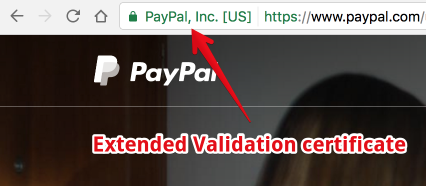
EV certificate means a higher security level and provides more guarantees than a regular certificate, proving that the website is not fraudulent or fake. When you visit a website protected by such certificate, the address bar becomes green, and the organization’s name appears in the browser’s interface.
Problems related to HTTPS filtering
The recent research shows that 5 to 10% of HTTPS connections are established by HTTPS filtering applications. It is usually done by various kinds of antivirus software. The bad news is that 24 of 26 tested antiviruses were in one way or another reducing the connection security level and two-thirds were creating vulnerable to hacking connections.
The researchers’ conclusion was simple - Internet security community has to pay close attention to applications that filter secure connections. And the developers of such programs have to attend to the quality of filtering implementation most seriously.
I want to note that Adguard has not been tested by the researchers. According to our estimates, and judging by the set of tests, at the time of testing we would get the maximum score - A*. Nevertheless, that score is not perfect. There are some problems that have been identified by researchers but were not taken into account in the final evaluation.
Here in Adguard, we completely agree with those conclusions. Moreover, we would like to be as open with users as possible and talk about the problems we are having at the moment, and what steps we are taking to improve the quality and security of filtering mechanism. The list of these problems is sorted by their priority.
The majority of the problems discovered in the research above are connected with certificate validation mechanisms. This is what we want to focus on firstly. We are working on a separate certificate validation library. Moreover, we want to make it open source. A separate article lists all known issues of HTTPS filtering in Adguard and estimates when we will fix them.
How to manually check HTTPS quality?
There are several websites created specifically for the purpose of checking HTTPS connections quality. These websites check if your browser (or, in our case, browser + Adguard) is susceptible to common vulnerabilities. If you plan to use any program that filters HTTPS (not necessarily Adguard, it may be an antivirus, etc.), we advise checking the connection quality on these websites.


















































