From budget to luxury: Ads now come to high-end smart TVs
We’ve all grown accustomed to the idea of ads populating budget TVs. After all, Roku, one of the trailblazers of the ad-supported model in the world of smart TV, has long positioned itself as an ad company rather than one focused solely on hardware. It seems like a fair trade-off: the TV or a TV stick is such a bargain, so there must be a hidden cost — and that cost is a swarm of annoying ads.
Some companies go even further. Remember Telly? They promised a free 55-inch 4K TV, with the “only” catch being a second screen that displays ads nonstop.
The trade-off has been clear, and some, albeit reluctantly, have come to accept the status quo. But what about high-end TVs? We pay a premium for premium quality and, ideally, fewer ads. Yet, it seems that’s becoming less and less the case.
LG OLED TV gets screensaver ads
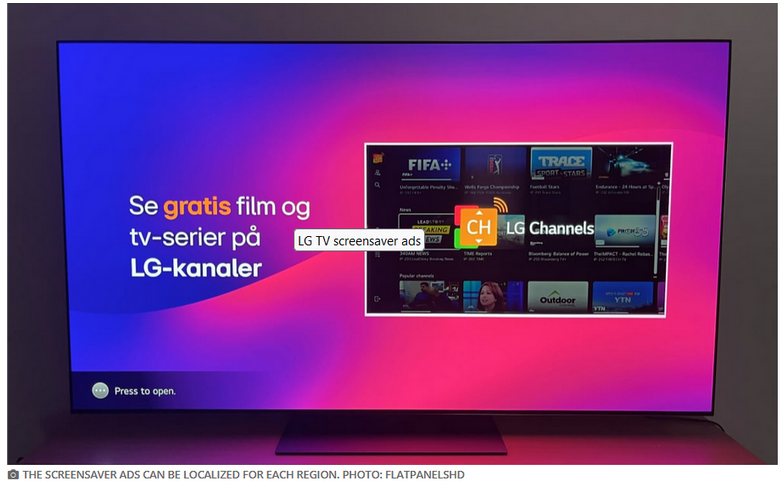
Enter LG OLED TV, the 65-inch model sells for $3,000 on BestBuy (compare to Roku’s 65" Class Select Series 4K Smart RokuTV, which goes for $399. According to a report by Flatpanelshd, G4 OLED TV has recently been spotted showing full-screen screensaver ads.
Source: FlatpanelsHD
According to the report, the ad appears before the regular screensaver takes over the screen. LG’s free ad-supported streaming service is being promoted in the screenshot above, but these screensaver ads aren’t limited to LG’s own products. Ads are also served by third-party advertisers, such as car manufacturers. We suspect this is just the beginning, and more physical product ads will soon grace high-end screens. It’s just how things are: they start slow, then quickly escalate down that slippery slope — before you know it, you’ll be seeing ads for donut chains and the like.
How to turn off LG screensaver ads
Fortunately, at least for the moment being, there’s a way to turn off those pesky screensaver ads on LG Smart TVs.
Head to the Settings menu and look for Additional Settings. There, you’ll find a toggle for Screen Saver Promotion, which is enabled by default. Just switch it off. While you're at it, consider disabling the other ad formats from LG as well.
LG is just jumping on the bandwagon
If you scour the Internet for feedback to the increasingly “right-in-your-face” invasion of ads served by TV vendors on people’s screens, you’ll see a lot of anger and frustration.
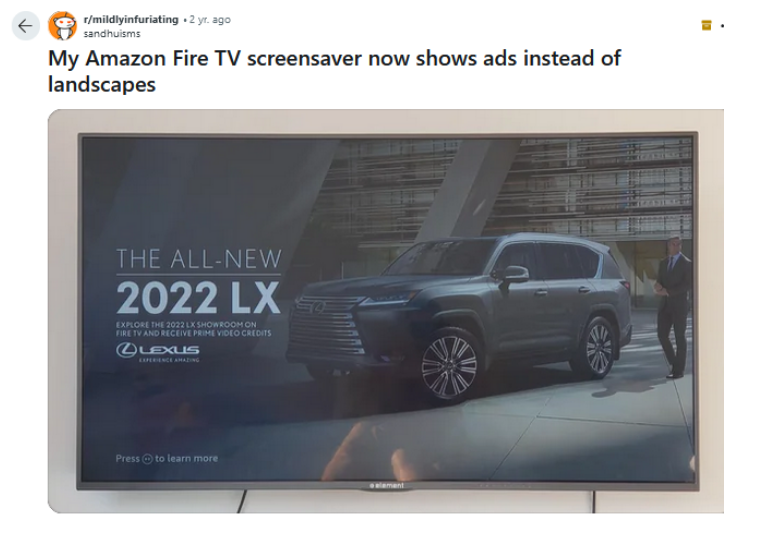
It’s pretty clear that people are fed up with ads popping up on idle screens. And if you think displaying ads for shows and movies is the lesser evil, think again—context matters. For instance, one Redditor shared that their Roku started showing ads for Sausage Party, a strictly adult comedy, in sleep mode. At first, it wasn’t a big deal, but then it became one, especially when their little brother asked about it. After weeks of waking up to the same ad, they found themselves wondering: is there any way to turn this off?. While there might be a way, it’s often buried deep in the settings where most users wouldn’t think to look.
So, in other words, it’s only getting worse, and the pit seems to have no bottom. Take the home screen ads on Google and Android TV: they’ve been around for a while, but a few years ago, they evolved to autoplay videos directly on your home screen, making them even more intrusive and harder to ignore. Samsung, another high-end brand like LG, has also been stepping up its ad game, much to the dismay of viewers.
Soon, we may not be able to escape ads even when connecting through HDMI. A recent Roku patent titled “HDMI Customized Ad Insertion” would enable Roku to identify content displayed on the screen in real time and serve ads as soon as you hit the pause button—whether you’re watching a Blu-ray movie, in the middle of a karaoke session, or playing a game.
How to block ads on smart TV: a general instruction
To effectively block ads, you’ll need to change the DNS server settings on your TV or router, or manually block the domains that deliver ads to your smart TV.
Among these methods, changing your TV’s default DNS server to one that filters out ads and trackers — like AdGuard DNS — is probably the simplest. You can usually do this through your TV’s Network settings. While not all smart TVs allow this change, most major brands do.
Alternatively, you can adjust the DNS settings on your router, which will block ads and trackers on all devices connected to your home network, not just your smart TV. However, this approach requires more technical knowledge since you’ll need to access your router’s web interface.
It’s important to understand that switching to an ad-blocking DNS server won't completely eliminate ads. It won't filter out ads embedded in the content, like product placements that appear during shows. Additionally, it won’t block ads which are loaded from the same domain as the content you're viewing.
If you have Android TV, you're in luck — you can easily install a dedicated ad blocker for smart TV from AdGuard, which blocks trackers and acts as a powerful firewall for your screen.


















































