Mozilla removes ad-tracking code from Firefox. What does it change?
Mozilla watcher Sören Hentzschel has spotted an uncanny change in Android and iOS versions of Firefox and Firefox Focus browsers. It turns out that the SDK from Adjust, which was used for tracking the effectiveness of ad campaigns, has been removed from the newest builds of these browsers.
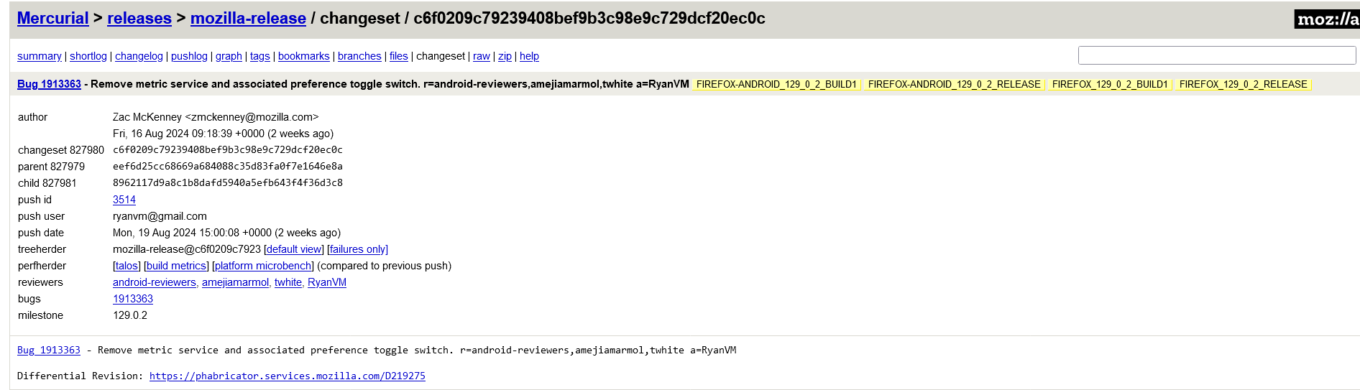
A screenshot of Mozilla’s Mercurial repository for the Firefox browser’s release branch showing that a metric service and an associated toggle switch have been removed. The link is provided by Sören Hentzschel. Source: Mozilla’s Mercurial repository
If you haven’t been following Firefox super closely, you might wonder: Why was there an ad-tracking SDK in the first place? After all, Mozilla has always positioned itself as a champion of privacy. So, what’s the deal with third-party trackers in their browser?
An open secret
It might shock some, but Mozilla has quietly used the Adjust SDK for years. Back in 2020, a curious Redditor on the Firefox subreddit demanded answers about this telemetry partnership — questioning what data was sent, how it was used, and how it squared with Mozilla’s privacy-first image.
“Generally I would assume that a company selling on privacy wouldn’t have such a partnership in the first place? Is there really no conflict of interest?” the Redditor asked. This question has likely been on many users’ minds.
Mozilla’s response at the time was that they prefer using open-source SDKs whenever possible and typically rely on their own Glean telemetry SDK for data collection. However, they argued they needed a more robust solution for managing and evaluating marketing campaigns across a wide range of countries and currencies. For this purpose, they chose Adjust, as it was, in their words, the “only open-source based product that met the requirements” for handling the complex marketing needs of their global user base.
What is Adjust exactly?
This isn’t the first time we’ve covered this telemetry company. Exactly two years ago, we highlighted it as one of the trackers embedded in several popular VPN servers. Trackers and VPNs? Unfortunately, they do sometimes come hand-in-hand as well.
So, that’s what we’ve found out about Adjust back then:
Adjust is a mobile attribution and analytics company owned and operated by adjust GmbH. “Unlimited and uncapped are words that we use a lot when we describe our data access,” the service boasts. Adjust says that its SDKs and APIs can process data such as hashed IP addresses, mobile identifiers, in-app actions, including purchases and registration, information regarding user interactions with ads, touch sensor data, accelerometer, gyroscope, battery, light sensor, device hardware specifications, and operating system version. The company claims it does not enrich this data to identify individual users, and does not share or disclose the data “with anyone else except our service providers and in response to lawful requests by public authorities.” The data is stored as long as developers use the SDK, unless Adjust is specifically told to do otherwise.
What Mozilla was using Adjust for: in its own words
Mozilla says that Firefox for Android uses the Adjust SDK to track and analyze the origin of app installs, specifically to determine if a user installed the browser in response to a specific marketing campaign.
So, when a new session starts, Firefox sends a “Session Message” to Adjust’s servers containing details like app version, device information, language, country, and session count.
Here’s a more detailed breakdown:
Basic App Info:
- Application ID (bundle_id)
- App version
- Device name and type
- OS version
User Information:
- Language
- Country
- Device-specific IDs (e.g., idfv)
Session Details:
- Session count
- Tracking settings (whether tracking is enabled)
Additional Data:
- Time stamps (e.g., when the session started and when the message was sent)
- Whether event buffering is enabled
Adjust then processes this information and, if the install can be attributed to a particular campaign, sends back attribution details. This response includes campaign identifiers and tracker information, but Firefox says it does not utilize or store these attribution details. All data transmission is secured via HTTPS, which means that the data is encrypted during transmission, protecting it from interception or tampering.
Why remove it now?
Mozilla has not acknowledged the apparent removal of the Adjust SDK. If you use Firefox on Android, you can still probably see the information about Firefox sharing “basic usage data” with Adjust in your settings if your browser version is older than 129.0.2 (Firefox) or 130.0 (Firefox Focus). To check for yourself you can go to Settings → Data collection → Marketing data.
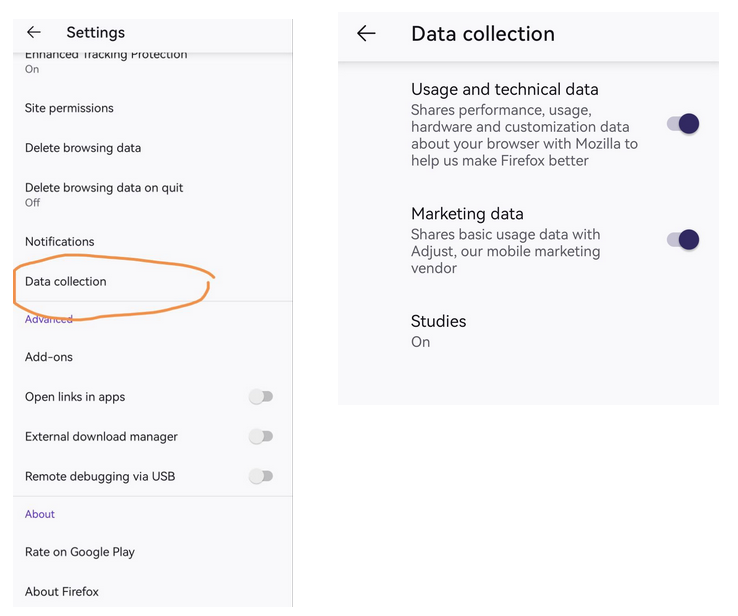
Screenshot of Firefox browser settings on Android
On the one hand, Mozilla previously defended the SDK’s use, so what’s changed, exactly? On the other hand, it has also received some backlash for it.
Perhaps it’s a sticky issue the non-profit does not want to comment on for now, especially in the light of its recent embrace of advertising with a new data collection feature designed to help advertisers track ad performance. The feature is called Privacy-Preserving Attribution (PPA), and is enabled by default in the newest version of the browser.
Whatever it is, Mozilla has preferred to stay silent on the apparent changes so far.
A welcome step, but is it enough?
Mozilla’s decision to remove the Adjust SDK has been met with mixed reactions from users, some of whom view it as a belated and reactionary move rather than a proactive step towards genuine privacy improvement.
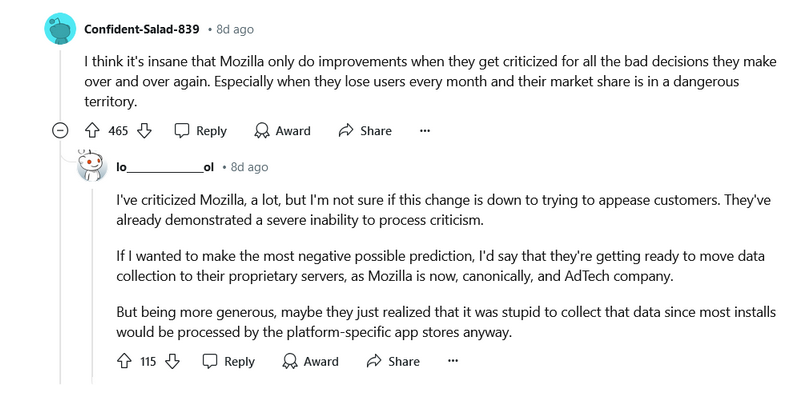
Source: Reddit
The motivations behind this change remain unclear. As one user speculated, it could be part of a broader strategy for Mozilla to shift data collection to its own servers, aligning with its emerging identity as an adtech company. The evergreen question if it’s really possible to be both a big player in adtech and still be a true privacy advocate is bound to be asked of Mozilla more often now, we predict.
There is also the elephant in the room that somewhat negates the good Mozzila is supposedly doing by removing the third-party ad tracking SDK — the elephant is the PPA feature, which continues to raise concerns about the extent of data collection under the guise of privacy.
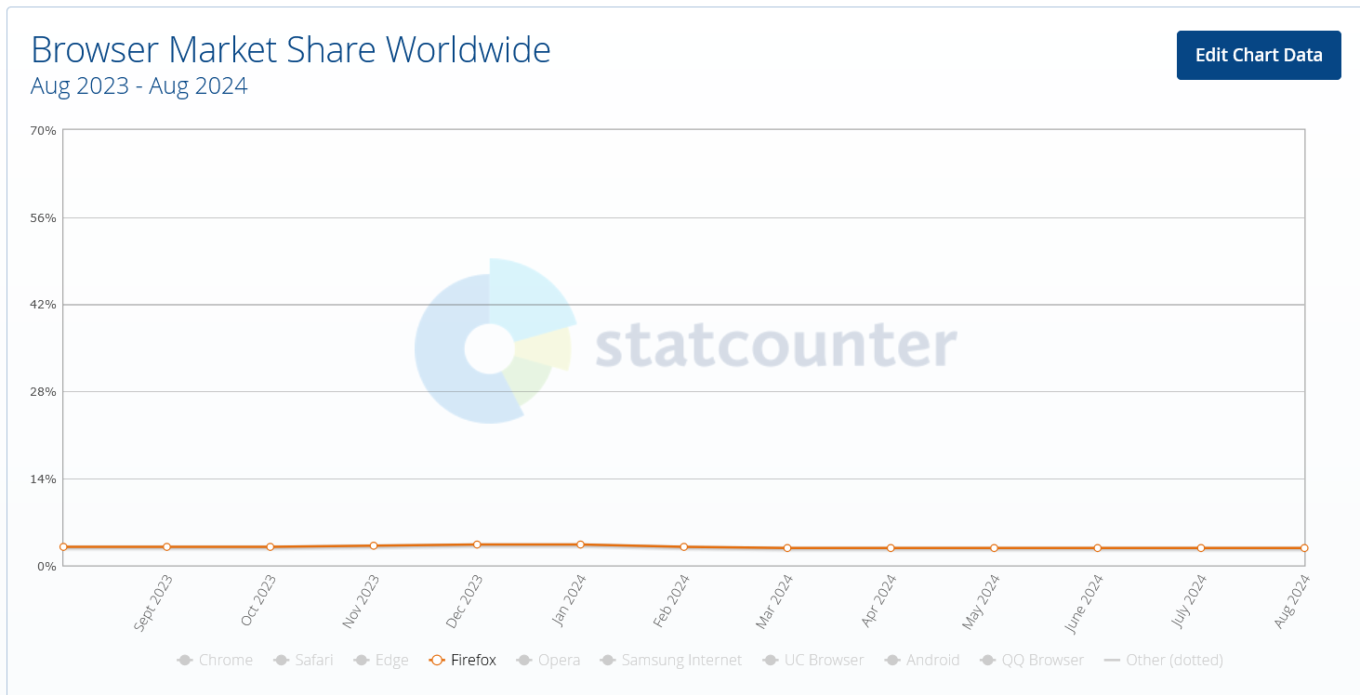
Mozilla’s market share is continuing to dwindle — it’s fallen below 3% in the last 12 months. And this adjustment is unlikely to restore user confidence in the company, if that was the goal, amid a growing controversy over its data collection practices. But it may be prudent to wait and see.


















































