Top Cryptojackers are video streaming websites, and they do not use CoinHive
Back in December 2017, we added a mechanism that allowed users to optionally report websites whenever a cryptojacking script is detected by AdGuard. It proved useful right away and allowed us to discover the largest known cryptojacking campaign, which was being run by some popular video streaming websites. Since then we have received more than a million user reports, and now it's time to analyze them.
Over the last two months, we received over 1.3 Million reports on more than 120 thousand websites. It's important to notice that sometimes cryptojacking was detected on some legitimate websites (Google, Youtube, Instagram, etc) and this is most likely caused by malicious browser extensions or malvertising.
However, 40% (over half a million) of the reports came from just 50 domains. Let's take a deeper look into what the top cryptojackers do.
Cryptojacking is defined as the secret use of your computing device in the background to mine cryptocurrency. All that is needed is to open the page that contains the script of the miner, and you will begin (without knowing) to "mine" the cryptocurrency for the script owner. The CPU consumption, in this case, can reach very high values, almost completely occupying the resources of the computer.
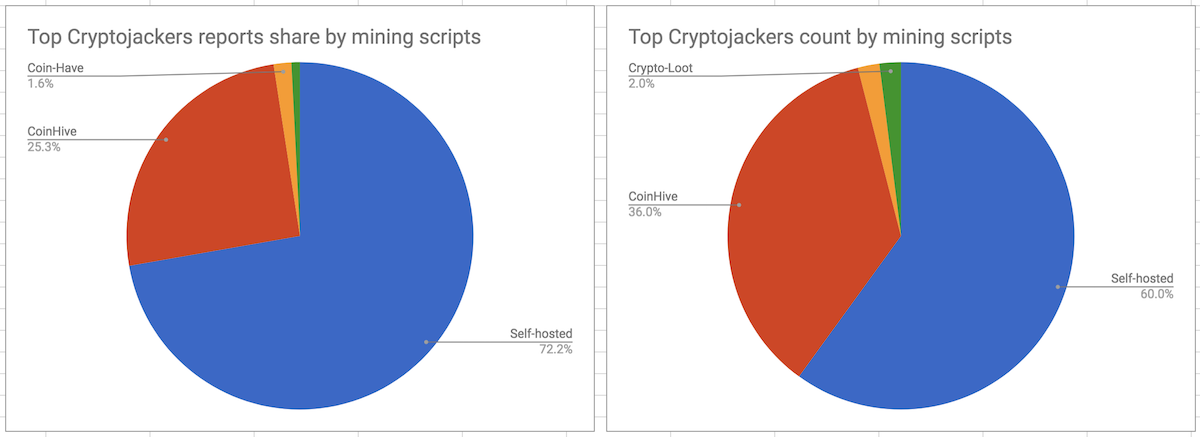
Top Cryptojackers do not use CoinHive
The first and the most popular in-browser cryptocurrency miner - CoinHive - has become synonymous with cryptojacking. Interestingly enough, though, it appears that most of the top cryptojackers do not use it. One might be led to think that the reason for this is that CoinHive domains are blocked by ad blockers and antivirus software, but that's only part of the truth. A more significant reason is the fact that CoinHive takes a 30% commission, which is a substantial part of the mining earnings. The alternatives are to use one of the CoinHive clones which take a smaller commission or to set up a self-hosted mining proxy. The latter may sound complicated, but in reality, it is rather easy to do, and reasonable, given how much they earn.
Video Hosting Cryptojacking Services
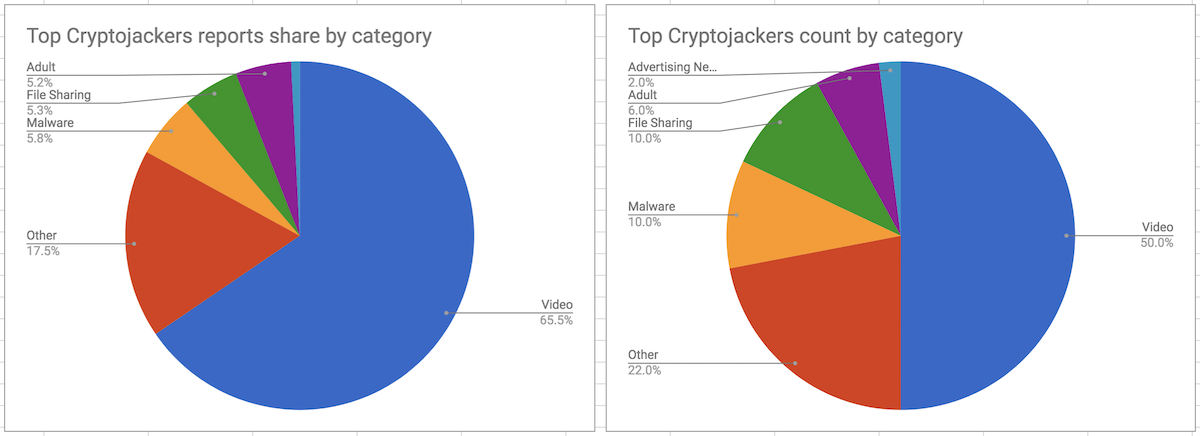
Half of the top cryptojacking domains belong to popular video hosting services. Some of them were discussed in our previous research. Let's remember these and also hail the new ones. Openload.co, Rapidshare.com and Streamango.com have been testing mining since the middle of December, but it seems now that they are not doing it anymore. On the other side, an insanely popular (#113 in the world according to SimilarWeb) OnlineVideoConverter.com is still doing it. Two more websites worth mentioning are streamplay.top and thevideo.me (and their mirrors). These two are responsible for almost 9% of all the registered reports.
Cryptojacking Malware
Five of the top 50 cryptojacking domains are likely to be a part of some malicious operations. Hidden iframes that load pages from these domains are injected into legitimate websites like Google, Instagram, Facebook, etc. Unfortunately, we don't have enough data to find every piece of malware injecting them.
However, we were able to identify 11 malicious Chrome extensions with a total weekly user count of almost 37,000:
Personal Finder
The first one is the so-called "Personal Finder" with almost 10k weekly users.
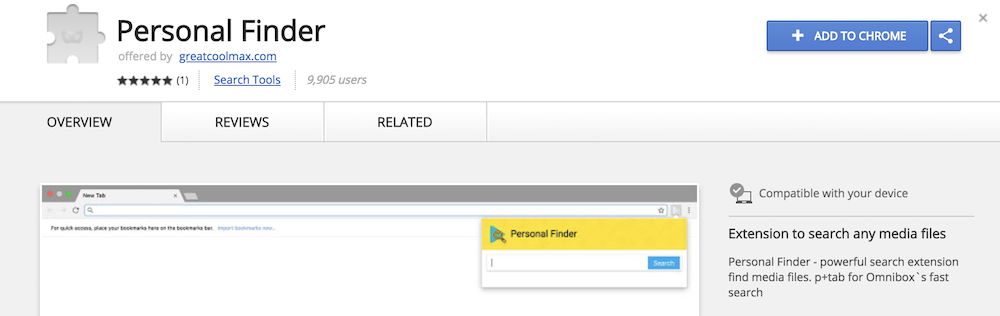
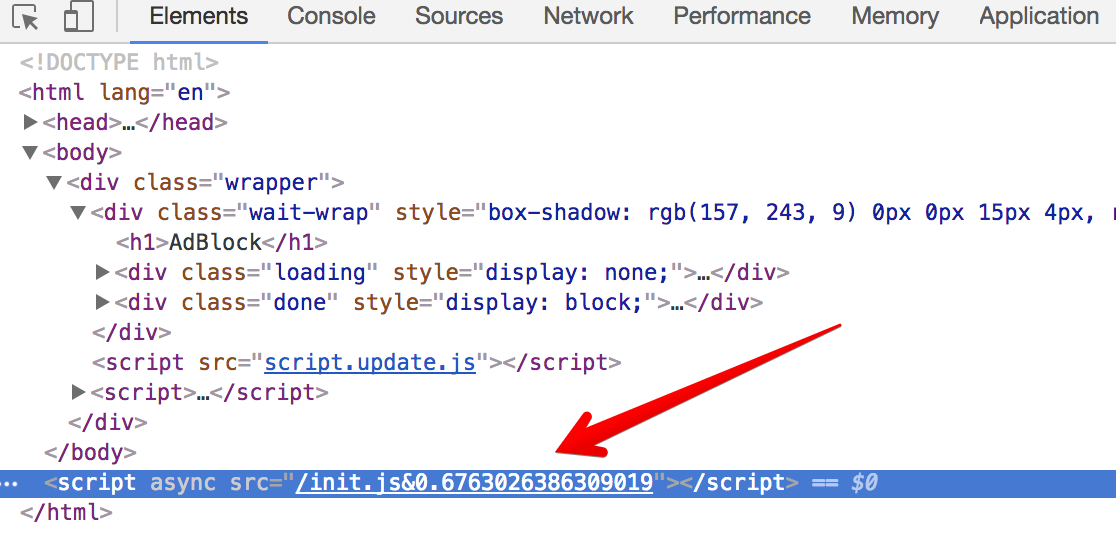
It uses a standard technique - an iframe is created on the extension's background page. After a short period of time, a mining script is loaded to that page and at this point, cryptojacking begins.

Hastalavista family
The family name is due to the "hastalavista.org" domain that is used by all these extensions. We found ten extensions of this "family" so far, and they use an interesting trick to avoid detection. These extensions' code does not contain anything suspicious. Once the user installs any of these extensions, it opens a "thank you" page; and the malicious script is then loaded into the extension using Chrome's messaging mechanism.
Conclusion
It has been almost five months since the problem of cryptojacking emerged, and all that time I had held a secret hope that it could bring something positive and maybe even provide an alternative to the advertising-based model. Unfortunately, I have to state that with time this technique floats ever farther over to the dark side; some even say that cryptojacking is now the most prevalent malware online. Although there is still a chance for it if publishers start using it legitimately.
How can you protect yourself? Use an ad blocker, an antivirus or one of the specialized extensions to combat in-browser mining. Also, there is some good news from Google Chrome developers. They have started work on a performance improvement that could potentially cripple cryptojacking scripts. The idea is to throttle Javascript service workers running in background tabs. As it happens, all the known cryptocurrency miners rely on these selfsame service workers. However, this cannot be considered to be a final solution. The top cryptojackers are video streaming websites that run cryptocurrency miners while the user is watching a video, and they will be working at full strength all during this time.


















































