WhatsApp is getting ads. What it means for you and your privacy
WhatsApp, an instant messaging app that Meta bought in 2014, is getting ads. Meta confirmed after years of speculation.
All other major Meta services have already been inundated with a steady stream of ads — think Instagram, Facebook Messenger, and the latest addition to the Meta family, Threads, which got ads not long after its birth. So, the fact that WhatsApp still didn’t have ads as of 2025 felt like an oddity — something that ran counter to Meta’s entire ad-driven business model.
And, although the eventual arrival of ads in WhatsApp was a long time coming and is in line with what Meta has been doing before, we can't help but regret this development.
Where will the ads be?
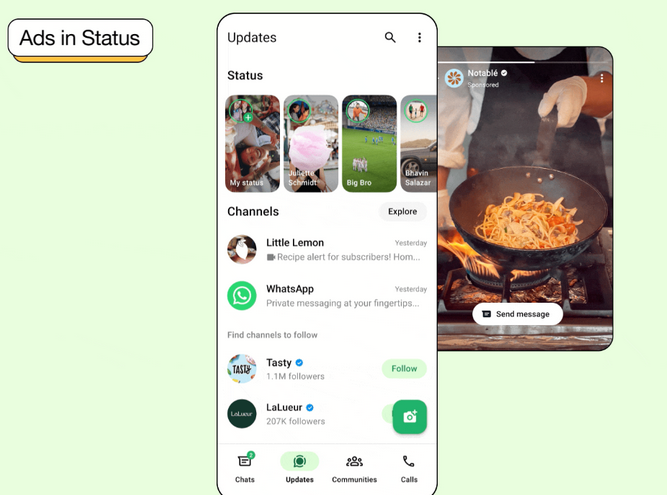
In its announcement, Meta said that WhatsApp will be getting ads in just one tab — Updates, which combines Status and Channels. Status is the tab designed for posting Status updates, similar to Instagram or Telegram Stories. While it may not be generating as much buzz as its Instagram lookalike (probably because it is mostly reserved to sharing content with close contacts), according to WhatsApp itself, the Updates tab is used by 1.5 billion people daily across the globe.
The ads will appear in several places, but perhaps the most potentially annoying slot is among the status updates posted by your family and friends.
Source: WhatsApp
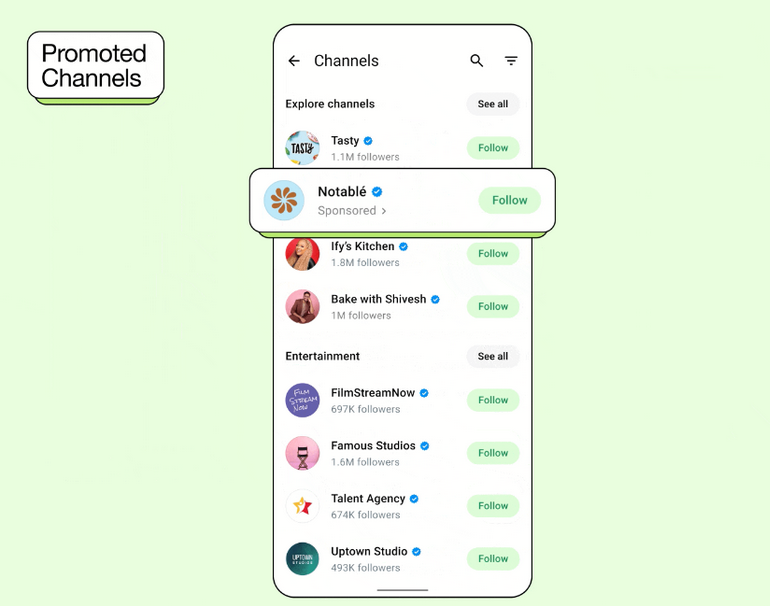
The ads will also sneak into the Channels section. Channels are a one-way broadcasting feature that lets people follow posts from individuals or organizations they're interested in. Now, if you want to explore channels you might like, the promoted ones will appear at the top of the selection.
How bad is it for privacy?
The first question that comes to mind for privacy-conscious users is what data WhatsApp will use to target ads and whether it’s possible to opt out.
When it comes to data collection, WhatsApp claims it will use “limited info” — such as your country, city, language, the channels you follow, and how you interact with the ads. If you’ve chosen to integrate WhatsApp with Meta’s Accounts Center, then the app will not just stop at your basic location or interests.
If you've ever logged into WhatsApp using your Facebook or Instagram account, or if you've linked your WhatsApp account to your Facebook profile, you're essentially integrating WhatsApp with Meta’s Accounts Center.
This means that WhatsApp could also tap into your ad preferences and behavioral data across the Meta ecosystem, enabling the company to serve even more targeted ads.
As for the possibility to opt out, there is none. Not even for money. Unlike Telegram, which places ads in public channels but offers the option to buy Telegram Premium for an ad-free experience, WhatsApp doesn’t have any of this — yet, or maybe forever.
Can these ads be blocked?
When it comes to blocking WhatsApp's new ads, it’s not completely unfeasible, but it's more complex than it may seem, especially on mobile.
On the web, there’s a better chance of blocking these ads. Put simply, if you use a browser-based version of WhatsApp on your computer, it will most likely be possible to filter out the ads using AdGuard or any other ad-blocking solution. However, things get way less clear-cut when using WhatsApp on your phone.
The reason for this is that, much like with other Meta platforms, these ads will likely be delivered through special domains used for both advertising and other content. In theory, it still makes it possible to block them, but in practice, it’s a long shot. Unlike web-browsing environments, mobile platforms such as iOS and Android make it far more challenging to intercept traffic at a granular level. With mobile apps, the traffic is typically encrypted via HTTPS, which complicates matters since it's not possible to easily decrypt or analyze this traffic. While it may be possible to route the traffic through certain proxies, the lack of decryption often means that the payload—i.e., the ads—remain hidden from the filter.
As an ad blocker, you would need to continuously analyze the app’s traffic to ensure that new ad delivery mechanisms don’t slip through the filters. However, without full access to the encrypted content, even the most advanced filtering solutions can only block a portion of the ads. In short, while blocking WhatsApp’s is possible on the web, it’s highly unlikely to work effectively on mobile devices due to the constraints of iOS and Android operating systems, which are designed to prevent such interception of traffic.
Final thoughts
WhatsApp says that it’s rolling out ads with your privacy in mind, meaning it won’t harvest data from your private conversations or use information from your private statuses, phone calls, or the groups you’re in to target ads to you. “Your personal messages, calls, and statuses remain end-to-end encrypted, meaning no one (not even us) can see or hear them,” WhatsApp says.
Likewise, the fact that WhatsApp will only place ads in two places (for now) might sound like no big deal — something we can live with.
The thing is, though, this might just be the beginning. While the new ad experience doesn’t sound too intrusive (at least on paper), it could turn out to be. Moreover, Meta may decide to place ads in more places over time, with the current update serving as a trial run.


















































