Netzwerk
Dieser Artikel behandelt AdGuard für Windows, einem multifunktionalen Werbeblocker, der Ihr Gerät auf Systemebene schützt. Um zu sehen, wie es funktioniert, laden Sie die AdGuard-App herunter
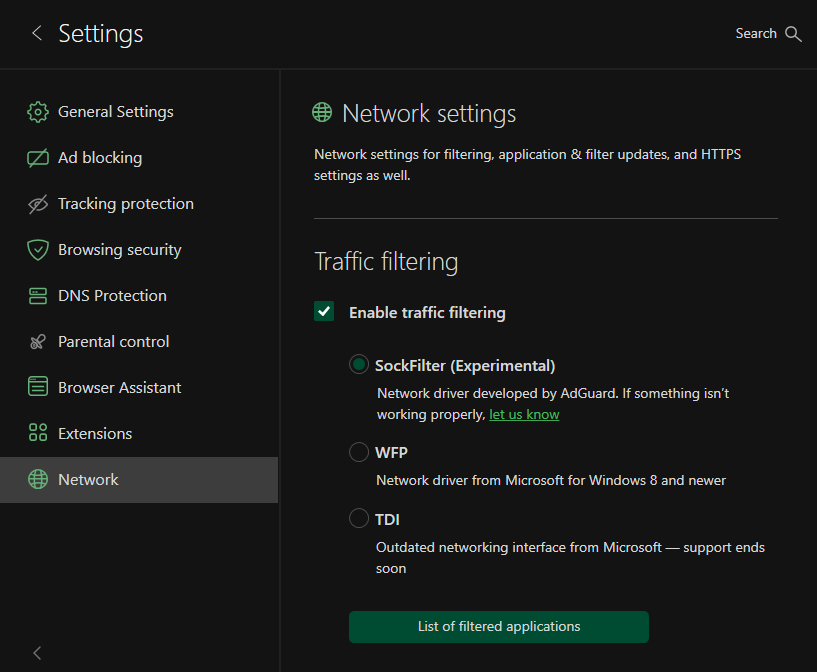
Das Modul Netzwerk ist der Netzwerkfilterung gewidmet, und hier finden Sie zusätzliche netzwerkbezogene Optionen. Zwei davon sind standardmäßig aktiviert: Datenverkehrsfilterung aktivieren und HTTPS filtern. Dies sind wichtige zusätzliche Vorsichtsmaßnahmen, um Ihren Webspace besser zu filtern. Die meisten Websites verwenden jetzt HTTPS, und dies gilt auch für die Werbung. Von vielen Websites, wie youtube.com, facebook.com und x.com, ist es unmöglich, Werbung ohne HTTPS-Filterung zu entfernen. Lassen Sie also die Funktion HTTPS filtern aktiviert, es sei denn, Sie haben einen triftigen Grund, dies nicht zu tun.
In diesem Modul können Sie das Kontrollkästchen AdGuard als HTTP-Proxy verwenden aktivieren, um AdGuard als regulären HTTP-Proxy zu verwenden, der den gesamten Datenverkehr filtert, der ihn durchläuft. Sie können auch die Funktion Websites mit EV-Zertifikaten filtern aktivieren. Extended Validation (EV) SSL-Zertifikate bieten eine stärkere Sicherheitsgarantie; die Inhaber solcher Websites müssen ein gründliches und weltweit standardisiertes Identitätsprüfungsverfahren durchlaufen, das durch EV-Richtlinien definiert ist. Daher werden Websites mit solchen Zertifikaten vertraut und nicht gefiltert.
Schließlich gibt es noch einen Abschnitt mit Proxy-Einstellungen. Dort können Sie angeben, welchen Proxyserver AdGuard verwenden soll, um Filter zu aktualisieren, neue Versionen zu erhalten usw.
Enable traffic filtering
Traffic filtering is the core mechanism that allows AdGuard to inspect and control the network traffic generated by applications on your computer. When it is enabled, AdGuard intercepts outgoing and incoming connections and checks them against its filtering rules. If a request matches a blocking rule, AdGuard can block it, modify it, or allow it depending on the configuration. In AdGuard for Windows, this interception is implemented through network drivers.
If HTTPS filtering is enabled, AdGuard performs a controlled local TLS interception: it decrypts the traffic using its local certificate, applies filtering rules, and then re-encrypts the traffic before sending it to the browser. The driver simply provides the system-level access needed for AdGuard to intercept these connections.
In Network, you can also enable traffic filtering and choose which driver to use: SockFilter, WFP, or TDI.
SockFilter
SockFilter is an experimental, lightweight kernel-mode network driver that works at the socket level (TCP/UDP). Anstatt Pakete zu überprüfen oder zu modifizieren, während sie den gesamten Windows-Netzwerkstack durchlaufen, fängt ein Sock-Filter Socket-Aufrufe (z. B. connect, send, receive, bind) auf einer höheren, stabileren Abstraktionsebene ab. This makes it ideal for applications that need to monitor or control network activity without deep packet processing.
SockFilter was first implemented in version 7.22.4, and it is still considered unstable — you may encounter bugs. Once fully tested and implemented, SockFilter has the potential to offer several advantages over other drivers:
- Es wird auf einer höheren Ebene ausgeführt, nämlich auf Socket-Ebene: SockFilter arbeitet mit Socket-Operationen statt mit rohen Paketen, wodurch es weniger komplex und stabiler ist als die Low-Level-Paketfilterung von WFP.
- Keine Beeinträchtigung anderer Netzwerktreiber: Da es über den VPN-, Firewall- und Antivirus-WFP-Filtern angesiedelt ist, vermeidet es Probleme mit der Filterreihenfolge und Kompatibilitätskonflikte, die im WFP-Stack häufig auftreten.
- Deutlich geringeres Risiko von NETIO-bedingten BSODs: SockFilter läuft nicht innerhalb der NETIO-Paketpipeline, wodurch die typischen Absturzszenarien vermieden werden, die durch WFP-Callouts verursacht werden, bei denen Puffer, Klassifizierungsergebnisse oder der Paketspeicher falsch verarbeitet werden.
Was die Nachteile betrifft, so sieht der SockFilter-Treiber nur Vorgänge auf Socket-Ebene und erfasst keinen Datenverkehr, der von anderen Kernel-Treibern oder Komponenten erzeugt wird, welche die Standard-Winsock-API umgehen. Aus Sicht der Low-Level-Vernetzung kann dies als Einschränkung angesehen werden, da der Treiber nicht auf Rohpakete zugreifen oder Nicht-Socket-Datenverkehr überprüfen kann. However, for an ad-blocking application, this behavior is not just acceptable but optimal. Der gesamte relevante Datenverkehr von Browsern und Apps im Benutzermodus wird über Standard-Sockets geleitet, und genau das muss durch AdGuard geregelt werden. Gleichzeitig wird durch das Ignorieren von Low-Level-Treiberdatenverkehr unnötige Komplexität vermieden, Kompatibilitätsprobleme werden umgangen und die Stabilität des Systems bleibt gewahrt.
WFP
WFP (Windows Filtering Platform) is a Microsoft networking framework built into Windows that allows software to filter and monitor network packets at different layers of the system networking stack. AdGuard uses WFP to safely hook into the network flow of applications and apply filtering rules before the traffic reaches the browser or the Internet. More information.
While it is a powerful driver, it may present stability risks, such as occasional system crashes (BSOD) and lower Internet speed for some users.
TDI
The TDI driver is also available, but it is outdated and may cause filtering issues in some versions of Google Chrome. A temporary workaround exists, but it’s not a reliable long-term solution.
AdGuard VPN
The last section is dedicated to AdGuard VPN — an ideal tool that provides security and anonymity each time you browse the Internet. You can download it by clicking the Download button or go to the AdGuard VPN website by clicking the Homepage button.
Wie funktioniert AdGuard VPN? Without going into technical details, we can say that VPN creates a secure encrypted tunnel between the user's computer or mobile device and a remote VPN server. In this way, data privacy is preserved, as well as the anonymity of the user, because a third-party observer sees the IP address of the VPN server and not the actual user's IP.
Was AdGuard VPN leistet:
- hides your real whereabouts and helps you stay anonymous
- changes your IP address to protect your data from tracking
- encrypts your traffic to make it unreadable to third parties
- lets you configure where to use VPN and where not to (exclusions feature)
To get more information about AdGuard VPN, dive into the AdGuard VPN Knowledge Base.