Android 11+ 设备上的证书安装
本文所述 AdGuard Android 版是在系统级上保护设备的多功能的广告拦截器。要了解工作原理,请下载 AdGuard 应用程序。
为了能够过滤 HTTPS 流量(这点很重要,因为大多数广告都使用 HTTPS),AdGuard 需要在设备的用户存储空间中安装证书。旧版本的 Android 操作系统可以自动完成,但在 Android 11 及更高版本上,用户必须手动安装。
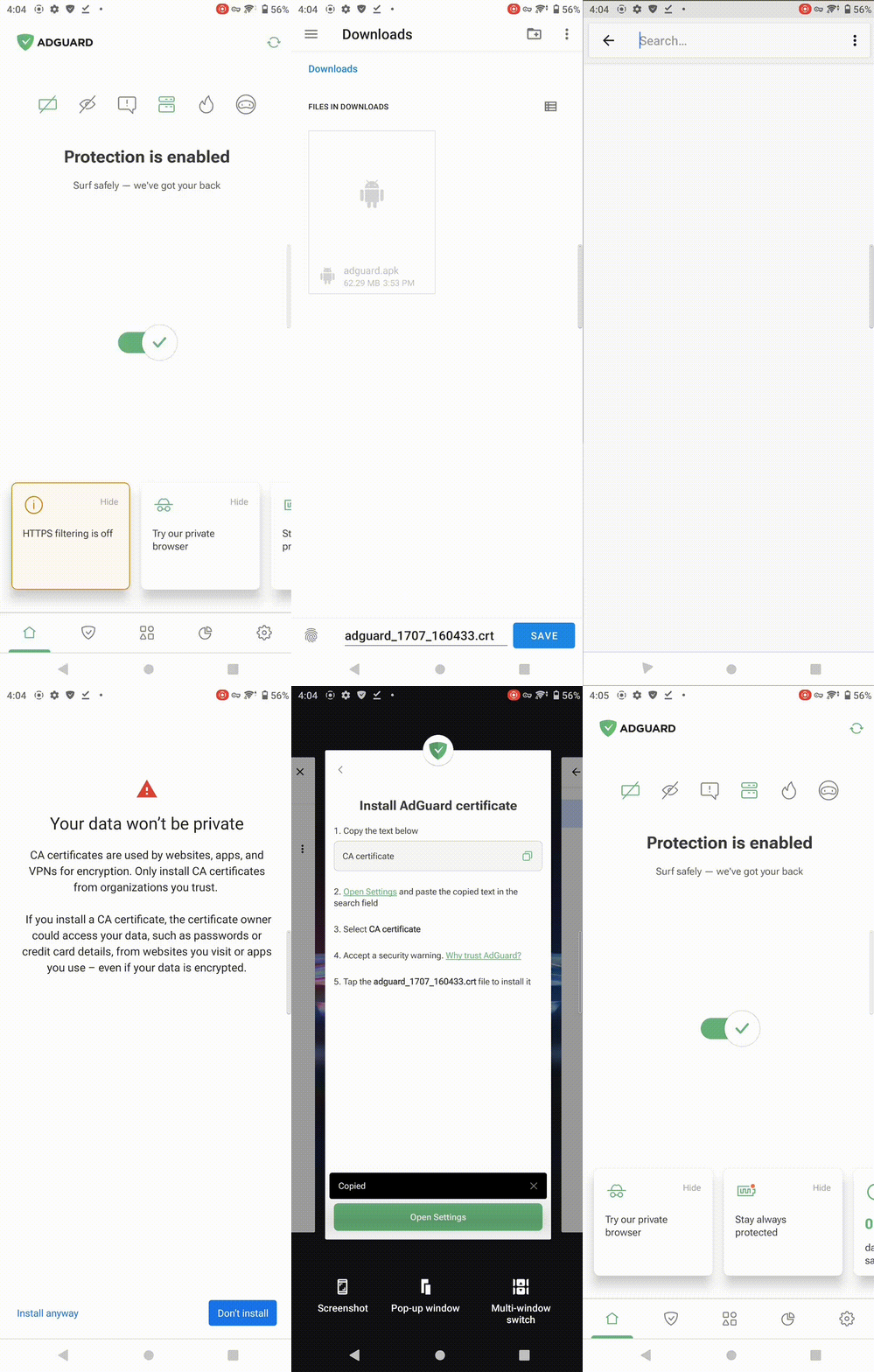
请按照以下步骤安装 AdGuard 证书:
-
打开应用程序。在 主页 屏上,点击「HTTPS 过滤已关闭」。
-
然后您将看到三个画面:
- HTTPS 过滤对广告拦截至关重要
- AdGuard 的 HTTPS 过滤是安全的
- AdGuard 证书
-
依次点击「继续」→「下一步」→「保存证书」。
-
在打开的下载文件夹底部点击「保存」。
-
保存后,从「CA 证书」字段复制文本,然后点击「打开设置」。
-
打开设置,在搜索栏中粘贴或输入「CA 证书」。点击相应选项。
-
可能会看到警告提示。如果出现,请点击「仍然安装」,如有必要请输入 PIN 码。
-
选择 AdGuard 证书文件。它其名称应类似于 adguard_1342_020322.crt。
完成!证书安装成功后,即可启用 HTTPS 过滤。
如果在手动安装证书过程中遇到问题(例如:已安装证书但应用仍无法识别),可参考以下任一解决方案:
- 重启 AdGuard。
- 再次尝试安装正确的证书(AdGuard Personal CA)。
安全警告
在早期 Android 版本中,快速设置面板会显示「网络可能受到监控」提示。点击该提示将打开包含详细信息的窗口。
从 Android 15 开始,除「网络可能受到监控」外,用户在安装证书及设备重启后还将看到警告通知:「由未知第三方安装的证书颁发机构」。这表示系统已在用户证书存储区检测到第三方证书。点击通知会打开用户证书存储中的证书列表。
尽管存在这些警告,您的流量依然安全。与远程服务器的连接始终保持加密状态。 AdGuard 仅会在决定是否过滤连接前验证服务器证书,其工作原理与浏览器类似。
如问题仍然存在使您无法安装证书,请联系我们的客户支持团队 support@adguard.com。