Websites crash, blame ad blockers: a hidden war in the digital world

When you use an ad blocker, encountering an “ad-block wall” or a pop-up asking you to disable it for access is common. While opinions on these ad-block walls vary — some implementations being more reasonable than others — they are generally straightforward in their intent. These websites openly express their dislike for ad blockers and request users to turn them off. However, a new and concerning trend has emerged with certain anti-ad block pop-ups that not only restrict access but also misattribute blame to ad blockers for website issues. In this article, we’ll explore this phenomenon in detail, examining the tactics behind these deceptive messages and their implications for user trust and website credibility.


While browsing for smart TV reviews, I came across a website called FlatpanelsHD. With my AdGuard ad blocker for Windows app running to block ads and interruptions, I opened the site, only to be met with a pop-up. It claimed the site couldn’t load properly because “html-load.com is broken,” and urged me to allow html-load.com to proceed.
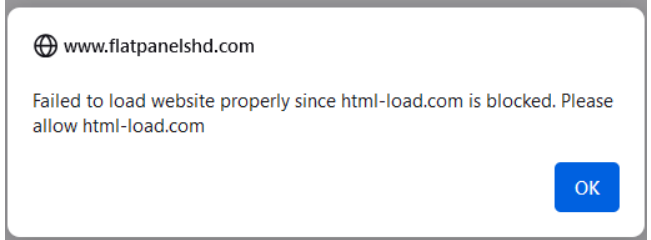
Flatpanels.hd warning message

I was surprised by this message, especially since the site seemed to be loading more or less correctly in the background. However, that didn’t last long.
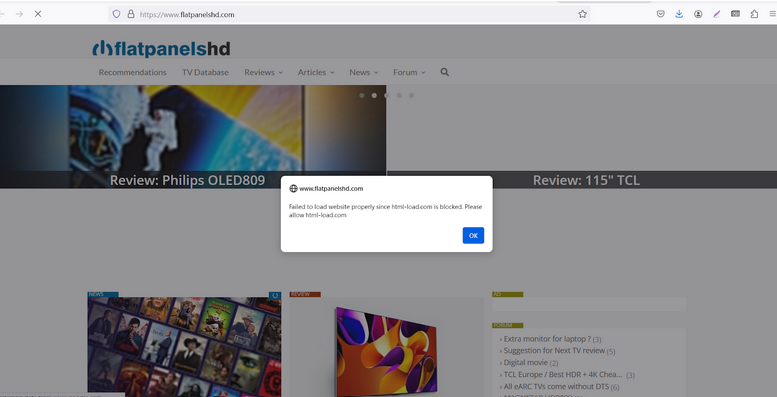
Flatpanels.hd breaking in the background

A few seconds later, the page no longer displayed the intended content and instead showed a jumble of strings, some of which were hyperlinked.
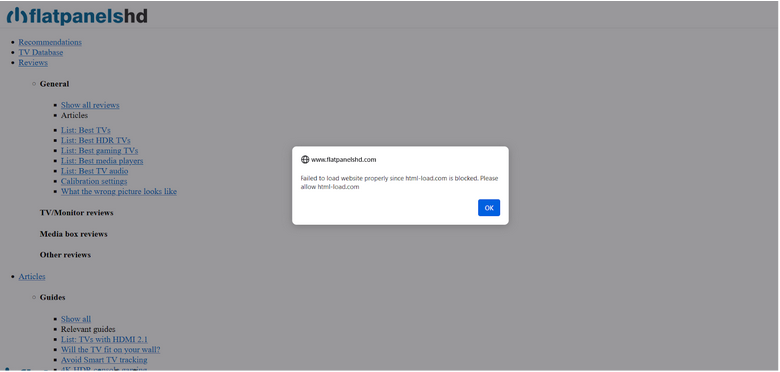
Flatpanels.hd with broken CSS

After clicking “OK,” another pop-up appeared, further explaining the situation. It read: “The page could not be loaded due to incorrect/bad filtering rule(s) of ad blocker.” In fine print at the bottom, it added: “The html-load.com domain is used for loading essential web resources such as HTML, CSS, and images. If this domain is blocked, errors may occur in website loading.”
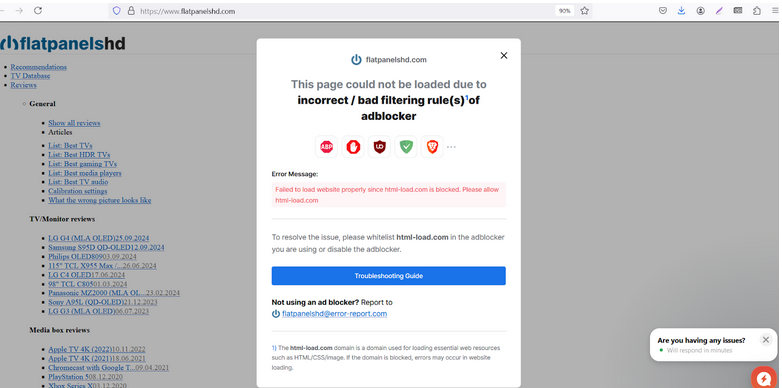
Flatpanels.hd error message

After some research, we at AdGuard discovered that dozens of websites employ similar tactics, displaying pop-ups that blame ad blockers for layout issues.
Below is a screenshot of yet another site that displays the same exact behavior.
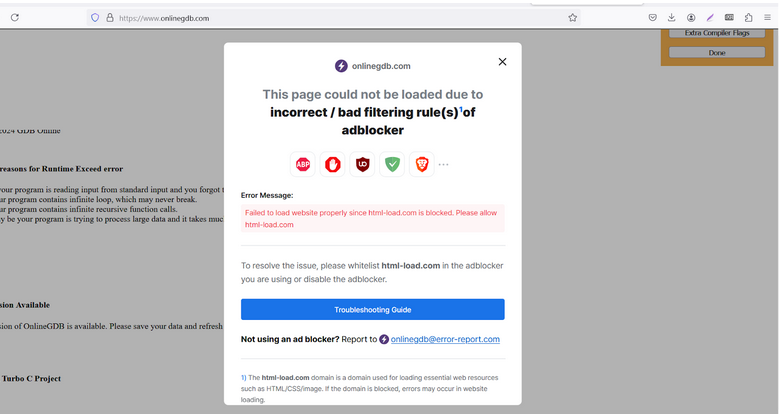
OnlineGDB error message

The catch here is this is not what is actually happening — ad blockers are not breaking these websites, it is so-called ad recovery tools that make them look broken. While it’s true that sometimes ad blockers can garble the original layout after blocking ads due to a bad or outdated filtering rule, this happens very rarely and almost never results in a complete breakdown of the layout.

Before we delve any deeper into why we believe the messages we’ve shown above are deceptive, let us show some other examples of similar if not the same behavior that we’d encountered earlier.

In August last year, we noticed similar tactics being used by Mail.ru, a popular Russian email service and web portal. Suddenly, a block displaying news stopped showing for users with ad blockers. As we looked into the root of the issue, we discovered that Mail.ru had added code to the page that, upon detecting an ad blocker, hid the news section. After implementing this code, Mail.ru made sure to point the finger at ad blockers as the culprit, going as far as emailing a notice to users that blamed ad blockers for the disappearance of certain elements from the page.

From what we’ve seen recently, it seems that the trend of framing ad blockers for the incorrect display of web pages (that is de-facto lying to users) is gaining momentum and becoming global.

Classic ad block walls: what’s the difference?

This approach of forcing users to disable their ad blockers is both new and not new at the same time. The very idea that users need to turn off their ad blocker to access content isn’t novel; it has long been employed by websites that greet visitors with ad block walls or anti-adblock pop-ups. These pop-ups typically request users to disable their ad blocker or add the site to their ad blocker’s whitelist.

In the case of these “classic” ad block walls, publishers openly acknowledge that their issue with ad blockers lies in their mere use, not in how they disrupt the website’s layout. Opinions on the “classic” ad block walls approach may vary, but at least the publishers are being honest. When it comes to our own policy, we believe that ad blocker detection messages should be allowed if they offer a feasible value exchange that does not put the user’s privacy or security at risk.

The same cannot be said for the new approach we’re focusing on in this article. So, let’s dive a little deeper into how it works behind the scenes.

First method: Reliance on external styles

What we’ve observed is the work of so-called ad recovery tools. These tools operate in various ways, often attempting to bypass ad blockers to display ads or recover lost revenue.

One common method involves an ad recovery tool loading styles from external sources. External styles are CSS (Cascading Style Sheets) files that define how a website looks and feels — everything from layout to colors.

If a website relies on an external style from a certain domain, the ad recovery tool loads this style from external sources, and if that domain is blocked by an ad blocker, the website’s layout can break. To address this issue and maintain the layout, AdGuard can sometimes load styles manually after a script is blocked. This approach helps ensure that the website remains visually coherent, even when ads are being filtered out.

This can be complicated, particularly on iOS or within browser extensions.

Second method: Misleading warning messages

There is also a second method.

Many websites, including FlatpanelsHD, do not rely on external styles; their layout remains intact even when ads are blocked. However, if the site detects that a script from html-load.com (in our case) isn’t loading, it triggers a misleading warning message. After clicking “OK,” a larger warning appears, filled with confusing jargon about CSS and images. In reality, it’s not the ad blocker causing issues, but an ad-recovery tool that removes the layout using special scripts.

When it detects that some requests are blocked or some specific elements are hidden or something went wrong with loading ads, the ad-recovery script removes all elements with style and link tag by using a script like:

document.querySelectorAll('link,style').forEach((e)=>e.remove())

This tactic misleads users into believing that the ad blocker is responsible for the failure. In reality, the site is attempting to shift the blame away from its own choice to use an ad-recovery tool, which is causing the problem, and pin it on the ad blocker instead.

Conclusion

What we’ve established here is that some websites are misrepresenting the reason for why they would not open with an ad blocker one. They come up with misleading messages that blame ad blockers for loading issues. In our view, such unscrupulous behavior only casts them in a negative light. When websites deceive users right from the moment they land on their pages, these sites risk damaging their reputation and eroding user trust. As the saying goes, if someone wrongs you once, they’re likely to do it again.

This kind of misdirection not only harms the relationship between users and ad blockers, but also between users and the websites themselves, because they manipulate user behavior with misinformation and abuse user trust.


Спадабаўся пост?
AdGuard VPN AdGuard DNS AdGuard Mail AdGuard Wallet
Галоўны экран AdGuard для Windows
Экран абароны AdGuard для Windows, які паказвае функцыі абароны і налады
Экран Статыстыка AdGuard для Windows, які паказвае статыстыку заблакіраванай рэкламы і праграм сачэння
Экран Кіраванне праграмамі ў AdGuard для Windows, які паказвае параметры кіравання абаронай для праграм, усталяваных на прыладзе
20 362 20362 водгукі
Выдатна!

AdGuard: блакіроўшчык рэкламы для Windows

AdGuard для Windows — гэта больш, чым блакіроўшчык рэкламы. Гэта шматфункцыянальны інструмент, які блакуе рэкламу, кантралюе доступ да небяспечных сайтаў, паскарае загрузку старонак і абараняе дзяцей ад непажаданага кантэнту

Спампоўваючы праграму, вы прымаеце ўмовы Ліцэнзійнага пагаднення
Microsoft Store
Спампоўваючы праграму, вы прымаеце ўмовы Ліцэнзійнага пагаднення
AdGuard для Windows версія 8.0, 14 дзён пробнага перыяду
Галоўны экран AdGuard для Mac
Экран рэжыму нябачнасці AdGuard для Mac
20 362 20362 водгукі
Выдатна!

AdGuard: блакіроўшчык рэкламы для Mac

AdGuard для Mac — гэта ўнікальны блакіроўшчык рэкламы, распрацаваны з улікам macOS. Акрамя абароны ад надакучлівай рэкламы ў браўзерах і праграмах, ён абараняе вас ад адсочвання, фішынгу і махлярства
Спампоўваючы праграму, вы прымаеце ўмовы Ліцэнзійнага пагаднення
Чытаць далей
AdGuard для Mac версія 2.19, 14 дзён пробнага перыяду
Галоўны экран AdGuard для Android
Экран Абарона ад сачэння ў AdGuard для Android
Экран Кіраванне праграмамі ў AdGuard для Android, які паказвае параметры кіравання абаронай для праграм, усталяваных на прыладзе
Экран Статыстыка AdGuard для Android, які паказвае статыстыку заблакіраванай рэкламы і праграм сачэння
Галоўны экран прыватнага браўзера AdGuard для Android
QR-код, каб спампаваць AdGuard для Android
20 362 20362 водгукі
Выдатна!

AdGuard: блакіроўшчык рэкламы для Android

Блакуе рэкламу і трэкеры ва ўсіх браўзерах, гульнях і іншых праграмах. Абараняе вашу прыватнасць і дазваляе вам кантраляваць, як вашы праграмы выкарыстоўваюць Інтэрнэт. Усталёўваецца праз APK
Спампоўваючы праграму, вы прымаеце ўмовы Ліцэнзійнага пагаднення
Чытаць далей
Сканіраванне для загрузкі
Выкарыстоўвайце любы счытвальнік QR-кодаў, даступны на вашай прыладзе
AdGuard для Android версія 4.14, 14 дзён пробнага перыяду
Галоўны экран AdGuard для iOS
Экран абароны AdGuard для iOS, які паказвае функцыі абароны і налады
Экран Статыстыка AdGuard для iOS, які паказвае статыстыку заблакіраванай рэкламы і праграм сачэння
QR-код, каб спампаваць AdGuard для iOS
20 362 20362 водгукі
Выдатна!

AdGuard: блакіроўшчык рэкламы для iOS

Найлепшы блакіроўшчык рэкламы для iOS для iPhone і iPad. AdGuard ліквідуе ўсе віды рэкламы і трэкераў у Safari і абараняе вашу прыватнасць ва ўсіх праграмах на ўзроўні DNS
Спампоўваючы праграму, вы прымаеце ўмовы Ліцэнзійнага пагаднення
Чытаць далей
Сканіраванне для загрузкі
Выкарыстоўвайце любы счытвальнік QR-кодаў, даступны на вашай прыладзе
AdGuard для iOS, 4.5
Галоўны экран AdGuard Content Blocker
Экран фільтры ў AdGuard Content Blocker
Экран налады ў AdGuard Content Blocker
20 362 20362 водгукі
Выдатна!

Блакіроўшчык кантэнту AdGuard

AdGuard Content Blocker ухіляе ўсе віды рэкламы ў мабільных браўзерах, якія падтрымліваюць тэхналогію блакіроўкі змесціва — напрыклад, Samsung Internet і Яндэкс.Браўзер. Яго функцыі абмежаваныя ў параўнанні з AdGuard для Android, але ён бясплатны, просты ў усталёўцы і эфектыўны
Спампоўваючы праграму, вы прымаеце ўмовы Ліцэнзійнага пагаднення
Чытаць далей
Блакіроўшчык кантэнту AdGuard, 2.8
Галоўны экран браузернае пашырэнне AdGuard
Экран Абарона ад сачэння ў браузернае пашырэнне AdGuard
20 362 20362 водгукі
Выдатна!

Браўзернае пашырэнне AdGuard

AdGuard — самае хуткае і лёгкае браўзарнае пашырэнне для блакавання ўсіх тыпаў рэкламы! Абірайце AdGuard для хуткага і бяспечнага сёрфінга без рэкламы.
Усталяваць
Спампоўваючы праграму, вы прымаеце ўмовы Ліцэнзійнага пагаднення
Усталяваць
Спампоўваючы праграму, вы прымаеце ўмовы Ліцэнзійнага пагаднення
Усталяваць
Спампоўваючы праграму, вы прымаеце ўмовы Ліцэнзійнага пагаднення
Усталяваць
Спампоўваючы праграму, вы прымаеце ўмовы Ліцэнзійнага пагаднення
Усталяваць
Спампоўваючы праграму, вы прымаеце ўмовы Ліцэнзійнага пагаднення
Чытаць далей
Усталяваць
Спампоўваючы праграму, вы прымаеце ўмовы Ліцэнзійнага пагаднення
Чытаць далей
Браўзернае пашырэнне AdGuard, 5.5
Галоўны экран Браўзерны памочнік AdGuard
20 362 20362 водгукі
Выдатна!

Памочнік AdGuard

Пашырэнне для браўзера-компаньён для настольных прыкладанняў AdGuard. Яно дазваляе блакіраваць карыстальніцкія элементы на вэб-сайтах, дадаваць вэб-сайты ў спіс дазволеных і адпраўляць справаздачы непасрэдна з вашага браўзера
Памочнік AdGuard, 1.4
20 362 20362 водгукі
Выдатна!

AdGuard Home

AdGuard Home — гэта сеткавае рашэнне для блакіроўкі рэкламы і праграм сачэння. Усталюйце яго адзін раз на вашым маршрутызатары, каб ахапіць усе прылады ў сетцы — дадатковае праграмнае забеспячэнне не патрабуецца. Гэта асабліва важна для розных прылад IoT, якія часта ўяўляюць пагрозу вашай прыватнасці
AdGuard Home, 0.107
Галоўны экран AdGuard Pro для iOS
Экран абароны ў AdGuard Pro для iOS, які паказвае функцыі абароны і налады
Экран Статыстыка ў AdGuard Pro для iOS, які паказвае статыстыку заблакіраванай рэкламы і праграм сачэння
20 362 20362 водгукі
Выдатна!

AdGuard Pro для iOS

AdGuard Pro для iOS пастаўляецца з усімі дадатковымі функцыямі блакіроўкі рэкламы і абароны, якія ўключаны. Ён прапануе тыя ж інструменты, што і платная версія AdGuard для iOS. Выдатна блакіруе рэкламу ў Safari, а таксама дазваляе наладжваць налады DNS, каб адаптаваць вашу абарону. Ён блакіруе рэкламу ў браўзерах і дадатках, абараняе дзяцей ад недапушчальнага кантэнту і захоўвае вашы асабістыя даныя бяспечнымі
Спампоўваючы праграму, вы прымаеце ўмовы Ліцэнзійнага пагаднення
Чытаць далей
AdGuard Pro для iOS, 4.5
Галоўны экран AdGuard Mini для Mac
Экран абароны Safari ў AdGuard Mini для Mac
Экран стварэння правіла ў AdGuard Mini для Mac
20 362 20362 водгукі
Выдатна!

AdGuard Mini для Mac — блакіроўшчык рэкламы ў Safari

AdGuard Mini для Mac — гэта магутны блакіроўшчык рэкламы для Safari. Гэта лёгкая праграма выдаляе рэкламу, блакуе праграмы сачэння і паскарае загрузку старонак. Яна дапамагае вам аглядаць вэб у Safari без адцягненняў і захоўваць вашы даныя ў прыватнасці
Усталяваць
Спампоўваючы праграму, вы прымаеце ўмовы Ліцэнзійнага пагаднення
Чытаць далей
AdGuard Mini для Mac, 2.3
Галоўны экран AdGuard для Android TV з уключанай абаронай
Экран блакіроўкі рэкламы AdGuard для Android TV, які паказвае яго функцыі і налады
Экран налады AdGuard для Android TV
Экран Кіраванне праграмамі AdGuard для Android TV, які паказвае праграмы, дзе рэклама і праграмы сачэння заблакіравана
20 362 20362 водгукі
Выдатна!

AdGuard для Android TV

AdGuard для Android TV — адзіная праграма, якая блакіруе рэкламу, ахоўвае вашу прыватнасць і працуе як міжсеткавы экран для вашага Smart TV. Атрымуйце папярэджанні аб вэб-пагрозах, выкарыстоўвайце бяспечны DNS і атрымлівайце перавагі ад шыфраванага трафіку. Адпачывайце і атрымлівайце асалоду ад улюбёных шоу з першакласнай абаронай і без рэкламы!
AdGuard для Android TV версія 4.14, 14 дзён пробнага перыяду
Маскот AdGuard, Агнар, трымае пінгвіна Linux
20 362 20362 водгукі
Выдатна!

AdGuard для Linux

AdGuard для Linux — гэта першы ў свеце сістэмны блакіроўшчык рэкламы для Linux. Блакуйце рэкламу і трэкеры на ўзроўні прылады, выбірайце з папярэдне ўсталяваных фільтраў альбо дадавайце ўласныя — усё праз інтэрфейс каманднага радка
AdGuard для Linux, 1.4
20 362 20362 водгукі
Выдатна!

AdGuard Temp Mail

Ваш часовы паштовую скрыню, каб на асноўную пошту не прыходзіў спам
20 362 20362 водгукі
Выдатна!

AdGuard VPN

75 лакацый па ўсім свеце

Доступ да любога кантэнту

Моцнае шыфраванне

Без лагавання

Самае хуткае злучэнне

Цэладзённая падтрымка

Паспрабуйце бясплатна
Спампоўваючы праграму, вы прымаеце ўмовы Ліцэнзійнага пагаднення
Чытаць далей
20 362 20362 водгукі
Выдатна!

AdGuard DNS

AdGuard DNS – гэта альтэрнатыўны спосаб заблакаваць рэкламу, абараніць асабістыя дадзеныя і ахаваць дзяцей ад дарослых матэрыялаў. Ён просты ў наладзе і выкарыстанні і забяспечвае патрэбны мінімум абароны ад рэкламы, трэкінгу і фішынгу, незалежна ад платформы.
20 362 20362 водгукі
Выдатна!

AdGuard Mail

Абараняйце сваю асобу, пазбягайце спаму і трымайце ўваходную пошту ў бяспецы з дапамогай нашых псеўданімаў і часовых адрасоў электроннай пошты. Скарыстайцеся нашым бясплатным сэрвісам перасылкі электроннай пошты і праграмамі для ўсіх аперацыйных сістэм.
20 362 20362 водгукі
Выдатна!

AdGuard Wallet

Бяспечны і прыватны крыпта-кашалёк, які дае вам поўны кантроль над вашымі актывамі. Адкрывайце для сябе тысячы крыптавалют для захоўвання, адпраўкі і абмену
Спампоўка AdGuard Каб усталяваць AdGuard, пстрыкніце файл, пазначаны стрэлкай Выберыце «Адкрыць» і націсніце «ОК», затым дачакайцеся спампоўкі файла. У акне, якое адкрылася, перацягніце значок AdGuard у папку «Праграмы». Дзякуй, што выбралі AdGuard! Выберыце «Адкрыць» і націсніце «ОК», затым дачакайцеся спампоўкі файла. У акне, якое адкрылася, націсніце «Усталяваць». Дзякуй, што выбралі AdGuard!
Усталюйце AdGuard на мабільную прыладу

















































