New twist in YouTube’s war against ad blockers: pay or see ads after 3 videos

YouTube appears to be ramping up its crusade against ad blockers, as first spotted by users on Reddit. A member of the r/youtube subreddit posted a screenshot of a pop-up message that the Google-owned platform now displays, limiting the user to watching only three videos for free without ads. After that, the user must either pay for a premium YouTube subscription or enable ads.

The message says: “It looks like you may be using an ad blocker. Video playback will be blocked unless YouTube is allowlisted or the ad blocker is disabled.” YouTube tries to justify this by saying that ads help keep the service free for users and support creators.
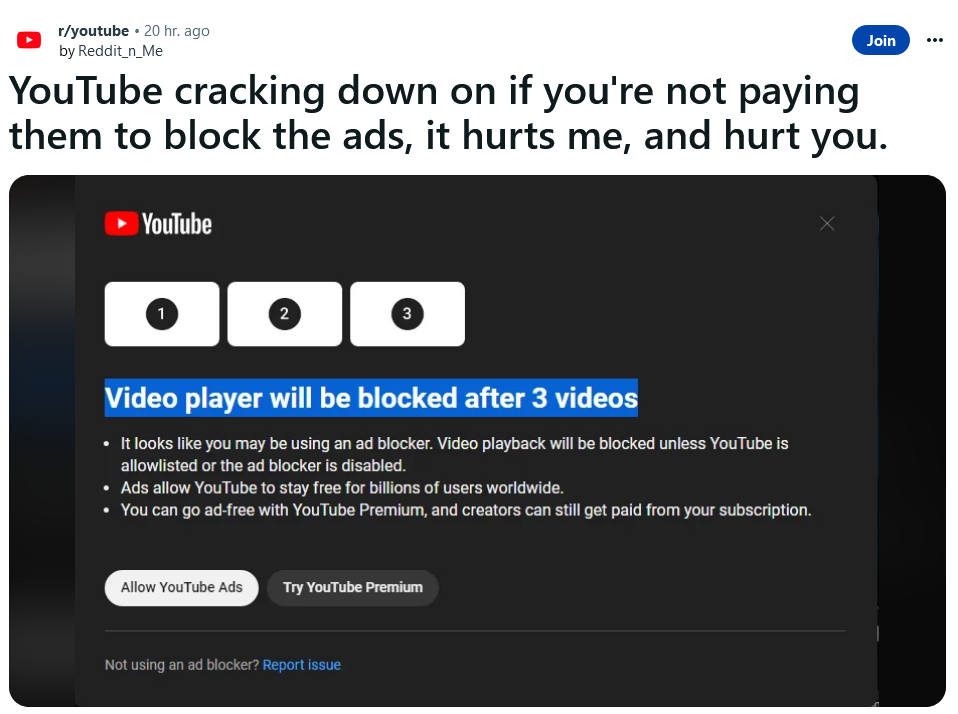
Reddit users spotted a pop-up from YouTube telling them to disable ad blockers

Source: Reddit

This comes a month after YouTube admitted to testing new methods to block ad blockers. In May, some users reported seeing a similar pop-up bluntly saying “ad blockers are not allowed” and preventing them from watching any content, period. Now, YouTube seems to have softened its stance a bit. Apparently, it has now decided that three videos is enough bait to lure non-paying users into its premium program. For that, they have to shell out $11.99 a month, or $119.99 a year in the US.

Like the last time, this test seems to be very limited and not many users are seeing the pop-up. But if anything, it shows that YouTube is not giving up on the idea of getting users to disable their ad blockers, one way or another.

As for how this will reflect on users, we have commented on this issue before, and we stand by our words today. Previously, we said that YouTube’s plan to purge ad blocking users from its platform will not go down well with either users or ad blockers, who will undoubtedly push back. As YouTube widens up its crackdown, ad blocker developers won’t sit idly by, but will try to come up with solutions that would allow them to evade YouTube’s detection — a process that might take some time.

This means that users who stick with ad blockers may have a mixed bag of experiences on YouTube. Sometimes they may see the annoying pop-ups, but at other times they may enjoy ad-free videos for free.

Will YouTube follow through with the ban on ad blockers?

Whether YouTube continues to tighten the screws on ad blocking users or backs off will largely depend on user reaction to the new feature. If the Reddit comments section is any indication, that reaction is overwhelmingly negative, with the top comment pointing out YouTube’s ad overload.

![Reddit users’s reaction to YouTube’s ban on ad blockers has been negative]

The seemingly ever-increasing amount of ads on YouTube has long been a source of frustration for users, and YouTube’s own actions in this regard have done little to appease them. Last September, YouTube began experimenting with up to 11 consecutive bumper ads — 6-second video ads that viewers can’t skip — before a video. The experiment caused a massive backlash and was soon stopped.

Another problem with ads on YouTube, aside from the fact that they can be annoying and invasive, is that some of them are also downright deceptive. Many users have encountered “scam ads” on YouTube that lure them into buying fake or dubious products, such as get-rich-quick schemes. Some of these ads even impersonate public figures or popular creators to trick their fans. This has driven some users to turn to ad blockers to make the platform not only cleaner, but safer for themselves.
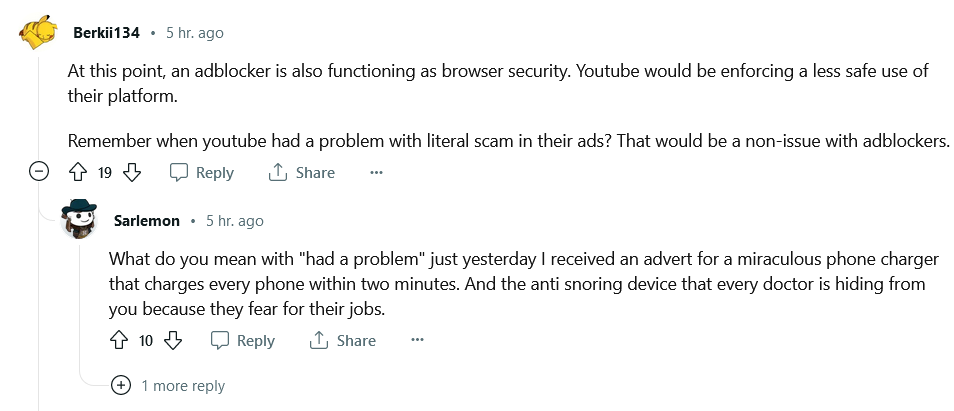
Users would resort to ad blockers to protect themselves from 'scam' YouTube ads

Why now?

On the one hand, YouTube is following a trend where video content platforms are moving toward subscriptions and incentivizing users to either watch more ads or pay twice. Netflix, for example, has just revealed it is phasing out its ad-free Basic plan, which costs $9.99 a month. New viewers who want to avoid ads will have to pay at least $15.49 a month for the Standard plan, which is quite a price hike.

On the other hand, YouTube’s ad revenue has declined for the third quarter in a row, which may have prompted its leadership to look for ways to boost it — and who to blame. Ad blockers just became the most convenient scapegoat. But what about creators? YouTube says that by disabling your ad blocker you’re supporting them. But are you? Well, only partially.

Not all creators benefit from turning off ad blocker

YouTube creators can earn a share of the platform’s ad revenue if they meet certain eligibility criteria, such as having at least 500 subscribers and 3,000 watch hours (for YouTube’s Partner Program) in the past year. However, joining the program does not guarantee a stable income from ads.

How much money you earn off YouTube ads depends on many factors, such as the topic of the video and the location of viewers, but the most crucial one is how many people actually click on the ads or watch them fully or for at least 30 seconds, whichever is shorter. Only those views count towards YouTube’s and creator’s ad revenue. According to Influencer Marketing Hub, the average earnings from views are about $0.018 per view or $18 per 1,000 views. However, this number can vary significantly, as The Business Insider reported that different influencers earned between $1.61 and $29.30 per 1,000 views. Moreover, videos can be demonetized on some more or less random pretext or by mistake, which can further reduce income from ads. All of this means that YouTube creators cannot rely on advertising alone to support their channels, and are likely to rely on brand deals and donations that provide a more stable stream of revenue and connection to their audiences.

It’s also worth noting that YouTube still monetizes videos from channels who have not (yet) qualified for its partner program. In plain words, this means YouTube keeps all the money from the ads it places in those videos, while the creators get nothing. Besides, some creators choose to disable YouTube ads altogether and make their money independently from YouTube, such as via donations, selling merchandise etc.

And let’s not forget that YouTube keeps a big chunk of the ad money for itself — about 45% — while the money you donate directly to your favorite YouTuber goes more or less right into their pockets. In short, YouTube ads are not a reliable source of income for most creators, as it hinges on many factors beyond their control. Therefore, turning off ad blockers may not have a significant impact on creators’ earnings, as most views do not generate any ad revenue anyway. A better way to support creators would be probably directly through donations, as it ensures the money goes to them, and not towards filling Big Tech’s bottomless pockets.


So far, we have not seen the new YouTube popup ourselves. As we mentioned, YouTube is still experimenting with the ban, which may explain why we haven’t witnessed the new YouTube popup yet. If you have, and are using the AdGuard ad blocker, send us a message. In the meantime, here’s a video on how to block ads on YouTube on any device with any OS using AdGuard.


Спадабаўся пост?
AdGuard VPN AdGuard DNS AdGuard Mail AdGuard Wallet
Галоўны экран AdGuard для Windows
Экран абароны AdGuard для Windows, які паказвае функцыі абароны і налады
Экран Статыстыка AdGuard для Windows, які паказвае статыстыку заблакіраванай рэкламы і праграм сачэння
Экран Кіраванне праграмамі ў AdGuard для Windows, які паказвае параметры кіравання абаронай для праграм, усталяваных на прыладзе
20 363 20363 водгукі
Выдатна!

AdGuard: блакіроўшчык рэкламы для Windows

AdGuard для Windows — гэта больш, чым блакіроўшчык рэкламы. Гэта шматфункцыянальны інструмент, які блакуе рэкламу, кантралюе доступ да небяспечных сайтаў, паскарае загрузку старонак і абараняе дзяцей ад непажаданага кантэнту
Спампоўваючы праграму, вы прымаеце ўмовы Ліцэнзійнага пагаднення
Microsoft Store
Спампоўваючы праграму, вы прымаеце ўмовы Ліцэнзійнага пагаднення
AdGuard для Windows версія 8.0, 14 дзён пробнага перыяду
Галоўны экран AdGuard для Mac
Экран рэжыму нябачнасці AdGuard для Mac
20 363 20363 водгукі
Выдатна!

AdGuard: блакіроўшчык рэкламы для Mac

AdGuard для Mac — гэта ўнікальны блакіроўшчык рэкламы, распрацаваны з улікам macOS. Акрамя абароны ад надакучлівай рэкламы ў браўзерах і праграмах, ён абараняе вас ад адсочвання, фішынгу і махлярства
Спампоўваючы праграму, вы прымаеце ўмовы Ліцэнзійнага пагаднення
Чытаць далей
AdGuard для Mac версія 2.19, 14 дзён пробнага перыяду
Галоўны экран AdGuard для Android
Экран Абарона ад сачэння ў AdGuard для Android
Экран Кіраванне праграмамі ў AdGuard для Android, які паказвае параметры кіравання абаронай для праграм, усталяваных на прыладзе
Экран Статыстыка AdGuard для Android, які паказвае статыстыку заблакіраванай рэкламы і праграм сачэння
Галоўны экран прыватнага браўзера AdGuard для Android
QR-код, каб спампаваць AdGuard для Android
20 363 20363 водгукі
Выдатна!

AdGuard: блакіроўшчык рэкламы для Android

Блакуе рэкламу і трэкеры ва ўсіх браўзерах, гульнях і іншых праграмах. Абараняе вашу прыватнасць і дазваляе вам кантраляваць, як вашы праграмы выкарыстоўваюць Інтэрнэт. Усталёўваецца праз APK
Спампоўваючы праграму, вы прымаеце ўмовы Ліцэнзійнага пагаднення
Чытаць далей
Сканіраванне для загрузкі
Выкарыстоўвайце любы счытвальнік QR-кодаў, даступны на вашай прыладзе
AdGuard для Android версія 4.14, 14 дзён пробнага перыяду
Галоўны экран AdGuard для iOS
Экран абароны AdGuard для iOS, які паказвае функцыі абароны і налады
Экран Статыстыка AdGuard для iOS, які паказвае статыстыку заблакіраванай рэкламы і праграм сачэння
QR-код, каб спампаваць AdGuard для iOS
20 363 20363 водгукі
Выдатна!

AdGuard: блакіроўшчык рэкламы для iOS

Найлепшы блакіроўшчык рэкламы для iOS для iPhone і iPad. AdGuard ліквідуе ўсе віды рэкламы і трэкераў у Safari і абараняе вашу прыватнасць ва ўсіх праграмах на ўзроўні DNS
Спампоўваючы праграму, вы прымаеце ўмовы Ліцэнзійнага пагаднення
Чытаць далей
Сканіраванне для загрузкі
Выкарыстоўвайце любы счытвальнік QR-кодаў, даступны на вашай прыладзе
AdGuard для iOS, 4.5
Галоўны экран AdGuard Content Blocker
Экран фільтры ў AdGuard Content Blocker
Экран налады ў AdGuard Content Blocker
20 363 20363 водгукі
Выдатна!

Блакіроўшчык кантэнту AdGuard

AdGuard Content Blocker ухіляе ўсе віды рэкламы ў мабільных браўзерах, якія падтрымліваюць тэхналогію блакіроўкі змесціва — напрыклад, Samsung Internet і Яндэкс.Браўзер. Яго функцыі абмежаваныя ў параўнанні з AdGuard для Android, але ён бясплатны, просты ў усталёўцы і эфектыўны
Спампоўваючы праграму, вы прымаеце ўмовы Ліцэнзійнага пагаднення
Чытаць далей
Блакіроўшчык кантэнту AdGuard, 2.8
Галоўны экран браузернае пашырэнне AdGuard
Экран Абарона ад сачэння ў браузернае пашырэнне AdGuard
20 363 20363 водгукі
Выдатна!

Браўзернае пашырэнне AdGuard

AdGuard — самае хуткае і лёгкае браўзарнае пашырэнне для блакавання ўсіх тыпаў рэкламы! Абірайце AdGuard для хуткага і бяспечнага сёрфінга без рэкламы.
Усталяваць
Спампоўваючы праграму, вы прымаеце ўмовы Ліцэнзійнага пагаднення
Усталяваць
Спампоўваючы праграму, вы прымаеце ўмовы Ліцэнзійнага пагаднення
Усталяваць
Спампоўваючы праграму, вы прымаеце ўмовы Ліцэнзійнага пагаднення
Усталяваць
Спампоўваючы праграму, вы прымаеце ўмовы Ліцэнзійнага пагаднення
Усталяваць
Спампоўваючы праграму, вы прымаеце ўмовы Ліцэнзійнага пагаднення
Чытаць далей
Усталяваць
Спампоўваючы праграму, вы прымаеце ўмовы Ліцэнзійнага пагаднення
Чытаць далей
Браўзернае пашырэнне AdGuard, 5.5
Галоўны экран Браўзерны памочнік AdGuard
20 363 20363 водгукі
Выдатна!

Памочнік AdGuard

Пашырэнне для браўзера-компаньён для настольных прыкладанняў AdGuard. Яно дазваляе блакіраваць карыстальніцкія элементы на вэб-сайтах, дадаваць вэб-сайты ў спіс дазволеных і адпраўляць справаздачы непасрэдна з вашага браўзера

Памочнік AdGuard, 1.4
20 363 20363 водгукі
Выдатна!

AdGuard Home

AdGuard Home — гэта сеткавае рашэнне для блакіроўкі рэкламы і праграм сачэння. Усталюйце яго адзін раз на вашым маршрутызатары, каб ахапіць усе прылады ў сетцы — дадатковае праграмнае забеспячэнне не патрабуецца. Гэта асабліва важна для розных прылад IoT, якія часта ўяўляюць пагрозу вашай прыватнасці

AdGuard Home, 0.107
Галоўны экран AdGuard Pro для iOS
Экран абароны ў AdGuard Pro для iOS, які паказвае функцыі абароны і налады
Экран Статыстыка ў AdGuard Pro для iOS, які паказвае статыстыку заблакіраванай рэкламы і праграм сачэння
20 363 20363 водгукі
Выдатна!

AdGuard Pro для iOS

AdGuard Pro для iOS пастаўляецца з усімі дадатковымі функцыямі блакіроўкі рэкламы і абароны, якія ўключаны. Ён прапануе тыя ж інструменты, што і платная версія AdGuard для iOS. Выдатна блакіруе рэкламу ў Safari, а таксама дазваляе наладжваць налады DNS, каб адаптаваць вашу абарону. Ён блакіруе рэкламу ў браўзерах і дадатках, абараняе дзяцей ад недапушчальнага кантэнту і захоўвае вашы асабістыя даныя бяспечнымі
Спампоўваючы праграму, вы прымаеце ўмовы Ліцэнзійнага пагаднення
Чытаць далей
AdGuard Pro для iOS, 4.5
Галоўны экран AdGuard Mini для Mac
Экран абароны Safari ў AdGuard Mini для Mac
Экран стварэння правіла ў AdGuard Mini для Mac
20 363 20363 водгукі
Выдатна!

AdGuard Mini для Mac — блакіроўшчык рэкламы ў Safari

AdGuard Mini для Mac — гэта магутны блакіроўшчык рэкламы для Safari. Гэта лёгкая праграма выдаляе рэкламу, блакуе праграмы сачэння і паскарае загрузку старонак. Яна дапамагае вам аглядаць вэб у Safari без адцягненняў і захоўваць вашы даныя ў прыватнасці
Усталяваць
Спампоўваючы праграму, вы прымаеце ўмовы Ліцэнзійнага пагаднення
Чытаць далей
AdGuard Mini для Mac, 2.3
Галоўны экран AdGuard для Android TV з уключанай абаронай
Экран блакіроўкі рэкламы AdGuard для Android TV, які паказвае яго функцыі і налады
Экран налады AdGuard для Android TV
Экран Кіраванне праграмамі AdGuard для Android TV, які паказвае праграмы, дзе рэклама і праграмы сачэння заблакіравана
20 363 20363 водгукі
Выдатна!

AdGuard для Android TV

AdGuard для Android TV — адзіная праграма, якая блакіруе рэкламу, ахоўвае вашу прыватнасць і працуе як міжсеткавы экран для вашага Smart TV. Атрымуйце папярэджанні аб вэб-пагрозах, выкарыстоўвайце бяспечны DNS і атрымлівайце перавагі ад шыфраванага трафіку. Адпачывайце і атрымлівайце асалоду ад улюбёных шоу з першакласнай абаронай і без рэкламы!
AdGuard для Android TV версія 4.14, 14 дзён пробнага перыяду
Маскот AdGuard, Агнар, трымае пінгвіна Linux
20 363 20363 водгукі
Выдатна!

AdGuard для Linux

AdGuard для Linux — гэта першы ў свеце сістэмны блакіроўшчык рэкламы для Linux. Блакуйце рэкламу і трэкеры на ўзроўні прылады, выбірайце з папярэдне ўсталяваных фільтраў альбо дадавайце ўласныя — усё праз інтэрфейс каманднага радка
AdGuard для Linux, 1.4
20 363 20363 водгукі
Выдатна!

AdGuard Temp Mail

Ваш часовы паштовую скрыню, каб на асноўную пошту не прыходзіў спам
20 363 20363 водгукі
Выдатна!

AdGuard VPN

75 лакацый па ўсім свеце

Доступ да любога кантэнту

Моцнае шыфраванне

Без лагавання

Самае хуткае злучэнне

Цэладзённая падтрымка

Паспрабуйце бясплатна
Спампоўваючы праграму, вы прымаеце ўмовы Ліцэнзійнага пагаднення
Чытаць далей
20 363 20363 водгукі
Выдатна!

AdGuard DNS

AdGuard DNS – гэта альтэрнатыўны спосаб заблакаваць рэкламу, абараніць асабістыя дадзеныя і ахаваць дзяцей ад дарослых матэрыялаў. Ён просты ў наладзе і выкарыстанні і забяспечвае патрэбны мінімум абароны ад рэкламы, трэкінгу і фішынгу, незалежна ад платформы.
20 363 20363 водгукі
Выдатна!

AdGuard Mail

Абараняйце сваю асобу, пазбягайце спаму і трымайце ўваходную пошту ў бяспецы з дапамогай нашых псеўданімаў і часовых адрасоў электроннай пошты. Скарыстайцеся нашым бясплатным сэрвісам перасылкі электроннай пошты і праграмамі для ўсіх аперацыйных сістэм.
20 363 20363 водгукі
Выдатна!

AdGuard Wallet

Бяспечны і прыватны крыпта-кашалёк, які дае вам поўны кантроль над вашымі актывамі. Адкрывайце для сябе тысячы крыптавалют для захоўвання, адпраўкі і абмену
Спампоўка AdGuard Каб усталяваць AdGuard, пстрыкніце файл, пазначаны стрэлкай Выберыце «Адкрыць» і націсніце «ОК», затым дачакайцеся спампоўкі файла. У акне, якое адкрылася, перацягніце значок AdGuard у папку «Праграмы». Дзякуй, што выбралі AdGuard! Выберыце «Адкрыць» і націсніце «ОК», затым дачакайцеся спампоўкі файла. У акне, якое адкрылася, націсніце «Усталяваць». Дзякуй, што выбралі AdGuard!
Усталюйце AdGuard на мабільную прыладу
















































