First public BETA of AdGuard 3.0 for iOS: you'll not recognize it

It's very exciting to be writing about an AdGuard for iOS update. I'm sure, for many users it will be no less exciting to read about it. Even though this is only a beta update, it will give you an impression of what to expect when the release version hits the AppStore (which will happen sooner than you might think). There's a lot to discuss, so let's not waste any more time and kick things off right away.

NOTE: fixing the last bugs took us a bit longer than we expected, and by the time we post this article the new beta has been just submitted for the TestFlight review. It will take some more time for it to pass this review, and then the beta will be available to all beta testers. Towards the end of the article I'll explain how to become a beta tester for AdGuard for iOS.

Pro or no Pro?

Most of our users know that there are two AdGuard for iOS apps — free one and Pro, the paid one. Those who've been around for a while are, perhaps, also familiar with the not-so-pleasant situation around Apple policy and AdGuard Pro. It'll soon be a whole year after Apple put a ban on AdGuard Pro updates (and many other apps that did content blocking outside Safari). We've been looking for various solutions, waiting for Apple to reconsider their policy, but in the end there just wasn't any solution that would have been completely satisfactory for users. So this is what we decided to go by:

  • AdGuard Pro for iOS will stay as it is

    Unless something truly magical happens, Apple is not going to loosen its grip on us. We still can't update AdGuard Pro without removing everything that makes it what it is. Thankfully, for the majority of users the app still functions alright, and we can only hope that it will stay that way for as long as possible.

  • Free AdGuard for iOS app will undergo a big update

    This is what this article is about in the first place. The baseline of the free app is that it is still a great tool for content blocking in Safari — even better than before, in fact. The app will remain free.

  • There will be new features in the free app available via in-app purchases

    Now, keep those pitchforks down for now, I'll explain everything in a moment. It's not as bad as it sounds, I promise :)

With all that said, let's move away from AdGuard Pro and start talking new beta. I'll skip discussing the new design on purpose, as you'll get a feel of it from the screenshots. And also, it's rather intuitive and there's no way it will cause you any troubles, so no need to devote too much time to it.

Powering through the rule count limitation

One of the biggest hurdles for any Safari content blocker is the notorious 50k active rule count limitation. For some reason, Apple thinks that 50,000 should be enough for you. For comparison, AdGuard Base filter alone has more than 100,000 rules! We're doing next to impossible things to optimize and compress our filters so that they can be used in Safari but the limitation still shows in the filtering quality.

Well, there is a trick that some content blockers have been using to circumvent this restriction, and AdGuard is going to arm itself with this trick too. The new beta combines five content blockers under one app, each of them has its own cap of 50k rules. That makes it 250k rules total (well, a little less in reality, but not by much). The only minor downside is that you need to enable all five content blockers in Safari settings on your phone/tablet, but that's not too big of an inconvenience comapred to the benefits.
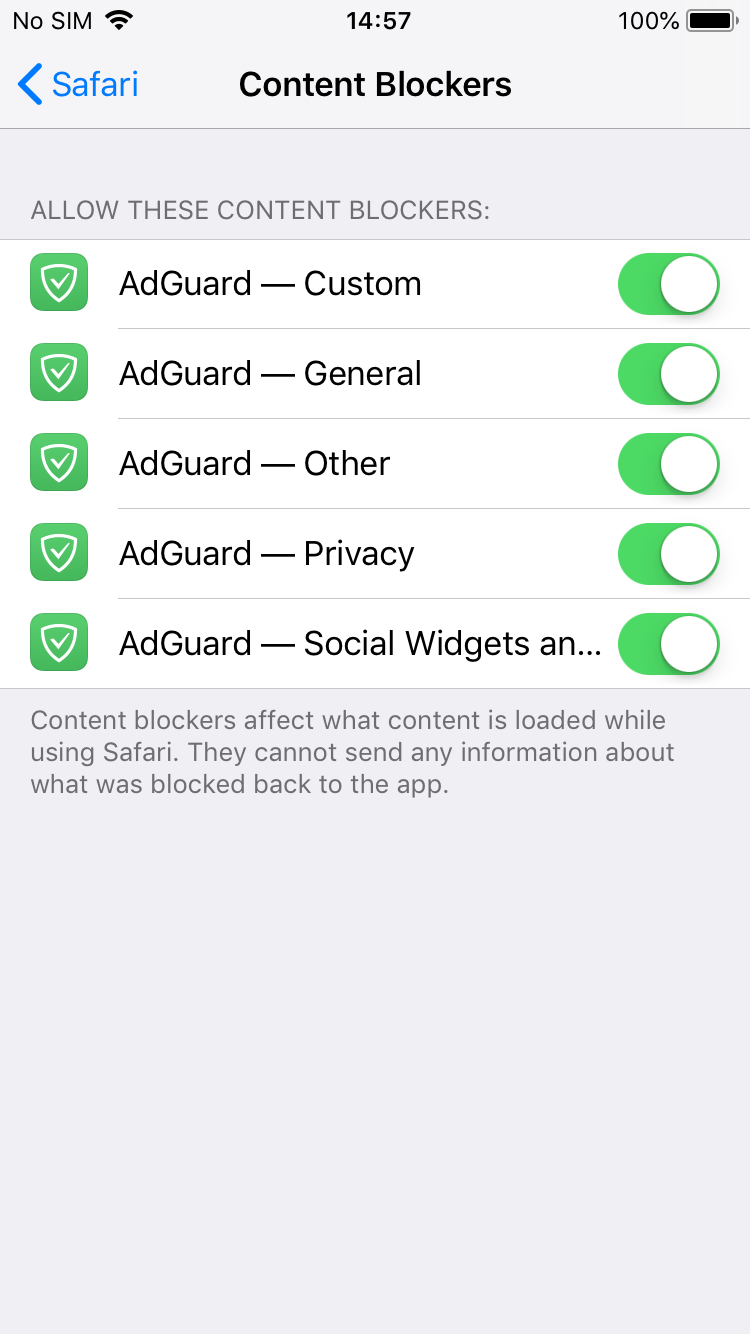
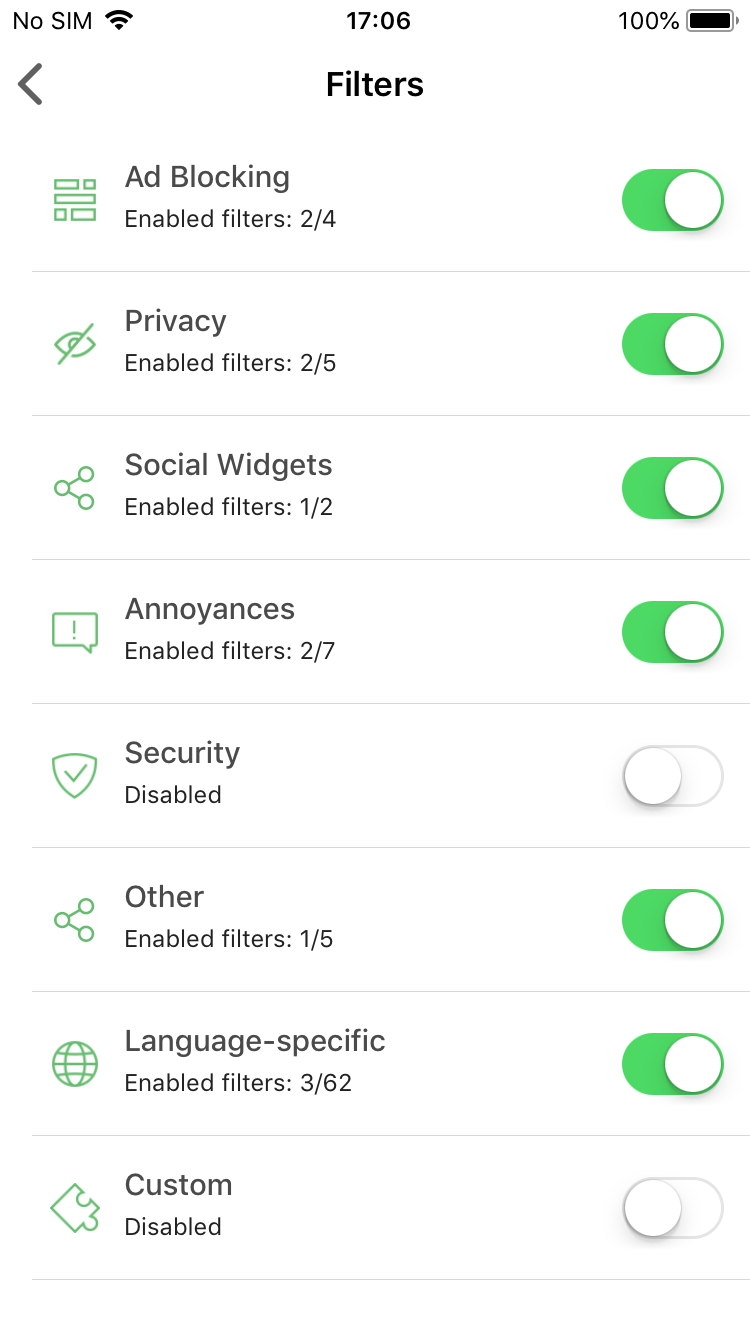
Turn on all five content blockers and enable any filters you want!

Premium features

I know this may seem like having Premium features in an updated free version of AdGuard for iOS contradicts with saying that we can't update the Pro version. Unfortunately, not everything could be transferred from there.

DNS Privacy

This is by far the biggest addition. If you're a user of AdGuard Pro, you'll recognize this immediately — it's good old custom DNS settings. Actually, it's more than that: now AdGuard supports DNS-over-TLS and DNS-over-HTTPS, two of the most secured DNS protocols.
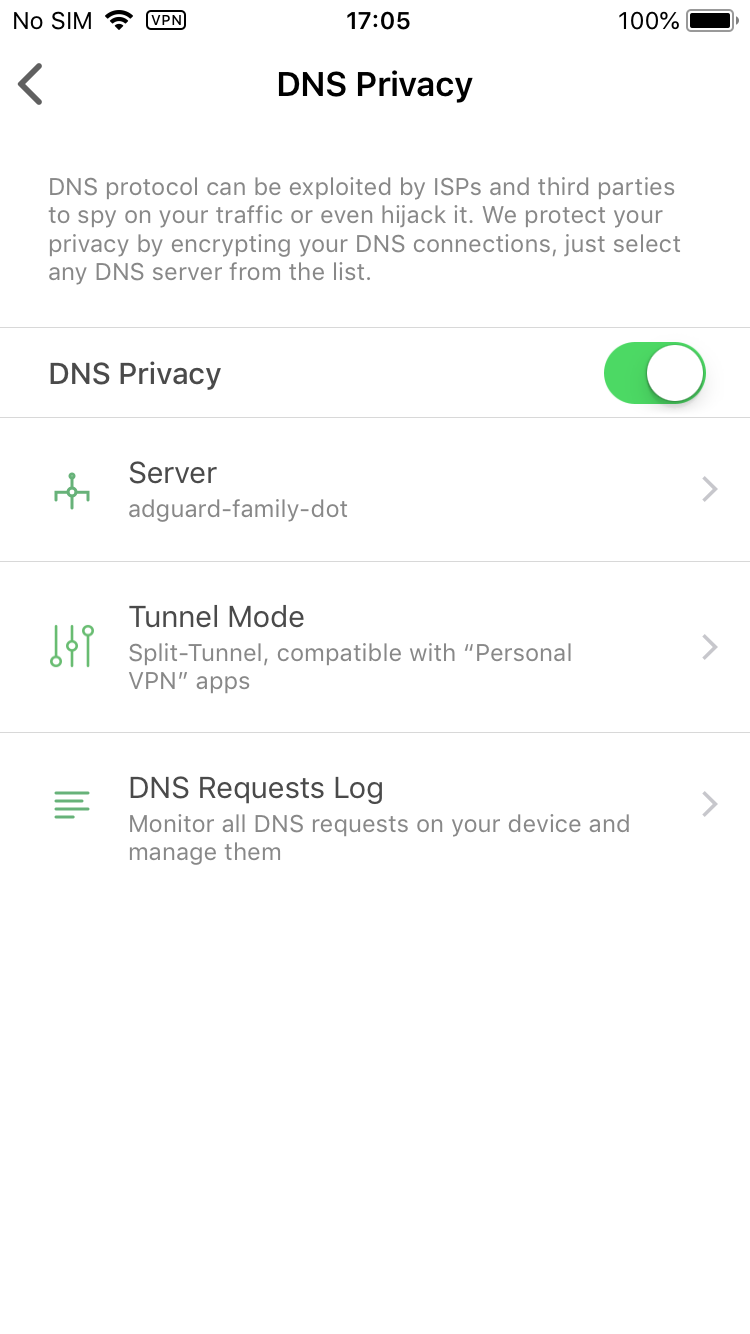
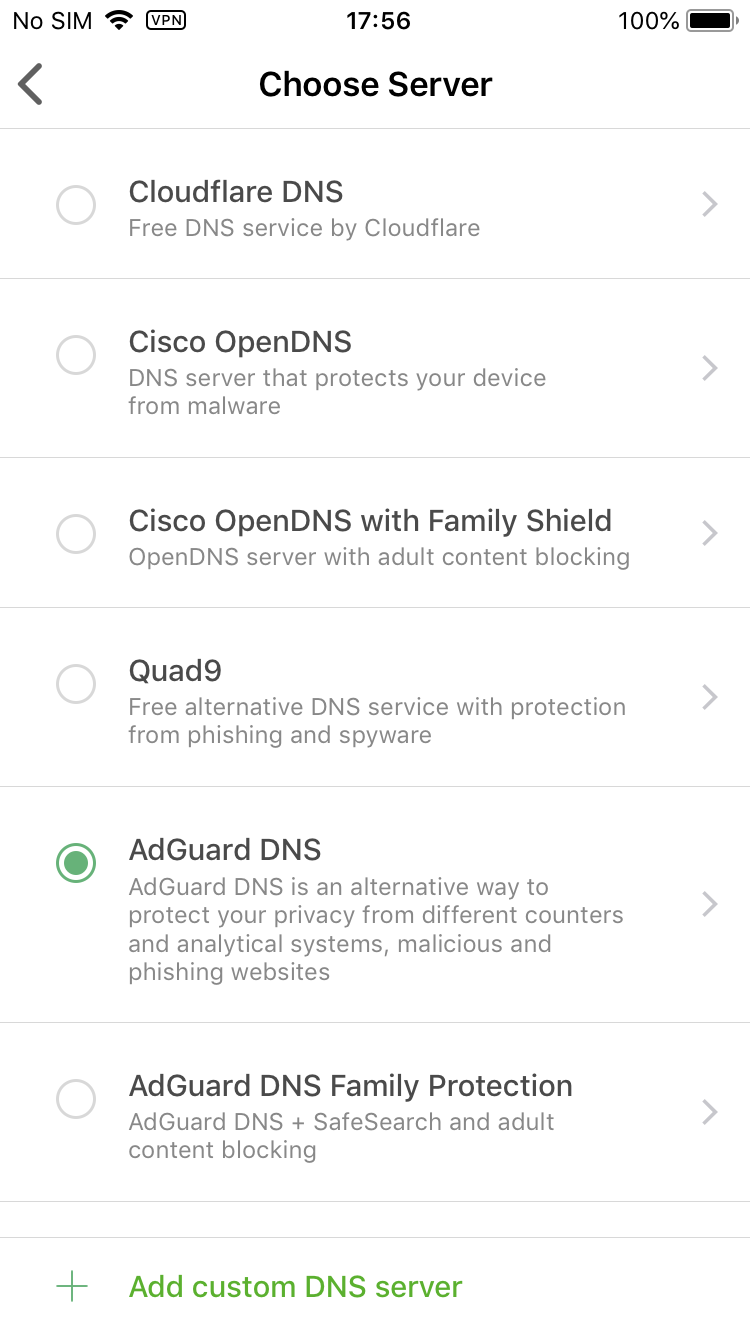
Manage your DNS settings

You select one of the DNS servers included by default or add any custom server you'd like. There's also a DNS requests log to monitor everything that's happening with your device's traffic. What you won't find there is any sort of DNS whitelist/blacklist or other customization. Sadly, this is as far as we can step under the circumstances.

Dark mode

Wait, wasn't dark mode the default (and only) choice before? Yes, but now we turned back to the classic white/green color scheme, as you could have seen on the screenshots above. Dark mode will be available to Premium users only, but isn't it worth it? :)
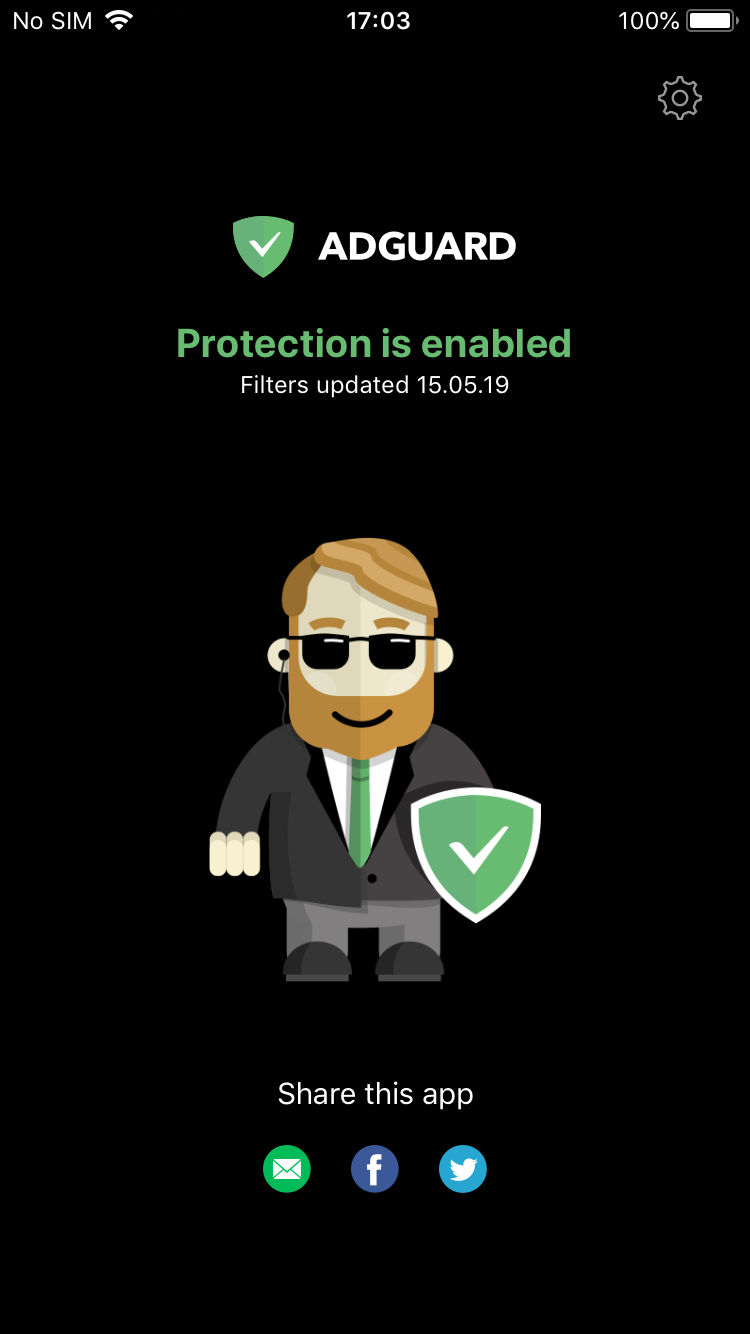
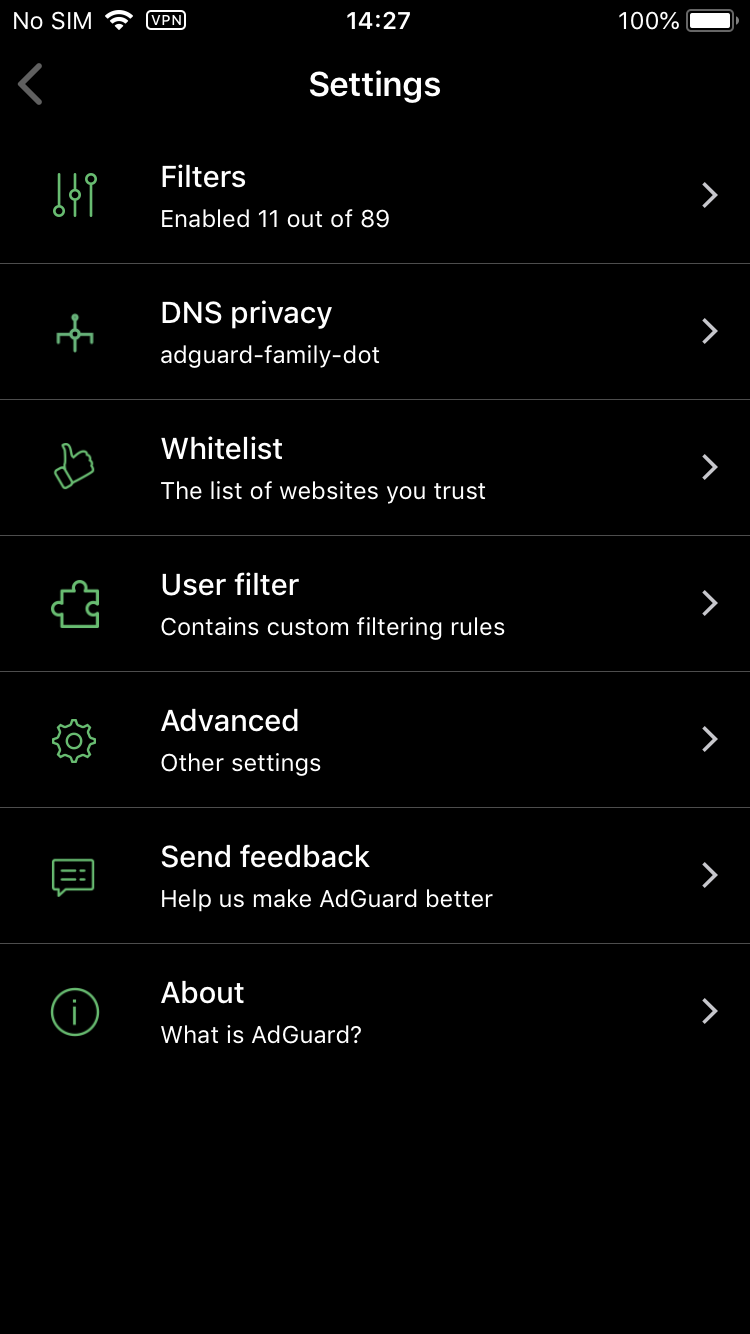
Bruce Wayne approves of this mode

Don't know about you, but I'm a big fan.

Premium filter categories

There are two filter categories that are available exclusively to Premium users:

Custom filters — not to be confused with the User filter that lets you add your own filtering rules and is present in the free version, as always. "Custom filters" is an entirely new filter group, you go there and add any number of filters by URL. Very useful if your favorite filter is not added by default, or if you have a filter of your own. Worth noting that filters added by URL will be automatically updated with the rest.
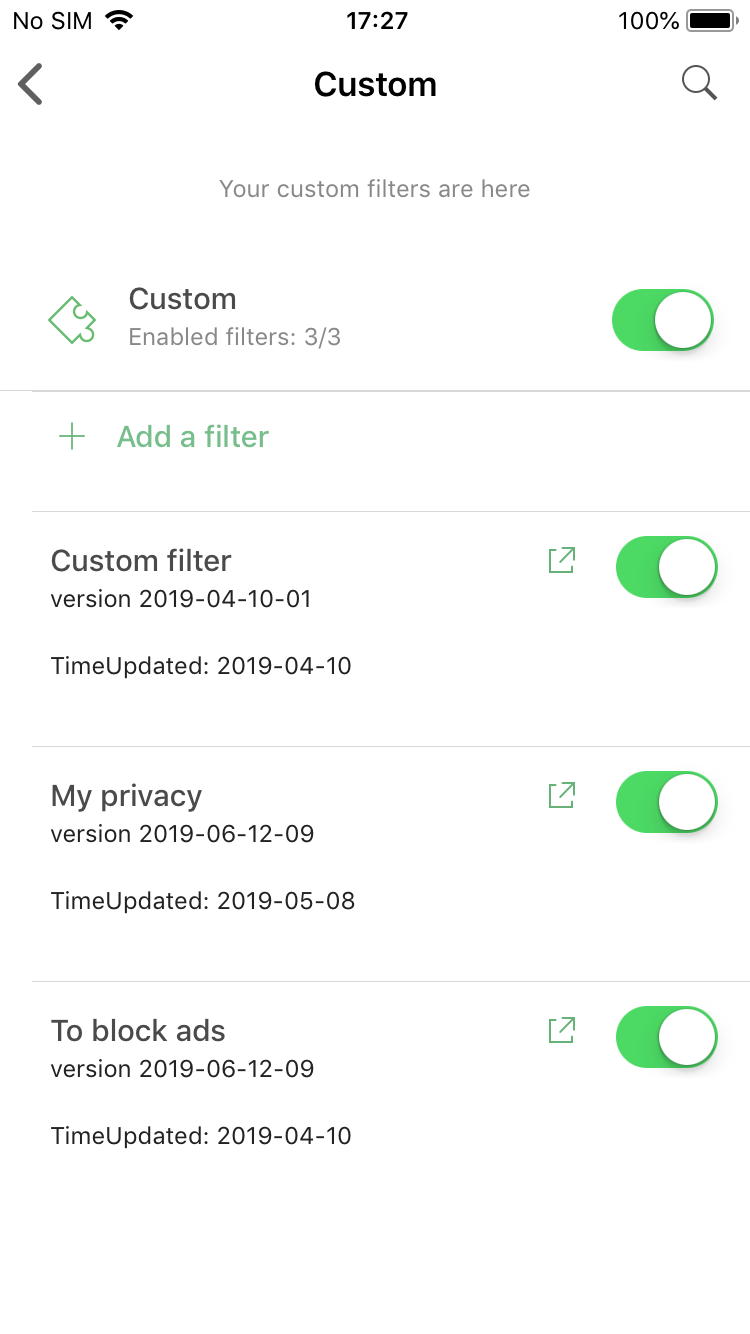
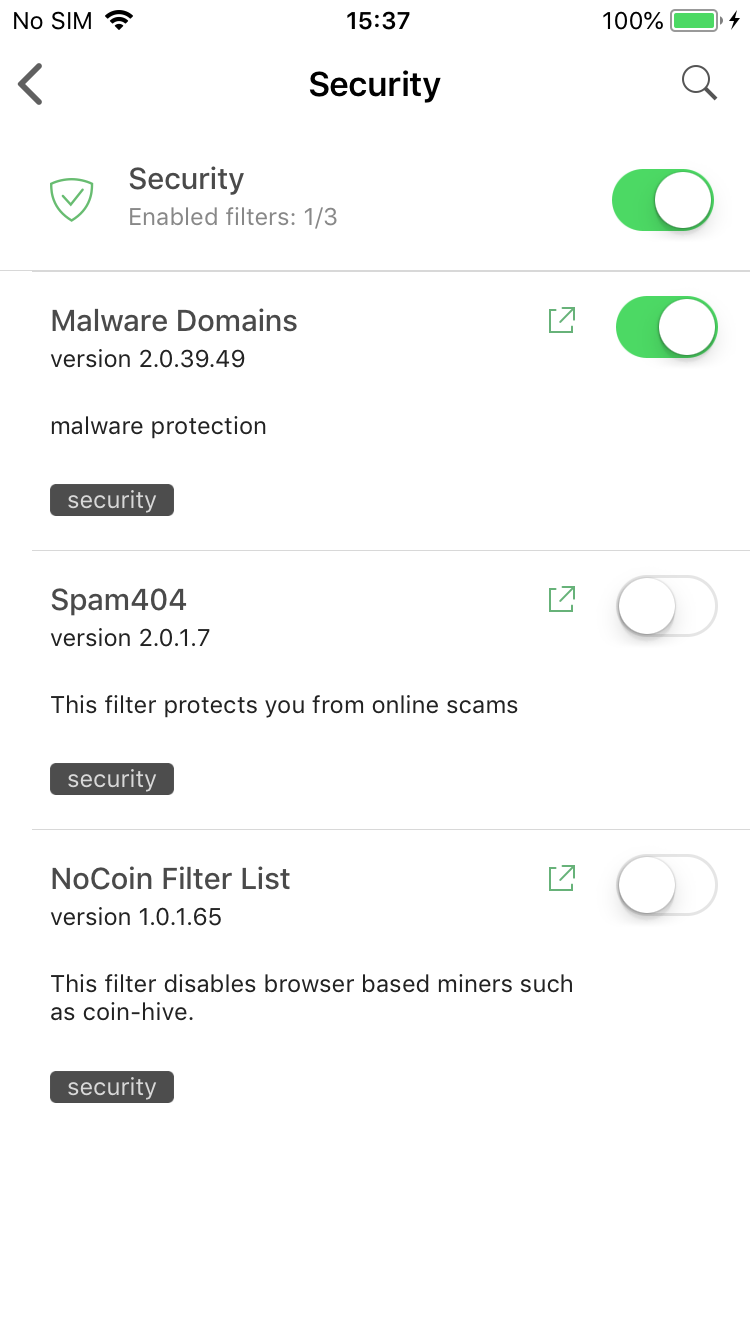
Premium filter categories: Custom and Security

Security filters — again, don't confuse it with the Privacy filter group. Protecting online privacy is essential and we wouldn't dare making it a Premium-only feature. Ensuring security is more about being attentive and careful when browsing the web, but if you look for a little extra insurance — this is for you.

How to get Premium?

There are three main options:

  • Purchase the subscription

    This is the most simple way. Just tap on the "Get Premium" plaque anywhere in the app and you'll be prompted to activate a monthly subscription. All you need to do is enter your Apple ID password and confirm the purchase.

  • Log into your AdGuard Personal account

    Go to the Settings > About > License screen and tap on the Login button there. You'll be asked to enter your AdGuard Personal account credentials. After you do, if you have a valid Premium or Mobile license in your account, it will be used to activate Premium in your AdGuard for iOS app. Friendly reminder that you can purchase any license on our official website.

  • Become a beta tester

    Very fitting! All approved beta testers receive a 1-year beta license key that works just as a regular key for our purposes. Head over to this page and send a request if you'd like to become a beta tester. You'll receive a reply with further instructions if your request was approved.

If you are already an AdGuard for iOS beta tester, you need to contact us anyway to get a beta license key. Having a TestFlight invite is not enough with the new beta.


And this is all for today. Get ready for the update, or jump right into it by becoming a beta tester. In the meantime, we'll be hitting you with more updates to various AdGuard products. So stay tuned, you'll be hearing from us again very soon!


Спадабаўся пост?
AdGuard VPN AdGuard DNS AdGuard Mail AdGuard Wallet
Галоўны экран AdGuard для Windows
Экран абароны AdGuard для Windows, які паказвае функцыі абароны і налады
Экран Статыстыка AdGuard для Windows, які паказвае статыстыку заблакіраванай рэкламы і праграм сачэння
Экран Кіраванне праграмамі ў AdGuard для Windows, які паказвае параметры кіравання абаронай для праграм, усталяваных на прыладзе
20 363 20363 водгукі
Выдатна!

AdGuard: блакіроўшчык рэкламы для Windows

AdGuard для Windows — гэта больш, чым блакіроўшчык рэкламы. Гэта шматфункцыянальны інструмент, які блакуе рэкламу, кантралюе доступ да небяспечных сайтаў, паскарае загрузку старонак і абараняе дзяцей ад непажаданага кантэнту
Спампоўваючы праграму, вы прымаеце ўмовы Ліцэнзійнага пагаднення
Microsoft Store
Спампоўваючы праграму, вы прымаеце ўмовы Ліцэнзійнага пагаднення
AdGuard для Windows версія 8.0, 14 дзён пробнага перыяду
Галоўны экран AdGuard для Mac
Экран рэжыму нябачнасці AdGuard для Mac
20 363 20363 водгукі
Выдатна!

AdGuard: блакіроўшчык рэкламы для Mac

AdGuard для Mac — гэта ўнікальны блакіроўшчык рэкламы, распрацаваны з улікам macOS. Акрамя абароны ад надакучлівай рэкламы ў браўзерах і праграмах, ён абараняе вас ад адсочвання, фішынгу і махлярства
Спампоўваючы праграму, вы прымаеце ўмовы Ліцэнзійнага пагаднення
Чытаць далей
AdGuard для Mac версія 2.19, 14 дзён пробнага перыяду
Галоўны экран AdGuard для Android
Экран Абарона ад сачэння ў AdGuard для Android
Экран Кіраванне праграмамі ў AdGuard для Android, які паказвае параметры кіравання абаронай для праграм, усталяваных на прыладзе
Экран Статыстыка AdGuard для Android, які паказвае статыстыку заблакіраванай рэкламы і праграм сачэння
Галоўны экран прыватнага браўзера AdGuard для Android
QR-код, каб спампаваць AdGuard для Android
20 363 20363 водгукі
Выдатна!

AdGuard: блакіроўшчык рэкламы для Android

Блакуе рэкламу і трэкеры ва ўсіх браўзерах, гульнях і іншых праграмах. Абараняе вашу прыватнасць і дазваляе вам кантраляваць, як вашы праграмы выкарыстоўваюць Інтэрнэт. Усталёўваецца праз APK
Спампоўваючы праграму, вы прымаеце ўмовы Ліцэнзійнага пагаднення
Чытаць далей
Сканіраванне для загрузкі
Выкарыстоўвайце любы счытвальнік QR-кодаў, даступны на вашай прыладзе
AdGuard для Android версія 4.14, 14 дзён пробнага перыяду
Галоўны экран AdGuard для iOS
Экран абароны AdGuard для iOS, які паказвае функцыі абароны і налады
Экран Статыстыка AdGuard для iOS, які паказвае статыстыку заблакіраванай рэкламы і праграм сачэння
QR-код, каб спампаваць AdGuard для iOS
20 363 20363 водгукі
Выдатна!

AdGuard: блакіроўшчык рэкламы для iOS

Найлепшы блакіроўшчык рэкламы для iOS для iPhone і iPad. AdGuard ліквідуе ўсе віды рэкламы і трэкераў у Safari і абараняе вашу прыватнасць ва ўсіх праграмах на ўзроўні DNS
Спампоўваючы праграму, вы прымаеце ўмовы Ліцэнзійнага пагаднення
Чытаць далей
Сканіраванне для загрузкі
Выкарыстоўвайце любы счытвальнік QR-кодаў, даступны на вашай прыладзе
AdGuard для iOS, 4.5
Галоўны экран AdGuard Content Blocker
Экран фільтры ў AdGuard Content Blocker
Экран налады ў AdGuard Content Blocker
20 363 20363 водгукі
Выдатна!

Блакіроўшчык кантэнту AdGuard

AdGuard Content Blocker ухіляе ўсе віды рэкламы ў мабільных браўзерах, якія падтрымліваюць тэхналогію блакіроўкі змесціва — напрыклад, Samsung Internet і Яндэкс.Браўзер. Яго функцыі абмежаваныя ў параўнанні з AdGuard для Android, але ён бясплатны, просты ў усталёўцы і эфектыўны
Спампоўваючы праграму, вы прымаеце ўмовы Ліцэнзійнага пагаднення
Чытаць далей
Блакіроўшчык кантэнту AdGuard, 2.8
Галоўны экран браузернае пашырэнне AdGuard
Экран Абарона ад сачэння ў браузернае пашырэнне AdGuard
20 363 20363 водгукі
Выдатна!

Браўзернае пашырэнне AdGuard

AdGuard — самае хуткае і лёгкае браўзарнае пашырэнне для блакавання ўсіх тыпаў рэкламы! Абірайце AdGuard для хуткага і бяспечнага сёрфінга без рэкламы.
Усталяваць
Спампоўваючы праграму, вы прымаеце ўмовы Ліцэнзійнага пагаднення
Усталяваць
Спампоўваючы праграму, вы прымаеце ўмовы Ліцэнзійнага пагаднення
Усталяваць
Спампоўваючы праграму, вы прымаеце ўмовы Ліцэнзійнага пагаднення
Усталяваць
Спампоўваючы праграму, вы прымаеце ўмовы Ліцэнзійнага пагаднення
Усталяваць
Спампоўваючы праграму, вы прымаеце ўмовы Ліцэнзійнага пагаднення
Чытаць далей
Усталяваць
Спампоўваючы праграму, вы прымаеце ўмовы Ліцэнзійнага пагаднення
Чытаць далей
Браўзернае пашырэнне AdGuard, 5.5
Галоўны экран Браўзерны памочнік AdGuard
20 363 20363 водгукі
Выдатна!

Памочнік AdGuard

Пашырэнне для браўзера-компаньён для настольных прыкладанняў AdGuard. Яно дазваляе блакіраваць карыстальніцкія элементы на вэб-сайтах, дадаваць вэб-сайты ў спіс дазволеных і адпраўляць справаздачы непасрэдна з вашага браўзера
Памочнік AdGuard, 1.4
20 363 20363 водгукі
Выдатна!

AdGuard Home

AdGuard Home — гэта сеткавае рашэнне для блакіроўкі рэкламы і праграм сачэння. Усталюйце яго адзін раз на вашым маршрутызатары, каб ахапіць усе прылады ў сетцы — дадатковае праграмнае забеспячэнне не патрабуецца. Гэта асабліва важна для розных прылад IoT, якія часта ўяўляюць пагрозу вашай прыватнасці
AdGuard Home, 0.107
Галоўны экран AdGuard Pro для iOS
Экран абароны ў AdGuard Pro для iOS, які паказвае функцыі абароны і налады
Экран Статыстыка ў AdGuard Pro для iOS, які паказвае статыстыку заблакіраванай рэкламы і праграм сачэння
20 363 20363 водгукі
Выдатна!

AdGuard Pro для iOS

AdGuard Pro для iOS пастаўляецца з усімі дадатковымі функцыямі блакіроўкі рэкламы і абароны, якія ўключаны. Ён прапануе тыя ж інструменты, што і платная версія AdGuard для iOS. Выдатна блакіруе рэкламу ў Safari, а таксама дазваляе наладжваць налады DNS, каб адаптаваць вашу абарону. Ён блакіруе рэкламу ў браўзерах і дадатках, абараняе дзяцей ад недапушчальнага кантэнту і захоўвае вашы асабістыя даныя бяспечнымі
Спампоўваючы праграму, вы прымаеце ўмовы Ліцэнзійнага пагаднення
Чытаць далей
AdGuard Pro для iOS, 4.5
Галоўны экран AdGuard Mini для Mac
Экран абароны Safari ў AdGuard Mini для Mac
Экран стварэння правіла ў AdGuard Mini для Mac
20 363 20363 водгукі
Выдатна!

AdGuard Mini для Mac — блакіроўшчык рэкламы ў Safari

AdGuard Mini для Mac — гэта магутны блакіроўшчык рэкламы для Safari. Гэта лёгкая праграма выдаляе рэкламу, блакуе праграмы сачэння і паскарае загрузку старонак. Яна дапамагае вам аглядаць вэб у Safari без адцягненняў і захоўваць вашы даныя ў прыватнасці
Усталяваць
Спампоўваючы праграму, вы прымаеце ўмовы Ліцэнзійнага пагаднення
Чытаць далей
AdGuard Mini для Mac, 2.3
Галоўны экран AdGuard для Android TV з уключанай абаронай
Экран блакіроўкі рэкламы AdGuard для Android TV, які паказвае яго функцыі і налады
Экран налады AdGuard для Android TV
Экран Кіраванне праграмамі AdGuard для Android TV, які паказвае праграмы, дзе рэклама і праграмы сачэння заблакіравана
20 363 20363 водгукі
Выдатна!

AdGuard для Android TV

AdGuard для Android TV — адзіная праграма, якая блакіруе рэкламу, ахоўвае вашу прыватнасць і працуе як міжсеткавы экран для вашага Smart TV. Атрымуйце папярэджанні аб вэб-пагрозах, выкарыстоўвайце бяспечны DNS і атрымлівайце перавагі ад шыфраванага трафіку. Адпачывайце і атрымлівайце асалоду ад улюбёных шоу з першакласнай абаронай і без рэкламы!
AdGuard для Android TV версія 4.14, 14 дзён пробнага перыяду
Маскот AdGuard, Агнар, трымае пінгвіна Linux
20 363 20363 водгукі
Выдатна!

AdGuard для Linux

AdGuard для Linux — гэта першы ў свеце сістэмны блакіроўшчык рэкламы для Linux. Блакуйце рэкламу і трэкеры на ўзроўні прылады, выбірайце з папярэдне ўсталяваных фільтраў альбо дадавайце ўласныя — усё праз інтэрфейс каманднага радка
AdGuard для Linux, 1.4
20 363 20363 водгукі
Выдатна!

AdGuard Temp Mail

Ваш часовы паштовую скрыню, каб на асноўную пошту не прыходзіў спам
20 363 20363 водгукі
Выдатна!

AdGuard VPN

75 лакацый па ўсім свеце

Доступ да любога кантэнту

Моцнае шыфраванне

Без лагавання

Самае хуткае злучэнне

Цэладзённая падтрымка

Паспрабуйце бясплатна
Спампоўваючы праграму, вы прымаеце ўмовы Ліцэнзійнага пагаднення
Чытаць далей
20 363 20363 водгукі
Выдатна!

AdGuard DNS

AdGuard DNS – гэта альтэрнатыўны спосаб заблакаваць рэкламу, абараніць асабістыя дадзеныя і ахаваць дзяцей ад дарослых матэрыялаў. Ён просты ў наладзе і выкарыстанні і забяспечвае патрэбны мінімум абароны ад рэкламы, трэкінгу і фішынгу, незалежна ад платформы.
20 363 20363 водгукі
Выдатна!

AdGuard Mail

Абараняйце сваю асобу, пазбягайце спаму і трымайце ўваходную пошту ў бяспецы з дапамогай нашых псеўданімаў і часовых адрасоў электроннай пошты. Скарыстайцеся нашым бясплатным сэрвісам перасылкі электроннай пошты і праграмамі для ўсіх аперацыйных сістэм.
20 363 20363 водгукі
Выдатна!

AdGuard Wallet

Бяспечны і прыватны крыпта-кашалёк, які дае вам поўны кантроль над вашымі актывамі. Адкрывайце для сябе тысячы крыптавалют для захоўвання, адпраўкі і абмену
Спампоўка AdGuard Каб усталяваць AdGuard, пстрыкніце файл, пазначаны стрэлкай Выберыце «Адкрыць» і націсніце «ОК», затым дачакайцеся спампоўкі файла. У акне, якое адкрылася, перацягніце значок AdGuard у папку «Праграмы». Дзякуй, што выбралі AdGuard! Выберыце «Адкрыць» і націсніце «ОК», затым дачакайцеся спампоўкі файла. У акне, якое адкрылася, націсніце «Усталяваць». Дзякуй, што выбралі AdGuard!
Усталюйце AdGuard на мабільную прыладу

















































