How AdGuard uses GitHub to stay transparent and user-oriented

At AdGuard, we fight daily to make the Internet safer, more comfortable, and more transparent. This commitment is reflected not only in our product features and strict privacy policies, but also in the fact that we keep our work as open as possible. That includes actively interacting with our community.

This is why all of our products have public repositories — online spaces where anybody can see what we are working on, report issues directly to AdGuard developers, and even contribute to our open-source projects. The repositories cover our ad-blocking apps, filters, browser extensions, DNS solutions, VPN tools, developer utilities, and more. There are different platforms that offer such functionality, but the most popular one by far is GutHub, and all AdGuard projects are stored there.

This article lists the most important repositories by category, summarizes the purpose of each one, and gives a simple breakdown of what users can do there.

💡
Pro tip: Creating an issue on GitHub is the most effective way to bring the attention of AdGuard developers to a problem. Just make sure to check that a similar issue doesn’t already exist and describe the problem in a comprehensive but concise way. If it does exist, you can upvote it.

What is Github and its repositories

Very simply put, you can think of GitHub as sort of Google Docs for code, where multiple people can work on the same project, track changes, and see who made which updates. It provides a central, cloud-based place to store your code so it’s accessible from anywhere. It also has teamwork tools for reviewing changes, fixing issues, and merging everyone’s work smoothly.

GitHub is widely used for open-source projects, letting anyone view the code, suggest improvements, and contribute.

A repository (often called “repo” for short) is the most basic element of GitHub. It's a place where you can store your code, your files, and each file's revision history. Repositories can have multiple collaborators and can be either public or private.

Where to start

You can find links to key repositories below in this article or visit the general AdGuardTeam GitHub page for a full list. In most repos, you can:

  • View README file on the main page: it gives you an introduction to the product and its repo
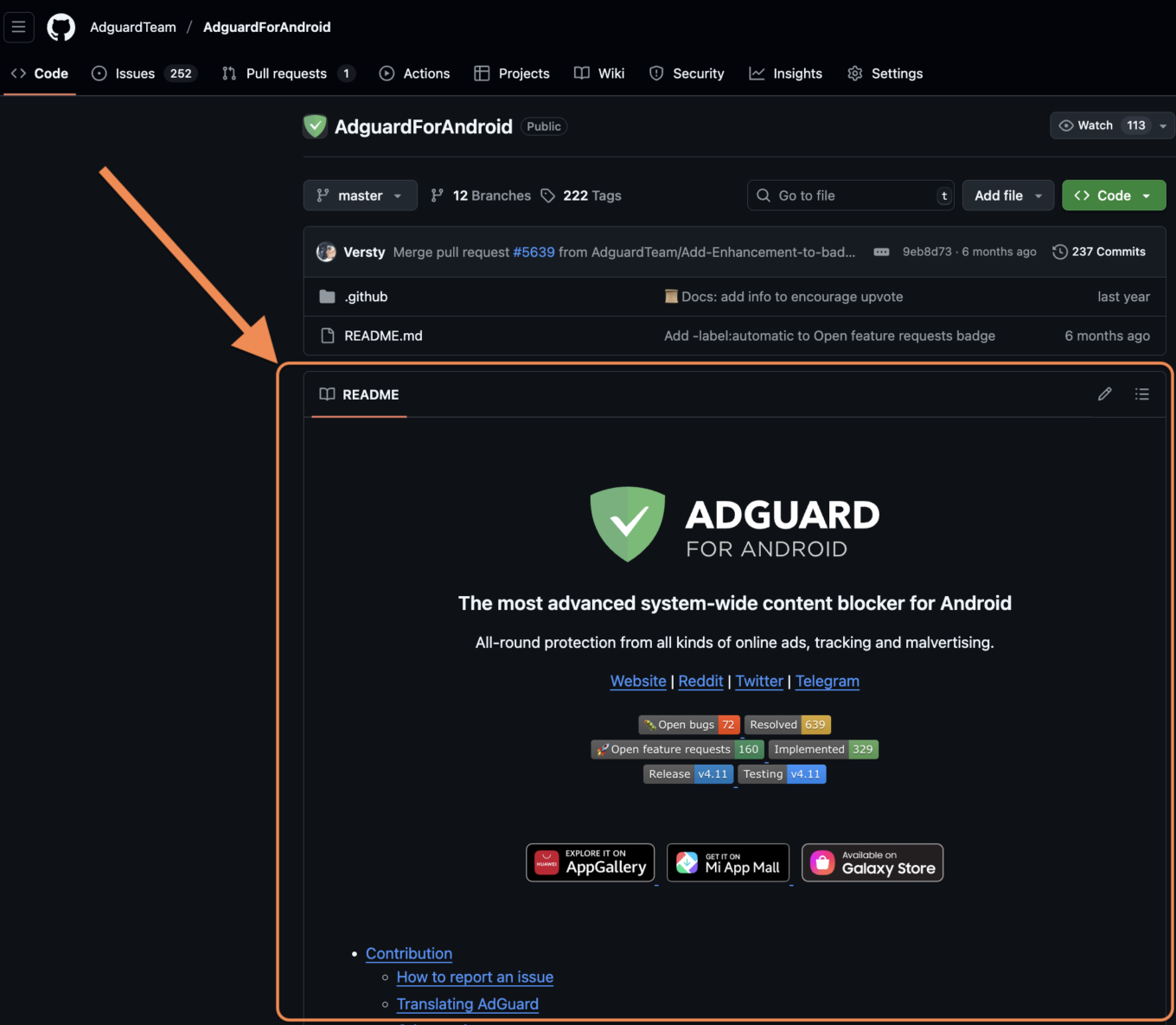
    README file *border

  • Check existing bug reports or feature requests, comment and upvote
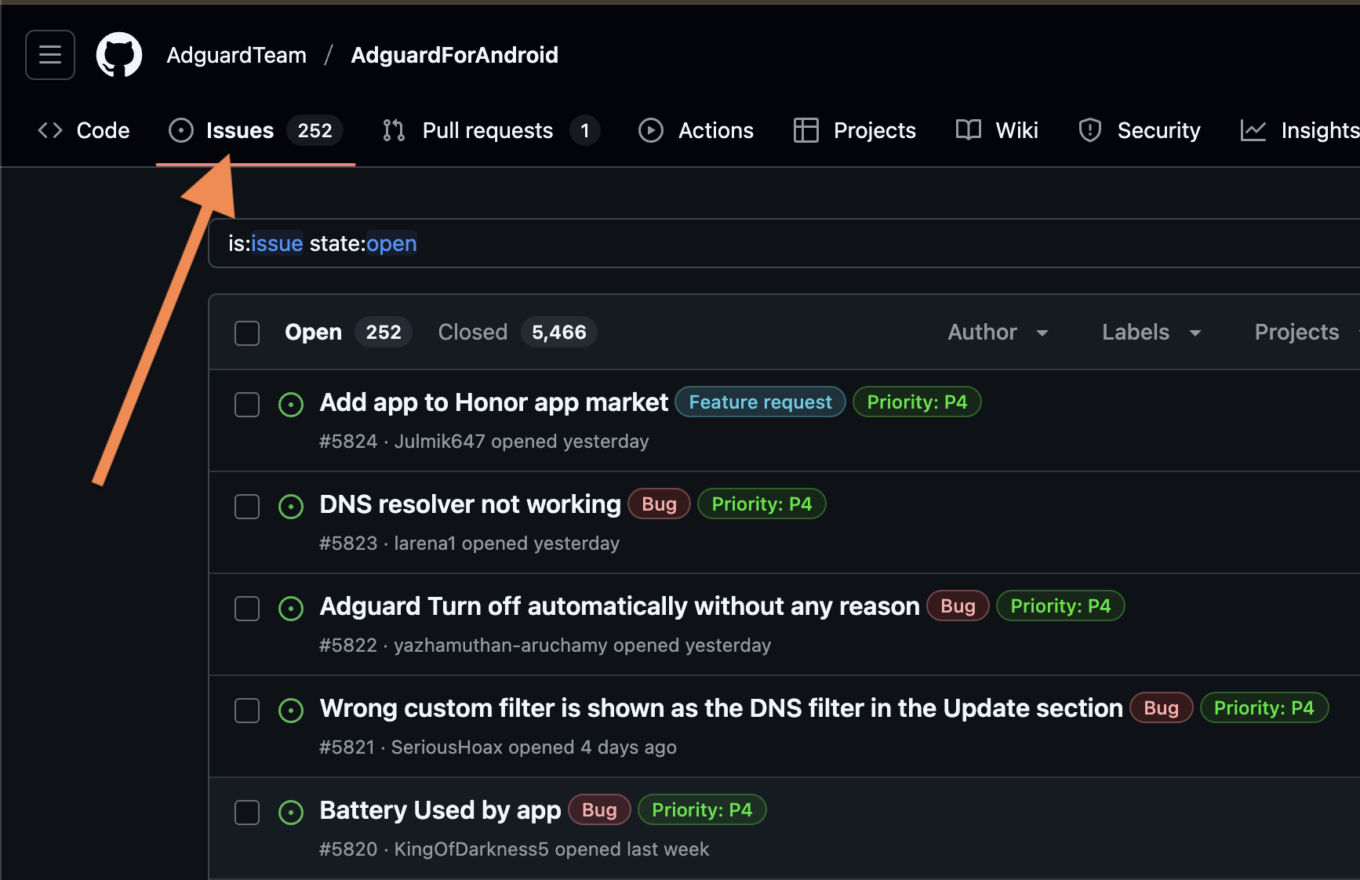
    Check issues *border

  • Create issues to report bugs or request features
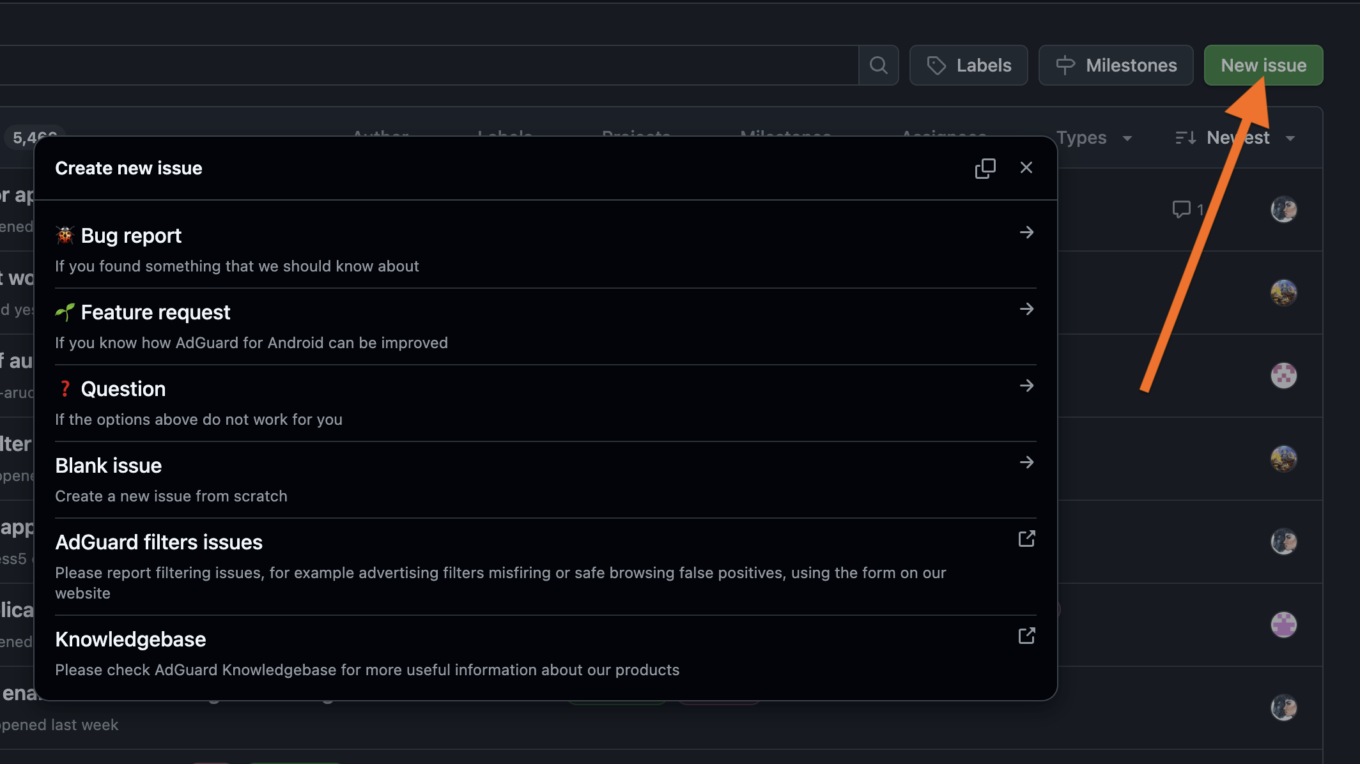
    Create issues *border

  • Check releases for different versions and their changelogs (and install an older version if needed)
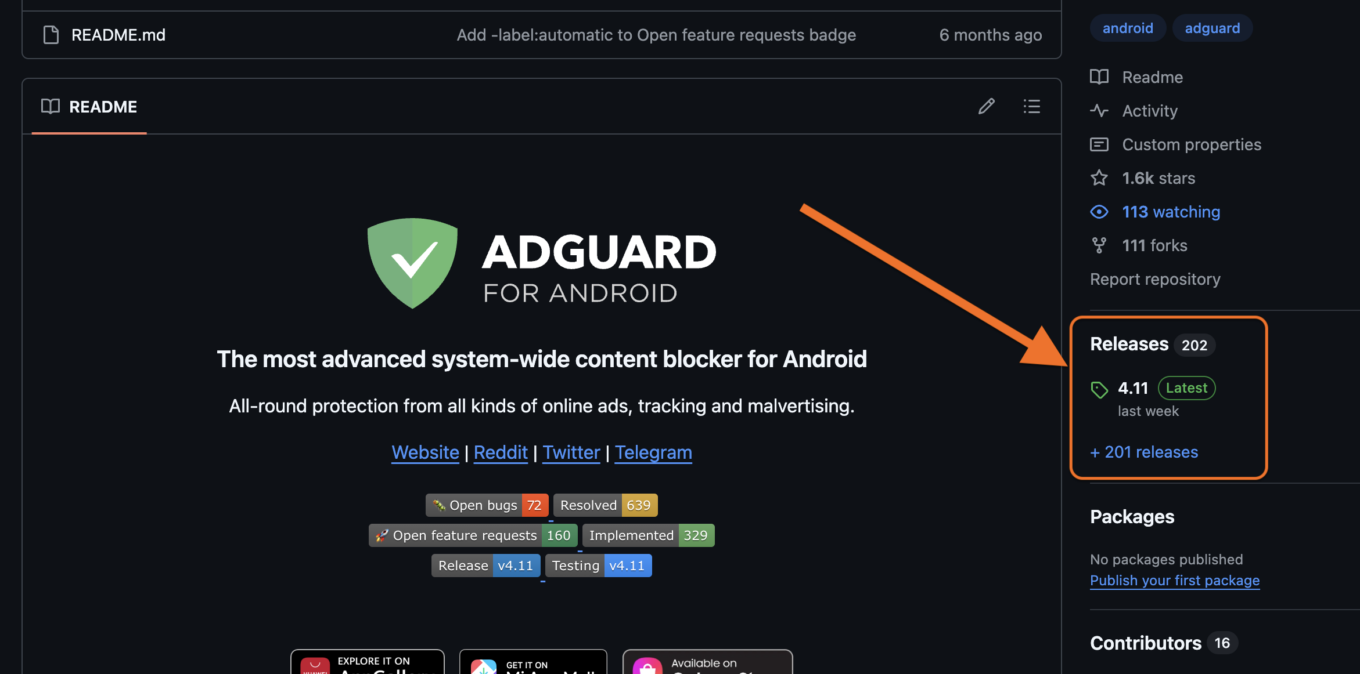
    Check releases *border

  • Install any older or beta version if needed
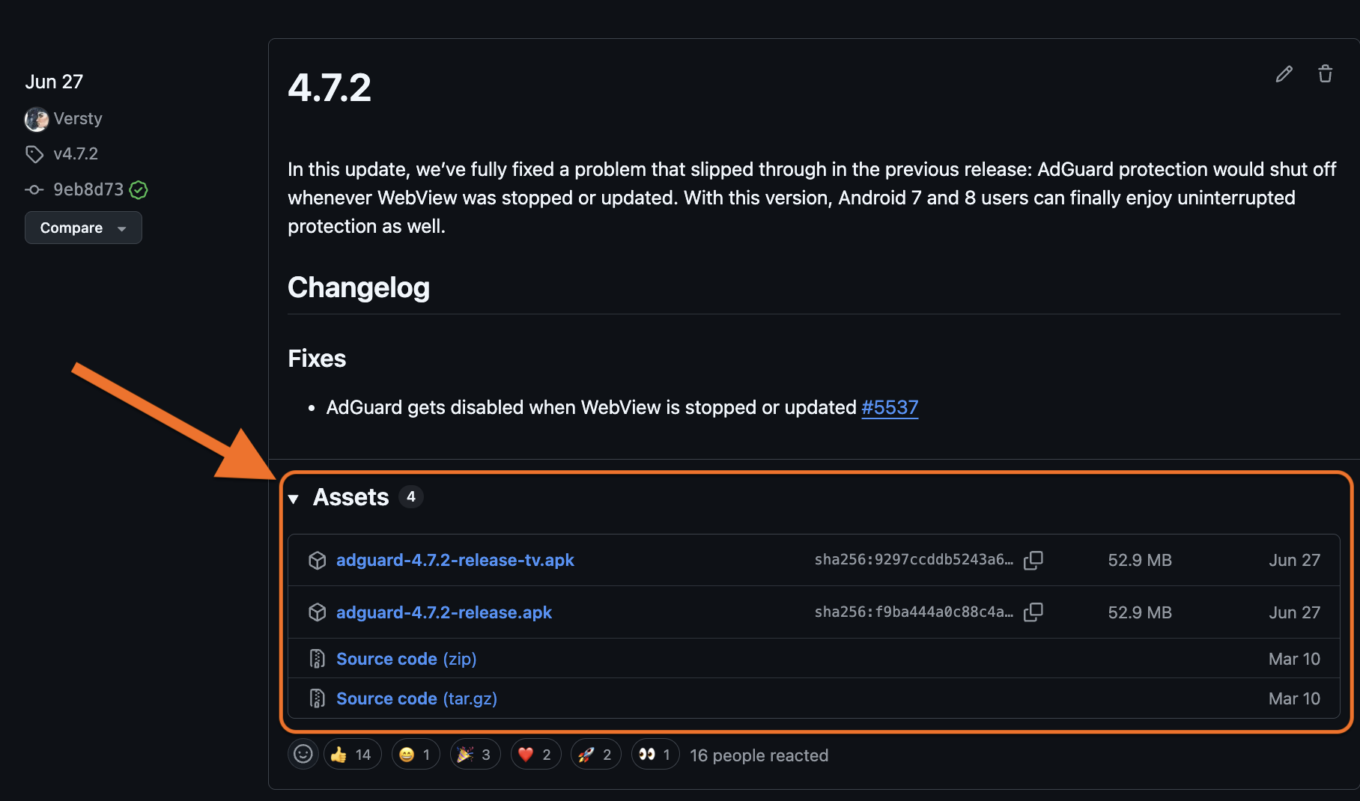
    Download builds *border

Note: If you are new to GitHub, you’ll need to create a GitHub account in order to create new issues and comment on the existing ones.

In open-source repos advanced users can also:

  • Browse code to understand product logic, what technologies are used and how they are implemented
  • Fork and contribute via pull requests

Whether you’re a casual user, technical expert, or a developer, AdGuard welcomes all community participation across its GitHub repos.

As part of our commitment to transparency, we host all legal documents — such as End-User License Agreements, Privacy Policies, and Terms and Conditions — on GitHub. Our LegalDocs repo lets anyone check the full history of changes to these documents.

LegalDocs

AdGuard Ad Blocker products

In these repositories, users can:

  • View and report bugs or feature requests via GitHub issues
  • Check changelogs, track release history, monitor updates
  • Download latest, previous, and beta builds (except for iOS)

AdguardForAndroid

Repository of AdGuard for Android — an app that provides system-wide ad blocking.

AdguardForiOS

Repository of AdGuard for iOS — Safari content blocker with DNS and custom filters. Users can also check open-source code.

AdguardForWindows

Repository of AdGuard for Windows. Non-open-source; GitHub used as an open bug tracker.

AdguardForMac

Repository of AdGuard for Mac — macOS standalone content blocker. Bug tracker only.

AdguardBrowserExtension

Repository of AdGuard Browser Extension — extension that provides ad blocking with enhanced privacy for Chrome, Firefox, Opera, Edge.

AdguardForSafari

Repository of AdGuard for Safari — Safari ad blocking extension for Mac. Users can also check open-sourced code.

AdGuardCLI

Repository of AdGuard for Linux — a command‑line interface for managing ad blocking.

AdGuard VPN products

In these repositories, users can:

  • View and report bugs or feature requests via GitHub issues
  • Check changelogs, track release history, monitor updates
  • Download latest, previous, and beta builds (except for iOS)

AdGuardVPNForiOS

Repository of AdGuard VPN for iOS. Serves as an open bug tracker.

AdGuardVPNForAndroid

Repository of AdGuard VPN for Android. Serves as an open bug tracker.

AdGuardVPNForWindows

Repository of AdGuard VPN for Windows. Serves as an open bug tracker.

AdGuardVPNForMac

Repository of AdGuard VPN for Mac — app designed for macOS.

AdGuardVPNExtension

Repository of AdGuard VPN Browser Extension.

AdGuardVPNCLI

Repository of AdGuard VPN for Linux — a command‑line interface for managing VPN connection. The repo acts as a bug tracker.

DNS-based products

AdGuardDNS

Open-source repository that is also used for tracking bugs and issues related to AdGuard DNS service. Users can:

  • View and report DNS issues
  • Suggest improvements

AdGuardHome

Repository of AdGuard Home — free network-wide software for blocking ads and trackers via DNS. Users can:

  • Check and file bug reports or feature requests
  • Review or contribute to code
  • Download and install releases

Documentation and Knowledge bases

Knowledge bases are aimed to help users better understand and use AdGuard. They describe each AdGuard product in detail: from feature overviews and problem-solving guides to advanced setting manuals and API documentations. In the repositories users can:

  • Suggest corrections or edits to knowledge base articles
  • Propose new articles
  • Test or run the local version

KnowledgeBase

Central documentation for AdGuard Ad Blocker and the technologies related to it.

KnowledgeBaseDNS

Detailed feature overview, troubleshooting guides and documentation for AdGuard DNS (both Public and Private), AdGuard Home, and everything related to them.

KnowledgeBaseVPN

Detailed feature overview and troubleshooting guides for AdGuard VPN.

KnowledgeBaseMail

Detailed feature overview and troubleshooting guides of AdGuard Mail.

Core libraries

AdGuardCoreLibs

AdGuard’s cross-platform core filtering engine. Used in Android, Windows, and Mac products. Users can:

  • Explore filtering logic and DNS handling
  • Report bugs and suggest features via Issues, contribute code via Pull requests

DNSLibs

A DNS library used by CoreLibs and AdGuardHome. Users can:

  • Review and contribute to low-level DNS implementation
  • Suggest optimizations

VPNLibs

Shared codebase used in AdGuard VPN products across platforms for AdGuard VPN protocol implementation. Users can:

  • Contribute to VPN stack behavior
  • Report or view performance issues and bugs

Core ad blocking and filtering technologies

AdguardFilters

Contains AdGuard’s core filter lists. Users can:

  • View and download filter lists
  • Create issues to report false positives or suggest new rules
  • Monitor updates to filter logic

AdGuardSDNSFilter

Repository of AdGuard DNS filter — the main DNS-level blocking list used in AdGuard DNS and DNS filtering features. Users can:

  • Inspect the current rule set
  • Propose changes or additions

AGLint

A linter for adblock filter list syntax. Users can:

  • Install AGLint to check their projects for rule issues
  • Contribute to lint rules

Scriptlets

JavaScript helpers used in filtering rules. Users can:

  • Explore available scriptlets
  • Submit pull requests for new scriptlets

tsurlfilter

TypeScript content blocker library for browser extensions. Users can:

  • Explore how filtering logic is implemented
  • Contribute fixes and features

There’s more

Above, we listed 27 main public AdGuard repositories out of 96 total. If you want to go down the rabbit hole, you can find the rest on the AdGuardTeam GitHub page.

We’ll be waiting for your feedback there! Stay safe online and offline.

Спадабаўся пост?
AdGuard VPN AdGuard DNS AdGuard Mail AdGuard Wallet
Галоўны экран AdGuard для Windows
Экран абароны AdGuard для Windows, які паказвае функцыі абароны і налады
Экран Статыстыка AdGuard для Windows, які паказвае статыстыку заблакіраванай рэкламы і праграм сачэння
Экран Кіраванне праграмамі ў AdGuard для Windows, які паказвае параметры кіравання абаронай для праграм, усталяваных на прыладзе
20 362 20362 водгукі
Выдатна!

AdGuard: блакіроўшчык рэкламы для Windows

AdGuard для Windows — гэта больш, чым блакіроўшчык рэкламы. Гэта шматфункцыянальны інструмент, які блакуе рэкламу, кантралюе доступ да небяспечных сайтаў, паскарае загрузку старонак і абараняе дзяцей ад непажаданага кантэнту

Спампоўваючы праграму, вы прымаеце ўмовы Ліцэнзійнага пагаднення
Microsoft Store
Спампоўваючы праграму, вы прымаеце ўмовы Ліцэнзійнага пагаднення
AdGuard для Windows версія 8.0, 14 дзён пробнага перыяду
Галоўны экран AdGuard для Mac
Экран рэжыму нябачнасці AdGuard для Mac
20 362 20362 водгукі
Выдатна!

AdGuard: блакіроўшчык рэкламы для Mac

AdGuard для Mac — гэта ўнікальны блакіроўшчык рэкламы, распрацаваны з улікам macOS. Акрамя абароны ад надакучлівай рэкламы ў браўзерах і праграмах, ён абараняе вас ад адсочвання, фішынгу і махлярства
Спампоўваючы праграму, вы прымаеце ўмовы Ліцэнзійнага пагаднення
Чытаць далей
AdGuard для Mac версія 2.19, 14 дзён пробнага перыяду
Галоўны экран AdGuard для Android
Экран Абарона ад сачэння ў AdGuard для Android
Экран Кіраванне праграмамі ў AdGuard для Android, які паказвае параметры кіравання абаронай для праграм, усталяваных на прыладзе
Экран Статыстыка AdGuard для Android, які паказвае статыстыку заблакіраванай рэкламы і праграм сачэння
Галоўны экран прыватнага браўзера AdGuard для Android
QR-код, каб спампаваць AdGuard для Android
20 362 20362 водгукі
Выдатна!

AdGuard: блакіроўшчык рэкламы для Android

Блакуе рэкламу і трэкеры ва ўсіх браўзерах, гульнях і іншых праграмах. Абараняе вашу прыватнасць і дазваляе вам кантраляваць, як вашы праграмы выкарыстоўваюць Інтэрнэт. Усталёўваецца праз APK
Спампоўваючы праграму, вы прымаеце ўмовы Ліцэнзійнага пагаднення
Чытаць далей
Сканіраванне для загрузкі
Выкарыстоўвайце любы счытвальнік QR-кодаў, даступны на вашай прыладзе
AdGuard для Android версія 4.14, 14 дзён пробнага перыяду
Галоўны экран AdGuard для iOS
Экран абароны AdGuard для iOS, які паказвае функцыі абароны і налады
Экран Статыстыка AdGuard для iOS, які паказвае статыстыку заблакіраванай рэкламы і праграм сачэння
QR-код, каб спампаваць AdGuard для iOS
20 362 20362 водгукі
Выдатна!

AdGuard: блакіроўшчык рэкламы для iOS

Найлепшы блакіроўшчык рэкламы для iOS для iPhone і iPad. AdGuard ліквідуе ўсе віды рэкламы і трэкераў у Safari і абараняе вашу прыватнасць ва ўсіх праграмах на ўзроўні DNS
Спампоўваючы праграму, вы прымаеце ўмовы Ліцэнзійнага пагаднення
Чытаць далей
Сканіраванне для загрузкі
Выкарыстоўвайце любы счытвальнік QR-кодаў, даступны на вашай прыладзе
AdGuard для iOS, 4.5
Галоўны экран AdGuard Content Blocker
Экран фільтры ў AdGuard Content Blocker
Экран налады ў AdGuard Content Blocker
20 362 20362 водгукі
Выдатна!

Блакіроўшчык кантэнту AdGuard

AdGuard Content Blocker ухіляе ўсе віды рэкламы ў мабільных браўзерах, якія падтрымліваюць тэхналогію блакіроўкі змесціва — напрыклад, Samsung Internet і Яндэкс.Браўзер. Яго функцыі абмежаваныя ў параўнанні з AdGuard для Android, але ён бясплатны, просты ў усталёўцы і эфектыўны
Спампоўваючы праграму, вы прымаеце ўмовы Ліцэнзійнага пагаднення
Чытаць далей
Блакіроўшчык кантэнту AdGuard, 2.8
Галоўны экран браузернае пашырэнне AdGuard
Экран Абарона ад сачэння ў браузернае пашырэнне AdGuard
20 362 20362 водгукі
Выдатна!

Браўзернае пашырэнне AdGuard

AdGuard — самае хуткае і лёгкае браўзарнае пашырэнне для блакавання ўсіх тыпаў рэкламы! Абірайце AdGuard для хуткага і бяспечнага сёрфінга без рэкламы.
Усталяваць
Спампоўваючы праграму, вы прымаеце ўмовы Ліцэнзійнага пагаднення
Усталяваць
Спампоўваючы праграму, вы прымаеце ўмовы Ліцэнзійнага пагаднення
Усталяваць
Спампоўваючы праграму, вы прымаеце ўмовы Ліцэнзійнага пагаднення
Усталяваць
Спампоўваючы праграму, вы прымаеце ўмовы Ліцэнзійнага пагаднення
Усталяваць
Спампоўваючы праграму, вы прымаеце ўмовы Ліцэнзійнага пагаднення
Чытаць далей
Усталяваць
Спампоўваючы праграму, вы прымаеце ўмовы Ліцэнзійнага пагаднення
Чытаць далей
Браўзернае пашырэнне AdGuard, 5.5
Галоўны экран Браўзерны памочнік AdGuard
20 362 20362 водгукі
Выдатна!

Памочнік AdGuard

Пашырэнне для браўзера-компаньён для настольных прыкладанняў AdGuard. Яно дазваляе блакіраваць карыстальніцкія элементы на вэб-сайтах, дадаваць вэб-сайты ў спіс дазволеных і адпраўляць справаздачы непасрэдна з вашага браўзера
Памочнік AdGuard, 1.4
20 362 20362 водгукі
Выдатна!

AdGuard Home

AdGuard Home — гэта сеткавае рашэнне для блакіроўкі рэкламы і праграм сачэння. Усталюйце яго адзін раз на вашым маршрутызатары, каб ахапіць усе прылады ў сетцы — дадатковае праграмнае забеспячэнне не патрабуецца. Гэта асабліва важна для розных прылад IoT, якія часта ўяўляюць пагрозу вашай прыватнасці
AdGuard Home, 0.107
Галоўны экран AdGuard Pro для iOS
Экран абароны ў AdGuard Pro для iOS, які паказвае функцыі абароны і налады
Экран Статыстыка ў AdGuard Pro для iOS, які паказвае статыстыку заблакіраванай рэкламы і праграм сачэння
20 362 20362 водгукі
Выдатна!

AdGuard Pro для iOS

AdGuard Pro для iOS пастаўляецца з усімі дадатковымі функцыямі блакіроўкі рэкламы і абароны, якія ўключаны. Ён прапануе тыя ж інструменты, што і платная версія AdGuard для iOS. Выдатна блакіруе рэкламу ў Safari, а таксама дазваляе наладжваць налады DNS, каб адаптаваць вашу абарону. Ён блакіруе рэкламу ў браўзерах і дадатках, абараняе дзяцей ад недапушчальнага кантэнту і захоўвае вашы асабістыя даныя бяспечнымі
Спампоўваючы праграму, вы прымаеце ўмовы Ліцэнзійнага пагаднення
Чытаць далей
AdGuard Pro для iOS, 4.5
Галоўны экран AdGuard Mini для Mac
Экран абароны Safari ў AdGuard Mini для Mac
Экран стварэння правіла ў AdGuard Mini для Mac
20 362 20362 водгукі
Выдатна!

AdGuard Mini для Mac — блакіроўшчык рэкламы ў Safari

AdGuard Mini для Mac — гэта магутны блакіроўшчык рэкламы для Safari. Гэта лёгкая праграма выдаляе рэкламу, блакуе праграмы сачэння і паскарае загрузку старонак. Яна дапамагае вам аглядаць вэб у Safari без адцягненняў і захоўваць вашы даныя ў прыватнасці
Усталяваць
Спампоўваючы праграму, вы прымаеце ўмовы Ліцэнзійнага пагаднення
Чытаць далей
AdGuard Mini для Mac, 2.3
Галоўны экран AdGuard для Android TV з уключанай абаронай
Экран блакіроўкі рэкламы AdGuard для Android TV, які паказвае яго функцыі і налады
Экран налады AdGuard для Android TV
Экран Кіраванне праграмамі AdGuard для Android TV, які паказвае праграмы, дзе рэклама і праграмы сачэння заблакіравана
20 362 20362 водгукі
Выдатна!

AdGuard для Android TV

AdGuard для Android TV — адзіная праграма, якая блакіруе рэкламу, ахоўвае вашу прыватнасць і працуе як міжсеткавы экран для вашага Smart TV. Атрымуйце папярэджанні аб вэб-пагрозах, выкарыстоўвайце бяспечны DNS і атрымлівайце перавагі ад шыфраванага трафіку. Адпачывайце і атрымлівайце асалоду ад улюбёных шоу з першакласнай абаронай і без рэкламы!
AdGuard для Android TV версія 4.14, 14 дзён пробнага перыяду
Маскот AdGuard, Агнар, трымае пінгвіна Linux
20 362 20362 водгукі
Выдатна!

AdGuard для Linux

AdGuard для Linux — гэта першы ў свеце сістэмны блакіроўшчык рэкламы для Linux. Блакуйце рэкламу і трэкеры на ўзроўні прылады, выбірайце з папярэдне ўсталяваных фільтраў альбо дадавайце ўласныя — усё праз інтэрфейс каманднага радка
AdGuard для Linux, 1.4
20 362 20362 водгукі
Выдатна!

AdGuard Temp Mail

Ваш часовы паштовую скрыню, каб на асноўную пошту не прыходзіў спам
20 362 20362 водгукі
Выдатна!

AdGuard VPN

75 лакацый па ўсім свеце

Доступ да любога кантэнту

Моцнае шыфраванне

Без лагавання

Самае хуткае злучэнне

Цэладзённая падтрымка

Паспрабуйце бясплатна
Спампоўваючы праграму, вы прымаеце ўмовы Ліцэнзійнага пагаднення
Чытаць далей
20 362 20362 водгукі
Выдатна!

AdGuard DNS

AdGuard DNS – гэта альтэрнатыўны спосаб заблакаваць рэкламу, абараніць асабістыя дадзеныя і ахаваць дзяцей ад дарослых матэрыялаў. Ён просты ў наладзе і выкарыстанні і забяспечвае патрэбны мінімум абароны ад рэкламы, трэкінгу і фішынгу, незалежна ад платформы.
20 362 20362 водгукі
Выдатна!

AdGuard Mail

Абараняйце сваю асобу, пазбягайце спаму і трымайце ўваходную пошту ў бяспецы з дапамогай нашых псеўданімаў і часовых адрасоў электроннай пошты. Скарыстайцеся нашым бясплатным сэрвісам перасылкі электроннай пошты і праграмамі для ўсіх аперацыйных сістэм.
20 362 20362 водгукі
Выдатна!

AdGuard Wallet

Бяспечны і прыватны крыпта-кашалёк, які дае вам поўны кантроль над вашымі актывамі. Адкрывайце для сябе тысячы крыптавалют для захоўвання, адпраўкі і абмену
Спампоўка AdGuard Каб усталяваць AdGuard, пстрыкніце файл, пазначаны стрэлкай Выберыце «Адкрыць» і націсніце «ОК», затым дачакайцеся спампоўкі файла. У акне, якое адкрылася, перацягніце значок AdGuard у папку «Праграмы». Дзякуй, што выбралі AdGuard! Выберыце «Адкрыць» і націсніце «ОК», затым дачакайцеся спампоўкі файла. У акне, якое адкрылася, націсніце «Усталяваць». Дзякуй, што выбралі AdGuard!
Усталюйце AdGuard на мабільную прыладу


















































