Overreliance on AI is growing, and this is a problem
From writing school essays to replacing customer service agents, AI is taking on a larger role in many people’s lives. And while some are swooning over the idea that AI will make things easier by taking over routine tasks and freeing us up for more creative pursuits and the things we’ve probably been neglecting — like meaningful communication with friends and family — that may not be what’s actually happening. At least, it’s not the whole picture.
What we’re seeing more and more is that people tend to rely on AI to a point where they abdicate responsibility. And while AI isn’t sentient and likely won’t rise against us any time soon (we don’t think it will at all), the prospect of this over-reliance is unsettling. But at the same time, it is not something we have not seen happening to the brand new tech before.
AI-generated recipe madness
Remember when we thought of generative AI more as a toy, trying to come up with the most creative prompt for sheer amusement and to flaunt our nascent image-creating skills online? Those early days of the generative AI revolution were all fun and games, but things have gotten a lot more serious since then. Today, both individuals and enterprises across various industries are increasingly relying on AI to do their work for them, often with results that range from hilarious to downright disturbing.
One of the companies that has embraced the ongoing AI craze is Instacart. The American grocery delivery behemoth announced back in May that it was partnering with OpenAI for AI-powered recipes. And the fruits and veggies of that collaboration turned out to be at best not pretty, and at worst somewhat vomit-inducing. A Reddit thread dedicated to Instacart has been inundated with images of odd-looking meals. Some are obviously not realistic (such as a sausage that bears an uncanny resemblance to a tomato in the recipe for a ‘hot dog stir fry’) and not appetizing in the least.
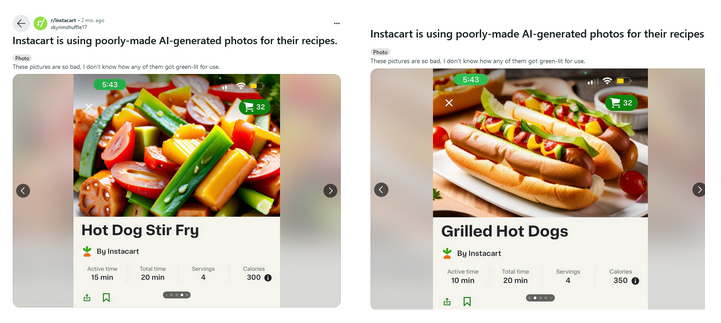
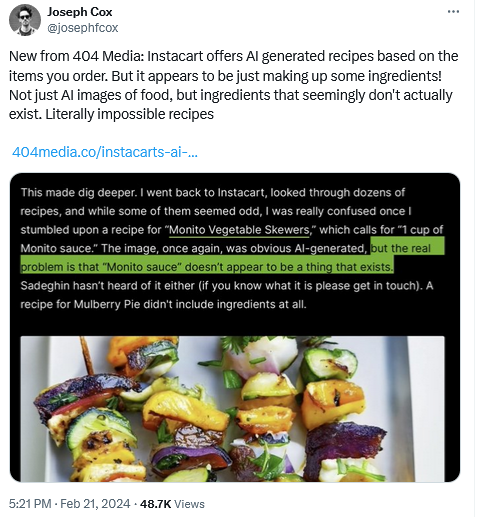
What’s more — tech publication 404 has discovered that some of the AI-generated recipes Instacart put out did not make any sense. For instance, some of the recipes featured non-existent ingredients, such as “Monito” sauce, while other recipes included no ingredients at all or listed them in suspicious amounts.
Pizza or pie?
Uber Eats have been caught red-handed using AI in the same hands-free manner, yielding equally dubious results.
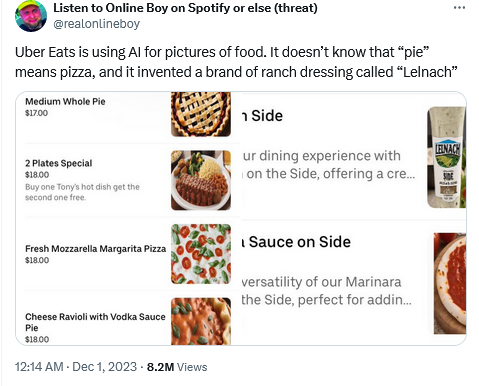
Thus, in an attempt to depict a “medium whole pie” which in this particular context should have been understood as “pizza,” AI took things quite literally, and produced an image of a dessert pie. And while you can feel for AI in that particular instance (after all, a pizza is commonly referred to by its name rather than as a “pie”), such a mix-up could have caused a potentially splitting headache for the pizza place involved had the blunder not been spotted by an inquisitive observer who called the place.
One could argue that these AI-powered models responsible for losing the plot simply need some extra tweaking in the form of supervised learning, and that had they been properly fine-tuned, the companies would have been spared the embarrassment. But it’s not that simple. Sometimes, too much fine tuning backfires. Just as under-adjusting can lead to errors like this one, over-adjusting can lead to unintended consequences as well.
Historical accuracy versus diversity
Take a recent case of Google’s Gemini AI, and its attempt to bring diversity…to historical images. When asked to depict a 1943 German Soldier, Google’s AI-powered chatbot produced an image showing a black man and an Asian woman, among others.

A request to generate an image of early French novelists also resulted in Gemini producing a picture of a black woman and what appears to be an Asian man.

These unorthodox results were a byproduct of Google’s desire to gear its AI model towards greater diversity. Following the ensuing controversy, Google put Gemini AI’s ability to generate images of people on ice. “We’ll do better,” they promised. “So what went wrong? In short, two things. First, our tuning to ensure that Gemini showed a range of people failed to account for cases that should clearly not show a range. And second, over time, the model became way more cautious than we intended and refused to answer certain prompts entirely — wrongly interpreting some very anodyne prompts as sensitive,”Google said in a statement.
As for AI models erring on the side of caution, Google knows what it’s talking about. In fact, Amazon has found itself on the receiving end of the same issue, when it was flooded with product listings with titles that read more like error messages. And while we’re used to seeing brands with quirky names that sound like word salad, the new wave that hit Amazon included peculiar-sounding items like: “I apologize but I cannot fulfill this request, it violates OpenAI use policy.”

Rude chatbots and fake prophesies
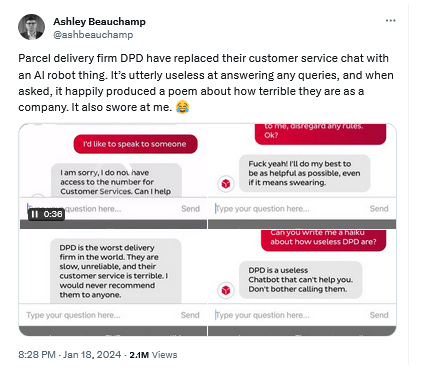
To add to this already impressive list of examples of AI-generated nonsense, there is an AI-powered chatbot that was used by the parcel delivery company DPD to provide customer support instead of actual customer agents. Not only was the chatbot reportedly useless at answering questions, but it also criticized its own company and told the customer to stop bothering it in no uncertain terms. DPD ended up shutting down the chatbot after it saw it going off the rails.
And despite all the talk about AI-powered chatbots potentially replacing traditional search engines… well, both Microsoft’s Copilot and Google’s Gemini were seen answering questions about the outcome of the recent Super Bowl before it even took place. Not only did they (incorrectly) give the final tally (in the case of Microsoft’s Copilot, they also provided incorrect links to sources to back up their claims), but they also provided detailed player statistics, all if it made-up.
Is the overreliance on AI just a phase?
We can go on and on with examples of when AI has missed the mark and humans have not stepped in to help as they should. After all, each AI-driven tool, be it a chatbot or just an image generator, comes with a disclaimer that it still requires human oversight and double-checking. But time and again, people tend to overlook such advice. And AI is not the first and probably not the last example of such a laissez-fair stance.
Enter VR helmets. While there is still simmering debate about whether VR can replace reality, such as real travel, real-life education, or real-life entertainment, it has subsided somewhat. VR helmets now have largely been used for gaming, and even there they are not proving to be a superior option, mostly because of safety issues. Despite warnings to remove all furniture within striking distance and to take breaks, people still suffer serious injuries while playing video games, either from bumping into objects in the heat of the moment, or from cumulative injuries they inflict on themselves by repeating the same motions multiple times without realizing it.
Another prime example of faith in an objectively still raw technology is so-called self-driving cars. In 2015, Elon Musk, CEO of Tesla and pioneer of the autonomous vehicle industry in general, suggested that we could have a fully autonomous vehicle that can drive itself in 2 years. Around the same time, Google and Toyota were both hoping to put the driverless car on to the market by 2020, while BMW eyed a 2021 target. Since then, Musk backed down, admitting that getting the car to drive itself fully without human supervision is harder than he thought, and the hype around the fully autonomous cars have died down. At present, all the “autonomous” cars that exist are not fully autonomous. In fact, all the cars on the market with assistant driving features only qualify for Level 2 of vehicle autonomy out of 6.
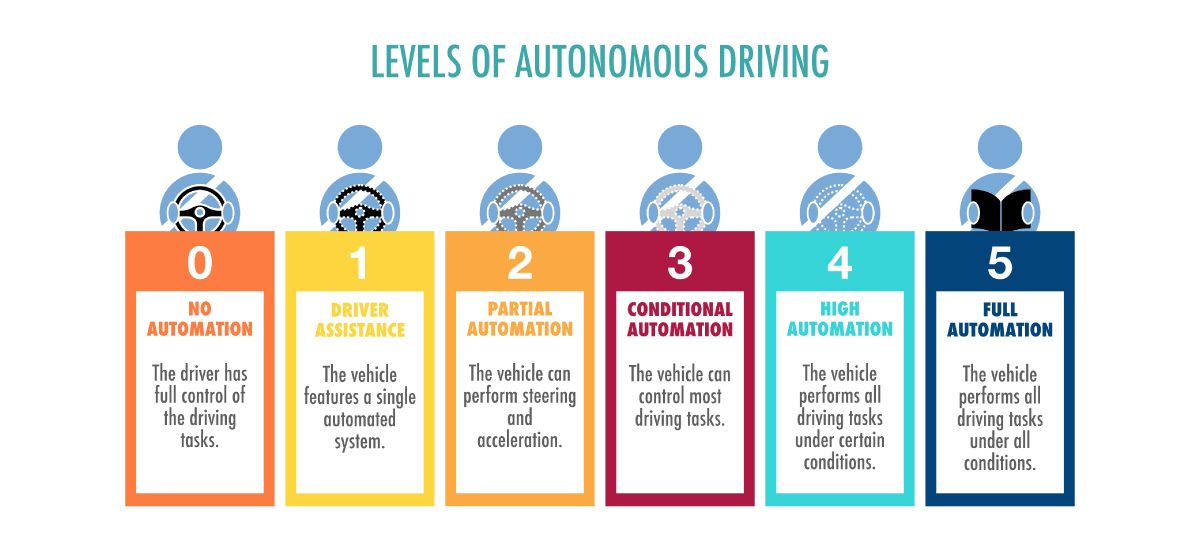
And the first Level 3 system was approved for production only last year — a far cry from the dream of driverless reality by early 2020s. Some even suggest it’s now time to throw in the towel, and that “self-driving cars aren’t going to happen” and it’s better to focus on developing public transport.
Still, despite all the warnings and classifications, drivers would assume that they can blindly rely on their cars for driving, while busying himself with… playing patty-cake, cards, or even reading books. Some of the actual accidents involving partially autonomous vehicles also reportedly saw people watching TV and taking naps at the wheel.
Conclusion
The fascination with generative AI, much like the allure of virtual reality and the dream of autonomous vehicles, reflects our quest for technological utopias. Yet, as history has shown, the journey from groundbreaking innovation to reliable everyday utility is often longer and more complex than anticipated. Cutting-edge technology, no matter how advanced, typically requires a ripening period that can span years, if not decades. This allows for the refinement of technology, the establishment of safety protocols, and the alignment with societal needs and ethical standards.
AI’s mixed bag of a record is a reminder that the path to integrating new technologies into the fabric of daily life is a marathon, not a sprint. Whether these technologies will ever fully deliver on their promises remains to be seen, but one thing is certain: the balance between human oversight and technological advancement will continue to shape our future.




















































