VPN use cases: Tinder tricks, cheaper trips, avoiding risks, and more

What is so special about VPN, you might think. It just masks your location. Of course, it’s good to gain access to something unavailable in your country. Or hide something from those greedy for your personal data for no matter what reasons.

But this “digital immigration”, or rather “IP tourism”, can be handy in unexpected (or at least not yet thought about) ways.

VPN is not just good for spoofing your geolocation for websites and apps that happened not to love the original one. It makes your connection secure and encrypted, saves the sensitive private data from abuse, so it is not only your location that you “hide”. Actually, if you connect to a public Wi-Fi network in a cafe or on the subway, you'd better hide anything you can.

We have hand-picked some of the important use cases where you definitely need a VPN. Let's have a look at them.

How VPN makes your life better: a couple of cases out of so many

1. Shopping abroad

Quite a pleasant feeling: to shop while abroad and buy some rare products that are not easy to find back home.

Nowadays you don't really need to physically go abroad, there is a great option of online shopping around the globe while sitting comfortably at home.
But sometimes it's hard because of the difference in payment systems and terms (specific cards are accepted, specific documents are required) for different countries.

Using a VPN and changing your virtual location to the store's country of origin you can avoid these difficulties and make your online shopping experience much more pleasant.

2. Saving money, again: cheaper airline tickets and hotels

Smart algorithms do a lot nowadays, for example, personalize prices for goods and services. An Uber ride becomes more expensive if your battery is low, or it starts to rain, or it’s Friday night, or you have the latest iPhone. How cool, right? You have your own price, made up exclusively for you!

Not quite. There is always a chance robots confuse you with a Rockefeller’s nephew (or you actually are Rockefeller’s nephew, but it is no reason for you to throw money away).

Airlines and booking agencies use your personal data to adjust prices: they want to show you a ticket’s cost not so high you’d go look for a better deal, but not too small as they want to profit. Change you location from a fancy Frisco district to, say, some Canadian outback and see what happens.

Maybe nothing. In this case, try some other locations — VPN services allow you to choose a server in different countries of the world (and it also may be helpful to use an alternative browser or clear the cookies in the one you used and search in the Private or Incognito mode). Search for the same flight day and destination on the same site — a couple of experiments will show you that prices actually differ.
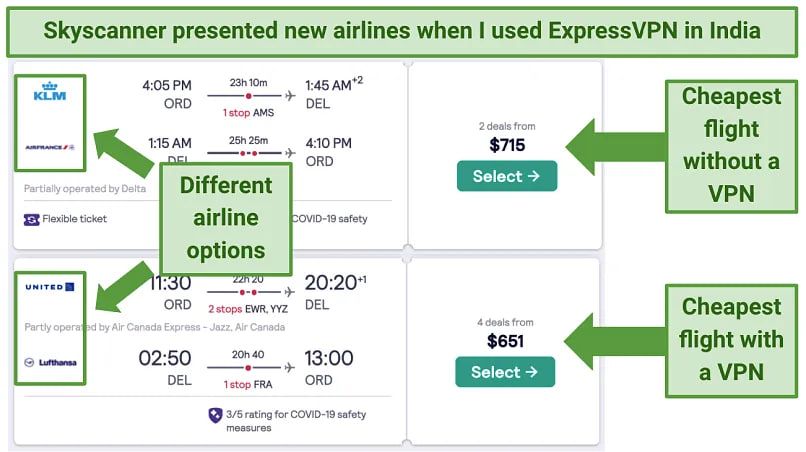
6fgb7vpnusecase

Image by Vpnmentor

A VPN masks not just your IP, it protects other kinds of personal data from being harvested by companies for price personalization. Well, if you are on an air company’s blacklist, it won’t help, so please behave in the air and on earth.

You can encounter price personalization when booking a hotel or renting a car as well. The advice is the same: change location, clear cookies, swap browsers, open a tab in Incognito or Private mode, experiment, finally, google it: people share all sorts of tips and tricks.

3. An escape from corporate slavery into the world of reasonable adults

Offices, schools, campuses, universities, and all types of institutions set up their own networks for people who have to use it. Sometimes they restrict nearly everything except for Wikipedia or work-related resources. If you know you tend to procrastinate and waste your productive hours on Facebook, just reconcile and be grateful to the network administrator. But if you have some things to be done, and a website in need is blocked, help yourself to some VPN.

There is actually another good reason for strict network restrictions: security. Corporate data leaks are a global problem, public organizations suffer too, schools, oh, well, even kindergartens are subjects to cyberthreats. Use VPN to secure your connection and help the network owners be safe: the data will be encrypted.

4. Digital remigration

It’s when you have your body abroad but need your soul to be at home. Superfluous romantic aside, you just might be willing to reach your favorite site or app when being on an abroad vacation or a business trip, but without a VPN it would be impossible.

5. Tinder: more freedom, less money wasted with a VPN

There are at least three ways VPN can help enrich your Tinder experience and solve possible problems.

Change your location to meet people from other countries — without overpaying

By default, you’ll be shown possible matches near you. You can choose a wide range, but you’ll virtually stay in your city or town (with suburbs). If you are in California but want to chat with someone from Paris, just buy Tinder’s paid subscription. But it is more expensive than most VPNs and works only for Tinder, while VPN… see above.

Unfortunately, VPN can help you with that only if you use Tinder via its website tinder.com and have forbidden your browser to detect your location in the settings. Tinder knows when you are using GPS, not IP (when it asks you to "turn on device location for better experience" it means their experience, of course, that’s why you are not allowed to say "no, thanks"). There are some ways for the mobile apps too… But do not count on a VPN in this case.

VPN is not only for pretending to be somewhere else but also for pretending not to be where you are

Tinder may be blocked in your country, in your office, at your school (which is especially upsetting if you are a teacher). Use VPN to get rid of the restrictions. Facebook may also be blocked in some countries or networks. Facebook is not essential for using Tinder, but if you log in via your Facebook account, you need it to be accessible.

Tinder on its side can block you as a user

Not neсesserily because you were naughty and did bad things to other users. Some people get blocked for resetting their account too frequently, for example. Use VPN to try to create another account, although there is no guarantee you’ll succeed: Tinder uses other ways besides IP detection to catch those who try to break back in through the back door.

6. Blocked websites

Why aren’t they letting me in? It is always intriguing — what’s behind the closed door. It may be wiser not to open it if your bluebearded husband asked you not to, but the Internet becomes more and more fragmented, there are some good reasons for it and so many toxic ones. If you find a website inaccessible, VPN may serve as a master key and make the Web more wide and worldly for you.

7. Finally. Security. Again and forever.

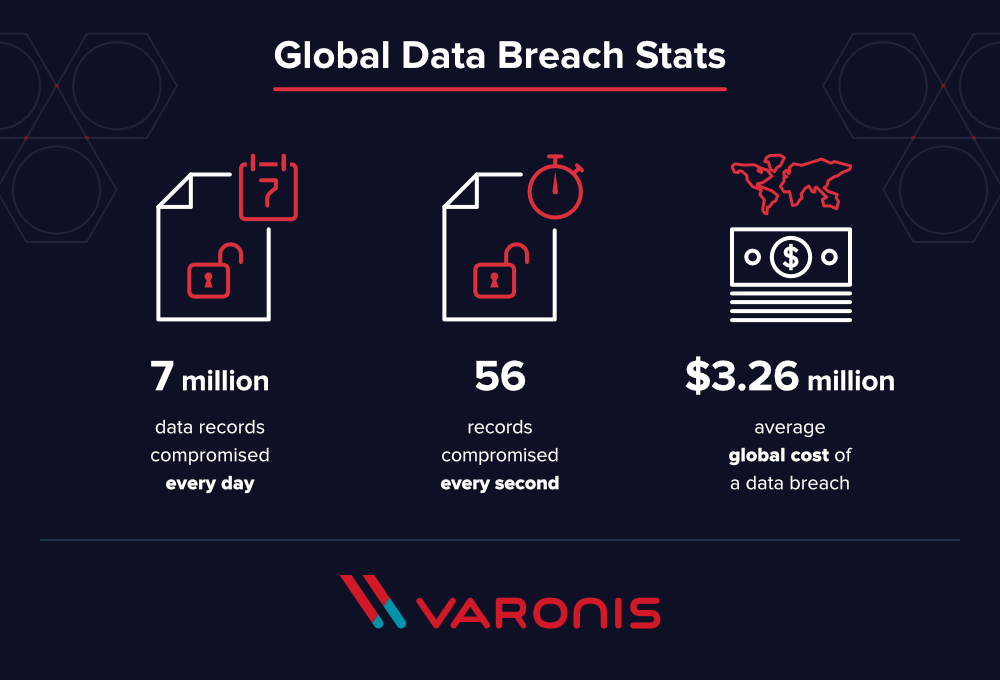
Yes, so boring. Protect your data, save your identity to yourself, do not make yourself and your family vulnerable to scammers and marketing manipulations, bullies and loonies, do not let your company’s data leak, blah blah blah. Every VPN provider keeps talking about how secured encrypted connection through a private network enhances the safety of your digital existence — because it just does.

We at AdGuard know too well how much money and stress nonchalance can cost. AdGuard VPN is made with your well-being in mind.
u9n5ovpnusecases_2

Actually, AdGuard VPN does more than just let you change your location and encrypt the traffic. There are features like Kill Switch, allow- and blocklists, different operation modes, in-house protocol and more. Learn more about all its unique features in this article.


Спадабаўся пост?
AdGuard VPN AdGuard DNS AdGuard Mail AdGuard Wallet
Галоўны экран AdGuard для Windows
Экран абароны AdGuard для Windows, які паказвае функцыі абароны і налады
Экран Статыстыка AdGuard для Windows, які паказвае статыстыку заблакіраванай рэкламы і праграм сачэння
Экран Кіраванне праграмамі ў AdGuard для Windows, які паказвае параметры кіравання абаронай для праграм, усталяваных на прыладзе
20 364 20364 водгукі
Выдатна!

AdGuard: блакіроўшчык рэкламы для Windows

AdGuard для Windows — гэта больш, чым блакіроўшчык рэкламы. Гэта шматфункцыянальны інструмент, які блакуе рэкламу, кантралюе доступ да небяспечных сайтаў, паскарае загрузку старонак і абараняе дзяцей ад непажаданага кантэнту

Спампоўваючы праграму, вы прымаеце ўмовы Ліцэнзійнага пагаднення
Microsoft Store
Спампоўваючы праграму, вы прымаеце ўмовы Ліцэнзійнага пагаднення
AdGuard для Windows версія 8.0, 14 дзён пробнага перыяду
Галоўны экран AdGuard для Mac
Экран рэжыму нябачнасці AdGuard для Mac
20 364 20364 водгукі
Выдатна!

AdGuard: блакіроўшчык рэкламы для Mac

AdGuard для Mac — гэта ўнікальны блакіроўшчык рэкламы, распрацаваны з улікам macOS. Акрамя абароны ад надакучлівай рэкламы ў браўзерах і праграмах, ён абараняе вас ад адсочвання, фішынгу і махлярства
Спампоўваючы праграму, вы прымаеце ўмовы Ліцэнзійнага пагаднення
Чытаць далей
AdGuard для Mac версія 2.19, 14 дзён пробнага перыяду
Галоўны экран AdGuard для Android
Экран Абарона ад сачэння ў AdGuard для Android
Экран Кіраванне праграмамі ў AdGuard для Android, які паказвае параметры кіравання абаронай для праграм, усталяваных на прыладзе
Экран Статыстыка AdGuard для Android, які паказвае статыстыку заблакіраванай рэкламы і праграм сачэння
Галоўны экран прыватнага браўзера AdGuard для Android
QR-код, каб спампаваць AdGuard для Android
20 364 20364 водгукі
Выдатна!

AdGuard: блакіроўшчык рэкламы для Android

Блакуе рэкламу і трэкеры ва ўсіх браўзерах, гульнях і іншых праграмах. Абараняе вашу прыватнасць і дазваляе вам кантраляваць, як вашы праграмы выкарыстоўваюць Інтэрнэт. Усталёўваецца праз APK
Спампоўваючы праграму, вы прымаеце ўмовы Ліцэнзійнага пагаднення
Чытаць далей
Сканіраванне для загрузкі
Выкарыстоўвайце любы счытвальнік QR-кодаў, даступны на вашай прыладзе
AdGuard для Android версія 4.14, 14 дзён пробнага перыяду
Галоўны экран AdGuard для iOS
Экран абароны AdGuard для iOS, які паказвае функцыі абароны і налады
Экран Статыстыка AdGuard для iOS, які паказвае статыстыку заблакіраванай рэкламы і праграм сачэння
QR-код, каб спампаваць AdGuard для iOS
20 364 20364 водгукі
Выдатна!

AdGuard: блакіроўшчык рэкламы для iOS

Найлепшы блакіроўшчык рэкламы для iOS для iPhone і iPad. AdGuard ліквідуе ўсе віды рэкламы і трэкераў у Safari і абараняе вашу прыватнасць ва ўсіх праграмах на ўзроўні DNS
Спампоўваючы праграму, вы прымаеце ўмовы Ліцэнзійнага пагаднення
Чытаць далей
Сканіраванне для загрузкі
Выкарыстоўвайце любы счытвальнік QR-кодаў, даступны на вашай прыладзе
AdGuard для iOS, 4.5
Галоўны экран AdGuard Content Blocker
Экран фільтры ў AdGuard Content Blocker
Экран налады ў AdGuard Content Blocker
20 364 20364 водгукі
Выдатна!

Блакіроўшчык кантэнту AdGuard

AdGuard Content Blocker ухіляе ўсе віды рэкламы ў мабільных браўзерах, якія падтрымліваюць тэхналогію блакіроўкі змесціва — напрыклад, Samsung Internet і Яндэкс.Браўзер. Яго функцыі абмежаваныя ў параўнанні з AdGuard для Android, але ён бясплатны, просты ў усталёўцы і эфектыўны
Спампоўваючы праграму, вы прымаеце ўмовы Ліцэнзійнага пагаднення
Чытаць далей
Блакіроўшчык кантэнту AdGuard, 2.8
Галоўны экран браузернае пашырэнне AdGuard
Экран Абарона ад сачэння ў браузернае пашырэнне AdGuard
20 364 20364 водгукі
Выдатна!

Браўзернае пашырэнне AdGuard

AdGuard — самае хуткае і лёгкае браўзарнае пашырэнне для блакавання ўсіх тыпаў рэкламы! Абірайце AdGuard для хуткага і бяспечнага сёрфінга без рэкламы.
Усталяваць
Спампоўваючы праграму, вы прымаеце ўмовы Ліцэнзійнага пагаднення
Усталяваць
Спампоўваючы праграму, вы прымаеце ўмовы Ліцэнзійнага пагаднення
Усталяваць
Спампоўваючы праграму, вы прымаеце ўмовы Ліцэнзійнага пагаднення
Усталяваць
Спампоўваючы праграму, вы прымаеце ўмовы Ліцэнзійнага пагаднення
Усталяваць
Спампоўваючы праграму, вы прымаеце ўмовы Ліцэнзійнага пагаднення
Чытаць далей
Усталяваць
Спампоўваючы праграму, вы прымаеце ўмовы Ліцэнзійнага пагаднення
Чытаць далей
Браўзернае пашырэнне AdGuard, 5.5
Галоўны экран Браўзерны памочнік AdGuard
20 364 20364 водгукі
Выдатна!

Памочнік AdGuard

Пашырэнне для браўзера-компаньён для настольных прыкладанняў AdGuard. Яно дазваляе блакіраваць карыстальніцкія элементы на вэб-сайтах, дадаваць вэб-сайты ў спіс дазволеных і адпраўляць справаздачы непасрэдна з вашага браўзера
Памочнік AdGuard, 1.4
20 364 20364 водгукі
Выдатна!

AdGuard Home

AdGuard Home — гэта сеткавае рашэнне для блакіроўкі рэкламы і праграм сачэння. Усталюйце яго адзін раз на вашым маршрутызатары, каб ахапіць усе прылады ў сетцы — дадатковае праграмнае забеспячэнне не патрабуецца. Гэта асабліва важна для розных прылад IoT, якія часта ўяўляюць пагрозу вашай прыватнасці
AdGuard Home, 0.107
Галоўны экран AdGuard Pro для iOS
Экран абароны ў AdGuard Pro для iOS, які паказвае функцыі абароны і налады
Экран Статыстыка ў AdGuard Pro для iOS, які паказвае статыстыку заблакіраванай рэкламы і праграм сачэння
20 364 20364 водгукі
Выдатна!

AdGuard Pro для iOS

AdGuard Pro для iOS пастаўляецца з усімі дадатковымі функцыямі блакіроўкі рэкламы і абароны, якія ўключаны. Ён прапануе тыя ж інструменты, што і платная версія AdGuard для iOS. Выдатна блакіруе рэкламу ў Safari, а таксама дазваляе наладжваць налады DNS, каб адаптаваць вашу абарону. Ён блакіруе рэкламу ў браўзерах і дадатках, абараняе дзяцей ад недапушчальнага кантэнту і захоўвае вашы асабістыя даныя бяспечнымі
Спампоўваючы праграму, вы прымаеце ўмовы Ліцэнзійнага пагаднення
Чытаць далей
AdGuard Pro для iOS, 4.5
Галоўны экран AdGuard Mini для Mac
Экран абароны Safari ў AdGuard Mini для Mac
Экран стварэння правіла ў AdGuard Mini для Mac
20 364 20364 водгукі
Выдатна!

AdGuard Mini для Mac — блакіроўшчык рэкламы ў Safari

AdGuard Mini для Mac — гэта магутны блакіроўшчык рэкламы для Safari. Гэта лёгкая праграма выдаляе рэкламу, блакуе праграмы сачэння і паскарае загрузку старонак. Яна дапамагае вам аглядаць вэб у Safari без адцягненняў і захоўваць вашы даныя ў прыватнасці
Усталяваць
Спампоўваючы праграму, вы прымаеце ўмовы Ліцэнзійнага пагаднення
Чытаць далей
AdGuard Mini для Mac, 2.3
Галоўны экран AdGuard для Android TV з уключанай абаронай
Экран блакіроўкі рэкламы AdGuard для Android TV, які паказвае яго функцыі і налады
Экран налады AdGuard для Android TV
Экран Кіраванне праграмамі AdGuard для Android TV, які паказвае праграмы, дзе рэклама і праграмы сачэння заблакіравана
20 364 20364 водгукі
Выдатна!

AdGuard для Android TV

AdGuard для Android TV — адзіная праграма, якая блакіруе рэкламу, ахоўвае вашу прыватнасць і працуе як міжсеткавы экран для вашага Smart TV. Атрымуйце папярэджанні аб вэб-пагрозах, выкарыстоўвайце бяспечны DNS і атрымлівайце перавагі ад шыфраванага трафіку. Адпачывайце і атрымлівайце асалоду ад улюбёных шоу з першакласнай абаронай і без рэкламы!
AdGuard для Android TV версія 4.14, 14 дзён пробнага перыяду
Маскот AdGuard, Агнар, трымае пінгвіна Linux
20 364 20364 водгукі
Выдатна!

AdGuard для Linux

AdGuard для Linux — гэта першы ў свеце сістэмны блакіроўшчык рэкламы для Linux. Блакуйце рэкламу і трэкеры на ўзроўні прылады, выбірайце з папярэдне ўсталяваных фільтраў альбо дадавайце ўласныя — усё праз інтэрфейс каманднага радка
AdGuard для Linux, 1.4
20 364 20364 водгукі
Выдатна!

AdGuard Temp Mail

Ваш часовы паштовую скрыню, каб на асноўную пошту не прыходзіў спам
20 364 20364 водгукі
Выдатна!

AdGuard VPN

75 лакацый па ўсім свеце

Доступ да любога кантэнту

Моцнае шыфраванне

Без лагавання

Самае хуткае злучэнне

Цэладзённая падтрымка

Паспрабуйце бясплатна
Спампоўваючы праграму, вы прымаеце ўмовы Ліцэнзійнага пагаднення
Чытаць далей
20 364 20364 водгукі
Выдатна!

AdGuard DNS

AdGuard DNS – гэта альтэрнатыўны спосаб заблакаваць рэкламу, абараніць асабістыя дадзеныя і ахаваць дзяцей ад дарослых матэрыялаў. Ён просты ў наладзе і выкарыстанні і забяспечвае патрэбны мінімум абароны ад рэкламы, трэкінгу і фішынгу, незалежна ад платформы.
20 364 20364 водгукі
Выдатна!

AdGuard Mail

Абараняйце сваю асобу, пазбягайце спаму і трымайце ўваходную пошту ў бяспецы з дапамогай нашых псеўданімаў і часовых адрасоў электроннай пошты. Скарыстайцеся нашым бясплатным сэрвісам перасылкі электроннай пошты і праграмамі для ўсіх аперацыйных сістэм.
20 364 20364 водгукі
Выдатна!

AdGuard Wallet

Бяспечны і прыватны крыпта-кашалёк, які дае вам поўны кантроль над вашымі актывамі. Адкрывайце для сябе тысячы крыптавалют для захоўвання, адпраўкі і абмену
Спампоўка AdGuard Каб усталяваць AdGuard, пстрыкніце файл, пазначаны стрэлкай Выберыце «Адкрыць» і націсніце «ОК», затым дачакайцеся спампоўкі файла. У акне, якое адкрылася, перацягніце значок AdGuard у папку «Праграмы». Дзякуй, што выбралі AdGuard! Выберыце «Адкрыць» і націсніце «ОК», затым дачакайцеся спампоўкі файла. У акне, якое адкрылася, націсніце «Усталяваць». Дзякуй, што выбралі AdGuard!
Усталюйце AdGuard на мабільную прыладу

















































