AdGuard Browser Extension v3.0

A lot has changed since the first ad blocking browser extensions appeared on the market. Simply blocking ads is not enough anymore (not to say it is an easy task — advertisers are constantly learning new tricks to jam their ads past the filters). Today, big data rules the world. Tracking is omnipresent, the price of information has skyrocketed, and so has the value of privacy. People seek tools to protect it, and ad blockers need to adapt to the new demands in order to stay competitive. We understand this more than anyone, and the new AdGuard browser extension v3.0 reflects this.

Thanks to the newly added Stealth Mode, a privacy-oriented multitool, AdGuard further stands out from the ranks of regular ad blocking extensions.

What's new?

Stealth Mode, without any doubt, is the headliner of the new version, but let's be patient and go over every noteworthy change one at a time.

New design

It’s true that any change starts from the inside, but in the end you’ll be judged by your looks more often than not. The AdGuard extension now has a new design, and it’s not just a dumb reskin. There’s a lot more to it: fresh icons and a new overall theme make the interface more natural and user friendly.
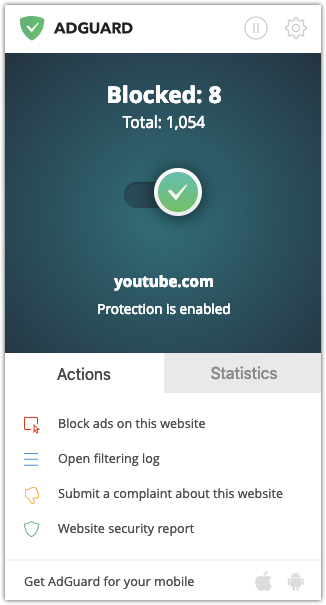
AdGuard Extension v3.0 main menu

In the main extension menu, you’ll also find a brand new "Statistics" tab. It features detailed numerical stats and charts, with the ability to show different types of data: filter-specific data, data for various time frames, or in total.
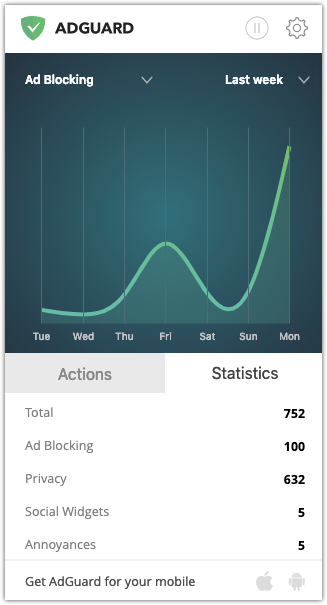
New Statistics tab

Also worth mentioning is the User filter. It has undergone a few changes too. The new luminous element highlighting and auto-save function, as well as a unified text field for filtering rules should make editing more convenient. The text box can also be resized to your liking.
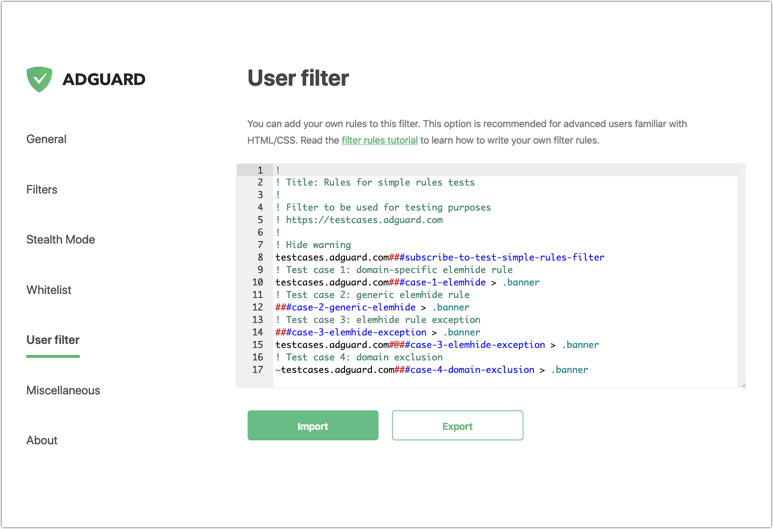
The new look of the User filter

We hope you’ll like the new design and find it convenient and pleasing to the eye. We certainly do!

Introducing Stealth Mode #283

Now, on to the main course of the update. We’ve said it a thousand times already and will say it again: privacy is not a luxury, it is an inalienable right of each person. Unfortunately, we have to fight for this right, and the AdGuard team is proud to be at the forefront of this battle.

Stealth Mode is a powerful instrument that protects your online privacy in many ways. In fact, Stealth Mode is more than that: it’s a whole module that includes a wide range of tools. Previously, only AdGuard for Windows users had access to Stealth Mode; and although the browser extension version doesn't have the full capabilities of its bigger brother just yet, it still does a very good job.
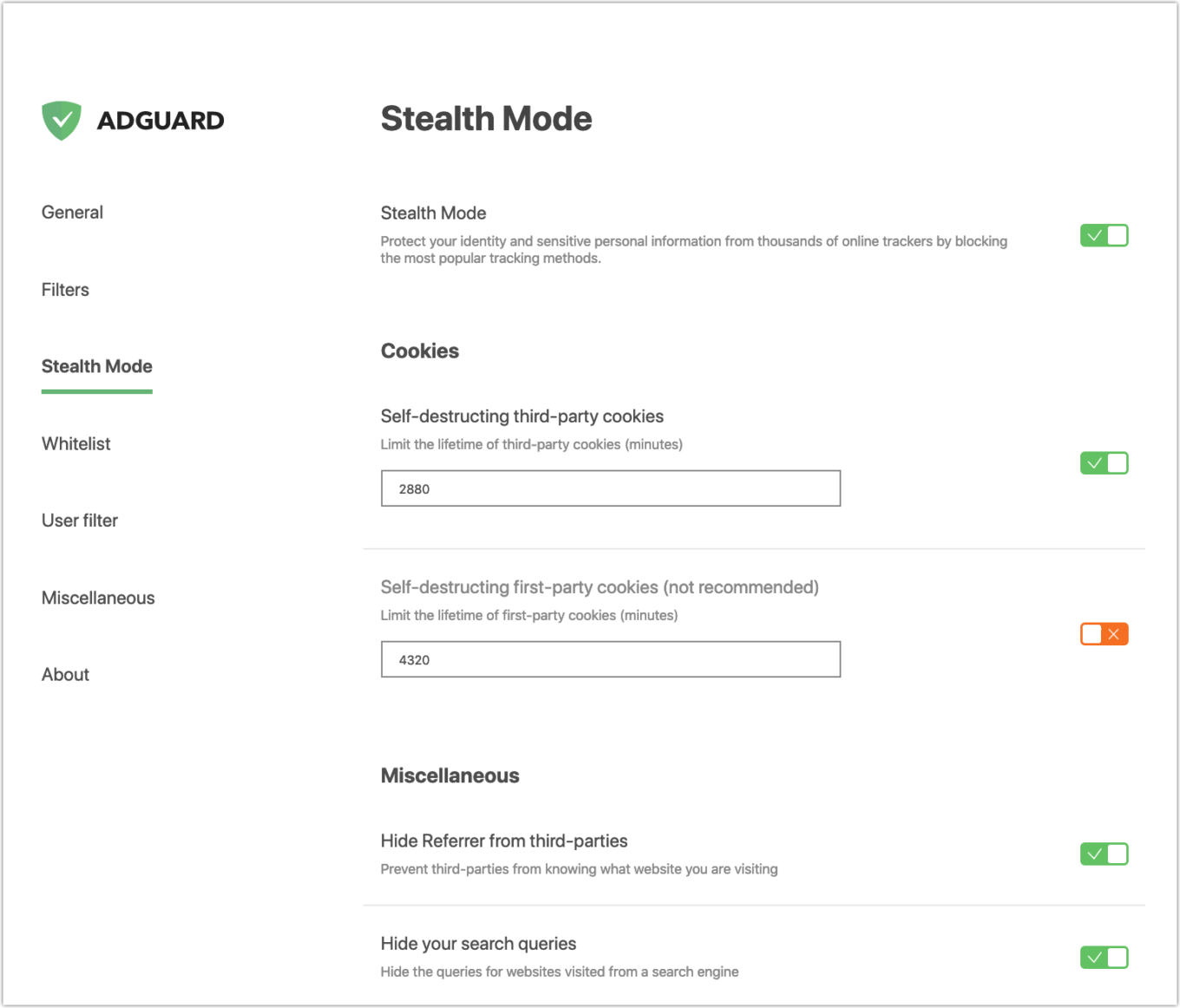
Stealth Mode — a great way to protect your online privacy

Those users who are new to the world of privacy protection might have some troubles understanding what this or that option does. And although all settings have tooltips, let's run through them real quick.

  • Cookies
    Cookies are one of the most common ways, for websites to get information about you just by using the built-in capabilities of your browser. By disabling them (or restricting their lifespan), you will make their job a lot harder. Be careful though: restricting third-party cookies will at most cause you minor inconvenience (e.g., you will have to manually enter your logins/passwords), but restricting first-party cookies can break some websites.

  • Hide Referrer
    Whenever you visit a website, it usually knows where you came there from, and will act accordingly. For example, let’s say you want to purchase a plane ticket after browsing travel packages — tickets for you might be overpriced. By hiding your referrer you deprive websites of this luxury.

  • Hide search queries
    Rather self-explanatory: whenever you click on a link from search results, it won't know what queries you made.

  • Send Do-Not-Track header
    Surprisingly, some websites are more polite than others, and actually will not track you if you ask them nicely by sending this special header with your web requests.

  • Delete X-Client-Data header
    Unique to the Chrome browser, this setting will prevent it from sending information about itself to Google domains.

  • Remove tracking parameters
    You must have noticed this before: often the link you follow contains garbage like utm_source, utm_content, etc. All these parameters are not essential in the slightest for the link to work, but serve for tracking purposes. Bonus: You can modify the list of these parameters yourself!

Future AdGuard extension updates will bring more Stealth Mode options, making it better and better at protecting your privacy.

Other major changes

Filter groups #1068

Going back a little, let's talk more about the new design. We changed the way in which the filters are presented to users. Instead of listing them all together, we combined the filters into semantic groups. Each group includes filters that serve some particular goal. For example, filters that block ads are grouped together, filters that block trackers and serve privacy purposes will be united into a different group, etc.
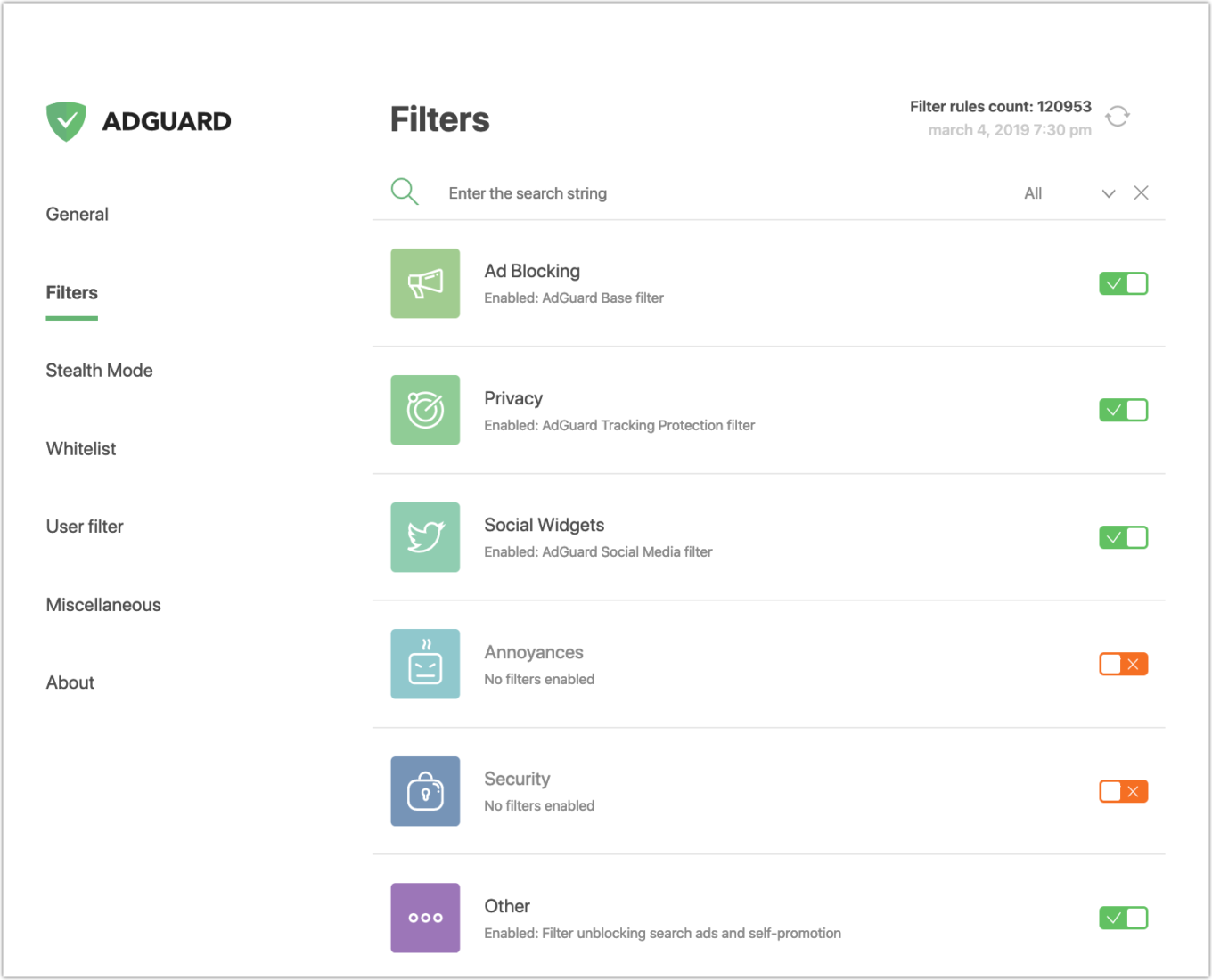
Filter groups

Filters in a group can be enabled and disabled individually, or all at once. Note that once the group is switched off, related filters will not work, even if they are enabled (they will not receive updates either). The new system should make filter management more intuitive and help new users.

New "Filters update period" setting #596

Speaking of filters, previously, filters were automatically updated every 48 hours (default period), end of story. Now you can adjust the frequency of automatic updates (by choosing from options: every 1/6/12/24/48 hours) or disable them completely, in case you prefer manual updates.

An option to disable integration mode #1012

For those who don't know, if you already have the AdGuard desktop app (either for Windows or Mac), our browser extension may become a useful addition to it. The extension can completely replace the browser-based “AdGuard Assistant” module (learn more). It is called Integration Mode, and now you can turn it on or off at will from the “Other settings” tab.

In conclusion

This doesn't, of course, cover the entire changelog. To see the rest of the changes (totaling almost a hundred), go to the GitHub repository.

Also, we would like to remind you that there is a beta channel for the AdGuard extension. If you’re interested in receiving the latest updates as soon as physically possible (and don't fear a stray bug or two), welcome into the fold.

And that’s all for today! Make sure your AdGuard is up to date, and see you soon!

At the moment of publishing of this post, the extension is in the process of updating. If you are using Firefox, the new version might not be available yet. To avoid waiting, you can install the beta version of the extension, it is quite stable.


Спадабаўся пост?
AdGuard VPN AdGuard DNS AdGuard Mail AdGuard Wallet
Галоўны экран AdGuard для Windows
Экран абароны AdGuard для Windows, які паказвае функцыі абароны і налады
Экран Статыстыка AdGuard для Windows, які паказвае статыстыку заблакіраванай рэкламы і праграм сачэння
Экран Кіраванне праграмамі ў AdGuard для Windows, які паказвае параметры кіравання абаронай для праграм, усталяваных на прыладзе
20 363 20363 водгукі
Выдатна!

AdGuard: блакіроўшчык рэкламы для Windows

AdGuard для Windows — гэта больш, чым блакіроўшчык рэкламы. Гэта шматфункцыянальны інструмент, які блакуе рэкламу, кантралюе доступ да небяспечных сайтаў, паскарае загрузку старонак і абараняе дзяцей ад непажаданага кантэнту

Спампоўваючы праграму, вы прымаеце ўмовы Ліцэнзійнага пагаднення
Microsoft Store
Спампоўваючы праграму, вы прымаеце ўмовы Ліцэнзійнага пагаднення
AdGuard для Windows версія 8.0, 14 дзён пробнага перыяду
Галоўны экран AdGuard для Mac
Экран рэжыму нябачнасці AdGuard для Mac
20 363 20363 водгукі
Выдатна!

AdGuard: блакіроўшчык рэкламы для Mac

AdGuard для Mac — гэта ўнікальны блакіроўшчык рэкламы, распрацаваны з улікам macOS. Акрамя абароны ад надакучлівай рэкламы ў браўзерах і праграмах, ён абараняе вас ад адсочвання, фішынгу і махлярства
Спампоўваючы праграму, вы прымаеце ўмовы Ліцэнзійнага пагаднення
Чытаць далей
AdGuard для Mac версія 2.19, 14 дзён пробнага перыяду
Галоўны экран AdGuard для Android
Экран Абарона ад сачэння ў AdGuard для Android
Экран Кіраванне праграмамі ў AdGuard для Android, які паказвае параметры кіравання абаронай для праграм, усталяваных на прыладзе
Экран Статыстыка AdGuard для Android, які паказвае статыстыку заблакіраванай рэкламы і праграм сачэння
Галоўны экран прыватнага браўзера AdGuard для Android
QR-код, каб спампаваць AdGuard для Android
20 363 20363 водгукі
Выдатна!

AdGuard: блакіроўшчык рэкламы для Android

Блакуе рэкламу і трэкеры ва ўсіх браўзерах, гульнях і іншых праграмах. Абараняе вашу прыватнасць і дазваляе вам кантраляваць, як вашы праграмы выкарыстоўваюць Інтэрнэт. Усталёўваецца праз APK
Спампоўваючы праграму, вы прымаеце ўмовы Ліцэнзійнага пагаднення
Чытаць далей
Сканіраванне для загрузкі
Выкарыстоўвайце любы счытвальнік QR-кодаў, даступны на вашай прыладзе
AdGuard для Android версія 4.14, 14 дзён пробнага перыяду
Галоўны экран AdGuard для iOS
Экран абароны AdGuard для iOS, які паказвае функцыі абароны і налады
Экран Статыстыка AdGuard для iOS, які паказвае статыстыку заблакіраванай рэкламы і праграм сачэння
QR-код, каб спампаваць AdGuard для iOS
20 363 20363 водгукі
Выдатна!

AdGuard: блакіроўшчык рэкламы для iOS

Найлепшы блакіроўшчык рэкламы для iOS для iPhone і iPad. AdGuard ліквідуе ўсе віды рэкламы і трэкераў у Safari і абараняе вашу прыватнасць ва ўсіх праграмах на ўзроўні DNS
Спампоўваючы праграму, вы прымаеце ўмовы Ліцэнзійнага пагаднення
Чытаць далей
Сканіраванне для загрузкі
Выкарыстоўвайце любы счытвальнік QR-кодаў, даступны на вашай прыладзе
AdGuard для iOS, 4.5
Галоўны экран AdGuard Content Blocker
Экран фільтры ў AdGuard Content Blocker
Экран налады ў AdGuard Content Blocker
20 363 20363 водгукі
Выдатна!

Блакіроўшчык кантэнту AdGuard

AdGuard Content Blocker ухіляе ўсе віды рэкламы ў мабільных браўзерах, якія падтрымліваюць тэхналогію блакіроўкі змесціва — напрыклад, Samsung Internet і Яндэкс.Браўзер. Яго функцыі абмежаваныя ў параўнанні з AdGuard для Android, але ён бясплатны, просты ў усталёўцы і эфектыўны
Спампоўваючы праграму, вы прымаеце ўмовы Ліцэнзійнага пагаднення
Чытаць далей
Блакіроўшчык кантэнту AdGuard, 2.8
Галоўны экран браузернае пашырэнне AdGuard
Экран Абарона ад сачэння ў браузернае пашырэнне AdGuard
20 363 20363 водгукі
Выдатна!

Браўзернае пашырэнне AdGuard

AdGuard — самае хуткае і лёгкае браўзарнае пашырэнне для блакавання ўсіх тыпаў рэкламы! Абірайце AdGuard для хуткага і бяспечнага сёрфінга без рэкламы.
Усталяваць
Спампоўваючы праграму, вы прымаеце ўмовы Ліцэнзійнага пагаднення
Усталяваць
Спампоўваючы праграму, вы прымаеце ўмовы Ліцэнзійнага пагаднення
Усталяваць
Спампоўваючы праграму, вы прымаеце ўмовы Ліцэнзійнага пагаднення
Усталяваць
Спампоўваючы праграму, вы прымаеце ўмовы Ліцэнзійнага пагаднення
Усталяваць
Спампоўваючы праграму, вы прымаеце ўмовы Ліцэнзійнага пагаднення
Чытаць далей
Усталяваць
Спампоўваючы праграму, вы прымаеце ўмовы Ліцэнзійнага пагаднення
Чытаць далей
Браўзернае пашырэнне AdGuard, 5.5
Галоўны экран Браўзерны памочнік AdGuard
20 363 20363 водгукі
Выдатна!

Памочнік AdGuard

Пашырэнне для браўзера-компаньён для настольных прыкладанняў AdGuard. Яно дазваляе блакіраваць карыстальніцкія элементы на вэб-сайтах, дадаваць вэб-сайты ў спіс дазволеных і адпраўляць справаздачы непасрэдна з вашага браўзера
Памочнік AdGuard, 1.4
20 363 20363 водгукі
Выдатна!

AdGuard Home

AdGuard Home — гэта сеткавае рашэнне для блакіроўкі рэкламы і праграм сачэння. Усталюйце яго адзін раз на вашым маршрутызатары, каб ахапіць усе прылады ў сетцы — дадатковае праграмнае забеспячэнне не патрабуецца. Гэта асабліва важна для розных прылад IoT, якія часта ўяўляюць пагрозу вашай прыватнасці
AdGuard Home, 0.107
Галоўны экран AdGuard Pro для iOS
Экран абароны ў AdGuard Pro для iOS, які паказвае функцыі абароны і налады
Экран Статыстыка ў AdGuard Pro для iOS, які паказвае статыстыку заблакіраванай рэкламы і праграм сачэння
20 363 20363 водгукі
Выдатна!

AdGuard Pro для iOS

AdGuard Pro для iOS пастаўляецца з усімі дадатковымі функцыямі блакіроўкі рэкламы і абароны, якія ўключаны. Ён прапануе тыя ж інструменты, што і платная версія AdGuard для iOS. Выдатна блакіруе рэкламу ў Safari, а таксама дазваляе наладжваць налады DNS, каб адаптаваць вашу абарону. Ён блакіруе рэкламу ў браўзерах і дадатках, абараняе дзяцей ад недапушчальнага кантэнту і захоўвае вашы асабістыя даныя бяспечнымі
Спампоўваючы праграму, вы прымаеце ўмовы Ліцэнзійнага пагаднення
Чытаць далей
AdGuard Pro для iOS, 4.5
Галоўны экран AdGuard Mini для Mac
Экран абароны Safari ў AdGuard Mini для Mac
Экран стварэння правіла ў AdGuard Mini для Mac
20 363 20363 водгукі
Выдатна!

AdGuard Mini для Mac — блакіроўшчык рэкламы ў Safari

AdGuard Mini для Mac — гэта магутны блакіроўшчык рэкламы для Safari. Гэта лёгкая праграма выдаляе рэкламу, блакуе праграмы сачэння і паскарае загрузку старонак. Яна дапамагае вам аглядаць вэб у Safari без адцягненняў і захоўваць вашы даныя ў прыватнасці
Усталяваць
Спампоўваючы праграму, вы прымаеце ўмовы Ліцэнзійнага пагаднення
Чытаць далей
AdGuard Mini для Mac, 2.3
Галоўны экран AdGuard для Android TV з уключанай абаронай
Экран блакіроўкі рэкламы AdGuard для Android TV, які паказвае яго функцыі і налады
Экран налады AdGuard для Android TV
Экран Кіраванне праграмамі AdGuard для Android TV, які паказвае праграмы, дзе рэклама і праграмы сачэння заблакіравана
20 363 20363 водгукі
Выдатна!

AdGuard для Android TV

AdGuard для Android TV — адзіная праграма, якая блакіруе рэкламу, ахоўвае вашу прыватнасць і працуе як міжсеткавы экран для вашага Smart TV. Атрымуйце папярэджанні аб вэб-пагрозах, выкарыстоўвайце бяспечны DNS і атрымлівайце перавагі ад шыфраванага трафіку. Адпачывайце і атрымлівайце асалоду ад улюбёных шоу з першакласнай абаронай і без рэкламы!
AdGuard для Android TV версія 4.14, 14 дзён пробнага перыяду
Маскот AdGuard, Агнар, трымае пінгвіна Linux
20 363 20363 водгукі
Выдатна!

AdGuard для Linux

AdGuard для Linux — гэта першы ў свеце сістэмны блакіроўшчык рэкламы для Linux. Блакуйце рэкламу і трэкеры на ўзроўні прылады, выбірайце з папярэдне ўсталяваных фільтраў альбо дадавайце ўласныя — усё праз інтэрфейс каманднага радка
AdGuard для Linux, 1.4
20 363 20363 водгукі
Выдатна!

AdGuard Temp Mail

Ваш часовы паштовую скрыню, каб на асноўную пошту не прыходзіў спам
20 363 20363 водгукі
Выдатна!

AdGuard VPN

75 лакацый па ўсім свеце

Доступ да любога кантэнту

Моцнае шыфраванне

Без лагавання

Самае хуткае злучэнне

Цэладзённая падтрымка

Паспрабуйце бясплатна
Спампоўваючы праграму, вы прымаеце ўмовы Ліцэнзійнага пагаднення
Чытаць далей
20 363 20363 водгукі
Выдатна!

AdGuard DNS

AdGuard DNS – гэта альтэрнатыўны спосаб заблакаваць рэкламу, абараніць асабістыя дадзеныя і ахаваць дзяцей ад дарослых матэрыялаў. Ён просты ў наладзе і выкарыстанні і забяспечвае патрэбны мінімум абароны ад рэкламы, трэкінгу і фішынгу, незалежна ад платформы.
20 363 20363 водгукі
Выдатна!

AdGuard Mail

Абараняйце сваю асобу, пазбягайце спаму і трымайце ўваходную пошту ў бяспецы з дапамогай нашых псеўданімаў і часовых адрасоў электроннай пошты. Скарыстайцеся нашым бясплатным сэрвісам перасылкі электроннай пошты і праграмамі для ўсіх аперацыйных сістэм.
20 363 20363 водгукі
Выдатна!

AdGuard Wallet

Бяспечны і прыватны крыпта-кашалёк, які дае вам поўны кантроль над вашымі актывамі. Адкрывайце для сябе тысячы крыптавалют для захоўвання, адпраўкі і абмену
Спампоўка AdGuard Каб усталяваць AdGuard, пстрыкніце файл, пазначаны стрэлкай Выберыце «Адкрыць» і націсніце «ОК», затым дачакайцеся спампоўкі файла. У акне, якое адкрылася, перацягніце значок AdGuard у папку «Праграмы». Дзякуй, што выбралі AdGuard! Выберыце «Адкрыць» і націсніце «ОК», затым дачакайцеся спампоўкі файла. У акне, якое адкрылася, націсніце «Усталяваць». Дзякуй, што выбралі AdGuard!
Усталюйце AdGuard на мабільную прыладу

















































