Cars gobbling up your data and showing ads are becoming the new normal. Can it be stopped?

Ads have been creeping onto infotainment screens across various car brands. They are made possible by technology known as over-the-air updates, once touted as a convenient way for connected car owners to receive new features and fixes without ever visiting a dealer. But this still cutting-edge tech increasingly reveals its darker side: continuous data collection, privacy erosion, and, inevitably, ads delivered straight to the dashboard.

How much does ‘peace of mind’ cost?

Stellantis, which owns Jeep, has become particularly notorious for its clumsy execution of the trend. Over the past few years, the company has repeatedly managed to spark the ire of its high-end model owners.

In February 2025, Reddit was set ablaze by a post from a 2022 Grand Cherokee owner who claimed their car simply would not stop serving ads on the infotainment screen.

Ironically, the pop-up (an image of which the Redditor shared) urged them to “purchase peace of mind,” Stellantis’ chosen branding for its extended vehicle warranties.
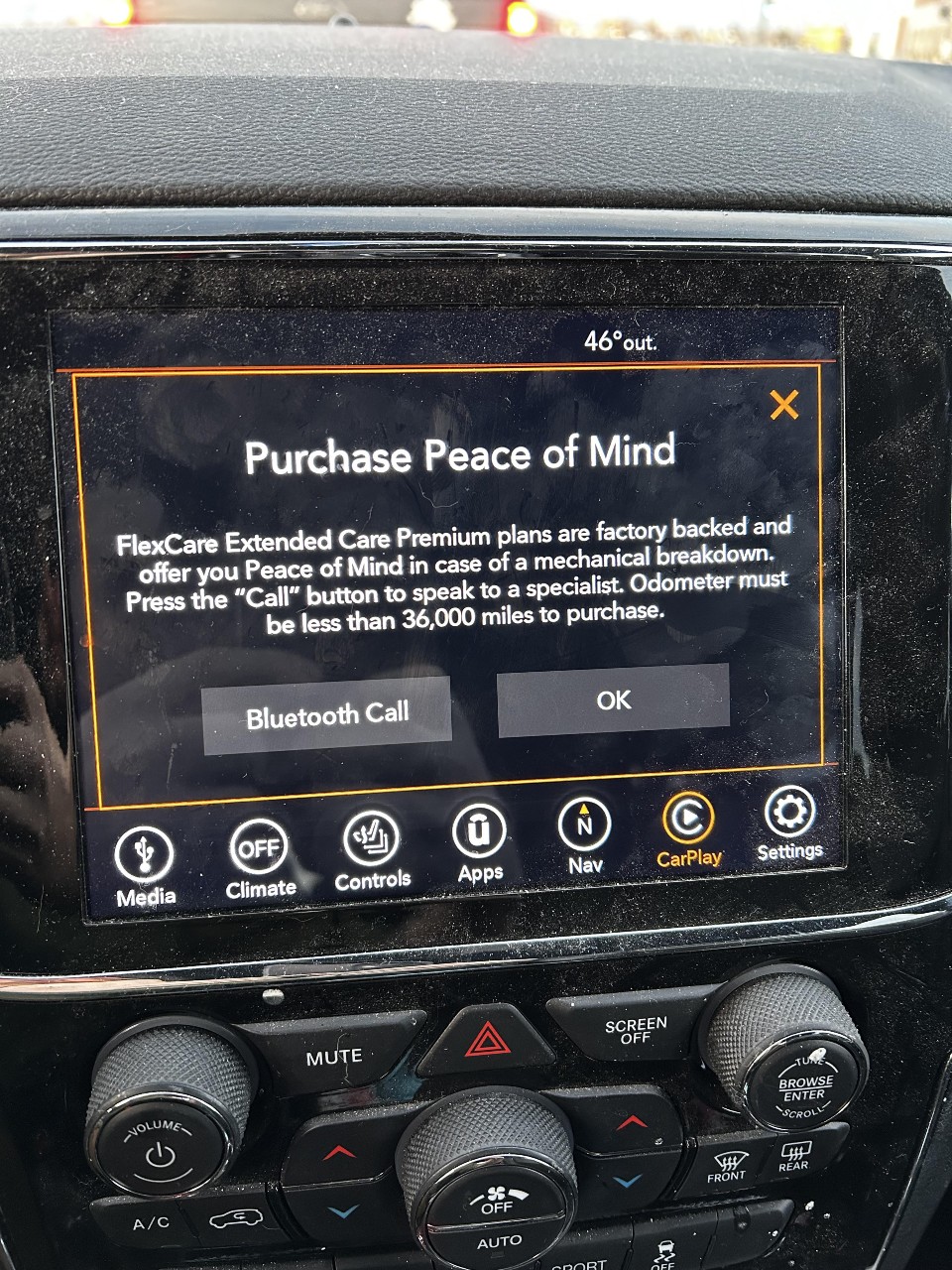
Ads in cars *mobile
Image source: Reddit

According to the owner, the message appeared every time the car stopped and refused to disappear even after the OK button was pressed. Stellantis blamed the behavior on a glitch, stating that the pop-up should have closed once the owner opted out, but otherwise defended the practice as an “information update.”

Similar Jeep owners’ encounters with warranty ads reportedly date back to at least 2022, and judging by recent history, the manufacturer shows little sign of backing away from this controversial yet increasingly common practice.

As the 2025 was slowly drawing to a close, Stellantis screeched yet again, blasting discount pop-ups onto WL Grand Cherokee owners’ in-car screens. The company defended the move by claiming it was simply “staying in touch with customers at critical points in their ownership,” a familiar bit of customer-service speak.

According to Stellantis, the messages were sent only to a limited group of owners and were designed to be as unobtrusive as possible. The discount offer appeared as a plain text notification only when the vehicle was started and stationary, disappeared once the car began moving or after the driver dismissed it (or after 15 seconds), and would reappear on the next startup only if the driver chose to be reminded later or didn’t interact with the message.

‘Almost wrecked it’: When pop-ups become a safety risk

It’s one thing when a pop-up lights up your infotainment screen while you’re stopped at a traffic light or parked. It’s already annoying and potentially distracting, but the risks multiply when ads appear mid-drive. That’s what allegedly happened to one Subaru driver, who claimed on Reddit that he nearly lost control of his vehicle after a pop-up promoting SiriusXM satellite radio suddenly took over the infotainment screen while he was driving at highway speed.

According to the post, the ad caused the entire screen to change, forcing the driver to take his eyes off the road. Driving at around 55 mph in winter conditions, he reportedly swerved, slid, and narrowly avoided ending up in a ditch. The poster claimed that the incident would not have happened had the ad not appeared. The driver described the experience as unacceptable, called on Subaru to stop all advertising while vehicles are in motion, and said he reported the incident to the US National Highway Traffic Safety Administration (NHTSA).

The incident was originally reported by The Autopian, which then spoke with the car’s owner. The owner revealed that he had received between six and eight such ads over the past two years. While that number might seem negligible on its own, the fact that the ads appeared while the car was in motion changes the equation entirely, each one carrying the potential for disastrous, even deadly, consequences. The Autopian also reported that Subaru owners appear to be receiving similar messages on a regular basis, with the first complaints dating back to early this year.

When asked to comment, Subaru confirmed that it pushes such pop-ups twice a year but appeared strikingly oblivious to the negative perception, let alone the potential consequences, of this tone-deaf marketing effort, claiming it was “the first” time it had heard of any issues related to them. Blessed be the unaware.

A legislative brake finally?

Incidents like these are fueling a broader debate about who really controls the data modern cars generate and what manufacturers are allowed to do with it. While pop-up ads themselves aren’t explicitly targeted (or at least not always), regulators and privacy advocates are increasingly and rightfully view connected cars as a symptom of a much larger problem: the near-total lack of meaningful limits on how automakers collect, use, and monetize vehicle data.

In the US the lawmakers have recently attempted to tackle this issue with the Data Rights for Information and Vehicle Electronics in Real-time (DRIVER) Act a bill that would give car owners greater control over the data their cars generate, including the ability to access it directly and opt out of any sales of personal data that might have been collected by the manufacturer through cameras, sensors, or otherwise.

Under the proposal, automakers would be prohibited from selling covered data unless they provide vehicle owners with a clear and conspicuous opportunity to opt out. Covered data includes personal motor-vehicle data linked to an identifiable person, such as biometric identifiers (like facial features or voice), precise geolocation data accurate within roughly a third of a mile, and driver behavior data, particularly when that data is used for profiling that can cause serious legal or similarly significant harm outside of employment. Data that is properly de-identified, pseudonymized, aggregated, or already public would remain exempt.

While the bill doesn’t ban in-car advertising outright, it directly challenges the ecosystem that enables it. Services like SiriusXM don’t materialize on infotainment screens by magic. They rely on data-sharing arrangements, behavioral insights, and access to the vehicle’s software environment. By forcing transparency, limiting resale, and giving drivers a real opt-out, the DRIVER Act would make it harder for automakers to quietly turn cars into rolling data pipelines for third parties.

The bill also carves out notable exceptions, allowing data use for safety improvements, recalls, cybersecurity, warranty administration, fraud prevention, and similar needs. In theory, those exceptions could provide loopholes for companies like Stellantis to keep bombarding customers with warranty ads. But although the bill isn’t perfect, it might represent a first step toward reining in the ad-driven, data-hungry car ecosystem.

Whether the DRIVER Act ultimately becomes law remains to be seen. But as infotainment screens increasingly double as ad surfaces, and, in some cases, potential safety hazards, it’s becoming harder to argue that the current free-for-all around vehicle data is not only a threat to privacy, but also to safety.


Спадабаўся пост?
AdGuard VPN AdGuard DNS AdGuard Mail AdGuard Wallet
Галоўны экран AdGuard для Windows
Экран абароны AdGuard для Windows, які паказвае функцыі абароны і налады
Экран Статыстыка AdGuard для Windows, які паказвае статыстыку заблакіраванай рэкламы і праграм сачэння
Экран Кіраванне праграмамі ў AdGuard для Windows, які паказвае параметры кіравання абаронай для праграм, усталяваных на прыладзе
20 362 20362 водгукі
Выдатна!

AdGuard: блакіроўшчык рэкламы для Windows

AdGuard для Windows — гэта больш, чым блакіроўшчык рэкламы. Гэта шматфункцыянальны інструмент, які блакуе рэкламу, кантралюе доступ да небяспечных сайтаў, паскарае загрузку старонак і абараняе дзяцей ад непажаданага кантэнту

Спампоўваючы праграму, вы прымаеце ўмовы Ліцэнзійнага пагаднення
Microsoft Store
Спампоўваючы праграму, вы прымаеце ўмовы Ліцэнзійнага пагаднення
AdGuard для Windows версія 8.0, 14 дзён пробнага перыяду
Галоўны экран AdGuard для Mac
Экран рэжыму нябачнасці AdGuard для Mac
20 362 20362 водгукі
Выдатна!

AdGuard: блакіроўшчык рэкламы для Mac

AdGuard для Mac — гэта ўнікальны блакіроўшчык рэкламы, распрацаваны з улікам macOS. Акрамя абароны ад надакучлівай рэкламы ў браўзерах і праграмах, ён абараняе вас ад адсочвання, фішынгу і махлярства
Спампоўваючы праграму, вы прымаеце ўмовы Ліцэнзійнага пагаднення
Чытаць далей
AdGuard для Mac версія 2.19, 14 дзён пробнага перыяду
Галоўны экран AdGuard для Android
Экран Абарона ад сачэння ў AdGuard для Android
Экран Кіраванне праграмамі ў AdGuard для Android, які паказвае параметры кіравання абаронай для праграм, усталяваных на прыладзе
Экран Статыстыка AdGuard для Android, які паказвае статыстыку заблакіраванай рэкламы і праграм сачэння
Галоўны экран прыватнага браўзера AdGuard для Android
QR-код, каб спампаваць AdGuard для Android
20 362 20362 водгукі
Выдатна!

AdGuard: блакіроўшчык рэкламы для Android

Блакуе рэкламу і трэкеры ва ўсіх браўзерах, гульнях і іншых праграмах. Абараняе вашу прыватнасць і дазваляе вам кантраляваць, як вашы праграмы выкарыстоўваюць Інтэрнэт. Усталёўваецца праз APK
Спампоўваючы праграму, вы прымаеце ўмовы Ліцэнзійнага пагаднення
Чытаць далей
Сканіраванне для загрузкі
Выкарыстоўвайце любы счытвальнік QR-кодаў, даступны на вашай прыладзе
AdGuard для Android версія 4.14, 14 дзён пробнага перыяду
Галоўны экран AdGuard для iOS
Экран абароны AdGuard для iOS, які паказвае функцыі абароны і налады
Экран Статыстыка AdGuard для iOS, які паказвае статыстыку заблакіраванай рэкламы і праграм сачэння
QR-код, каб спампаваць AdGuard для iOS
20 362 20362 водгукі
Выдатна!

AdGuard: блакіроўшчык рэкламы для iOS

Найлепшы блакіроўшчык рэкламы для iOS для iPhone і iPad. AdGuard ліквідуе ўсе віды рэкламы і трэкераў у Safari і абараняе вашу прыватнасць ва ўсіх праграмах на ўзроўні DNS
Спампоўваючы праграму, вы прымаеце ўмовы Ліцэнзійнага пагаднення
Чытаць далей
Сканіраванне для загрузкі
Выкарыстоўвайце любы счытвальнік QR-кодаў, даступны на вашай прыладзе
AdGuard для iOS, 4.5
Галоўны экран AdGuard Content Blocker
Экран фільтры ў AdGuard Content Blocker
Экран налады ў AdGuard Content Blocker
20 362 20362 водгукі
Выдатна!

Блакіроўшчык кантэнту AdGuard

AdGuard Content Blocker ухіляе ўсе віды рэкламы ў мабільных браўзерах, якія падтрымліваюць тэхналогію блакіроўкі змесціва — напрыклад, Samsung Internet і Яндэкс.Браўзер. Яго функцыі абмежаваныя ў параўнанні з AdGuard для Android, але ён бясплатны, просты ў усталёўцы і эфектыўны
Спампоўваючы праграму, вы прымаеце ўмовы Ліцэнзійнага пагаднення
Чытаць далей
Блакіроўшчык кантэнту AdGuard, 2.8
Галоўны экран браузернае пашырэнне AdGuard
Экран Абарона ад сачэння ў браузернае пашырэнне AdGuard
20 362 20362 водгукі
Выдатна!

Браўзернае пашырэнне AdGuard

AdGuard — самае хуткае і лёгкае браўзарнае пашырэнне для блакавання ўсіх тыпаў рэкламы! Абірайце AdGuard для хуткага і бяспечнага сёрфінга без рэкламы.
Усталяваць
Спампоўваючы праграму, вы прымаеце ўмовы Ліцэнзійнага пагаднення
Усталяваць
Спампоўваючы праграму, вы прымаеце ўмовы Ліцэнзійнага пагаднення
Усталяваць
Спампоўваючы праграму, вы прымаеце ўмовы Ліцэнзійнага пагаднення
Усталяваць
Спампоўваючы праграму, вы прымаеце ўмовы Ліцэнзійнага пагаднення
Усталяваць
Спампоўваючы праграму, вы прымаеце ўмовы Ліцэнзійнага пагаднення
Чытаць далей
Усталяваць
Спампоўваючы праграму, вы прымаеце ўмовы Ліцэнзійнага пагаднення
Чытаць далей
Браўзернае пашырэнне AdGuard, 5.5
Галоўны экран Браўзерны памочнік AdGuard
20 362 20362 водгукі
Выдатна!

Памочнік AdGuard

Пашырэнне для браўзера-компаньён для настольных прыкладанняў AdGuard. Яно дазваляе блакіраваць карыстальніцкія элементы на вэб-сайтах, дадаваць вэб-сайты ў спіс дазволеных і адпраўляць справаздачы непасрэдна з вашага браўзера
Памочнік AdGuard, 1.4
20 362 20362 водгукі
Выдатна!

AdGuard Home

AdGuard Home — гэта сеткавае рашэнне для блакіроўкі рэкламы і праграм сачэння. Усталюйце яго адзін раз на вашым маршрутызатары, каб ахапіць усе прылады ў сетцы — дадатковае праграмнае забеспячэнне не патрабуецца. Гэта асабліва важна для розных прылад IoT, якія часта ўяўляюць пагрозу вашай прыватнасці
AdGuard Home, 0.107
Галоўны экран AdGuard Pro для iOS
Экран абароны ў AdGuard Pro для iOS, які паказвае функцыі абароны і налады
Экран Статыстыка ў AdGuard Pro для iOS, які паказвае статыстыку заблакіраванай рэкламы і праграм сачэння
20 362 20362 водгукі
Выдатна!

AdGuard Pro для iOS

AdGuard Pro для iOS пастаўляецца з усімі дадатковымі функцыямі блакіроўкі рэкламы і абароны, якія ўключаны. Ён прапануе тыя ж інструменты, што і платная версія AdGuard для iOS. Выдатна блакіруе рэкламу ў Safari, а таксама дазваляе наладжваць налады DNS, каб адаптаваць вашу абарону. Ён блакіруе рэкламу ў браўзерах і дадатках, абараняе дзяцей ад недапушчальнага кантэнту і захоўвае вашы асабістыя даныя бяспечнымі
Спампоўваючы праграму, вы прымаеце ўмовы Ліцэнзійнага пагаднення
Чытаць далей
AdGuard Pro для iOS, 4.5
Галоўны экран AdGuard Mini для Mac
Экран абароны Safari ў AdGuard Mini для Mac
Экран стварэння правіла ў AdGuard Mini для Mac
20 362 20362 водгукі
Выдатна!

AdGuard Mini для Mac — блакіроўшчык рэкламы ў Safari

AdGuard Mini для Mac — гэта магутны блакіроўшчык рэкламы для Safari. Гэта лёгкая праграма выдаляе рэкламу, блакуе праграмы сачэння і паскарае загрузку старонак. Яна дапамагае вам аглядаць вэб у Safari без адцягненняў і захоўваць вашы даныя ў прыватнасці
Усталяваць
Спампоўваючы праграму, вы прымаеце ўмовы Ліцэнзійнага пагаднення
Чытаць далей
AdGuard Mini для Mac, 2.3
Галоўны экран AdGuard для Android TV з уключанай абаронай
Экран блакіроўкі рэкламы AdGuard для Android TV, які паказвае яго функцыі і налады
Экран налады AdGuard для Android TV
Экран Кіраванне праграмамі AdGuard для Android TV, які паказвае праграмы, дзе рэклама і праграмы сачэння заблакіравана
20 362 20362 водгукі
Выдатна!

AdGuard для Android TV

AdGuard для Android TV — адзіная праграма, якая блакіруе рэкламу, ахоўвае вашу прыватнасць і працуе як міжсеткавы экран для вашага Smart TV. Атрымуйце папярэджанні аб вэб-пагрозах, выкарыстоўвайце бяспечны DNS і атрымлівайце перавагі ад шыфраванага трафіку. Адпачывайце і атрымлівайце асалоду ад улюбёных шоу з першакласнай абаронай і без рэкламы!
AdGuard для Android TV версія 4.14, 14 дзён пробнага перыяду
Маскот AdGuard, Агнар, трымае пінгвіна Linux
20 362 20362 водгукі
Выдатна!

AdGuard для Linux

AdGuard для Linux — гэта першы ў свеце сістэмны блакіроўшчык рэкламы для Linux. Блакуйце рэкламу і трэкеры на ўзроўні прылады, выбірайце з папярэдне ўсталяваных фільтраў альбо дадавайце ўласныя — усё праз інтэрфейс каманднага радка
AdGuard для Linux, 1.4
20 362 20362 водгукі
Выдатна!

AdGuard Temp Mail

Ваш часовы паштовую скрыню, каб на асноўную пошту не прыходзіў спам
20 362 20362 водгукі
Выдатна!

AdGuard VPN

75 лакацый па ўсім свеце

Доступ да любога кантэнту

Моцнае шыфраванне

Без лагавання

Самае хуткае злучэнне

Цэладзённая падтрымка

Паспрабуйце бясплатна
Спампоўваючы праграму, вы прымаеце ўмовы Ліцэнзійнага пагаднення
Чытаць далей
20 362 20362 водгукі
Выдатна!

AdGuard DNS

AdGuard DNS – гэта альтэрнатыўны спосаб заблакаваць рэкламу, абараніць асабістыя дадзеныя і ахаваць дзяцей ад дарослых матэрыялаў. Ён просты ў наладзе і выкарыстанні і забяспечвае патрэбны мінімум абароны ад рэкламы, трэкінгу і фішынгу, незалежна ад платформы.
20 362 20362 водгукі
Выдатна!

AdGuard Mail

Абараняйце сваю асобу, пазбягайце спаму і трымайце ўваходную пошту ў бяспецы з дапамогай нашых псеўданімаў і часовых адрасоў электроннай пошты. Скарыстайцеся нашым бясплатным сэрвісам перасылкі электроннай пошты і праграмамі для ўсіх аперацыйных сістэм.
20 362 20362 водгукі
Выдатна!

AdGuard Wallet

Бяспечны і прыватны крыпта-кашалёк, які дае вам поўны кантроль над вашымі актывамі. Адкрывайце для сябе тысячы крыптавалют для захоўвання, адпраўкі і абмену
Спампоўка AdGuard Каб усталяваць AdGuard, пстрыкніце файл, пазначаны стрэлкай Выберыце «Адкрыць» і націсніце «ОК», затым дачакайцеся спампоўкі файла. У акне, якое адкрылася, перацягніце значок AdGuard у папку «Праграмы». Дзякуй, што выбралі AdGuard! Выберыце «Адкрыць» і націсніце «ОК», затым дачакайцеся спампоўкі файла. У акне, якое адкрылася, націсніце «Усталяваць». Дзякуй, што выбралі AdGuard!
Усталюйце AdGuard на мабільную прыладу

















































