Can GPT-4 block ads better than humans? We put an AI-powered ad blocker to the test

Everyone knows ChatGPT, an AI chatbot based on OpenAI’s latest model, GPT-4. But beyond OpenAI’s own products, GPT-4 has been integrated into many applications and services, from learning and payment apps to Microsoft’s Bing AI and now ad blocking.

A Chrome extension with a rather straightforward name GPT-AdBlocker was launched in April this year on Product Hunt. It is developed by a company called In5 Tech, based in Dubai, UAE. The extension claims to use GPT-4 technology to block all kinds of trackers and ads, including sponsored content inside YouTube videos that your typical ad blocker cannot block. The GPT-AdBlocker team describes the extension as “the ultimate all-in-one solution.” As far as its accuracy goes, they say it’s “very accurate” in detecting ads in videos but “some errors”may creep in. So far, the extension is available only for Chrome, but the team behind it plans to deploy it to “multiple other browsers.”

Intrigued by the new kid on the block, and the AI-powered one at that, we decided to give it a try.

The ideal outcome: achievable or not?

Before we present you the results of our experiments with GPT-AdBlocker, let’s talk a bit about the extension’s features and how it should work in an ideal world.

GPT-AdBlocker has a very clean, if not ascetic interface and only two switches: one for regular ad blocking and one for AI-powered sponsor blocking, which is what we are interested in today. Of course, you can turn off the AI mode and use it as a regular ad blocker, but that’s not what we’re here for. It is with both of its modes enabled at the same time that GPT AdBlocker is supposed to be at its most efficient.
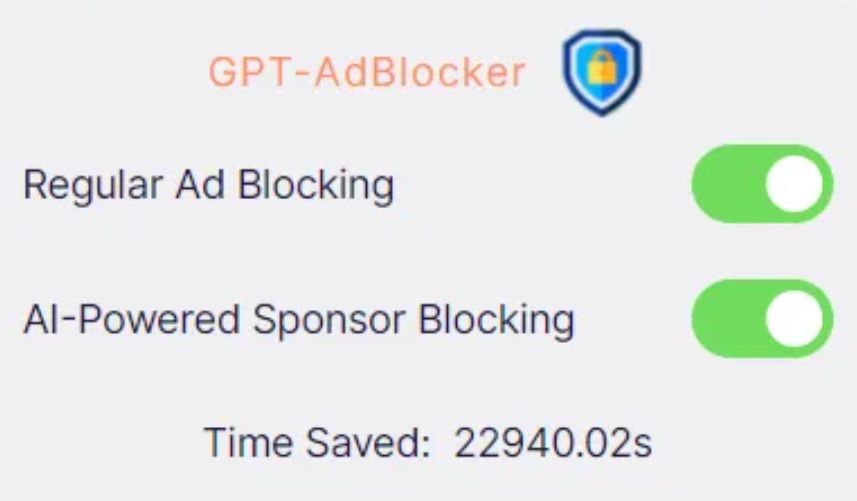
GPT-AdBlocker has a clean and simple interface *mobile

So, in its ideal implementation the GPT-AdBlocker should allow you to skip sponsored content in videos, which are the segments that brands usually pay the content creator directly for.

We imagined it would look something like in the example below, where we used a graphic editor to manually cut the Destroying My RTX 3090 Ti With Incredible Minecraft Graphics YouTube video to remove a sponsored segment.

Some of you might wonder why we had to cut the video manually to demonstrate a ‘near-perfect’ example of how the GPT-AdBlocker is supposed to work. But let’s just say that the results of our interaction with the actual extension to skip sponsored ads were… a very mixed bag. And now we will show you why — with receipts, of course.

The challenges of AI ad blocking: choppy cuts & incomplete sentences

We wanted to test how well the GPT-AdBlocker works on different types of videos that feature at least one sponsored segment. One of these videos was the one that we had manually edited before — now let’s compare it with the version that the AI-powered ad blocker produced.

The difference is not huge, but it is noticeable and not in favor of the extension: after the sponsored segment is skipped, the video resumes abruptly, in the middle of a sentence. However, this by no means a catastrophe and the content is still watchable.

The same cannot be said about videos that feature multiple product placements throughout, which is very common with tutorials, where showing tools, whichever they are, is an inalienable part of the content. When we watched a makeup tutorial with the GPT-AdBlocker on, we counted five skipped segments. The cuts were usually rough, some product placements were removed, some were not. As a result, we missed important parts of the content, which made the video unwatchable. See our compilation of cuts by the extension below (fade in and fade out are done by us).

Sometimes the issue would be just a jagged cut, which made you wonder whether anything valuable was skipped or if it was just how it was supposed to be.

Sometimes it would be just a few words missing, with the video stopping and resuming mid-sentence as in the example below — though, one could argue that even a few words can make a big difference.

Generally, the problems started when the sponsored segment was not a separate part of the video, but an integral part of it. Like in the example below, where AI cropped the video in such a way that the key part of financial advice is missing (we would not weigh in on the merits of that advice, but you get the point).

Oftentimes the extension would not remove the sponsored segment in its entirety, but only parts of it, which is, however, probably still better than removing too much.

Ethical dilemma

In our express analysis on YouTube’s potential ban on ad blockers, we mentioned that content creators are increasingly relying on brand deals, in addition to donations, to support their work. The ways of YouTube when it comes to monetization or demonetization of certain videos and entire channels are generally unsearchable; besides, YouTube takes about 45% of the creators’ ad revenues. Brands, unlike YouTube, pay content creators directly, usually better, and that pay is more stable.

Granted, sponsored segments can be annoying, sketchy and feel too long — but they are still part of the content, so blocking them entirely raises an ethical issue. And as far as we’re concerned, it’s probably unfair to take an axe to all that brand money. Content creators who are transparent about sponsored content in their videos and clearly label it, make it pretty easy to manually skip it. On the other hand, there are plenty of YouTubers who promote junk, but should honest content creators suffer for the unscrupulous ones?

In a nutshell: what we think about AI & ad blocking

The emergence of an AI-powered ad blocking extension is an intriguing and a potentially transformative development in the field. The goal of the extension is to detect and remove sponsored segments from videos, and it does that, but not all of them, and not completely. Sometimes it leaves “leftovers” of sponsored ads, sometimes it cuts the video rather crudely. Sometimes it works nearly perfectly, but rarely.

The approach is interesting and will shape the future of ad blocking to some extent. AI is permeating all areas, and ad blocking, like ad creation, is no exception. However, the current implementation of this technology, exemplified by the GPT-AdBlocker, falls short of providing a reliable and comprehensive solution. Moreover, while the integration of AI into ad blocking is promising, it’s possible that even with additional fine-tuning it won’t be a panacea for all ad-related challenges due to the intricacies of content creation.

In cases where sponsored segments or product placements are seamlessly embedded into a video, GPT-AdBlocker may render the content unwatchable. For example, content genres such as makeup tutorials (or any type of tutorial) can suffer significantly when key segments are omitted.

Nonetheless, AI is already impacting the advertising industry, and it’s only natural that the ad blocking industry will take advantage of its capabilities. The debate is not whether we should use AI, but rather how we should use it.


Спадабаўся пост?
AdGuard VPN AdGuard DNS AdGuard Mail AdGuard Wallet
Галоўны экран AdGuard для Windows
Экран абароны AdGuard для Windows, які паказвае функцыі абароны і налады
Экран Статыстыка AdGuard для Windows, які паказвае статыстыку заблакіраванай рэкламы і праграм сачэння
Экран Кіраванне праграмамі ў AdGuard для Windows, які паказвае параметры кіравання абаронай для праграм, усталяваных на прыладзе
20 363 20363 водгукі
Выдатна!

AdGuard: блакіроўшчык рэкламы для Windows

AdGuard для Windows — гэта больш, чым блакіроўшчык рэкламы. Гэта шматфункцыянальны інструмент, які блакуе рэкламу, кантралюе доступ да небяспечных сайтаў, паскарае загрузку старонак і абараняе дзяцей ад непажаданага кантэнту

Спампоўваючы праграму, вы прымаеце ўмовы Ліцэнзійнага пагаднення
Microsoft Store
Спампоўваючы праграму, вы прымаеце ўмовы Ліцэнзійнага пагаднення
AdGuard для Windows версія 8.0, 14 дзён пробнага перыяду
Галоўны экран AdGuard для Mac
Экран рэжыму нябачнасці AdGuard для Mac
20 363 20363 водгукі
Выдатна!

AdGuard: блакіроўшчык рэкламы для Mac

AdGuard для Mac — гэта ўнікальны блакіроўшчык рэкламы, распрацаваны з улікам macOS. Акрамя абароны ад надакучлівай рэкламы ў браўзерах і праграмах, ён абараняе вас ад адсочвання, фішынгу і махлярства
Спампоўваючы праграму, вы прымаеце ўмовы Ліцэнзійнага пагаднення
Чытаць далей
AdGuard для Mac версія 2.19, 14 дзён пробнага перыяду
Галоўны экран AdGuard для Android
Экран Абарона ад сачэння ў AdGuard для Android
Экран Кіраванне праграмамі ў AdGuard для Android, які паказвае параметры кіравання абаронай для праграм, усталяваных на прыладзе
Экран Статыстыка AdGuard для Android, які паказвае статыстыку заблакіраванай рэкламы і праграм сачэння
Галоўны экран прыватнага браўзера AdGuard для Android
QR-код, каб спампаваць AdGuard для Android
20 363 20363 водгукі
Выдатна!

AdGuard: блакіроўшчык рэкламы для Android

Блакуе рэкламу і трэкеры ва ўсіх браўзерах, гульнях і іншых праграмах. Абараняе вашу прыватнасць і дазваляе вам кантраляваць, як вашы праграмы выкарыстоўваюць Інтэрнэт. Усталёўваецца праз APK
Спампоўваючы праграму, вы прымаеце ўмовы Ліцэнзійнага пагаднення
Чытаць далей
Сканіраванне для загрузкі
Выкарыстоўвайце любы счытвальнік QR-кодаў, даступны на вашай прыладзе
AdGuard для Android версія 4.14, 14 дзён пробнага перыяду
Галоўны экран AdGuard для iOS
Экран абароны AdGuard для iOS, які паказвае функцыі абароны і налады
Экран Статыстыка AdGuard для iOS, які паказвае статыстыку заблакіраванай рэкламы і праграм сачэння
QR-код, каб спампаваць AdGuard для iOS
20 363 20363 водгукі
Выдатна!

AdGuard: блакіроўшчык рэкламы для iOS

Найлепшы блакіроўшчык рэкламы для iOS для iPhone і iPad. AdGuard ліквідуе ўсе віды рэкламы і трэкераў у Safari і абараняе вашу прыватнасць ва ўсіх праграмах на ўзроўні DNS
Спампоўваючы праграму, вы прымаеце ўмовы Ліцэнзійнага пагаднення
Чытаць далей
Сканіраванне для загрузкі
Выкарыстоўвайце любы счытвальнік QR-кодаў, даступны на вашай прыладзе
AdGuard для iOS, 4.5
Галоўны экран AdGuard Content Blocker
Экран фільтры ў AdGuard Content Blocker
Экран налады ў AdGuard Content Blocker
20 363 20363 водгукі
Выдатна!

Блакіроўшчык кантэнту AdGuard

AdGuard Content Blocker ухіляе ўсе віды рэкламы ў мабільных браўзерах, якія падтрымліваюць тэхналогію блакіроўкі змесціва — напрыклад, Samsung Internet і Яндэкс.Браўзер. Яго функцыі абмежаваныя ў параўнанні з AdGuard для Android, але ён бясплатны, просты ў усталёўцы і эфектыўны
Спампоўваючы праграму, вы прымаеце ўмовы Ліцэнзійнага пагаднення
Чытаць далей
Блакіроўшчык кантэнту AdGuard, 2.8
Галоўны экран браузернае пашырэнне AdGuard
Экран Абарона ад сачэння ў браузернае пашырэнне AdGuard
20 363 20363 водгукі
Выдатна!

Браўзернае пашырэнне AdGuard

AdGuard — самае хуткае і лёгкае браўзарнае пашырэнне для блакавання ўсіх тыпаў рэкламы! Абірайце AdGuard для хуткага і бяспечнага сёрфінга без рэкламы.
Усталяваць
Спампоўваючы праграму, вы прымаеце ўмовы Ліцэнзійнага пагаднення
Усталяваць
Спампоўваючы праграму, вы прымаеце ўмовы Ліцэнзійнага пагаднення
Усталяваць
Спампоўваючы праграму, вы прымаеце ўмовы Ліцэнзійнага пагаднення
Усталяваць
Спампоўваючы праграму, вы прымаеце ўмовы Ліцэнзійнага пагаднення
Усталяваць
Спампоўваючы праграму, вы прымаеце ўмовы Ліцэнзійнага пагаднення
Чытаць далей
Усталяваць
Спампоўваючы праграму, вы прымаеце ўмовы Ліцэнзійнага пагаднення
Чытаць далей
Браўзернае пашырэнне AdGuard, 5.5
Галоўны экран Браўзерны памочнік AdGuard
20 363 20363 водгукі
Выдатна!

Памочнік AdGuard

Пашырэнне для браўзера-компаньён для настольных прыкладанняў AdGuard. Яно дазваляе блакіраваць карыстальніцкія элементы на вэб-сайтах, дадаваць вэб-сайты ў спіс дазволеных і адпраўляць справаздачы непасрэдна з вашага браўзера
Памочнік AdGuard, 1.4
20 363 20363 водгукі
Выдатна!

AdGuard Home

AdGuard Home — гэта сеткавае рашэнне для блакіроўкі рэкламы і праграм сачэння. Усталюйце яго адзін раз на вашым маршрутызатары, каб ахапіць усе прылады ў сетцы — дадатковае праграмнае забеспячэнне не патрабуецца. Гэта асабліва важна для розных прылад IoT, якія часта ўяўляюць пагрозу вашай прыватнасці
AdGuard Home, 0.107
Галоўны экран AdGuard Pro для iOS
Экран абароны ў AdGuard Pro для iOS, які паказвае функцыі абароны і налады
Экран Статыстыка ў AdGuard Pro для iOS, які паказвае статыстыку заблакіраванай рэкламы і праграм сачэння
20 363 20363 водгукі
Выдатна!

AdGuard Pro для iOS

AdGuard Pro для iOS пастаўляецца з усімі дадатковымі функцыямі блакіроўкі рэкламы і абароны, якія ўключаны. Ён прапануе тыя ж інструменты, што і платная версія AdGuard для iOS. Выдатна блакіруе рэкламу ў Safari, а таксама дазваляе наладжваць налады DNS, каб адаптаваць вашу абарону. Ён блакіруе рэкламу ў браўзерах і дадатках, абараняе дзяцей ад недапушчальнага кантэнту і захоўвае вашы асабістыя даныя бяспечнымі
Спампоўваючы праграму, вы прымаеце ўмовы Ліцэнзійнага пагаднення
Чытаць далей
AdGuard Pro для iOS, 4.5
Галоўны экран AdGuard Mini для Mac
Экран абароны Safari ў AdGuard Mini для Mac
Экран стварэння правіла ў AdGuard Mini для Mac
20 363 20363 водгукі
Выдатна!

AdGuard Mini для Mac — блакіроўшчык рэкламы ў Safari

AdGuard Mini для Mac — гэта магутны блакіроўшчык рэкламы для Safari. Гэта лёгкая праграма выдаляе рэкламу, блакуе праграмы сачэння і паскарае загрузку старонак. Яна дапамагае вам аглядаць вэб у Safari без адцягненняў і захоўваць вашы даныя ў прыватнасці
Усталяваць
Спампоўваючы праграму, вы прымаеце ўмовы Ліцэнзійнага пагаднення
Чытаць далей
AdGuard Mini для Mac, 2.3
Галоўны экран AdGuard для Android TV з уключанай абаронай
Экран блакіроўкі рэкламы AdGuard для Android TV, які паказвае яго функцыі і налады
Экран налады AdGuard для Android TV
Экран Кіраванне праграмамі AdGuard для Android TV, які паказвае праграмы, дзе рэклама і праграмы сачэння заблакіравана
20 363 20363 водгукі
Выдатна!

AdGuard для Android TV

AdGuard для Android TV — адзіная праграма, якая блакіруе рэкламу, ахоўвае вашу прыватнасць і працуе як міжсеткавы экран для вашага Smart TV. Атрымуйце папярэджанні аб вэб-пагрозах, выкарыстоўвайце бяспечны DNS і атрымлівайце перавагі ад шыфраванага трафіку. Адпачывайце і атрымлівайце асалоду ад улюбёных шоу з першакласнай абаронай і без рэкламы!
AdGuard для Android TV версія 4.14, 14 дзён пробнага перыяду
Маскот AdGuard, Агнар, трымае пінгвіна Linux
20 363 20363 водгукі
Выдатна!

AdGuard для Linux

AdGuard для Linux — гэта першы ў свеце сістэмны блакіроўшчык рэкламы для Linux. Блакуйце рэкламу і трэкеры на ўзроўні прылады, выбірайце з папярэдне ўсталяваных фільтраў альбо дадавайце ўласныя — усё праз інтэрфейс каманднага радка
AdGuard для Linux, 1.4
20 363 20363 водгукі
Выдатна!

AdGuard Temp Mail

Ваш часовы паштовую скрыню, каб на асноўную пошту не прыходзіў спам
20 363 20363 водгукі
Выдатна!

AdGuard VPN

75 лакацый па ўсім свеце

Доступ да любога кантэнту

Моцнае шыфраванне

Без лагавання

Самае хуткае злучэнне

Цэладзённая падтрымка

Паспрабуйце бясплатна
Спампоўваючы праграму, вы прымаеце ўмовы Ліцэнзійнага пагаднення
Чытаць далей
20 363 20363 водгукі
Выдатна!

AdGuard DNS

AdGuard DNS – гэта альтэрнатыўны спосаб заблакаваць рэкламу, абараніць асабістыя дадзеныя і ахаваць дзяцей ад дарослых матэрыялаў. Ён просты ў наладзе і выкарыстанні і забяспечвае патрэбны мінімум абароны ад рэкламы, трэкінгу і фішынгу, незалежна ад платформы.
20 363 20363 водгукі
Выдатна!

AdGuard Mail

Абараняйце сваю асобу, пазбягайце спаму і трымайце ўваходную пошту ў бяспецы з дапамогай нашых псеўданімаў і часовых адрасоў электроннай пошты. Скарыстайцеся нашым бясплатным сэрвісам перасылкі электроннай пошты і праграмамі для ўсіх аперацыйных сістэм.
20 363 20363 водгукі
Выдатна!

AdGuard Wallet

Бяспечны і прыватны крыпта-кашалёк, які дае вам поўны кантроль над вашымі актывамі. Адкрывайце для сябе тысячы крыптавалют для захоўвання, адпраўкі і абмену
Спампоўка AdGuard Каб усталяваць AdGuard, пстрыкніце файл, пазначаны стрэлкай Выберыце «Адкрыць» і націсніце «ОК», затым дачакайцеся спампоўкі файла. У акне, якое адкрылася, перацягніце значок AdGuard у папку «Праграмы». Дзякуй, што выбралі AdGuard! Выберыце «Адкрыць» і націсніце «ОК», затым дачакайцеся спампоўкі файла. У акне, якое адкрылася, націсніце «Усталяваць». Дзякуй, што выбралі AdGuard!
Усталюйце AdGuard на мабільную прыладу

















































