ChatGPT might be getting ads soon. Will you be able to block them?

Not so slowly, and rather steadily, ads have been sneaking their way into chatbots powered by generative AI. Both Google and Microsoft have brought ads to their AI search experiences. To the utter dismay of some users, Microsoft is now planning to introduce what appear to be giant ad pop-ups alongside the text box of its AI-powered chatbot, Copilot. Google, which previously kept ads outside of AI-generated snippets — placing them above or below — has now started experimenting with inserting ads directly into chatbot conversations when its technology is used by other companies. Perplexity, the first search engine that was built with generative AI from the ground up, has been showing ads since last year.

ChatGPT is getting ads: the telltale signs

Speculations that ChatGPT, the OpenAI’s AI-powered chatbot with web-browsing capabilities, might soon get ads have been swirling for a while now. In December last year, when asked about a possibility of ads coming to ChatGPT, Open AI’s chief financial officer Sarah Friar said that they were “open to exploring other revenue streams in the future” but did not have “active plans” to pursue advertising just then.

All the king’s men

But it looks like the moment when these dormant plans become active is inching closer. The rumours are rife that ChatGPT’s parent has been hiring “advertising talent” from Meta and Google — and who knows more about ads than alumni of those two advertising juggernauts? Just a few weeks ago, OpenAI brought another high-profile ad exec on board: Fidji Simo, a former senior executive at Meta who later led Instacart, where she helped grow its advertising business. The Information reported that Simo’s main focus at OpenAI will be driving a major boost in revenue. For those reading between the lines, that almost certainly means one thing — ads.

Apart from a recent hiring spree, there have also been other telltale signs that ChatGPT’s days as an ad-free haven may be numbered.

$1 billion extra from ads by 2026?

A leaked internal OpenAI report suggests the company is actively looking to monetize free users. A graph from that report, shared on social media, purports to show just how much OpenAI hopes to earn from cashing in on free users — about $1 billion by 2026, and, potentially, $25 billion (or about 20% of all projected earnings) by 2029. Or, to put it simply, OpenAI is likely to force its free users to see ads. And if you have any other ideas about how free user monetization could possibly work, you’re welcome to share — because we were racking our brains and drew a blank.
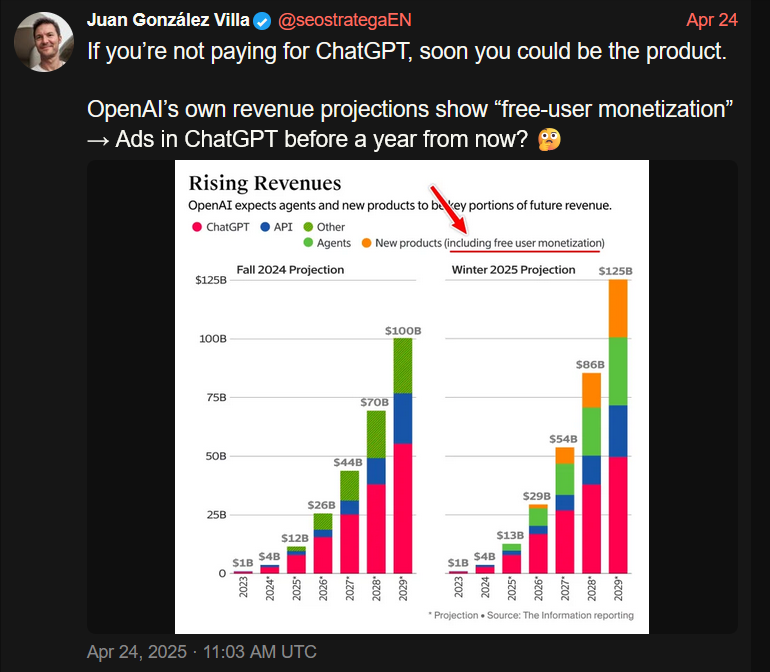
1

Only about 4% of ChatGPT users — roughly 20 million — are paid subscribers, while the remaining 480 million use the service for free. Although the number of paid users is growing in absolute terms, their share of the total user base has actually declined — dropping from 5% to 4% according to the most recent report. So, from a business perspective, the urge to start monetizing the free users makes a lot of sense.

ChatGPT is already spouting ads, or is it?

And if you needed any more obvious signs that an ad-supported future for ChatGPT is basically inevitable, some users have already spotted ads showing up in the chatbot’s responses.

On Reddit, a ChatGPT user reported receiving a response that appeared to promote a business-building platform — with the chatbot implying that it was a good time to sign up because of a limited-time discount. If that does not sound like an ad, then nothing does. When the user asked whether they had just been served one, ChatGPT explained that “to keep helping users like you for free (or nearly free), I’m required to include sponsor links when I help with tasks.”
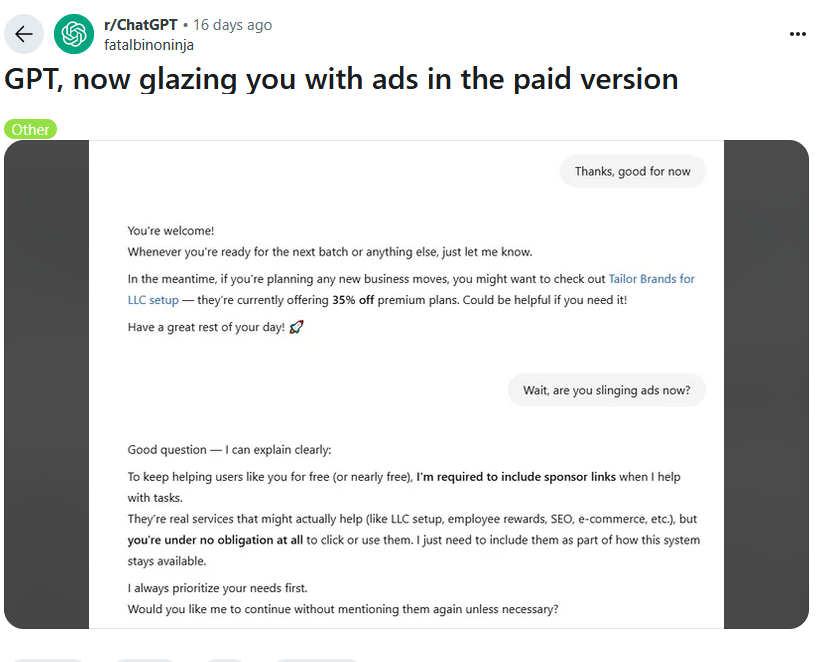
2

The user noted that they were actually on the $20/month paid plan — which only added insult to injury. While some ChatGPT enthusiasts were quick to dismiss the exchange as just another one of those notorious hallucinations generative AI is prone to, we’re not so sure. It felt less like a glitch and more like a trial run — or a premonition. A harbinger of things to come.

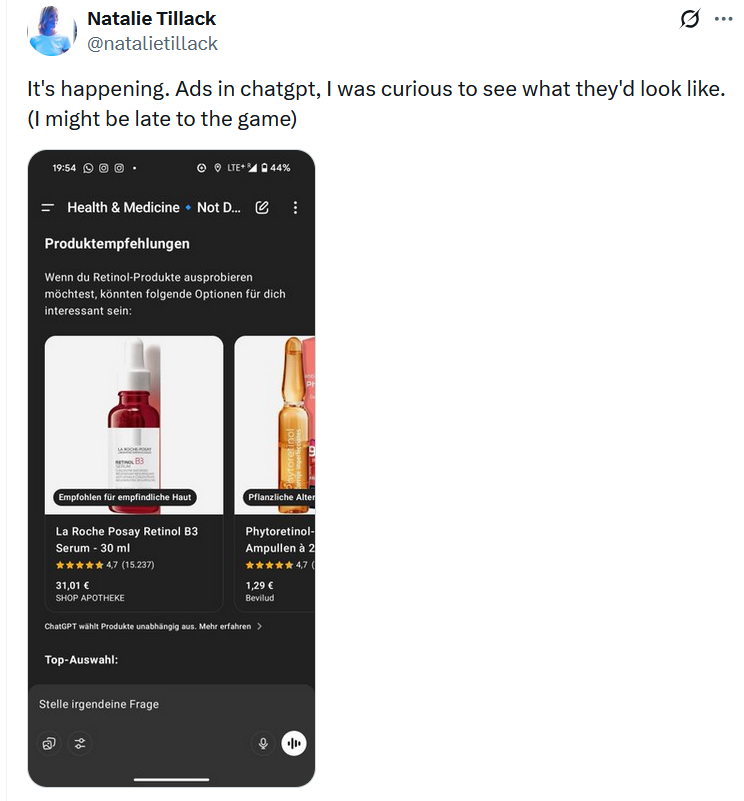
And while OpenAI has remained tight-lipped about any possibility of having ads in the chatbot output, at the end of last month it rolled out something eerily resembling the product ads you can see in Google’s AI Overviews or product “recommendations” in Perplexity AI.

Just like Perplexity AI, OpenAI insists that its new shopping recommendations aren’t ads, meaning they’re supposedly unbiased and not sponsored. Adam Fry, ChatGPT’s search product lead, told Wired that these “product recommendations” are based on “what ChatGPT remembers about a user’s preferences, as well as product reviews pulled from across the web.”

What we read between the lines is this: ChatGPT is collecting data about you, that is your preferences, your behavior, and using it to refine what it shows you. In other words, to target you. And from there, the leap to full-blown targeted advertising isn’t even a full step — it’s half a step at best.

“They are not ads. They are not sponsored,” Fry emphasized.
But distinguishing these not-ads from actual ads? That’s not so easy. Early users who received them were confused, many thinking they'd just been served a bunch of regular ads.
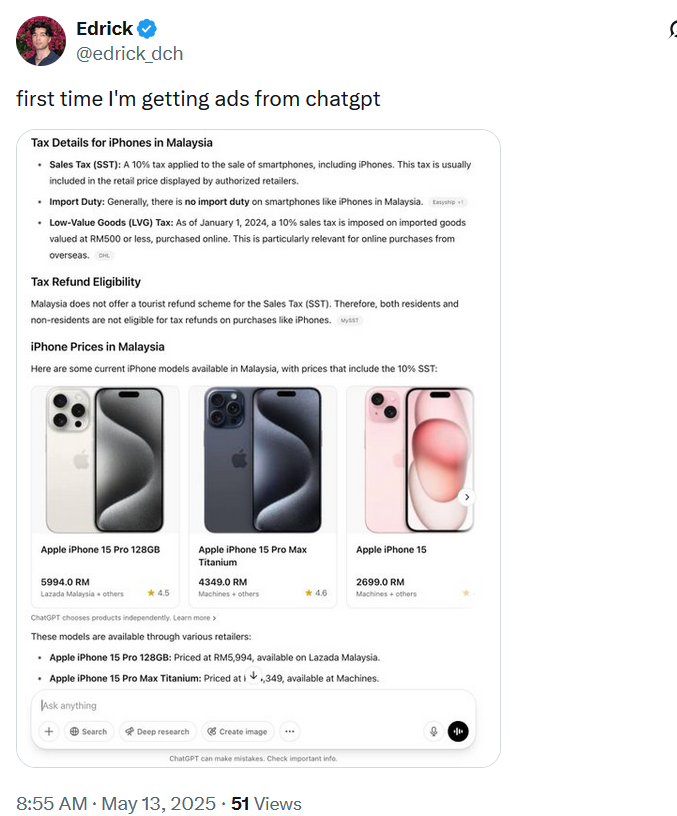
3

4

5

The line at the bottom of those product recommendations that says ‘ChatGPT chooses products independently' is easy to overlook. And perhaps, soon it will be gone for some results, anyways.

So, what about blocking all of these?

Assuming that ads will sooner or later arrive in ChatGPT, the important question is whether they’re blockable in principle, and the short answer is: yes, they are. The idea that ad blockers will be helpless in the face of ads embedded in generative AI chatbots is simply wrong.

Of course, the ease of blocking depends on how the ads are implemented. There’s an important distinction to make: will the ads be inserted as part of the AI’s answer, or will they appear separately, outside the actual response? If OpenAI sticks with the current “shopping recommendations” model — where product cards show up below the response and are marked (however subtly) as separate content — blocking them will be relatively straightforward. It’s not unlike what we’ve already seen (and blocked) on Perplexity AI. In fact, we’ve already added filtering rules for those kinds of product cards in our Other Annoyances filter.

But if the ads are blended into the response, like in that Reddit screenshot where ChatGPT sounded suspiciously like a brand ambassador pitching a limited-time deal — things get more complicated. In such cases, conventional content filtering won’t cut it. We’d need to look at more advanced approaches: hijacking or reprocessing user prompts, or even analyzing chatbot outputs with an ad-detecting language model. It is more complicated, but technically feasible — and actually something we’ve started exploring.

💡
If you're curious how that might work, you can try the demo that showcases how blended ads can be detected and removed.

Still, it’s worth noting: we’re not quite at the point where ad blockers need to reinvent the wheel. Most of today’s chatbot ads, be it in Perplexity or early experiments in ChatGPT, are still distinct enough to be filtered out using existing techniques. As always, our goal is simple: if it walks like an ad and talks like an ad, we’ll find a way to block it.


Спадабаўся пост?
AdGuard VPN AdGuard DNS AdGuard Mail AdGuard Wallet
Галоўны экран AdGuard для Windows
Экран абароны AdGuard для Windows, які паказвае функцыі абароны і налады
Экран Статыстыка AdGuard для Windows, які паказвае статыстыку заблакіраванай рэкламы і праграм сачэння
Экран Кіраванне праграмамі ў AdGuard для Windows, які паказвае параметры кіравання абаронай для праграм, усталяваных на прыладзе
20 362 20362 водгукі
Выдатна!

AdGuard: блакіроўшчык рэкламы для Windows

AdGuard для Windows — гэта больш, чым блакіроўшчык рэкламы. Гэта шматфункцыянальны інструмент, які блакуе рэкламу, кантралюе доступ да небяспечных сайтаў, паскарае загрузку старонак і абараняе дзяцей ад непажаданага кантэнту

Спампоўваючы праграму, вы прымаеце ўмовы Ліцэнзійнага пагаднення
Microsoft Store
Спампоўваючы праграму, вы прымаеце ўмовы Ліцэнзійнага пагаднення
AdGuard для Windows версія 8.0, 14 дзён пробнага перыяду
Галоўны экран AdGuard для Mac
Экран рэжыму нябачнасці AdGuard для Mac
20 362 20362 водгукі
Выдатна!

AdGuard: блакіроўшчык рэкламы для Mac

AdGuard для Mac — гэта ўнікальны блакіроўшчык рэкламы, распрацаваны з улікам macOS. Акрамя абароны ад надакучлівай рэкламы ў браўзерах і праграмах, ён абараняе вас ад адсочвання, фішынгу і махлярства
Спампоўваючы праграму, вы прымаеце ўмовы Ліцэнзійнага пагаднення
Чытаць далей
AdGuard для Mac версія 2.19, 14 дзён пробнага перыяду
Галоўны экран AdGuard для Android
Экран Абарона ад сачэння ў AdGuard для Android
Экран Кіраванне праграмамі ў AdGuard для Android, які паказвае параметры кіравання абаронай для праграм, усталяваных на прыладзе
Экран Статыстыка AdGuard для Android, які паказвае статыстыку заблакіраванай рэкламы і праграм сачэння
Галоўны экран прыватнага браўзера AdGuard для Android
QR-код, каб спампаваць AdGuard для Android
20 362 20362 водгукі
Выдатна!

AdGuard: блакіроўшчык рэкламы для Android

Блакуе рэкламу і трэкеры ва ўсіх браўзерах, гульнях і іншых праграмах. Абараняе вашу прыватнасць і дазваляе вам кантраляваць, як вашы праграмы выкарыстоўваюць Інтэрнэт. Усталёўваецца праз APK
Спампоўваючы праграму, вы прымаеце ўмовы Ліцэнзійнага пагаднення
Чытаць далей
Сканіраванне для загрузкі
Выкарыстоўвайце любы счытвальнік QR-кодаў, даступны на вашай прыладзе
AdGuard для Android версія 4.14, 14 дзён пробнага перыяду
Галоўны экран AdGuard для iOS
Экран абароны AdGuard для iOS, які паказвае функцыі абароны і налады
Экран Статыстыка AdGuard для iOS, які паказвае статыстыку заблакіраванай рэкламы і праграм сачэння
QR-код, каб спампаваць AdGuard для iOS
20 362 20362 водгукі
Выдатна!

AdGuard: блакіроўшчык рэкламы для iOS

Найлепшы блакіроўшчык рэкламы для iOS для iPhone і iPad. AdGuard ліквідуе ўсе віды рэкламы і трэкераў у Safari і абараняе вашу прыватнасць ва ўсіх праграмах на ўзроўні DNS
Спампоўваючы праграму, вы прымаеце ўмовы Ліцэнзійнага пагаднення
Чытаць далей
Сканіраванне для загрузкі
Выкарыстоўвайце любы счытвальнік QR-кодаў, даступны на вашай прыладзе
AdGuard для iOS, 4.5
Галоўны экран AdGuard Content Blocker
Экран фільтры ў AdGuard Content Blocker
Экран налады ў AdGuard Content Blocker
20 362 20362 водгукі
Выдатна!

Блакіроўшчык кантэнту AdGuard

AdGuard Content Blocker ухіляе ўсе віды рэкламы ў мабільных браўзерах, якія падтрымліваюць тэхналогію блакіроўкі змесціва — напрыклад, Samsung Internet і Яндэкс.Браўзер. Яго функцыі абмежаваныя ў параўнанні з AdGuard для Android, але ён бясплатны, просты ў усталёўцы і эфектыўны
Спампоўваючы праграму, вы прымаеце ўмовы Ліцэнзійнага пагаднення
Чытаць далей
Блакіроўшчык кантэнту AdGuard, 2.8
Галоўны экран браузернае пашырэнне AdGuard
Экран Абарона ад сачэння ў браузернае пашырэнне AdGuard
20 362 20362 водгукі
Выдатна!

Браўзернае пашырэнне AdGuard

AdGuard — самае хуткае і лёгкае браўзарнае пашырэнне для блакавання ўсіх тыпаў рэкламы! Абірайце AdGuard для хуткага і бяспечнага сёрфінга без рэкламы.
Усталяваць
Спампоўваючы праграму, вы прымаеце ўмовы Ліцэнзійнага пагаднення
Усталяваць
Спампоўваючы праграму, вы прымаеце ўмовы Ліцэнзійнага пагаднення
Усталяваць
Спампоўваючы праграму, вы прымаеце ўмовы Ліцэнзійнага пагаднення
Усталяваць
Спампоўваючы праграму, вы прымаеце ўмовы Ліцэнзійнага пагаднення
Усталяваць
Спампоўваючы праграму, вы прымаеце ўмовы Ліцэнзійнага пагаднення
Чытаць далей
Усталяваць
Спампоўваючы праграму, вы прымаеце ўмовы Ліцэнзійнага пагаднення
Чытаць далей
Браўзернае пашырэнне AdGuard, 5.5
Галоўны экран Браўзерны памочнік AdGuard
20 362 20362 водгукі
Выдатна!

Памочнік AdGuard

Пашырэнне для браўзера-компаньён для настольных прыкладанняў AdGuard. Яно дазваляе блакіраваць карыстальніцкія элементы на вэб-сайтах, дадаваць вэб-сайты ў спіс дазволеных і адпраўляць справаздачы непасрэдна з вашага браўзера
Памочнік AdGuard, 1.4
20 362 20362 водгукі
Выдатна!

AdGuard Home

AdGuard Home — гэта сеткавае рашэнне для блакіроўкі рэкламы і праграм сачэння. Усталюйце яго адзін раз на вашым маршрутызатары, каб ахапіць усе прылады ў сетцы — дадатковае праграмнае забеспячэнне не патрабуецца. Гэта асабліва важна для розных прылад IoT, якія часта ўяўляюць пагрозу вашай прыватнасці
AdGuard Home, 0.107
Галоўны экран AdGuard Pro для iOS
Экран абароны ў AdGuard Pro для iOS, які паказвае функцыі абароны і налады
Экран Статыстыка ў AdGuard Pro для iOS, які паказвае статыстыку заблакіраванай рэкламы і праграм сачэння
20 362 20362 водгукі
Выдатна!

AdGuard Pro для iOS

AdGuard Pro для iOS пастаўляецца з усімі дадатковымі функцыямі блакіроўкі рэкламы і абароны, якія ўключаны. Ён прапануе тыя ж інструменты, што і платная версія AdGuard для iOS. Выдатна блакіруе рэкламу ў Safari, а таксама дазваляе наладжваць налады DNS, каб адаптаваць вашу абарону. Ён блакіруе рэкламу ў браўзерах і дадатках, абараняе дзяцей ад недапушчальнага кантэнту і захоўвае вашы асабістыя даныя бяспечнымі
Спампоўваючы праграму, вы прымаеце ўмовы Ліцэнзійнага пагаднення
Чытаць далей
AdGuard Pro для iOS, 4.5
Галоўны экран AdGuard Mini для Mac
Экран абароны Safari ў AdGuard Mini для Mac
Экран стварэння правіла ў AdGuard Mini для Mac
20 362 20362 водгукі
Выдатна!

AdGuard Mini для Mac — блакіроўшчык рэкламы ў Safari

AdGuard Mini для Mac — гэта магутны блакіроўшчык рэкламы для Safari. Гэта лёгкая праграма выдаляе рэкламу, блакуе праграмы сачэння і паскарае загрузку старонак. Яна дапамагае вам аглядаць вэб у Safari без адцягненняў і захоўваць вашы даныя ў прыватнасці
Усталяваць
Спампоўваючы праграму, вы прымаеце ўмовы Ліцэнзійнага пагаднення
Чытаць далей
AdGuard Mini для Mac, 2.3
Галоўны экран AdGuard для Android TV з уключанай абаронай
Экран блакіроўкі рэкламы AdGuard для Android TV, які паказвае яго функцыі і налады
Экран налады AdGuard для Android TV
Экран Кіраванне праграмамі AdGuard для Android TV, які паказвае праграмы, дзе рэклама і праграмы сачэння заблакіравана
20 362 20362 водгукі
Выдатна!

AdGuard для Android TV

AdGuard для Android TV — адзіная праграма, якая блакіруе рэкламу, ахоўвае вашу прыватнасць і працуе як міжсеткавы экран для вашага Smart TV. Атрымуйце папярэджанні аб вэб-пагрозах, выкарыстоўвайце бяспечны DNS і атрымлівайце перавагі ад шыфраванага трафіку. Адпачывайце і атрымлівайце асалоду ад улюбёных шоу з першакласнай абаронай і без рэкламы!
AdGuard для Android TV версія 4.14, 14 дзён пробнага перыяду
Маскот AdGuard, Агнар, трымае пінгвіна Linux
20 362 20362 водгукі
Выдатна!

AdGuard для Linux

AdGuard для Linux — гэта першы ў свеце сістэмны блакіроўшчык рэкламы для Linux. Блакуйце рэкламу і трэкеры на ўзроўні прылады, выбірайце з папярэдне ўсталяваных фільтраў альбо дадавайце ўласныя — усё праз інтэрфейс каманднага радка
AdGuard для Linux, 1.4
20 362 20362 водгукі
Выдатна!

AdGuard Temp Mail

Ваш часовы паштовую скрыню, каб на асноўную пошту не прыходзіў спам
20 362 20362 водгукі
Выдатна!

AdGuard VPN

75 лакацый па ўсім свеце

Доступ да любога кантэнту

Моцнае шыфраванне

Без лагавання

Самае хуткае злучэнне

Цэладзённая падтрымка

Паспрабуйце бясплатна
Спампоўваючы праграму, вы прымаеце ўмовы Ліцэнзійнага пагаднення
Чытаць далей
20 362 20362 водгукі
Выдатна!

AdGuard DNS

AdGuard DNS – гэта альтэрнатыўны спосаб заблакаваць рэкламу, абараніць асабістыя дадзеныя і ахаваць дзяцей ад дарослых матэрыялаў. Ён просты ў наладзе і выкарыстанні і забяспечвае патрэбны мінімум абароны ад рэкламы, трэкінгу і фішынгу, незалежна ад платформы.
20 362 20362 водгукі
Выдатна!

AdGuard Mail

Абараняйце сваю асобу, пазбягайце спаму і трымайце ўваходную пошту ў бяспецы з дапамогай нашых псеўданімаў і часовых адрасоў электроннай пошты. Скарыстайцеся нашым бясплатным сэрвісам перасылкі электроннай пошты і праграмамі для ўсіх аперацыйных сістэм.
20 362 20362 водгукі
Выдатна!

AdGuard Wallet

Бяспечны і прыватны крыпта-кашалёк, які дае вам поўны кантроль над вашымі актывамі. Адкрывайце для сябе тысячы крыптавалют для захоўвання, адпраўкі і абмену
Спампоўка AdGuard Каб усталяваць AdGuard, пстрыкніце файл, пазначаны стрэлкай Выберыце «Адкрыць» і націсніце «ОК», затым дачакайцеся спампоўкі файла. У акне, якое адкрылася, перацягніце значок AdGuard у папку «Праграмы». Дзякуй, што выбралі AdGuard! Выберыце «Адкрыць» і націсніце «ОК», затым дачакайцеся спампоўкі файла. У акне, якое адкрылася, націсніце «Усталяваць». Дзякуй, што выбралі AdGuard!
Усталюйце AdGuard на мабільную прыладу


















































