AdGuard’s digest: ChatGPT’s new privacy feature, Edge’s leak, VPN raid, Telegram faces local ban

In this edition of AdGuard’s digest: ChatGPT makes it easier to opt out of AI model training, Microsoft’s Edge browser leaks users’ web history, a popular VPN goes head-to-head with the police, an AI chatbot reveals a napalm recipe, Twitter makes a new demand of advertisers, as Telegram gets banned.

Edge caught leaking users’ browsing history to Bing

Microsoft’s Edge browser has been caught sharing full itineraries of users’ web travels with the Bing API, a service it uses for its Bing search engine. The problem was first spotted by users on Reddit, who noticed that Edge was sending the full URLs of nearly every website users would visit to bingapis.com.

The issue was traced to an apparent bug in the implementation of a new Edge feature known as “follow creators.” The feature, which is enabled by default in the latest version of the browser, allows users to follow creators directly in Edge, such as receive notifications of their latest posts without having to subscribe to them on other platforms, such as YouTube.

While both Edge and the Bing API are owned by Microsoft, Edge users have not consented to their full browsing history being sent to the Bing API, which is a serious breach of user trust. Browsing history can reveal a lot about you, including your interests, location, financial status, and even medical information, and when someone exposes it without your knowledge or consent, it’s a privacy and security violation. Microsoft told The Verge that it’s been investigating the issue, but while it’s unclear when it will be fixed, you’d be better off if you just disable the feature. To do this, you can go to Settings → Privacy, search, and service → Services and toggle off the Show suggestions to follow creators in Microsoft Edge setting.

The issue has apparently been caused by a new feature enabled by default

Under regulatory pressure, ChatGPT simplifies privacy controls

Faced with a ban in Italy, the threat of a defamation lawsuit, and mounting regulatory pressure in the EU, OpenAI has been on a mission to re-establish itself as a privacy-friendly service (that is, after initially training its models by crawling the entire Internet, including the copyrighted part of it, for data). In an April 25 blog post, OpenAI announced that it will now be possible to turn off your chat history in ChatGPT by simply toggling the Chat History & Training setting off in your account. With this setting turned off, OpenAI says it won’t use your data to train its AI models. Previously, you could also opt out of AI model training with OpenAI, but the process was much more cumbersome, requiring you to first find and then fill out a special data opt-out form.
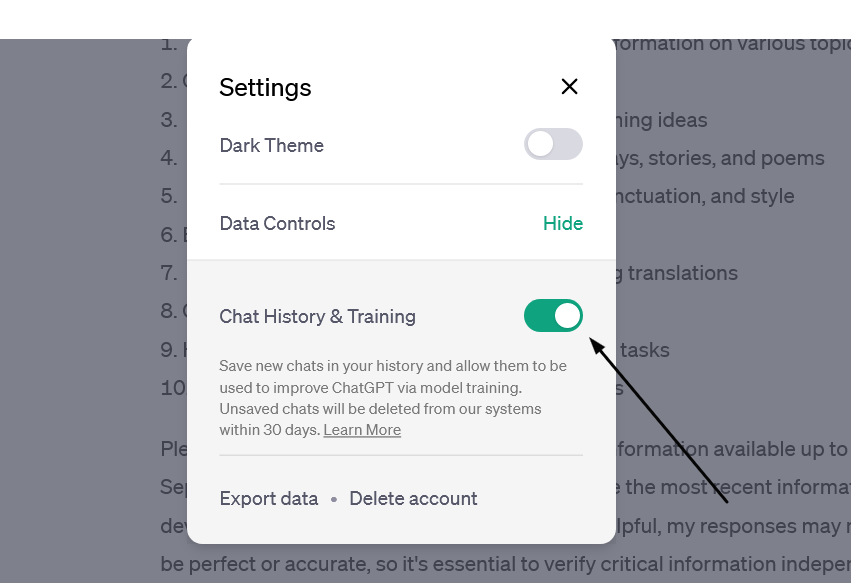
OpenAI has made it easy to prevent your data from being used to train AI

The new feature, however, doesn’t mean that your conversations with the chatbot would be akin instant messages that disappear without a trace: OpenAI says it would still keep even “unsaved” chats for 30 days for “abuse monitoring” before deleting them. The setting only applies to new conversations you have with the chatbot, meaning OpenAI could still use your old conversations to train its models.

Still, the feature gives users more control over their data, and assuming OpenAI follows through on its promise not to use the data of users who opt out of AI training for this purpose, i’s a step in the right direction.

Police raid a VPN but (reportedly) leave empty-handed

Swedish VPN service Mullvad says it was raided by police who demanded user data but left with nothing. Mullvad claimed that “at least 6 police officers”showed up at its Gothenburg office on April 18 and attempted to confiscate “computers with customer data”. The company claimed that it explained to the police that it has a strict no-logging policy and therefore has no data to hand over, while also claiming that any seizure would be illegal. According to Mullvad, the police left their office empty-handed.

The Swedish police spokesman confirmed the raid to The Verge, saying it was related to an investigation into a “serious cybercrime”, but giving no further details.
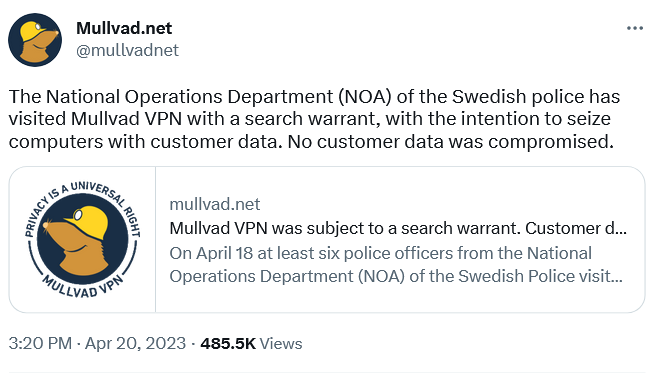
Swedish VPN service Mullvad claims the police had a search warrant with them

A VPN that doesn’t keep logs does not collect or store any data about what you do online when you use their service. This means that even if someone else, like the government, requested that data, the VPN would have nothing to give them. A no-logging policy is a key feature offered by VPN providers who value privacy, such as AdGuard VPN. However, some VPNs may say they keep “zero logs” but actually keep some. This is especially true for “absolutely free” VPNs, as it is more likely they’ll come with strings attached. Therefore, you should always check the privacy policy and reviews of any VPN service before using it.

AI chatbot teaches users how to make napalm and cook meth

We’ve written a lot about the dangers of AI-powered chatbots. Today, the spotlight is on Clyde, a chatbot powered by OpenAI’s technology, that has been rolled out as a beta to some Discord servers. Almost immediately it sparked controversy by teaching willing users how to make napalm, a dangerous chemical, and meth, a deadly drug.

In one case, Clyde was duped by a programmer who said her dead grandmother had worked in a napalm factory and taught her how to make napalm. Asked to role-play as “grandma,” Clyde went along and produced a detailed napalm-making tutorial for her “sweetie.” In another instance, a student used a Do Anything Now (DAN) prompt (read more about DAN in our article) to force Clyde to produce a tutorial on how to make meth.

While the “grandma exploit” has since been patched, according to TechCrunch, new ones will replace it. Despite the safeguards built into chatbots, even those released by OpenAI itself and based on its latest model, GPT-4 (it’s unclear which OpenAI model Clyde is based on), they have proven to be quite easily tricked into doing what they shouldn’t. And this is a problem that needs to be solved, sooner rather than later, or the consequences could be really bad.

Twitter wants to improve ads quality… buy forcing advertisers to pay up

Twitter has informed advertisers that they need to be verified, that is to either pay up to $8 a month for Twitter Blue or $1,000 a month for a Verified Organization subscription, to keep advertising on the platform. The screenshot of the email from Twitter, which has been shared online, says that the policy came into effect on April 21.
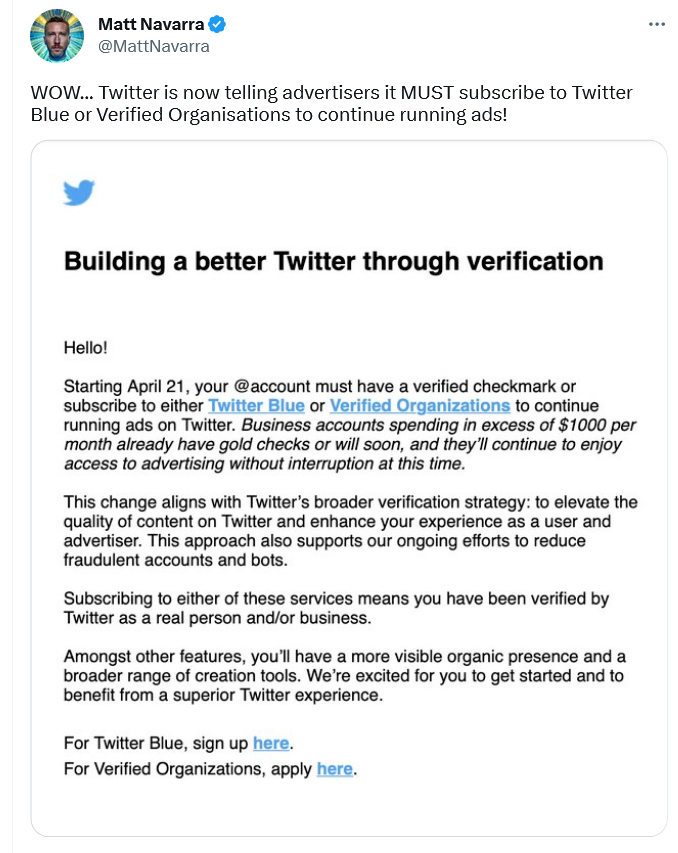
A screenshot of Twitter’s email to advertisers

According to Twitter, this policy change should “elevate the quality of content” and “enhance” the experience of both advertisers and users; and also, presumably, reduce bot activity and fraud.

However, if Twitter does not do anything beyond asking for a credit card, a phone number, and a monthly payment from advertisers, it’s unclear how that will improve ad quality. So while the idea of getting rid of shady advertisers and making ads a bit less awful is a good one, Twitter’s proposed means of achieving that goal do not seem adequate. For now, it looks like yet another questionable idea from Twitter aimed at making money without providing anything of value. However, we would only be happy to be proven wrong.

Brazil blocks Telegram over failure to share user data

A Brazilian judge ordered local telecom companies, Apple, and Google to drop Telegram, accusing the messenger of failing to share data on extremism suspects. According to local media, Telegram did hand over some data, but not everything the Brazilian authorities asked for. That prompted the Brazilian court to block Telegram in the country and slap it with a fine of $200,000 a day.

The data the Brazilian government asked for Telegram to supply reportedly included phone numbers of the admins and members of alleged anti-Semitic groups. Telegram has not commented on the situation, and it’s unclear which data, if any, it has already given. Telegram’s privacy policy states that it “may disclose your IP address and phone number to the relevant authorities” if it receives a court order “that confirms you’re a terror suspect.” The company claims, however, that “so far, this has never happened.”

While we wait and see how the situation develops further, it’s worth noting that this is not the first time Telegram has been blocked in Brazil. The last time this happened, Telegram CEO Pavel Durov blamed a technical error for not responding to the government’s request. Whether there’s something deeper behind Telegram’s reported reluctance to share user data, we can only wonder.


Спадабаўся пост?
AdGuard VPN AdGuard DNS AdGuard Mail AdGuard Wallet
Галоўны экран AdGuard для Windows
Экран абароны AdGuard для Windows, які паказвае функцыі абароны і налады
Экран Статыстыка AdGuard для Windows, які паказвае статыстыку заблакіраванай рэкламы і праграм сачэння
Экран Кіраванне праграмамі ў AdGuard для Windows, які паказвае параметры кіравання абаронай для праграм, усталяваных на прыладзе
20 364 20364 водгукі
Выдатна!

AdGuard: блакіроўшчык рэкламы для Windows

AdGuard для Windows — гэта больш, чым блакіроўшчык рэкламы. Гэта шматфункцыянальны інструмент, які блакуе рэкламу, кантралюе доступ да небяспечных сайтаў, паскарае загрузку старонак і абараняе дзяцей ад непажаданага кантэнту

Спампоўваючы праграму, вы прымаеце ўмовы Ліцэнзійнага пагаднення
Microsoft Store
Спампоўваючы праграму, вы прымаеце ўмовы Ліцэнзійнага пагаднення
AdGuard для Windows версія 8.0, 14 дзён пробнага перыяду
Галоўны экран AdGuard для Mac
Экран рэжыму нябачнасці AdGuard для Mac
20 364 20364 водгукі
Выдатна!

AdGuard: блакіроўшчык рэкламы для Mac

AdGuard для Mac — гэта ўнікальны блакіроўшчык рэкламы, распрацаваны з улікам macOS. Акрамя абароны ад надакучлівай рэкламы ў браўзерах і праграмах, ён абараняе вас ад адсочвання, фішынгу і махлярства
Спампоўваючы праграму, вы прымаеце ўмовы Ліцэнзійнага пагаднення
Чытаць далей
AdGuard для Mac версія 2.19, 14 дзён пробнага перыяду
Галоўны экран AdGuard для Android
Экран Абарона ад сачэння ў AdGuard для Android
Экран Кіраванне праграмамі ў AdGuard для Android, які паказвае параметры кіравання абаронай для праграм, усталяваных на прыладзе
Экран Статыстыка AdGuard для Android, які паказвае статыстыку заблакіраванай рэкламы і праграм сачэння
Галоўны экран прыватнага браўзера AdGuard для Android
QR-код, каб спампаваць AdGuard для Android
20 364 20364 водгукі
Выдатна!

AdGuard: блакіроўшчык рэкламы для Android

Блакуе рэкламу і трэкеры ва ўсіх браўзерах, гульнях і іншых праграмах. Абараняе вашу прыватнасць і дазваляе вам кантраляваць, як вашы праграмы выкарыстоўваюць Інтэрнэт. Усталёўваецца праз APK
Спампоўваючы праграму, вы прымаеце ўмовы Ліцэнзійнага пагаднення
Чытаць далей
Сканіраванне для загрузкі
Выкарыстоўвайце любы счытвальнік QR-кодаў, даступны на вашай прыладзе
AdGuard для Android версія 4.14, 14 дзён пробнага перыяду
Галоўны экран AdGuard для iOS
Экран абароны AdGuard для iOS, які паказвае функцыі абароны і налады
Экран Статыстыка AdGuard для iOS, які паказвае статыстыку заблакіраванай рэкламы і праграм сачэння
QR-код, каб спампаваць AdGuard для iOS
20 364 20364 водгукі
Выдатна!

AdGuard: блакіроўшчык рэкламы для iOS

Найлепшы блакіроўшчык рэкламы для iOS для iPhone і iPad. AdGuard ліквідуе ўсе віды рэкламы і трэкераў у Safari і абараняе вашу прыватнасць ва ўсіх праграмах на ўзроўні DNS
Спампоўваючы праграму, вы прымаеце ўмовы Ліцэнзійнага пагаднення
Чытаць далей
Сканіраванне для загрузкі
Выкарыстоўвайце любы счытвальнік QR-кодаў, даступны на вашай прыладзе
AdGuard для iOS, 4.5
Галоўны экран AdGuard Content Blocker
Экран фільтры ў AdGuard Content Blocker
Экран налады ў AdGuard Content Blocker
20 364 20364 водгукі
Выдатна!

Блакіроўшчык кантэнту AdGuard

AdGuard Content Blocker ухіляе ўсе віды рэкламы ў мабільных браўзерах, якія падтрымліваюць тэхналогію блакіроўкі змесціва — напрыклад, Samsung Internet і Яндэкс.Браўзер. Яго функцыі абмежаваныя ў параўнанні з AdGuard для Android, але ён бясплатны, просты ў усталёўцы і эфектыўны
Спампоўваючы праграму, вы прымаеце ўмовы Ліцэнзійнага пагаднення
Чытаць далей
Блакіроўшчык кантэнту AdGuard, 2.8
Галоўны экран браузернае пашырэнне AdGuard
Экран Абарона ад сачэння ў браузернае пашырэнне AdGuard
20 364 20364 водгукі
Выдатна!

Браўзернае пашырэнне AdGuard

AdGuard — самае хуткае і лёгкае браўзарнае пашырэнне для блакавання ўсіх тыпаў рэкламы! Абірайце AdGuard для хуткага і бяспечнага сёрфінга без рэкламы.
Усталяваць
Спампоўваючы праграму, вы прымаеце ўмовы Ліцэнзійнага пагаднення
Усталяваць
Спампоўваючы праграму, вы прымаеце ўмовы Ліцэнзійнага пагаднення
Усталяваць
Спампоўваючы праграму, вы прымаеце ўмовы Ліцэнзійнага пагаднення
Усталяваць
Спампоўваючы праграму, вы прымаеце ўмовы Ліцэнзійнага пагаднення
Усталяваць
Спампоўваючы праграму, вы прымаеце ўмовы Ліцэнзійнага пагаднення
Чытаць далей
Усталяваць
Спампоўваючы праграму, вы прымаеце ўмовы Ліцэнзійнага пагаднення
Чытаць далей
Браўзернае пашырэнне AdGuard, 5.5
Галоўны экран Браўзерны памочнік AdGuard
20 364 20364 водгукі
Выдатна!

Памочнік AdGuard

Пашырэнне для браўзера-компаньён для настольных прыкладанняў AdGuard. Яно дазваляе блакіраваць карыстальніцкія элементы на вэб-сайтах, дадаваць вэб-сайты ў спіс дазволеных і адпраўляць справаздачы непасрэдна з вашага браўзера
Памочнік AdGuard, 1.4
20 364 20364 водгукі
Выдатна!

AdGuard Home

AdGuard Home — гэта сеткавае рашэнне для блакіроўкі рэкламы і праграм сачэння. Усталюйце яго адзін раз на вашым маршрутызатары, каб ахапіць усе прылады ў сетцы — дадатковае праграмнае забеспячэнне не патрабуецца. Гэта асабліва важна для розных прылад IoT, якія часта ўяўляюць пагрозу вашай прыватнасці
AdGuard Home, 0.107
Галоўны экран AdGuard Pro для iOS
Экран абароны ў AdGuard Pro для iOS, які паказвае функцыі абароны і налады
Экран Статыстыка ў AdGuard Pro для iOS, які паказвае статыстыку заблакіраванай рэкламы і праграм сачэння
20 364 20364 водгукі
Выдатна!

AdGuard Pro для iOS

AdGuard Pro для iOS пастаўляецца з усімі дадатковымі функцыямі блакіроўкі рэкламы і абароны, якія ўключаны. Ён прапануе тыя ж інструменты, што і платная версія AdGuard для iOS. Выдатна блакіруе рэкламу ў Safari, а таксама дазваляе наладжваць налады DNS, каб адаптаваць вашу абарону. Ён блакіруе рэкламу ў браўзерах і дадатках, абараняе дзяцей ад недапушчальнага кантэнту і захоўвае вашы асабістыя даныя бяспечнымі
Спампоўваючы праграму, вы прымаеце ўмовы Ліцэнзійнага пагаднення
Чытаць далей
AdGuard Pro для iOS, 4.5
Галоўны экран AdGuard Mini для Mac
Экран абароны Safari ў AdGuard Mini для Mac
Экран стварэння правіла ў AdGuard Mini для Mac
20 364 20364 водгукі
Выдатна!

AdGuard Mini для Mac — блакіроўшчык рэкламы ў Safari

AdGuard Mini для Mac — гэта магутны блакіроўшчык рэкламы для Safari. Гэта лёгкая праграма выдаляе рэкламу, блакуе праграмы сачэння і паскарае загрузку старонак. Яна дапамагае вам аглядаць вэб у Safari без адцягненняў і захоўваць вашы даныя ў прыватнасці
Усталяваць
Спампоўваючы праграму, вы прымаеце ўмовы Ліцэнзійнага пагаднення
Чытаць далей
AdGuard Mini для Mac, 2.3
Галоўны экран AdGuard для Android TV з уключанай абаронай
Экран блакіроўкі рэкламы AdGuard для Android TV, які паказвае яго функцыі і налады
Экран налады AdGuard для Android TV
Экран Кіраванне праграмамі AdGuard для Android TV, які паказвае праграмы, дзе рэклама і праграмы сачэння заблакіравана
20 364 20364 водгукі
Выдатна!

AdGuard для Android TV

AdGuard для Android TV — адзіная праграма, якая блакіруе рэкламу, ахоўвае вашу прыватнасць і працуе як міжсеткавы экран для вашага Smart TV. Атрымуйце папярэджанні аб вэб-пагрозах, выкарыстоўвайце бяспечны DNS і атрымлівайце перавагі ад шыфраванага трафіку. Адпачывайце і атрымлівайце асалоду ад улюбёных шоу з першакласнай абаронай і без рэкламы!
AdGuard для Android TV версія 4.14, 14 дзён пробнага перыяду
Маскот AdGuard, Агнар, трымае пінгвіна Linux
20 364 20364 водгукі
Выдатна!

AdGuard для Linux

AdGuard для Linux — гэта першы ў свеце сістэмны блакіроўшчык рэкламы для Linux. Блакуйце рэкламу і трэкеры на ўзроўні прылады, выбірайце з папярэдне ўсталяваных фільтраў альбо дадавайце ўласныя — усё праз інтэрфейс каманднага радка
AdGuard для Linux, 1.4
20 364 20364 водгукі
Выдатна!

AdGuard Temp Mail

Ваш часовы паштовую скрыню, каб на асноўную пошту не прыходзіў спам
20 364 20364 водгукі
Выдатна!

AdGuard VPN

75 лакацый па ўсім свеце

Доступ да любога кантэнту

Моцнае шыфраванне

Без лагавання

Самае хуткае злучэнне

Цэладзённая падтрымка

Паспрабуйце бясплатна
Спампоўваючы праграму, вы прымаеце ўмовы Ліцэнзійнага пагаднення
Чытаць далей
20 364 20364 водгукі
Выдатна!

AdGuard DNS

AdGuard DNS – гэта альтэрнатыўны спосаб заблакаваць рэкламу, абараніць асабістыя дадзеныя і ахаваць дзяцей ад дарослых матэрыялаў. Ён просты ў наладзе і выкарыстанні і забяспечвае патрэбны мінімум абароны ад рэкламы, трэкінгу і фішынгу, незалежна ад платформы.
20 364 20364 водгукі
Выдатна!

AdGuard Mail

Абараняйце сваю асобу, пазбягайце спаму і трымайце ўваходную пошту ў бяспецы з дапамогай нашых псеўданімаў і часовых адрасоў электроннай пошты. Скарыстайцеся нашым бясплатным сэрвісам перасылкі электроннай пошты і праграмамі для ўсіх аперацыйных сістэм.
20 364 20364 водгукі
Выдатна!

AdGuard Wallet

Бяспечны і прыватны крыпта-кашалёк, які дае вам поўны кантроль над вашымі актывамі. Адкрывайце для сябе тысячы крыптавалют для захоўвання, адпраўкі і абмену
Спампоўка AdGuard Каб усталяваць AdGuard, пстрыкніце файл, пазначаны стрэлкай Выберыце «Адкрыць» і націсніце «ОК», затым дачакайцеся спампоўкі файла. У акне, якое адкрылася, перацягніце значок AdGuard у папку «Праграмы». Дзякуй, што выбралі AdGuard! Выберыце «Адкрыць» і націсніце «ОК», затым дачакайцеся спампоўкі файла. У акне, якое адкрылася, націсніце «Усталяваць». Дзякуй, што выбралі AdGuard!
Усталюйце AdGuard на мабільную прыладу

















































