Research says extensions can steal your password from websites. Should you be worried?

Recent research by the University of Wisconsin-Madison found that “a significant percentage” of extensions in Chrome — about 12.5% — have received permissions from users that enable them to access sensitive personal information. The paper mainly focuses on passwords that the researchers say are often stored in plaintext within the source code of even reputable websites. These unprotected passwords, they argue, can become easy targets for malicious data-hungry extensions.

The researchers found that on 15% of the websites they studied — and these are not some obscure and unknown portals, but the likes of Google and Cloudflare (among others) — passwords were “present in plain text in the HTML source code.” In the researchers’ opinion, this careless attitude by website developers combined with relatively lax Chrome rules for extension developers leave the door wide open for attackers to exploit this vulnerability. During their research, they identified 190 extensions that were “directly accessing password fields,” including such popular extensions as AdBlockPlus and Honey — both of them boasting over 10 million downloads.

Exerpt from the research
Source

The researchers said:

“Analyzing the manifest files (the JSON-formatted files that provide important information about the extension’s capabilities and the files it uses), we find that 12.5% (17.3K) extensions have the necessary permissions to extract sensitive information on all web pages.”

While Google Chrome’s new platform for extensions, Manifest V3, has imposed constraints on what extensions can do, the researchers found that these measures did not mitigate risks to security in any substantial way. They said: “Despite MV3’s intended advancements in user privacy and security, content scripts’ operations remain unchanged. This maintains the lack of security boundary between the extension and web page and allows an extension to be loaded on the DOM tree and gain unrestricted access to the webpage, posing security risks for the users.”

Sounds ominous, doesn’t it? So, let’s set things straight.

It’s a trust issue, there’s no getting round it

While it might be true that ad blocking extensions (like many others) require some scary-sounding permissions, it’s not because they are inherently malicious or hell-bent on stealing your data. It’s just they have no other way to do their job. And you have to trust them to do it right.

In fact, it’s by far not the first time that alarm bells have been sounded about the extent to which extensions can access user data. The issue is not specific to Chrome — extensions for other browsers, such as Firefox, have the same capabilities and permissions. Nor is it just about ad blockers: all extensions that need to modify the content of web pages, such as password managers and productivity tools, require broad access to the information on these web pages. The technical reason behind this is that these extensions use JavaScript, a programming language that allows them to read and transform HTML elements on the web page to fulfill their purpose. For example, password managers use JavaScript to insert passwords and usernames into input fields, while productivity tools use it to block distractions, track time, save web pages, etc. So, what about ad blockers?

Ad blockers run JavaScript to scan web pages for ad scripts and other elements that match their blocklist, so that they can block them. It also allows them to hide “ad leftovers” — empty spaces and broken elements that may have been left behind by the blocked ads. This process is called “cosmetic processing.”

In the AdGuard extension description in the Chrome Web Browser Store, we try to be transparent about why we need certain permissions.
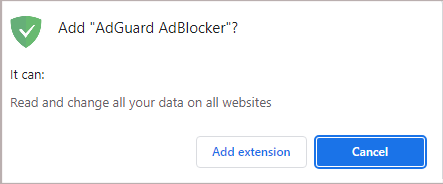
AdGuard permissions

Thus we explain that we need permissions to read and change all your data on all websites (“host permission” in Chrome) and to access tabs (“tabs permission”) in order to block ads, as well as apply cosmetic rules so that web pages look clean and tidy. We also need the webNavigation permission to catch the moment when to inject ad-blocking scriptlets, that is before the page loads any ads.

To sum it up, the AdGuard extension, as well as many others, may require intrusive-sounding permissions to work. Ultimately, it’s up to you if you trust their developers and their justifications for needing these permissions enough to grant them.

So, should you be worried?

Yes, in the grand scheme of things, you should. You should be mindful when installing extensions that can access your data on web pages. Even if rather slim, there’s a chance that the extension you want to install is a malicious one and will steal your password or banking details that are stored in plaintext in a website’s HTML source code. With additional functionality come additional risks, and this applies not only for add-ons, but also for other services and devices: take WiFi-enabled vacuums or modern cars with sensors, for example. So, to cut to the chase, you will have to accept a higher level of risk to your security and privacy when you allow your add-on to work its magic, such as blocking ads. Regardless of whether you think such a trade-off is fair or not, it is just unavoidable.

In 2018, Mozilla devoted an entire blog post to extension permissions, including “scary-sounding ones”, in which it explained why extensions like ad blockers need them for legitimate reasons, but also highlighted the risks of installing them.

However, the Firefox maker noted that such cases, when a malicious developer claims your extension does one thing while it actually does something else, while possible, are still “rare.”
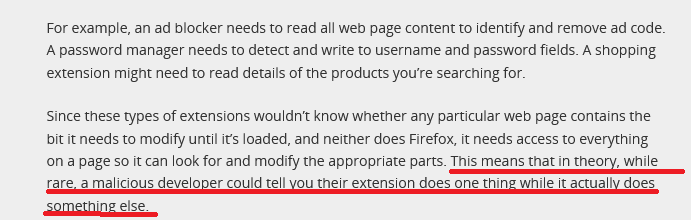
Mozilla's blog

Source: Mozilla

You may argue that even “rare” is sometimes too often. And we agree wholeheartedly — downplaying this problem would do nobody good. A few years ago, we ourselves exposed several malicious ad blocking extensions that ripped off the code of legitimate ones and could change your browser’s behavior in any way. At the time we estimated that over 20,000,000 people could be affected by these fake ad blockers. So now the burning question is, how can you be a little more comfortable giving your extension the ability to see all of your browsing activity?

Well, here’s a checklist that the extension needs to meet to be considered safe in our eyes:

  • The author of the extension is clearly stated, has a physical address, and, ideally, has been in the industry for many years

  • The privacy policy is present, clear, and user-friendly

  • The reasons for permissions are clearly stated, and match the purposes of the extension

  • The extension is open source: you can see the list of all commits and it’s always available (for example, our trusted Chrome ad blocker is free and public)

  • The developer maintains online presence and can be easily contacted by users (via social media, website, or a dedicated support desk) and provides timely responses

  • The extension has positive ratings and favorable reviews. Although these are not an iron-clad guarantee of it being safe, as reviews can be manipulated by bots or left by non-inquisitive casual users who appreciate the fact that the extension works and don’t look any deeper — but that’s another story


Спадабаўся пост?
AdGuard VPN AdGuard DNS AdGuard Mail AdGuard Wallet
Галоўны экран AdGuard для Windows
Экран абароны AdGuard для Windows, які паказвае функцыі абароны і налады
Экран Статыстыка AdGuard для Windows, які паказвае статыстыку заблакіраванай рэкламы і праграм сачэння
Экран Кіраванне праграмамі ў AdGuard для Windows, які паказвае параметры кіравання абаронай для праграм, усталяваных на прыладзе
20 363 20363 водгукі
Выдатна!

AdGuard: блакіроўшчык рэкламы для Windows

AdGuard для Windows — гэта больш, чым блакіроўшчык рэкламы. Гэта шматфункцыянальны інструмент, які блакуе рэкламу, кантралюе доступ да небяспечных сайтаў, паскарае загрузку старонак і абараняе дзяцей ад непажаданага кантэнту
Спампоўваючы праграму, вы прымаеце ўмовы Ліцэнзійнага пагаднення
Microsoft Store
Спампоўваючы праграму, вы прымаеце ўмовы Ліцэнзійнага пагаднення
AdGuard для Windows версія 8.0, 14 дзён пробнага перыяду
Галоўны экран AdGuard для Mac
Экран рэжыму нябачнасці AdGuard для Mac
20 363 20363 водгукі
Выдатна!

AdGuard: блакіроўшчык рэкламы для Mac

AdGuard для Mac — гэта ўнікальны блакіроўшчык рэкламы, распрацаваны з улікам macOS. Акрамя абароны ад надакучлівай рэкламы ў браўзерах і праграмах, ён абараняе вас ад адсочвання, фішынгу і махлярства
Спампоўваючы праграму, вы прымаеце ўмовы Ліцэнзійнага пагаднення
Чытаць далей
AdGuard для Mac версія 2.19, 14 дзён пробнага перыяду
Галоўны экран AdGuard для Android
Экран Абарона ад сачэння ў AdGuard для Android
Экран Кіраванне праграмамі ў AdGuard для Android, які паказвае параметры кіравання абаронай для праграм, усталяваных на прыладзе
Экран Статыстыка AdGuard для Android, які паказвае статыстыку заблакіраванай рэкламы і праграм сачэння
Галоўны экран прыватнага браўзера AdGuard для Android
QR-код, каб спампаваць AdGuard для Android
20 363 20363 водгукі
Выдатна!

AdGuard: блакіроўшчык рэкламы для Android

Блакуе рэкламу і трэкеры ва ўсіх браўзерах, гульнях і іншых праграмах. Абараняе вашу прыватнасць і дазваляе вам кантраляваць, як вашы праграмы выкарыстоўваюць Інтэрнэт. Усталёўваецца праз APK
Спампоўваючы праграму, вы прымаеце ўмовы Ліцэнзійнага пагаднення
Чытаць далей
Сканіраванне для загрузкі
Выкарыстоўвайце любы счытвальнік QR-кодаў, даступны на вашай прыладзе
AdGuard для Android версія 4.14, 14 дзён пробнага перыяду
Галоўны экран AdGuard для iOS
Экран абароны AdGuard для iOS, які паказвае функцыі абароны і налады
Экран Статыстыка AdGuard для iOS, які паказвае статыстыку заблакіраванай рэкламы і праграм сачэння
QR-код, каб спампаваць AdGuard для iOS
20 363 20363 водгукі
Выдатна!

AdGuard: блакіроўшчык рэкламы для iOS

Найлепшы блакіроўшчык рэкламы для iOS для iPhone і iPad. AdGuard ліквідуе ўсе віды рэкламы і трэкераў у Safari і абараняе вашу прыватнасць ва ўсіх праграмах на ўзроўні DNS
Спампоўваючы праграму, вы прымаеце ўмовы Ліцэнзійнага пагаднення
Чытаць далей
Сканіраванне для загрузкі
Выкарыстоўвайце любы счытвальнік QR-кодаў, даступны на вашай прыладзе
AdGuard для iOS, 4.5
Галоўны экран AdGuard Content Blocker
Экран фільтры ў AdGuard Content Blocker
Экран налады ў AdGuard Content Blocker
20 363 20363 водгукі
Выдатна!

Блакіроўшчык кантэнту AdGuard

AdGuard Content Blocker ухіляе ўсе віды рэкламы ў мабільных браўзерах, якія падтрымліваюць тэхналогію блакіроўкі змесціва — напрыклад, Samsung Internet і Яндэкс.Браўзер. Яго функцыі абмежаваныя ў параўнанні з AdGuard для Android, але ён бясплатны, просты ў усталёўцы і эфектыўны
Спампоўваючы праграму, вы прымаеце ўмовы Ліцэнзійнага пагаднення
Чытаць далей
Блакіроўшчык кантэнту AdGuard, 2.8
Галоўны экран браузернае пашырэнне AdGuard
Экран Абарона ад сачэння ў браузернае пашырэнне AdGuard
20 363 20363 водгукі
Выдатна!

Браўзернае пашырэнне AdGuard

AdGuard — самае хуткае і лёгкае браўзарнае пашырэнне для блакавання ўсіх тыпаў рэкламы! Абірайце AdGuard для хуткага і бяспечнага сёрфінга без рэкламы.
Усталяваць
Спампоўваючы праграму, вы прымаеце ўмовы Ліцэнзійнага пагаднення
Усталяваць
Спампоўваючы праграму, вы прымаеце ўмовы Ліцэнзійнага пагаднення
Усталяваць
Спампоўваючы праграму, вы прымаеце ўмовы Ліцэнзійнага пагаднення
Усталяваць
Спампоўваючы праграму, вы прымаеце ўмовы Ліцэнзійнага пагаднення
Усталяваць
Спампоўваючы праграму, вы прымаеце ўмовы Ліцэнзійнага пагаднення
Чытаць далей
Усталяваць
Спампоўваючы праграму, вы прымаеце ўмовы Ліцэнзійнага пагаднення
Чытаць далей
Браўзернае пашырэнне AdGuard, 5.5
Галоўны экран Браўзерны памочнік AdGuard
20 363 20363 водгукі
Выдатна!

Памочнік AdGuard

Пашырэнне для браўзера-компаньён для настольных прыкладанняў AdGuard. Яно дазваляе блакіраваць карыстальніцкія элементы на вэб-сайтах, дадаваць вэб-сайты ў спіс дазволеных і адпраўляць справаздачы непасрэдна з вашага браўзера
Памочнік AdGuard, 1.4
20 363 20363 водгукі
Выдатна!

AdGuard Home

AdGuard Home — гэта сеткавае рашэнне для блакіроўкі рэкламы і праграм сачэння. Усталюйце яго адзін раз на вашым маршрутызатары, каб ахапіць усе прылады ў сетцы — дадатковае праграмнае забеспячэнне не патрабуецца. Гэта асабліва важна для розных прылад IoT, якія часта ўяўляюць пагрозу вашай прыватнасці
AdGuard Home, 0.107
Галоўны экран AdGuard Pro для iOS
Экран абароны ў AdGuard Pro для iOS, які паказвае функцыі абароны і налады
Экран Статыстыка ў AdGuard Pro для iOS, які паказвае статыстыку заблакіраванай рэкламы і праграм сачэння
20 363 20363 водгукі
Выдатна!

AdGuard Pro для iOS

AdGuard Pro для iOS пастаўляецца з усімі дадатковымі функцыямі блакіроўкі рэкламы і абароны, якія ўключаны. Ён прапануе тыя ж інструменты, што і платная версія AdGuard для iOS. Выдатна блакіруе рэкламу ў Safari, а таксама дазваляе наладжваць налады DNS, каб адаптаваць вашу абарону. Ён блакіруе рэкламу ў браўзерах і дадатках, абараняе дзяцей ад недапушчальнага кантэнту і захоўвае вашы асабістыя даныя бяспечнымі
Спампоўваючы праграму, вы прымаеце ўмовы Ліцэнзійнага пагаднення
Чытаць далей
AdGuard Pro для iOS, 4.5
Галоўны экран AdGuard Mini для Mac
Экран абароны Safari ў AdGuard Mini для Mac
Экран стварэння правіла ў AdGuard Mini для Mac
20 363 20363 водгукі
Выдатна!

AdGuard Mini для Mac — блакіроўшчык рэкламы ў Safari

AdGuard Mini для Mac — гэта магутны блакіроўшчык рэкламы для Safari. Гэта лёгкая праграма выдаляе рэкламу, блакуе праграмы сачэння і паскарае загрузку старонак. Яна дапамагае вам аглядаць вэб у Safari без адцягненняў і захоўваць вашы даныя ў прыватнасці
Усталяваць
Спампоўваючы праграму, вы прымаеце ўмовы Ліцэнзійнага пагаднення
Чытаць далей
AdGuard Mini для Mac, 2.3
Галоўны экран AdGuard для Android TV з уключанай абаронай
Экран блакіроўкі рэкламы AdGuard для Android TV, які паказвае яго функцыі і налады
Экран налады AdGuard для Android TV
Экран Кіраванне праграмамі AdGuard для Android TV, які паказвае праграмы, дзе рэклама і праграмы сачэння заблакіравана
20 363 20363 водгукі
Выдатна!

AdGuard для Android TV

AdGuard для Android TV — адзіная праграма, якая блакіруе рэкламу, ахоўвае вашу прыватнасць і працуе як міжсеткавы экран для вашага Smart TV. Атрымуйце папярэджанні аб вэб-пагрозах, выкарыстоўвайце бяспечны DNS і атрымлівайце перавагі ад шыфраванага трафіку. Адпачывайце і атрымлівайце асалоду ад улюбёных шоу з першакласнай абаронай і без рэкламы!
AdGuard для Android TV версія 4.14, 14 дзён пробнага перыяду
Маскот AdGuard, Агнар, трымае пінгвіна Linux
20 363 20363 водгукі
Выдатна!

AdGuard для Linux

AdGuard для Linux — гэта першы ў свеце сістэмны блакіроўшчык рэкламы для Linux. Блакуйце рэкламу і трэкеры на ўзроўні прылады, выбірайце з папярэдне ўсталяваных фільтраў альбо дадавайце ўласныя — усё праз інтэрфейс каманднага радка
AdGuard для Linux, 1.4
20 363 20363 водгукі
Выдатна!

AdGuard Temp Mail

Ваш часовы паштовую скрыню, каб на асноўную пошту не прыходзіў спам
20 363 20363 водгукі
Выдатна!

AdGuard VPN

75 лакацый па ўсім свеце

Доступ да любога кантэнту

Моцнае шыфраванне

Без лагавання

Самае хуткае злучэнне

Цэладзённая падтрымка

Паспрабуйце бясплатна
Спампоўваючы праграму, вы прымаеце ўмовы Ліцэнзійнага пагаднення
Чытаць далей
20 363 20363 водгукі
Выдатна!

AdGuard DNS

AdGuard DNS – гэта альтэрнатыўны спосаб заблакаваць рэкламу, абараніць асабістыя дадзеныя і ахаваць дзяцей ад дарослых матэрыялаў. Ён просты ў наладзе і выкарыстанні і забяспечвае патрэбны мінімум абароны ад рэкламы, трэкінгу і фішынгу, незалежна ад платформы.
20 363 20363 водгукі
Выдатна!

AdGuard Mail

Абараняйце сваю асобу, пазбягайце спаму і трымайце ўваходную пошту ў бяспецы з дапамогай нашых псеўданімаў і часовых адрасоў электроннай пошты. Скарыстайцеся нашым бясплатным сэрвісам перасылкі электроннай пошты і праграмамі для ўсіх аперацыйных сістэм.
20 363 20363 водгукі
Выдатна!

AdGuard Wallet

Бяспечны і прыватны крыпта-кашалёк, які дае вам поўны кантроль над вашымі актывамі. Адкрывайце для сябе тысячы крыптавалют для захоўвання, адпраўкі і абмену
Спампоўка AdGuard Каб усталяваць AdGuard, пстрыкніце файл, пазначаны стрэлкай Выберыце «Адкрыць» і націсніце «ОК», затым дачакайцеся спампоўкі файла. У акне, якое адкрылася, перацягніце значок AdGuard у папку «Праграмы». Дзякуй, што выбралі AdGuard! Выберыце «Адкрыць» і націсніце «ОК», затым дачакайцеся спампоўкі файла. У акне, якое адкрылася, націсніце «Усталяваць». Дзякуй, што выбралі AdGuard!
Усталюйце AdGuard на мабільную прыладу


















































