Fake Ad Blockers 2: Now with Cookies and Ad Fraud

— OK, Google, I use Chrome, and I'd like to get an ad blocker for it.
— Sure, head to Chrome Web Store, there are literally hundreds of ad blockers there!
— Hmm, hundreds you say? Is it safe? I heard that last year a lot of them appeared to be fake and malicious!
— No worries, we are going to limit the power of ad blockers soon, this will definitely help!
— Oh, really? That's cool, thank you! I'll grab one from the top of the search results. This "AdBlock" by "AdBlock, Inc" looks legit. It has a privacy policy, it has over 800,000 users, and it is from a German company. Or maybe I'll try this "uBlock" by "Charlie Lee"? Five stars rating, 850,000 users, it must be good as well.

Stop right there!

This "AdBlock" is fake and malicious, and the "uBlock" one is the same. And there are many more not so popular deceptive clones there. How do I know that? I spent quite some time inspecting their code trying to figure out what they do. The real question is, how could you (a casual user) know it?
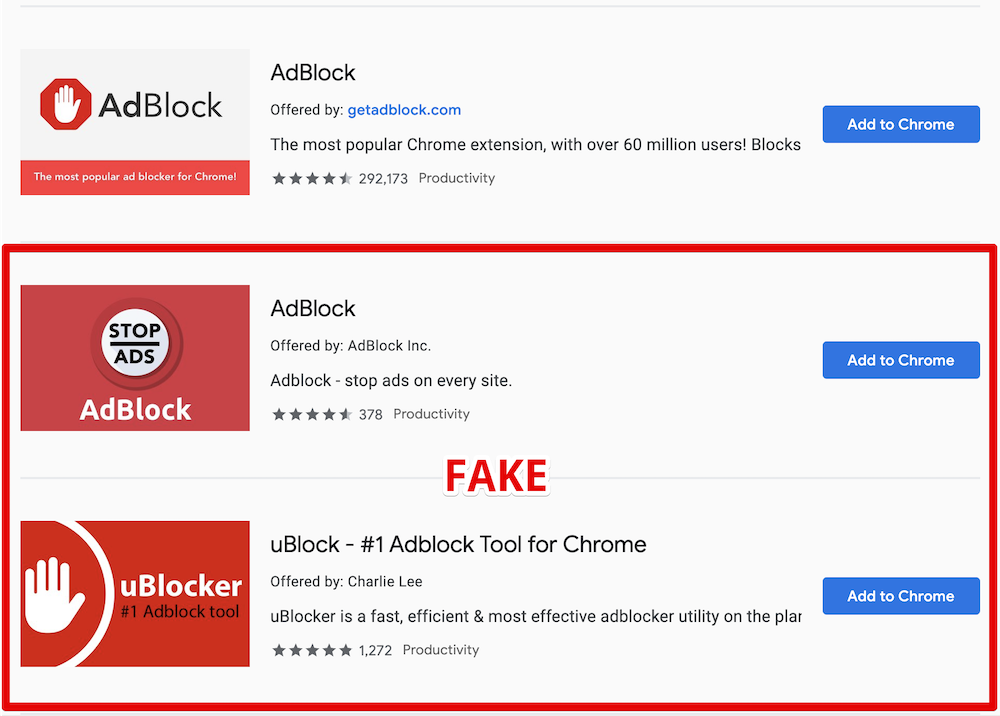
Here is the legit AdBlock extension followed by its clones

What's wrong with them?

For starters, they are using the names of two other very popular ad blockers, and this alone is deceitful and simply not right and should be enough. However, despite multiple reports, these extensions are still not removed.

Apparently, ethical issues and deception cannot be a reason for extension removal. Let's get to the next part then — malicious behavior.

Here goes the technical explanation. Skip to the next part if you're not a developer.

At first, these add-ons just do what they're supposed to do — they block ads. They both are based on the code of the original "AdBlock" extension so the quality is good enough.

Periodically, they send a request like this:

GET https://ublockerext.com/heartbeat/json/?action=config&&id=dgpfeomibahlpbobpnjpcobpechebadh&version=1.7&lt=199&uid=76f24bff-d831-aa47-7377-7ea195bf9cf8&r=1567540438520

At first glance, the server response looks innocent:

{"blockPopups":true,"statuses":[["synchronize_invalid_url","filters_subscription_lastDownload_invalidURL"],["synchronize_connection_error","filters_subscription_lastDownload_connectionError"],["synchronize_invalid_data","filters_subscription_lastDownload_invalidData"],["synchronize_checksum_mismatch","filters_subscription_lastDownload_checksumMismatch"]]}

However, about 55 hours after the installation, the response suddenly changes, and it does not look that innocent anymore.

This new response contains a list of commands for the extension to execute. After that the extensions' behavior changes, and they start doing a few more things besides ad blocking.

They now send a request to urldata.net for each new visited domain. For instance, if you visit teamviewer.com, they'll send a request like this:

http://urldata.net/api?key=4e4a7faf91b2bcda88a60e269e4d6208bfe8d3d6&out=https%3A%2F%2Fteamviewer.com&format=txt

The response to this request contains a special URL:

http://urldata.net/newapi/click/PvdHh16uGq6mLqmbUoT3AaUImj7ynsh0cVlCywkljEF19oBV0JH4jNYpn--xwIyEV36OMPPH1IrESEyclc7yxEbB3mYrfPMxnGqoV4SOmQ4MI9NYNHAQrPHwvJNE0W488ESUN1y7ONahVxwBZKnr4PZlZKI5gNi65DoIfYNwXAPoyFwh8Mgz1bX63V4PnjspvZa-DqjF5GTNxoIJqpHLC1_SwlFRYeoIvVGutkgfCSI4hMHa3z52VbL7VxbaQAhhqLC-uJUJO_s234VL3JDM01O-JE9PS6fXOH6z5XUojvotSQ5mZe7NFEsuMaeSK9rasy8MvaICWZpGDmgxIodzvMpJUv41ppkuqMBDDYpHptCEBb4Za_HffgaiKn-aY_COfan5P650B6ZTQsVqNKidMRRaHY4FxvM7VA79vX5_Oe0J0c9Wczw8VM9GrvzlGLdt4TjyBcF2JEtpcayh99JdL1wxrL_EoEHMml4LDy1JwT8LPxPG2vrlK5QSuoGrx-7tJLHD6Gq3SUeQj1XXEcENy77hkzU79TO9_hEs29Kq6ASdk6NKIZT8gOuJsNOAkU4i0Y9JvmEpdENyBL2ugmFNyitW2CfGzHrLsNex

The extensions will immediately open that URL in the background. A chain of redirects follows this request:

The last request in the chain is:

https://www.teamviewer.com/en/content/2019-cj-emea/?coupon=aff-19-en-10-1&utm_source=affiliate&utm_medium=cj&utm_campaign=dedc1dc5d58611e982c203670a180513&utm_content=2933854&PID=affiliate.cj.q1&s=1&cjevent=dedc1dc5d58611e982c203670a180513

What's going on here, you'd ask? Apparently, this address belongs to Teamviewer's affiliate program. In response, your browser receives a special "affiliate" cookie. Now if you make a purchase on teamviewer.com the extensions owner will be paid a comission by Teamviewer.

This technique is known as Cookie stuffing, and this is basically an ad fraud scheme.

There are many more affiliate links they are using for this. Here's just a small part I've been able to extract in 30 minutes. Here are some notable victims: microsoft.com, linkedin.com, aliexpress.com, booking.com, and many more.

Another interesting thing about this extension is that it contains some self-protection mechanisms. For instance, it detects if the developer console is open, it ceases all suspicious activity at once.

Summary

  • Both fake AdBlock and uBlock deceive users by using names of legitimate popular ad blockers.
  • They have not been taken down by Google despite multiple reports about deceptive naming.
  • The real purpose of these extensions is Cookie stuffing — an illegal ad fraud scheme.
  • The scale is unprecedented. These two add-ons have more than 1.6 Million "weekly active users", who were stuffed with cookies of over than 300 websites from Alexa Top 10000. It is difficult to estimate the damage, but I'd say that we are talking about millions of USD monthly.

Actually, there's a bright side to it. Now that this fraud scheme is uncovered, affiliate programs' owners can follow the money trail and find out who is behind this scheme. Sentences for cookie stuffing are real so there's a chance that the developers of these extensions will be held responsible.

The problem of fake extensions

This problem is not new, and similar cases were reported before. However, despite that, I see no effort from Google to resolve this. It seems that the situation is even worse now. At least fake blockers had to invent a new name before. Now, as you can see, they don't even bother to do that!

It's not only regular users who fall for their tricks. For instance, here is the fake "AdBlock" on the list of ad blockers recommended by androidcentral.com:

Excerpt from the review on Android Central

Is this problem unique to Chrome WebStore? Well, not really. For instance, an AdGuard rip-off has even got a "recommended" badge on Mozilla Add-ons despite multiple reports on the unethical behavior (1, 2). Well, at least it did not try to use our name.

How can this situation be improved?

You might have heard about the solution Google proposed called "Manifest V3". They say that limiting extensions capabilities will improve the overall performance, security and privacy.

Will it, though? While I kinda agree with the performance point, I don't see how it can help with the other two. For instance, it would do no harm to these two add-ons - cookie stuffing is still possible in this scenario.

In fact, I fully agree with what EFF proposes:

In order to truly protect users, Google needs to start properly enforcing existing Chrome Web Store policies.
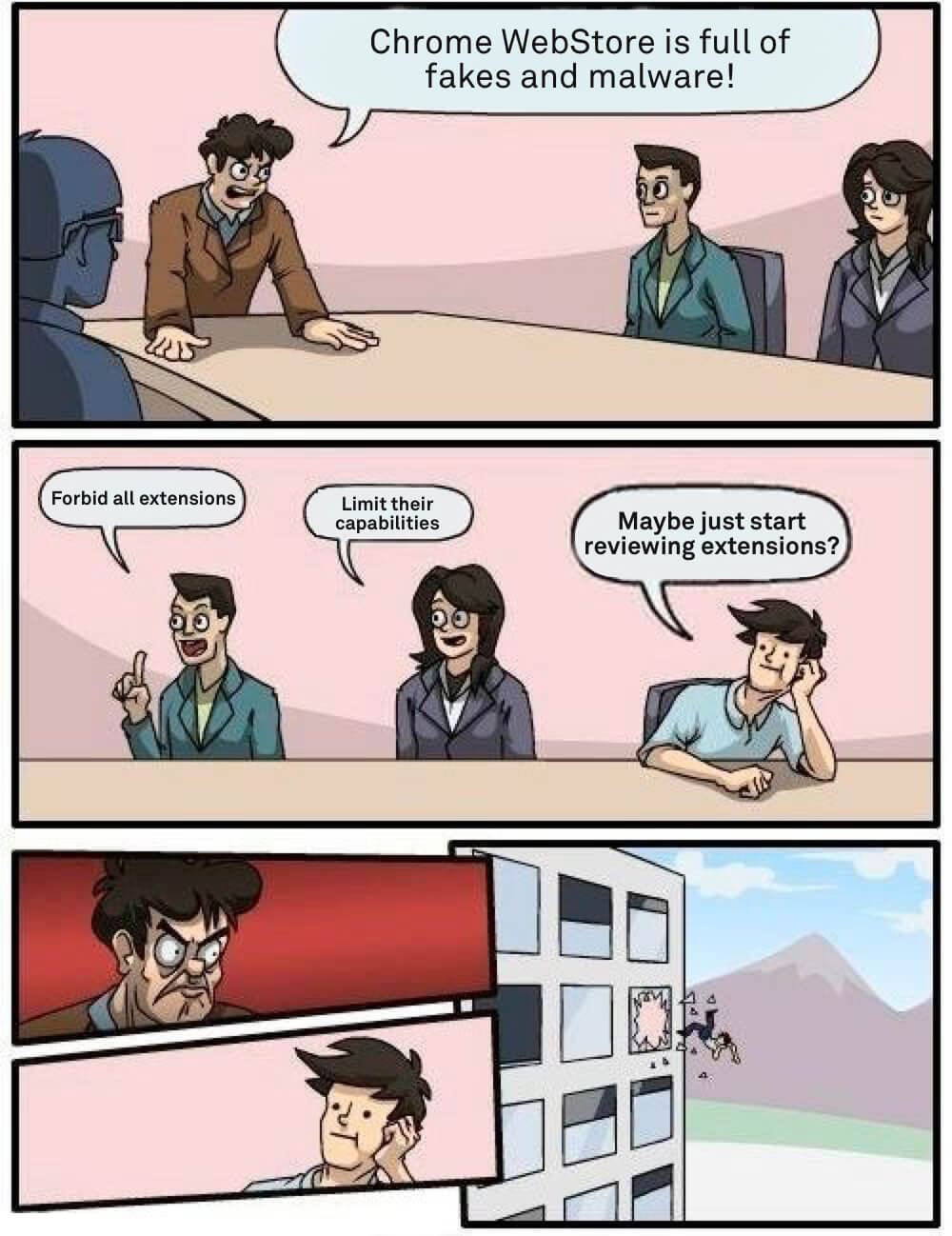
Somewhere at Google office

How can you protect yourself?

As you can see, even journalists sometimes fall for the fakes so this is a difficult question. A year ago I'd have said that the recipe is simple — install extensions only from the developers you trust.

The situation is now worse than before so I'd like to add a couple of things to the list of recommendations, at least until things somehow change:

  1. If you're going to install a browser extension, think again. Maybe you don't really need it?
  2. Don't believe what you read in the extension's description. Be aware that there's almost no review process, and this can easily be a fake.
  3. Reading the users' reviews won't help as well. These two extensions had excellent reviews and yet they were malicious.
  4. Don't use the WebStore internal search, install extensions from the trusted developers' websites directly.

UPD (Sep 18th):
Both malicious extensions we mentioned in this article are currently blocked in Chrome. While this is undoubtedly good news, Google needs to do much, much more to prove they really care about their users' safety.


Спадабаўся пост?
AdGuard VPN AdGuard DNS AdGuard Mail AdGuard Wallet
Галоўны экран AdGuard для Windows
Экран абароны AdGuard для Windows, які паказвае функцыі абароны і налады
Экран Статыстыка AdGuard для Windows, які паказвае статыстыку заблакіраванай рэкламы і праграм сачэння
Экран Кіраванне праграмамі ў AdGuard для Windows, які паказвае параметры кіравання абаронай для праграм, усталяваных на прыладзе
20 363 20363 водгукі
Выдатна!

AdGuard: блакіроўшчык рэкламы для Windows

AdGuard для Windows — гэта больш, чым блакіроўшчык рэкламы. Гэта шматфункцыянальны інструмент, які блакуе рэкламу, кантралюе доступ да небяспечных сайтаў, паскарае загрузку старонак і абараняе дзяцей ад непажаданага кантэнту

Спампоўваючы праграму, вы прымаеце ўмовы Ліцэнзійнага пагаднення
Microsoft Store
Спампоўваючы праграму, вы прымаеце ўмовы Ліцэнзійнага пагаднення
AdGuard для Windows версія 8.0, 14 дзён пробнага перыяду
Галоўны экран AdGuard для Mac
Экран рэжыму нябачнасці AdGuard для Mac
20 363 20363 водгукі
Выдатна!

AdGuard: блакіроўшчык рэкламы для Mac

AdGuard для Mac — гэта ўнікальны блакіроўшчык рэкламы, распрацаваны з улікам macOS. Акрамя абароны ад надакучлівай рэкламы ў браўзерах і праграмах, ён абараняе вас ад адсочвання, фішынгу і махлярства
Спампоўваючы праграму, вы прымаеце ўмовы Ліцэнзійнага пагаднення
Чытаць далей
AdGuard для Mac версія 2.19, 14 дзён пробнага перыяду
Галоўны экран AdGuard для Android
Экран Абарона ад сачэння ў AdGuard для Android
Экран Кіраванне праграмамі ў AdGuard для Android, які паказвае параметры кіравання абаронай для праграм, усталяваных на прыладзе
Экран Статыстыка AdGuard для Android, які паказвае статыстыку заблакіраванай рэкламы і праграм сачэння
Галоўны экран прыватнага браўзера AdGuard для Android
QR-код, каб спампаваць AdGuard для Android
20 363 20363 водгукі
Выдатна!

AdGuard: блакіроўшчык рэкламы для Android

Блакуе рэкламу і трэкеры ва ўсіх браўзерах, гульнях і іншых праграмах. Абараняе вашу прыватнасць і дазваляе вам кантраляваць, як вашы праграмы выкарыстоўваюць Інтэрнэт. Усталёўваецца праз APK
Спампоўваючы праграму, вы прымаеце ўмовы Ліцэнзійнага пагаднення
Чытаць далей
Сканіраванне для загрузкі
Выкарыстоўвайце любы счытвальнік QR-кодаў, даступны на вашай прыладзе
AdGuard для Android версія 4.14, 14 дзён пробнага перыяду
Галоўны экран AdGuard для iOS
Экран абароны AdGuard для iOS, які паказвае функцыі абароны і налады
Экран Статыстыка AdGuard для iOS, які паказвае статыстыку заблакіраванай рэкламы і праграм сачэння
QR-код, каб спампаваць AdGuard для iOS
20 363 20363 водгукі
Выдатна!

AdGuard: блакіроўшчык рэкламы для iOS

Найлепшы блакіроўшчык рэкламы для iOS для iPhone і iPad. AdGuard ліквідуе ўсе віды рэкламы і трэкераў у Safari і абараняе вашу прыватнасць ва ўсіх праграмах на ўзроўні DNS
Спампоўваючы праграму, вы прымаеце ўмовы Ліцэнзійнага пагаднення
Чытаць далей
Сканіраванне для загрузкі
Выкарыстоўвайце любы счытвальнік QR-кодаў, даступны на вашай прыладзе
AdGuard для iOS, 4.5
Галоўны экран AdGuard Content Blocker
Экран фільтры ў AdGuard Content Blocker
Экран налады ў AdGuard Content Blocker
20 363 20363 водгукі
Выдатна!

Блакіроўшчык кантэнту AdGuard

AdGuard Content Blocker ухіляе ўсе віды рэкламы ў мабільных браўзерах, якія падтрымліваюць тэхналогію блакіроўкі змесціва — напрыклад, Samsung Internet і Яндэкс.Браўзер. Яго функцыі абмежаваныя ў параўнанні з AdGuard для Android, але ён бясплатны, просты ў усталёўцы і эфектыўны
Спампоўваючы праграму, вы прымаеце ўмовы Ліцэнзійнага пагаднення
Чытаць далей
Блакіроўшчык кантэнту AdGuard, 2.8
Галоўны экран браузернае пашырэнне AdGuard
Экран Абарона ад сачэння ў браузернае пашырэнне AdGuard
20 363 20363 водгукі
Выдатна!

Браўзернае пашырэнне AdGuard

AdGuard — самае хуткае і лёгкае браўзарнае пашырэнне для блакавання ўсіх тыпаў рэкламы! Абірайце AdGuard для хуткага і бяспечнага сёрфінга без рэкламы.
Усталяваць
Спампоўваючы праграму, вы прымаеце ўмовы Ліцэнзійнага пагаднення
Усталяваць
Спампоўваючы праграму, вы прымаеце ўмовы Ліцэнзійнага пагаднення
Усталяваць
Спампоўваючы праграму, вы прымаеце ўмовы Ліцэнзійнага пагаднення
Усталяваць
Спампоўваючы праграму, вы прымаеце ўмовы Ліцэнзійнага пагаднення
Усталяваць
Спампоўваючы праграму, вы прымаеце ўмовы Ліцэнзійнага пагаднення
Чытаць далей
Усталяваць
Спампоўваючы праграму, вы прымаеце ўмовы Ліцэнзійнага пагаднення
Чытаць далей
Браўзернае пашырэнне AdGuard, 5.5
Галоўны экран Браўзерны памочнік AdGuard
20 363 20363 водгукі
Выдатна!

Памочнік AdGuard

Пашырэнне для браўзера-компаньён для настольных прыкладанняў AdGuard. Яно дазваляе блакіраваць карыстальніцкія элементы на вэб-сайтах, дадаваць вэб-сайты ў спіс дазволеных і адпраўляць справаздачы непасрэдна з вашага браўзера
Памочнік AdGuard, 1.4
20 363 20363 водгукі
Выдатна!

AdGuard Home

AdGuard Home — гэта сеткавае рашэнне для блакіроўкі рэкламы і праграм сачэння. Усталюйце яго адзін раз на вашым маршрутызатары, каб ахапіць усе прылады ў сетцы — дадатковае праграмнае забеспячэнне не патрабуецца. Гэта асабліва важна для розных прылад IoT, якія часта ўяўляюць пагрозу вашай прыватнасці
AdGuard Home, 0.107
Галоўны экран AdGuard Pro для iOS
Экран абароны ў AdGuard Pro для iOS, які паказвае функцыі абароны і налады
Экран Статыстыка ў AdGuard Pro для iOS, які паказвае статыстыку заблакіраванай рэкламы і праграм сачэння
20 363 20363 водгукі
Выдатна!

AdGuard Pro для iOS

AdGuard Pro для iOS пастаўляецца з усімі дадатковымі функцыямі блакіроўкі рэкламы і абароны, якія ўключаны. Ён прапануе тыя ж інструменты, што і платная версія AdGuard для iOS. Выдатна блакіруе рэкламу ў Safari, а таксама дазваляе наладжваць налады DNS, каб адаптаваць вашу абарону. Ён блакіруе рэкламу ў браўзерах і дадатках, абараняе дзяцей ад недапушчальнага кантэнту і захоўвае вашы асабістыя даныя бяспечнымі
Спампоўваючы праграму, вы прымаеце ўмовы Ліцэнзійнага пагаднення
Чытаць далей
AdGuard Pro для iOS, 4.5
Галоўны экран AdGuard Mini для Mac
Экран абароны Safari ў AdGuard Mini для Mac
Экран стварэння правіла ў AdGuard Mini для Mac
20 363 20363 водгукі
Выдатна!

AdGuard Mini для Mac — блакіроўшчык рэкламы ў Safari

AdGuard Mini для Mac — гэта магутны блакіроўшчык рэкламы для Safari. Гэта лёгкая праграма выдаляе рэкламу, блакуе праграмы сачэння і паскарае загрузку старонак. Яна дапамагае вам аглядаць вэб у Safari без адцягненняў і захоўваць вашы даныя ў прыватнасці
Усталяваць
Спампоўваючы праграму, вы прымаеце ўмовы Ліцэнзійнага пагаднення
Чытаць далей
AdGuard Mini для Mac, 2.3
Галоўны экран AdGuard для Android TV з уключанай абаронай
Экран блакіроўкі рэкламы AdGuard для Android TV, які паказвае яго функцыі і налады
Экран налады AdGuard для Android TV
Экран Кіраванне праграмамі AdGuard для Android TV, які паказвае праграмы, дзе рэклама і праграмы сачэння заблакіравана
20 363 20363 водгукі
Выдатна!

AdGuard для Android TV

AdGuard для Android TV — адзіная праграма, якая блакіруе рэкламу, ахоўвае вашу прыватнасць і працуе як міжсеткавы экран для вашага Smart TV. Атрымуйце папярэджанні аб вэб-пагрозах, выкарыстоўвайце бяспечны DNS і атрымлівайце перавагі ад шыфраванага трафіку. Адпачывайце і атрымлівайце асалоду ад улюбёных шоу з першакласнай абаронай і без рэкламы!
AdGuard для Android TV версія 4.14, 14 дзён пробнага перыяду
Маскот AdGuard, Агнар, трымае пінгвіна Linux
20 363 20363 водгукі
Выдатна!

AdGuard для Linux

AdGuard для Linux — гэта першы ў свеце сістэмны блакіроўшчык рэкламы для Linux. Блакуйце рэкламу і трэкеры на ўзроўні прылады, выбірайце з папярэдне ўсталяваных фільтраў альбо дадавайце ўласныя — усё праз інтэрфейс каманднага радка
AdGuard для Linux, 1.4
20 363 20363 водгукі
Выдатна!

AdGuard Temp Mail

Ваш часовы паштовую скрыню, каб на асноўную пошту не прыходзіў спам
20 363 20363 водгукі
Выдатна!

AdGuard VPN

75 лакацый па ўсім свеце

Доступ да любога кантэнту

Моцнае шыфраванне

Без лагавання

Самае хуткае злучэнне

Цэладзённая падтрымка

Паспрабуйце бясплатна
Спампоўваючы праграму, вы прымаеце ўмовы Ліцэнзійнага пагаднення
Чытаць далей
20 363 20363 водгукі
Выдатна!

AdGuard DNS

AdGuard DNS – гэта альтэрнатыўны спосаб заблакаваць рэкламу, абараніць асабістыя дадзеныя і ахаваць дзяцей ад дарослых матэрыялаў. Ён просты ў наладзе і выкарыстанні і забяспечвае патрэбны мінімум абароны ад рэкламы, трэкінгу і фішынгу, незалежна ад платформы.
20 363 20363 водгукі
Выдатна!

AdGuard Mail

Абараняйце сваю асобу, пазбягайце спаму і трымайце ўваходную пошту ў бяспецы з дапамогай нашых псеўданімаў і часовых адрасоў электроннай пошты. Скарыстайцеся нашым бясплатным сэрвісам перасылкі электроннай пошты і праграмамі для ўсіх аперацыйных сістэм.
20 363 20363 водгукі
Выдатна!

AdGuard Wallet

Бяспечны і прыватны крыпта-кашалёк, які дае вам поўны кантроль над вашымі актывамі. Адкрывайце для сябе тысячы крыптавалют для захоўвання, адпраўкі і абмену
Спампоўка AdGuard Каб усталяваць AdGuard, пстрыкніце файл, пазначаны стрэлкай Выберыце «Адкрыць» і націсніце «ОК», затым дачакайцеся спампоўкі файла. У акне, якое адкрылася, перацягніце значок AdGuard у папку «Праграмы». Дзякуй, што выбралі AdGuard! Выберыце «Адкрыць» і націсніце «ОК», затым дачакайцеся спампоўкі файла. У акне, якое адкрылася, націсніце «Усталяваць». Дзякуй, што выбралі AdGuard!
Усталюйце AdGuard на мабільную прыладу

















































