Mozilla solves the Manifest V3 puzzle to save ad blockers from Chromapocalypse

Mozilla has made good on its promise to implement Google’s new extension platform, Manifest V3, in a way that does not compromise the functionality of ad blockers. The new version of Firefox, which began rolling out last month, will ensure that users still have access to popular privacy-preserving tools, most notably content-blocking extensions.

On the one hand, by implementing Manifest V3 on its own terms, Mozilla saves developers who are switching to the new platform from having to support two different versions of their extensions (for Google Chrome and Firefox) at the same time. On the other hand, it allows content-blocking extensions that were originally built using the less restrictive Manifest V2 to continue working at full tilt.

Before we go any further, let us remind you what Manifest V3 is, and why it has drawn so much backlash from privacy advocates and content-blocking extension developers including AdGuard.

The troubled Manifest

Manifest V3 is Chrome’s new extension API, first announced in 2018. It is now being implemented across Chromium-based browsers, including, of course, Google Chrome itself.

The API introduces significant changes to the rules that extensions have to follow, such as which browser features an extension has access to and can modify. For example, previously the browser would ask a content-blocking extension what to do with a particular web request, and the extension would respond by either greenlighting, blocking or redirecting it. The new, narrower API gives the right to modify requests to the browser itself, while the extension simply announces or “declares” a set of rules by which the browser should respond. Google notes that this will prevent extensions, including ad blockers, from accessing “potentially sensitive user data,” and will make them “safer to everyone.” The downside is, this change will also cause ad blockers to lose some of their functionality.

You can never have too many rules

The problem with Manifest V3 is that it limits the number of built-in and user-added rules for extensions installed by an individual user. Namely, Chrome has set a guaranteed minimum limit of 30,000 built-in (“static”) rules per extension and a total limit of 330,000 static rules. As for user-added (“dynamic”) rules, they are capped at mere 5,000. Since at the heart of any ad-blocking extension are the filtering rules that ‘teach’ it to detect ads, such restrictions can become a real snag.

The number provided by Google is sufficient if you have only one extension that relies on the declarative NetRequest API in Manifest V3 to block ads. However, if you use more than one extension, this can become an issue: extensions will compete for the remaining rules, and some won’t be able to squeeze into the limit.

Another problem is that Google wants developers to have all the rules already built into the extension at the time of installation. Essentially, developers will have to define what their extension will do with specific requests in advance, and not ad-lib as it used to be before. This means that ad blockers will be slower to respond to changes on the site, as developers will have to upload a new version of the extension each time something changes — and wait till it passes a review, which is not a quick process in itself.

However, there’s still a glimmer of hope that the situation will improve. We have proposed an increase in the number of dynamic rules and rule sets and are championing these changes to Manifest V3 in ongoing discussions between browser vendors and the content blocking community. Hopefully the former will take our arguments into account.

Ultimately, with Chrome being a dominant force in the browser market, once Google deprecates Manifest V2, extension developers will either have to adapt to Manifest V3 or lose users. And we would like to see that transition go as smoothly as possible.
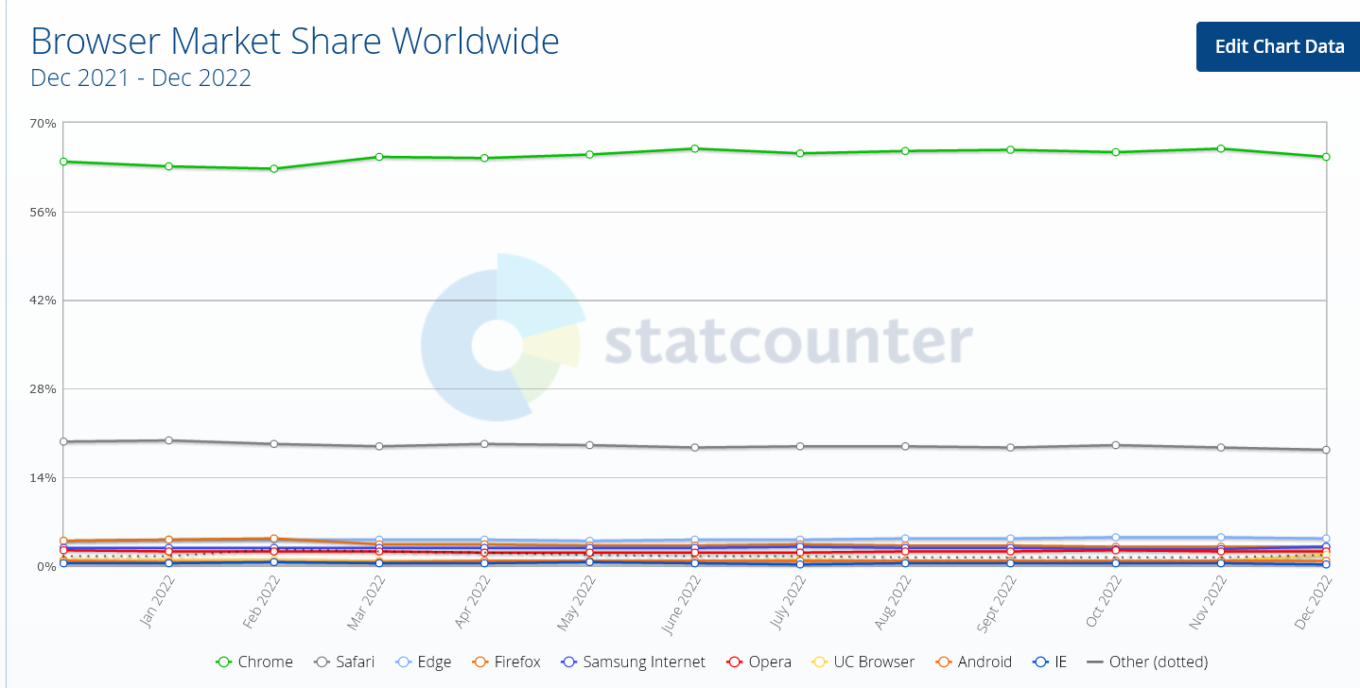
Google Chrome is a dominant force among desktop browsers

The ball in Chrome’s court

Google claims that the changes to the API will make extensions “more secure, performant, and private-respecting by default”. However, lingering concerns over their impact on ad-blocking prevent some experts from embracing the new platform. We too have repeatedly sounded the alarm about the negative impact Manifest V3 may have on Chrome developers and users.

To its credit, though, Google has sought to address these concerns. Being one of the founders of The World Wide Web Consortium’s (W3C) WebExtensions Community Group (on par with Apple, Mozilla, and Microsoft), Chrome solicited feedback on Manifest V3 from extension developers and welcomed criticism.

Still, Google’s response has been too slow and so far has failed to assuage developers’ concerns. Acknowledging these apprehensions, Mozilla announced last year that Firefox would continue to support the webRequest API to block entire categories of HTTP requests in its implementation of Manifest V3, but would also support a compatible version of declarativeNetRequest API, proposed by Google as a replacement for webRequest.

Compared to Firefox users, who will continue to benefit from the full functionality of ad blocking extensions, Chrome's 3 billion users may soon find themselves at a disadvantage when it comes to ad blocking. In the long run, this could become a catalyst for some Chrome users to switch to Firefox.

The sunset that never comes

In November, Mozilla announced that it would continue to support Manifest V2 extensions “for the foreseeable future” and promised to set a timeframe for disabling the old manifest “towards the end of 2023.”

As for Google Chrome, its timeline for pulling the plug on Manifest V2 has been pushed back so many times that it's hard to keep track. In January 2022, Google stopped accepting new extensions based on Manifest V2 to the Chrome Web Store. By June 2023 the tech giant was supposed to be experimenting with turning off support for Manifest V2 extensions in Chrome. However, in December all the remaining deadlines were put under review and all the experiments were postponed indefinitely.
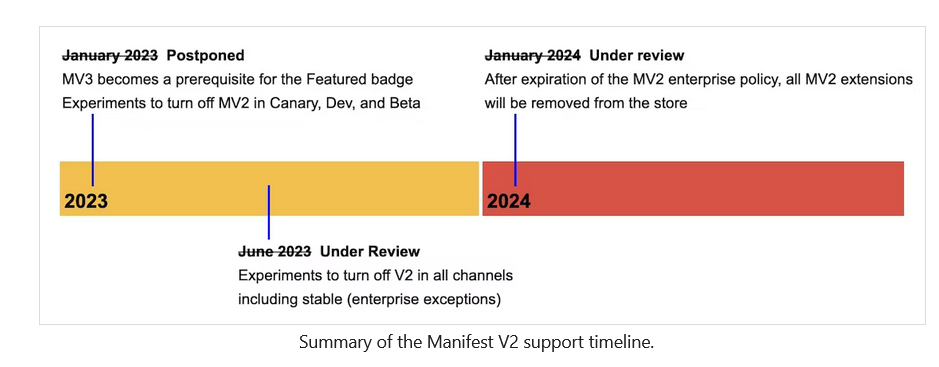
Google has pushed the deadline for sunsetting Manifest V2 a lot of times

That said, the threat of Manifest V2’s eventual demise is real. The doomsday clock for Manifest V2 may have stopped ticking, but Google could resume it at any time, so we thought it was important to have a solution ready if and when that happens.

Ad blocking in the era of Manifest V3

Believing that the chances of a sudden Google U-turn were slim, AdGuard started working on a prototype of a new Manifest V3-compliant extension as early as mid-2021. In August last year, we released an experimental ad blocking extension that met all the requirements of Manifest V3, becoming the first ad blocker to do so. Because it’s based on Manifest V3, with all its unfortunate limitations, this new extension may not be as effective as the old, tried and tested one. The extension will, however, still proactively block requests to trackers, hide social widgets, banners and video ads — in other words, it will do everything you’d expect an ad blocking extension to do.

We may have been the first, but other ad blockers soon followed suit, proving that ad blocking and Manifest V3 may not be a perfect match, but neither its arrival is a death sentence.

A month later, the author of popular ad blocker, uBlock Origin, published an experimental extension uBO Minus, compatible with Manifest V3. AdBlock Plus has also been working on a version of the extension that works on Manifest V3.

Google disappoints, Mozilla saves the day

Google claims that the sole purpose of replacing the old Manifest with a new extension platform that limits ad blocking is to provide greater security and privacy for users. Maybe that’s true, and Google does want to improve the extension platform to make it more secure and private.

Unfortunately, Google has made many decisions about the design of its new platform without taking into account the wishes and concerns of extension developers and, in the end, their own users. As a result, ad blocking extensions will lose some of their functionality. However, we don’t think the company will be too upset about this.

For its part, Mozilla has taken a more measured and less confrontational approach to ad blocking. The Firefox owner has shown that it is not impossible to implement Manifest V3 in a way that does not limit the functionality of ad blockers and at the same time increases security.


Спадабаўся пост?
AdGuard VPN AdGuard DNS AdGuard Mail AdGuard Wallet
Галоўны экран AdGuard для Windows
Экран абароны AdGuard для Windows, які паказвае функцыі абароны і налады
Экран Статыстыка AdGuard для Windows, які паказвае статыстыку заблакіраванай рэкламы і праграм сачэння
Экран Кіраванне праграмамі ў AdGuard для Windows, які паказвае параметры кіравання абаронай для праграм, усталяваных на прыладзе
20 364 20364 водгукі
Выдатна!

AdGuard: блакіроўшчык рэкламы для Windows

AdGuard для Windows — гэта больш, чым блакіроўшчык рэкламы. Гэта шматфункцыянальны інструмент, які блакуе рэкламу, кантралюе доступ да небяспечных сайтаў, паскарае загрузку старонак і абараняе дзяцей ад непажаданага кантэнту

Спампоўваючы праграму, вы прымаеце ўмовы Ліцэнзійнага пагаднення
Microsoft Store
Спампоўваючы праграму, вы прымаеце ўмовы Ліцэнзійнага пагаднення
AdGuard для Windows версія 8.0, 14 дзён пробнага перыяду
Галоўны экран AdGuard для Mac
Экран рэжыму нябачнасці AdGuard для Mac
20 364 20364 водгукі
Выдатна!

AdGuard: блакіроўшчык рэкламы для Mac

AdGuard для Mac — гэта ўнікальны блакіроўшчык рэкламы, распрацаваны з улікам macOS. Акрамя абароны ад надакучлівай рэкламы ў браўзерах і праграмах, ён абараняе вас ад адсочвання, фішынгу і махлярства
Спампоўваючы праграму, вы прымаеце ўмовы Ліцэнзійнага пагаднення
Чытаць далей
AdGuard для Mac версія 2.19, 14 дзён пробнага перыяду
Галоўны экран AdGuard для Android
Экран Абарона ад сачэння ў AdGuard для Android
Экран Кіраванне праграмамі ў AdGuard для Android, які паказвае параметры кіравання абаронай для праграм, усталяваных на прыладзе
Экран Статыстыка AdGuard для Android, які паказвае статыстыку заблакіраванай рэкламы і праграм сачэння
Галоўны экран прыватнага браўзера AdGuard для Android
QR-код, каб спампаваць AdGuard для Android
20 364 20364 водгукі
Выдатна!

AdGuard: блакіроўшчык рэкламы для Android

Блакуе рэкламу і трэкеры ва ўсіх браўзерах, гульнях і іншых праграмах. Абараняе вашу прыватнасць і дазваляе вам кантраляваць, як вашы праграмы выкарыстоўваюць Інтэрнэт. Усталёўваецца праз APK
Спампоўваючы праграму, вы прымаеце ўмовы Ліцэнзійнага пагаднення
Чытаць далей
Сканіраванне для загрузкі
Выкарыстоўвайце любы счытвальнік QR-кодаў, даступны на вашай прыладзе
AdGuard для Android версія 4.14, 14 дзён пробнага перыяду
Галоўны экран AdGuard для iOS
Экран абароны AdGuard для iOS, які паказвае функцыі абароны і налады
Экран Статыстыка AdGuard для iOS, які паказвае статыстыку заблакіраванай рэкламы і праграм сачэння
QR-код, каб спампаваць AdGuard для iOS
20 364 20364 водгукі
Выдатна!

AdGuard: блакіроўшчык рэкламы для iOS

Найлепшы блакіроўшчык рэкламы для iOS для iPhone і iPad. AdGuard ліквідуе ўсе віды рэкламы і трэкераў у Safari і абараняе вашу прыватнасць ва ўсіх праграмах на ўзроўні DNS
Спампоўваючы праграму, вы прымаеце ўмовы Ліцэнзійнага пагаднення
Чытаць далей
Сканіраванне для загрузкі
Выкарыстоўвайце любы счытвальнік QR-кодаў, даступны на вашай прыладзе
AdGuard для iOS, 4.5
Галоўны экран AdGuard Content Blocker
Экран фільтры ў AdGuard Content Blocker
Экран налады ў AdGuard Content Blocker
20 364 20364 водгукі
Выдатна!

Блакіроўшчык кантэнту AdGuard

AdGuard Content Blocker ухіляе ўсе віды рэкламы ў мабільных браўзерах, якія падтрымліваюць тэхналогію блакіроўкі змесціва — напрыклад, Samsung Internet і Яндэкс.Браўзер. Яго функцыі абмежаваныя ў параўнанні з AdGuard для Android, але ён бясплатны, просты ў усталёўцы і эфектыўны
Спампоўваючы праграму, вы прымаеце ўмовы Ліцэнзійнага пагаднення
Чытаць далей
Блакіроўшчык кантэнту AdGuard, 2.8
Галоўны экран браузернае пашырэнне AdGuard
Экран Абарона ад сачэння ў браузернае пашырэнне AdGuard
20 364 20364 водгукі
Выдатна!

Браўзернае пашырэнне AdGuard

AdGuard — самае хуткае і лёгкае браўзарнае пашырэнне для блакавання ўсіх тыпаў рэкламы! Абірайце AdGuard для хуткага і бяспечнага сёрфінга без рэкламы.
Усталяваць
Спампоўваючы праграму, вы прымаеце ўмовы Ліцэнзійнага пагаднення
Усталяваць
Спампоўваючы праграму, вы прымаеце ўмовы Ліцэнзійнага пагаднення
Усталяваць
Спампоўваючы праграму, вы прымаеце ўмовы Ліцэнзійнага пагаднення
Усталяваць
Спампоўваючы праграму, вы прымаеце ўмовы Ліцэнзійнага пагаднення
Усталяваць
Спампоўваючы праграму, вы прымаеце ўмовы Ліцэнзійнага пагаднення
Чытаць далей
Усталяваць
Спампоўваючы праграму, вы прымаеце ўмовы Ліцэнзійнага пагаднення
Чытаць далей
Браўзернае пашырэнне AdGuard, 5.5
Галоўны экран Браўзерны памочнік AdGuard
20 364 20364 водгукі
Выдатна!

Памочнік AdGuard

Пашырэнне для браўзера-компаньён для настольных прыкладанняў AdGuard. Яно дазваляе блакіраваць карыстальніцкія элементы на вэб-сайтах, дадаваць вэб-сайты ў спіс дазволеных і адпраўляць справаздачы непасрэдна з вашага браўзера
Памочнік AdGuard, 1.4
20 364 20364 водгукі
Выдатна!

AdGuard Home

AdGuard Home — гэта сеткавае рашэнне для блакіроўкі рэкламы і праграм сачэння. Усталюйце яго адзін раз на вашым маршрутызатары, каб ахапіць усе прылады ў сетцы — дадатковае праграмнае забеспячэнне не патрабуецца. Гэта асабліва важна для розных прылад IoT, якія часта ўяўляюць пагрозу вашай прыватнасці
AdGuard Home, 0.107
Галоўны экран AdGuard Pro для iOS
Экран абароны ў AdGuard Pro для iOS, які паказвае функцыі абароны і налады
Экран Статыстыка ў AdGuard Pro для iOS, які паказвае статыстыку заблакіраванай рэкламы і праграм сачэння
20 364 20364 водгукі
Выдатна!

AdGuard Pro для iOS

AdGuard Pro для iOS пастаўляецца з усімі дадатковымі функцыямі блакіроўкі рэкламы і абароны, якія ўключаны. Ён прапануе тыя ж інструменты, што і платная версія AdGuard для iOS. Выдатна блакіруе рэкламу ў Safari, а таксама дазваляе наладжваць налады DNS, каб адаптаваць вашу абарону. Ён блакіруе рэкламу ў браўзерах і дадатках, абараняе дзяцей ад недапушчальнага кантэнту і захоўвае вашы асабістыя даныя бяспечнымі
Спампоўваючы праграму, вы прымаеце ўмовы Ліцэнзійнага пагаднення
Чытаць далей
AdGuard Pro для iOS, 4.5
Галоўны экран AdGuard Mini для Mac
Экран абароны Safari ў AdGuard Mini для Mac
Экран стварэння правіла ў AdGuard Mini для Mac
20 364 20364 водгукі
Выдатна!

AdGuard Mini для Mac — блакіроўшчык рэкламы ў Safari

AdGuard Mini для Mac — гэта магутны блакіроўшчык рэкламы для Safari. Гэта лёгкая праграма выдаляе рэкламу, блакуе праграмы сачэння і паскарае загрузку старонак. Яна дапамагае вам аглядаць вэб у Safari без адцягненняў і захоўваць вашы даныя ў прыватнасці
Усталяваць
Спампоўваючы праграму, вы прымаеце ўмовы Ліцэнзійнага пагаднення
Чытаць далей
AdGuard Mini для Mac, 2.3
Галоўны экран AdGuard для Android TV з уключанай абаронай
Экран блакіроўкі рэкламы AdGuard для Android TV, які паказвае яго функцыі і налады
Экран налады AdGuard для Android TV
Экран Кіраванне праграмамі AdGuard для Android TV, які паказвае праграмы, дзе рэклама і праграмы сачэння заблакіравана
20 364 20364 водгукі
Выдатна!

AdGuard для Android TV

AdGuard для Android TV — адзіная праграма, якая блакіруе рэкламу, ахоўвае вашу прыватнасць і працуе як міжсеткавы экран для вашага Smart TV. Атрымуйце папярэджанні аб вэб-пагрозах, выкарыстоўвайце бяспечны DNS і атрымлівайце перавагі ад шыфраванага трафіку. Адпачывайце і атрымлівайце асалоду ад улюбёных шоу з першакласнай абаронай і без рэкламы!
AdGuard для Android TV версія 4.14, 14 дзён пробнага перыяду
Маскот AdGuard, Агнар, трымае пінгвіна Linux
20 364 20364 водгукі
Выдатна!

AdGuard для Linux

AdGuard для Linux — гэта першы ў свеце сістэмны блакіроўшчык рэкламы для Linux. Блакуйце рэкламу і трэкеры на ўзроўні прылады, выбірайце з папярэдне ўсталяваных фільтраў альбо дадавайце ўласныя — усё праз інтэрфейс каманднага радка
AdGuard для Linux, 1.4
20 364 20364 водгукі
Выдатна!

AdGuard Temp Mail

Ваш часовы паштовую скрыню, каб на асноўную пошту не прыходзіў спам
20 364 20364 водгукі
Выдатна!

AdGuard VPN

75 лакацый па ўсім свеце

Доступ да любога кантэнту

Моцнае шыфраванне

Без лагавання

Самае хуткае злучэнне

Цэладзённая падтрымка

Паспрабуйце бясплатна
Спампоўваючы праграму, вы прымаеце ўмовы Ліцэнзійнага пагаднення
Чытаць далей
20 364 20364 водгукі
Выдатна!

AdGuard DNS

AdGuard DNS – гэта альтэрнатыўны спосаб заблакаваць рэкламу, абараніць асабістыя дадзеныя і ахаваць дзяцей ад дарослых матэрыялаў. Ён просты ў наладзе і выкарыстанні і забяспечвае патрэбны мінімум абароны ад рэкламы, трэкінгу і фішынгу, незалежна ад платформы.
20 364 20364 водгукі
Выдатна!

AdGuard Mail

Абараняйце сваю асобу, пазбягайце спаму і трымайце ўваходную пошту ў бяспецы з дапамогай нашых псеўданімаў і часовых адрасоў электроннай пошты. Скарыстайцеся нашым бясплатным сэрвісам перасылкі электроннай пошты і праграмамі для ўсіх аперацыйных сістэм.
20 364 20364 водгукі
Выдатна!

AdGuard Wallet

Бяспечны і прыватны крыпта-кашалёк, які дае вам поўны кантроль над вашымі актывамі. Адкрывайце для сябе тысячы крыптавалют для захоўвання, адпраўкі і абмену
Спампоўка AdGuard Каб усталяваць AdGuard, пстрыкніце файл, пазначаны стрэлкай Выберыце «Адкрыць» і націсніце «ОК», затым дачакайцеся спампоўкі файла. У акне, якое адкрылася, перацягніце значок AdGuard у папку «Праграмы». Дзякуй, што выбралі AdGuard! Выберыце «Адкрыць» і націсніце «ОК», затым дачакайцеся спампоўкі файла. У акне, якое адкрылася, націсніце «Усталяваць». Дзякуй, што выбралі AdGuard!
Усталюйце AdGuard на мабільную прыладу

















































