Google is failing miserably at weeding out bad extensions, new research indicates

Google Chrome, the most widely used desktop browser with an impressive 66% market share, boasts a user base of 1.6 billion active users. The number of extensions that it hosts is equally impressive: over 125,000 are listed on its Chrome Web Store (CWS). However, the immense popularity of the browser, and, as a result, its extensions, has a darker, dreary side. According to a research conducted by Stanford University, it looks like the Big G’s hands are so full that it hardly has any control over its sprawling extension empire.

The researchers found that despite rigorous checks that Google supposedly performs on each extension using a combination of machine-learning and human review, it falls spectacularly short of the goal — ensuring that the extensions are safe to use.
jzpyesm

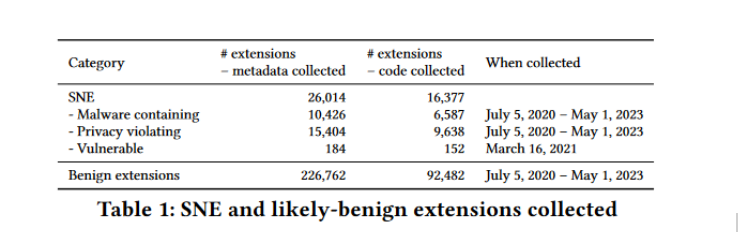
According to the report, the scale of risk posed by potentially harmful and outright dangerous extensions, which the researchers call “Security-Noteworthy Extensions” or SNE, is simply hair-raising. Over the past three years, more than 346 million users have installed at least one SNE, the research says. Among these installations, 280 million users downloaded malware-containing extensions, 63.3 million installed extensions that violated CWS policies, and 2.9 million users installed extensions known to have vulnerabilities.

And even if we discount policy-violating and vulnerable extensions that are not necessary acute security threats to your PC, it still leaves 280 million malware-laden extensions that can unleash a range of threats, from bombarding users with malicious ads to invisibly tracking and spying on them, all while potentially stealing sensitive data like login credentials.

In a nutshell, what this data means is that millions of users have unwittingly exposed themselves to threats ranging from data theft to privacy violations while thinking they are adding useful functionality to their browsers.

Dangerous extensions linger in Chrome store for years

What is especially alarming is that benign extensions — those that do not endanger your privacy or security — tend to stay in the Chrome store less time than vulnerable extensions. The researchers found that benign extensions stay for an average of 1,152 days, while vulnerable extensions’ lifespan reaches the average of 1,248 days, over 3 years. Malware-containing extensions stay for far less on average, but they still inhabit the CWS for more than a year (380 days).

As for the median, for benign extensions it is significantly lower (780 days) than for vulnerable extensions (1,213 days).

As the researchers note, “This is extremely problematic, as such extensions put the security and privacy of their users at risk for years.”

The average lifespan of malicious extensions is troubling, but some cases are much worse. Researchers found a shocking outlier: a malware-laden extension called “TeleApp” that remained in the CWS for a staggering 8.5 years! Last updated in December 2013, over 10 years ago, TeleApp managed to fly under the radar until it was finally removed in June 2022.

Equally disconcerting is the fact that malware-tainted extensions have on average a larger user base than benign ones. According to the research, benign extensions average 11,000 users, while malware-containing extensions boast more than twice as many, or 27,000 users.

How to spot a bad extension?

Google does not seem to be doing a good job of vetting the extensions and weeding out the bad apples. Moreover, as the researchers note, while Google engineers “seem to be looking for malware-containing or policy-violating extensions through their review process” (cue the word “seem”), they apparently have no tools or a procedure in place to detect vulnerable extensions.

The researchers define vulnerable extensions as those that contain weaknesses in their code that, if exploited by attackers, could allow for widespread malicious attacks like stealing user data or injecting malicious scripts on every website you visit. This means that the large pool of potentially dangerous extensions remains a black spot for Google.

So, if Google is struggling to kick out the bad guys, can the users themselves step up and take matters into their own hands? Ideally, yes. However, as the researchers point out, that is incredibly difficult to accomplish in practice because at the first glance at least SNE extensions do not really stand out from the crowd.

For instance, the researchers found out that rating is not the best indicator of trustworthiness, to say the least. While a significant portion of malicious extensions (52%) and vulnerable ones (47%) lack ratings entirely, a surprising number of benign extensions (32%) also fall into this category. Even more concerning, the median rating across the board remains high: 5 for benign and policy-violating extensions, 4.9 for malware-laden ones, and 4.5 for vulnerable extensions. As the researchers point out, this suggests users are generally oblivious to the true nature and risks associated with extensions they install. While fake or manipulated reviews can’t be ruled out, this seems to be a double-edged sword impacting both benign and malicious extensions.

So, if you cannot really trust reviews, how are you supposed to know whether a certain extension is good or bad? Alas, there are no foolproof indicators, but probably your best bet will be to look at the developer’s record, at least the research suggests so.

Developer reputation: a clue, but not a guarantee

Interestingly, the research indicates that developers with at least one malicious extension tend to publish more security-noteworthy extensions on average than the developers with at least one benign extension. Thus, according to the paper, “a developer having published 1 malicious extension publishes on average 3.6 benign, 4.9 malware-containing, 1.4 policy-violating, and 0.00093 vulnerable extensions.” The research also suggests that a developer having a malware-containing or privacy-violating extension will likely publish another one of those.

Curiously, the researchers counted 30 developers with over 100 malware-containing extensions each.

However, here a key distinction emerges between malicious and vulnerable extensions. While malware and privacy-violating extensions often come from repeat offenders, developers publishing vulnerable extensions appear to have a higher proportion of benign extensions as well, suggesting these vulnerabilities might be unintentional mistakes during implementation.

Bad extensions tend to ask for more permissions

The researchers found that Security-Noteworthy Extensions (SNEs) require more access to your data than benign extensions, which should not come as a big surprise. The median number of API permissions requested by malware-containing and vulnerable extensions is 4, whereas policy-violating ones need 2, and benign extensions require only 1.

Ultimately, the more permissions an extension has, the larger the attack surface is.

Interestingly, both benign extensions and SNEs seem to use similar APIs for functionality. The key difference lies in the ‘topSites’ permission, which grants access to your most visited sites. This permission ranks second for malicious extensions (used by over 4,000 extensions) but doesn’t appear in the top 10 for other categories. This likely relates to malware hijacking your homepage on new tabs, a functionality requiring ‘topSites’ access.

However, the story changes when we look at host permissions (access to specific websites). Permissions granting access to all URLs, like <all_urls> or http://, are popular among benign and vulnerable extensions. In contrast, malware and policy-violating extensions frequently target specific Google subdomains. This suggests that malware developers might be intentionally avoiding permissions that trigger Google’s scrutiny and potentially flag their extensions as malicious.

What about updates?

A big source of vulnerabilities and therefore risk for users is the extensions that have not been updated for years, and therefore are more likely to be susceptible to various attacks due to unpatched security holes.

In terms of sheer numbers, the researchers found that 60% of all extensions available have never been updated, which makes them a low-hanging fruit to exploitation and compromise. Even more shocking, perhaps, is that half of the extensions known to be vulnerable (meaning their vulnerabilities have been reported publicly), remain unpatched in the Chrome store for two years after their vulnerabilities are disclosed.

In conclusion

As users increasingly rely on extensions to enhance their browsing experiences, we believe that the responsibility lies with both developers and platform curators — in this case Google — to prioritize security. Google’s role is especially critical when it comes to malware-laden extensions whose developers made them that way by design.
Enhanced monitoring, stricter enforcement of policies, and improved user education are crucial steps toward mitigating these risks and ensuring a safer browsing environment for millions of Chrome users worldwide.


Discuss this post on our social networks

Спадабаўся пост?
AdGuard VPN AdGuard DNS AdGuard Mail AdGuard Wallet
Галоўны экран AdGuard для Windows
Экран абароны AdGuard для Windows, які паказвае функцыі абароны і налады
Экран Статыстыка AdGuard для Windows, які паказвае статыстыку заблакіраванай рэкламы і праграм сачэння
Экран Кіраванне праграмамі ў AdGuard для Windows, які паказвае параметры кіравання абаронай для праграм, усталяваных на прыладзе
20 363 20363 водгукі
Выдатна!

AdGuard: блакіроўшчык рэкламы для Windows

AdGuard для Windows — гэта больш, чым блакіроўшчык рэкламы. Гэта шматфункцыянальны інструмент, які блакуе рэкламу, кантралюе доступ да небяспечных сайтаў, паскарае загрузку старонак і абараняе дзяцей ад непажаданага кантэнту

Спампоўваючы праграму, вы прымаеце ўмовы Ліцэнзійнага пагаднення
Microsoft Store
Спампоўваючы праграму, вы прымаеце ўмовы Ліцэнзійнага пагаднення
AdGuard для Windows версія 8.0, 14 дзён пробнага перыяду
Галоўны экран AdGuard для Mac
Экран рэжыму нябачнасці AdGuard для Mac
20 363 20363 водгукі
Выдатна!

AdGuard: блакіроўшчык рэкламы для Mac

AdGuard для Mac — гэта ўнікальны блакіроўшчык рэкламы, распрацаваны з улікам macOS. Акрамя абароны ад надакучлівай рэкламы ў браўзерах і праграмах, ён абараняе вас ад адсочвання, фішынгу і махлярства
Спампоўваючы праграму, вы прымаеце ўмовы Ліцэнзійнага пагаднення
Чытаць далей
AdGuard для Mac версія 2.19, 14 дзён пробнага перыяду
Галоўны экран AdGuard для Android
Экран Абарона ад сачэння ў AdGuard для Android
Экран Кіраванне праграмамі ў AdGuard для Android, які паказвае параметры кіравання абаронай для праграм, усталяваных на прыладзе
Экран Статыстыка AdGuard для Android, які паказвае статыстыку заблакіраванай рэкламы і праграм сачэння
Галоўны экран прыватнага браўзера AdGuard для Android
QR-код, каб спампаваць AdGuard для Android
20 363 20363 водгукі
Выдатна!

AdGuard: блакіроўшчык рэкламы для Android

Блакуе рэкламу і трэкеры ва ўсіх браўзерах, гульнях і іншых праграмах. Абараняе вашу прыватнасць і дазваляе вам кантраляваць, як вашы праграмы выкарыстоўваюць Інтэрнэт. Усталёўваецца праз APK
Спампоўваючы праграму, вы прымаеце ўмовы Ліцэнзійнага пагаднення
Чытаць далей
Сканіраванне для загрузкі
Выкарыстоўвайце любы счытвальнік QR-кодаў, даступны на вашай прыладзе
AdGuard для Android версія 4.14, 14 дзён пробнага перыяду
Галоўны экран AdGuard для iOS
Экран абароны AdGuard для iOS, які паказвае функцыі абароны і налады
Экран Статыстыка AdGuard для iOS, які паказвае статыстыку заблакіраванай рэкламы і праграм сачэння
QR-код, каб спампаваць AdGuard для iOS
20 363 20363 водгукі
Выдатна!

AdGuard: блакіроўшчык рэкламы для iOS

Найлепшы блакіроўшчык рэкламы для iOS для iPhone і iPad. AdGuard ліквідуе ўсе віды рэкламы і трэкераў у Safari і абараняе вашу прыватнасць ва ўсіх праграмах на ўзроўні DNS
Спампоўваючы праграму, вы прымаеце ўмовы Ліцэнзійнага пагаднення
Чытаць далей
Сканіраванне для загрузкі
Выкарыстоўвайце любы счытвальнік QR-кодаў, даступны на вашай прыладзе
AdGuard для iOS, 4.5
Галоўны экран AdGuard Content Blocker
Экран фільтры ў AdGuard Content Blocker
Экран налады ў AdGuard Content Blocker
20 363 20363 водгукі
Выдатна!

Блакіроўшчык кантэнту AdGuard

AdGuard Content Blocker ухіляе ўсе віды рэкламы ў мабільных браўзерах, якія падтрымліваюць тэхналогію блакіроўкі змесціва — напрыклад, Samsung Internet і Яндэкс.Браўзер. Яго функцыі абмежаваныя ў параўнанні з AdGuard для Android, але ён бясплатны, просты ў усталёўцы і эфектыўны
Спампоўваючы праграму, вы прымаеце ўмовы Ліцэнзійнага пагаднення
Чытаць далей
Блакіроўшчык кантэнту AdGuard, 2.8
Галоўны экран браузернае пашырэнне AdGuard
Экран Абарона ад сачэння ў браузернае пашырэнне AdGuard
20 363 20363 водгукі
Выдатна!

Браўзернае пашырэнне AdGuard

AdGuard — самае хуткае і лёгкае браўзарнае пашырэнне для блакавання ўсіх тыпаў рэкламы! Абірайце AdGuard для хуткага і бяспечнага сёрфінга без рэкламы.
Усталяваць
Спампоўваючы праграму, вы прымаеце ўмовы Ліцэнзійнага пагаднення
Усталяваць
Спампоўваючы праграму, вы прымаеце ўмовы Ліцэнзійнага пагаднення
Усталяваць
Спампоўваючы праграму, вы прымаеце ўмовы Ліцэнзійнага пагаднення
Усталяваць
Спампоўваючы праграму, вы прымаеце ўмовы Ліцэнзійнага пагаднення
Усталяваць
Спампоўваючы праграму, вы прымаеце ўмовы Ліцэнзійнага пагаднення
Чытаць далей
Усталяваць
Спампоўваючы праграму, вы прымаеце ўмовы Ліцэнзійнага пагаднення
Чытаць далей
Браўзернае пашырэнне AdGuard, 5.5
Галоўны экран Браўзерны памочнік AdGuard
20 363 20363 водгукі
Выдатна!

Памочнік AdGuard

Пашырэнне для браўзера-компаньён для настольных прыкладанняў AdGuard. Яно дазваляе блакіраваць карыстальніцкія элементы на вэб-сайтах, дадаваць вэб-сайты ў спіс дазволеных і адпраўляць справаздачы непасрэдна з вашага браўзера
Памочнік AdGuard, 1.4
20 363 20363 водгукі
Выдатна!

AdGuard Home

AdGuard Home — гэта сеткавае рашэнне для блакіроўкі рэкламы і праграм сачэння. Усталюйце яго адзін раз на вашым маршрутызатары, каб ахапіць усе прылады ў сетцы — дадатковае праграмнае забеспячэнне не патрабуецца. Гэта асабліва важна для розных прылад IoT, якія часта ўяўляюць пагрозу вашай прыватнасці
AdGuard Home, 0.107
Галоўны экран AdGuard Pro для iOS
Экран абароны ў AdGuard Pro для iOS, які паказвае функцыі абароны і налады
Экран Статыстыка ў AdGuard Pro для iOS, які паказвае статыстыку заблакіраванай рэкламы і праграм сачэння
20 363 20363 водгукі
Выдатна!

AdGuard Pro для iOS

AdGuard Pro для iOS пастаўляецца з усімі дадатковымі функцыямі блакіроўкі рэкламы і абароны, якія ўключаны. Ён прапануе тыя ж інструменты, што і платная версія AdGuard для iOS. Выдатна блакіруе рэкламу ў Safari, а таксама дазваляе наладжваць налады DNS, каб адаптаваць вашу абарону. Ён блакіруе рэкламу ў браўзерах і дадатках, абараняе дзяцей ад недапушчальнага кантэнту і захоўвае вашы асабістыя даныя бяспечнымі
Спампоўваючы праграму, вы прымаеце ўмовы Ліцэнзійнага пагаднення
Чытаць далей
AdGuard Pro для iOS, 4.5
Галоўны экран AdGuard Mini для Mac
Экран абароны Safari ў AdGuard Mini для Mac
Экран стварэння правіла ў AdGuard Mini для Mac
20 363 20363 водгукі
Выдатна!

AdGuard Mini для Mac — блакіроўшчык рэкламы ў Safari

AdGuard Mini для Mac — гэта магутны блакіроўшчык рэкламы для Safari. Гэта лёгкая праграма выдаляе рэкламу, блакуе праграмы сачэння і паскарае загрузку старонак. Яна дапамагае вам аглядаць вэб у Safari без адцягненняў і захоўваць вашы даныя ў прыватнасці
Усталяваць
Спампоўваючы праграму, вы прымаеце ўмовы Ліцэнзійнага пагаднення
Чытаць далей
AdGuard Mini для Mac, 2.3
Галоўны экран AdGuard для Android TV з уключанай абаронай
Экран блакіроўкі рэкламы AdGuard для Android TV, які паказвае яго функцыі і налады
Экран налады AdGuard для Android TV
Экран Кіраванне праграмамі AdGuard для Android TV, які паказвае праграмы, дзе рэклама і праграмы сачэння заблакіравана
20 363 20363 водгукі
Выдатна!

AdGuard для Android TV

AdGuard для Android TV — адзіная праграма, якая блакіруе рэкламу, ахоўвае вашу прыватнасць і працуе як міжсеткавы экран для вашага Smart TV. Атрымуйце папярэджанні аб вэб-пагрозах, выкарыстоўвайце бяспечны DNS і атрымлівайце перавагі ад шыфраванага трафіку. Адпачывайце і атрымлівайце асалоду ад улюбёных шоу з першакласнай абаронай і без рэкламы!
AdGuard для Android TV версія 4.14, 14 дзён пробнага перыяду
Маскот AdGuard, Агнар, трымае пінгвіна Linux
20 363 20363 водгукі
Выдатна!

AdGuard для Linux

AdGuard для Linux — гэта першы ў свеце сістэмны блакіроўшчык рэкламы для Linux. Блакуйце рэкламу і трэкеры на ўзроўні прылады, выбірайце з папярэдне ўсталяваных фільтраў альбо дадавайце ўласныя — усё праз інтэрфейс каманднага радка
AdGuard для Linux, 1.4
20 363 20363 водгукі
Выдатна!

AdGuard Temp Mail

Ваш часовы паштовую скрыню, каб на асноўную пошту не прыходзіў спам
20 363 20363 водгукі
Выдатна!

AdGuard VPN

75 лакацый па ўсім свеце

Доступ да любога кантэнту

Моцнае шыфраванне

Без лагавання

Самае хуткае злучэнне

Цэладзённая падтрымка

Паспрабуйце бясплатна
Спампоўваючы праграму, вы прымаеце ўмовы Ліцэнзійнага пагаднення
Чытаць далей
20 363 20363 водгукі
Выдатна!

AdGuard DNS

AdGuard DNS – гэта альтэрнатыўны спосаб заблакаваць рэкламу, абараніць асабістыя дадзеныя і ахаваць дзяцей ад дарослых матэрыялаў. Ён просты ў наладзе і выкарыстанні і забяспечвае патрэбны мінімум абароны ад рэкламы, трэкінгу і фішынгу, незалежна ад платформы.
20 363 20363 водгукі
Выдатна!

AdGuard Mail

Абараняйце сваю асобу, пазбягайце спаму і трымайце ўваходную пошту ў бяспецы з дапамогай нашых псеўданімаў і часовых адрасоў электроннай пошты. Скарыстайцеся нашым бясплатным сэрвісам перасылкі электроннай пошты і праграмамі для ўсіх аперацыйных сістэм.
20 363 20363 водгукі
Выдатна!

AdGuard Wallet

Бяспечны і прыватны крыпта-кашалёк, які дае вам поўны кантроль над вашымі актывамі. Адкрывайце для сябе тысячы крыптавалют для захоўвання, адпраўкі і абмену
Спампоўка AdGuard Каб усталяваць AdGuard, пстрыкніце файл, пазначаны стрэлкай Выберыце «Адкрыць» і націсніце «ОК», затым дачакайцеся спампоўкі файла. У акне, якое адкрылася, перацягніце значок AdGuard у папку «Праграмы». Дзякуй, што выбралі AdGuard! Выберыце «Адкрыць» і націсніце «ОК», затым дачакайцеся спампоўкі файла. У акне, якое адкрылася, націсніце «Усталяваць». Дзякуй, што выбралі AdGuard!
Усталюйце AdGuard на мабільную прыладу

















































