Incognito mode is a sham: it makes you feel safe while failing to protect your data

What does it mean to “go incognito”? According to the authoritative Collins dictionary, it means “using a false name or wearing a disguise, in order to avoid being recognized or identified.”

Given that, it’s quite tempting and natural to think that when you open an “incognito” window in the Google Chrome browser, you’re doing just that: hiding your identity and sailing anonymously across the Web (all while donning a stylish fedora hat and those circular Windsor glasses).

A survey by the University of Chicago found that many people vastly overestimate the benefits offered by private browsing modes, even after reading the fine print in the disclaimers. For example, the majority of the respondents believed that their search history was not recorded by Google, even if they were logged in their Google account. While some 27 percent wrongly thought that private mode protects them against viruses and malware.

To dispel these and other misunderstandings about private modes, we will zero in on the most popular of them — Chrome’s incognito mode.

How it works and what it is used for

Let’s start with what Incognito mode can really do for you. In a nutshell, it hides your browsing habits from other users of the same PC, or laptop, or phone — or any device for that matter. In more technical terms, when you’re in incognito mode, neither your search nor your browsing history is stored locally on your device. So it can be quite useful if you are looking for a surprise gift for your partner with whom you happen to share a laptop or a tablet. And if that was what people actually used the mode for, we would have no problem with it.
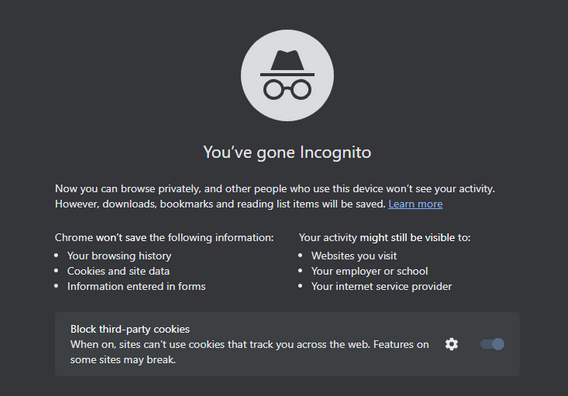
Chrome_Incognito_Mode

However, this is far from being the case. A February 2023 survey conducted in the UK showed that every second person who used private browsing or incognito mode primarily did it to protect their personal information from scammers and criminals. Around 40% would toggle it on in order to stop advertisers from tracking them across the Web.

While Chrome’s incognito mode blocks third-party cookies (tracking codes planted by the websites other than the one you’re visiting in your browser) by default, it still collects cookies and site data during the session. They are stored in a temporary folder and are not deleted at least until you close all incognito windows.

Moreover, a lawsuit filed against Google by the users of incognito mode in 2020 claims that Google “stores users’ regular and private browsing data in the same logs.” It then “uses those mixed logs to send users personalized ads,” and even if individual data points are “anonymized,” Google is able to “uniquely identify a user with a high probability of success” when these data points are pooled.

What Google admits about Incognito mode

Chrome’s incognito mode disclaimer states that your activity will still be visible to three parties: the websites you visit, your employer or school, and your internet service provider.

It means that the analytic tools of the websites you visit can still capture some data about your on-site activity. This data will be anonymized but only to a degree.
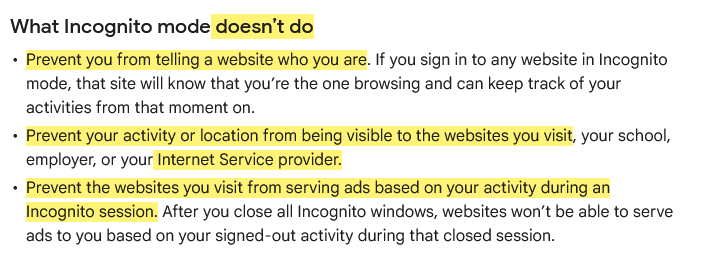
This is what Google says about Incognito mode

Source: Google

To give you the taste of browsing in an ‘incognito mode,’ we visited the CBC.ca website while using the AdGuard browser extension and took a screenshot of what it detected…
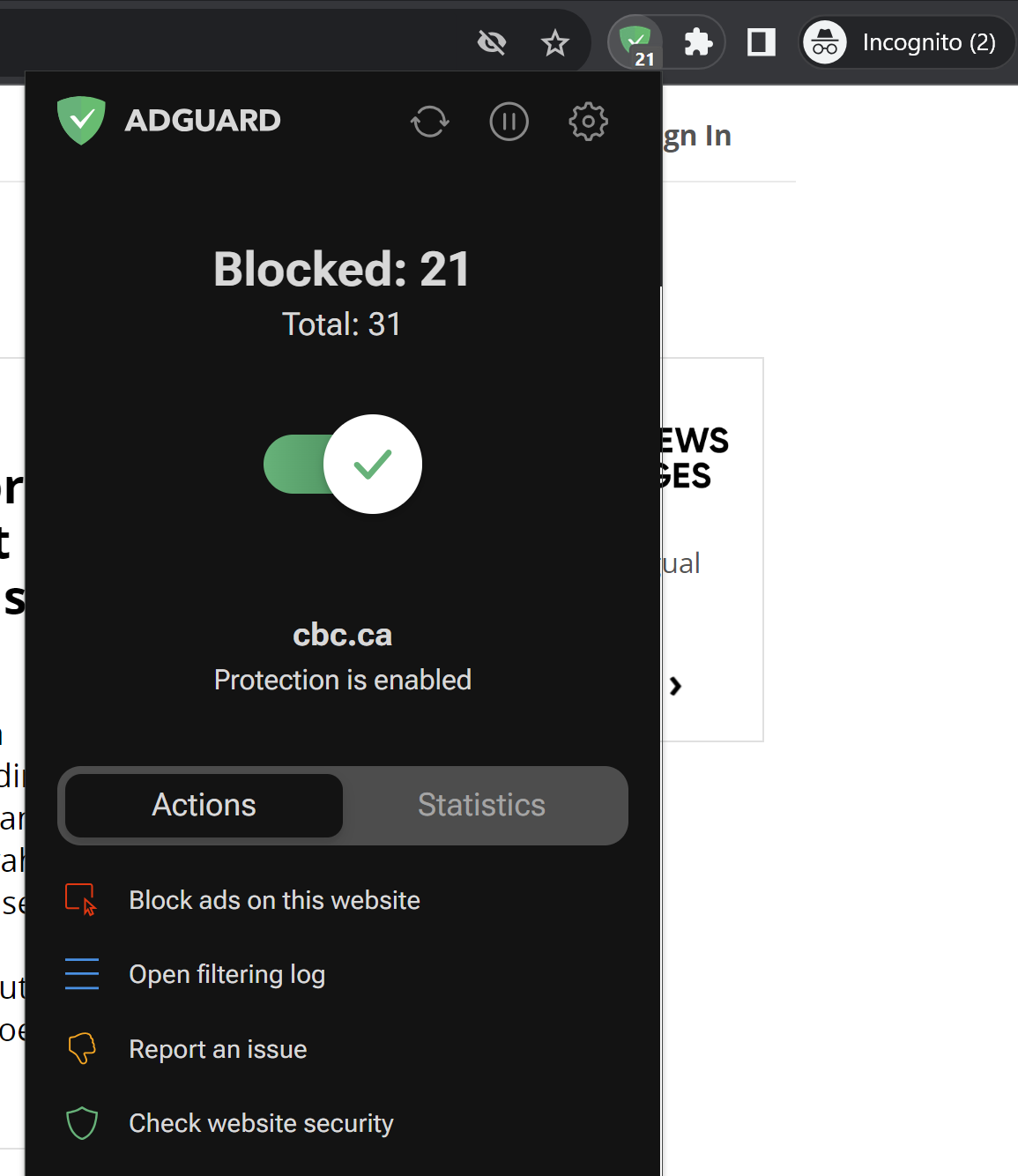
AdGuard Browser Extension has detected trackers in incognito mode

Note that we did not include third-party cookies in this test, because they are already blocked by default in Chrome’s incognito mode. But even without them, you can see how much tracking is going on behind the scenes. Almost every line you can see in the screenshot below is a failed attempt by a tracking tool to send some information about your online identity to a third party.
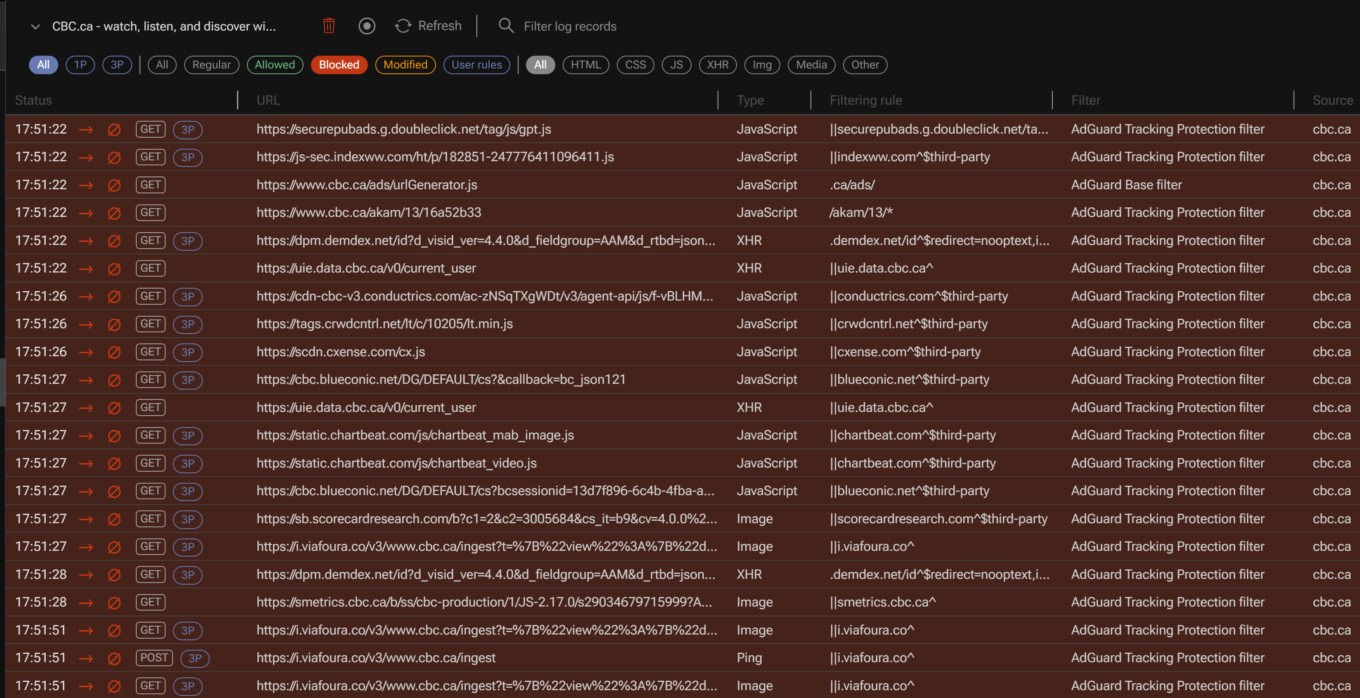
AdGuard filtering log

For example, one of such attempted requests was to Chartbeat, a provider of real-time website analytics. Chartbeat helps websites monitor their traffic, user engagement, and other important metrics. The request URL contains a tracking pixel (a tiny image embedded in web pages that is used to track user activity) and various parameters that send data to Chartbeat, such as host name, page URL, user ID, device type, screen resolution, and more.
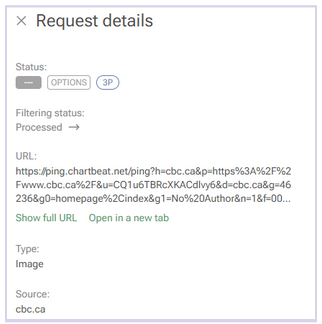
A request to a tracking company detected by AdGuard

Websites will be able to use this data to serve you ads during the session.

Incognito mode also does not hide your browsing activity from your IT department or your school network administrators, if you are using a work or a school network. In short, if you’re not the administrator of the network — for example, if you’re browsing the web using the Wi-Fi in a coffee shop — then you should consider your online activity to be out in the open, incognito mode or not.

In the same vein, regardless of whether you’re using incognito mode, your Internet Service Provider (ISP) will still be able to trace your IP address and see your activity.

And if you sign in to the site with your password and login, the little protection that incognito mode gives you from trackers will naturally be gone. “The site will know that you’re the one browsing and can keep track of your activities from that moment on,”Google says. So, if you sign in on YouTube, for example, while in incognito mode, it will record your activity and serve you recommendations based on it.

It’s probably even worse than that

There are things Google tells users about incognito mode — like the fact that it only helps keep your browsing history private from your partner or child — but there are some things it does not tell. The 2020 class-action lawsuit, that we’ve already mentioned, purports to reveal some of these things.

Remember that disclaimer that appears when you open an incognito mode window? Well, it does mention that third-party websites, your employer, and your school could see what you’re doing online. However, there is one important party that is not mentioned in the disclaimer: Google itself.

An excerpt from the lawsuit challenging incognito mode

Source: Lawsuit

According to the lawsuit, Google tracks and collects data from users even when they are in incognito mode. The plaintiffs claim that Google uses various methods to intercept and monitor users’ browsing data without their consent. The lawsuit explains how this works: “Whenever a user visits a website that is running Google Analytics, Ad Manager, or some similar Google service, Google’s software directs the user’s browser to send a separate communication to Google. This happens even when users are in private browsing mode, unbeknownst to website developers or the users themselves.”

The grand illusion of incognito mode

Incognito mode is like the emperor’s new clothes: it creates a false sense of security where there is none. In fact, its application is so narrow that you might be better off without it. If you want to clear your browsing history, cookies, and site data for a certain time period, there are other tools you can use. In Chrome, you can do this by selecting More Tools → Clear Browsing Data on the desktop version, or Settings → Privacy and security → Clear browsing data on the mobile version.
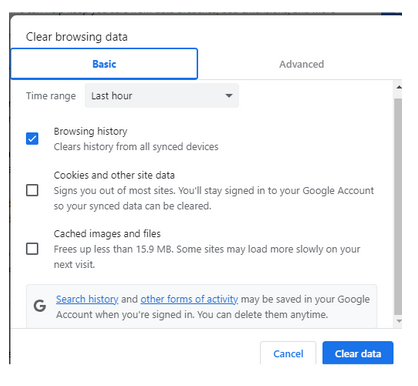
Google privacy controls allow to clear browsing history

However, if you want to truly protect your privacy and anonymity online, there are other, far better ways to do so.

One of them is using a VPN (Virtual Private Network), which is a service that encrypts your internet traffic and routes it through a remote server. This way, you can hide your IP address and location from your ISP, websites and third parties. There are many VPN providers available, but you should choose one that has a good reputation, a no-logs policy, and strong encryption. Generally, a VPN should not slow down your connection a lot, but it might be something you have to come to terms with in exchange for improved privacy.

Another way to go private online is using the Tor browser, which is a free software that allows you to browse the web anonymously. Tor works by bouncing your traffic through a network of volunteer nodes, called relays, that make it hard to trace your identity and location. Tor, however, has some drawbacks as well, such as (sometimes extremely) slow speed and serious compatibility issues.

Using a reliable ad blocker for Chrome will also go a long way in ensuring your browsing stays private. Almost every single one of them blocks trackers and not just ads; not to mention that the vast majority of ads serve as tracking tools, too.

When there are so many tools available to you to protect your privacy and keep your data private, there’s just no reason to resort to incognito mode… unless, of course, you’re looking for that gift for your SO.


Спадабаўся пост?
AdGuard VPN AdGuard DNS AdGuard Mail AdGuard Wallet
Галоўны экран AdGuard для Windows
Экран абароны AdGuard для Windows, які паказвае функцыі абароны і налады
Экран Статыстыка AdGuard для Windows, які паказвае статыстыку заблакіраванай рэкламы і праграм сачэння
Экран Кіраванне праграмамі ў AdGuard для Windows, які паказвае параметры кіравання абаронай для праграм, усталяваных на прыладзе
20 363 20363 водгукі
Выдатна!

AdGuard: блакіроўшчык рэкламы для Windows

AdGuard для Windows — гэта больш, чым блакіроўшчык рэкламы. Гэта шматфункцыянальны інструмент, які блакуе рэкламу, кантралюе доступ да небяспечных сайтаў, паскарае загрузку старонак і абараняе дзяцей ад непажаданага кантэнту

Спампоўваючы праграму, вы прымаеце ўмовы Ліцэнзійнага пагаднення
Microsoft Store
Спампоўваючы праграму, вы прымаеце ўмовы Ліцэнзійнага пагаднення
AdGuard для Windows версія 8.0, 14 дзён пробнага перыяду
Галоўны экран AdGuard для Mac
Экран рэжыму нябачнасці AdGuard для Mac
20 363 20363 водгукі
Выдатна!

AdGuard: блакіроўшчык рэкламы для Mac

AdGuard для Mac — гэта ўнікальны блакіроўшчык рэкламы, распрацаваны з улікам macOS. Акрамя абароны ад надакучлівай рэкламы ў браўзерах і праграмах, ён абараняе вас ад адсочвання, фішынгу і махлярства
Спампоўваючы праграму, вы прымаеце ўмовы Ліцэнзійнага пагаднення
Чытаць далей
AdGuard для Mac версія 2.19, 14 дзён пробнага перыяду
Галоўны экран AdGuard для Android
Экран Абарона ад сачэння ў AdGuard для Android
Экран Кіраванне праграмамі ў AdGuard для Android, які паказвае параметры кіравання абаронай для праграм, усталяваных на прыладзе
Экран Статыстыка AdGuard для Android, які паказвае статыстыку заблакіраванай рэкламы і праграм сачэння
Галоўны экран прыватнага браўзера AdGuard для Android
QR-код, каб спампаваць AdGuard для Android
20 363 20363 водгукі
Выдатна!

AdGuard: блакіроўшчык рэкламы для Android

Блакуе рэкламу і трэкеры ва ўсіх браўзерах, гульнях і іншых праграмах. Абараняе вашу прыватнасць і дазваляе вам кантраляваць, як вашы праграмы выкарыстоўваюць Інтэрнэт. Усталёўваецца праз APK
Спампоўваючы праграму, вы прымаеце ўмовы Ліцэнзійнага пагаднення
Чытаць далей
Сканіраванне для загрузкі
Выкарыстоўвайце любы счытвальнік QR-кодаў, даступны на вашай прыладзе
AdGuard для Android версія 4.14, 14 дзён пробнага перыяду
Галоўны экран AdGuard для iOS
Экран абароны AdGuard для iOS, які паказвае функцыі абароны і налады
Экран Статыстыка AdGuard для iOS, які паказвае статыстыку заблакіраванай рэкламы і праграм сачэння
QR-код, каб спампаваць AdGuard для iOS
20 363 20363 водгукі
Выдатна!

AdGuard: блакіроўшчык рэкламы для iOS

Найлепшы блакіроўшчык рэкламы для iOS для iPhone і iPad. AdGuard ліквідуе ўсе віды рэкламы і трэкераў у Safari і абараняе вашу прыватнасць ва ўсіх праграмах на ўзроўні DNS
Спампоўваючы праграму, вы прымаеце ўмовы Ліцэнзійнага пагаднення
Чытаць далей
Сканіраванне для загрузкі
Выкарыстоўвайце любы счытвальнік QR-кодаў, даступны на вашай прыладзе
AdGuard для iOS, 4.5
Галоўны экран AdGuard Content Blocker
Экран фільтры ў AdGuard Content Blocker
Экран налады ў AdGuard Content Blocker
20 363 20363 водгукі
Выдатна!

Блакіроўшчык кантэнту AdGuard

AdGuard Content Blocker ухіляе ўсе віды рэкламы ў мабільных браўзерах, якія падтрымліваюць тэхналогію блакіроўкі змесціва — напрыклад, Samsung Internet і Яндэкс.Браўзер. Яго функцыі абмежаваныя ў параўнанні з AdGuard для Android, але ён бясплатны, просты ў усталёўцы і эфектыўны
Спампоўваючы праграму, вы прымаеце ўмовы Ліцэнзійнага пагаднення
Чытаць далей
Блакіроўшчык кантэнту AdGuard, 2.8
Галоўны экран браузернае пашырэнне AdGuard
Экран Абарона ад сачэння ў браузернае пашырэнне AdGuard
20 363 20363 водгукі
Выдатна!

Браўзернае пашырэнне AdGuard

AdGuard — самае хуткае і лёгкае браўзарнае пашырэнне для блакавання ўсіх тыпаў рэкламы! Абірайце AdGuard для хуткага і бяспечнага сёрфінга без рэкламы.
Усталяваць
Спампоўваючы праграму, вы прымаеце ўмовы Ліцэнзійнага пагаднення
Усталяваць
Спампоўваючы праграму, вы прымаеце ўмовы Ліцэнзійнага пагаднення
Усталяваць
Спампоўваючы праграму, вы прымаеце ўмовы Ліцэнзійнага пагаднення
Усталяваць
Спампоўваючы праграму, вы прымаеце ўмовы Ліцэнзійнага пагаднення
Усталяваць
Спампоўваючы праграму, вы прымаеце ўмовы Ліцэнзійнага пагаднення
Чытаць далей
Усталяваць
Спампоўваючы праграму, вы прымаеце ўмовы Ліцэнзійнага пагаднення
Чытаць далей
Браўзернае пашырэнне AdGuard, 5.5
Галоўны экран Браўзерны памочнік AdGuard
20 363 20363 водгукі
Выдатна!

Памочнік AdGuard

Пашырэнне для браўзера-компаньён для настольных прыкладанняў AdGuard. Яно дазваляе блакіраваць карыстальніцкія элементы на вэб-сайтах, дадаваць вэб-сайты ў спіс дазволеных і адпраўляць справаздачы непасрэдна з вашага браўзера
Памочнік AdGuard, 1.4
20 363 20363 водгукі
Выдатна!

AdGuard Home

AdGuard Home — гэта сеткавае рашэнне для блакіроўкі рэкламы і праграм сачэння. Усталюйце яго адзін раз на вашым маршрутызатары, каб ахапіць усе прылады ў сетцы — дадатковае праграмнае забеспячэнне не патрабуецца. Гэта асабліва важна для розных прылад IoT, якія часта ўяўляюць пагрозу вашай прыватнасці
AdGuard Home, 0.107
Галоўны экран AdGuard Pro для iOS
Экран абароны ў AdGuard Pro для iOS, які паказвае функцыі абароны і налады
Экран Статыстыка ў AdGuard Pro для iOS, які паказвае статыстыку заблакіраванай рэкламы і праграм сачэння
20 363 20363 водгукі
Выдатна!

AdGuard Pro для iOS

AdGuard Pro для iOS пастаўляецца з усімі дадатковымі функцыямі блакіроўкі рэкламы і абароны, якія ўключаны. Ён прапануе тыя ж інструменты, што і платная версія AdGuard для iOS. Выдатна блакіруе рэкламу ў Safari, а таксама дазваляе наладжваць налады DNS, каб адаптаваць вашу абарону. Ён блакіруе рэкламу ў браўзерах і дадатках, абараняе дзяцей ад недапушчальнага кантэнту і захоўвае вашы асабістыя даныя бяспечнымі
Спампоўваючы праграму, вы прымаеце ўмовы Ліцэнзійнага пагаднення
Чытаць далей
AdGuard Pro для iOS, 4.5
Галоўны экран AdGuard Mini для Mac
Экран абароны Safari ў AdGuard Mini для Mac
Экран стварэння правіла ў AdGuard Mini для Mac
20 363 20363 водгукі
Выдатна!

AdGuard Mini для Mac — блакіроўшчык рэкламы ў Safari

AdGuard Mini для Mac — гэта магутны блакіроўшчык рэкламы для Safari. Гэта лёгкая праграма выдаляе рэкламу, блакуе праграмы сачэння і паскарае загрузку старонак. Яна дапамагае вам аглядаць вэб у Safari без адцягненняў і захоўваць вашы даныя ў прыватнасці
Усталяваць
Спампоўваючы праграму, вы прымаеце ўмовы Ліцэнзійнага пагаднення
Чытаць далей
AdGuard Mini для Mac, 2.3
Галоўны экран AdGuard для Android TV з уключанай абаронай
Экран блакіроўкі рэкламы AdGuard для Android TV, які паказвае яго функцыі і налады
Экран налады AdGuard для Android TV
Экран Кіраванне праграмамі AdGuard для Android TV, які паказвае праграмы, дзе рэклама і праграмы сачэння заблакіравана
20 363 20363 водгукі
Выдатна!

AdGuard для Android TV

AdGuard для Android TV — адзіная праграма, якая блакіруе рэкламу, ахоўвае вашу прыватнасць і працуе як міжсеткавы экран для вашага Smart TV. Атрымуйце папярэджанні аб вэб-пагрозах, выкарыстоўвайце бяспечны DNS і атрымлівайце перавагі ад шыфраванага трафіку. Адпачывайце і атрымлівайце асалоду ад улюбёных шоу з першакласнай абаронай і без рэкламы!
AdGuard для Android TV версія 4.14, 14 дзён пробнага перыяду
Маскот AdGuard, Агнар, трымае пінгвіна Linux
20 363 20363 водгукі
Выдатна!

AdGuard для Linux

AdGuard для Linux — гэта першы ў свеце сістэмны блакіроўшчык рэкламы для Linux. Блакуйце рэкламу і трэкеры на ўзроўні прылады, выбірайце з папярэдне ўсталяваных фільтраў альбо дадавайце ўласныя — усё праз інтэрфейс каманднага радка
AdGuard для Linux, 1.4
20 363 20363 водгукі
Выдатна!

AdGuard Temp Mail

Ваш часовы паштовую скрыню, каб на асноўную пошту не прыходзіў спам
20 363 20363 водгукі
Выдатна!

AdGuard VPN

75 лакацый па ўсім свеце

Доступ да любога кантэнту

Моцнае шыфраванне

Без лагавання

Самае хуткае злучэнне

Цэладзённая падтрымка

Паспрабуйце бясплатна
Спампоўваючы праграму, вы прымаеце ўмовы Ліцэнзійнага пагаднення
Чытаць далей
20 363 20363 водгукі
Выдатна!

AdGuard DNS

AdGuard DNS – гэта альтэрнатыўны спосаб заблакаваць рэкламу, абараніць асабістыя дадзеныя і ахаваць дзяцей ад дарослых матэрыялаў. Ён просты ў наладзе і выкарыстанні і забяспечвае патрэбны мінімум абароны ад рэкламы, трэкінгу і фішынгу, незалежна ад платформы.
20 363 20363 водгукі
Выдатна!

AdGuard Mail

Абараняйце сваю асобу, пазбягайце спаму і трымайце ўваходную пошту ў бяспецы з дапамогай нашых псеўданімаў і часовых адрасоў электроннай пошты. Скарыстайцеся нашым бясплатным сэрвісам перасылкі электроннай пошты і праграмамі для ўсіх аперацыйных сістэм.
20 363 20363 водгукі
Выдатна!

AdGuard Wallet

Бяспечны і прыватны крыпта-кашалёк, які дае вам поўны кантроль над вашымі актывамі. Адкрывайце для сябе тысячы крыптавалют для захоўвання, адпраўкі і абмену
Спампоўка AdGuard Каб усталяваць AdGuard, пстрыкніце файл, пазначаны стрэлкай Выберыце «Адкрыць» і націсніце «ОК», затым дачакайцеся спампоўкі файла. У акне, якое адкрылася, перацягніце значок AdGuard у папку «Праграмы». Дзякуй, што выбралі AdGuard! Выберыце «Адкрыць» і націсніце «ОК», затым дачакайцеся спампоўкі файла. У акне, якое адкрылася, націсніце «Усталяваць». Дзякуй, што выбралі AdGuard!
Усталюйце AdGuard на мабільную прыладу

















































