Mozilla deletes promise to 'never sell' your data. Has it really backed out on its word?

Mozilla, the company behind the open-source Firefox browser, has long prided itself on standing apart from tech giants like Google. Unlike Google, which has a rich history of collecting user data even if you try to say ‘no’, Mozilla has consistently insisted — and generally followed through — that user controls in Firefox aren’t a smokescreen and that it puts privacy front and center. Mozilla’s Privacy FAQ still greets you with a subheading in bold: “We Stand for People over Profit.”

The promise that’s no longer there

In late February, Mozilla updated its Privacy FAQ, Firefox’s own Privacy FAQ and introduced Firefox TOU. All three documents raised a lot of eyebrows, sending the community into frenzy.

Let’s start with the TOU. The Firefox Terms of Use, released in late February, intially included the language that had many users scratching their heads. Specifically, it stated that “when you upload or input information through Firefox, you hereby grant us a nonexclusive, royalty-free, worldwide license to use that information to help you navigate, experience, and interact with online content as you indicate with your use of Firefox.”
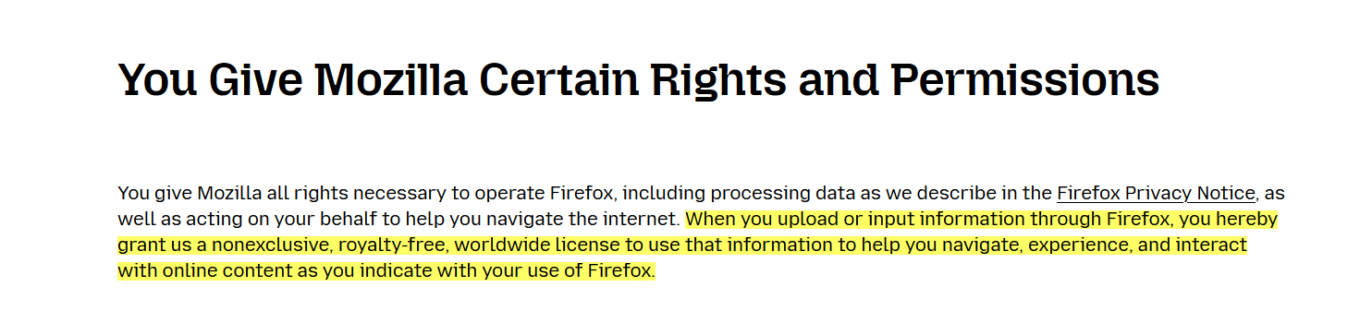
The promise

What appeared to be a new policy triggered a flood of comments on Reddit, with users taking exception to the wording. Some criticized the language for being too vague, while not inherently and necessarily nefarious. Others were ringing alarm bells, and rather loudly: “For frick's sake I don't want you to use information typed in to Firefox, Mozilla. Whatever I type into the browser window is between me and whatever service I'm sending the information to, not you, Mozilla,” one Redditor ranted.

Others were still more willing to give Mozilla the benefit of the doubt: “I believe the Mozilla Foundation is trying to do the right thing, but this kind of language in the terms is ripe for abuse. I hope they clarify it.”

In response to the backlash, Mozilla released a blog post to try and clear things up, saying:

We’ve seen a little confusion about the language regarding licenses, so we want to clear that up. We need a license to allow us to make some of the basic functionality of Firefox possible. Without it, we couldn’t use information typed into Firefox, for example. It does NOT give us ownership of your data or a right to use it for anything other than what is described in the Privacy Notice.

However, this attempt at clarification only seemed to stir the pot further. Mozilla claimed they needed the license to make basic Firefox features work, but didn’t explain why they needed access to what you type in.

A few days later, Mozilla made another attempt at setting the record straight (or at damage control, whichever you prefer).

In a seperate blog post on February 28, it announced that it had changed the TOU once again.

Now the paragraph, that has caused so much controversy, reads like this:

You give Mozilla the rights necessary to operate Firefox. This includes processing your data as we describe in the Firefox Privacy Notice. It also includes a nonexclusive, royalty-free, worldwide license for the purpose of doing as you request with the content you input in Firefox. This does not give Mozilla any ownership in that content.

The apparent goal of this change was to ease users' fears that Mozilla now claims ownership of their typed-in content. However, if anything, the wording is even more vague than before, as it simply directs users to check the Firefox Privacy Notice for details as to how exactly their data will be used.

The TOU was only a small part of the controversy. Mozilla's updated Privacy FAQ and Firefox Privacy FAQ were responsible for the other part.

Previously, Mozilla's Privacy FAQ proudly stated that they “don’t sell data about you,” nor do they buy data about you. Below is a screenshot of the FAQ from February 6:
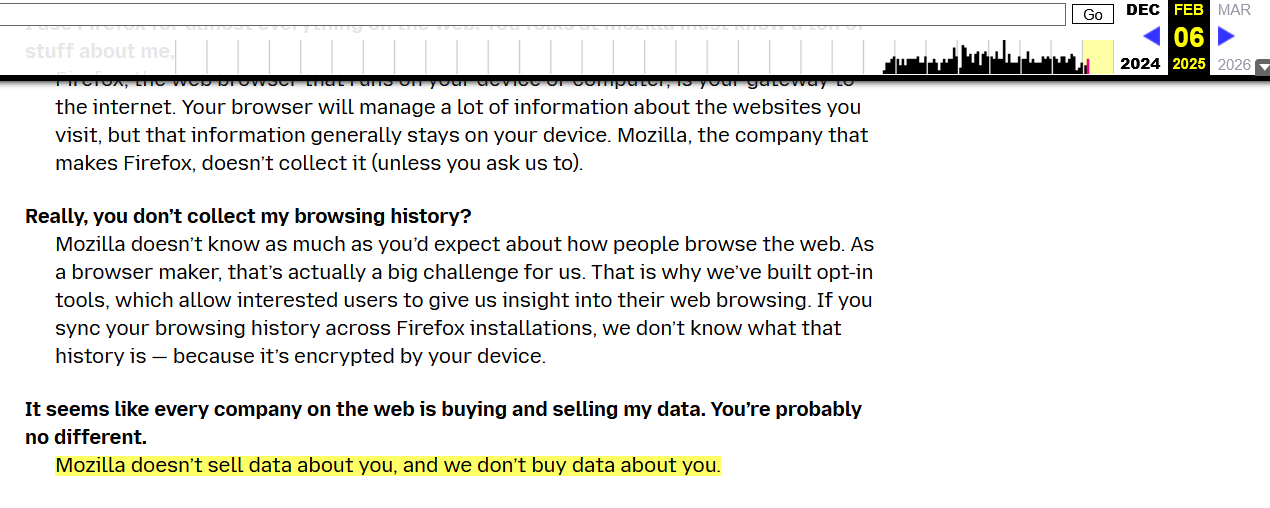
The promise2

The updated version now reads that Mozilla “does not sell data about you” but “in the way that most people think about “selling data”. This makes you wonder, whether you’re the ‘most people’ and what’s all this really supposed to mean.
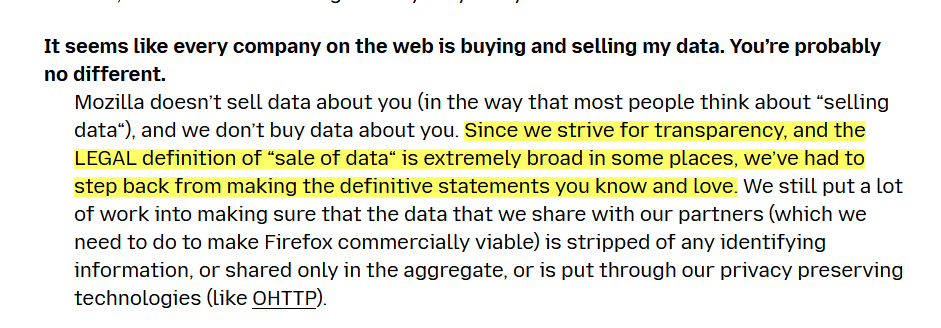
The promise
Current version of Mozilla’s Privacy FAQ

In its blog post from February 28, Mozilla justified the new, somewhat vague wording by stating that the current legal definition of what constitutes a sale of data is too "broad and evolving."

However, even more confusing — and arguably more disheartening for users — was the removal of Mozilla’s bold promise to “never sell your data” from its Firefox Privacy FAQ. Previously, the FAQ had answered the question “Does Firefox sell your personal data?” with a resounding “Nope. Never have, never will. And we protect you from many of the advertisers who do.”
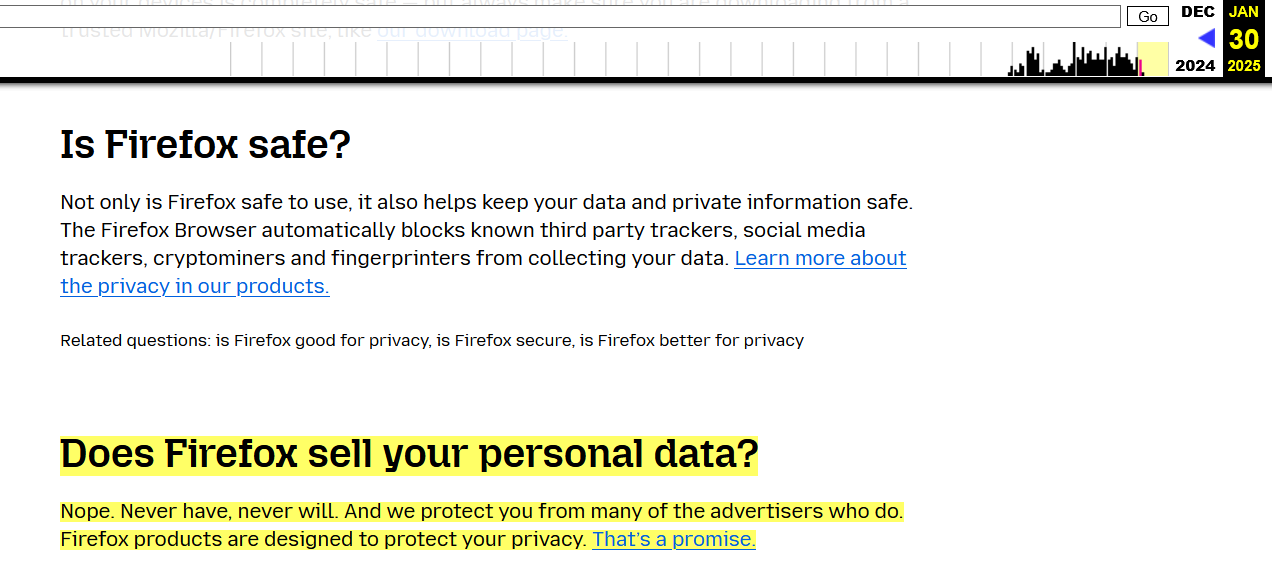
Mozilla's FAQ screenshot

Now (as of the time of writing), the section is missing completely from Firefox’s Privacy FAQ:
The promise

To be fair, the section appears to be under construction, and it’s likely we’ll soon see a replacement to the promise that had been dear to many of Firefox’s users.

And while some might have been taken off guard by an apparent change of heart on behalf of Mozilla, this new language isn't coming as a surprise to those who’ve been paying close attention to Mozilla lately. Here’s why.

Mozilla’s slow descent into ad tech

One of Mozilla’s core principles has always been its commitment to user privacy, with a foundational promise not to sell data. However, over the past few years, and more noticeably, months, that promise has started to fade, and the pillars supporting it have shown signs of crumbling.

Back in October, Mozilla made official what many had been predicting: its move into the ad-tech space. In a blog post, Mozilla president Mark Surman raised a question: “How do we ensure that privacy is not a privilege of the few, but a fundamental right available to everyone?” He went on to suggest that one part of the solution lies in “online advertising,” arguing that the system is “fundamentally broken.” Mozilla, according to Surman, is experimenting with advertising as a way to fix it.

For what it’s worth, Mozilla is following a well-worn path that many tech companies took before it. Much like Google and Microsoft, which have rolled out features like Google’s Protected Audience API and Microsoft’s Ad Selection API, Mozilla is now attempting to blend privacy with advertising. However, advertising has never been a major part of Mozilla’s DNA — until quite recently.

The shift has taken time to shape up, but it’s becoming much clearer now. Just last summer, Mozilla made waves by acquiring Anonym, an ad metrics company. The goal? They claim it will improve ad targeting while safeguarding user data. Not long after, Mozilla rolled out Privacy-Preserving Attribution (PPA), a feature designed to let advertisers track the effectiveness of their ads without crossing the line into intrusive tracking. PPA was enabled by default in Firefox.

Time to ditch Firefox?

The latest changes to Mozilla’s Terms of Service and Privacy FAQs seem to reflect its growing focus on advertising.

As the company becomes more deeply entangled in the ad-tech industry, its long-standing promises about privacy are starting to feel less clear-cut. What once seemed like an unwavering dedication to protecting user data is now being tested by the growing push to make privacy compatible with advertising. For many users, this raises the question: how much is Mozilla really willing to compromise? While the answer is not yet clear, bidding farewell to that bold, albeit idealistic, promise feels sad. It might mark the end of an era — and, even sadder, that end may be inevitable.


Спадабаўся пост?
AdGuard VPN AdGuard DNS AdGuard Mail AdGuard Wallet
Галоўны экран AdGuard для Windows
Экран абароны AdGuard для Windows, які паказвае функцыі абароны і налады
Экран Статыстыка AdGuard для Windows, які паказвае статыстыку заблакіраванай рэкламы і праграм сачэння
Экран Кіраванне праграмамі ў AdGuard для Windows, які паказвае параметры кіравання абаронай для праграм, усталяваных на прыладзе
20 362 20362 водгукі
Выдатна!

AdGuard: блакіроўшчык рэкламы для Windows

AdGuard для Windows — гэта больш, чым блакіроўшчык рэкламы. Гэта шматфункцыянальны інструмент, які блакуе рэкламу, кантралюе доступ да небяспечных сайтаў, паскарае загрузку старонак і абараняе дзяцей ад непажаданага кантэнту

Спампоўваючы праграму, вы прымаеце ўмовы Ліцэнзійнага пагаднення
Microsoft Store
Спампоўваючы праграму, вы прымаеце ўмовы Ліцэнзійнага пагаднення
AdGuard для Windows версія 8.0, 14 дзён пробнага перыяду
Галоўны экран AdGuard для Mac
Экран рэжыму нябачнасці AdGuard для Mac
20 362 20362 водгукі
Выдатна!

AdGuard: блакіроўшчык рэкламы для Mac

AdGuard для Mac — гэта ўнікальны блакіроўшчык рэкламы, распрацаваны з улікам macOS. Акрамя абароны ад надакучлівай рэкламы ў браўзерах і праграмах, ён абараняе вас ад адсочвання, фішынгу і махлярства
Спампоўваючы праграму, вы прымаеце ўмовы Ліцэнзійнага пагаднення
Чытаць далей
AdGuard для Mac версія 2.19, 14 дзён пробнага перыяду
Галоўны экран AdGuard для Android
Экран Абарона ад сачэння ў AdGuard для Android
Экран Кіраванне праграмамі ў AdGuard для Android, які паказвае параметры кіравання абаронай для праграм, усталяваных на прыладзе
Экран Статыстыка AdGuard для Android, які паказвае статыстыку заблакіраванай рэкламы і праграм сачэння
Галоўны экран прыватнага браўзера AdGuard для Android
QR-код, каб спампаваць AdGuard для Android
20 362 20362 водгукі
Выдатна!

AdGuard: блакіроўшчык рэкламы для Android

Блакуе рэкламу і трэкеры ва ўсіх браўзерах, гульнях і іншых праграмах. Абараняе вашу прыватнасць і дазваляе вам кантраляваць, як вашы праграмы выкарыстоўваюць Інтэрнэт. Усталёўваецца праз APK
Спампоўваючы праграму, вы прымаеце ўмовы Ліцэнзійнага пагаднення
Чытаць далей
Сканіраванне для загрузкі
Выкарыстоўвайце любы счытвальнік QR-кодаў, даступны на вашай прыладзе
AdGuard для Android версія 4.14, 14 дзён пробнага перыяду
Галоўны экран AdGuard для iOS
Экран абароны AdGuard для iOS, які паказвае функцыі абароны і налады
Экран Статыстыка AdGuard для iOS, які паказвае статыстыку заблакіраванай рэкламы і праграм сачэння
QR-код, каб спампаваць AdGuard для iOS
20 362 20362 водгукі
Выдатна!

AdGuard: блакіроўшчык рэкламы для iOS

Найлепшы блакіроўшчык рэкламы для iOS для iPhone і iPad. AdGuard ліквідуе ўсе віды рэкламы і трэкераў у Safari і абараняе вашу прыватнасць ва ўсіх праграмах на ўзроўні DNS
Спампоўваючы праграму, вы прымаеце ўмовы Ліцэнзійнага пагаднення
Чытаць далей
Сканіраванне для загрузкі
Выкарыстоўвайце любы счытвальнік QR-кодаў, даступны на вашай прыладзе
AdGuard для iOS, 4.5
Галоўны экран AdGuard Content Blocker
Экран фільтры ў AdGuard Content Blocker
Экран налады ў AdGuard Content Blocker
20 362 20362 водгукі
Выдатна!

Блакіроўшчык кантэнту AdGuard

AdGuard Content Blocker ухіляе ўсе віды рэкламы ў мабільных браўзерах, якія падтрымліваюць тэхналогію блакіроўкі змесціва — напрыклад, Samsung Internet і Яндэкс.Браўзер. Яго функцыі абмежаваныя ў параўнанні з AdGuard для Android, але ён бясплатны, просты ў усталёўцы і эфектыўны
Спампоўваючы праграму, вы прымаеце ўмовы Ліцэнзійнага пагаднення
Чытаць далей
Блакіроўшчык кантэнту AdGuard, 2.8
Галоўны экран браузернае пашырэнне AdGuard
Экран Абарона ад сачэння ў браузернае пашырэнне AdGuard
20 362 20362 водгукі
Выдатна!

Браўзернае пашырэнне AdGuard

AdGuard — самае хуткае і лёгкае браўзарнае пашырэнне для блакавання ўсіх тыпаў рэкламы! Абірайце AdGuard для хуткага і бяспечнага сёрфінга без рэкламы.
Усталяваць
Спампоўваючы праграму, вы прымаеце ўмовы Ліцэнзійнага пагаднення
Усталяваць
Спампоўваючы праграму, вы прымаеце ўмовы Ліцэнзійнага пагаднення
Усталяваць
Спампоўваючы праграму, вы прымаеце ўмовы Ліцэнзійнага пагаднення
Усталяваць
Спампоўваючы праграму, вы прымаеце ўмовы Ліцэнзійнага пагаднення
Усталяваць
Спампоўваючы праграму, вы прымаеце ўмовы Ліцэнзійнага пагаднення
Чытаць далей
Усталяваць
Спампоўваючы праграму, вы прымаеце ўмовы Ліцэнзійнага пагаднення
Чытаць далей
Браўзернае пашырэнне AdGuard, 5.5
Галоўны экран Браўзерны памочнік AdGuard
20 362 20362 водгукі
Выдатна!

Памочнік AdGuard

Пашырэнне для браўзера-компаньён для настольных прыкладанняў AdGuard. Яно дазваляе блакіраваць карыстальніцкія элементы на вэб-сайтах, дадаваць вэб-сайты ў спіс дазволеных і адпраўляць справаздачы непасрэдна з вашага браўзера
Памочнік AdGuard, 1.4
20 362 20362 водгукі
Выдатна!

AdGuard Home

AdGuard Home — гэта сеткавае рашэнне для блакіроўкі рэкламы і праграм сачэння. Усталюйце яго адзін раз на вашым маршрутызатары, каб ахапіць усе прылады ў сетцы — дадатковае праграмнае забеспячэнне не патрабуецца. Гэта асабліва важна для розных прылад IoT, якія часта ўяўляюць пагрозу вашай прыватнасці
AdGuard Home, 0.107
Галоўны экран AdGuard Pro для iOS
Экран абароны ў AdGuard Pro для iOS, які паказвае функцыі абароны і налады
Экран Статыстыка ў AdGuard Pro для iOS, які паказвае статыстыку заблакіраванай рэкламы і праграм сачэння
20 362 20362 водгукі
Выдатна!

AdGuard Pro для iOS

AdGuard Pro для iOS пастаўляецца з усімі дадатковымі функцыямі блакіроўкі рэкламы і абароны, якія ўключаны. Ён прапануе тыя ж інструменты, што і платная версія AdGuard для iOS. Выдатна блакіруе рэкламу ў Safari, а таксама дазваляе наладжваць налады DNS, каб адаптаваць вашу абарону. Ён блакіруе рэкламу ў браўзерах і дадатках, абараняе дзяцей ад недапушчальнага кантэнту і захоўвае вашы асабістыя даныя бяспечнымі
Спампоўваючы праграму, вы прымаеце ўмовы Ліцэнзійнага пагаднення
Чытаць далей
AdGuard Pro для iOS, 4.5
Галоўны экран AdGuard Mini для Mac
Экран абароны Safari ў AdGuard Mini для Mac
Экран стварэння правіла ў AdGuard Mini для Mac
20 362 20362 водгукі
Выдатна!

AdGuard Mini для Mac — блакіроўшчык рэкламы ў Safari

AdGuard Mini для Mac — гэта магутны блакіроўшчык рэкламы для Safari. Гэта лёгкая праграма выдаляе рэкламу, блакуе праграмы сачэння і паскарае загрузку старонак. Яна дапамагае вам аглядаць вэб у Safari без адцягненняў і захоўваць вашы даныя ў прыватнасці
Усталяваць
Спампоўваючы праграму, вы прымаеце ўмовы Ліцэнзійнага пагаднення
Чытаць далей
AdGuard Mini для Mac, 2.3
Галоўны экран AdGuard для Android TV з уключанай абаронай
Экран блакіроўкі рэкламы AdGuard для Android TV, які паказвае яго функцыі і налады
Экран налады AdGuard для Android TV
Экран Кіраванне праграмамі AdGuard для Android TV, які паказвае праграмы, дзе рэклама і праграмы сачэння заблакіравана
20 362 20362 водгукі
Выдатна!

AdGuard для Android TV

AdGuard для Android TV — адзіная праграма, якая блакіруе рэкламу, ахоўвае вашу прыватнасць і працуе як міжсеткавы экран для вашага Smart TV. Атрымуйце папярэджанні аб вэб-пагрозах, выкарыстоўвайце бяспечны DNS і атрымлівайце перавагі ад шыфраванага трафіку. Адпачывайце і атрымлівайце асалоду ад улюбёных шоу з першакласнай абаронай і без рэкламы!
AdGuard для Android TV версія 4.14, 14 дзён пробнага перыяду
Маскот AdGuard, Агнар, трымае пінгвіна Linux
20 362 20362 водгукі
Выдатна!

AdGuard для Linux

AdGuard для Linux — гэта першы ў свеце сістэмны блакіроўшчык рэкламы для Linux. Блакуйце рэкламу і трэкеры на ўзроўні прылады, выбірайце з папярэдне ўсталяваных фільтраў альбо дадавайце ўласныя — усё праз інтэрфейс каманднага радка
AdGuard для Linux, 1.4
20 362 20362 водгукі
Выдатна!

AdGuard Temp Mail

Ваш часовы паштовую скрыню, каб на асноўную пошту не прыходзіў спам
20 362 20362 водгукі
Выдатна!

AdGuard VPN

75 лакацый па ўсім свеце

Доступ да любога кантэнту

Моцнае шыфраванне

Без лагавання

Самае хуткае злучэнне

Цэладзённая падтрымка

Паспрабуйце бясплатна
Спампоўваючы праграму, вы прымаеце ўмовы Ліцэнзійнага пагаднення
Чытаць далей
20 362 20362 водгукі
Выдатна!

AdGuard DNS

AdGuard DNS – гэта альтэрнатыўны спосаб заблакаваць рэкламу, абараніць асабістыя дадзеныя і ахаваць дзяцей ад дарослых матэрыялаў. Ён просты ў наладзе і выкарыстанні і забяспечвае патрэбны мінімум абароны ад рэкламы, трэкінгу і фішынгу, незалежна ад платформы.
20 362 20362 водгукі
Выдатна!

AdGuard Mail

Абараняйце сваю асобу, пазбягайце спаму і трымайце ўваходную пошту ў бяспецы з дапамогай нашых псеўданімаў і часовых адрасоў электроннай пошты. Скарыстайцеся нашым бясплатным сэрвісам перасылкі электроннай пошты і праграмамі для ўсіх аперацыйных сістэм.
20 362 20362 водгукі
Выдатна!

AdGuard Wallet

Бяспечны і прыватны крыпта-кашалёк, які дае вам поўны кантроль над вашымі актывамі. Адкрывайце для сябе тысячы крыптавалют для захоўвання, адпраўкі і абмену
Спампоўка AdGuard Каб усталяваць AdGuard, пстрыкніце файл, пазначаны стрэлкай Выберыце «Адкрыць» і націсніце «ОК», затым дачакайцеся спампоўкі файла. У акне, якое адкрылася, перацягніце значок AdGuard у папку «Праграмы». Дзякуй, што выбралі AdGuard! Выберыце «Адкрыць» і націсніце «ОК», затым дачакайцеся спампоўкі файла. У акне, якое адкрылася, націсніце «Усталяваць». Дзякуй, што выбралі AdGuard!
Усталюйце AdGuard на мабільную прыладу

















































