Mozilla removes ad-tracking code from Firefox. What does it change?

Mozilla watcher Sören Hentzschel has spotted an uncanny change in Android and iOS versions of Firefox and Firefox Focus browsers. It turns out that the SDK from Adjust, which was used for tracking the effectiveness of ad campaigns, has been removed from the newest builds of these browsers.
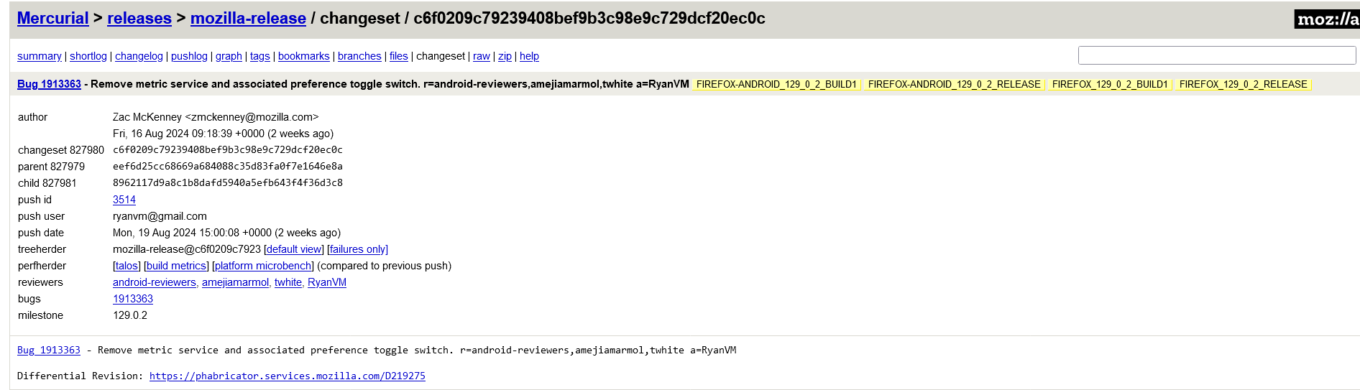
A screenshot of Mozilla’s Mercurial repository for the Firefox browser’s release branch

A screenshot of Mozilla’s Mercurial repository for the Firefox browser’s release branch showing that a metric service and an associated toggle switch have been removed. The link is provided by Sören Hentzschel. Source: Mozilla’s Mercurial repository

If you haven’t been following Firefox super closely, you might wonder: Why was there an ad-tracking SDK in the first place? After all, Mozilla has always positioned itself as a champion of privacy. So, what’s the deal with third-party trackers in their browser?

An open secret

It might shock some, but Mozilla has quietly used the Adjust SDK for years. Back in 2020, a curious Redditor on the Firefox subreddit demanded answers about this telemetry partnership — questioning what data was sent, how it was used, and how it squared with Mozilla’s privacy-first image.

“Generally I would assume that a company selling on privacy wouldn’t have such a partnership in the first place? Is there really no conflict of interest?” the Redditor asked. This question has likely been on many users’ minds.

Mozilla’s response at the time was that they prefer using open-source SDKs whenever possible and typically rely on their own Glean telemetry SDK for data collection. However, they argued they needed a more robust solution for managing and evaluating marketing campaigns across a wide range of countries and currencies. For this purpose, they chose Adjust, as it was, in their words, the “only open-source based product that met the requirements” for handling the complex marketing needs of their global user base.

What is Adjust exactly?

This isn’t the first time we’ve covered this telemetry company. Exactly two years ago, we highlighted it as one of the trackers embedded in several popular VPN servers. Trackers and VPNs? Unfortunately, they do sometimes come hand-in-hand as well.

So, that’s what we’ve found out about Adjust back then:

Adjust is a mobile attribution and analytics company owned and operated by adjust GmbH. “Unlimited and uncapped are words that we use a lot when we describe our data access,” the service boasts. Adjust says that its SDKs and APIs can process data such as hashed IP addresses, mobile identifiers, in-app actions, including purchases and registration, information regarding user interactions with ads, touch sensor data, accelerometer, gyroscope, battery, light sensor, device hardware specifications, and operating system version. The company claims it does not enrich this data to identify individual users, and does not share or disclose the data “with anyone else except our service providers and in response to lawful requests by public authorities.” The data is stored as long as developers use the SDK, unless Adjust is specifically told to do otherwise.

What Mozilla was using Adjust for: in its own words

Mozilla says that Firefox for Android uses the Adjust SDK to track and analyze the origin of app installs, specifically to determine if a user installed the browser in response to a specific marketing campaign.

So, when a new session starts, Firefox sends a “Session Message” to Adjust’s servers containing details like app version, device information, language, country, and session count.

Here’s a more detailed breakdown:

Basic App Info:

  • Application ID (bundle_id)
  • App version
  • Device name and type
  • OS version

User Information:

  • Language
  • Country
  • Device-specific IDs (e.g., idfv)

Session Details:

  • Session count
  • Tracking settings (whether tracking is enabled)

Additional Data:

  • Time stamps (e.g., when the session started and when the message was sent)
  • Whether event buffering is enabled

Adjust then processes this information and, if the install can be attributed to a particular campaign, sends back attribution details. This response includes campaign identifiers and tracker information, but Firefox says it does not utilize or store these attribution details. All data transmission is secured via HTTPS, which means that the data is encrypted during transmission, protecting it from interception or tampering.

Why remove it now?

Mozilla has not acknowledged the apparent removal of the Adjust SDK. If you use Firefox on Android, you can still probably see the information about Firefox sharing “basic usage data” with Adjust in your settings if your browser version is older than 129.0.2 (Firefox) or 130.0 (Firefox Focus). To check for yourself you can go to Settings → Data collection → Marketing data.
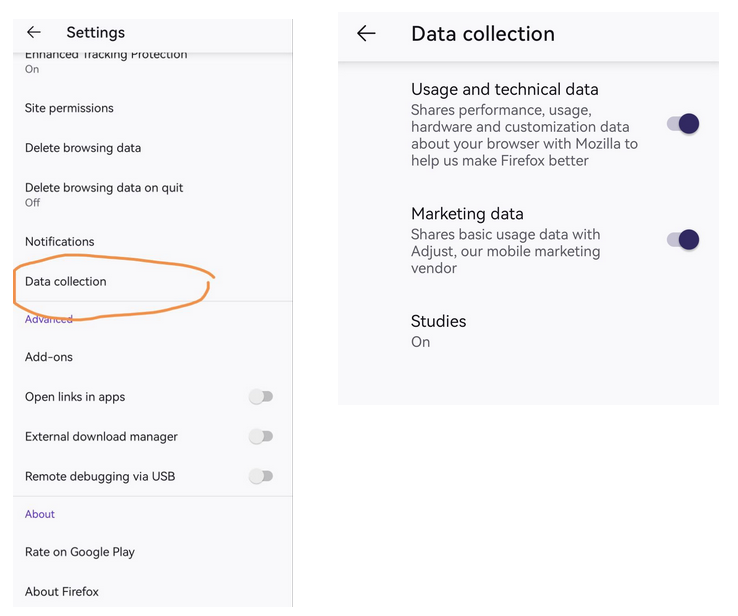
Firefox browser settings on Android

Screenshot of Firefox browser settings on Android

On the one hand, Mozilla previously defended the SDK’s use, so what’s changed, exactly? On the other hand, it has also received some backlash for it.

Perhaps it’s a sticky issue the non-profit does not want to comment on for now, especially in the light of its recent embrace of advertising with a new data collection feature designed to help advertisers track ad performance. The feature is called Privacy-Preserving Attribution (PPA), and is enabled by default in the newest version of the browser.

Whatever it is, Mozilla has preferred to stay silent on the apparent changes so far.

A welcome step, but is it enough?

Mozilla’s decision to remove the Adjust SDK has been met with mixed reactions from users, some of whom view it as a belated and reactionary move rather than a proactive step towards genuine privacy improvement.
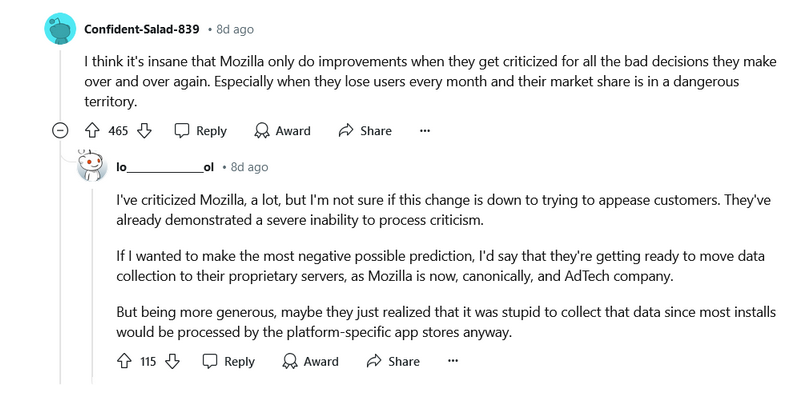
A screenshot of one of the Reddit discussions on the recent change

Source: Reddit

The motivations behind this change remain unclear. As one user speculated, it could be part of a broader strategy for Mozilla to shift data collection to its own servers, aligning with its emerging identity as an adtech company. The evergreen question if it’s really possible to be both a big player in adtech and still be a true privacy advocate is bound to be asked of Mozilla more often now, we predict.

There is also the elephant in the room that somewhat negates the good Mozzila is supposedly doing by removing the third-party ad tracking SDK — the elephant is the PPA feature, which continues to raise concerns about the extent of data collection under the guise of privacy.
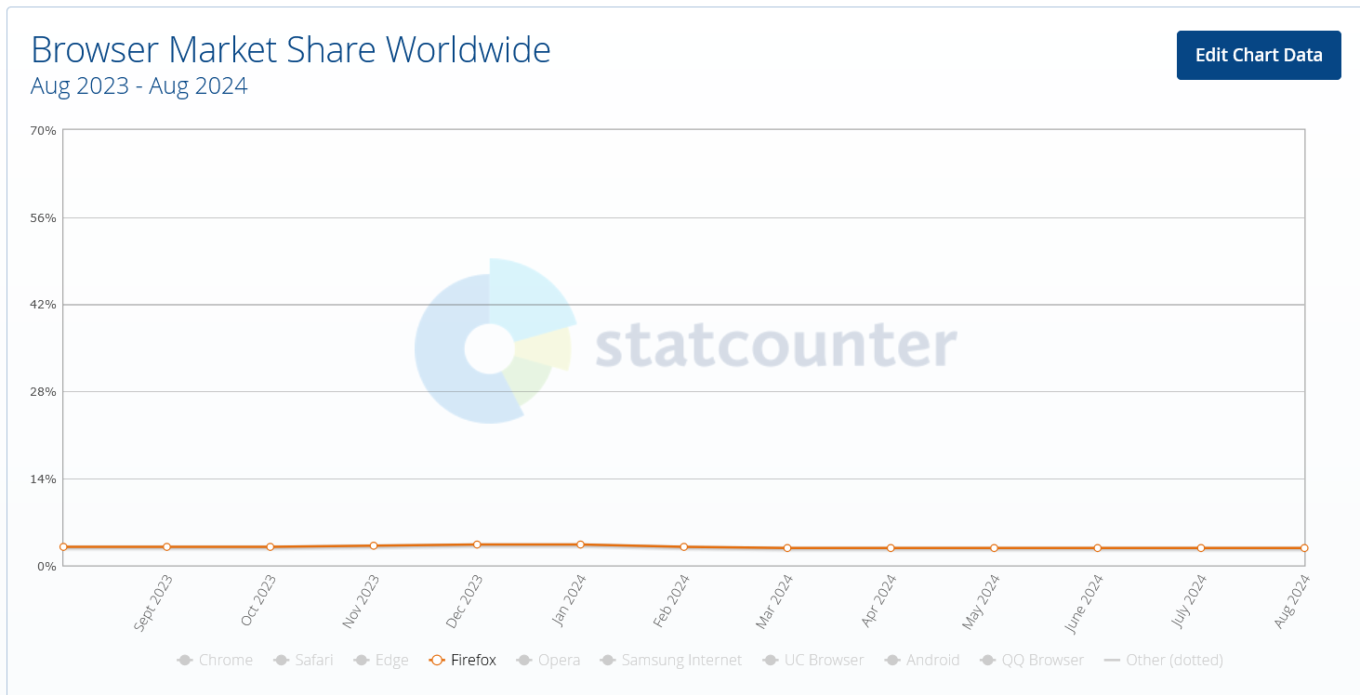
Firefox market share over the last year

Mozilla’s market share is continuing to dwindle — it’s fallen below 3% in the last 12 months. And this adjustment is unlikely to restore user confidence in the company, if that was the goal, amid a growing controversy over its data collection practices. But it may be prudent to wait and see.


Does Mozilla have your trust? Discuss on our social networks

Спадабаўся пост?
AdGuard VPN AdGuard DNS AdGuard Mail AdGuard Wallet
Галоўны экран AdGuard для Windows
Экран абароны AdGuard для Windows, які паказвае функцыі абароны і налады
Экран Статыстыка AdGuard для Windows, які паказвае статыстыку заблакіраванай рэкламы і праграм сачэння
Экран Кіраванне праграмамі ў AdGuard для Windows, які паказвае параметры кіравання абаронай для праграм, усталяваных на прыладзе
20 362 20362 водгукі
Выдатна!

AdGuard: блакіроўшчык рэкламы для Windows

AdGuard для Windows — гэта больш, чым блакіроўшчык рэкламы. Гэта шматфункцыянальны інструмент, які блакуе рэкламу, кантралюе доступ да небяспечных сайтаў, паскарае загрузку старонак і абараняе дзяцей ад непажаданага кантэнту

Спампоўваючы праграму, вы прымаеце ўмовы Ліцэнзійнага пагаднення
Microsoft Store
Спампоўваючы праграму, вы прымаеце ўмовы Ліцэнзійнага пагаднення
AdGuard для Windows версія 8.0, 14 дзён пробнага перыяду
Галоўны экран AdGuard для Mac
Экран рэжыму нябачнасці AdGuard для Mac
20 362 20362 водгукі
Выдатна!

AdGuard: блакіроўшчык рэкламы для Mac

AdGuard для Mac — гэта ўнікальны блакіроўшчык рэкламы, распрацаваны з улікам macOS. Акрамя абароны ад надакучлівай рэкламы ў браўзерах і праграмах, ён абараняе вас ад адсочвання, фішынгу і махлярства
Спампоўваючы праграму, вы прымаеце ўмовы Ліцэнзійнага пагаднення
Чытаць далей
AdGuard для Mac версія 2.19, 14 дзён пробнага перыяду
Галоўны экран AdGuard для Android
Экран Абарона ад сачэння ў AdGuard для Android
Экран Кіраванне праграмамі ў AdGuard для Android, які паказвае параметры кіравання абаронай для праграм, усталяваных на прыладзе
Экран Статыстыка AdGuard для Android, які паказвае статыстыку заблакіраванай рэкламы і праграм сачэння
Галоўны экран прыватнага браўзера AdGuard для Android
QR-код, каб спампаваць AdGuard для Android
20 362 20362 водгукі
Выдатна!

AdGuard: блакіроўшчык рэкламы для Android

Блакуе рэкламу і трэкеры ва ўсіх браўзерах, гульнях і іншых праграмах. Абараняе вашу прыватнасць і дазваляе вам кантраляваць, як вашы праграмы выкарыстоўваюць Інтэрнэт. Усталёўваецца праз APK
Спампоўваючы праграму, вы прымаеце ўмовы Ліцэнзійнага пагаднення
Чытаць далей
Сканіраванне для загрузкі
Выкарыстоўвайце любы счытвальнік QR-кодаў, даступны на вашай прыладзе
AdGuard для Android версія 4.14, 14 дзён пробнага перыяду
Галоўны экран AdGuard для iOS
Экран абароны AdGuard для iOS, які паказвае функцыі абароны і налады
Экран Статыстыка AdGuard для iOS, які паказвае статыстыку заблакіраванай рэкламы і праграм сачэння
QR-код, каб спампаваць AdGuard для iOS
20 362 20362 водгукі
Выдатна!

AdGuard: блакіроўшчык рэкламы для iOS

Найлепшы блакіроўшчык рэкламы для iOS для iPhone і iPad. AdGuard ліквідуе ўсе віды рэкламы і трэкераў у Safari і абараняе вашу прыватнасць ва ўсіх праграмах на ўзроўні DNS
Спампоўваючы праграму, вы прымаеце ўмовы Ліцэнзійнага пагаднення
Чытаць далей
Сканіраванне для загрузкі
Выкарыстоўвайце любы счытвальнік QR-кодаў, даступны на вашай прыладзе
AdGuard для iOS, 4.5
Галоўны экран AdGuard Content Blocker
Экран фільтры ў AdGuard Content Blocker
Экран налады ў AdGuard Content Blocker
20 362 20362 водгукі
Выдатна!

Блакіроўшчык кантэнту AdGuard

AdGuard Content Blocker ухіляе ўсе віды рэкламы ў мабільных браўзерах, якія падтрымліваюць тэхналогію блакіроўкі змесціва — напрыклад, Samsung Internet і Яндэкс.Браўзер. Яго функцыі абмежаваныя ў параўнанні з AdGuard для Android, але ён бясплатны, просты ў усталёўцы і эфектыўны
Спампоўваючы праграму, вы прымаеце ўмовы Ліцэнзійнага пагаднення
Чытаць далей
Блакіроўшчык кантэнту AdGuard, 2.8
Галоўны экран браузернае пашырэнне AdGuard
Экран Абарона ад сачэння ў браузернае пашырэнне AdGuard
20 362 20362 водгукі
Выдатна!

Браўзернае пашырэнне AdGuard

AdGuard — самае хуткае і лёгкае браўзарнае пашырэнне для блакавання ўсіх тыпаў рэкламы! Абірайце AdGuard для хуткага і бяспечнага сёрфінга без рэкламы.
Усталяваць
Спампоўваючы праграму, вы прымаеце ўмовы Ліцэнзійнага пагаднення
Усталяваць
Спампоўваючы праграму, вы прымаеце ўмовы Ліцэнзійнага пагаднення
Усталяваць
Спампоўваючы праграму, вы прымаеце ўмовы Ліцэнзійнага пагаднення
Усталяваць
Спампоўваючы праграму, вы прымаеце ўмовы Ліцэнзійнага пагаднення
Усталяваць
Спампоўваючы праграму, вы прымаеце ўмовы Ліцэнзійнага пагаднення
Чытаць далей
Усталяваць
Спампоўваючы праграму, вы прымаеце ўмовы Ліцэнзійнага пагаднення
Чытаць далей
Браўзернае пашырэнне AdGuard, 5.5
Галоўны экран Браўзерны памочнік AdGuard
20 362 20362 водгукі
Выдатна!

Памочнік AdGuard

Пашырэнне для браўзера-компаньён для настольных прыкладанняў AdGuard. Яно дазваляе блакіраваць карыстальніцкія элементы на вэб-сайтах, дадаваць вэб-сайты ў спіс дазволеных і адпраўляць справаздачы непасрэдна з вашага браўзера
Памочнік AdGuard, 1.4
20 362 20362 водгукі
Выдатна!

AdGuard Home

AdGuard Home — гэта сеткавае рашэнне для блакіроўкі рэкламы і праграм сачэння. Усталюйце яго адзін раз на вашым маршрутызатары, каб ахапіць усе прылады ў сетцы — дадатковае праграмнае забеспячэнне не патрабуецца. Гэта асабліва важна для розных прылад IoT, якія часта ўяўляюць пагрозу вашай прыватнасці
AdGuard Home, 0.107
Галоўны экран AdGuard Pro для iOS
Экран абароны ў AdGuard Pro для iOS, які паказвае функцыі абароны і налады
Экран Статыстыка ў AdGuard Pro для iOS, які паказвае статыстыку заблакіраванай рэкламы і праграм сачэння
20 362 20362 водгукі
Выдатна!

AdGuard Pro для iOS

AdGuard Pro для iOS пастаўляецца з усімі дадатковымі функцыямі блакіроўкі рэкламы і абароны, якія ўключаны. Ён прапануе тыя ж інструменты, што і платная версія AdGuard для iOS. Выдатна блакіруе рэкламу ў Safari, а таксама дазваляе наладжваць налады DNS, каб адаптаваць вашу абарону. Ён блакіруе рэкламу ў браўзерах і дадатках, абараняе дзяцей ад недапушчальнага кантэнту і захоўвае вашы асабістыя даныя бяспечнымі
Спампоўваючы праграму, вы прымаеце ўмовы Ліцэнзійнага пагаднення
Чытаць далей
AdGuard Pro для iOS, 4.5
Галоўны экран AdGuard Mini для Mac
Экран абароны Safari ў AdGuard Mini для Mac
Экран стварэння правіла ў AdGuard Mini для Mac
20 362 20362 водгукі
Выдатна!

AdGuard Mini для Mac — блакіроўшчык рэкламы ў Safari

AdGuard Mini для Mac — гэта магутны блакіроўшчык рэкламы для Safari. Гэта лёгкая праграма выдаляе рэкламу, блакуе праграмы сачэння і паскарае загрузку старонак. Яна дапамагае вам аглядаць вэб у Safari без адцягненняў і захоўваць вашы даныя ў прыватнасці
Усталяваць
Спампоўваючы праграму, вы прымаеце ўмовы Ліцэнзійнага пагаднення
Чытаць далей
AdGuard Mini для Mac, 2.3
Галоўны экран AdGuard для Android TV з уключанай абаронай
Экран блакіроўкі рэкламы AdGuard для Android TV, які паказвае яго функцыі і налады
Экран налады AdGuard для Android TV
Экран Кіраванне праграмамі AdGuard для Android TV, які паказвае праграмы, дзе рэклама і праграмы сачэння заблакіравана
20 362 20362 водгукі
Выдатна!

AdGuard для Android TV

AdGuard для Android TV — адзіная праграма, якая блакіруе рэкламу, ахоўвае вашу прыватнасць і працуе як міжсеткавы экран для вашага Smart TV. Атрымуйце папярэджанні аб вэб-пагрозах, выкарыстоўвайце бяспечны DNS і атрымлівайце перавагі ад шыфраванага трафіку. Адпачывайце і атрымлівайце асалоду ад улюбёных шоу з першакласнай абаронай і без рэкламы!
AdGuard для Android TV версія 4.14, 14 дзён пробнага перыяду
Маскот AdGuard, Агнар, трымае пінгвіна Linux
20 362 20362 водгукі
Выдатна!

AdGuard для Linux

AdGuard для Linux — гэта першы ў свеце сістэмны блакіроўшчык рэкламы для Linux. Блакуйце рэкламу і трэкеры на ўзроўні прылады, выбірайце з папярэдне ўсталяваных фільтраў альбо дадавайце ўласныя — усё праз інтэрфейс каманднага радка
AdGuard для Linux, 1.4
20 362 20362 водгукі
Выдатна!

AdGuard Temp Mail

Ваш часовы паштовую скрыню, каб на асноўную пошту не прыходзіў спам
20 362 20362 водгукі
Выдатна!

AdGuard VPN

75 лакацый па ўсім свеце

Доступ да любога кантэнту

Моцнае шыфраванне

Без лагавання

Самае хуткае злучэнне

Цэладзённая падтрымка

Паспрабуйце бясплатна
Спампоўваючы праграму, вы прымаеце ўмовы Ліцэнзійнага пагаднення
Чытаць далей
20 362 20362 водгукі
Выдатна!

AdGuard DNS

AdGuard DNS – гэта альтэрнатыўны спосаб заблакаваць рэкламу, абараніць асабістыя дадзеныя і ахаваць дзяцей ад дарослых матэрыялаў. Ён просты ў наладзе і выкарыстанні і забяспечвае патрэбны мінімум абароны ад рэкламы, трэкінгу і фішынгу, незалежна ад платформы.
20 362 20362 водгукі
Выдатна!

AdGuard Mail

Абараняйце сваю асобу, пазбягайце спаму і трымайце ўваходную пошту ў бяспецы з дапамогай нашых псеўданімаў і часовых адрасоў электроннай пошты. Скарыстайцеся нашым бясплатным сэрвісам перасылкі электроннай пошты і праграмамі для ўсіх аперацыйных сістэм.
20 362 20362 водгукі
Выдатна!

AdGuard Wallet

Бяспечны і прыватны крыпта-кашалёк, які дае вам поўны кантроль над вашымі актывамі. Адкрывайце для сябе тысячы крыптавалют для захоўвання, адпраўкі і абмену
Спампоўка AdGuard Каб усталяваць AdGuard, пстрыкніце файл, пазначаны стрэлкай Выберыце «Адкрыць» і націсніце «ОК», затым дачакайцеся спампоўкі файла. У акне, якое адкрылася, перацягніце значок AdGuard у папку «Праграмы». Дзякуй, што выбралі AdGuard! Выберыце «Адкрыць» і націсніце «ОК», затым дачакайцеся спампоўкі файла. У акне, якое адкрылася, націсніце «Усталяваць». Дзякуй, што выбралі AdGuard!
Усталюйце AdGuard на мабільную прыладу

















































