The big brother in your pocket: TeleSign’s ‘reputation score’ system explained

What if there’s a hidden system tracking and scoring you based on every phone call you make or take? It sounds like something from a Black Mirror episode and may remind you of the controversial China’s social credit system. But surprisingly, half of the world’s mobile phone users are already part of such a system, and many are Europeans, who are supposed to enjoy strong privacy protections.

How profiling works and why it’s problematic

NOYB, a privacy advocacy group, has filed a lawsuit against the US company TeleSign, a Belgian telecom provider BICS, and their parent Proximus. They claim these companies are unauthorizedly profiling billions of phone users to assign them a ‘reputation’ or ‘trust’ score.

This score can affect your access to online services: If your score is bad, you may be blocked from accessing certain online platforms, or be subject to additional checks which those with better scores won’t have to go through. These restrictions are imposed by TeleSign’s partners, which reportedly include Microsoft, TikTok, Skype, LinkedIn, and SalesForce. So, who are BICS and TeleSign and what do they do exactly?

BICS is a Belgian telecom giant, which connects networks of mobile phone providers in over 200 countries. By doing so, BICS gains access to personal information of billions of customers. BICS gets to know how often people make calls, how long they talk, for how long they don’t use their phones, where they are, and when they receive calls and from whom. This data is then shared with TeleSign, which assigns ‘reputation scores’ to phone numbers and sells this data as a fraud prevention tool, called ‘Intelligence API’. Per month, TeleSign says it “verifies over five billion phone numbers,” which represents “half of the world’s mobile users,” and “gives critical insight into the remaining billions.”

The problem? Phone users that trust their mobile operators with their information are not aware of this scheme.

The lawsuit points out that the system is problematic also because TeleSign falls under US surveillance laws, which means that the US government can access the data. Sending European personal data across the Atlantic is technically illegal without a valid EU-US data transfer agreement. The old agreement, called the Privacy Shield, was scrapped in 2020 in part because the US laws were deemed too intrusive, and the existing privacy protections in the US not on par with the GDPR standards in the EU. The resulting legal vacuum has left many big tech companies like Meta facing hefty fines for continuing to transfer European user data to the US. In early July, the EU and US finally hammered out the details of a deal that should replace it, but its fate is still uncertain as it is likely to face legal challenges.

What data does TeleSign access to determine a reputation score?

Exactly how the reputation score is calculated is anyone’s guess. On its website, TeleSign claims that the reputation score is assessed on various factors, but the exact methodology is proprietary. Some of the things TeleSign says it uses to assign a score to phone numbers are phone number data and analytics, data from organizations that allow it to check whether a phone number belongs to a known fraudster, patterns in phone usage, frequency of usage (which can also indicate fraud, for example, if it is used every few minutes), and machine learning predictions.

Because the methodology is proprietary, there’s no way to know how these things add up to a high or low trust score. Users can ask TeleSign for a copy of their data, and some have found they received a “medium-low” risk rating.

While users can obtain their data from TeleSign, mobile operators seem unaware that their customer data is being sent to TeleSign, according to NOYB.

So, in a nutshell, your access to a particular online service may be blocked due to an opaque, privately-operated scoring system that assigns you a rating based on an arbitrary set of criteria and works behind the scenes without your knowledge.

Legal basis: what BICS and Telesign say?

The GDPR lists six lawful grounds for processing personal data, namely consent, contract, vital interests, public duty, and legitimate interests. The latter is the most flexible, and it lets companies use data without asking the user directly. For instance, OpenAI uses “legitimate interests” as an excuse to collect and use publicly available personal information to train AI models like GPT, which powers ChatGPT. This justification is highly questionable, and OpenAI’s habit of grabbing personal and other data from the Web has been met with mounting pile of lawsuits accusing it of profiting from privacy violations.

BICS and TeleSign both claim ‘legitimate interests’, specifically, detection or prevention of fraud as their legal basis of data processing.
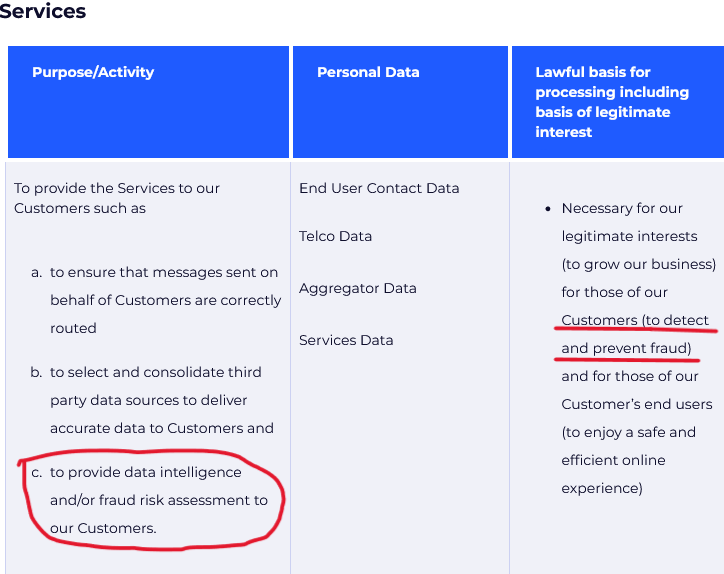
TeleSign claims it processes user data to detect fraud
Source: TeleSign privacy policy

Speaking to Belgian newspaper Le Soir last year, Proximus, which owns both BICS and TeleSign, said that all transferred data is “end-to-end encrypted” while telephone numbers “are masked to prevent individual identification.” As for how it manages privacy risks stemming from transfer of data to the US, which by this day still lacks a federal privacy law, it says that it “has taken additional measures to prevent the identification of individuals should the data end up in the hands of an authority or should a data breach occur.” But how these companies ensure the data does not fall into the wrong hands is unclear.

The lawsuit alleges that BICS and TeleSign’s activities go beyond fraud prevention, and are disproportionate, mainly meant to generate revenue. BICS has never informed users of the data processing, which potentially violates its transparency obligation under article 14 of GDPR.

Something rings a bell?

What the TeleSign system does is basically evaluate your reputation, or in other words, your trustworthiness, based on your phone behavior. To some extent, such a system is reminiscent of China’s social credit system in that they both assess trustworthiness based on behavior data, and can reward or punish individuals based on this data. This should ring alarm bells for privacy-conscious users.
Of course, It would be a stretch to equate the activities of TeleSign and BICS with those of the Chinese government. Firstly, because China’s social credit system is a government policy and not a commercial product, and secondly, it is way wider in scope, as it presumes tracking and scoring people based on a large variety of their online and offline activities.

How the system can negatively affect you

Despite assurances from Proximus, BICS, and TeleSign, the data is not safe with them. There is the obvious danger in the data being processed in the US, where data protection laws are weak, while the safeguards proposed in the newly proposed US-EU transfer agreement have yet to withstand a legal challenge. The collected data could also be exposed by a breach or a leak, leading to identity theft. In addition, and perhaps most importantly, the system can deny services to mobile users based on their reputation scores, which are calculated without their knowledge and consent, and which they have no way of correcting, deleting, or challenging, simply because they are unaware of their existence.

What can you do

Thanks to NOYB exposing the practice, more people will get to know about it and their right to request, rectify, and delete their data from TeleSign. This can be done through a form on TeleSign’s website. According to its privacy policy, it’s possible to opt out of all personal data selling and sharing, including for profiling purposes.

TeleSign privacy policy allows some users to opt out of profiling

Source: TeleSign privacy policy

To avoid being profiled by TeleSign or similar companies, some general recommendations are to use multiple phone numbers for different purposes, or to use a virtual number instead of your real one for online services. For example, if you do cold-calling, you may want to have a separate phone for that, so you won’t be mistaken for a scammer and denied access to certain services.

Moreover, you should be aware of the data protection laws that you can benefit from, such as by asking for the data that companies have on you and requesting its deletion. You should also take other measures to protect your privacy, including using a VPN, limiting the personal information you share online, and being careful with app permissions. These steps won’t stop phone-based profiling directly, but they will add an extra layer of privacy to your browsing.


Спадабаўся пост?
AdGuard VPN AdGuard DNS AdGuard Mail AdGuard Wallet
Галоўны экран AdGuard для Windows
Экран абароны AdGuard для Windows, які паказвае функцыі абароны і налады
Экран Статыстыка AdGuard для Windows, які паказвае статыстыку заблакіраванай рэкламы і праграм сачэння
Экран Кіраванне праграмамі ў AdGuard для Windows, які паказвае параметры кіравання абаронай для праграм, усталяваных на прыладзе
20 363 20363 водгукі
Выдатна!

AdGuard: блакіроўшчык рэкламы для Windows

AdGuard для Windows — гэта больш, чым блакіроўшчык рэкламы. Гэта шматфункцыянальны інструмент, які блакуе рэкламу, кантралюе доступ да небяспечных сайтаў, паскарае загрузку старонак і абараняе дзяцей ад непажаданага кантэнту

Спампоўваючы праграму, вы прымаеце ўмовы Ліцэнзійнага пагаднення
Microsoft Store
Спампоўваючы праграму, вы прымаеце ўмовы Ліцэнзійнага пагаднення
AdGuard для Windows версія 8.0, 14 дзён пробнага перыяду
Галоўны экран AdGuard для Mac
Экран рэжыму нябачнасці AdGuard для Mac
20 363 20363 водгукі
Выдатна!

AdGuard: блакіроўшчык рэкламы для Mac

AdGuard для Mac — гэта ўнікальны блакіроўшчык рэкламы, распрацаваны з улікам macOS. Акрамя абароны ад надакучлівай рэкламы ў браўзерах і праграмах, ён абараняе вас ад адсочвання, фішынгу і махлярства
Спампоўваючы праграму, вы прымаеце ўмовы Ліцэнзійнага пагаднення
Чытаць далей
AdGuard для Mac версія 2.19, 14 дзён пробнага перыяду
Галоўны экран AdGuard для Android
Экран Абарона ад сачэння ў AdGuard для Android
Экран Кіраванне праграмамі ў AdGuard для Android, які паказвае параметры кіравання абаронай для праграм, усталяваных на прыладзе
Экран Статыстыка AdGuard для Android, які паказвае статыстыку заблакіраванай рэкламы і праграм сачэння
Галоўны экран прыватнага браўзера AdGuard для Android
QR-код, каб спампаваць AdGuard для Android
20 363 20363 водгукі
Выдатна!

AdGuard: блакіроўшчык рэкламы для Android

Блакуе рэкламу і трэкеры ва ўсіх браўзерах, гульнях і іншых праграмах. Абараняе вашу прыватнасць і дазваляе вам кантраляваць, як вашы праграмы выкарыстоўваюць Інтэрнэт. Усталёўваецца праз APK
Спампоўваючы праграму, вы прымаеце ўмовы Ліцэнзійнага пагаднення
Чытаць далей
Сканіраванне для загрузкі
Выкарыстоўвайце любы счытвальнік QR-кодаў, даступны на вашай прыладзе
AdGuard для Android версія 4.14, 14 дзён пробнага перыяду
Галоўны экран AdGuard для iOS
Экран абароны AdGuard для iOS, які паказвае функцыі абароны і налады
Экран Статыстыка AdGuard для iOS, які паказвае статыстыку заблакіраванай рэкламы і праграм сачэння
QR-код, каб спампаваць AdGuard для iOS
20 363 20363 водгукі
Выдатна!

AdGuard: блакіроўшчык рэкламы для iOS

Найлепшы блакіроўшчык рэкламы для iOS для iPhone і iPad. AdGuard ліквідуе ўсе віды рэкламы і трэкераў у Safari і абараняе вашу прыватнасць ва ўсіх праграмах на ўзроўні DNS
Спампоўваючы праграму, вы прымаеце ўмовы Ліцэнзійнага пагаднення
Чытаць далей
Сканіраванне для загрузкі
Выкарыстоўвайце любы счытвальнік QR-кодаў, даступны на вашай прыладзе
AdGuard для iOS, 4.5
Галоўны экран AdGuard Content Blocker
Экран фільтры ў AdGuard Content Blocker
Экран налады ў AdGuard Content Blocker
20 363 20363 водгукі
Выдатна!

Блакіроўшчык кантэнту AdGuard

AdGuard Content Blocker ухіляе ўсе віды рэкламы ў мабільных браўзерах, якія падтрымліваюць тэхналогію блакіроўкі змесціва — напрыклад, Samsung Internet і Яндэкс.Браўзер. Яго функцыі абмежаваныя ў параўнанні з AdGuard для Android, але ён бясплатны, просты ў усталёўцы і эфектыўны
Спампоўваючы праграму, вы прымаеце ўмовы Ліцэнзійнага пагаднення
Чытаць далей
Блакіроўшчык кантэнту AdGuard, 2.8
Галоўны экран браузернае пашырэнне AdGuard
Экран Абарона ад сачэння ў браузернае пашырэнне AdGuard
20 363 20363 водгукі
Выдатна!

Браўзернае пашырэнне AdGuard

AdGuard — самае хуткае і лёгкае браўзарнае пашырэнне для блакавання ўсіх тыпаў рэкламы! Абірайце AdGuard для хуткага і бяспечнага сёрфінга без рэкламы.
Усталяваць
Спампоўваючы праграму, вы прымаеце ўмовы Ліцэнзійнага пагаднення
Усталяваць
Спампоўваючы праграму, вы прымаеце ўмовы Ліцэнзійнага пагаднення
Усталяваць
Спампоўваючы праграму, вы прымаеце ўмовы Ліцэнзійнага пагаднення
Усталяваць
Спампоўваючы праграму, вы прымаеце ўмовы Ліцэнзійнага пагаднення
Усталяваць
Спампоўваючы праграму, вы прымаеце ўмовы Ліцэнзійнага пагаднення
Чытаць далей
Усталяваць
Спампоўваючы праграму, вы прымаеце ўмовы Ліцэнзійнага пагаднення
Чытаць далей
Браўзернае пашырэнне AdGuard, 5.5
Галоўны экран Браўзерны памочнік AdGuard
20 363 20363 водгукі
Выдатна!

Памочнік AdGuard

Пашырэнне для браўзера-компаньён для настольных прыкладанняў AdGuard. Яно дазваляе блакіраваць карыстальніцкія элементы на вэб-сайтах, дадаваць вэб-сайты ў спіс дазволеных і адпраўляць справаздачы непасрэдна з вашага браўзера
Памочнік AdGuard, 1.4
20 363 20363 водгукі
Выдатна!

AdGuard Home

AdGuard Home — гэта сеткавае рашэнне для блакіроўкі рэкламы і праграм сачэння. Усталюйце яго адзін раз на вашым маршрутызатары, каб ахапіць усе прылады ў сетцы — дадатковае праграмнае забеспячэнне не патрабуецца. Гэта асабліва важна для розных прылад IoT, якія часта ўяўляюць пагрозу вашай прыватнасці
AdGuard Home, 0.107
Галоўны экран AdGuard Pro для iOS
Экран абароны ў AdGuard Pro для iOS, які паказвае функцыі абароны і налады
Экран Статыстыка ў AdGuard Pro для iOS, які паказвае статыстыку заблакіраванай рэкламы і праграм сачэння
20 363 20363 водгукі
Выдатна!

AdGuard Pro для iOS

AdGuard Pro для iOS пастаўляецца з усімі дадатковымі функцыямі блакіроўкі рэкламы і абароны, якія ўключаны. Ён прапануе тыя ж інструменты, што і платная версія AdGuard для iOS. Выдатна блакіруе рэкламу ў Safari, а таксама дазваляе наладжваць налады DNS, каб адаптаваць вашу абарону. Ён блакіруе рэкламу ў браўзерах і дадатках, абараняе дзяцей ад недапушчальнага кантэнту і захоўвае вашы асабістыя даныя бяспечнымі
Спампоўваючы праграму, вы прымаеце ўмовы Ліцэнзійнага пагаднення
Чытаць далей
AdGuard Pro для iOS, 4.5
Галоўны экран AdGuard Mini для Mac
Экран абароны Safari ў AdGuard Mini для Mac
Экран стварэння правіла ў AdGuard Mini для Mac
20 363 20363 водгукі
Выдатна!

AdGuard Mini для Mac — блакіроўшчык рэкламы ў Safari

AdGuard Mini для Mac — гэта магутны блакіроўшчык рэкламы для Safari. Гэта лёгкая праграма выдаляе рэкламу, блакуе праграмы сачэння і паскарае загрузку старонак. Яна дапамагае вам аглядаць вэб у Safari без адцягненняў і захоўваць вашы даныя ў прыватнасці
Усталяваць
Спампоўваючы праграму, вы прымаеце ўмовы Ліцэнзійнага пагаднення
Чытаць далей
AdGuard Mini для Mac, 2.3
Галоўны экран AdGuard для Android TV з уключанай абаронай
Экран блакіроўкі рэкламы AdGuard для Android TV, які паказвае яго функцыі і налады
Экран налады AdGuard для Android TV
Экран Кіраванне праграмамі AdGuard для Android TV, які паказвае праграмы, дзе рэклама і праграмы сачэння заблакіравана
20 363 20363 водгукі
Выдатна!

AdGuard для Android TV

AdGuard для Android TV — адзіная праграма, якая блакіруе рэкламу, ахоўвае вашу прыватнасць і працуе як міжсеткавы экран для вашага Smart TV. Атрымуйце папярэджанні аб вэб-пагрозах, выкарыстоўвайце бяспечны DNS і атрымлівайце перавагі ад шыфраванага трафіку. Адпачывайце і атрымлівайце асалоду ад улюбёных шоу з першакласнай абаронай і без рэкламы!
AdGuard для Android TV версія 4.14, 14 дзён пробнага перыяду
Маскот AdGuard, Агнар, трымае пінгвіна Linux
20 363 20363 водгукі
Выдатна!

AdGuard для Linux

AdGuard для Linux — гэта першы ў свеце сістэмны блакіроўшчык рэкламы для Linux. Блакуйце рэкламу і трэкеры на ўзроўні прылады, выбірайце з папярэдне ўсталяваных фільтраў альбо дадавайце ўласныя — усё праз інтэрфейс каманднага радка
AdGuard для Linux, 1.4
20 363 20363 водгукі
Выдатна!

AdGuard Temp Mail

Ваш часовы паштовую скрыню, каб на асноўную пошту не прыходзіў спам
20 363 20363 водгукі
Выдатна!

AdGuard VPN

75 лакацый па ўсім свеце

Доступ да любога кантэнту

Моцнае шыфраванне

Без лагавання

Самае хуткае злучэнне

Цэладзённая падтрымка

Паспрабуйце бясплатна
Спампоўваючы праграму, вы прымаеце ўмовы Ліцэнзійнага пагаднення
Чытаць далей
20 363 20363 водгукі
Выдатна!

AdGuard DNS

AdGuard DNS – гэта альтэрнатыўны спосаб заблакаваць рэкламу, абараніць асабістыя дадзеныя і ахаваць дзяцей ад дарослых матэрыялаў. Ён просты ў наладзе і выкарыстанні і забяспечвае патрэбны мінімум абароны ад рэкламы, трэкінгу і фішынгу, незалежна ад платформы.
20 363 20363 водгукі
Выдатна!

AdGuard Mail

Абараняйце сваю асобу, пазбягайце спаму і трымайце ўваходную пошту ў бяспецы з дапамогай нашых псеўданімаў і часовых адрасоў электроннай пошты. Скарыстайцеся нашым бясплатным сэрвісам перасылкі электроннай пошты і праграмамі для ўсіх аперацыйных сістэм.
20 363 20363 водгукі
Выдатна!

AdGuard Wallet

Бяспечны і прыватны крыпта-кашалёк, які дае вам поўны кантроль над вашымі актывамі. Адкрывайце для сябе тысячы крыптавалют для захоўвання, адпраўкі і абмену
Спампоўка AdGuard Каб усталяваць AdGuard, пстрыкніце файл, пазначаны стрэлкай Выберыце «Адкрыць» і націсніце «ОК», затым дачакайцеся спампоўкі файла. У акне, якое адкрылася, перацягніце значок AdGuard у папку «Праграмы». Дзякуй, што выбралі AdGuard! Выберыце «Адкрыць» і націсніце «ОК», затым дачакайцеся спампоўкі файла. У акне, якое адкрылася, націсніце «Усталяваць». Дзякуй, што выбралі AdGuard!
Усталюйце AdGuard на мабільную прыладу

















































