TechTok #12. Navigating privacy in a data-driven world: Simple steps for protecting your data and fine-tuning your VPN

In this new edition of TechTok, we’re tackling two very different questions. One is incredibly broad in scope, while the other is much narrower. But what ties them together is that the answers to both may seem more straightforward than they actually are. Let’s dive in.

First question is from katy perry's boyfriend:

I've been online for ages, and I'm guessing my personal data is probably already out there for anyone who's interested. Does it make sense to start using ad blockers and VPNs? Or how can I start living a more private life after years of shitposting ? It seems a bit pointless now

First of all, it’s understandable to have regrets about all the data we’ve shared throughout the years, especially when we did not know better. However, unless you’re living completely off the grid, it’s impossible not to leave a trail of personal data behind. The real question isn’t whether that trail exists but how accurate and how distinct it is. As for having already left a trail, the truth is, you can’t be a purist in the digital age without a massive tradeoff in convenience, and very few people are in a fundamentally different position. In fact, younger generations arguably have it worse thanks to “sharenting,” which doesn’t mean they should give up on privacy from the start. Chances are, you’re actually in a better position than them. The key point here is that information is valuable mostly while it’s current. You can’t turn history back, but you can make sure that whatever you leave online from this point onward is limited. And data only really works as long as it’s searchable and linkable to you which means there are ways to blunt its impact.

From there, the goal isn’t to erase yourself from the internet, but to slowly make yourself less legible. Put simply, the goal is to make the data you leave behind fragmented, harder to link together, or less accurate, so anyone trying to track you, target you with ads, or aggregate your personal info will get a muddled picture rather than a “readable” profile.

Even small, boring changes in how you go about digital hygiene matter, and compound over time. One of those is clearing cookies and cache, especially if you automate it. In Chrome, you can configure on-device data to delete automatically upon closing. Similar features are available in most popular browsers. This doesn’t make you anonymous, but it does prevent long-term tracking from neatly stitching together months or years of behavior. The tradeoff is that you'll log out more often, and things will be a bit less convenient.

The same logic applies to separating contexts. Keeping work, private life, and casual online activity from constantly bleeding into one another makes profiling harder. Whether that’s separate browser profiles or separate email addresses, you’re making it harder to link different parts of your life. In this regard, using email aliases and temporary addresses can help. Aliases are useful for accounts you actually use but don’t fully trust with your main inbox like newsletters, shopping sites, or online services you want to keep separate. Temporary addresses are great for one-off sign-ups, trials, or downloads where you don’t expect or want any follow-up.

📫
One service that provides both is AdGuard Mail. Used this way, these tools reduce reuse, limit cross-site linkage, and help contain the damage when (not if) leaks happen.

Social media works similarly. Simply reducing discoverability can go a long way; one example is opting out of search engine indexing, which you can do on Instagram. Other measures include changing the name displayed on your profile, switching to a different username (or/and using different usernames for different social media accounts), or limiting who can see your posts in the first place — that is according to recommendations from X, but they are universally applicable. These steps can prevent your profile information and posts associated with it from appearing in search engine results. In short, changing a handle can help disrupt name-based searches, even if it doesn’t erase existing data entirely. And while none of this is a panacea, most data collection relies on ease rather than persistence.

You can also deal directly with search engines. Google, for example, lets you request the removal of private information like your address, phone number, email, government IDs, bank details, medical records, or even confidential usernames and passwords. Use Google’s “Results about you” feature to find and request removals, and you can even set up notifications for new results. Keep in mind that Google can only remove information from its search results — if you want content taken down from the original website, you’ll need to contact the site owner directly.

If there’s one unglamorous but genuinely effective step, it’s dealing with data brokers. Opting out is tedious, but it works, and once done it tends to stay done. You can visit the opt-out pages of sites like Spokeo and Epsilon to request your records be removed. However, given how many of such data brokers are out there, perhaps the most surefire way is to use a specialized removal service.

Beyond controlling what’s already out there, you can also limit how much new data gets collected about you. Ad blockers help stop trackers and third-party scripts from quietly following your activity across sites, which reduces the amount of behavioral data that can be linked back to you. VPNs, meanwhile, mask your IP address and encrypt your connection, making it harder for websites, advertisers, or even your ISP to build a profile based on your location or browsing habits. Neither of these tools makes you invisible, but combined with the other steps such as separating contexts, using aliases, and managing search visibility, they make it significantly harder for anyone to piece together a detailed picture of your online life.

Taken together, none of this is about achieving perfect privacy. That ship sailed for almost everyone a long time ago. What is achievable is making your data older, noisier, and less connected over time. And in practice, that’s usually enough.

Now, second question comes from Elle:

I'm sooo not tech-savvy. If I leave my VPN on, will it stay on when I shut down my PC? Thanks so much for your time.

If you leave your VPN on and then shut down your PC, the VPN won’t keep running in the background once your computer is powered off. When you restart your PC, the VPN will need to reconnect to establish the secure connection again. So, answering your question — no, the VPN won’t stay on once you shut down your PC.

However, most popular VPNs provide an option to automatically reconnect after a system restart, which is a common feature.

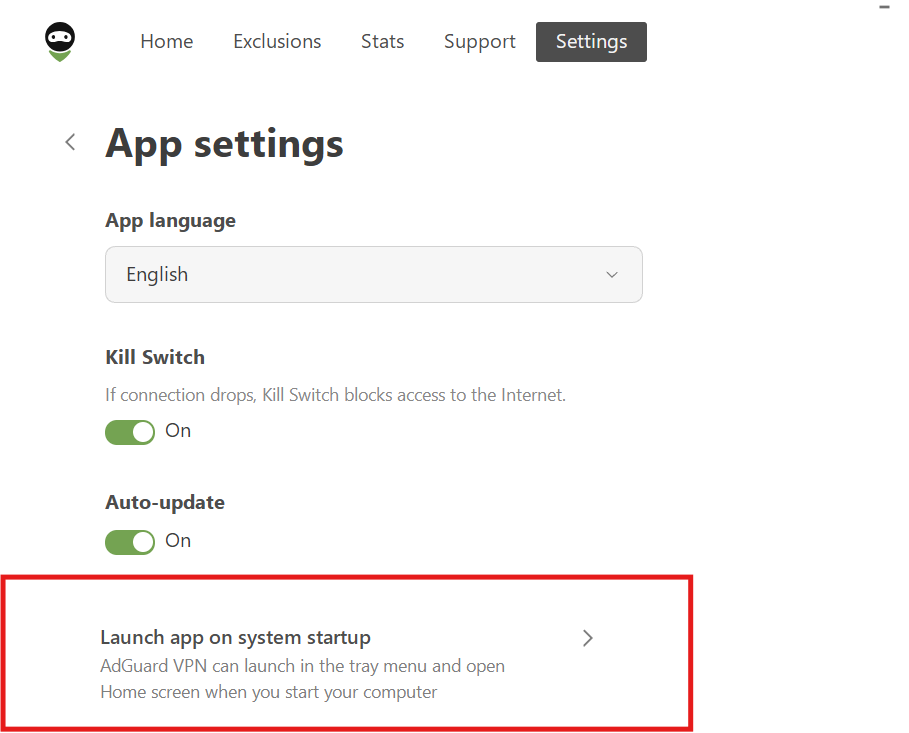
With AdGuard VPN, you can streamline this process with a couple of helpful features. First, you can enable Launch app on system startup in the app’s settings. This ensures that the VPN app automatically opens as soon as your computer boots up, so you don’t have to manually launch it each time.
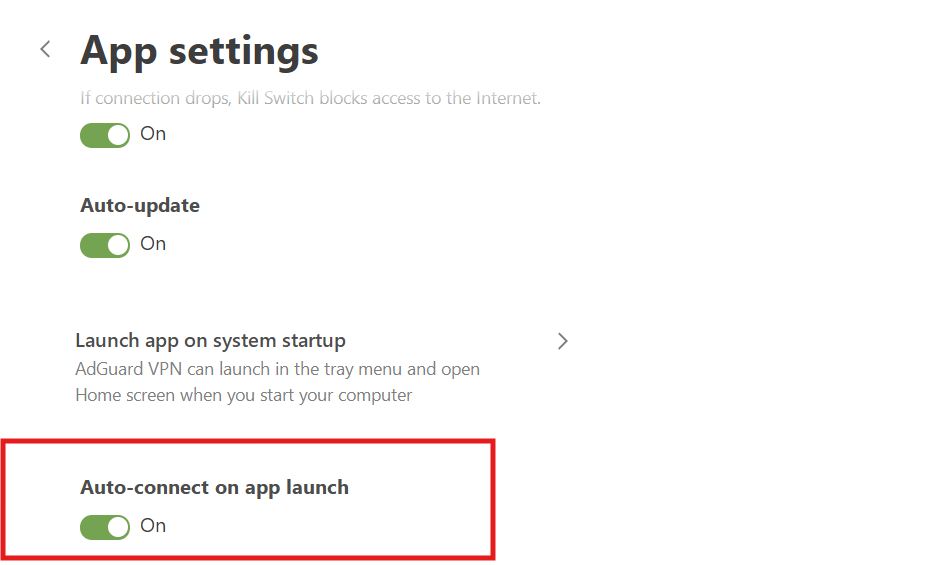
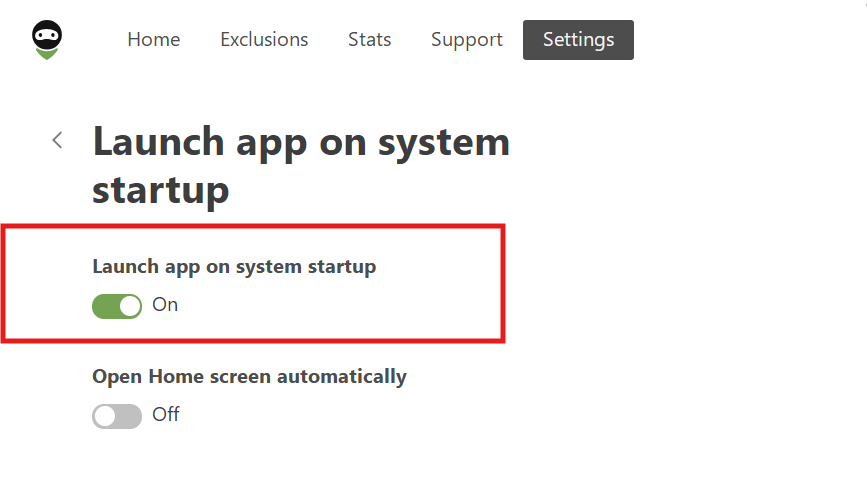
Next, you can enable the Auto-connect on app launch feature. This ensures that as soon as the app opens, it will automatically connect to the VPN without any extra action needed from you. Together, these features make sure that your VPN is ready to protect you right from the moment your computer starts up, with no additional steps required.
Спадабаўся пост?
AdGuard VPN AdGuard DNS AdGuard Mail AdGuard Wallet
Галоўны экран AdGuard для Windows
Экран абароны AdGuard для Windows, які паказвае функцыі абароны і налады
Экран Статыстыка AdGuard для Windows, які паказвае статыстыку заблакіраванай рэкламы і праграм сачэння
Экран Кіраванне праграмамі ў AdGuard для Windows, які паказвае параметры кіравання абаронай для праграм, усталяваных на прыладзе
20 362 20362 водгукі
Выдатна!

AdGuard: блакіроўшчык рэкламы для Windows

AdGuard для Windows — гэта больш, чым блакіроўшчык рэкламы. Гэта шматфункцыянальны інструмент, які блакуе рэкламу, кантралюе доступ да небяспечных сайтаў, паскарае загрузку старонак і абараняе дзяцей ад непажаданага кантэнту
Спампоўваючы праграму, вы прымаеце ўмовы Ліцэнзійнага пагаднення
Microsoft Store
Спампоўваючы праграму, вы прымаеце ўмовы Ліцэнзійнага пагаднення
AdGuard для Windows версія 8.0, 14 дзён пробнага перыяду
Галоўны экран AdGuard для Mac
Экран рэжыму нябачнасці AdGuard для Mac
20 362 20362 водгукі
Выдатна!

AdGuard: блакіроўшчык рэкламы для Mac

AdGuard для Mac — гэта ўнікальны блакіроўшчык рэкламы, распрацаваны з улікам macOS. Акрамя абароны ад надакучлівай рэкламы ў браўзерах і праграмах, ён абараняе вас ад адсочвання, фішынгу і махлярства
Спампоўваючы праграму, вы прымаеце ўмовы Ліцэнзійнага пагаднення
Чытаць далей
AdGuard для Mac версія 2.19, 14 дзён пробнага перыяду
Галоўны экран AdGuard для Android
Экран Абарона ад сачэння ў AdGuard для Android
Экран Кіраванне праграмамі ў AdGuard для Android, які паказвае параметры кіравання абаронай для праграм, усталяваных на прыладзе
Экран Статыстыка AdGuard для Android, які паказвае статыстыку заблакіраванай рэкламы і праграм сачэння
Галоўны экран прыватнага браўзера AdGuard для Android
QR-код, каб спампаваць AdGuard для Android
20 362 20362 водгукі
Выдатна!

AdGuard: блакіроўшчык рэкламы для Android

Блакуе рэкламу і трэкеры ва ўсіх браўзерах, гульнях і іншых праграмах. Абараняе вашу прыватнасць і дазваляе вам кантраляваць, як вашы праграмы выкарыстоўваюць Інтэрнэт. Усталёўваецца праз APK
Спампоўваючы праграму, вы прымаеце ўмовы Ліцэнзійнага пагаднення
Чытаць далей
Сканіраванне для загрузкі
Выкарыстоўвайце любы счытвальнік QR-кодаў, даступны на вашай прыладзе
AdGuard для Android версія 4.14, 14 дзён пробнага перыяду
Галоўны экран AdGuard для iOS
Экран абароны AdGuard для iOS, які паказвае функцыі абароны і налады
Экран Статыстыка AdGuard для iOS, які паказвае статыстыку заблакіраванай рэкламы і праграм сачэння
QR-код, каб спампаваць AdGuard для iOS
20 362 20362 водгукі
Выдатна!

AdGuard: блакіроўшчык рэкламы для iOS

Найлепшы блакіроўшчык рэкламы для iOS для iPhone і iPad. AdGuard ліквідуе ўсе віды рэкламы і трэкераў у Safari і абараняе вашу прыватнасць ва ўсіх праграмах на ўзроўні DNS

Спампоўваючы праграму, вы прымаеце ўмовы Ліцэнзійнага пагаднення
Чытаць далей
Сканіраванне для загрузкі
Выкарыстоўвайце любы счытвальнік QR-кодаў, даступны на вашай прыладзе
AdGuard для iOS, 4.5
Галоўны экран AdGuard Content Blocker
Экран фільтры ў AdGuard Content Blocker
Экран налады ў AdGuard Content Blocker
20 362 20362 водгукі
Выдатна!

Блакіроўшчык кантэнту AdGuard

AdGuard Content Blocker ухіляе ўсе віды рэкламы ў мабільных браўзерах, якія падтрымліваюць тэхналогію блакіроўкі змесціва — напрыклад, Samsung Internet і Яндэкс.Браўзер. Яго функцыі абмежаваныя ў параўнанні з AdGuard для Android, але ён бясплатны, просты ў усталёўцы і эфектыўны

Спампоўваючы праграму, вы прымаеце ўмовы Ліцэнзійнага пагаднення
Чытаць далей
Блакіроўшчык кантэнту AdGuard, 2.8
Галоўны экран браузернае пашырэнне AdGuard
Экран Абарона ад сачэння ў браузернае пашырэнне AdGuard
20 362 20362 водгукі
Выдатна!

Браўзернае пашырэнне AdGuard

AdGuard — самае хуткае і лёгкае браўзарнае пашырэнне для блакавання ўсіх тыпаў рэкламы! Абірайце AdGuard для хуткага і бяспечнага сёрфінга без рэкламы.
Усталяваць
Спампоўваючы праграму, вы прымаеце ўмовы Ліцэнзійнага пагаднення
Усталяваць
Спампоўваючы праграму, вы прымаеце ўмовы Ліцэнзійнага пагаднення
Усталяваць
Спампоўваючы праграму, вы прымаеце ўмовы Ліцэнзійнага пагаднення
Усталяваць
Спампоўваючы праграму, вы прымаеце ўмовы Ліцэнзійнага пагаднення
Усталяваць
Спампоўваючы праграму, вы прымаеце ўмовы Ліцэнзійнага пагаднення
Чытаць далей
Усталяваць
Спампоўваючы праграму, вы прымаеце ўмовы Ліцэнзійнага пагаднення
Чытаць далей
Браўзернае пашырэнне AdGuard, 5.5
Галоўны экран Браўзерны памочнік AdGuard
20 362 20362 водгукі
Выдатна!

Памочнік AdGuard

Пашырэнне для браўзера-компаньён для настольных прыкладанняў AdGuard. Яно дазваляе блакіраваць карыстальніцкія элементы на вэб-сайтах, дадаваць вэб-сайты ў спіс дазволеных і адпраўляць справаздачы непасрэдна з вашага браўзера
Памочнік AdGuard, 1.4
20 362 20362 водгукі
Выдатна!

AdGuard Home

AdGuard Home — гэта сеткавае рашэнне для блакіроўкі рэкламы і праграм сачэння. Усталюйце яго адзін раз на вашым маршрутызатары, каб ахапіць усе прылады ў сетцы — дадатковае праграмнае забеспячэнне не патрабуецца. Гэта асабліва важна для розных прылад IoT, якія часта ўяўляюць пагрозу вашай прыватнасці
AdGuard Home, 0.107
Галоўны экран AdGuard Pro для iOS
Экран абароны ў AdGuard Pro для iOS, які паказвае функцыі абароны і налады
Экран Статыстыка ў AdGuard Pro для iOS, які паказвае статыстыку заблакіраванай рэкламы і праграм сачэння
20 362 20362 водгукі
Выдатна!

AdGuard Pro для iOS

AdGuard Pro для iOS пастаўляецца з усімі дадатковымі функцыямі блакіроўкі рэкламы і абароны, якія ўключаны. Ён прапануе тыя ж інструменты, што і платная версія AdGuard для iOS. Выдатна блакіруе рэкламу ў Safari, а таксама дазваляе наладжваць налады DNS, каб адаптаваць вашу абарону. Ён блакіруе рэкламу ў браўзерах і дадатках, абараняе дзяцей ад недапушчальнага кантэнту і захоўвае вашы асабістыя даныя бяспечнымі
Спампоўваючы праграму, вы прымаеце ўмовы Ліцэнзійнага пагаднення
Чытаць далей
AdGuard Pro для iOS, 4.5
Галоўны экран AdGuard Mini для Mac
Экран абароны Safari ў AdGuard Mini для Mac
Экран стварэння правіла ў AdGuard Mini для Mac
20 362 20362 водгукі
Выдатна!

AdGuard Mini для Mac — блакіроўшчык рэкламы ў Safari

AdGuard Mini для Mac — гэта магутны блакіроўшчык рэкламы для Safari. Гэта лёгкая праграма выдаляе рэкламу, блакуе праграмы сачэння і паскарае загрузку старонак. Яна дапамагае вам аглядаць вэб у Safari без адцягненняў і захоўваць вашы даныя ў прыватнасці
Усталяваць
Спампоўваючы праграму, вы прымаеце ўмовы Ліцэнзійнага пагаднення
Чытаць далей
AdGuard Mini для Mac, 2.3
Галоўны экран AdGuard для Android TV з уключанай абаронай
Экран блакіроўкі рэкламы AdGuard для Android TV, які паказвае яго функцыі і налады
Экран налады AdGuard для Android TV
Экран Кіраванне праграмамі AdGuard для Android TV, які паказвае праграмы, дзе рэклама і праграмы сачэння заблакіравана
20 362 20362 водгукі
Выдатна!

AdGuard для Android TV

AdGuard для Android TV — адзіная праграма, якая блакіруе рэкламу, ахоўвае вашу прыватнасць і працуе як міжсеткавы экран для вашага Smart TV. Атрымуйце папярэджанні аб вэб-пагрозах, выкарыстоўвайце бяспечны DNS і атрымлівайце перавагі ад шыфраванага трафіку. Адпачывайце і атрымлівайце асалоду ад улюбёных шоу з першакласнай абаронай і без рэкламы!
AdGuard для Android TV версія 4.14, 14 дзён пробнага перыяду
Маскот AdGuard, Агнар, трымае пінгвіна Linux
20 362 20362 водгукі
Выдатна!

AdGuard для Linux

AdGuard для Linux — гэта першы ў свеце сістэмны блакіроўшчык рэкламы для Linux. Блакуйце рэкламу і трэкеры на ўзроўні прылады, выбірайце з папярэдне ўсталяваных фільтраў альбо дадавайце ўласныя — усё праз інтэрфейс каманднага радка
AdGuard для Linux, 1.4
20 362 20362 водгукі
Выдатна!

AdGuard Temp Mail

Ваш часовы паштовую скрыню, каб на асноўную пошту не прыходзіў спам
20 362 20362 водгукі
Выдатна!

AdGuard VPN

75 лакацый па ўсім свеце

Доступ да любога кантэнту

Моцнае шыфраванне

Без лагавання

Самае хуткае злучэнне

Цэладзённая падтрымка

Паспрабуйце бясплатна
Спампоўваючы праграму, вы прымаеце ўмовы Ліцэнзійнага пагаднення
Чытаць далей
20 362 20362 водгукі
Выдатна!

AdGuard DNS

AdGuard DNS – гэта альтэрнатыўны спосаб заблакаваць рэкламу, абараніць асабістыя дадзеныя і ахаваць дзяцей ад дарослых матэрыялаў. Ён просты ў наладзе і выкарыстанні і забяспечвае патрэбны мінімум абароны ад рэкламы, трэкінгу і фішынгу, незалежна ад платформы.
20 362 20362 водгукі
Выдатна!

AdGuard Mail

Абараняйце сваю асобу, пазбягайце спаму і трымайце ўваходную пошту ў бяспецы з дапамогай нашых псеўданімаў і часовых адрасоў электроннай пошты. Скарыстайцеся нашым бясплатным сэрвісам перасылкі электроннай пошты і праграмамі для ўсіх аперацыйных сістэм.
20 362 20362 водгукі
Выдатна!

AdGuard Wallet

Бяспечны і прыватны крыпта-кашалёк, які дае вам поўны кантроль над вашымі актывамі. Адкрывайце для сябе тысячы крыптавалют для захоўвання, адпраўкі і абмену
Спампоўка AdGuard Каб усталяваць AdGuard, пстрыкніце файл, пазначаны стрэлкай Выберыце «Адкрыць» і націсніце «ОК», затым дачакайцеся спампоўкі файла. У акне, якое адкрылася, перацягніце значок AdGuard у папку «Праграмы». Дзякуй, што выбралі AdGuard! Выберыце «Адкрыць» і націсніце «ОК», затым дачакайцеся спампоўкі файла. У акне, якое адкрылася, націсніце «Усталяваць». Дзякуй, што выбралі AdGuard!
Усталюйце AdGuard на мабільную прыладу

















































