Twitter’s love-hate relationship with ads, Google’s flop, dangerous search and a big data breach. AdGuard’s digest

In this edition of AdGuard’s Digest: Google comes under fire for its flawed attempt to reinvent ad targeting, Twitter makes a U-turn on third-party clients and criticizes its own ad policies, hackers continue to exploit search ads, while a telecoms giant runs into bad luck for the eighth time.

Google’s replacement for third-party cookies is put on blast

Google’s much-discussed Privacy Sandbox initiative has been dealt a stinging blow. The W3C Technical Architecture Group (TAG) has concluded that it did not meet its stated goal of enabling targeted advertising and protecting users from tracking and profiling at the same time.

The group took aim at one specific element of the proposal, the Topics API, envisioned as a replacement for third-party cookies. In its review of Topics, TAG notes that the technology still allows the browser to share information about the user’s online behavior. Moreover, the data is “gathered and sent behind the scenes,” while the user has no “fine-grained control” over what it reveals about them, the group said. The proposed alternative to third-party cookies appears to “maintain the status quo of inappropriate surveillance on the web,” TAG said, while recommending that Google not proceed with the technology. Google disagreed with the findings, insisting that Topics is a significant improvement over third-party cookies.

TAG is a special working group within the The World Wide Web Consortium, and includes the inventor of the Web Tim Berners-Lee.

We have long argued that Google is up to no good with its Topics API. In our own deep-dive review of the Privacy Sandbox we argued that Topics would still allow Big Tech to profile users and, if anything, would only cement Google’s advertising monopoly.

‘End of an era’: Twitter bans third-party clients

Twitter’s embattled CEO Elon Musk may be busy in court, but that does not mean a pause in Twitter-related news.

Recently, Twitter updated its developer terms to outlaw third-party apps, breaking away from its long-held policy. When asked about the change, Twitter said it was simply “enforcing long-standing API rules.” Twitter’s oldest third-party client, Twitterriffic, which came to iOS even before Twitter itself, was forced to pull its apps from the iOS and Mac app stores as well. In a blog post, Twitterrific said that app’s “sudden and undignified demise” was brought about by an unannounced policy change from an “increasingly capricious Twitter”.

The ban represents a U-turn in Twitter’s treatment of third-party clients — the platform previously tolerated them. The move also signals that Musk’s Twitter is willing to go to great lengths to increase the tech giant’s advertising revenue. Users of third-party clients don’t see Twitter’s ads.

The fact that Twitter is betting heavily on advertising and leaving users with no alternatives in the form of third-party clients makes sense from a business perspective, but is worrying from a user’s point of view. The rumors that Twitter is planning to force non-paying users to share their location and phone numbers for targeted advertising only adds fuel to the concerns.

Musk vows to tackle icky ads, teases ad-free Twitter plan

As if to assuage some of these fears, Musk took to Twitter to state the obvious: “Ads are too frequent and too big on Twitter,” the still-CEO wrote. He then promised to take steps to address the issue “in the coming weeks”, as well as release a higher-priced subscription tier with “zero ads”.
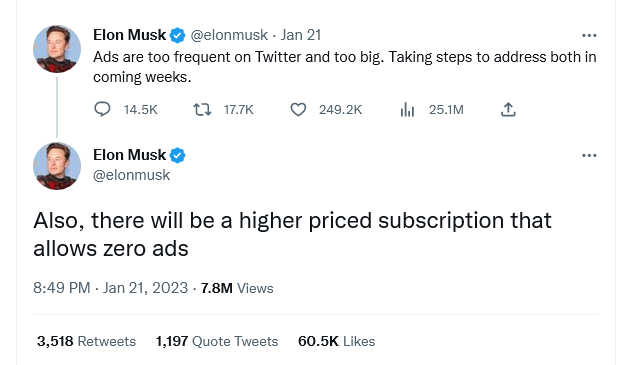
Musk teases ad-free subscription tier for Twitter

This is not the first time Musk has teased an ad-free tier. Last month, the Twitter CEO said that the new plan sans ads would arrive already that year. Currently, Twitter Blue subscribers pay $11 a month (if they buy the subscription through Android or iOS) or $8 (if they buy it through a web browser) to see half as many ads as regular, non-paying users.

Twitter’s introduction of an ad-free tier is a welcome step and a cause for celebration for those who have grown tired of ad-cluttered feeds, but not enough to give up on Twitter. A lot will depend on the pricing, though. We can see that Twitter is trying to walk a fine line between pleasing advertisers and users, and we can only hope that the balance doesn’t tip too heavily towards the former.

Google search is infested with malicious ads, researchers find

Cybercriminals increasingly rely on Google Search ads to lure users to bogus websites laced with malware, BleepingComputer has found. These fake websites often resemble those of legitimate companies, known for open-source software.

BleepingComputer conducted the research after a popular influencer saw all his crypto assets stolen as result of the scheme. The researchers found that in some cases, hackers outbid legitimate developers so the malicious ad appeared at the top of search results, above the legitimate company’s paid ad. Such was the case with CCleaner, a utility used to clean unwanted files. The fake CCLeaner website directed users to download Redline malware, which allowed criminals to steal sensitive personal information such as passwords, credit card details and crypto assets from unsuspecting victims. Together with other security researchers, BleepingComputer uncovered a dozen malicious ads leading to fake websites. In response, Google said it has “robust policies” against ads that impersonate brands and enforces them “vigorously”.

Well, apparently not vigorously enough, because the problem of malicious ads in Google search seems to persist. Last month the FBI even issued an alert about dangerous search ads, urging the public to use ad blockers. Indeed, ad blockers, including the AdGuard Browser extension and the AdGuard app, help protect against the threat of ads placed by cybercriminals. To block most search ads, you’ll need to enable the “block search ads” setting in your extension.
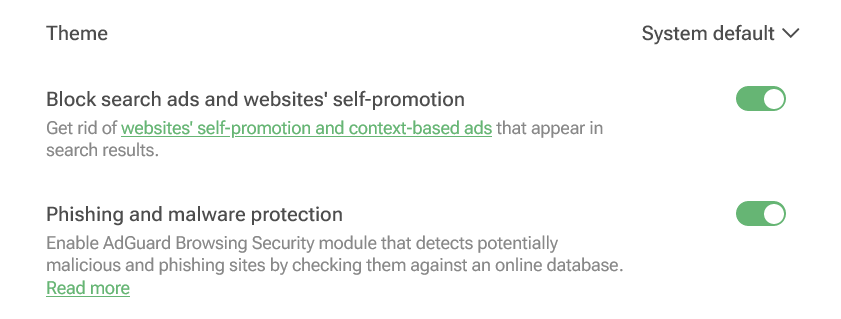
You can enable blocking search ads in your AdGuard Browser extension

Screenshot: AdGuard Browser extension

Not again... Personal data of 37 million T-Mobile customers stolen

Telecoms giant T-Mobile has revealed that it has suffered another data breach, with hackers stealing personal data of some 37 million of its customers. The bad actor apparently exploited a flaw in one of the company’s APIs to retrieve the data.

The breach occurred in early January and was immediately contained, T-Mobile said. The telecoms provider noted that hackers gained access to a “limited set of account information”, including its customers’ names, billing addresses, email addresses, dates of birth and T-Mobile account numbers. No payment information or government ID numbers were exposed, it claimed.

Still, the breach represents a very worrying pattern, as this is the eighth time T-Mobile has been hacked in five years, according to TechCrunch. T-Mobile also famously fell victim to the Lapsus$ hackers, who stole its source code in a series of hacks in March 2022. The new hack, as well as T-Mobile’s history of data breaches, shows that large companies are just as vulnerable to attack as smaller ones. The bigger the company, the more customer data it has at its disposal, the more attractive it is as a target. What this means for us as users is that we need to be very selective about what data we share, with whom, and how much control we have over it.


Спадабаўся пост?
AdGuard VPN AdGuard DNS AdGuard Mail AdGuard Wallet
Галоўны экран AdGuard для Windows
Экран абароны AdGuard для Windows, які паказвае функцыі абароны і налады
Экран Статыстыка AdGuard для Windows, які паказвае статыстыку заблакіраванай рэкламы і праграм сачэння
Экран Кіраванне праграмамі ў AdGuard для Windows, які паказвае параметры кіравання абаронай для праграм, усталяваных на прыладзе
20 364 20364 водгукі
Выдатна!

AdGuard: блакіроўшчык рэкламы для Windows

AdGuard для Windows — гэта больш, чым блакіроўшчык рэкламы. Гэта шматфункцыянальны інструмент, які блакуе рэкламу, кантралюе доступ да небяспечных сайтаў, паскарае загрузку старонак і абараняе дзяцей ад непажаданага кантэнту

Спампоўваючы праграму, вы прымаеце ўмовы Ліцэнзійнага пагаднення
Microsoft Store
Спампоўваючы праграму, вы прымаеце ўмовы Ліцэнзійнага пагаднення
AdGuard для Windows версія 8.0, 14 дзён пробнага перыяду
Галоўны экран AdGuard для Mac
Экран рэжыму нябачнасці AdGuard для Mac
20 364 20364 водгукі
Выдатна!

AdGuard: блакіроўшчык рэкламы для Mac

AdGuard для Mac — гэта ўнікальны блакіроўшчык рэкламы, распрацаваны з улікам macOS. Акрамя абароны ад надакучлівай рэкламы ў браўзерах і праграмах, ён абараняе вас ад адсочвання, фішынгу і махлярства
Спампоўваючы праграму, вы прымаеце ўмовы Ліцэнзійнага пагаднення
Чытаць далей
AdGuard для Mac версія 2.19, 14 дзён пробнага перыяду
Галоўны экран AdGuard для Android
Экран Абарона ад сачэння ў AdGuard для Android
Экран Кіраванне праграмамі ў AdGuard для Android, які паказвае параметры кіравання абаронай для праграм, усталяваных на прыладзе
Экран Статыстыка AdGuard для Android, які паказвае статыстыку заблакіраванай рэкламы і праграм сачэння
Галоўны экран прыватнага браўзера AdGuard для Android
QR-код, каб спампаваць AdGuard для Android
20 364 20364 водгукі
Выдатна!

AdGuard: блакіроўшчык рэкламы для Android

Блакуе рэкламу і трэкеры ва ўсіх браўзерах, гульнях і іншых праграмах. Абараняе вашу прыватнасць і дазваляе вам кантраляваць, як вашы праграмы выкарыстоўваюць Інтэрнэт. Усталёўваецца праз APK
Спампоўваючы праграму, вы прымаеце ўмовы Ліцэнзійнага пагаднення
Чытаць далей
Сканіраванне для загрузкі
Выкарыстоўвайце любы счытвальнік QR-кодаў, даступны на вашай прыладзе
AdGuard для Android версія 4.14, 14 дзён пробнага перыяду
Галоўны экран AdGuard для iOS
Экран абароны AdGuard для iOS, які паказвае функцыі абароны і налады
Экран Статыстыка AdGuard для iOS, які паказвае статыстыку заблакіраванай рэкламы і праграм сачэння
QR-код, каб спампаваць AdGuard для iOS
20 364 20364 водгукі
Выдатна!

AdGuard: блакіроўшчык рэкламы для iOS

Найлепшы блакіроўшчык рэкламы для iOS для iPhone і iPad. AdGuard ліквідуе ўсе віды рэкламы і трэкераў у Safari і абараняе вашу прыватнасць ва ўсіх праграмах на ўзроўні DNS
Спампоўваючы праграму, вы прымаеце ўмовы Ліцэнзійнага пагаднення
Чытаць далей
Сканіраванне для загрузкі
Выкарыстоўвайце любы счытвальнік QR-кодаў, даступны на вашай прыладзе
AdGuard для iOS, 4.5
Галоўны экран AdGuard Content Blocker
Экран фільтры ў AdGuard Content Blocker
Экран налады ў AdGuard Content Blocker
20 364 20364 водгукі
Выдатна!

Блакіроўшчык кантэнту AdGuard

AdGuard Content Blocker ухіляе ўсе віды рэкламы ў мабільных браўзерах, якія падтрымліваюць тэхналогію блакіроўкі змесціва — напрыклад, Samsung Internet і Яндэкс.Браўзер. Яго функцыі абмежаваныя ў параўнанні з AdGuard для Android, але ён бясплатны, просты ў усталёўцы і эфектыўны
Спампоўваючы праграму, вы прымаеце ўмовы Ліцэнзійнага пагаднення
Чытаць далей
Блакіроўшчык кантэнту AdGuard, 2.8
Галоўны экран браузернае пашырэнне AdGuard
Экран Абарона ад сачэння ў браузернае пашырэнне AdGuard
20 364 20364 водгукі
Выдатна!

Браўзернае пашырэнне AdGuard

AdGuard — самае хуткае і лёгкае браўзарнае пашырэнне для блакавання ўсіх тыпаў рэкламы! Абірайце AdGuard для хуткага і бяспечнага сёрфінга без рэкламы.
Усталяваць
Спампоўваючы праграму, вы прымаеце ўмовы Ліцэнзійнага пагаднення
Усталяваць
Спампоўваючы праграму, вы прымаеце ўмовы Ліцэнзійнага пагаднення
Усталяваць
Спампоўваючы праграму, вы прымаеце ўмовы Ліцэнзійнага пагаднення
Усталяваць
Спампоўваючы праграму, вы прымаеце ўмовы Ліцэнзійнага пагаднення
Усталяваць
Спампоўваючы праграму, вы прымаеце ўмовы Ліцэнзійнага пагаднення
Чытаць далей
Усталяваць
Спампоўваючы праграму, вы прымаеце ўмовы Ліцэнзійнага пагаднення
Чытаць далей
Браўзернае пашырэнне AdGuard, 5.5
Галоўны экран Браўзерны памочнік AdGuard
20 364 20364 водгукі
Выдатна!

Памочнік AdGuard

Пашырэнне для браўзера-компаньён для настольных прыкладанняў AdGuard. Яно дазваляе блакіраваць карыстальніцкія элементы на вэб-сайтах, дадаваць вэб-сайты ў спіс дазволеных і адпраўляць справаздачы непасрэдна з вашага браўзера
Памочнік AdGuard, 1.4
20 364 20364 водгукі
Выдатна!

AdGuard Home

AdGuard Home — гэта сеткавае рашэнне для блакіроўкі рэкламы і праграм сачэння. Усталюйце яго адзін раз на вашым маршрутызатары, каб ахапіць усе прылады ў сетцы — дадатковае праграмнае забеспячэнне не патрабуецца. Гэта асабліва важна для розных прылад IoT, якія часта ўяўляюць пагрозу вашай прыватнасці
AdGuard Home, 0.107
Галоўны экран AdGuard Pro для iOS
Экран абароны ў AdGuard Pro для iOS, які паказвае функцыі абароны і налады
Экран Статыстыка ў AdGuard Pro для iOS, які паказвае статыстыку заблакіраванай рэкламы і праграм сачэння
20 364 20364 водгукі
Выдатна!

AdGuard Pro для iOS

AdGuard Pro для iOS пастаўляецца з усімі дадатковымі функцыямі блакіроўкі рэкламы і абароны, якія ўключаны. Ён прапануе тыя ж інструменты, што і платная версія AdGuard для iOS. Выдатна блакіруе рэкламу ў Safari, а таксама дазваляе наладжваць налады DNS, каб адаптаваць вашу абарону. Ён блакіруе рэкламу ў браўзерах і дадатках, абараняе дзяцей ад недапушчальнага кантэнту і захоўвае вашы асабістыя даныя бяспечнымі
Спампоўваючы праграму, вы прымаеце ўмовы Ліцэнзійнага пагаднення
Чытаць далей
AdGuard Pro для iOS, 4.5
Галоўны экран AdGuard Mini для Mac
Экран абароны Safari ў AdGuard Mini для Mac
Экран стварэння правіла ў AdGuard Mini для Mac
20 364 20364 водгукі
Выдатна!

AdGuard Mini для Mac — блакіроўшчык рэкламы ў Safari

AdGuard Mini для Mac — гэта магутны блакіроўшчык рэкламы для Safari. Гэта лёгкая праграма выдаляе рэкламу, блакуе праграмы сачэння і паскарае загрузку старонак. Яна дапамагае вам аглядаць вэб у Safari без адцягненняў і захоўваць вашы даныя ў прыватнасці
Усталяваць
Спампоўваючы праграму, вы прымаеце ўмовы Ліцэнзійнага пагаднення
Чытаць далей
AdGuard Mini для Mac, 2.3
Галоўны экран AdGuard для Android TV з уключанай абаронай
Экран блакіроўкі рэкламы AdGuard для Android TV, які паказвае яго функцыі і налады
Экран налады AdGuard для Android TV
Экран Кіраванне праграмамі AdGuard для Android TV, які паказвае праграмы, дзе рэклама і праграмы сачэння заблакіравана
20 364 20364 водгукі
Выдатна!

AdGuard для Android TV

AdGuard для Android TV — адзіная праграма, якая блакіруе рэкламу, ахоўвае вашу прыватнасць і працуе як міжсеткавы экран для вашага Smart TV. Атрымуйце папярэджанні аб вэб-пагрозах, выкарыстоўвайце бяспечны DNS і атрымлівайце перавагі ад шыфраванага трафіку. Адпачывайце і атрымлівайце асалоду ад улюбёных шоу з першакласнай абаронай і без рэкламы!
AdGuard для Android TV версія 4.14, 14 дзён пробнага перыяду
Маскот AdGuard, Агнар, трымае пінгвіна Linux
20 364 20364 водгукі
Выдатна!

AdGuard для Linux

AdGuard для Linux — гэта першы ў свеце сістэмны блакіроўшчык рэкламы для Linux. Блакуйце рэкламу і трэкеры на ўзроўні прылады, выбірайце з папярэдне ўсталяваных фільтраў альбо дадавайце ўласныя — усё праз інтэрфейс каманднага радка
AdGuard для Linux, 1.4
20 364 20364 водгукі
Выдатна!

AdGuard Temp Mail

Ваш часовы паштовую скрыню, каб на асноўную пошту не прыходзіў спам
20 364 20364 водгукі
Выдатна!

AdGuard VPN

75 лакацый па ўсім свеце

Доступ да любога кантэнту

Моцнае шыфраванне

Без лагавання

Самае хуткае злучэнне

Цэладзённая падтрымка

Паспрабуйце бясплатна
Спампоўваючы праграму, вы прымаеце ўмовы Ліцэнзійнага пагаднення
Чытаць далей
20 364 20364 водгукі
Выдатна!

AdGuard DNS

AdGuard DNS – гэта альтэрнатыўны спосаб заблакаваць рэкламу, абараніць асабістыя дадзеныя і ахаваць дзяцей ад дарослых матэрыялаў. Ён просты ў наладзе і выкарыстанні і забяспечвае патрэбны мінімум абароны ад рэкламы, трэкінгу і фішынгу, незалежна ад платформы.
20 364 20364 водгукі
Выдатна!

AdGuard Mail

Абараняйце сваю асобу, пазбягайце спаму і трымайце ўваходную пошту ў бяспецы з дапамогай нашых псеўданімаў і часовых адрасоў электроннай пошты. Скарыстайцеся нашым бясплатным сэрвісам перасылкі электроннай пошты і праграмамі для ўсіх аперацыйных сістэм.
20 364 20364 водгукі
Выдатна!

AdGuard Wallet

Бяспечны і прыватны крыпта-кашалёк, які дае вам поўны кантроль над вашымі актывамі. Адкрывайце для сябе тысячы крыптавалют для захоўвання, адпраўкі і абмену
Спампоўка AdGuard Каб усталяваць AdGuard, пстрыкніце файл, пазначаны стрэлкай Выберыце «Адкрыць» і націсніце «ОК», затым дачакайцеся спампоўкі файла. У акне, якое адкрылася, перацягніце значок AdGuard у папку «Праграмы». Дзякуй, што выбралі AdGuard! Выберыце «Адкрыць» і націсніце «ОК», затым дачакайцеся спампоўкі файла. У акне, якое адкрылася, націсніце «Усталяваць». Дзякуй, што выбралі AdGuard!
Усталюйце AdGuard на мабільную прыладу

















































