Twitter charges for security, Apple wants more ads, AI art deemed not copyrightable, and more. AdGuard’s digest

In this edition of AdGuard’s digest: Twitter makes 2FA through SMS part of its paid subscription, Apple TV may add an ad-supported plan, OpenAI promises to stop using customer data to train AI, AI-generated image copyright claim fails in the US as LastPass spills all the beans about its latest breach.

Twitter makes the most common 2FA option a paid service

Twitter users with multi-factor authentication will soon have to pay for a subscription to continue receiving verification codes via SMS. Twitter has announced that from 20 March, the popular 2FA method will be disabled for non-Twitter Blue subscribers, removing an extra layer of protection for their accounts. Instead, non-paying users are encouraged to switch to alternative 2FA methods that are free (at least for now): an authentication app and a security key.

Twitter portrayed its rather unorthodox decision to bundle a basic security feature with its paid subscription as a way… to improve user security. “While historically a popular form of 2FA, unfortunately we have seen phone-number based 2FA be used — and abused — by bad actors,”the company’s statement reads.

It’s true that attackers can bypass text-based 2FA, and it’s probably not the most secure MFA method available. But the question is, if it’s so bad, why would Twitter make it part of its paid service instead of just getting rid of it? If we had to hazard a guess, it’s probably that Twitter wants to save some money on sending text messages. What’s worrying, however, is that according to Twitter’s own data from two years ago, only 2.6% of its users had 2FA, of which a whopping 74% chose to receive codes via SMS. We’ll have to see how this all plays out, but chances are that the few people who were using 2FA will now stop using it, and that doesn’t bode well for Twitter’s security.

Apple’s romance with advertising gets steamier

Last year we wrote about and lamented Neftlix’s decision to introduce an ad-supported tier, and now it looks like Apple’s streaming service, Apple TV+, is following in Netflix’s footsteps. The Information reported that the tech giant recently hired a top executive to help it build an ad business for Apple TV+.

Currently, Apple TV+, which carries such hit shows as Ted Lasso on an exclusive basis, only has an ad-free subscription. That subscription costs $6.99 a month, the same as Netflix’s basic plan with ads. While Apple has not confirmed that it’d be launching an ad-supported tier, the rumor is that it has already been courting advertisers.

Too little is known about Apple’s plan for its streaming service to draw any definite conclusions. However, it should be noted that any advertising business relies on the widespread collection of user data in order to target ads. And widespread collection of user data is never good for privacy — something Apple says it cares about. It’s not as if Apple is just dipping its toes in the advertising waters. In fact, the company has been busy building its own advertising empire for quite some time. Most recently, it has started showing more ads in the App Store, and it’s likely we’ll see more of this in the coming years.

No, you cannot copyright AI-generated images, US government says

The US Copyright Office has revoked the copyright protection it had granted to a digital artist for the images she created using Midjorney, a text-to-image AI. The artist, Kris Kashtanova, used the images for a graphic novel, 'Zarya of the Dawn', published last year. The Copyright Office initially granted Kashtanova protection for the book in its entirety, thus setting a precedent. However, when the agency found out (from Kashtanova’s social media, no less) that the images had been generated by AI, it reconsidered the case and denied her protection for individual images.

The Copyright Office wrote that even though Kashtanova claimed to have edited the images, the edits were “too minor and imperceptible to supply the necessary creativity for copyright protection.”
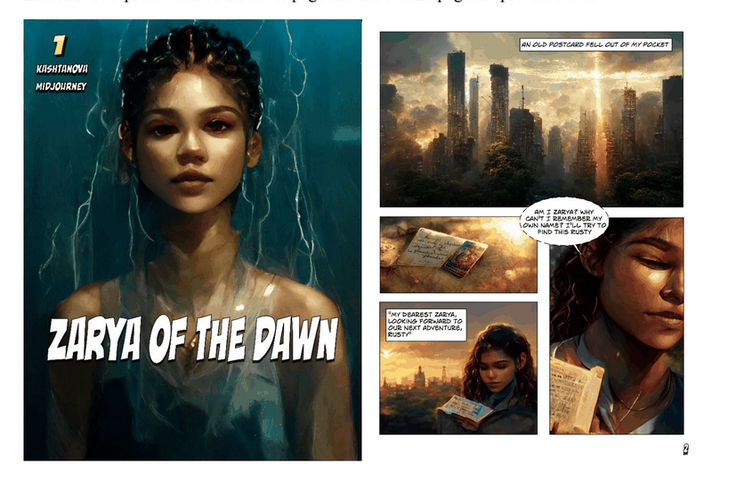
Al-generated images from ‘Zarya of the Dawn’

Excerpts from ‘Zarya of the Dawn’. Source: US Copyright Office

Since we have been ushered into the era of AI-generated art, the issue of copyright has been at the center of the debate. While some, like Kashtanova, argue that giving instructions to an AI is a creative act in itself, others disagree. It’s also worth remembering that this AI-generated art is preying on the work of other artists, scraped from the web without permission. And while there have been attempts to address this issue, it still looms large. Currently, two of the most popular text-to-image generators, Midjorney and Stable Diffusion, are both facing copyright infringement lawsuits.

OpenAI stops using customer data to train AI… but not users’

OpenAI, the mastermind behind ChatGPT and DALLE-E, has announced that it will stop harvesting data from companies that integrate its paid API by default. Previously, any data fed into the API could have been used to improve OpenAI’s services, unless the customer had specifically opted out of such sharing.

Now, OpenAI’s terms of service states that this will no longer be the case. “OpenAI will not use data submitted by customers via our API to train or improve our models unless you explicitly decide to share your data with us for this purpose”, the updated ToS reads. OpenAI now promises to only retain data sent through the API for a maximum of 30 days for “abuse and misuse monitoring purposes,” after which it says it will delete the data “unless otherwise required by law.”
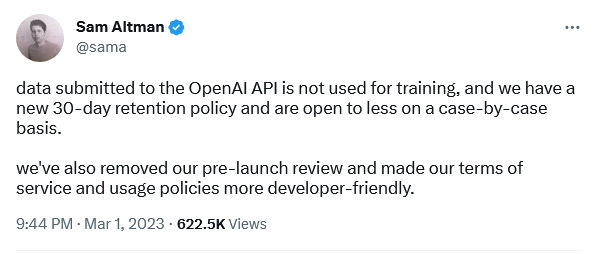
OpenAI’s CEO confirmed the policy change

The policy update is apparently intended to assuage fears about the privacy-bending nature of AI. However, it still doesn’t apply to regular users chatting with ChatGPT or experimenting with DALL-E. “For non-API consumer products like ChatGPT and DALL-E, we may use content such as prompts, responses, uploaded images, and generated images to improve our services,” OpenAI states on its website.

It’s rather unfortunate that regular users don’t get the same privacy protections as API customers, but, nevetherless, it’s still a step in the right direction by OpenAI.

All roads lead… to a home PC: LastPass spills the beans on mega-breach

LastPass, one of the world’s most popular password managers, has shed light on its recent breach that compromised users’ personal information. In an update, LastPass said that attackers hacked the home computer of one of its engineers who had access to the decryption keys for its cloud storage. The hackers used a vulnerability in media software on the engineer’s computer to install keylogger malware and steal his master password. This gave them access to sensitive user information such as billing and email addresses, end-user names and phone numbers, as well as encrypted vaults where passwords are stored. LastPass said that cracking users’ master passwords would likely take attackers “millions of years”, but some users could be at risk if they have weak or reused passwords.

The series of hacking incidents that have plagued LastPass reflects badly on the company. However, this does not mean that you should shy away from using password managers altogether. They are a much safer way to store your passwords than in a text file or on a piece of paper.


Спадабаўся пост?
AdGuard VPN AdGuard DNS AdGuard Mail AdGuard Wallet
Галоўны экран AdGuard для Windows
Экран абароны AdGuard для Windows, які паказвае функцыі абароны і налады
Экран Статыстыка AdGuard для Windows, які паказвае статыстыку заблакіраванай рэкламы і праграм сачэння
Экран Кіраванне праграмамі ў AdGuard для Windows, які паказвае параметры кіравання абаронай для праграм, усталяваных на прыладзе
20 364 20364 водгукі
Выдатна!

AdGuard: блакіроўшчык рэкламы для Windows

AdGuard для Windows — гэта больш, чым блакіроўшчык рэкламы. Гэта шматфункцыянальны інструмент, які блакуе рэкламу, кантралюе доступ да небяспечных сайтаў, паскарае загрузку старонак і абараняе дзяцей ад непажаданага кантэнту

Спампоўваючы праграму, вы прымаеце ўмовы Ліцэнзійнага пагаднення
Microsoft Store
Спампоўваючы праграму, вы прымаеце ўмовы Ліцэнзійнага пагаднення
AdGuard для Windows версія 8.0, 14 дзён пробнага перыяду
Галоўны экран AdGuard для Mac
Экран рэжыму нябачнасці AdGuard для Mac
20 364 20364 водгукі
Выдатна!

AdGuard: блакіроўшчык рэкламы для Mac

AdGuard для Mac — гэта ўнікальны блакіроўшчык рэкламы, распрацаваны з улікам macOS. Акрамя абароны ад надакучлівай рэкламы ў браўзерах і праграмах, ён абараняе вас ад адсочвання, фішынгу і махлярства
Спампоўваючы праграму, вы прымаеце ўмовы Ліцэнзійнага пагаднення
Чытаць далей
AdGuard для Mac версія 2.19, 14 дзён пробнага перыяду
Галоўны экран AdGuard для Android
Экран Абарона ад сачэння ў AdGuard для Android
Экран Кіраванне праграмамі ў AdGuard для Android, які паказвае параметры кіравання абаронай для праграм, усталяваных на прыладзе
Экран Статыстыка AdGuard для Android, які паказвае статыстыку заблакіраванай рэкламы і праграм сачэння
Галоўны экран прыватнага браўзера AdGuard для Android
QR-код, каб спампаваць AdGuard для Android
20 364 20364 водгукі
Выдатна!

AdGuard: блакіроўшчык рэкламы для Android

Блакуе рэкламу і трэкеры ва ўсіх браўзерах, гульнях і іншых праграмах. Абараняе вашу прыватнасць і дазваляе вам кантраляваць, як вашы праграмы выкарыстоўваюць Інтэрнэт. Усталёўваецца праз APK
Спампоўваючы праграму, вы прымаеце ўмовы Ліцэнзійнага пагаднення
Чытаць далей
Сканіраванне для загрузкі
Выкарыстоўвайце любы счытвальнік QR-кодаў, даступны на вашай прыладзе
AdGuard для Android версія 4.14, 14 дзён пробнага перыяду
Галоўны экран AdGuard для iOS
Экран абароны AdGuard для iOS, які паказвае функцыі абароны і налады
Экран Статыстыка AdGuard для iOS, які паказвае статыстыку заблакіраванай рэкламы і праграм сачэння
QR-код, каб спампаваць AdGuard для iOS
20 364 20364 водгукі
Выдатна!

AdGuard: блакіроўшчык рэкламы для iOS

Найлепшы блакіроўшчык рэкламы для iOS для iPhone і iPad. AdGuard ліквідуе ўсе віды рэкламы і трэкераў у Safari і абараняе вашу прыватнасць ва ўсіх праграмах на ўзроўні DNS
Спампоўваючы праграму, вы прымаеце ўмовы Ліцэнзійнага пагаднення
Чытаць далей
Сканіраванне для загрузкі
Выкарыстоўвайце любы счытвальнік QR-кодаў, даступны на вашай прыладзе
AdGuard для iOS, 4.5
Галоўны экран AdGuard Content Blocker
Экран фільтры ў AdGuard Content Blocker
Экран налады ў AdGuard Content Blocker
20 364 20364 водгукі
Выдатна!

Блакіроўшчык кантэнту AdGuard

AdGuard Content Blocker ухіляе ўсе віды рэкламы ў мабільных браўзерах, якія падтрымліваюць тэхналогію блакіроўкі змесціва — напрыклад, Samsung Internet і Яндэкс.Браўзер. Яго функцыі абмежаваныя ў параўнанні з AdGuard для Android, але ён бясплатны, просты ў усталёўцы і эфектыўны
Спампоўваючы праграму, вы прымаеце ўмовы Ліцэнзійнага пагаднення
Чытаць далей
Блакіроўшчык кантэнту AdGuard, 2.8
Галоўны экран браузернае пашырэнне AdGuard
Экран Абарона ад сачэння ў браузернае пашырэнне AdGuard
20 364 20364 водгукі
Выдатна!

Браўзернае пашырэнне AdGuard

AdGuard — самае хуткае і лёгкае браўзарнае пашырэнне для блакавання ўсіх тыпаў рэкламы! Абірайце AdGuard для хуткага і бяспечнага сёрфінга без рэкламы.
Усталяваць
Спампоўваючы праграму, вы прымаеце ўмовы Ліцэнзійнага пагаднення
Усталяваць
Спампоўваючы праграму, вы прымаеце ўмовы Ліцэнзійнага пагаднення
Усталяваць
Спампоўваючы праграму, вы прымаеце ўмовы Ліцэнзійнага пагаднення
Усталяваць
Спампоўваючы праграму, вы прымаеце ўмовы Ліцэнзійнага пагаднення
Усталяваць
Спампоўваючы праграму, вы прымаеце ўмовы Ліцэнзійнага пагаднення
Чытаць далей
Усталяваць
Спампоўваючы праграму, вы прымаеце ўмовы Ліцэнзійнага пагаднення
Чытаць далей
Браўзернае пашырэнне AdGuard, 5.5
Галоўны экран Браўзерны памочнік AdGuard
20 364 20364 водгукі
Выдатна!

Памочнік AdGuard

Пашырэнне для браўзера-компаньён для настольных прыкладанняў AdGuard. Яно дазваляе блакіраваць карыстальніцкія элементы на вэб-сайтах, дадаваць вэб-сайты ў спіс дазволеных і адпраўляць справаздачы непасрэдна з вашага браўзера
Памочнік AdGuard, 1.4
20 364 20364 водгукі
Выдатна!

AdGuard Home

AdGuard Home — гэта сеткавае рашэнне для блакіроўкі рэкламы і праграм сачэння. Усталюйце яго адзін раз на вашым маршрутызатары, каб ахапіць усе прылады ў сетцы — дадатковае праграмнае забеспячэнне не патрабуецца. Гэта асабліва важна для розных прылад IoT, якія часта ўяўляюць пагрозу вашай прыватнасці
AdGuard Home, 0.107
Галоўны экран AdGuard Pro для iOS
Экран абароны ў AdGuard Pro для iOS, які паказвае функцыі абароны і налады
Экран Статыстыка ў AdGuard Pro для iOS, які паказвае статыстыку заблакіраванай рэкламы і праграм сачэння
20 364 20364 водгукі
Выдатна!

AdGuard Pro для iOS

AdGuard Pro для iOS пастаўляецца з усімі дадатковымі функцыямі блакіроўкі рэкламы і абароны, якія ўключаны. Ён прапануе тыя ж інструменты, што і платная версія AdGuard для iOS. Выдатна блакіруе рэкламу ў Safari, а таксама дазваляе наладжваць налады DNS, каб адаптаваць вашу абарону. Ён блакіруе рэкламу ў браўзерах і дадатках, абараняе дзяцей ад недапушчальнага кантэнту і захоўвае вашы асабістыя даныя бяспечнымі
Спампоўваючы праграму, вы прымаеце ўмовы Ліцэнзійнага пагаднення
Чытаць далей
AdGuard Pro для iOS, 4.5
Галоўны экран AdGuard Mini для Mac
Экран абароны Safari ў AdGuard Mini для Mac
Экран стварэння правіла ў AdGuard Mini для Mac
20 364 20364 водгукі
Выдатна!

AdGuard Mini для Mac — блакіроўшчык рэкламы ў Safari

AdGuard Mini для Mac — гэта магутны блакіроўшчык рэкламы для Safari. Гэта лёгкая праграма выдаляе рэкламу, блакуе праграмы сачэння і паскарае загрузку старонак. Яна дапамагае вам аглядаць вэб у Safari без адцягненняў і захоўваць вашы даныя ў прыватнасці
Усталяваць
Спампоўваючы праграму, вы прымаеце ўмовы Ліцэнзійнага пагаднення
Чытаць далей
AdGuard Mini для Mac, 2.3
Галоўны экран AdGuard для Android TV з уключанай абаронай
Экран блакіроўкі рэкламы AdGuard для Android TV, які паказвае яго функцыі і налады
Экран налады AdGuard для Android TV
Экран Кіраванне праграмамі AdGuard для Android TV, які паказвае праграмы, дзе рэклама і праграмы сачэння заблакіравана
20 364 20364 водгукі
Выдатна!

AdGuard для Android TV

AdGuard для Android TV — адзіная праграма, якая блакіруе рэкламу, ахоўвае вашу прыватнасць і працуе як міжсеткавы экран для вашага Smart TV. Атрымуйце папярэджанні аб вэб-пагрозах, выкарыстоўвайце бяспечны DNS і атрымлівайце перавагі ад шыфраванага трафіку. Адпачывайце і атрымлівайце асалоду ад улюбёных шоу з першакласнай абаронай і без рэкламы!
AdGuard для Android TV версія 4.14, 14 дзён пробнага перыяду
Маскот AdGuard, Агнар, трымае пінгвіна Linux
20 364 20364 водгукі
Выдатна!

AdGuard для Linux

AdGuard для Linux — гэта першы ў свеце сістэмны блакіроўшчык рэкламы для Linux. Блакуйце рэкламу і трэкеры на ўзроўні прылады, выбірайце з папярэдне ўсталяваных фільтраў альбо дадавайце ўласныя — усё праз інтэрфейс каманднага радка
AdGuard для Linux, 1.4
20 364 20364 водгукі
Выдатна!

AdGuard Temp Mail

Ваш часовы паштовую скрыню, каб на асноўную пошту не прыходзіў спам
20 364 20364 водгукі
Выдатна!

AdGuard VPN

75 лакацый па ўсім свеце

Доступ да любога кантэнту

Моцнае шыфраванне

Без лагавання

Самае хуткае злучэнне

Цэладзённая падтрымка

Паспрабуйце бясплатна
Спампоўваючы праграму, вы прымаеце ўмовы Ліцэнзійнага пагаднення
Чытаць далей
20 364 20364 водгукі
Выдатна!

AdGuard DNS

AdGuard DNS – гэта альтэрнатыўны спосаб заблакаваць рэкламу, абараніць асабістыя дадзеныя і ахаваць дзяцей ад дарослых матэрыялаў. Ён просты ў наладзе і выкарыстанні і забяспечвае патрэбны мінімум абароны ад рэкламы, трэкінгу і фішынгу, незалежна ад платформы.
20 364 20364 водгукі
Выдатна!

AdGuard Mail

Абараняйце сваю асобу, пазбягайце спаму і трымайце ўваходную пошту ў бяспецы з дапамогай нашых псеўданімаў і часовых адрасоў электроннай пошты. Скарыстайцеся нашым бясплатным сэрвісам перасылкі электроннай пошты і праграмамі для ўсіх аперацыйных сістэм.
20 364 20364 водгукі
Выдатна!

AdGuard Wallet

Бяспечны і прыватны крыпта-кашалёк, які дае вам поўны кантроль над вашымі актывамі. Адкрывайце для сябе тысячы крыптавалют для захоўвання, адпраўкі і абмену
Спампоўка AdGuard Каб усталяваць AdGuard, пстрыкніце файл, пазначаны стрэлкай Выберыце «Адкрыць» і націсніце «ОК», затым дачакайцеся спампоўкі файла. У акне, якое адкрылася, перацягніце значок AdGuard у папку «Праграмы». Дзякуй, што выбралі AdGuard! Выберыце «Адкрыць» і націсніце «ОК», затым дачакайцеся спампоўкі файла. У акне, якое адкрылася, націсніце «Усталяваць». Дзякуй, што выбралі AdGuard!
Усталюйце AdGuard на мабільную прыладу

















































