Musk taking over Twitter has created chaos. Will he make order out of it?

Some thought that this day would never come, but on October 27 billionaire entreprenuer Elon Musk officially closed the deal with Twitter, acquiring the social media company for $44 billion. Musk took the reins in rather dramatic fashion, showing the entire Twitter board of directors the door and making himself its sole director and CEO (presumably temporarily).

After becoming the Chief Twit, Musk unveiled his plan to change the platform’s monetization model via premium subscriptions. About 90% of Twitter’s revenue currently comes from advertising, and Twitter’s overreliance on ad money along with its spam bots have always been one of Musk’s biggest pet peeves.

Faced with the irreversable fact of Musk’s takeover, the Twittersphere descended into chaos. Users have envisaged doomsday scenarios in which Twitter would become a “cesspool of vitriol and hatred”, free of any regulation, and accused Musk of trying to turn it into “a money grabbing cash machine.”

With Musk taking his first steps at Twitter, only time will tell whether he breathes new life into the platform or indeed puts the final nail into its coffin. Musk himself declared that he added Twitter to his already extensive portfolio of assets not to make more money, but to “try to help humanity” and that he does not rule out that he fails in this quest. There is “a very real possibility” of that, according to the entrepreneur himself.

Still, Musk’s vision for Twitter’s future as a freemium service is spot-on. However, there are just too many variables that one has to take into account to bet on his success.

Moving away from ad-based monetization model

Musk had been talking about how he would change Twitter at length even before he bought the company. But the only proposal the auto tycon has given specific details about so far is how he plans to steer Twitter away from its ad-driven monetization model.
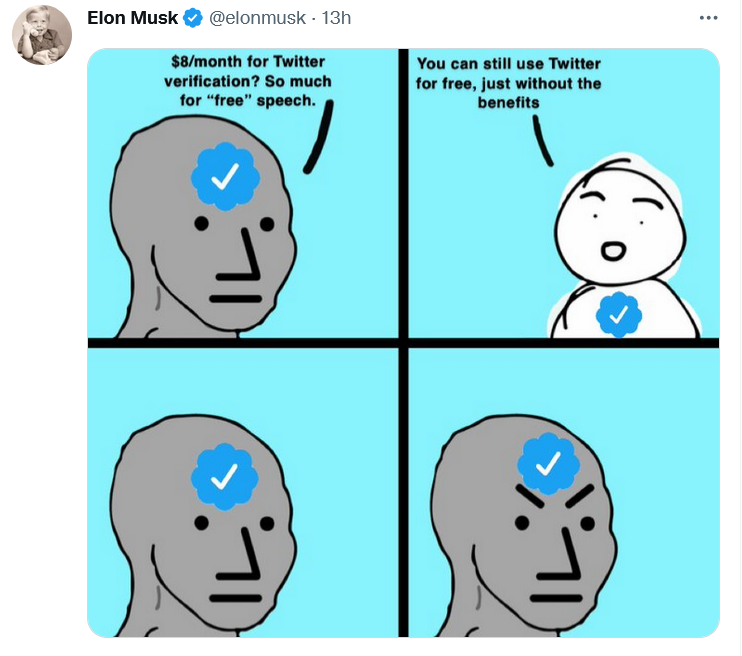
Musk explained Twitter’s freemium model in his favorite way — with a meme

In a series of tweets on November 1, Musk blasted the Twitter verification system as unfair. “Twitter’s current lords & peasants system for who has or doesn’t have a blue checkmark is bullshit,” the billionaire wrote.

To open up verification to all users, Musk suggested making the blue checkmark part of a paid Twitter Blue subscription. Launched last June, Twitter Blue is so far only available in the US, Canada, Australia, and New Zealand. Subscribers pay a monthly fee adjusted for the region. In the US, the fee amounts to $4.99/month.

As of now, Twitter requires an account to be “authentic,”“notable,” and “active” for a blue tick to be bestowed upon it. The allocation of verification badges and their removal is solely at Twitter’s discretion. The practice sparked controversy in the past: in 2016 Twitter “unverified” the account of right-wing personality Milo Yiannopoulos, fuelling the debate about censorship on the platform.

Good value for money finally or a rip-off?

Although Twitter Blue went live more than a year ago, the revenue stream from the company’s original attempt to diversify its monetization model has been more of a trickle. Sensor Tower estimated that Twitter Blue generated only $6.4 million in global spending to date, a drop in the ocean compared to Twitter’s annual revenue of $5.08 billion in 2021. Now Musk, apparently, wants to turn Twitter Blue into something worth paying for. Whether he succeeds in doing so or kills Twitter while trying, is a very big question.

Twitter Blue currently does offer a number of useful features, but they have failed to win over power users. Subscribers can already save tweets to bookmarks, undo a tweet within up to 60 seconds of sending it, read long threads as a single page of text, customize the navigation bar, and get instant access to the most-shared articles from people they follow. Most recently, Twitter Blue allowed subscribers in Australia, Canada, and New Zealand to edit tweets up to five times in 30 minutes after posting.

Musk proposed increasing the Twitter Blue fee from $4.5 to $8 a month in the US, but he also touted additional features that should turn things around for the paid service.

Apart from the blue tick, subscribers will get priority in replies, mentions and search. They will also be able to post longer videos and audios, as well as gain access to paywalled content from publishers willing to partner with Twitter.
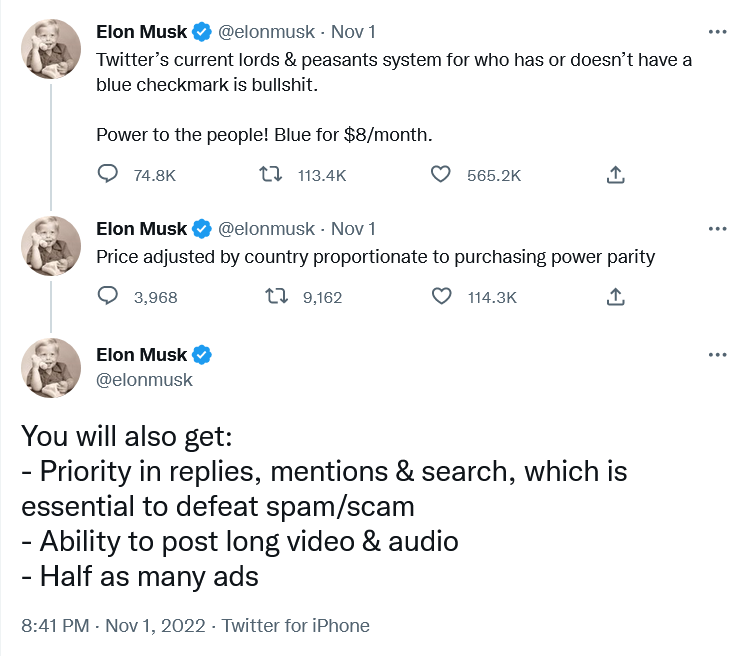
Musk unveiled his plan for Twitter monetization…on Twitter

According to different estimates, there are from 300,000 up to 400,000 verified accounts on Twitter. In the second quarter of 2022, Twitter reported 237 million monetizable daily users. It’s unclear how many of them will buy into the Musk vision, and will be ready to pay for it from their own pockets.

Under Musk’s plan, public figures should remain recognizable even if they do not pay for the subscription. Twitter would add “a secondary tag” below their names, “which is already the case for politicians,” according to Musk. Apparently, the Twitter CEO referred to the labels for government and state-affiliated media accounts Twitter introduced back in 2020.

Fewer ads for subscribers

Most interesting for regular users, perhaps, is that subscribers will see fewer distractions, namely, “half as many ads.”

Some may consider this as a letdown from a man who once said that he “hates advertising.”. In a since deleted Twitter thread from April, Musk proposed essentially the same model, but suggested that those who sign up for Twitter Blue should see no ads at all.

“The power of corporations to dictate policy is greatly enhanced if Twitter depends on advertising money to survive,” Musk tweeted at the time.
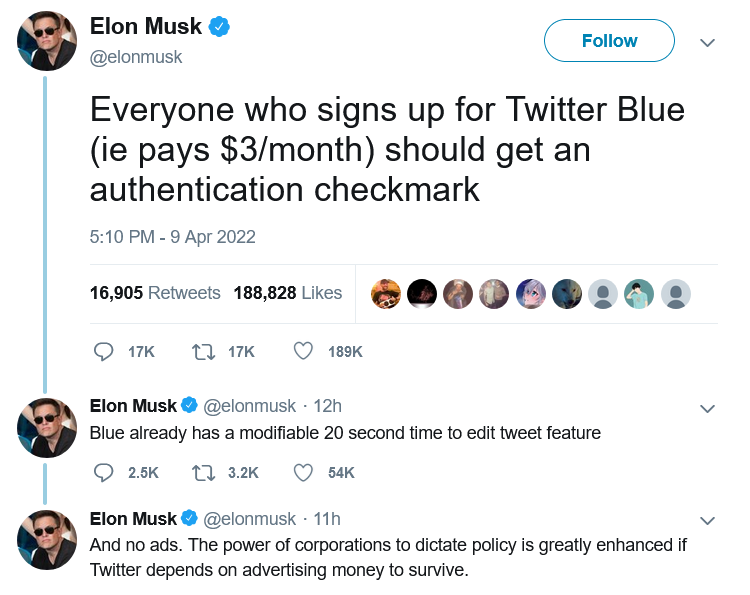
Half a year before becoming Twitter CEO, Musk suggested disabling ads for Twitter Blue subscribers

At the moment, though, Twitter Blue subscribers are being bombarded with the same amount of ads as non-subscribers. So, Musk’s decision can be seen as a step in the right direction.

According to Musk, the new system should enable Twitter to “defeat spam/scam on the platform”, as well as provide it with a “revenue stream to reward content creators.”

Ads will not go away, so won’t content moderation

After ascending to the Twitter throne, Musk has softened his stance towards advertisers. On the same day the Twitter deal was officially done and dusted, Musk addressed the advertising industry in a Twitter post titled “Dear Twitter Advertisers.”

“There has been much speculation about why I bought Twitter and what I think about advertising. Most of it has been wrong,”Musk wrote. The billionaire, who is known as a vocal advocate of the freedom of speech, added that while he wants the platform to be “warm and welcoming to all,” it won’t be completely free of regulation. “Twitter obviously cannot become a free-for-all hellspace, where anything can be said for no consequences!”

Musk then made it clear that advertisers will stay on the platform, but hinted that the rules for how they conduct their business can change. “It is essentially to show Twitter users advertising that is as relevant as possible to their needs. Low relevancy ads are spam, but highly relevant ads are actually content!” Musk went on to write.

The post was too sketchy on details as far as the future of ads on Twitter is concerned. Musk said that he wants to make Twitter “the most respected advertising platform in the world,” and judging by his previous rhetoric it is unlikely to mean harvesting more personal data without user consent. Hopefully, quite the opposite.

Meanwhile, individual companies, such as automaker GM (which, incidentally, is a Tesla competitor), have decided to suspend advertising on Twitter. It is unclear how many advertisers will decide to stick with the platform when the dust settles.

What to expect next?

It remains to be seen if Musk comes back to various proposals he’d made while still not at the helm of Twitter. One of them is to introduce end-to-end encryption for Twitter DMs like in the privacy-first Signal messanger. Another is to make Twitter algorithms open source. If Musk brings these ideas of his to life, Twitter would become more private and secure.

Given that Musk, however successful his other business ventures may be, is rather unpredictable, it’s difficult to gauge what will come out of his great Twitter gamble.

But a pivot from an ad-based revenue model to a model based on paid subscriptions is also pivot to more privacy. If Twitter’s revenue no longer fully depends on advertising, big corporations will have less sway over the company, and Twitter — fewer incentives to sell user data.
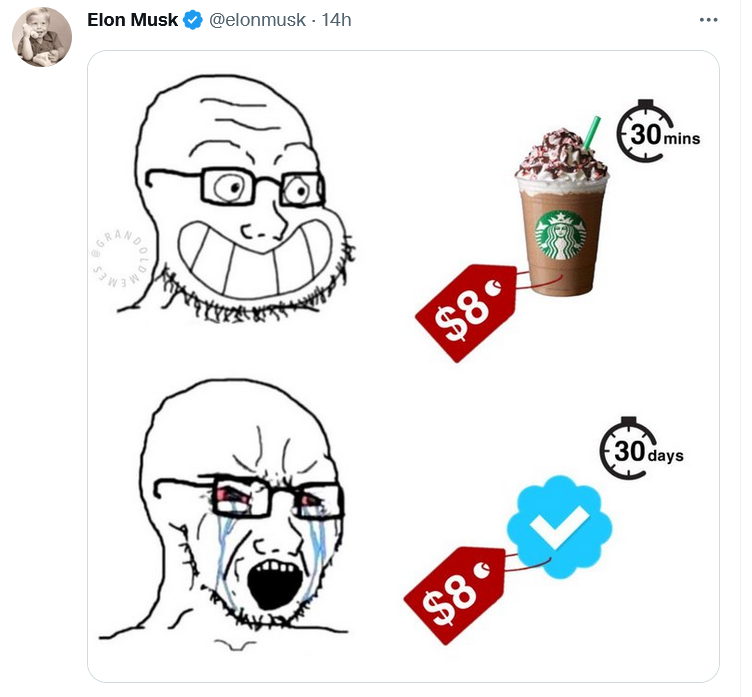
Musk compared the proposed Twitter subscription fee to a price of one cup of coffee

Whether the new model takes off, and what shape it will take in the end, one can only guess. Right now the odds are not in Musk’s favor, but no one becomes the richest man in the world for nothing. Much will depend on how Musk uses his personal marketing appeal to sell Twitter Blue to users, whether and how quickly he adds new features, and how well he listens to feedback. For now, everything is still up in the air. For example, it’s unclear how many ads are “half as many ads” exactly, and whether all the new proposed features would be enough to convince users to pay for a subscription.

As for the price tag, $8 is less than the cost of a few cups of coffee. It’s more about whether Musk will be able to sweeten the deal up enough.


Спадабаўся пост?
AdGuard VPN AdGuard DNS AdGuard Mail AdGuard Wallet
Галоўны экран AdGuard для Windows
Экран абароны AdGuard для Windows, які паказвае функцыі абароны і налады
Экран Статыстыка AdGuard для Windows, які паказвае статыстыку заблакіраванай рэкламы і праграм сачэння
Экран Кіраванне праграмамі ў AdGuard для Windows, які паказвае параметры кіравання абаронай для праграм, усталяваных на прыладзе
20 364 20364 водгукі
Выдатна!

AdGuard: блакіроўшчык рэкламы для Windows

AdGuard для Windows — гэта больш, чым блакіроўшчык рэкламы. Гэта шматфункцыянальны інструмент, які блакуе рэкламу, кантралюе доступ да небяспечных сайтаў, паскарае загрузку старонак і абараняе дзяцей ад непажаданага кантэнту

Спампоўваючы праграму, вы прымаеце ўмовы Ліцэнзійнага пагаднення
Microsoft Store
Спампоўваючы праграму, вы прымаеце ўмовы Ліцэнзійнага пагаднення
AdGuard для Windows версія 8.0, 14 дзён пробнага перыяду
Галоўны экран AdGuard для Mac
Экран рэжыму нябачнасці AdGuard для Mac
20 364 20364 водгукі
Выдатна!

AdGuard: блакіроўшчык рэкламы для Mac

AdGuard для Mac — гэта ўнікальны блакіроўшчык рэкламы, распрацаваны з улікам macOS. Акрамя абароны ад надакучлівай рэкламы ў браўзерах і праграмах, ён абараняе вас ад адсочвання, фішынгу і махлярства
Спампоўваючы праграму, вы прымаеце ўмовы Ліцэнзійнага пагаднення
Чытаць далей
AdGuard для Mac версія 2.19, 14 дзён пробнага перыяду
Галоўны экран AdGuard для Android
Экран Абарона ад сачэння ў AdGuard для Android
Экран Кіраванне праграмамі ў AdGuard для Android, які паказвае параметры кіравання абаронай для праграм, усталяваных на прыладзе
Экран Статыстыка AdGuard для Android, які паказвае статыстыку заблакіраванай рэкламы і праграм сачэння
Галоўны экран прыватнага браўзера AdGuard для Android
QR-код, каб спампаваць AdGuard для Android
20 364 20364 водгукі
Выдатна!

AdGuard: блакіроўшчык рэкламы для Android

Блакуе рэкламу і трэкеры ва ўсіх браўзерах, гульнях і іншых праграмах. Абараняе вашу прыватнасць і дазваляе вам кантраляваць, як вашы праграмы выкарыстоўваюць Інтэрнэт. Усталёўваецца праз APK
Спампоўваючы праграму, вы прымаеце ўмовы Ліцэнзійнага пагаднення
Чытаць далей
Сканіраванне для загрузкі
Выкарыстоўвайце любы счытвальнік QR-кодаў, даступны на вашай прыладзе
AdGuard для Android версія 4.14, 14 дзён пробнага перыяду
Галоўны экран AdGuard для iOS
Экран абароны AdGuard для iOS, які паказвае функцыі абароны і налады
Экран Статыстыка AdGuard для iOS, які паказвае статыстыку заблакіраванай рэкламы і праграм сачэння
QR-код, каб спампаваць AdGuard для iOS
20 364 20364 водгукі
Выдатна!

AdGuard: блакіроўшчык рэкламы для iOS

Найлепшы блакіроўшчык рэкламы для iOS для iPhone і iPad. AdGuard ліквідуе ўсе віды рэкламы і трэкераў у Safari і абараняе вашу прыватнасць ва ўсіх праграмах на ўзроўні DNS
Спампоўваючы праграму, вы прымаеце ўмовы Ліцэнзійнага пагаднення
Чытаць далей
Сканіраванне для загрузкі
Выкарыстоўвайце любы счытвальнік QR-кодаў, даступны на вашай прыладзе
AdGuard для iOS, 4.5
Галоўны экран AdGuard Content Blocker
Экран фільтры ў AdGuard Content Blocker
Экран налады ў AdGuard Content Blocker
20 364 20364 водгукі
Выдатна!

Блакіроўшчык кантэнту AdGuard

AdGuard Content Blocker ухіляе ўсе віды рэкламы ў мабільных браўзерах, якія падтрымліваюць тэхналогію блакіроўкі змесціва — напрыклад, Samsung Internet і Яндэкс.Браўзер. Яго функцыі абмежаваныя ў параўнанні з AdGuard для Android, але ён бясплатны, просты ў усталёўцы і эфектыўны
Спампоўваючы праграму, вы прымаеце ўмовы Ліцэнзійнага пагаднення
Чытаць далей
Блакіроўшчык кантэнту AdGuard, 2.8
Галоўны экран браузернае пашырэнне AdGuard
Экран Абарона ад сачэння ў браузернае пашырэнне AdGuard
20 364 20364 водгукі
Выдатна!

Браўзернае пашырэнне AdGuard

AdGuard — самае хуткае і лёгкае браўзарнае пашырэнне для блакавання ўсіх тыпаў рэкламы! Абірайце AdGuard для хуткага і бяспечнага сёрфінга без рэкламы.
Усталяваць
Спампоўваючы праграму, вы прымаеце ўмовы Ліцэнзійнага пагаднення
Усталяваць
Спампоўваючы праграму, вы прымаеце ўмовы Ліцэнзійнага пагаднення
Усталяваць
Спампоўваючы праграму, вы прымаеце ўмовы Ліцэнзійнага пагаднення
Усталяваць
Спампоўваючы праграму, вы прымаеце ўмовы Ліцэнзійнага пагаднення
Усталяваць
Спампоўваючы праграму, вы прымаеце ўмовы Ліцэнзійнага пагаднення
Чытаць далей
Усталяваць
Спампоўваючы праграму, вы прымаеце ўмовы Ліцэнзійнага пагаднення
Чытаць далей
Браўзернае пашырэнне AdGuard, 5.5
Галоўны экран Браўзерны памочнік AdGuard
20 364 20364 водгукі
Выдатна!

Памочнік AdGuard

Пашырэнне для браўзера-компаньён для настольных прыкладанняў AdGuard. Яно дазваляе блакіраваць карыстальніцкія элементы на вэб-сайтах, дадаваць вэб-сайты ў спіс дазволеных і адпраўляць справаздачы непасрэдна з вашага браўзера
Памочнік AdGuard, 1.4
20 364 20364 водгукі
Выдатна!

AdGuard Home

AdGuard Home — гэта сеткавае рашэнне для блакіроўкі рэкламы і праграм сачэння. Усталюйце яго адзін раз на вашым маршрутызатары, каб ахапіць усе прылады ў сетцы — дадатковае праграмнае забеспячэнне не патрабуецца. Гэта асабліва важна для розных прылад IoT, якія часта ўяўляюць пагрозу вашай прыватнасці
AdGuard Home, 0.107
Галоўны экран AdGuard Pro для iOS
Экран абароны ў AdGuard Pro для iOS, які паказвае функцыі абароны і налады
Экран Статыстыка ў AdGuard Pro для iOS, які паказвае статыстыку заблакіраванай рэкламы і праграм сачэння
20 364 20364 водгукі
Выдатна!

AdGuard Pro для iOS

AdGuard Pro для iOS пастаўляецца з усімі дадатковымі функцыямі блакіроўкі рэкламы і абароны, якія ўключаны. Ён прапануе тыя ж інструменты, што і платная версія AdGuard для iOS. Выдатна блакіруе рэкламу ў Safari, а таксама дазваляе наладжваць налады DNS, каб адаптаваць вашу абарону. Ён блакіруе рэкламу ў браўзерах і дадатках, абараняе дзяцей ад недапушчальнага кантэнту і захоўвае вашы асабістыя даныя бяспечнымі
Спампоўваючы праграму, вы прымаеце ўмовы Ліцэнзійнага пагаднення
Чытаць далей
AdGuard Pro для iOS, 4.5
Галоўны экран AdGuard Mini для Mac
Экран абароны Safari ў AdGuard Mini для Mac
Экран стварэння правіла ў AdGuard Mini для Mac
20 364 20364 водгукі
Выдатна!

AdGuard Mini для Mac — блакіроўшчык рэкламы ў Safari

AdGuard Mini для Mac — гэта магутны блакіроўшчык рэкламы для Safari. Гэта лёгкая праграма выдаляе рэкламу, блакуе праграмы сачэння і паскарае загрузку старонак. Яна дапамагае вам аглядаць вэб у Safari без адцягненняў і захоўваць вашы даныя ў прыватнасці
Усталяваць
Спампоўваючы праграму, вы прымаеце ўмовы Ліцэнзійнага пагаднення
Чытаць далей
AdGuard Mini для Mac, 2.3
Галоўны экран AdGuard для Android TV з уключанай абаронай
Экран блакіроўкі рэкламы AdGuard для Android TV, які паказвае яго функцыі і налады
Экран налады AdGuard для Android TV
Экран Кіраванне праграмамі AdGuard для Android TV, які паказвае праграмы, дзе рэклама і праграмы сачэння заблакіравана
20 364 20364 водгукі
Выдатна!

AdGuard для Android TV

AdGuard для Android TV — адзіная праграма, якая блакіруе рэкламу, ахоўвае вашу прыватнасць і працуе як міжсеткавы экран для вашага Smart TV. Атрымуйце папярэджанні аб вэб-пагрозах, выкарыстоўвайце бяспечны DNS і атрымлівайце перавагі ад шыфраванага трафіку. Адпачывайце і атрымлівайце асалоду ад улюбёных шоу з першакласнай абаронай і без рэкламы!
AdGuard для Android TV версія 4.14, 14 дзён пробнага перыяду
Маскот AdGuard, Агнар, трымае пінгвіна Linux
20 364 20364 водгукі
Выдатна!

AdGuard для Linux

AdGuard для Linux — гэта першы ў свеце сістэмны блакіроўшчык рэкламы для Linux. Блакуйце рэкламу і трэкеры на ўзроўні прылады, выбірайце з папярэдне ўсталяваных фільтраў альбо дадавайце ўласныя — усё праз інтэрфейс каманднага радка
AdGuard для Linux, 1.4
20 364 20364 водгукі
Выдатна!

AdGuard Temp Mail

Ваш часовы паштовую скрыню, каб на асноўную пошту не прыходзіў спам
20 364 20364 водгукі
Выдатна!

AdGuard VPN

75 лакацый па ўсім свеце

Доступ да любога кантэнту

Моцнае шыфраванне

Без лагавання

Самае хуткае злучэнне

Цэладзённая падтрымка

Паспрабуйце бясплатна
Спампоўваючы праграму, вы прымаеце ўмовы Ліцэнзійнага пагаднення
Чытаць далей
20 364 20364 водгукі
Выдатна!

AdGuard DNS

AdGuard DNS – гэта альтэрнатыўны спосаб заблакаваць рэкламу, абараніць асабістыя дадзеныя і ахаваць дзяцей ад дарослых матэрыялаў. Ён просты ў наладзе і выкарыстанні і забяспечвае патрэбны мінімум абароны ад рэкламы, трэкінгу і фішынгу, незалежна ад платформы.
20 364 20364 водгукі
Выдатна!

AdGuard Mail

Абараняйце сваю асобу, пазбягайце спаму і трымайце ўваходную пошту ў бяспецы з дапамогай нашых псеўданімаў і часовых адрасоў электроннай пошты. Скарыстайцеся нашым бясплатным сэрвісам перасылкі электроннай пошты і праграмамі для ўсіх аперацыйных сістэм.
20 364 20364 водгукі
Выдатна!

AdGuard Wallet

Бяспечны і прыватны крыпта-кашалёк, які дае вам поўны кантроль над вашымі актывамі. Адкрывайце для сябе тысячы крыптавалют для захоўвання, адпраўкі і абмену
Спампоўка AdGuard Каб усталяваць AdGuard, пстрыкніце файл, пазначаны стрэлкай Выберыце «Адкрыць» і націсніце «ОК», затым дачакайцеся спампоўкі файла. У акне, якое адкрылася, перацягніце значок AdGuard у папку «Праграмы». Дзякуй, што выбралі AdGuard! Выберыце «Адкрыць» і націсніце «ОК», затым дачакайцеся спампоўкі файла. У акне, якое адкрылася, націсніце «Усталяваць». Дзякуй, што выбралі AdGuard!
Усталюйце AdGuard на мабільную прыладу

















































