Elon, what the ad?? Unmarked ads flood X

Since he took over Twitter a year ago, Elon Musk has made a lot of unpopular decisions. The billionaire has turned the once-coveted verification check into a pay-for-play feature, restricted (presumably temporarily) the number of posts users can see, ended free access to the Twitter API, and is seriously considering introducing $1 annual fee for all new users. And, lest we forget, he rebranded the blue, homey Twitter into a bland black-and-white “X,” a symbol straight out of the Aughts (hi, XTina and X-men) that Musk has long been obsessed with.

Musk’s grand vision of turning X into an “everything app,” similar to China’s WeChat, has been met with skepticism at best, while X’s ad revenue, the company’s main source of income by far, has been falling 55% each month year-on-year.

This alone makes for a pretty dismal record for the first year of Musk’s reign.

While previous moves have been controversial, but one could argue not completely unjustified, the latest one should, and hopefully will, draw universal condemnation. Apparently, X is now experimenting with removing “ad” labels from regular ads as well as introducing ads that cannot be reported at all.

Undercover ads

Since early September, users have been reporting en masse that some of the ads they saw in their algorithmic “for me” feed and “following” feed were missing ad labels.

The only difference between these unlabelled and regular ads was that they were not marked as such. If the user was shrewd enough to figure out that an unlabelled post was in fact an ad and not an organic result, they could click on a three-dot menu in the top right corner of the post and report it.
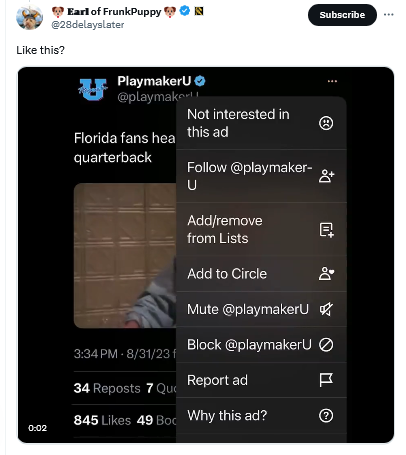
An unmarked X ad

Mashable was first on the story. It noted, giving Musk the benefit of the doubt, that it was “unclear if X, under owner Elon Musk, decided to remove these ad labels or if this is a temporary glitch.”

Judging by how the situation evolved over the next several weeks, the theory that it was a simple glitch seems increasingly unlikely.

About a month later, X users began noticing an even less transparent and more spammy ad format. These low-quality ads were posted by inactive accounts with no username and a profile picture that was a cropped version of the image in the post. The three-dot menu was also missing, making it impossible for users to block or report these ads.
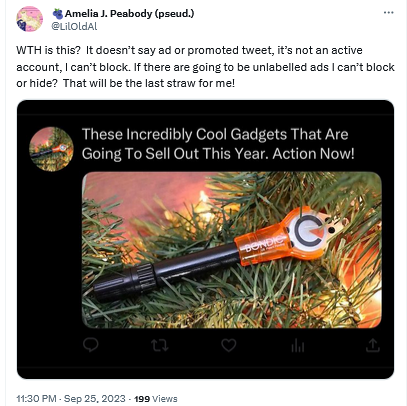
A spammy X ad without labels

We have not seen such ads ourselves, but according to Mashable, clicking on any part of these ads would redirect users to a third-party website. Mashable also reported that there was no mention of this new ad format in X’s ad inventory, which suggested that the ads came from a server of an external ad provider, not from X’s own servers.

X has not provided any explanation as to what is happening to its ads, but it is definitely something fishy. The Wired pointed out, the failure of X to clearly mark ads as ads can land it in trouble with the law, specifically the US Federal Trade Commission Act. The law requires companies to accompany ads with relevant disclosures to prevent that from being “deceptive.” And in the case of Twitter’s new ad formats these disclosures are nowhere to be seen, which makes the ads potentially illegal.

How it all started

X’s experiment with new ad formats and labeling (or rather, the lack thereof) did not come out of the blue. It’s been a slow progression from more obvious labels — to less obvious — and now, to no labels at all.

In fact, Twitter’s ad labels had not changed much for about ten years. When the platform first introduced ads in 2011, they were accompanied by the tag “Promoted” and a yellow arrow in the bottom left corner.
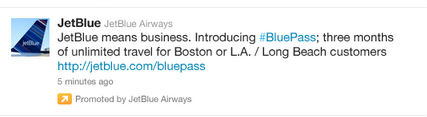
An old Twitter ad

Source: TechCrunch

These ads were displayed only to those users who already followed the advertiser’s account.

In the years that followed, the arrow lost its distinctive yellow color and took on a more subtle gray hue.
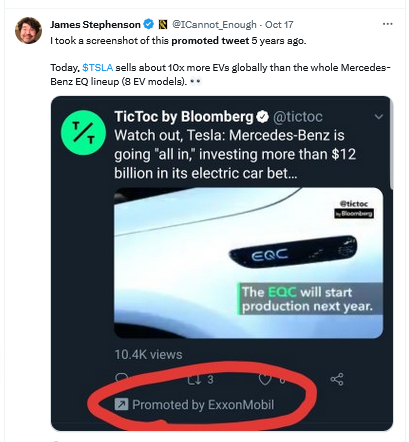
Twitter made the yellow arrow grey

And earlier this year, X changed the look of its ad labels again. It replaced the “promoted” tag in the bottom left corner with the tiny “ad” label in the top right corner, and got rid of the arrow. The new, much more subtle label was not well received by users, who argued that it was harder to spot, but the change stuck.
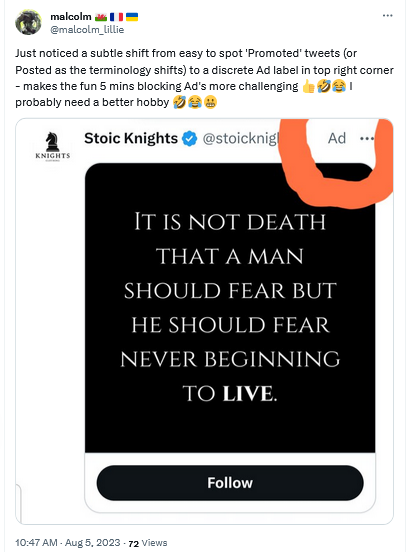
X replaced the 'promoted' tag with the 'ad' tag

It’s not that X is doing something unprecedented by making ad labels less prominent and promoted results less indistinguishable from organic results. Google has been at the forefront of this trend for years. But no one before has had the audacity to get rid of ad labels altogether (federal regulators, anyone?). And this is where X could set a precedent that, if they are allowed to set it, many will be tempted to follow.

Why is X doing that?

There are several possible explanations for X’s Schrödinger labels, and the most obvious one is that by removing the labels, X wants to increase engagement with the ads. The bet is that people who are misled into thinking that the ads are regular posts will click on them, which in turn will increase the click-through rate (CTR) and thus X’s ad revenue.

At first glance, this seems like a desperate move. But Musk, or whoever is in charge of this test, probably thinks that desperate times call for desperate measures. And what are desperate times if not when the majority of advertisers who returned to X reportedly spend 90% less than before. Add to that Musk’s increasing desire to blame X’s ad woes on someone else: first it was the Anti-Defamation League, and now the war in the Middle East.

As for where these spammy ads without handles might be coming from, Mashable pointed out that they are likely being seeded by X’s new third-party ad partners. These are Google and inMobi. Last month, Google confirmed that X would be using its programmatic platform, Google Ad Manager, to sell some of the unclaimed ad space on X’s home feed.

A less likely explanation for X’s new ad labels is a series of terrible glitches that the company (for some reason) has been unable to fix for over a month. While this explanation may seem preposterous, we would not rule it out: remember, we’re still talking about the company which at one point laid off 80% of its employees.

Another one is that Musk is probably testing the waters with regulators. In other words, X may want to see how far it can push the envelope with the government until it gets a slap on the wrist, or something more painful.

Are they possible to block?

X’s testing of these two new ad formats is a worrying development, as it makes ads more intrusive and less transparent. We hope that the regulators take notice, and intervene soon. We also hope that other platforms will not follow X’s example.

The AdGuard Ad Blocker app can block regular ads if X is opened in your browser, including on mobile devices. Note that if you have an Android device, you can block ads in any browser with AdGuard. As for iOS devices, you can only block ads in Safari with AdGuard.

Keep in mind: AdGuard DNS, or any other ad-blocking DNS for that matter, won’t be able to block ads on Twitter (or similar services like YouTube or Instagram) because Twitter uses the same DNS server to serve both ads and all other content.

We have not encountered X’s new ad formats yet, but based on the reports we’ve seen, we cannot rule out that AdGuard may not be able to block unlabelled ads that still have a three-dot menu with the existing filtering rules. However, we’re fairly confident that as soon as X rolls out this new ad format for a wider audience, we will be able to adapt and block these ads as well.

As for the “spammy-looking” ads that are presumably served by third-party networks, AdGuard should be able to block them with current filtering rules.


Спадабаўся пост?
AdGuard VPN AdGuard DNS AdGuard Mail AdGuard Wallet
Галоўны экран AdGuard для Windows
Экран абароны AdGuard для Windows, які паказвае функцыі абароны і налады
Экран Статыстыка AdGuard для Windows, які паказвае статыстыку заблакіраванай рэкламы і праграм сачэння
Экран Кіраванне праграмамі ў AdGuard для Windows, які паказвае параметры кіравання абаронай для праграм, усталяваных на прыладзе
20 363 20363 водгукі
Выдатна!

AdGuard: блакіроўшчык рэкламы для Windows

AdGuard для Windows — гэта больш, чым блакіроўшчык рэкламы. Гэта шматфункцыянальны інструмент, які блакуе рэкламу, кантралюе доступ да небяспечных сайтаў, паскарае загрузку старонак і абараняе дзяцей ад непажаданага кантэнту

Спампоўваючы праграму, вы прымаеце ўмовы Ліцэнзійнага пагаднення
Microsoft Store
Спампоўваючы праграму, вы прымаеце ўмовы Ліцэнзійнага пагаднення
AdGuard для Windows версія 8.0, 14 дзён пробнага перыяду
Галоўны экран AdGuard для Mac
Экран рэжыму нябачнасці AdGuard для Mac
20 363 20363 водгукі
Выдатна!

AdGuard: блакіроўшчык рэкламы для Mac

AdGuard для Mac — гэта ўнікальны блакіроўшчык рэкламы, распрацаваны з улікам macOS. Акрамя абароны ад надакучлівай рэкламы ў браўзерах і праграмах, ён абараняе вас ад адсочвання, фішынгу і махлярства
Спампоўваючы праграму, вы прымаеце ўмовы Ліцэнзійнага пагаднення
Чытаць далей
AdGuard для Mac версія 2.19, 14 дзён пробнага перыяду
Галоўны экран AdGuard для Android
Экран Абарона ад сачэння ў AdGuard для Android
Экран Кіраванне праграмамі ў AdGuard для Android, які паказвае параметры кіравання абаронай для праграм, усталяваных на прыладзе
Экран Статыстыка AdGuard для Android, які паказвае статыстыку заблакіраванай рэкламы і праграм сачэння
Галоўны экран прыватнага браўзера AdGuard для Android
QR-код, каб спампаваць AdGuard для Android
20 363 20363 водгукі
Выдатна!

AdGuard: блакіроўшчык рэкламы для Android

Блакуе рэкламу і трэкеры ва ўсіх браўзерах, гульнях і іншых праграмах. Абараняе вашу прыватнасць і дазваляе вам кантраляваць, як вашы праграмы выкарыстоўваюць Інтэрнэт. Усталёўваецца праз APK
Спампоўваючы праграму, вы прымаеце ўмовы Ліцэнзійнага пагаднення
Чытаць далей
Сканіраванне для загрузкі
Выкарыстоўвайце любы счытвальнік QR-кодаў, даступны на вашай прыладзе
AdGuard для Android версія 4.14, 14 дзён пробнага перыяду
Галоўны экран AdGuard для iOS
Экран абароны AdGuard для iOS, які паказвае функцыі абароны і налады
Экран Статыстыка AdGuard для iOS, які паказвае статыстыку заблакіраванай рэкламы і праграм сачэння
QR-код, каб спампаваць AdGuard для iOS
20 363 20363 водгукі
Выдатна!

AdGuard: блакіроўшчык рэкламы для iOS

Найлепшы блакіроўшчык рэкламы для iOS для iPhone і iPad. AdGuard ліквідуе ўсе віды рэкламы і трэкераў у Safari і абараняе вашу прыватнасць ва ўсіх праграмах на ўзроўні DNS
Спампоўваючы праграму, вы прымаеце ўмовы Ліцэнзійнага пагаднення
Чытаць далей
Сканіраванне для загрузкі
Выкарыстоўвайце любы счытвальнік QR-кодаў, даступны на вашай прыладзе
AdGuard для iOS, 4.5
Галоўны экран AdGuard Content Blocker
Экран фільтры ў AdGuard Content Blocker
Экран налады ў AdGuard Content Blocker
20 363 20363 водгукі
Выдатна!

Блакіроўшчык кантэнту AdGuard

AdGuard Content Blocker ухіляе ўсе віды рэкламы ў мабільных браўзерах, якія падтрымліваюць тэхналогію блакіроўкі змесціва — напрыклад, Samsung Internet і Яндэкс.Браўзер. Яго функцыі абмежаваныя ў параўнанні з AdGuard для Android, але ён бясплатны, просты ў усталёўцы і эфектыўны
Спампоўваючы праграму, вы прымаеце ўмовы Ліцэнзійнага пагаднення
Чытаць далей
Блакіроўшчык кантэнту AdGuard, 2.8
Галоўны экран браузернае пашырэнне AdGuard
Экран Абарона ад сачэння ў браузернае пашырэнне AdGuard
20 363 20363 водгукі
Выдатна!

Браўзернае пашырэнне AdGuard

AdGuard — самае хуткае і лёгкае браўзарнае пашырэнне для блакавання ўсіх тыпаў рэкламы! Абірайце AdGuard для хуткага і бяспечнага сёрфінга без рэкламы.
Усталяваць
Спампоўваючы праграму, вы прымаеце ўмовы Ліцэнзійнага пагаднення
Усталяваць
Спампоўваючы праграму, вы прымаеце ўмовы Ліцэнзійнага пагаднення
Усталяваць
Спампоўваючы праграму, вы прымаеце ўмовы Ліцэнзійнага пагаднення
Усталяваць
Спампоўваючы праграму, вы прымаеце ўмовы Ліцэнзійнага пагаднення
Усталяваць
Спампоўваючы праграму, вы прымаеце ўмовы Ліцэнзійнага пагаднення
Чытаць далей
Усталяваць
Спампоўваючы праграму, вы прымаеце ўмовы Ліцэнзійнага пагаднення
Чытаць далей
Браўзернае пашырэнне AdGuard, 5.5
Галоўны экран Браўзерны памочнік AdGuard
20 363 20363 водгукі
Выдатна!

Памочнік AdGuard

Пашырэнне для браўзера-компаньён для настольных прыкладанняў AdGuard. Яно дазваляе блакіраваць карыстальніцкія элементы на вэб-сайтах, дадаваць вэб-сайты ў спіс дазволеных і адпраўляць справаздачы непасрэдна з вашага браўзера
Памочнік AdGuard, 1.4
20 363 20363 водгукі
Выдатна!

AdGuard Home

AdGuard Home — гэта сеткавае рашэнне для блакіроўкі рэкламы і праграм сачэння. Усталюйце яго адзін раз на вашым маршрутызатары, каб ахапіць усе прылады ў сетцы — дадатковае праграмнае забеспячэнне не патрабуецца. Гэта асабліва важна для розных прылад IoT, якія часта ўяўляюць пагрозу вашай прыватнасці
AdGuard Home, 0.107
Галоўны экран AdGuard Pro для iOS
Экран абароны ў AdGuard Pro для iOS, які паказвае функцыі абароны і налады
Экран Статыстыка ў AdGuard Pro для iOS, які паказвае статыстыку заблакіраванай рэкламы і праграм сачэння
20 363 20363 водгукі
Выдатна!

AdGuard Pro для iOS

AdGuard Pro для iOS пастаўляецца з усімі дадатковымі функцыямі блакіроўкі рэкламы і абароны, якія ўключаны. Ён прапануе тыя ж інструменты, што і платная версія AdGuard для iOS. Выдатна блакіруе рэкламу ў Safari, а таксама дазваляе наладжваць налады DNS, каб адаптаваць вашу абарону. Ён блакіруе рэкламу ў браўзерах і дадатках, абараняе дзяцей ад недапушчальнага кантэнту і захоўвае вашы асабістыя даныя бяспечнымі
Спампоўваючы праграму, вы прымаеце ўмовы Ліцэнзійнага пагаднення
Чытаць далей
AdGuard Pro для iOS, 4.5
Галоўны экран AdGuard Mini для Mac
Экран абароны Safari ў AdGuard Mini для Mac
Экран стварэння правіла ў AdGuard Mini для Mac
20 363 20363 водгукі
Выдатна!

AdGuard Mini для Mac — блакіроўшчык рэкламы ў Safari

AdGuard Mini для Mac — гэта магутны блакіроўшчык рэкламы для Safari. Гэта лёгкая праграма выдаляе рэкламу, блакуе праграмы сачэння і паскарае загрузку старонак. Яна дапамагае вам аглядаць вэб у Safari без адцягненняў і захоўваць вашы даныя ў прыватнасці
Усталяваць
Спампоўваючы праграму, вы прымаеце ўмовы Ліцэнзійнага пагаднення
Чытаць далей
AdGuard Mini для Mac, 2.3
Галоўны экран AdGuard для Android TV з уключанай абаронай
Экран блакіроўкі рэкламы AdGuard для Android TV, які паказвае яго функцыі і налады
Экран налады AdGuard для Android TV
Экран Кіраванне праграмамі AdGuard для Android TV, які паказвае праграмы, дзе рэклама і праграмы сачэння заблакіравана
20 363 20363 водгукі
Выдатна!

AdGuard для Android TV

AdGuard для Android TV — адзіная праграма, якая блакіруе рэкламу, ахоўвае вашу прыватнасць і працуе як міжсеткавы экран для вашага Smart TV. Атрымуйце папярэджанні аб вэб-пагрозах, выкарыстоўвайце бяспечны DNS і атрымлівайце перавагі ад шыфраванага трафіку. Адпачывайце і атрымлівайце асалоду ад улюбёных шоу з першакласнай абаронай і без рэкламы!
AdGuard для Android TV версія 4.14, 14 дзён пробнага перыяду
Маскот AdGuard, Агнар, трымае пінгвіна Linux
20 363 20363 водгукі
Выдатна!

AdGuard для Linux

AdGuard для Linux — гэта першы ў свеце сістэмны блакіроўшчык рэкламы для Linux. Блакуйце рэкламу і трэкеры на ўзроўні прылады, выбірайце з папярэдне ўсталяваных фільтраў альбо дадавайце ўласныя — усё праз інтэрфейс каманднага радка
AdGuard для Linux, 1.4
20 363 20363 водгукі
Выдатна!

AdGuard Temp Mail

Ваш часовы паштовую скрыню, каб на асноўную пошту не прыходзіў спам
20 363 20363 водгукі
Выдатна!

AdGuard VPN

75 лакацый па ўсім свеце

Доступ да любога кантэнту

Моцнае шыфраванне

Без лагавання

Самае хуткае злучэнне

Цэладзённая падтрымка

Паспрабуйце бясплатна
Спампоўваючы праграму, вы прымаеце ўмовы Ліцэнзійнага пагаднення
Чытаць далей
20 363 20363 водгукі
Выдатна!

AdGuard DNS

AdGuard DNS – гэта альтэрнатыўны спосаб заблакаваць рэкламу, абараніць асабістыя дадзеныя і ахаваць дзяцей ад дарослых матэрыялаў. Ён просты ў наладзе і выкарыстанні і забяспечвае патрэбны мінімум абароны ад рэкламы, трэкінгу і фішынгу, незалежна ад платформы.
20 363 20363 водгукі
Выдатна!

AdGuard Mail

Абараняйце сваю асобу, пазбягайце спаму і трымайце ўваходную пошту ў бяспецы з дапамогай нашых псеўданімаў і часовых адрасоў электроннай пошты. Скарыстайцеся нашым бясплатным сэрвісам перасылкі электроннай пошты і праграмамі для ўсіх аперацыйных сістэм.
20 363 20363 водгукі
Выдатна!

AdGuard Wallet

Бяспечны і прыватны крыпта-кашалёк, які дае вам поўны кантроль над вашымі актывамі. Адкрывайце для сябе тысячы крыптавалют для захоўвання, адпраўкі і абмену
Спампоўка AdGuard Каб усталяваць AdGuard, пстрыкніце файл, пазначаны стрэлкай Выберыце «Адкрыць» і націсніце «ОК», затым дачакайцеся спампоўкі файла. У акне, якое адкрылася, перацягніце значок AdGuard у папку «Праграмы». Дзякуй, што выбралі AdGuard! Выберыце «Адкрыць» і націсніце «ОК», затым дачакайцеся спампоўкі файла. У акне, якое адкрылася, націсніце «Усталяваць». Дзякуй, што выбралі AdGuard!
Усталюйце AdGuard на мабільную прыладу

















































