TikTok, Meta, X, and others exploit push notifications on iOS to collect data about users

Apple has long said that fingerprinting — tracking a user through the hardware and software features of their device — is not allowed. But apparently some popular apps have found a backdoor that they are exploiting in plain sight.

Privacy researcher Tommy Mysk has discovered that a number of popular iOS apps are using a push notification feature, first introduced in 2016, to send detailed data about the user’s device to their companies’ servers.

Mysk explained that he noticed this disturbing and seemingly persistent pattern when he examined several social media apps, including TikTok, Facebook, FB Messenger, Instagram, Threads, and X. All of these apps took advantage of the feature that allowed them to customize their push notifications even when not running.

This feature is not intrinsically malicious and serves an important purpose. For example, it can be useful for apps that need to decode the notification payload or download additional content to best present the notification to the user. When an app receives a push notification, iOS signals the app to wake up and run for a short time. During this time, the app can do whatever the developer wants, including tweaking the push notification’s appearance in some way. The latter would be the original purpose of the feature, but the problem is that the app may also be collecting data or sending information about the user during that time.

Mysk has observed that the apps he has studied have learned to take full advantage of this limited run time to collect data from the device and send that data to remote servers. The researcher calls the ability to run code in the background “a gold mine for data-hungry apps.”

So how does it all work, according to Mysk?

  • The app developer comes up with a code they want the app to run in the background
  • The developer sends a push notification to the user of the app. The push can be about anything, from a news update, a live sports score to a new friend request
  • The user’s device receives the push notification, but does not show it on the screen yet. iOS recognizes that the push notification is from the social app and wakes it up in the background. The app is now running, but the user can’t see it or interact with it
  • The app runs the code that the developer has prepared in the background. And while it may be innocuous, for example, be used to add more information, such as images, to the notification, it can also be used to harvest data from the user’s device and send that data to the developer’s servers

This scheme can provide developers with a unique combination of the software and hardware characteristics of the user’s device.

Many apps are using this feature as an opportunity to send detailed device information while running quietly in the background. This includes: system uptime, locale, keyboard language, available memory, battery status, device model, display brightness, to mention a few.

This data can subsequently be used to track the user across applications, Mysk points out.

What data is being collected?

In the video describing the examples of such trickery, Mysk shows the types of data that can be collected by social media companies through the push notification loophole. The collection is done either through the company’s own services or with the help of third-party tools, such as Google’s analytics tools — Google Analytics and Firebase.
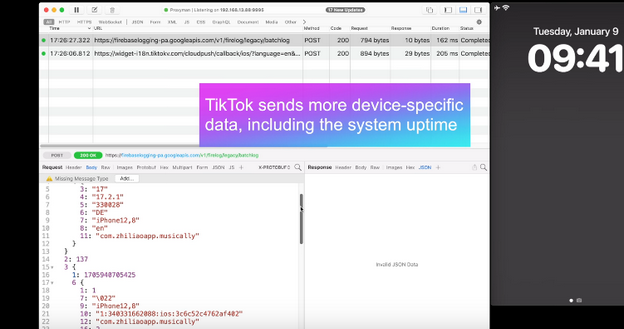
TikTok

With TikTok, for example, the app sends the iPhone’s boot time to the remote servers every time it receives a push notification.
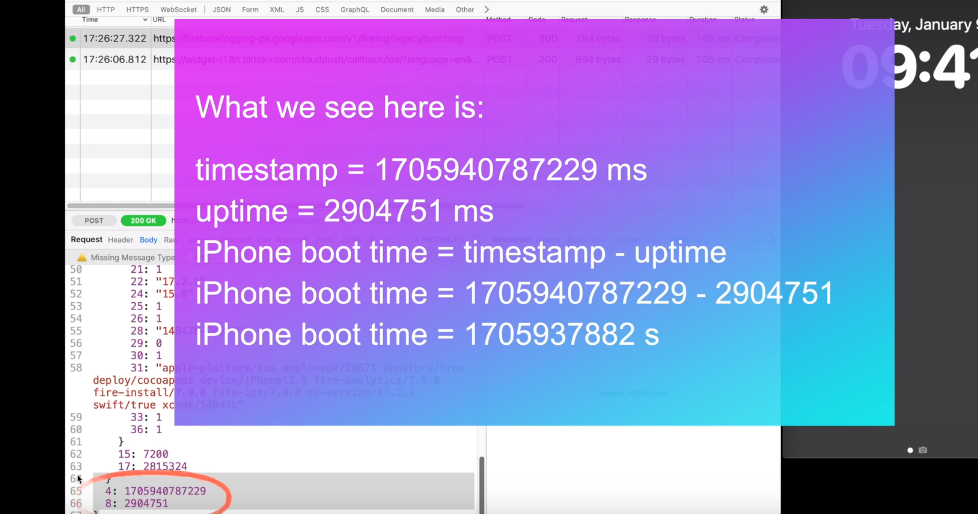
TikTok sends a lot of data to external servers

That means that TikTok knows exactly when the user last restarted their iPhone. If collected over a period of time, the boot time can tell how often the user reboots their iPhone, which can indicate how much they use it or how stable it is. It can be also used to identify the user’s device or track their activity.

When the Facebook app sends a push notification to the same device, Facebook receives the same data about the user’s iPhone last boot time.
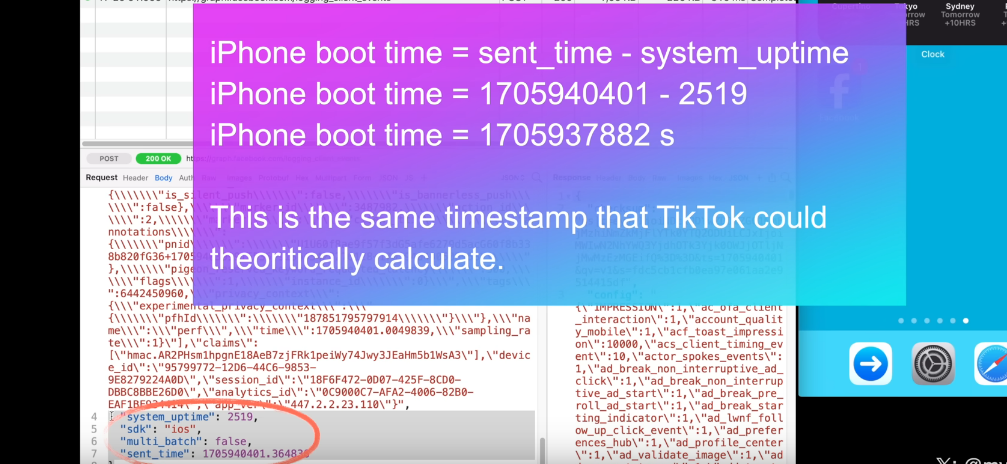
Facebook

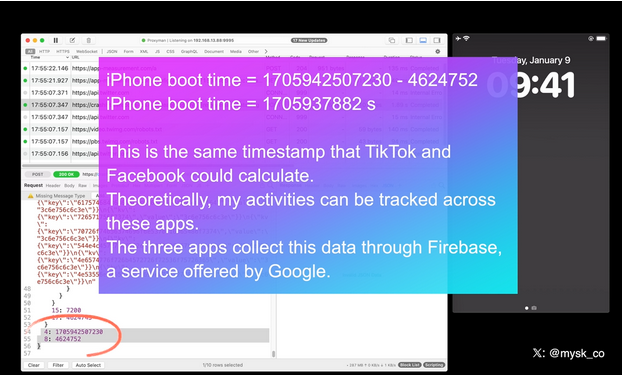
As the researcher notes, this may facilitate tracking the user across different apps. That is because the boot time can be used as a unique identifier for the user’s device. If the same device has multiple apps that collect and send the boot time to the same or different servers, these servers can compare the boot time data and link it to the same device. This way, they can track the user’s behavior and preferences across different apps, even if the user does not use the same account or login information for each app. All of this makes the exploitation of the push notification feature by social media companies a legitimate privacy threat.

Moreover, Mysk notes that some apps, for example Facebook and TikTok, also send data when clearing their notifications in Notification Center, which is an iOS feature that provides an overview of alerts from applications.

For example, when a user clears a Facebook notification, the app sends a request with detailed information, including the information about available memory, the last app event, such as liking a post, the time since last app event, the actor ID, that identifies the user’s account on Facebook, the preferred content size, the timestamp (i.e. the exact date and time) when the notification was cleared, the connection type, and so forth.
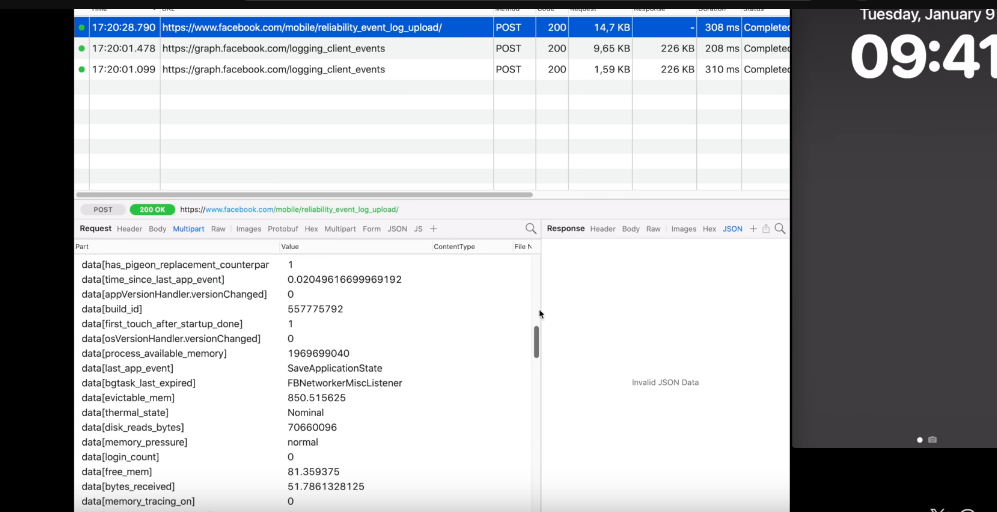
When a user clear a Facebook notification, the app sends detailed information about the user to the external servers

Twitter (X) handles the collection of the user’s information more or less the same way as Facebook and TikTok do.
X/Twitter

All three companies are using Firebase, a service offered by Google, Mysk notes, adding that “the frequency at which many apps send device information after being triggered by a notification is mind-blowing.”

New Apple rule for devs: what will they change?

Mysk pins a lot of hopes on the new rules for developers that Apple has put in place and that will come into effect this spring. As it unveiled the rules, Apple announced that developers would need to explain why their apps have to use certain APIs (Application Programming Interfaces), which are methods for different apps to communicate and share data.

The developers will have to explain why they need to access device information not only for their own code, but also for third-party SDKs (software development kits) that they add to their apps. Both apps and third-party SDKs will need to write one or more “approved reasons” for why they need to access device information through specific APIs in separate documents called “privacy manifest files.” These reasons should be “consistent with the app’s functionality.” We wrote a detailed review of Apple’s new requirement for developers in August — check it out here.

But the question is, will it stop companies from harvesting data from apps through the push notification backdoor? In theory, it should, but only if Apple seriously enforces these rules and monitors developers’ compliance. Which is by no means guaranteed.

We believe that the new rules will improve the situation, but by how much? It is a difficult question with many variables. Developers will have to take the new rules into account, so there’s a chance they’ll try to follow them in good faith. However, those who are hell-bent on continuing to collect this data will likely choose to take risks. And then it’ll be up to Apple and its reviewers to catch these apps in the act.

In any case, we hope Apple takes a proactive and transparent approach to privacy enforcement, or users’ data will continue to be at risk.


Syntes om dette indlæg?
AdGuard VPN AdGuard DNS AdGuard Mail AdGuard Wallet
Hovedskærmen i AdGuard til Windows
Beskyttelsesskærmen i AdGuard til Windows, der viser beskyttelsesfunktioner og -indstillinger
Statistikskærmen i AdGuard til Windows, der viser statistik over blokerede annoncer og trackere
App-håndteringsskærmen i AdGuard til Windows, der viser beskyttelseshåndteringsindstillinger for apps installeret på enheden
20.401 20401 brugeranmeldelser
Fremragende!

AdGuard til Windows: adblocker til PC

AdGuard til Windows er mere end en adblocker. Den er et multifunktionsværktøj, der blokerer annoncer, kontrollerer adgangen til farlige websteder, accelererer sideindlæsning og beskytter børn mod upassende indhold
Ved at downloade programmet accepterer du betingelserne i Licensaftalen
Microsoft Store
Ved at downloade programmet accepterer du betingelserne i Licensaftalen
AdGuard til Windows v8.0, 14-dages prøveperiode
Hovedskærmen i AdGuard til Mac
Skærmen Stealth Mode i AdGuard til Mac
20.401 20401 brugeranmeldelser
Fremragende!

AdGuard til Mac: adblocker på systemniveau

AdGuard til Mac er en unik adblocker designet med macOS i tankerne. Ud over at beskytte mod irriterende annoncer i webbrowsere og apps, beskytter den også mod sporing, phishing og svindel
Ved at downloade programmet accepterer du betingelserne i Licensaftalen
Læs mere
AdGuard til Mac v2.19, 14-dages prøveperiode
Hovedskærmen i AdGuard til Android
Sporingsbeskyttelsesskærmen i AdGuard til Android
App-håndteringsskærmen i AdGuard til Android, der viser beskyttelseshåndteringsindstillingerne for apps installeret på enheden
Statistikskærmen i AdGuard til Android, der viser statistik for blokerede annoncer og trackere
Hovedskærmen i AdGuards private webbrowser til Android
QR-koden til download af AdGuard til Android
20.401 20401 brugeranmeldelser
Fremragende!

AdGuard til Android: adblocker til all apps

Blokerer annoncer og trackere på tværs af alle webbrowsere, spil og andre apps. Beskytter fortroligheden og muliggør styring af, hvordan apps bruger internet. Installeres via APK
Ved at downloade programmet accepterer du betingelserne i Licensaftalen
Læs mere
Skan for at downloade
Brug en hvilken som helst QR-kodelæser fra enheden
AdGuard til Android v4.14, 14-dages prøveperiode
Hovedskærmen i AdGuard til iOS
Beskyttelsesskærmen i AdGuard til iOS, der viser beskyttelsesfunktioner og -indstillinger
Statistikskærmen i AdGuard til iOS, der viser statistik for blokerede annoncer og trackere
QR-koden til download af AdGuard til iOS
20.401 20401 brugeranmeldelser
Fremragende!

AdGuard til iOS: adblocker til mere end Safari

Den bedste iOS-adblocker til iPhone og iPad. AdGuard eliminerer alle slags annoncer og trackere i Safari og beskytter fortroligheden på tværs af alle apps på DNS-niveau
Ved at downloade programmet accepterer du betingelserne i Licensaftalen
Læs mere
Skan for at downloade
Brug en hvilken som helst QR-kodelæser fra enheden
AdGuard til iOS v4.5
Hovedskærmen i AdGuard Content Blocker
Filtre-kærmen i AdGuard Content Blocker
Indstillingsskærmen i AdGuard Content Blocker
20.401 20401 brugeranmeldelser
Fremragende!

AdGuard Indholdsblocker

AdGuard Content Blocker eliminerer alle former for annoncer i mobilwebbrowsere, som understøtter indholdsblocker-teknologi — nemlig Samsung Internet og Yandex.Browser. Dens funktioner er begrænsede sammenlignet med AdGuard til Android, men den er gratis, nem at installere og effektiv
Ved at downloade programmet accepterer du betingelserne i Licensaftalen
Læs mere
AdGuard Indholdsblocker v2.8
Hovedskærmen i AdGuard Browser Extension
Skærmen Sporingsbeskyttelse i AdGuard Browser Extension
20.401 20401 brugeranmeldelser
Fremragende!

AdGuard Browserudvidelse

AdGuard er den hurtigste og mest letvægts adblockerudvidelse, der effektivt blokerer alle former for annoncer på alle websider! Vælg AdGuard til den benyttede webbrowser og få annoncefri, hurtig og sikker browsing.
Installér
Ved at downloade programmet accepterer du betingelserne i Licensaftalen
Installér
Ved at downloade programmet accepterer du betingelserne i Licensaftalen
Installér
Ved at downloade programmet accepterer du betingelserne i Licensaftalen
Installér
Ved at downloade programmet accepterer du betingelserne i Licensaftalen
Installér
Ved at downloade programmet accepterer du betingelserne i Licensaftalen
Læs mere
Installér
Ved at downloade programmet accepterer du betingelserne i Licensaftalen
Læs mere
AdGuard Browserudvidelse v5.5
Hovedskærmen i AdGuard Assistent
20.401 20401 brugeranmeldelser
Fremragende!

AdGuard Assistent

En ledsager-webbrowerudvidelse til AdGuard computer-apps. Den muliggør at blokere tilpassede elementer på websteder, føje websteder til hvidlisten samt indsende anmeldelser direkte fra webbrowseren
AdGuard Assistent v1.4
20.401 20401 brugeranmeldelser
Fremragende!

AdGuard Home

AdGuard Home er en netværksbaseret løsning til blokering af annoncer og trackere. Installér den én gang på routeren for at dække alle enheder på hjemmenetværket — ingen yderligere klientsoftware kræves. Dette er især vigtigt for forskellige IoT-enheder, som ofte udgør en fortrolighedstrussel
AdGuard Home v0.107
Hovedskærmen i AdGuard Pro til iOS
Beskyttelsesskærmen i AdGuard Pro til iOS, der viser beskyttelsesfunktioner og indstillinger
Statistikskærmen i AdGuard Pro til iOS, der viser statistik for blokerede annoncer og trackere
20.401 20401 brugeranmeldelser
Fremragende!

AdGuard Pro til iOS

AdGuard Pro til iOS leveres med alle de avancerede adblocking-beskyttelsesfunktioner slået til. Den tilbyder de samme værktøjer som betalingsversionen af AdGuard til iOS. Den er fremragende til adblocking i Safari og muliggør at tilpasse DNS-indstillinger for at skræddersy beskyttelsen. Den blokerer annoncer i webbrowsere og apps, beskytter børnene mod upassende indhold og holder de personlige data sikre
Ved at downloade programmet accepterer du betingelserne i Licensaftalen
Læs mere
AdGuard Pro til iOS v4.5
Hovedskærmen i AdGuard Mini til Mac
Safari-beskyttelsesskærmen i AdGuard Mini til Mac
Opret regel-skærmen i AdGuard Mini til Mac
20.401 20401 brugeranmeldelser
Fremragende!

AdGuard Mini til Mac — Safari-adblocker

AdGuard Mini til Mac er en kraftfuld Safari-adblocker. Denne letvægts-app fjerner annoncer, blokerer trackere og accelererer sideindlæsning. Den hjælper med at surfe på nettet med Safari uden forstyrrelser og holde personlige data fortrolige
Installér
Ved at downloade programmet accepterer du betingelserne i Licensaftalen
Læs mere
AdGuard Mini til Mac v2.3
Hovedskærmen i AdGuard til Android TV med beskyttelse slået til
Adblockingskærmen i AdGuard til Android TV, der viser dens funktioner og indstillinger
Indstillingsskærmen i AdGuard til Android TV
App-håndteringsskærmen i AdGuard til Android TV, der viser de apps, hvori annoncer og trackere er blokeret
20.401 20401 brugeranmeldelser
Fremragende!

AdGuard til Android TV

AdGuard til Android TV er den eneste app, der blokerer annoncer, beskytter fortroligheden og fungerer som en firewall til Smart TV'et. Bliv advaret om webtrusler, brug sikker DNS og drag fordel af krypteret trafik. Slap af og dyk ned i dine yndlingsprogrammer med førsteklasses sikkerhed og nul annoncer!

AdGuard til Android TV v4.14, 14-dages prøveperiode
AdGuard-maskotten, Agnar, der holder Linux-pingvinen
20.401 20401 brugeranmeldelser
Fremragende!

AdGuard til Linux

AdGuard til Linux er verdens første systemdækkende Linux-adblocker. Blokér annoncer og trackere på enhedsniveau, vælg blandt præinstallerede filtrer eller tilføj egen — alt sammen via kommandolinjegrænsefladen

AdGuard til Linux v1.4
20.401 20401 brugeranmeldelser
Fremragende!

AdGuard Temp Mail

Adressegenerator til en gratis midlertidig e-mail, der holder dig anonym og beskytter fortroligheden. Ingen spam i den primære indbakke!
20.401 20401 brugeranmeldelser
Fremragende!

AdGuard VPN

75 placeringer verden over

Adgang til alle typer indhold

Stærk kryptering

Ingen logning-politik

Hurtigste forbindelse

24/7-support

Afprøv gratis
Ved at downloade programmet accepterer du betingelserne i Licensaftalen
Læs mere
20.401 20401 brugeranmeldelser
Fremragende!

AdGuard DNS

AdGuard DNS er en idiotsikker måde at blokere Internetannoncer på, der ikke kræver nogle programinstallationer. Den er nemt at bruge, fuldstændig gratis, let at opsætte på en hvilken som helst enhed, og den giver dig de som minimum nødvendige funktioner til at blokere annoncer, tællere, ondsindede websteder og voksenindhold.
20.401 20401 brugeranmeldelser
Fremragende!

AdGuard Mail

Beskyt identiteten, undgå spam og hold indbakken sikker med vores aliasser og midlertidige e-mailadresser. Brug vores gratis e-mailvideresendelsestjeneste og apps på alle operativsystemer
20.401 20401 brugeranmeldelser
Fremragende!

AdGuard Wallet

En sikker og fortrolig krypto-wallet, hvormed man har fuld kontrol over sine aktiver. Håndtér flere wallets og find tusindvis af kryptovalutaer, som man kan opbevare, sende og ombytte
AdGuard-download er startet Klik på den af pilen angivet knap for at starte installationen. Vælg "Åbn" og klik på "OK". Afvent at filen downloades. I det åbnede vindue, træk AdGuard-ikonet til "Apps"-mappen. Tak fordi du valgte AdGuard! Vælg "Åbn" og klik på "OK". Afvent at filen downloades. I det åbnede vindue, klik på "Installér". Tak fordi du valgte AdGuard!
Installér også AdGuard til mobilenheder
















































