First public BETA of AdGuard 3.0 for iOS: you'll not recognize it

It's very exciting to be writing about an AdGuard for iOS update. I'm sure, for many users it will be no less exciting to read about it. Even though this is only a beta update, it will give you an impression of what to expect when the release version hits the AppStore (which will happen sooner than you might think). There's a lot to discuss, so let's not waste any more time and kick things off right away.

NOTE: fixing the last bugs took us a bit longer than we expected, and by the time we post this article the new beta has been just submitted for the TestFlight review. It will take some more time for it to pass this review, and then the beta will be available to all beta testers. Towards the end of the article I'll explain how to become a beta tester for AdGuard for iOS.

Pro or no Pro?

Most of our users know that there are two AdGuard for iOS apps — free one and Pro, the paid one. Those who've been around for a while are, perhaps, also familiar with the not-so-pleasant situation around Apple policy and AdGuard Pro. It'll soon be a whole year after Apple put a ban on AdGuard Pro updates (and many other apps that did content blocking outside Safari). We've been looking for various solutions, waiting for Apple to reconsider their policy, but in the end there just wasn't any solution that would have been completely satisfactory for users. So this is what we decided to go by:

  • AdGuard Pro for iOS will stay as it is

    Unless something truly magical happens, Apple is not going to loosen its grip on us. We still can't update AdGuard Pro without removing everything that makes it what it is. Thankfully, for the majority of users the app still functions alright, and we can only hope that it will stay that way for as long as possible.

  • Free AdGuard for iOS app will undergo a big update

    This is what this article is about in the first place. The baseline of the free app is that it is still a great tool for content blocking in Safari — even better than before, in fact. The app will remain free.

  • There will be new features in the free app available via in-app purchases

    Now, keep those pitchforks down for now, I'll explain everything in a moment. It's not as bad as it sounds, I promise :)

With all that said, let's move away from AdGuard Pro and start talking new beta. I'll skip discussing the new design on purpose, as you'll get a feel of it from the screenshots. And also, it's rather intuitive and there's no way it will cause you any troubles, so no need to devote too much time to it.

Powering through the rule count limitation

One of the biggest hurdles for any Safari content blocker is the notorious 50k active rule count limitation. For some reason, Apple thinks that 50,000 should be enough for you. For comparison, AdGuard Base filter alone has more than 100,000 rules! We're doing next to impossible things to optimize and compress our filters so that they can be used in Safari but the limitation still shows in the filtering quality.

Well, there is a trick that some content blockers have been using to circumvent this restriction, and AdGuard is going to arm itself with this trick too. The new beta combines five content blockers under one app, each of them has its own cap of 50k rules. That makes it 250k rules total (well, a little less in reality, but not by much). The only minor downside is that you need to enable all five content blockers in Safari settings on your phone/tablet, but that's not too big of an inconvenience comapred to the benefits.
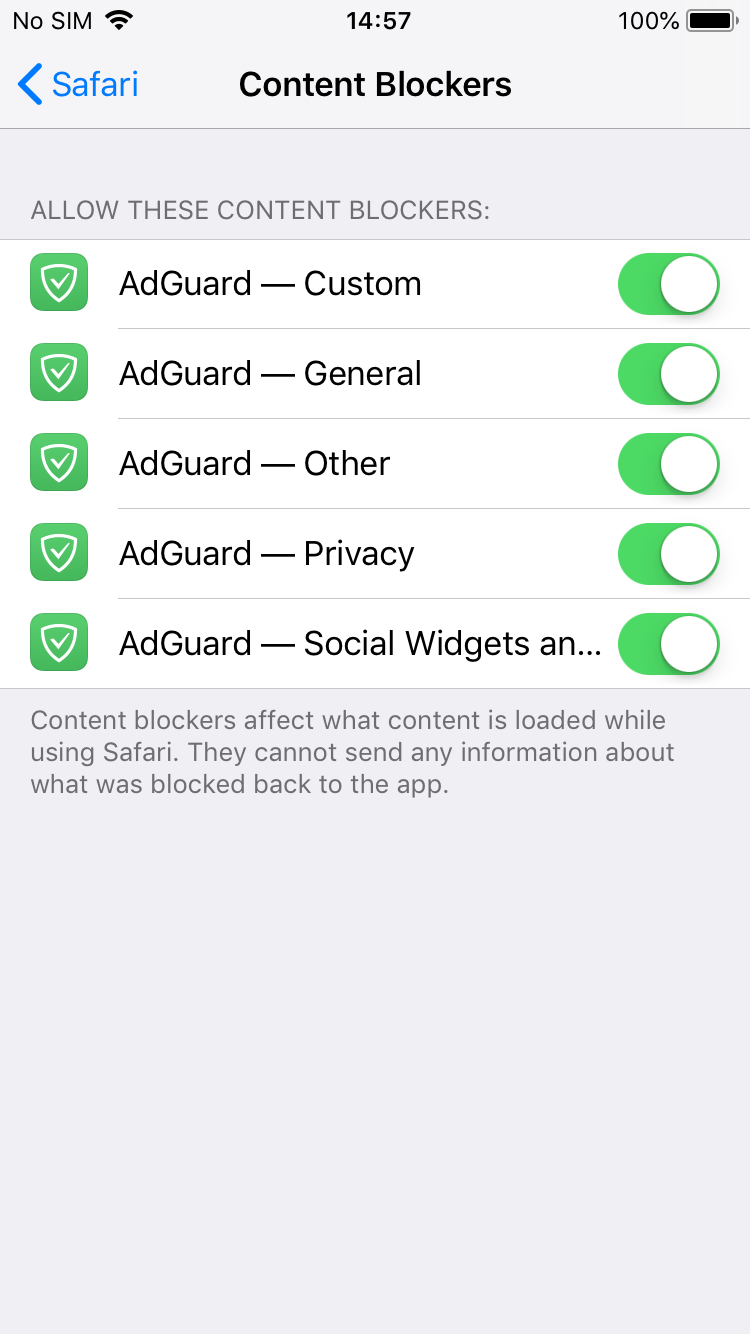
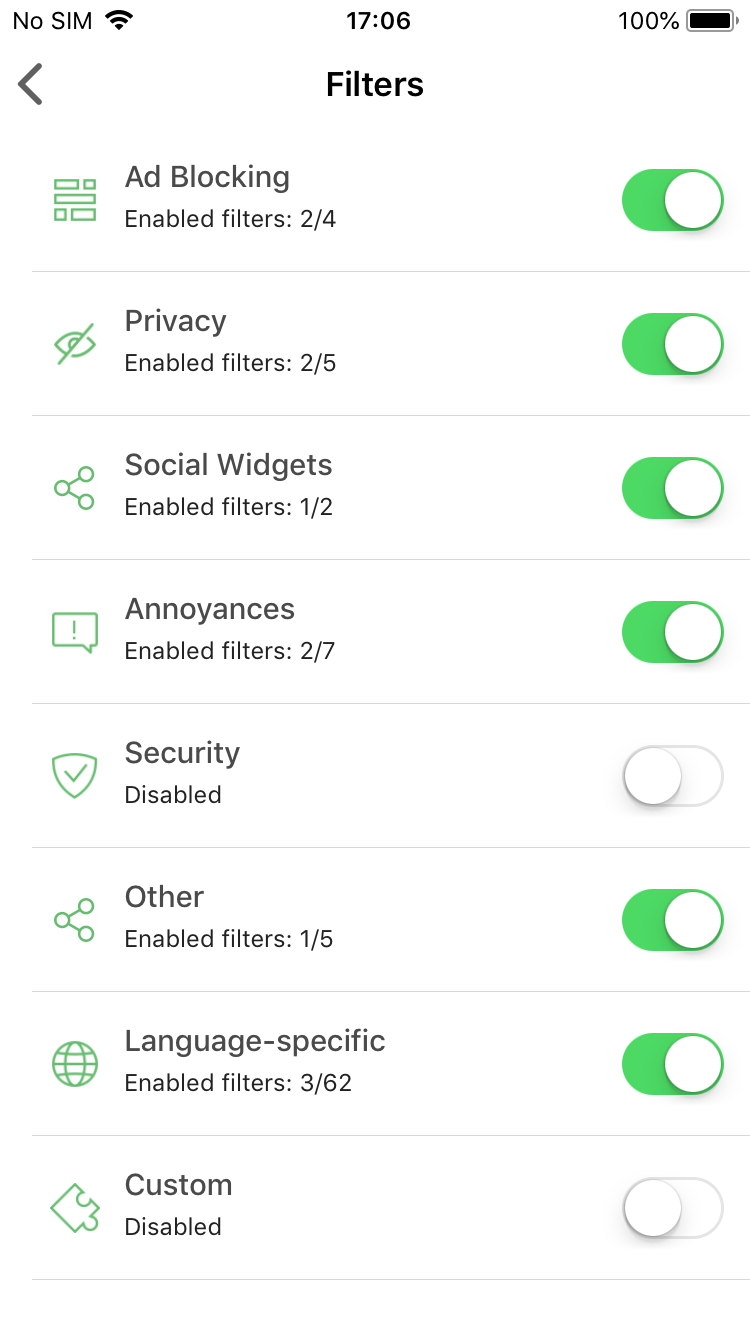
Turn on all five content blockers and enable any filters you want!

Premium features

I know this may seem like having Premium features in an updated free version of AdGuard for iOS contradicts with saying that we can't update the Pro version. Unfortunately, not everything could be transferred from there.

DNS Privacy

This is by far the biggest addition. If you're a user of AdGuard Pro, you'll recognize this immediately — it's good old custom DNS settings. Actually, it's more than that: now AdGuard supports DNS-over-TLS and DNS-over-HTTPS, two of the most secured DNS protocols.
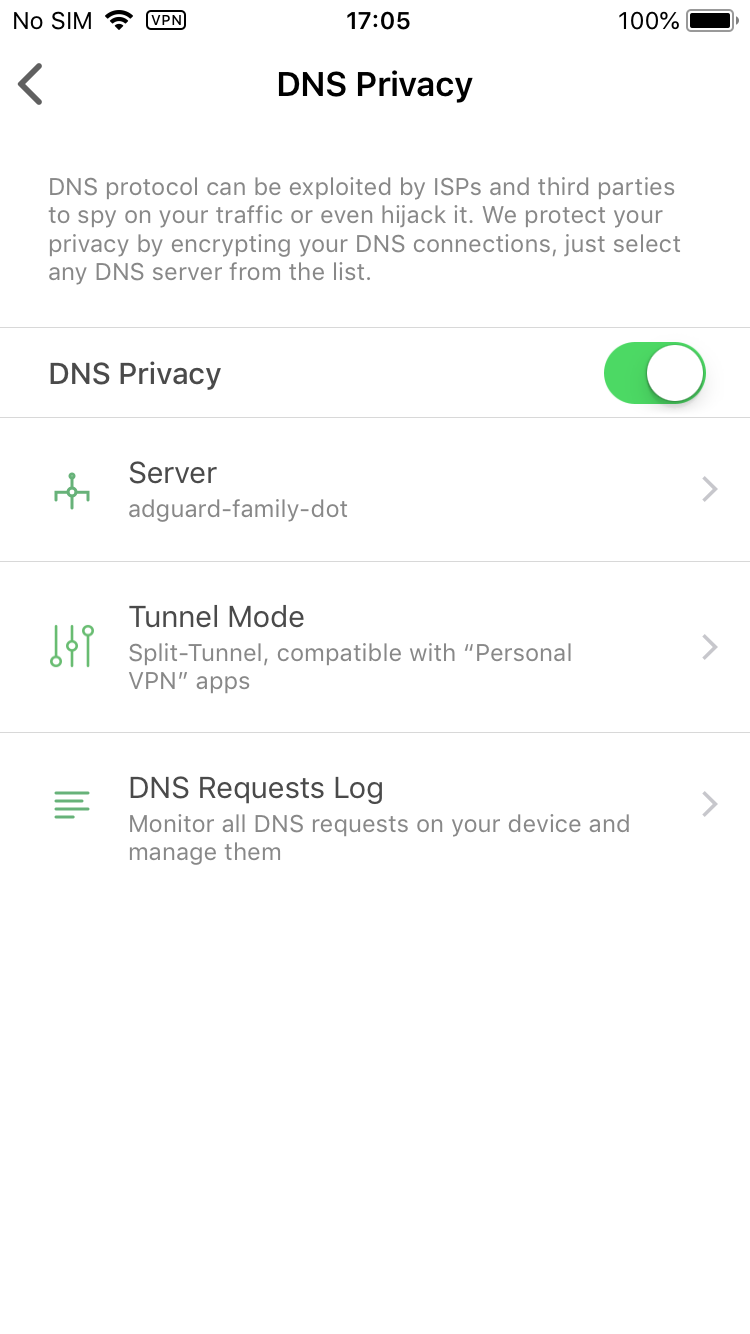
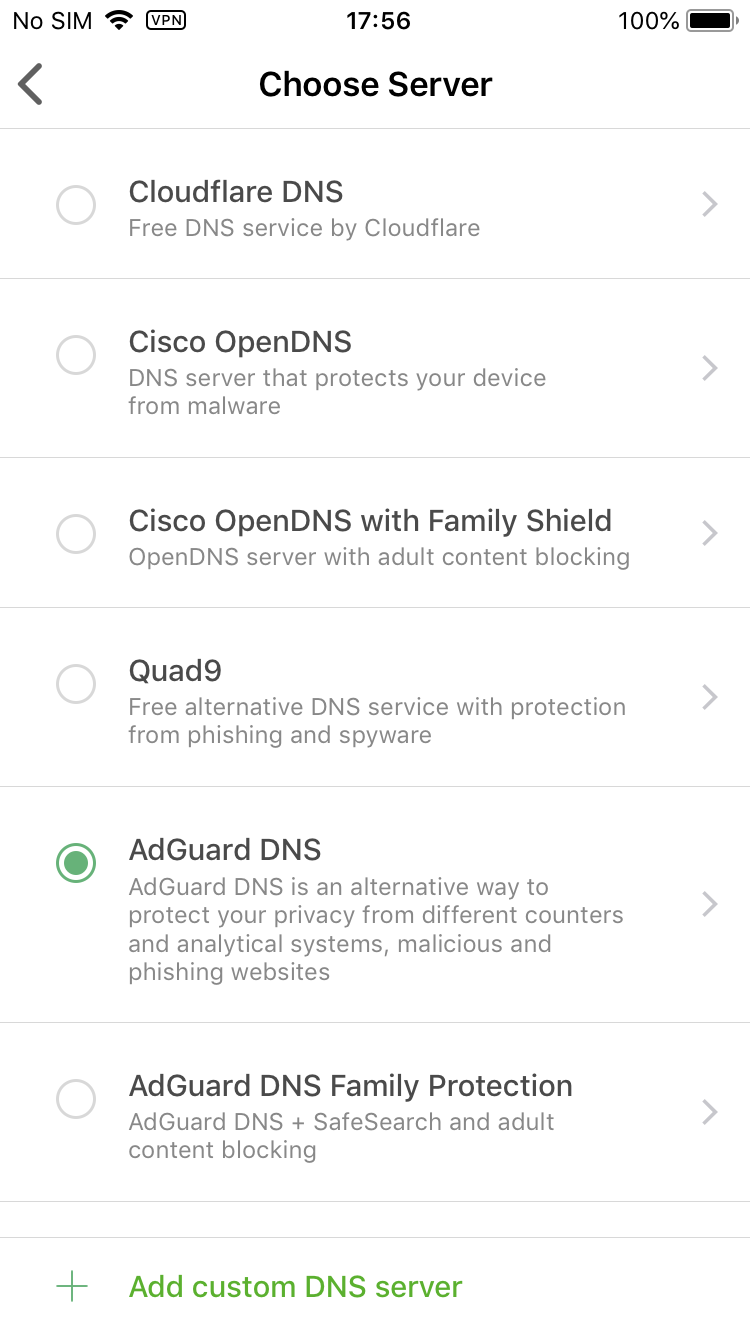
Manage your DNS settings

You select one of the DNS servers included by default or add any custom server you'd like. There's also a DNS requests log to monitor everything that's happening with your device's traffic. What you won't find there is any sort of DNS whitelist/blacklist or other customization. Sadly, this is as far as we can step under the circumstances.

Dark mode

Wait, wasn't dark mode the default (and only) choice before? Yes, but now we turned back to the classic white/green color scheme, as you could have seen on the screenshots above. Dark mode will be available to Premium users only, but isn't it worth it? :)
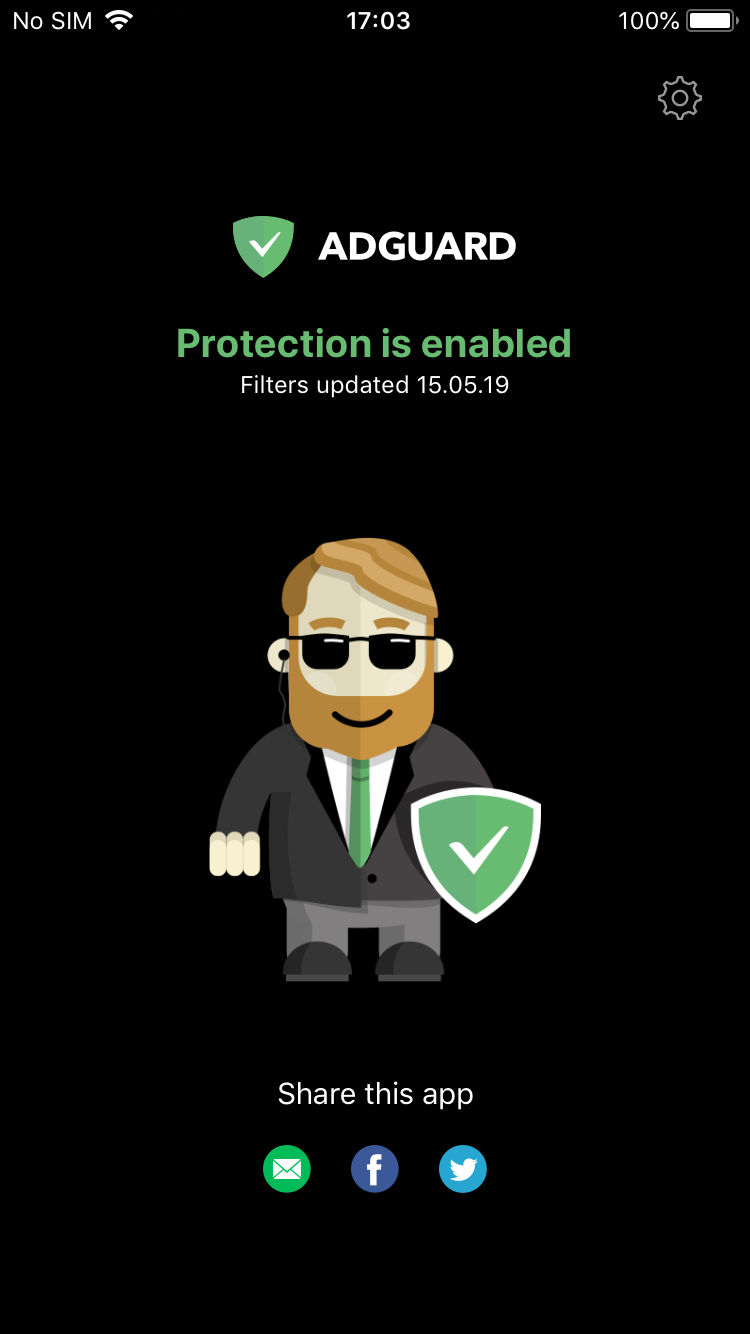
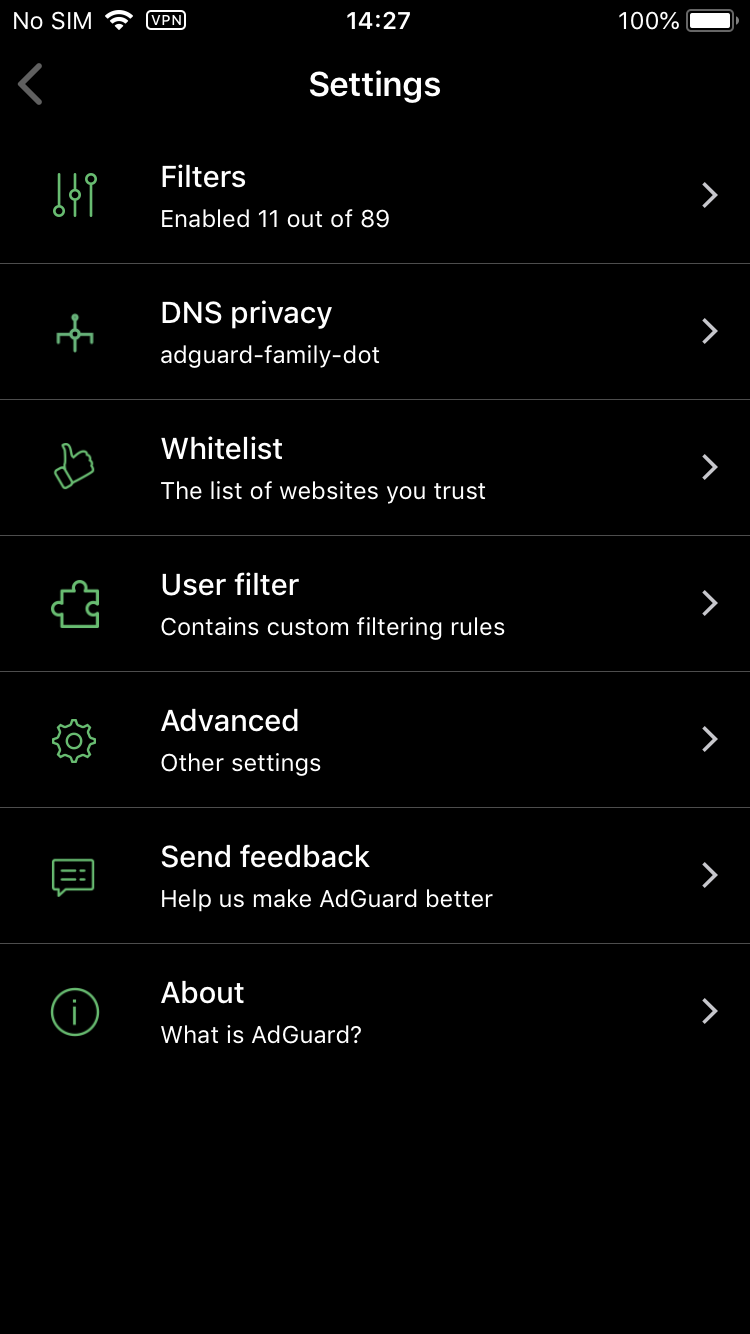
Bruce Wayne approves of this mode

Don't know about you, but I'm a big fan.

Premium filter categories

There are two filter categories that are available exclusively to Premium users:

Custom filters — not to be confused with the User filter that lets you add your own filtering rules and is present in the free version, as always. "Custom filters" is an entirely new filter group, you go there and add any number of filters by URL. Very useful if your favorite filter is not added by default, or if you have a filter of your own. Worth noting that filters added by URL will be automatically updated with the rest.
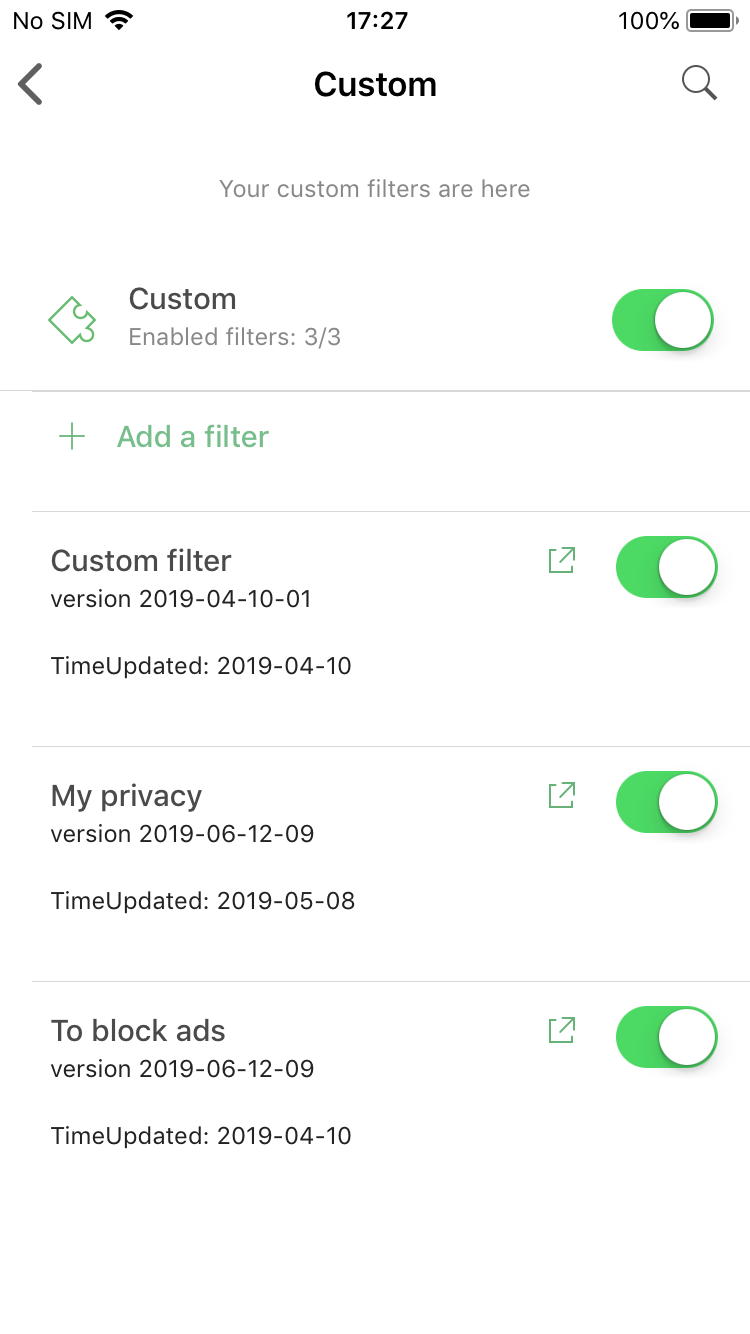
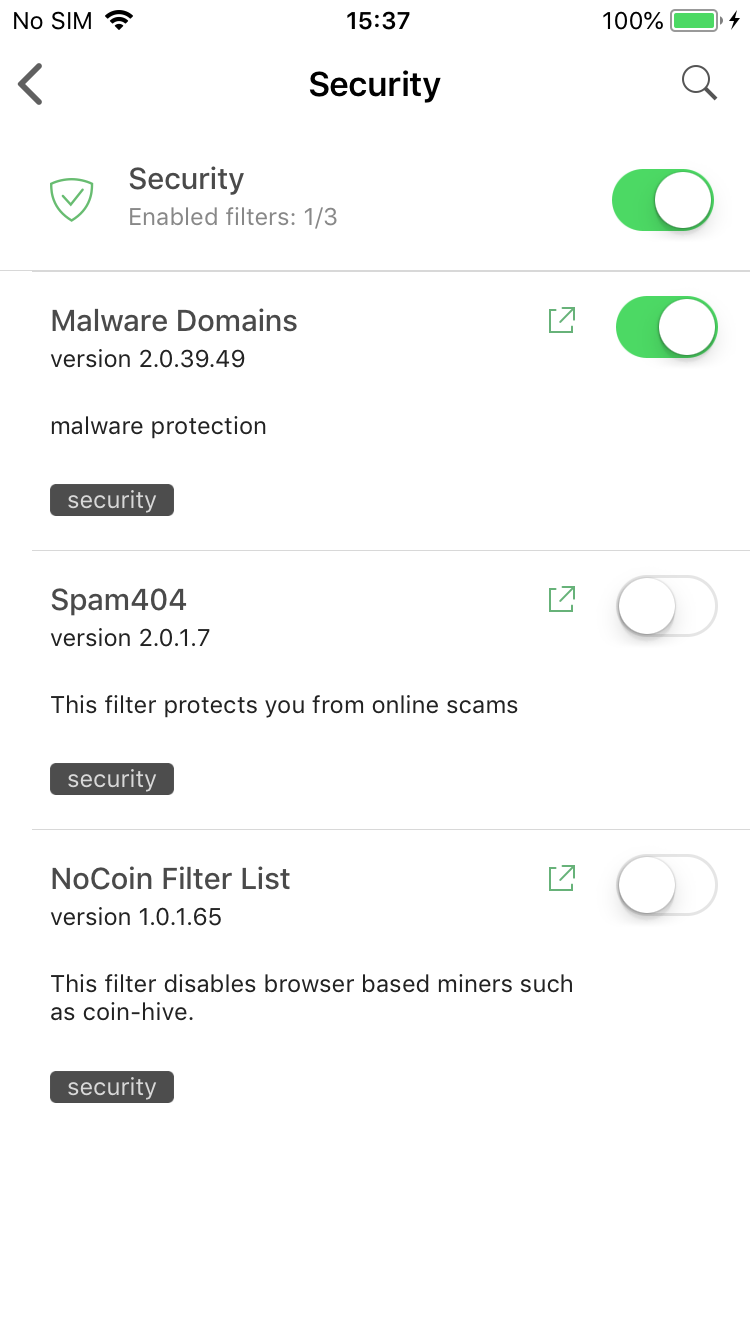
Premium filter categories: Custom and Security

Security filters — again, don't confuse it with the Privacy filter group. Protecting online privacy is essential and we wouldn't dare making it a Premium-only feature. Ensuring security is more about being attentive and careful when browsing the web, but if you look for a little extra insurance — this is for you.

How to get Premium?

There are three main options:

  • Purchase the subscription

    This is the most simple way. Just tap on the "Get Premium" plaque anywhere in the app and you'll be prompted to activate a monthly subscription. All you need to do is enter your Apple ID password and confirm the purchase.

  • Log into your AdGuard Personal account

    Go to the Settings > About > License screen and tap on the Login button there. You'll be asked to enter your AdGuard Personal account credentials. After you do, if you have a valid Premium or Mobile license in your account, it will be used to activate Premium in your AdGuard for iOS app. Friendly reminder that you can purchase any license on our official website.

  • Become a beta tester

    Very fitting! All approved beta testers receive a 1-year beta license key that works just as a regular key for our purposes. Head over to this page and send a request if you'd like to become a beta tester. You'll receive a reply with further instructions if your request was approved.

If you are already an AdGuard for iOS beta tester, you need to contact us anyway to get a beta license key. Having a TestFlight invite is not enough with the new beta.


And this is all for today. Get ready for the update, or jump right into it by becoming a beta tester. In the meantime, we'll be hitting you with more updates to various AdGuard products. So stay tuned, you'll be hearing from us again very soon!


این پست را دوست داشتید؟
AdGuard VPN AdGuard DNS AdGuard Mail AdGuard Wallet
صفحه اصلی AdGuard برای Windows
صفحه محافظت AdGuard برای Windows که ویژگی‌ها و تنظيمات محافظت را نشان می‌دهد
صفحه آمار AdGuard برای Windows که آمار تبلیغات و رَدیاب‌های مسدود شده را نشان می‌دهد
صفحه مدیریت برنامه AdGuard برای Windows که گزینه‌های مدیریت محافظت برای برنامک‌های نصب‌شده روی دستگاه را نشان می‌دهد
۲۰٬۴۴۳ 20443 بررسی
بسیار عالی!

AdGuard برای Windows: مسدودکننده تبلیغات برای رایانه شخصی

AdGuard برای ویندوز چیزی فراتر از یک مسدودکننده تبلیغات است. این یک ابزار چندمنظوره است که تبلیغات را مسدود می‌کند، دسترسی به سایت‌های خطرناک را کنترل می‌کند، بارگذاری صفحات را سریع‌تر می‌کند و از کودکان در برابر محتوای نامناسب محافظت می‌کند
با دانلود برنامه شما شرایط توافقنامه مجوز را قبول می کنید
Microsoft Store
با دانلود برنامه شما شرایط توافقنامه مجوز را قبول می کنید
AdGuard برای Windows v8.0، دوره آزمایشی 14روزه
صفحه اصلی AdGuard برای Mac
صفحه حالت نهان AdGuard برای Mac
۲۰٬۴۴۳ 20443 بررسی
بسیار عالی!

AdGuard برای مک: مسدودکنندهٔ تبلیغات در سطح سیستم

AdGuard برای Mac یک مسدودکنندهٔ تبلیغات منحصربه‌فرد است که با در نظر گرفتن macOS طراحی شده است. علاوه بر محافظت از شما در برابر تبلیغات آزاردهنده در مرورگرها و برنامه‌ها، شما را در برابر ردیابی، فیشینگ و کلاهبرداری نیز محافظت می‌کند
با دانلود برنامه شما شرایط توافقنامه مجوز را قبول می کنید
بیشتر بخوانید
AdGuard برای Mac v2.19، دوره آزمایشی 14روزه
صفحه اصلی AdGuard برای Android
صفحه حفاظت در برابر ردیابی AdGuard برای Android
صفحه مدیریت برنامه AdGuard برای Android که گزینه‌های مدیریت محافظت برای برنامک‌های نصب‌شده روی دستگاه را نشان می‌دهد
صفحه آمار AdGuard برای Android که آمار تبلیغات و رَدیاب‌های مسدود شده را نشان می‌دهد
صفحه اصلی مرورگر خصوصی AdGuard برای Android
کد QR برای بارگیری AdGuard برای Android
۲۰٬۴۴۳ 20443 بررسی
بسیار عالی!

ادگارد برای اندروید: مسدودکنندهٔ تبلیغات برای همهٔ برنامه‌ها

تبلیغات و ردیاب‌ها را در همه مرورگرها، بازی‌ها و سایر برنامه‌ها مسدود می‌کند. از حریم خصوصی شما محافظت می‌کند و به شما امکان می‌دهد کنترل کنید برنامه‌هایتان چگونه از اینترنت استفاده می‌کنند. از طریق APK نصب می‌شود
با دانلود برنامه شما شرایط توافقنامه مجوز را قبول می کنید
بیشتر بخوانید
اسکن برای دانلود
استفاده از هر کد خوان QR موجود در دستگاه شما
AdGuard برای اندروید v4.14، دوره آزمایشی 14روزه
صفحه اصلی AdGuard برای iOS
صفحه محافظت AdGuard برای iOS که ویژگی‌ها و تنظيمات محافظت را نشان می‌دهد
صفحه آمار AdGuard برای iOS که آمار تبلیغات و رَدیاب‌های مسدود شده را نشان می‌دهد
کد QR برای بارگیری AdGuard برای iOS
۲۰٬۴۴۳ 20443 بررسی
بسیار عالی!

AdGuard برای iOS: مسدودکنندهٔ تبلیغات فراتر از Safari

بهترین مسدودکننده تبلیغات iOS برای iPhone و iPad. AdGuard همه انواع تبلیغات و ردیاب‌ها را در Safari حذف می‌کند و از حریم خصوصی شما در همه برنامه‌ها در سطح DNS محافظت می‌کند
با دانلود برنامه شما شرایط توافقنامه مجوز را قبول می کنید
بیشتر بخوانید
اسکن برای دانلود
استفاده از هر کد خوان QR موجود در دستگاه شما
AdGuard برای iOS نسخه 4.5
صفحه اصلی AdGuard Content Blocker
صفحه فیلترها در AdGuard Content Blocker
صفحه تنظيمات در AdGuard Content Blocker
۲۰٬۴۴۳ 20443 بررسی
بسیار عالی!

مسدودساز محتوای AdGuard

AdGuard Content Blocker انواع تبلیغات را در مرورگرهای تلفن همراه که از فناوری مسدود کردن محتوا پشتیبانی می کنند حذف می کند - یعنی اینترنت سامسونگ و مرورگر Yandex. ویژگی های آن در مقایسه با AdGuard برای اندروید محدود است، اما رایگان، نصب آسان و کارآمد است
با دانلود برنامه شما شرایط توافقنامه مجوز را قبول می کنید
بیشتر بخوانید
مسدودساز محتوای AdGuard نسخه 2.8
صفحه اصلی افزونه مرورگر AdGuard
صفحه حفاظت در برابر ردیابی افزونه مرورگر AdGuard
۲۰٬۴۴۳ 20443 بررسی
بسیار عالی!

افزونه مرورگر AdGuard

AdGuard سریع ترین و سبک ترین افزونه ای است که انواع تبلیغات را در صفحات وب مسدود می کند! AdGuard را برای مرورگری که میخواهید انتخاب کنید و وب گردی امن و سریع را تجربه کنید.
نصب
با دانلود برنامه شما شرایط توافقنامه مجوز را قبول می کنید
نصب
با دانلود برنامه شما شرایط توافقنامه مجوز را قبول می کنید
نصب
با دانلود برنامه شما شرایط توافقنامه مجوز را قبول می کنید
نصب
با دانلود برنامه شما شرایط توافقنامه مجوز را قبول می کنید
نصب
با دانلود برنامه شما شرایط توافقنامه مجوز را قبول می کنید
بیشتر بخوانید
نصب
با دانلود برنامه شما شرایط توافقنامه مجوز را قبول می کنید
بیشتر بخوانید
افزونه مرورگر AdGuard نسخه 5.5
صفحه اصلی AdGuard Assistant
۲۰٬۴۴۳ 20443 بررسی
بسیار عالی!

AdGuard دستیار

افزونه مرورگر همراه برای برنامه های دسکتاپ AdGuard. این امکان را به شما می دهد که آیتم های سفارشی را در وب سایت ها مسدود کنید، وب سایت ها را به لیست مجاز اضافه کنید و گزارش ها را مستقیما از مرورگر خود ارسال کنید
AdGuard دستیار نسخه 1.4
۲۰٬۴۴۳ 20443 بررسی
بسیار عالی!

AdGuard Home

AdGuard Home یک راه حل مبتنی بر شبکه برای مسدود کردن تبلیغات و ردیاب ها است. آن را یک بار روی روتر خود نصب کنید تا همه دستگاه های موجود در شبکه خانگی خود را پوشش دهید - بدون نیاز به نرم افزار مشتری اضافی. این امر به ویژه برای دستگاه های مختلف اینترنت اشیا که اغلب حریم خصوصی شما را تهدید می کنند بسیار مهم است
AdGuard Home نسخه 0.107
صفحه اصلی AdGuard Pro برای iOS
صفحه محافظت AdGuard Pro برای iOS که قابلیت‌ها و تنظيمات محافظت را نشان می‌دهد
صفحه آمار AdGuard Pro برای iOS که آمار تبلیغات و رَدیاب‌های مسدود شده را نشان می‌دهد
۲۰٬۴۴۳ 20443 بررسی
بسیار عالی!

AdGuard Pro برای iOS

AdGuard Pro برای iOS با تمام ویژگی‌های پیشرفته محافظت در برابر مسدود کردن تبلیغات ارائه می‌شود. این نسخه همان ابزارهای نسخه پولی AdGuard برای iOS را ارائه می‌دهد. این نسخه در مسدود کردن تبلیغات در سافاری عالی عمل می‌کند و به شما امکان می‌دهد تنظیمات DNS را برای محافظت متناسب با نیاز خود سفارشی کنید. این نسخه تبلیغات را در مرورگرها و برنامه‌ها مسدود می‌کند، از فرزندان شما در برابر محتوای نامناسب محافظت می‌کند و اطلاعات شخصی شما را ایمن نگه می‌دارد.
با دانلود برنامه شما شرایط توافقنامه مجوز را قبول می کنید
بیشتر بخوانید
AdGuard Pro برای iOS نسخه 4.5
صفحه اصلی AdGuard Mini برای Mac
صفحه محافظت Safari در AdGuard Mini برای Mac
صفحه ایجاد رویه در AdGuard Mini برای Mac
۲۰٬۴۴۳ 20443 بررسی
بسیار عالی!

AdGuard Mini برای Mac — مسدود کننده تبلیغات Safari

AdGuard Mini برای Mac یک مسدودکنندهٔ قدرتمند تبلیغات برای Safari است. این برنامک سبک، تبلیغات را حذف می‌کند، ردیاب‌ها را مسدود می‌کند و بارگذاری صفحه را سریع‌تر می‌کند. این ابزار به شما کمک می‌کند تا بدون حواس‌پرتی در Safari گشت‌و‌گذار کنید و داده‌های خود را خصوصی نگه دارید
نصب
با دانلود برنامه شما شرایط توافقنامه مجوز را قبول می کنید
بیشتر بخوانید
AdGuard Mini برای Mac نسخه 2.3
صفحه اصلی AdGuard برای Android TV با محافظت فعال شده
صفحه مسدودسازی تبلیغات AdGuard برای Android TV که ویژگی‌ها و تنظيمات آن را نشان می‌دهد
صفحه تنظيمات AdGuard برای Android TV
صفحه مدیریت برنامه AdGuard برای Android TV که برنامک‌هایی را نشان می‌دهد که در آن‌ها تبلیغات و رَدیاب‌ها مسدود شده‌اند
۲۰٬۴۴۳ 20443 بررسی
بسیار عالی!

AdGuard برای Android TV

AdGuard برای Android TV تنها برنامه‌ای است که تبلیغات را مسدود می‌کند، از حریم خصوصی شما محافظت کرده و همانند یک دیوار آتش برای تلویزیون هوشمند شما عمل می‌کند. در مورد تهدیدات وب هشدار دریافت کنید، از DNS ایمن استفاده کرده و از انتقال داده اینترنتی رمزگذاری شده بهره‌مند شوید. آرامش داشته باشید و غرق نمایش‌های مورد علاقه خود با امنیت عالی و تبلیغات صفر شوید!
AdGuard برای Android TV v4.14، دوره آزمایشی 14روزه
نماد AdGuard، Agnar، در حالی که پنگوئن Linux را در دست دارد
۲۰٬۴۴۳ 20443 بررسی
بسیار عالی!

AdGuard برای لینوکس

AdGuard برای لینوکس اولین مسدود کننده تبلیغات لینوکس در سراسر جهان است. تبلیغات و ردیاب‌ها را در سطح دستگاه مسدود کنید، از بین فیلترهای از پیش نصب شده انتخاب کنید یا فیلترهای خود را اضافه کنید - همه از طریق رابط خط فرمان
AdGuard برای لینوکس نسخه 1.4
۲۰٬۴۴۳ 20443 بررسی
بسیار عالی!

AdGuard Temp Mail

یک تولید‌کننده رایانشانی موقت رایگان که شما را ناشناس نگه می‌دارد و از حریم خصوصی شما محافظت می‌کند. هرزنامه‌ای در صندوق ورودی اصلی شما در کار نخواهد بود!
۲۰٬۴۴۳ 20443 بررسی
بسیار عالی!

AdGuard VPN

75 محل در سرتاسر جهان

دسترسی به هر محتوا

رمزگذاری قوی

سیاست عدم ذخیره وقایع

سریعترین اتصال

24/7 پشتیبانی

ارزیابی رایگان
با دانلود برنامه شما شرایط توافقنامه مجوز را قبول می کنید
بیشتر بخوانید
۲۰٬۴۴۳ 20443 بررسی
بسیار عالی!

AdGuard DNS

AdGuard DNS راه حلی جایگزین برای مسدودسازی تبلیغات، حفاظت حریم خصوصی و نظارت والدین است. راه اندازی آسان و استفاده رایگان، آن حداقل حفاظت لازم در برابر تبلیغات آنلاین،ردیاب ها و فیشینگ ها را میدهد،و در همه سیستم عامل ها و دستگاه ها کار می کند.
۲۰٬۴۴۳ 20443 بررسی
بسیار عالی!

AdGuard Mail

از هویت خود محافظت کنید، از هرزنامه دوری نمایید و صندوق ورودی خود را با نام‌های مستعار و رایانشانی‌های موقت ما امن نگه دارید. از خدمت رایگان فوروارد رایانامه و برنامک‌های ما برای همه سامانه‌عامل‌ها لذت ببرید
۲۰٬۴۴۳ 20443 بررسی
بسیار عالی!

AdGuard Wallet

یک کیف پول ارز دیجیتال امن و خصوصی که به شما امکان کنترل کامل بر دارایی‌هایتان را می‌دهد. چندین کیف پول را مدیریت کنید و هزاران ارز دیجیتال را برای ذخیره، ارسال و مبادله کشف کنید.
در حال بارگیری AdGuard برای نصب AdGuard، روی پرونده نشان داده شده توسط پیکان کلیک کنید گزینه "بازکردن " را انتخاب و روی "تایید" کلیک کنید — برای دانلود فایل منتظر بمانید. در پنجره باز شده، آیکون AdGuard را به پوشه "برنامه ها" بکشید.بابت انتخاب AdGuard متشکریم! گزینه "بازکردن " را انتخاب و روی "تایید" کلیک کنید — برای دانلود فایل منتظر بمانید. در پنجره باز شده روی "نصب" کلیک کنید.بابت انتخاب AdGuard متشکریم!
AdGuard را روی دستگاه تلفن همراه خود نصب کنید

















































