How AdGuard uses GitHub to stay transparent and user-oriented

At AdGuard, we fight daily to make the Internet safer, more comfortable, and more transparent. This commitment is reflected not only in our product features and strict privacy policies, but also in the fact that we keep our work as open as possible. That includes actively interacting with our community.

This is why all of our products have public repositories — online spaces where anybody can see what we are working on, report issues directly to AdGuard developers, and even contribute to our open-source projects. The repositories cover our ad-blocking apps, filters, browser extensions, DNS solutions, VPN tools, developer utilities, and more. There are different platforms that offer such functionality, but the most popular one by far is GutHub, and all AdGuard projects are stored there.

This article lists the most important repositories by category, summarizes the purpose of each one, and gives a simple breakdown of what users can do there.

💡
Pro tip: Creating an issue on GitHub is the most effective way to bring the attention of AdGuard developers to a problem. Just make sure to check that a similar issue doesn’t already exist and describe the problem in a comprehensive but concise way. If it does exist, you can upvote it.

What is Github and its repositories

Very simply put, you can think of GitHub as sort of Google Docs for code, where multiple people can work on the same project, track changes, and see who made which updates. It provides a central, cloud-based place to store your code so it’s accessible from anywhere. It also has teamwork tools for reviewing changes, fixing issues, and merging everyone’s work smoothly.

GitHub is widely used for open-source projects, letting anyone view the code, suggest improvements, and contribute.

A repository (often called “repo” for short) is the most basic element of GitHub. It's a place where you can store your code, your files, and each file's revision history. Repositories can have multiple collaborators and can be either public or private.

Where to start

You can find links to key repositories below in this article or visit the general AdGuardTeam GitHub page for a full list. In most repos, you can:

  • View README file on the main page: it gives you an introduction to the product and its repo
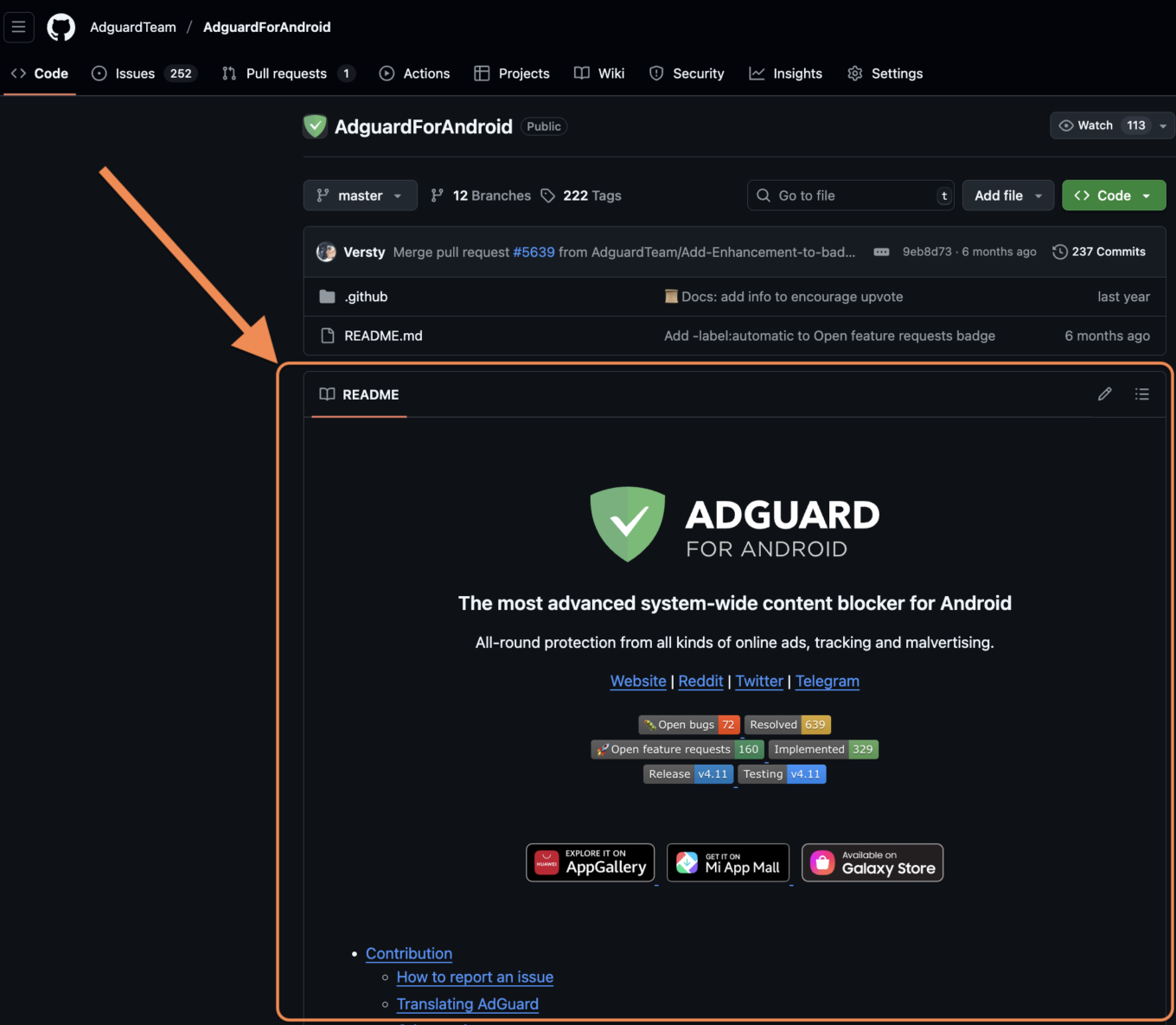
    README file *border

  • Check existing bug reports or feature requests, comment and upvote
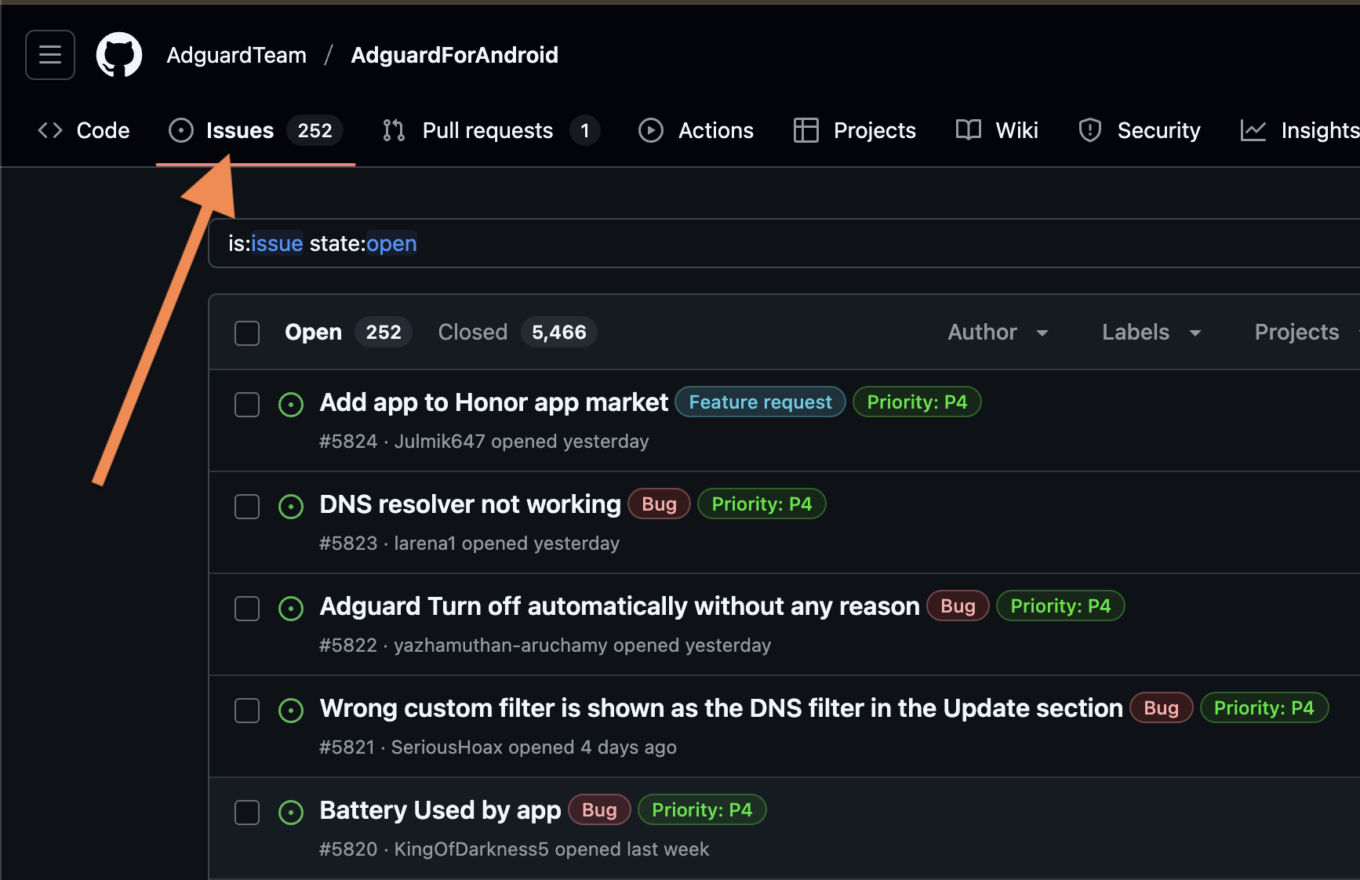
    Check issues *border

  • Create issues to report bugs or request features
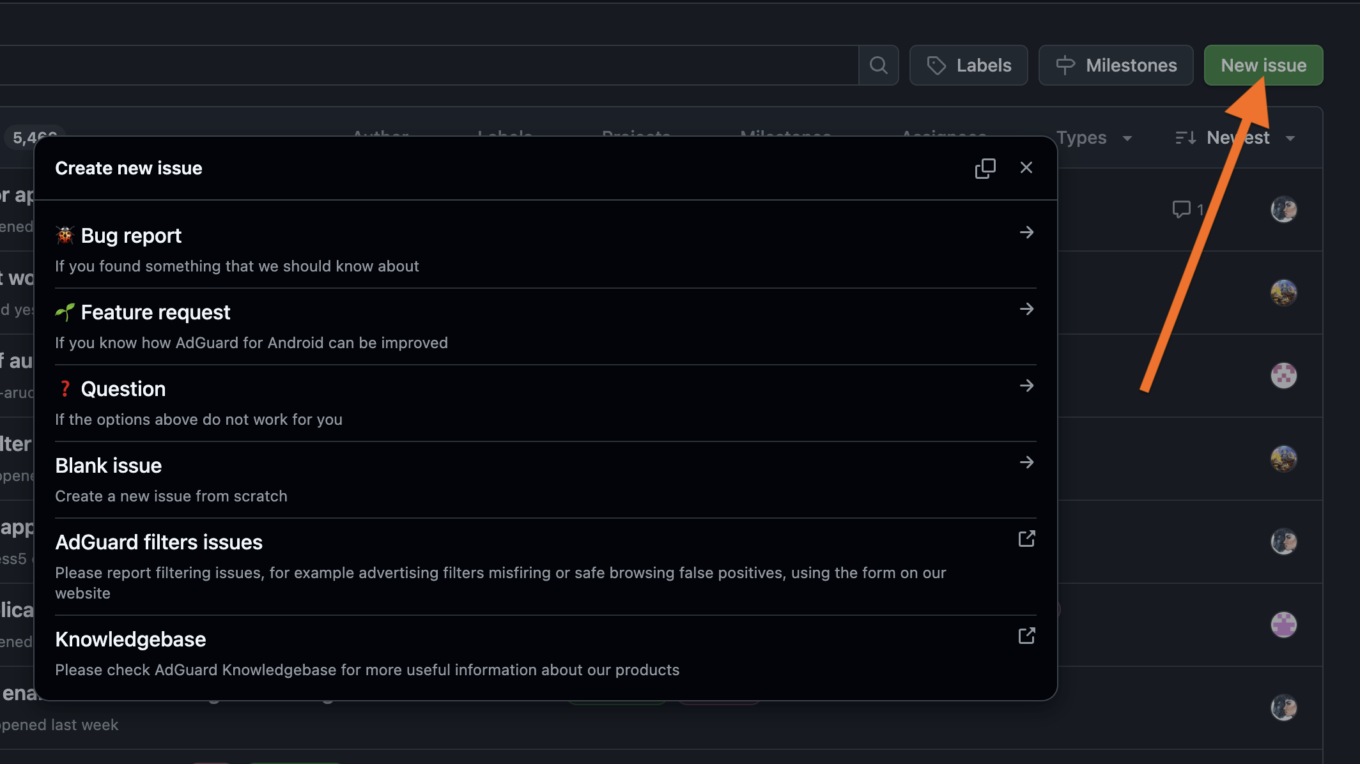
    Create issues *border

  • Check releases for different versions and their changelogs (and install an older version if needed)
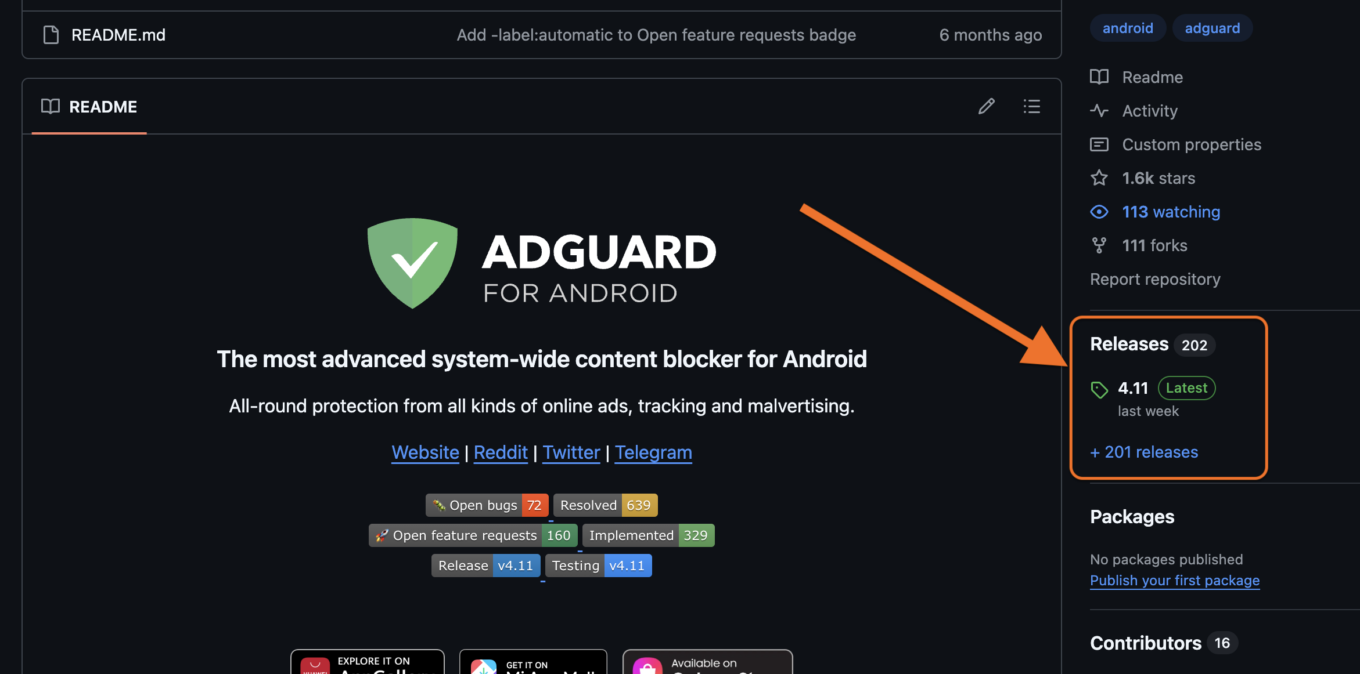
    Check releases *border

  • Install any older or beta version if needed
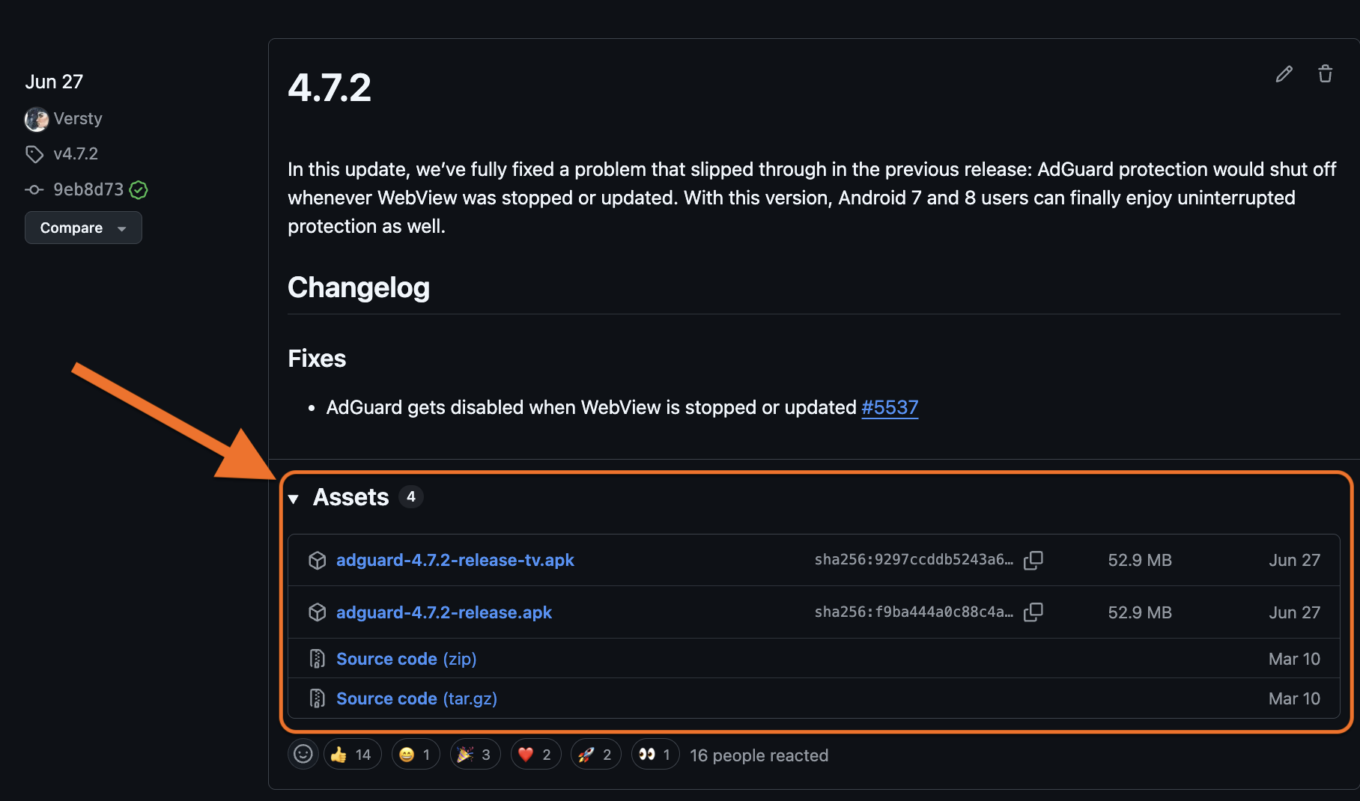
    Download builds *border

Note: If you are new to GitHub, you’ll need to create a GitHub account in order to create new issues and comment on the existing ones.

In open-source repos advanced users can also:

  • Browse code to understand product logic, what technologies are used and how they are implemented
  • Fork and contribute via pull requests

Whether you’re a casual user, technical expert, or a developer, AdGuard welcomes all community participation across its GitHub repos.

As part of our commitment to transparency, we host all legal documents — such as End-User License Agreements, Privacy Policies, and Terms and Conditions — on GitHub. Our LegalDocs repo lets anyone check the full history of changes to these documents.

LegalDocs

AdGuard Ad Blocker products

In these repositories, users can:

  • View and report bugs or feature requests via GitHub issues
  • Check changelogs, track release history, monitor updates
  • Download latest, previous, and beta builds (except for iOS)

AdguardForAndroid

Repository of AdGuard for Android — an app that provides system-wide ad blocking.

AdguardForiOS

Repository of AdGuard for iOS — Safari content blocker with DNS and custom filters. Users can also check open-source code.

AdguardForWindows

Repository of AdGuard for Windows. Non-open-source; GitHub used as an open bug tracker.

AdguardForMac

Repository of AdGuard for Mac — macOS standalone content blocker. Bug tracker only.

AdguardBrowserExtension

Repository of AdGuard Browser Extension — extension that provides ad blocking with enhanced privacy for Chrome, Firefox, Opera, Edge.

AdguardForSafari

Repository of AdGuard for Safari — Safari ad blocking extension for Mac. Users can also check open-sourced code.

AdGuardCLI

Repository of AdGuard for Linux — a command‑line interface for managing ad blocking.

AdGuard VPN products

In these repositories, users can:

  • View and report bugs or feature requests via GitHub issues
  • Check changelogs, track release history, monitor updates
  • Download latest, previous, and beta builds (except for iOS)

AdGuardVPNForiOS

Repository of AdGuard VPN for iOS. Serves as an open bug tracker.

AdGuardVPNForAndroid

Repository of AdGuard VPN for Android. Serves as an open bug tracker.

AdGuardVPNForWindows

Repository of AdGuard VPN for Windows. Serves as an open bug tracker.

AdGuardVPNForMac

Repository of AdGuard VPN for Mac — app designed for macOS.

AdGuardVPNExtension

Repository of AdGuard VPN Browser Extension.

AdGuardVPNCLI

Repository of AdGuard VPN for Linux — a command‑line interface for managing VPN connection. The repo acts as a bug tracker.

DNS-based products

AdGuardDNS

Open-source repository that is also used for tracking bugs and issues related to AdGuard DNS service. Users can:

  • View and report DNS issues
  • Suggest improvements

AdGuardHome

Repository of AdGuard Home — free network-wide software for blocking ads and trackers via DNS. Users can:

  • Check and file bug reports or feature requests
  • Review or contribute to code
  • Download and install releases

Documentation and Knowledge bases

Knowledge bases are aimed to help users better understand and use AdGuard. They describe each AdGuard product in detail: from feature overviews and problem-solving guides to advanced setting manuals and API documentations. In the repositories users can:

  • Suggest corrections or edits to knowledge base articles
  • Propose new articles
  • Test or run the local version

KnowledgeBase

Central documentation for AdGuard Ad Blocker and the technologies related to it.

KnowledgeBaseDNS

Detailed feature overview, troubleshooting guides and documentation for AdGuard DNS (both Public and Private), AdGuard Home, and everything related to them.

KnowledgeBaseVPN

Detailed feature overview and troubleshooting guides for AdGuard VPN.

KnowledgeBaseMail

Detailed feature overview and troubleshooting guides of AdGuard Mail.

Core libraries

AdGuardCoreLibs

AdGuard’s cross-platform core filtering engine. Used in Android, Windows, and Mac products. Users can:

  • Explore filtering logic and DNS handling
  • Report bugs and suggest features via Issues, contribute code via Pull requests

DNSLibs

A DNS library used by CoreLibs and AdGuardHome. Users can:

  • Review and contribute to low-level DNS implementation
  • Suggest optimizations

VPNLibs

Shared codebase used in AdGuard VPN products across platforms for AdGuard VPN protocol implementation. Users can:

  • Contribute to VPN stack behavior
  • Report or view performance issues and bugs

Core ad blocking and filtering technologies

AdguardFilters

Contains AdGuard’s core filter lists. Users can:

  • View and download filter lists
  • Create issues to report false positives or suggest new rules
  • Monitor updates to filter logic

AdGuardSDNSFilter

Repository of AdGuard DNS filter — the main DNS-level blocking list used in AdGuard DNS and DNS filtering features. Users can:

  • Inspect the current rule set
  • Propose changes or additions

AGLint

A linter for adblock filter list syntax. Users can:

  • Install AGLint to check their projects for rule issues
  • Contribute to lint rules

Scriptlets

JavaScript helpers used in filtering rules. Users can:

  • Explore available scriptlets
  • Submit pull requests for new scriptlets

tsurlfilter

TypeScript content blocker library for browser extensions. Users can:

  • Explore how filtering logic is implemented
  • Contribute fixes and features

There’s more

Above, we listed 27 main public AdGuard repositories out of 96 total. If you want to go down the rabbit hole, you can find the rest on the AdGuardTeam GitHub page.

We’ll be waiting for your feedback there! Stay safe online and offline.

این پست را دوست داشتید؟
AdGuard VPN AdGuard DNS AdGuard Mail AdGuard Wallet
صفحه اصلی AdGuard برای Windows
صفحه محافظت AdGuard برای Windows که ویژگی‌ها و تنظيمات محافظت را نشان می‌دهد
صفحه آمار AdGuard برای Windows که آمار تبلیغات و رَدیاب‌های مسدود شده را نشان می‌دهد
صفحه مدیریت برنامه AdGuard برای Windows که گزینه‌های مدیریت محافظت برای برنامک‌های نصب‌شده روی دستگاه را نشان می‌دهد
۲۰٬۴۳۸ 20438 بررسی
بسیار عالی!

AdGuard برای Windows: مسدودکننده تبلیغات برای رایانه شخصی

AdGuard برای ویندوز چیزی فراتر از یک مسدودکننده تبلیغات است. این یک ابزار چندمنظوره است که تبلیغات را مسدود می‌کند، دسترسی به سایت‌های خطرناک را کنترل می‌کند، بارگذاری صفحات را سریع‌تر می‌کند و از کودکان در برابر محتوای نامناسب محافظت می‌کند

با دانلود برنامه شما شرایط توافقنامه مجوز را قبول می کنید
Microsoft Store
با دانلود برنامه شما شرایط توافقنامه مجوز را قبول می کنید
AdGuard برای Windows v8.0، دوره آزمایشی 14روزه
صفحه اصلی AdGuard برای Mac
صفحه حالت نهان AdGuard برای Mac
۲۰٬۴۳۸ 20438 بررسی
بسیار عالی!

AdGuard برای مک: مسدودکنندهٔ تبلیغات در سطح سیستم

AdGuard برای Mac یک مسدودکنندهٔ تبلیغات منحصربه‌فرد است که با در نظر گرفتن macOS طراحی شده است. علاوه بر محافظت از شما در برابر تبلیغات آزاردهنده در مرورگرها و برنامه‌ها، شما را در برابر ردیابی، فیشینگ و کلاهبرداری نیز محافظت می‌کند
با دانلود برنامه شما شرایط توافقنامه مجوز را قبول می کنید
بیشتر بخوانید
AdGuard برای Mac v2.19، دوره آزمایشی 14روزه
صفحه اصلی AdGuard برای Android
صفحه حفاظت در برابر ردیابی AdGuard برای Android
صفحه مدیریت برنامه AdGuard برای Android که گزینه‌های مدیریت محافظت برای برنامک‌های نصب‌شده روی دستگاه را نشان می‌دهد
صفحه آمار AdGuard برای Android که آمار تبلیغات و رَدیاب‌های مسدود شده را نشان می‌دهد
صفحه اصلی مرورگر خصوصی AdGuard برای Android
کد QR برای بارگیری AdGuard برای Android
۲۰٬۴۳۸ 20438 بررسی
بسیار عالی!

ادگارد برای اندروید: مسدودکنندهٔ تبلیغات برای همهٔ برنامه‌ها

تبلیغات و ردیاب‌ها را در همه مرورگرها، بازی‌ها و سایر برنامه‌ها مسدود می‌کند. از حریم خصوصی شما محافظت می‌کند و به شما امکان می‌دهد کنترل کنید برنامه‌هایتان چگونه از اینترنت استفاده می‌کنند. از طریق APK نصب می‌شود
با دانلود برنامه شما شرایط توافقنامه مجوز را قبول می کنید
بیشتر بخوانید
اسکن برای دانلود
استفاده از هر کد خوان QR موجود در دستگاه شما
AdGuard برای اندروید v4.14، دوره آزمایشی 14روزه
صفحه اصلی AdGuard برای iOS
صفحه محافظت AdGuard برای iOS که ویژگی‌ها و تنظيمات محافظت را نشان می‌دهد
صفحه آمار AdGuard برای iOS که آمار تبلیغات و رَدیاب‌های مسدود شده را نشان می‌دهد
کد QR برای بارگیری AdGuard برای iOS
۲۰٬۴۳۸ 20438 بررسی
بسیار عالی!

AdGuard برای iOS: مسدودکنندهٔ تبلیغات فراتر از Safari

بهترین مسدودکننده تبلیغات iOS برای iPhone و iPad. AdGuard همه انواع تبلیغات و ردیاب‌ها را در Safari حذف می‌کند و از حریم خصوصی شما در همه برنامه‌ها در سطح DNS محافظت می‌کند
با دانلود برنامه شما شرایط توافقنامه مجوز را قبول می کنید
بیشتر بخوانید
اسکن برای دانلود
استفاده از هر کد خوان QR موجود در دستگاه شما
AdGuard برای iOS نسخه 4.5
صفحه اصلی AdGuard Content Blocker
صفحه فیلترها در AdGuard Content Blocker
صفحه تنظيمات در AdGuard Content Blocker
۲۰٬۴۳۸ 20438 بررسی
بسیار عالی!

مسدودساز محتوای AdGuard

AdGuard Content Blocker انواع تبلیغات را در مرورگرهای تلفن همراه که از فناوری مسدود کردن محتوا پشتیبانی می کنند حذف می کند - یعنی اینترنت سامسونگ و مرورگر Yandex. ویژگی های آن در مقایسه با AdGuard برای اندروید محدود است، اما رایگان، نصب آسان و کارآمد است
با دانلود برنامه شما شرایط توافقنامه مجوز را قبول می کنید
بیشتر بخوانید
مسدودساز محتوای AdGuard نسخه 2.8
صفحه اصلی افزونه مرورگر AdGuard
صفحه حفاظت در برابر ردیابی افزونه مرورگر AdGuard
۲۰٬۴۳۸ 20438 بررسی
بسیار عالی!

افزونه مرورگر AdGuard

AdGuard سریع ترین و سبک ترین افزونه ای است که انواع تبلیغات را در صفحات وب مسدود می کند! AdGuard را برای مرورگری که میخواهید انتخاب کنید و وب گردی امن و سریع را تجربه کنید.
نصب
با دانلود برنامه شما شرایط توافقنامه مجوز را قبول می کنید
نصب
با دانلود برنامه شما شرایط توافقنامه مجوز را قبول می کنید
نصب
با دانلود برنامه شما شرایط توافقنامه مجوز را قبول می کنید
نصب
با دانلود برنامه شما شرایط توافقنامه مجوز را قبول می کنید
نصب
با دانلود برنامه شما شرایط توافقنامه مجوز را قبول می کنید
بیشتر بخوانید
نصب
با دانلود برنامه شما شرایط توافقنامه مجوز را قبول می کنید
بیشتر بخوانید
افزونه مرورگر AdGuard نسخه 5.5
صفحه اصلی AdGuard Assistant
۲۰٬۴۳۸ 20438 بررسی
بسیار عالی!

AdGuard دستیار

افزونه مرورگر همراه برای برنامه های دسکتاپ AdGuard. این امکان را به شما می دهد که آیتم های سفارشی را در وب سایت ها مسدود کنید، وب سایت ها را به لیست مجاز اضافه کنید و گزارش ها را مستقیما از مرورگر خود ارسال کنید
AdGuard دستیار نسخه 1.4
۲۰٬۴۳۸ 20438 بررسی
بسیار عالی!

AdGuard Home

AdGuard Home یک راه حل مبتنی بر شبکه برای مسدود کردن تبلیغات و ردیاب ها است. آن را یک بار روی روتر خود نصب کنید تا همه دستگاه های موجود در شبکه خانگی خود را پوشش دهید - بدون نیاز به نرم افزار مشتری اضافی. این امر به ویژه برای دستگاه های مختلف اینترنت اشیا که اغلب حریم خصوصی شما را تهدید می کنند بسیار مهم است
AdGuard Home نسخه 0.107
صفحه اصلی AdGuard Pro برای iOS
صفحه محافظت AdGuard Pro برای iOS که قابلیت‌ها و تنظيمات محافظت را نشان می‌دهد
صفحه آمار AdGuard Pro برای iOS که آمار تبلیغات و رَدیاب‌های مسدود شده را نشان می‌دهد
۲۰٬۴۳۸ 20438 بررسی
بسیار عالی!

AdGuard Pro برای iOS

AdGuard Pro برای iOS با تمام ویژگی‌های پیشرفته محافظت در برابر مسدود کردن تبلیغات ارائه می‌شود. این نسخه همان ابزارهای نسخه پولی AdGuard برای iOS را ارائه می‌دهد. این نسخه در مسدود کردن تبلیغات در سافاری عالی عمل می‌کند و به شما امکان می‌دهد تنظیمات DNS را برای محافظت متناسب با نیاز خود سفارشی کنید. این نسخه تبلیغات را در مرورگرها و برنامه‌ها مسدود می‌کند، از فرزندان شما در برابر محتوای نامناسب محافظت می‌کند و اطلاعات شخصی شما را ایمن نگه می‌دارد.
با دانلود برنامه شما شرایط توافقنامه مجوز را قبول می کنید
بیشتر بخوانید
AdGuard Pro برای iOS نسخه 4.5
صفحه اصلی AdGuard Mini برای Mac
صفحه محافظت Safari در AdGuard Mini برای Mac
صفحه ایجاد رویه در AdGuard Mini برای Mac
۲۰٬۴۳۸ 20438 بررسی
بسیار عالی!

AdGuard Mini برای Mac — مسدود کننده تبلیغات Safari

AdGuard Mini برای Mac یک مسدودکنندهٔ قدرتمند تبلیغات برای Safari است. این برنامک سبک، تبلیغات را حذف می‌کند، ردیاب‌ها را مسدود می‌کند و بارگذاری صفحه را سریع‌تر می‌کند. این ابزار به شما کمک می‌کند تا بدون حواس‌پرتی در Safari گشت‌و‌گذار کنید و داده‌های خود را خصوصی نگه دارید
نصب
با دانلود برنامه شما شرایط توافقنامه مجوز را قبول می کنید
بیشتر بخوانید
AdGuard Mini برای Mac نسخه 2.3
صفحه اصلی AdGuard برای Android TV با محافظت فعال شده
صفحه مسدودسازی تبلیغات AdGuard برای Android TV که ویژگی‌ها و تنظيمات آن را نشان می‌دهد
صفحه تنظيمات AdGuard برای Android TV
صفحه مدیریت برنامه AdGuard برای Android TV که برنامک‌هایی را نشان می‌دهد که در آن‌ها تبلیغات و رَدیاب‌ها مسدود شده‌اند
۲۰٬۴۳۸ 20438 بررسی
بسیار عالی!

AdGuard برای Android TV

AdGuard برای Android TV تنها برنامه‌ای است که تبلیغات را مسدود می‌کند، از حریم خصوصی شما محافظت کرده و همانند یک دیوار آتش برای تلویزیون هوشمند شما عمل می‌کند. در مورد تهدیدات وب هشدار دریافت کنید، از DNS ایمن استفاده کرده و از انتقال داده اینترنتی رمزگذاری شده بهره‌مند شوید. آرامش داشته باشید و غرق نمایش‌های مورد علاقه خود با امنیت عالی و تبلیغات صفر شوید!
AdGuard برای Android TV v4.14، دوره آزمایشی 14روزه
نماد AdGuard، Agnar، در حالی که پنگوئن Linux را در دست دارد
۲۰٬۴۳۸ 20438 بررسی
بسیار عالی!

AdGuard برای لینوکس

AdGuard برای لینوکس اولین مسدود کننده تبلیغات لینوکس در سراسر جهان است. تبلیغات و ردیاب‌ها را در سطح دستگاه مسدود کنید، از بین فیلترهای از پیش نصب شده انتخاب کنید یا فیلترهای خود را اضافه کنید - همه از طریق رابط خط فرمان
AdGuard برای لینوکس نسخه 1.4
۲۰٬۴۳۸ 20438 بررسی
بسیار عالی!

AdGuard Temp Mail

یک تولید‌کننده رایانشانی موقت رایگان که شما را ناشناس نگه می‌دارد و از حریم خصوصی شما محافظت می‌کند. هرزنامه‌ای در صندوق ورودی اصلی شما در کار نخواهد بود!
۲۰٬۴۳۸ 20438 بررسی
بسیار عالی!

AdGuard VPN

75 محل در سرتاسر جهان

دسترسی به هر محتوا

رمزگذاری قوی

سیاست عدم ذخیره وقایع

سریعترین اتصال

24/7 پشتیبانی

ارزیابی رایگان
با دانلود برنامه شما شرایط توافقنامه مجوز را قبول می کنید
بیشتر بخوانید
۲۰٬۴۳۸ 20438 بررسی
بسیار عالی!

AdGuard DNS

AdGuard DNS راه حلی جایگزین برای مسدودسازی تبلیغات، حفاظت حریم خصوصی و نظارت والدین است. راه اندازی آسان و استفاده رایگان، آن حداقل حفاظت لازم در برابر تبلیغات آنلاین،ردیاب ها و فیشینگ ها را میدهد،و در همه سیستم عامل ها و دستگاه ها کار می کند.
۲۰٬۴۳۸ 20438 بررسی
بسیار عالی!

AdGuard Mail

از هویت خود محافظت کنید، از هرزنامه دوری نمایید و صندوق ورودی خود را با نام‌های مستعار و رایانشانی‌های موقت ما امن نگه دارید. از خدمت رایگان فوروارد رایانامه و برنامک‌های ما برای همه سامانه‌عامل‌ها لذت ببرید
۲۰٬۴۳۸ 20438 بررسی
بسیار عالی!

AdGuard Wallet

یک کیف پول ارز دیجیتال امن و خصوصی که به شما امکان کنترل کامل بر دارایی‌هایتان را می‌دهد. چندین کیف پول را مدیریت کنید و هزاران ارز دیجیتال را برای ذخیره، ارسال و مبادله کشف کنید.
در حال بارگیری AdGuard برای نصب AdGuard، روی پرونده نشان داده شده توسط پیکان کلیک کنید گزینه "بازکردن " را انتخاب و روی "تایید" کلیک کنید — برای دانلود فایل منتظر بمانید. در پنجره باز شده، آیکون AdGuard را به پوشه "برنامه ها" بکشید.بابت انتخاب AdGuard متشکریم! گزینه "بازکردن " را انتخاب و روی "تایید" کلیک کنید — برای دانلود فایل منتظر بمانید. در پنجره باز شده روی "نصب" کلیک کنید.بابت انتخاب AdGuard متشکریم!
AdGuard را روی دستگاه تلفن همراه خود نصب کنید


















































