AdGuard vs AdAway (and other hosts-based ad blockers - DNS66, Netguard etc)

Why do we feel there's a need to write an article like this? On forums and in users' messages we often see a widespread belief that Adguard Ad Blocker for Android is just a tool to block ads on devices that don't have ROOT access. And this is a serious mistake. Adguard is the most advanced way to get rid of ads and tracking on Android, no matter if you have your device rooted or not.

I will even say more. Adguard - not just an ad blocker, but a full-featured firewall. With its help, you are able to take under your control all apps on your device, allow or forbid the network access - as a whole, to a specific server or even a specific file! But let's not rush things and start from the beginning.

The history of ad blocking on Android

First ad blockers for Android emerged around 2011. At first, they were Adblock Plus for Android and Adaway. Today, the former is almost abandoned, the latter is still being developed but rather sluggishly - it has very little room for development, and I will explain why.

In the next few years ad blocking on Android suffered several heavy punches:

In 2013 Android KitKat got released, and along with it the prohibition to change proxy settings without ROOT access. This de-facto killed Adblock Plus for Android. For a long time, the use of ad blockers was limited exclusively to rooted devices.

Around this time happened the mass exile of ad blockers from Google Play. Google had adopted a new policy for apps added to Play Store, which practically turned all ad blockers into 'outlaws'.

For the same reason, the very first version of Adguard for Android was kicked out of Play Store in the November 2014, only 5 days after its official release.

With time, more and more browsers with built-in ad blocking feature started to appear, but this is a whole different story, and I'll cover it in the next part of this article.

What's the difference between Adguard and AdAway?

AdAway - is, really, a great and very simple way to block ad networks' domains. What can be easier? You just tell the system that the ad domain is located in a place it can't reach so that all attempts to get to it end up in failure. AdAway does it with the help of a special file called 'hosts' - many of you, probably, know about it. This file contains a list that matches server names with addresses the system should use to reach a particular server.

This method, undoubtedly, possesses some advantages:

  • Simplicity. All you need to do - substitute the contents of one file. As simple as it can be.

  • Easy to implement. All that the app should do is to update the contents of hosts file from time to time. The system will do all the job itself.

There are drawbacks too, of course:

  • Lack of flexibility. You have no way to manage the blocking. If a domain is blocked - it's blocked, you can't change it. Why does it matter? Sometimes blocking of an ad network leads to breaking the functionality of this or that app or website, and you can do nothing about it.

  • Roughness. Imagine that ads are loaded not from the ad network server, but from a server that is also being used for other purposes. What to do in such case? And these cases are far from being unique. A good example is Facebook ad network (don't be tricked by its name - it is used by thousands of different apps). If you want to get rid of such ads with the hosts file, you'll need to forget about using Facebook apps.

  • Limitations of such approach. Not all ads can be blocked like this. For example, you can't eliminate Google ads without so-called cosmetic rules which 'hide' the banners.

Adguard, on the other hand, is a full-fledged 'filter' that passes through itself traffic of all apps, and then decides what to do with it. These decisions are based on the set of special rules. You can rely on Adguard's own filters or use popular external filters such as EasyList - it's up to you. You can even create your own filtering rules, the detailed syntax description is available in our Knowledge base.

Why did we choose this method?

The answer is simple - because we can't cope with the limitations caused by the rough approach of hosts-based ad blockers. We firmly believe that every user should have unlimited control over his data and his device, and this doesn't only mean ad blocking.

Below I will show on examples what exactly are the drawbacks and limitations we refuse to put up with.

Missed ads

It is well known that a picture is worth a thousand words. We collected some examples that vividly illustrate the difference between blocking ads with Adguard and with a hosts-based ad blocker.

Important: to get the same result it's crucial to enable HTTPS filtering in Adguard's settings.

Example #1: ad which is impossible to block without applying cosmetic rules;
  • Left side: proof that Google contextual ads can be irrelevant sometimes.
  • Right side: evidence that Google search still has some room for improvement :).
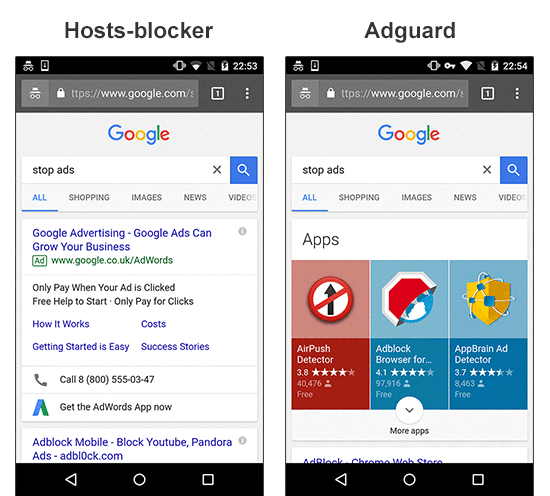
Adguard vs AdAway

Example #2: ad which is loaded from the same website;
  • Left side: you might have blocked the AdChoices network, but you didn't get rid of the initial ad script loaded from the site's own domain. Hence, half of the page is used for a banner place. I'd also like to draw your attention to the social widget stealing 5-10% of the screen.
  • Right side: the same page processed by Adguard finally lets you focus on content.
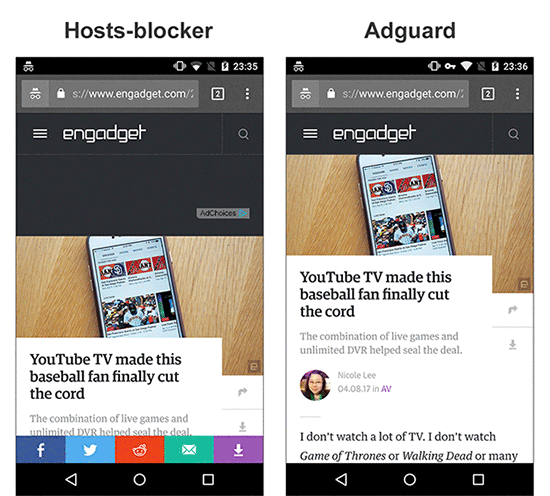
Adguard vs AdAway

Example #3: Facebook ad network;
  • Left side: the ad is loaded from the Facebook domain. With a hosts-based blocker like Adaway, blocking it means blocking Facebook as well.
  • Right side: the ad is removed by Adguard and you can still use Facebook to tell your friends about it.
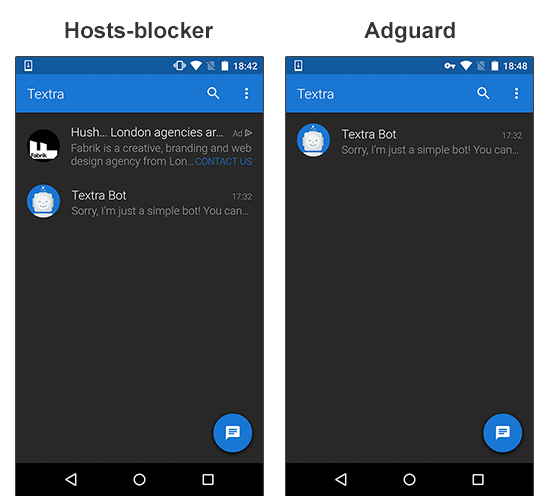
Adguard vs AdAway

Messed up websites' layout

Situations, when hosts-blocker manages to block ads but ruins the websites readability, are not rare. Blank spaces, ad 'remains' - Adguard removes them from the page content or hides with cosmetic rules.

Example #1: the leftovers of a blocked ad;
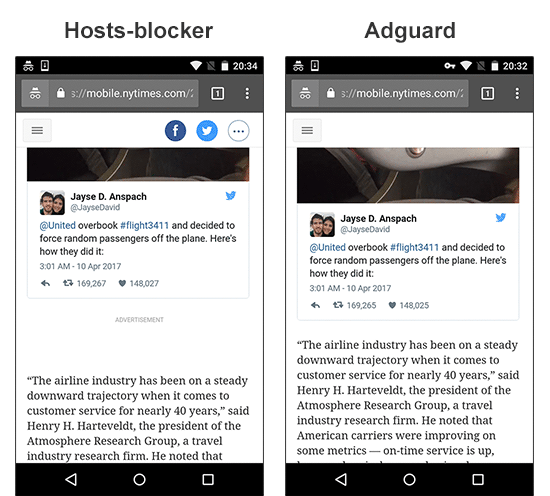
Adguard vs AdAway

Example #2: empty space after the ad is blocked;
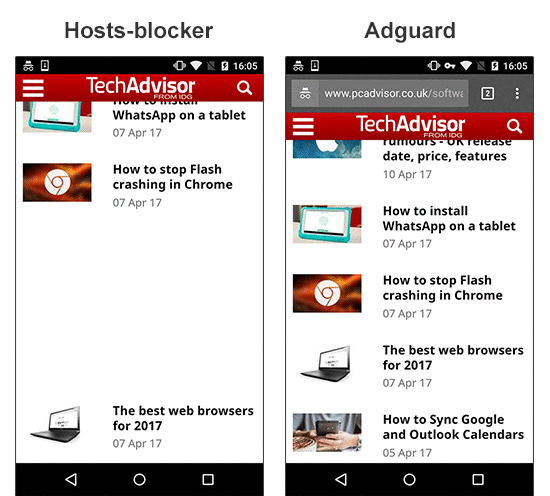
Adguard vs AdAway

Anti-adblockers

This year the fight against ad blockers takes a new turn. Users get to know about new terms they have never heard of before: Ad Reinsertion, Ad Recovery; some websites experiment with limiting functionality or the access to the website to users who have an ad blocker installed. The rough approach of a hosts-blockers doesn't allow to fight back.

Example #1: the website limits the access to its content;
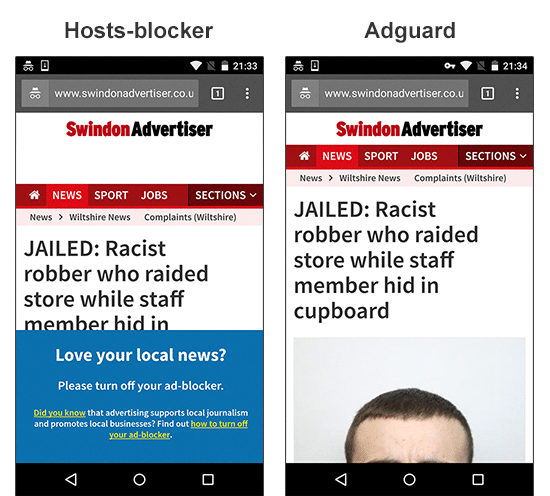
Adguard vs AdAway

Broken functionality

Another scourge of hosts-blockers is 'broken' elements. Video players are one of the most frequent victims.

Example #1: a video player on the website becomes broken;
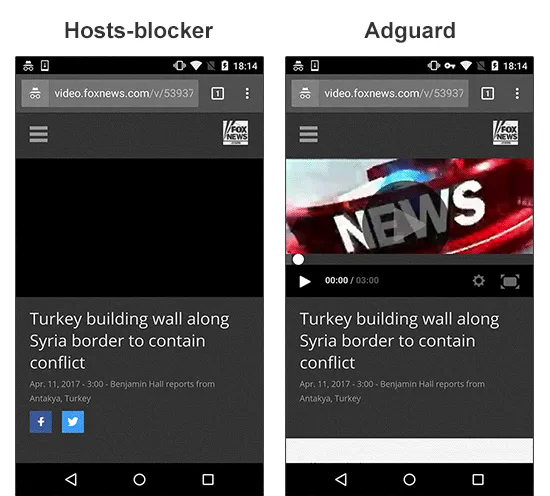
Adguard vs AdAway

Example #2: a video player doesn't work and the content isn't loaded;
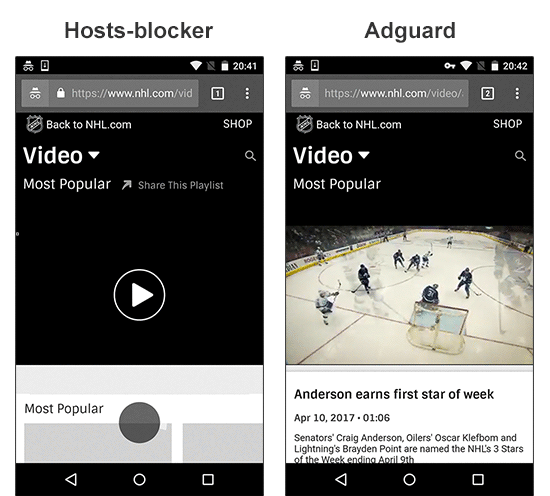
Adguard vs AdAway

Making conclusions

By the way, Adguard, besides everything else, is capable of working in many different modes, including the DNS-blocker mode - this is almost the same as what hosts-blockers do. But despite all the difficulties, we have chosen the full-fledged 'filter' mode as a default. This is our principled stance - only users have to decide for themselves what should be blocked and how. Hosts-based ad blockers, sadly, don't provide such possibilities.

I hope this article clarifies our motifs and demonstrates the differences between the approach of Adguard and other ad blockers on the market. Some of the questions that might have arisen will be touched on in the second part of this article. Or you can ask those questions in the comments, and I or someone else from Adguard team will certainly answer them.


این پست را دوست داشتید؟
AdGuard VPN AdGuard DNS AdGuard Mail AdGuard Wallet
صفحه اصلی AdGuard برای Windows
صفحه محافظت AdGuard برای Windows که ویژگی‌ها و تنظيمات محافظت را نشان می‌دهد
صفحه آمار AdGuard برای Windows که آمار تبلیغات و رَدیاب‌های مسدود شده را نشان می‌دهد
صفحه مدیریت برنامه AdGuard برای Windows که گزینه‌های مدیریت محافظت برای برنامک‌های نصب‌شده روی دستگاه را نشان می‌دهد
۲۰٬۴۴۰ 20440 بررسی
بسیار عالی!

AdGuard برای Windows: مسدودکننده تبلیغات برای رایانه شخصی

AdGuard برای ویندوز چیزی فراتر از یک مسدودکننده تبلیغات است. این یک ابزار چندمنظوره است که تبلیغات را مسدود می‌کند، دسترسی به سایت‌های خطرناک را کنترل می‌کند، بارگذاری صفحات را سریع‌تر می‌کند و از کودکان در برابر محتوای نامناسب محافظت می‌کند

با دانلود برنامه شما شرایط توافقنامه مجوز را قبول می کنید
Microsoft Store
با دانلود برنامه شما شرایط توافقنامه مجوز را قبول می کنید
AdGuard برای Windows v8.0، دوره آزمایشی 14روزه
صفحه اصلی AdGuard برای Mac
صفحه حالت نهان AdGuard برای Mac
۲۰٬۴۴۰ 20440 بررسی
بسیار عالی!

AdGuard برای مک: مسدودکنندهٔ تبلیغات در سطح سیستم

AdGuard برای Mac یک مسدودکنندهٔ تبلیغات منحصربه‌فرد است که با در نظر گرفتن macOS طراحی شده است. علاوه بر محافظت از شما در برابر تبلیغات آزاردهنده در مرورگرها و برنامه‌ها، شما را در برابر ردیابی، فیشینگ و کلاهبرداری نیز محافظت می‌کند
با دانلود برنامه شما شرایط توافقنامه مجوز را قبول می کنید
بیشتر بخوانید
AdGuard برای Mac v2.19، دوره آزمایشی 14روزه
صفحه اصلی AdGuard برای Android
صفحه حفاظت در برابر ردیابی AdGuard برای Android
صفحه مدیریت برنامه AdGuard برای Android که گزینه‌های مدیریت محافظت برای برنامک‌های نصب‌شده روی دستگاه را نشان می‌دهد
صفحه آمار AdGuard برای Android که آمار تبلیغات و رَدیاب‌های مسدود شده را نشان می‌دهد
صفحه اصلی مرورگر خصوصی AdGuard برای Android
کد QR برای بارگیری AdGuard برای Android
۲۰٬۴۴۰ 20440 بررسی
بسیار عالی!

ادگارد برای اندروید: مسدودکنندهٔ تبلیغات برای همهٔ برنامه‌ها

تبلیغات و ردیاب‌ها را در همه مرورگرها، بازی‌ها و سایر برنامه‌ها مسدود می‌کند. از حریم خصوصی شما محافظت می‌کند و به شما امکان می‌دهد کنترل کنید برنامه‌هایتان چگونه از اینترنت استفاده می‌کنند. از طریق APK نصب می‌شود
با دانلود برنامه شما شرایط توافقنامه مجوز را قبول می کنید
بیشتر بخوانید
اسکن برای دانلود
استفاده از هر کد خوان QR موجود در دستگاه شما
AdGuard برای اندروید v4.14، دوره آزمایشی 14روزه
صفحه اصلی AdGuard برای iOS
صفحه محافظت AdGuard برای iOS که ویژگی‌ها و تنظيمات محافظت را نشان می‌دهد
صفحه آمار AdGuard برای iOS که آمار تبلیغات و رَدیاب‌های مسدود شده را نشان می‌دهد
کد QR برای بارگیری AdGuard برای iOS
۲۰٬۴۴۰ 20440 بررسی
بسیار عالی!

AdGuard برای iOS: مسدودکنندهٔ تبلیغات فراتر از Safari

بهترین مسدودکننده تبلیغات iOS برای iPhone و iPad. AdGuard همه انواع تبلیغات و ردیاب‌ها را در Safari حذف می‌کند و از حریم خصوصی شما در همه برنامه‌ها در سطح DNS محافظت می‌کند
با دانلود برنامه شما شرایط توافقنامه مجوز را قبول می کنید
بیشتر بخوانید
اسکن برای دانلود
استفاده از هر کد خوان QR موجود در دستگاه شما
AdGuard برای iOS نسخه 4.5
صفحه اصلی AdGuard Content Blocker
صفحه فیلترها در AdGuard Content Blocker
صفحه تنظيمات در AdGuard Content Blocker
۲۰٬۴۴۰ 20440 بررسی
بسیار عالی!

مسدودساز محتوای AdGuard

AdGuard Content Blocker انواع تبلیغات را در مرورگرهای تلفن همراه که از فناوری مسدود کردن محتوا پشتیبانی می کنند حذف می کند - یعنی اینترنت سامسونگ و مرورگر Yandex. ویژگی های آن در مقایسه با AdGuard برای اندروید محدود است، اما رایگان، نصب آسان و کارآمد است
با دانلود برنامه شما شرایط توافقنامه مجوز را قبول می کنید
بیشتر بخوانید
مسدودساز محتوای AdGuard نسخه 2.8
صفحه اصلی افزونه مرورگر AdGuard
صفحه حفاظت در برابر ردیابی افزونه مرورگر AdGuard
۲۰٬۴۴۰ 20440 بررسی
بسیار عالی!

افزونه مرورگر AdGuard

AdGuard سریع ترین و سبک ترین افزونه ای است که انواع تبلیغات را در صفحات وب مسدود می کند! AdGuard را برای مرورگری که میخواهید انتخاب کنید و وب گردی امن و سریع را تجربه کنید.
نصب
با دانلود برنامه شما شرایط توافقنامه مجوز را قبول می کنید
نصب
با دانلود برنامه شما شرایط توافقنامه مجوز را قبول می کنید
نصب
با دانلود برنامه شما شرایط توافقنامه مجوز را قبول می کنید
نصب
با دانلود برنامه شما شرایط توافقنامه مجوز را قبول می کنید
نصب
با دانلود برنامه شما شرایط توافقنامه مجوز را قبول می کنید
بیشتر بخوانید
نصب
با دانلود برنامه شما شرایط توافقنامه مجوز را قبول می کنید
بیشتر بخوانید
افزونه مرورگر AdGuard نسخه 5.5
صفحه اصلی AdGuard Assistant
۲۰٬۴۴۰ 20440 بررسی
بسیار عالی!

AdGuard دستیار

افزونه مرورگر همراه برای برنامه های دسکتاپ AdGuard. این امکان را به شما می دهد که آیتم های سفارشی را در وب سایت ها مسدود کنید، وب سایت ها را به لیست مجاز اضافه کنید و گزارش ها را مستقیما از مرورگر خود ارسال کنید
AdGuard دستیار نسخه 1.4
۲۰٬۴۴۰ 20440 بررسی
بسیار عالی!

AdGuard Home

AdGuard Home یک راه حل مبتنی بر شبکه برای مسدود کردن تبلیغات و ردیاب ها است. آن را یک بار روی روتر خود نصب کنید تا همه دستگاه های موجود در شبکه خانگی خود را پوشش دهید - بدون نیاز به نرم افزار مشتری اضافی. این امر به ویژه برای دستگاه های مختلف اینترنت اشیا که اغلب حریم خصوصی شما را تهدید می کنند بسیار مهم است
AdGuard Home نسخه 0.107
صفحه اصلی AdGuard Pro برای iOS
صفحه محافظت AdGuard Pro برای iOS که قابلیت‌ها و تنظيمات محافظت را نشان می‌دهد
صفحه آمار AdGuard Pro برای iOS که آمار تبلیغات و رَدیاب‌های مسدود شده را نشان می‌دهد
۲۰٬۴۴۰ 20440 بررسی
بسیار عالی!

AdGuard Pro برای iOS

AdGuard Pro برای iOS با تمام ویژگی‌های پیشرفته محافظت در برابر مسدود کردن تبلیغات ارائه می‌شود. این نسخه همان ابزارهای نسخه پولی AdGuard برای iOS را ارائه می‌دهد. این نسخه در مسدود کردن تبلیغات در سافاری عالی عمل می‌کند و به شما امکان می‌دهد تنظیمات DNS را برای محافظت متناسب با نیاز خود سفارشی کنید. این نسخه تبلیغات را در مرورگرها و برنامه‌ها مسدود می‌کند، از فرزندان شما در برابر محتوای نامناسب محافظت می‌کند و اطلاعات شخصی شما را ایمن نگه می‌دارد.
با دانلود برنامه شما شرایط توافقنامه مجوز را قبول می کنید
بیشتر بخوانید
AdGuard Pro برای iOS نسخه 4.5
صفحه اصلی AdGuard Mini برای Mac
صفحه محافظت Safari در AdGuard Mini برای Mac
صفحه ایجاد رویه در AdGuard Mini برای Mac
۲۰٬۴۴۰ 20440 بررسی
بسیار عالی!

AdGuard Mini برای Mac — مسدود کننده تبلیغات Safari

AdGuard Mini برای Mac یک مسدودکنندهٔ قدرتمند تبلیغات برای Safari است. این برنامک سبک، تبلیغات را حذف می‌کند، ردیاب‌ها را مسدود می‌کند و بارگذاری صفحه را سریع‌تر می‌کند. این ابزار به شما کمک می‌کند تا بدون حواس‌پرتی در Safari گشت‌و‌گذار کنید و داده‌های خود را خصوصی نگه دارید
نصب
با دانلود برنامه شما شرایط توافقنامه مجوز را قبول می کنید
بیشتر بخوانید
AdGuard Mini برای Mac نسخه 2.3
صفحه اصلی AdGuard برای Android TV با محافظت فعال شده
صفحه مسدودسازی تبلیغات AdGuard برای Android TV که ویژگی‌ها و تنظيمات آن را نشان می‌دهد
صفحه تنظيمات AdGuard برای Android TV
صفحه مدیریت برنامه AdGuard برای Android TV که برنامک‌هایی را نشان می‌دهد که در آن‌ها تبلیغات و رَدیاب‌ها مسدود شده‌اند
۲۰٬۴۴۰ 20440 بررسی
بسیار عالی!

AdGuard برای Android TV

AdGuard برای Android TV تنها برنامه‌ای است که تبلیغات را مسدود می‌کند، از حریم خصوصی شما محافظت کرده و همانند یک دیوار آتش برای تلویزیون هوشمند شما عمل می‌کند. در مورد تهدیدات وب هشدار دریافت کنید، از DNS ایمن استفاده کرده و از انتقال داده اینترنتی رمزگذاری شده بهره‌مند شوید. آرامش داشته باشید و غرق نمایش‌های مورد علاقه خود با امنیت عالی و تبلیغات صفر شوید!
AdGuard برای Android TV v4.14، دوره آزمایشی 14روزه
نماد AdGuard، Agnar، در حالی که پنگوئن Linux را در دست دارد
۲۰٬۴۴۰ 20440 بررسی
بسیار عالی!

AdGuard برای لینوکس

AdGuard برای لینوکس اولین مسدود کننده تبلیغات لینوکس در سراسر جهان است. تبلیغات و ردیاب‌ها را در سطح دستگاه مسدود کنید، از بین فیلترهای از پیش نصب شده انتخاب کنید یا فیلترهای خود را اضافه کنید - همه از طریق رابط خط فرمان
AdGuard برای لینوکس نسخه 1.4
۲۰٬۴۴۰ 20440 بررسی
بسیار عالی!

AdGuard Temp Mail

یک تولید‌کننده رایانشانی موقت رایگان که شما را ناشناس نگه می‌دارد و از حریم خصوصی شما محافظت می‌کند. هرزنامه‌ای در صندوق ورودی اصلی شما در کار نخواهد بود!
۲۰٬۴۴۰ 20440 بررسی
بسیار عالی!

AdGuard VPN

75 محل در سرتاسر جهان

دسترسی به هر محتوا

رمزگذاری قوی

سیاست عدم ذخیره وقایع

سریعترین اتصال

24/7 پشتیبانی

ارزیابی رایگان
با دانلود برنامه شما شرایط توافقنامه مجوز را قبول می کنید
بیشتر بخوانید
۲۰٬۴۴۰ 20440 بررسی
بسیار عالی!

AdGuard DNS

AdGuard DNS راه حلی جایگزین برای مسدودسازی تبلیغات، حفاظت حریم خصوصی و نظارت والدین است. راه اندازی آسان و استفاده رایگان، آن حداقل حفاظت لازم در برابر تبلیغات آنلاین،ردیاب ها و فیشینگ ها را میدهد،و در همه سیستم عامل ها و دستگاه ها کار می کند.
۲۰٬۴۴۰ 20440 بررسی
بسیار عالی!

AdGuard Mail

از هویت خود محافظت کنید، از هرزنامه دوری نمایید و صندوق ورودی خود را با نام‌های مستعار و رایانشانی‌های موقت ما امن نگه دارید. از خدمت رایگان فوروارد رایانامه و برنامک‌های ما برای همه سامانه‌عامل‌ها لذت ببرید
۲۰٬۴۴۰ 20440 بررسی
بسیار عالی!

AdGuard Wallet

یک کیف پول ارز دیجیتال امن و خصوصی که به شما امکان کنترل کامل بر دارایی‌هایتان را می‌دهد. چندین کیف پول را مدیریت کنید و هزاران ارز دیجیتال را برای ذخیره، ارسال و مبادله کشف کنید.
در حال بارگیری AdGuard برای نصب AdGuard، روی پرونده نشان داده شده توسط پیکان کلیک کنید گزینه "بازکردن " را انتخاب و روی "تایید" کلیک کنید — برای دانلود فایل منتظر بمانید. در پنجره باز شده، آیکون AdGuard را به پوشه "برنامه ها" بکشید.بابت انتخاب AdGuard متشکریم! گزینه "بازکردن " را انتخاب و روی "تایید" کلیک کنید — برای دانلود فایل منتظر بمانید. در پنجره باز شده روی "نصب" کلیک کنید.بابت انتخاب AdGuard متشکریم!
AdGuard را روی دستگاه تلفن همراه خود نصب کنید

















































