VPN use cases: Tinder tricks, cheaper trips, avoiding risks, and more

What is so special about VPN, you might think. It just masks your location. Of course, it’s good to gain access to something unavailable in your country. Or hide something from those greedy for your personal data for no matter what reasons.

But this “digital immigration”, or rather “IP tourism”, can be handy in unexpected (or at least not yet thought about) ways.

VPN is not just good for spoofing your geolocation for websites and apps that happened not to love the original one. It makes your connection secure and encrypted, saves the sensitive private data from abuse, so it is not only your location that you “hide”. Actually, if you connect to a public Wi-Fi network in a cafe or on the subway, you'd better hide anything you can.

We have hand-picked some of the important use cases where you definitely need a VPN. Let's have a look at them.

How VPN makes your life better: a couple of cases out of so many

1. Shopping abroad

Quite a pleasant feeling: to shop while abroad and buy some rare products that are not easy to find back home.

Nowadays you don't really need to physically go abroad, there is a great option of online shopping around the globe while sitting comfortably at home.
But sometimes it's hard because of the difference in payment systems and terms (specific cards are accepted, specific documents are required) for different countries.

Using a VPN and changing your virtual location to the store's country of origin you can avoid these difficulties and make your online shopping experience much more pleasant.

2. Saving money, again: cheaper airline tickets and hotels

Smart algorithms do a lot nowadays, for example, personalize prices for goods and services. An Uber ride becomes more expensive if your battery is low, or it starts to rain, or it’s Friday night, or you have the latest iPhone. How cool, right? You have your own price, made up exclusively for you!

Not quite. There is always a chance robots confuse you with a Rockefeller’s nephew (or you actually are Rockefeller’s nephew, but it is no reason for you to throw money away).

Airlines and booking agencies use your personal data to adjust prices: they want to show you a ticket’s cost not so high you’d go look for a better deal, but not too small as they want to profit. Change you location from a fancy Frisco district to, say, some Canadian outback and see what happens.

Maybe nothing. In this case, try some other locations — VPN services allow you to choose a server in different countries of the world (and it also may be helpful to use an alternative browser or clear the cookies in the one you used and search in the Private or Incognito mode). Search for the same flight day and destination on the same site — a couple of experiments will show you that prices actually differ.
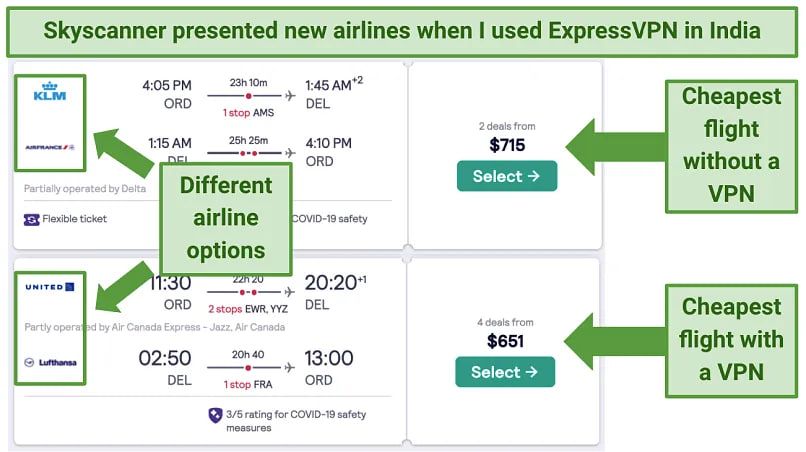
6fgb7vpnusecase

Image by Vpnmentor

A VPN masks not just your IP, it protects other kinds of personal data from being harvested by companies for price personalization. Well, if you are on an air company’s blacklist, it won’t help, so please behave in the air and on earth.

You can encounter price personalization when booking a hotel or renting a car as well. The advice is the same: change location, clear cookies, swap browsers, open a tab in Incognito or Private mode, experiment, finally, google it: people share all sorts of tips and tricks.

3. An escape from corporate slavery into the world of reasonable adults

Offices, schools, campuses, universities, and all types of institutions set up their own networks for people who have to use it. Sometimes they restrict nearly everything except for Wikipedia or work-related resources. If you know you tend to procrastinate and waste your productive hours on Facebook, just reconcile and be grateful to the network administrator. But if you have some things to be done, and a website in need is blocked, help yourself to some VPN.

There is actually another good reason for strict network restrictions: security. Corporate data leaks are a global problem, public organizations suffer too, schools, oh, well, even kindergartens are subjects to cyberthreats. Use VPN to secure your connection and help the network owners be safe: the data will be encrypted.

4. Digital remigration

It’s when you have your body abroad but need your soul to be at home. Superfluous romantic aside, you just might be willing to reach your favorite site or app when being on an abroad vacation or a business trip, but without a VPN it would be impossible.

5. Tinder: more freedom, less money wasted with a VPN

There are at least three ways VPN can help enrich your Tinder experience and solve possible problems.

Change your location to meet people from other countries — without overpaying

By default, you’ll be shown possible matches near you. You can choose a wide range, but you’ll virtually stay in your city or town (with suburbs). If you are in California but want to chat with someone from Paris, just buy Tinder’s paid subscription. But it is more expensive than most VPNs and works only for Tinder, while VPN… see above.

Unfortunately, VPN can help you with that only if you use Tinder via its website tinder.com and have forbidden your browser to detect your location in the settings. Tinder knows when you are using GPS, not IP (when it asks you to "turn on device location for better experience" it means their experience, of course, that’s why you are not allowed to say "no, thanks"). There are some ways for the mobile apps too… But do not count on a VPN in this case.

VPN is not only for pretending to be somewhere else but also for pretending not to be where you are

Tinder may be blocked in your country, in your office, at your school (which is especially upsetting if you are a teacher). Use VPN to get rid of the restrictions. Facebook may also be blocked in some countries or networks. Facebook is not essential for using Tinder, but if you log in via your Facebook account, you need it to be accessible.

Tinder on its side can block you as a user

Not neсesserily because you were naughty and did bad things to other users. Some people get blocked for resetting their account too frequently, for example. Use VPN to try to create another account, although there is no guarantee you’ll succeed: Tinder uses other ways besides IP detection to catch those who try to break back in through the back door.

6. Blocked websites

Why aren’t they letting me in? It is always intriguing — what’s behind the closed door. It may be wiser not to open it if your bluebearded husband asked you not to, but the Internet becomes more and more fragmented, there are some good reasons for it and so many toxic ones. If you find a website inaccessible, VPN may serve as a master key and make the Web more wide and worldly for you.

7. Finally. Security. Again and forever.

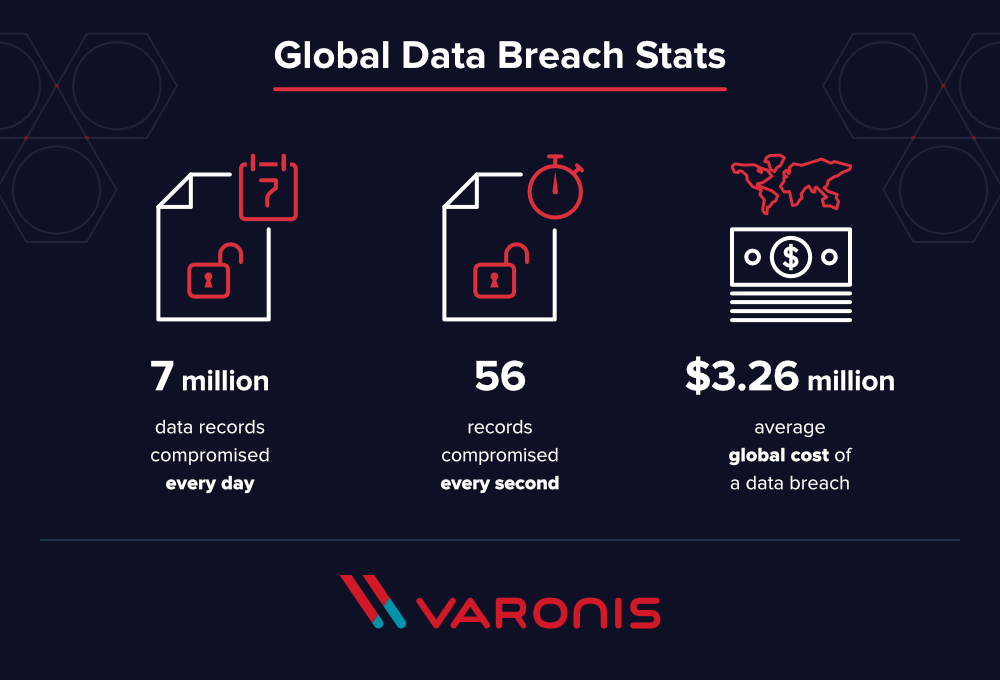
Yes, so boring. Protect your data, save your identity to yourself, do not make yourself and your family vulnerable to scammers and marketing manipulations, bullies and loonies, do not let your company’s data leak, blah blah blah. Every VPN provider keeps talking about how secured encrypted connection through a private network enhances the safety of your digital existence — because it just does.

We at AdGuard know too well how much money and stress nonchalance can cost. AdGuard VPN is made with your well-being in mind.
u9n5ovpnusecases_2

Actually, AdGuard VPN does more than just let you change your location and encrypt the traffic. There are features like Kill Switch, allow- and blocklists, different operation modes, in-house protocol and more. Learn more about all its unique features in this article.


این پست را دوست داشتید؟
AdGuard VPN AdGuard DNS AdGuard Mail AdGuard Wallet
صفحه اصلی AdGuard برای Windows
صفحه محافظت AdGuard برای Windows که ویژگی‌ها و تنظيمات محافظت را نشان می‌دهد
صفحه آمار AdGuard برای Windows که آمار تبلیغات و رَدیاب‌های مسدود شده را نشان می‌دهد
صفحه مدیریت برنامه AdGuard برای Windows که گزینه‌های مدیریت محافظت برای برنامک‌های نصب‌شده روی دستگاه را نشان می‌دهد
۲۰٬۴۴۲ 20442 بررسی
بسیار عالی!

AdGuard برای Windows: مسدودکننده تبلیغات برای رایانه شخصی

AdGuard برای ویندوز چیزی فراتر از یک مسدودکننده تبلیغات است. این یک ابزار چندمنظوره است که تبلیغات را مسدود می‌کند، دسترسی به سایت‌های خطرناک را کنترل می‌کند، بارگذاری صفحات را سریع‌تر می‌کند و از کودکان در برابر محتوای نامناسب محافظت می‌کند

با دانلود برنامه شما شرایط توافقنامه مجوز را قبول می کنید
Microsoft Store
با دانلود برنامه شما شرایط توافقنامه مجوز را قبول می کنید
AdGuard برای Windows v8.0، دوره آزمایشی 14روزه
صفحه اصلی AdGuard برای Mac
صفحه حالت نهان AdGuard برای Mac
۲۰٬۴۴۲ 20442 بررسی
بسیار عالی!

AdGuard برای مک: مسدودکنندهٔ تبلیغات در سطح سیستم

AdGuard برای Mac یک مسدودکنندهٔ تبلیغات منحصربه‌فرد است که با در نظر گرفتن macOS طراحی شده است. علاوه بر محافظت از شما در برابر تبلیغات آزاردهنده در مرورگرها و برنامه‌ها، شما را در برابر ردیابی، فیشینگ و کلاهبرداری نیز محافظت می‌کند
با دانلود برنامه شما شرایط توافقنامه مجوز را قبول می کنید
بیشتر بخوانید
AdGuard برای Mac v2.19، دوره آزمایشی 14روزه
صفحه اصلی AdGuard برای Android
صفحه حفاظت در برابر ردیابی AdGuard برای Android
صفحه مدیریت برنامه AdGuard برای Android که گزینه‌های مدیریت محافظت برای برنامک‌های نصب‌شده روی دستگاه را نشان می‌دهد
صفحه آمار AdGuard برای Android که آمار تبلیغات و رَدیاب‌های مسدود شده را نشان می‌دهد
صفحه اصلی مرورگر خصوصی AdGuard برای Android
کد QR برای بارگیری AdGuard برای Android
۲۰٬۴۴۲ 20442 بررسی
بسیار عالی!

ادگارد برای اندروید: مسدودکنندهٔ تبلیغات برای همهٔ برنامه‌ها

تبلیغات و ردیاب‌ها را در همه مرورگرها، بازی‌ها و سایر برنامه‌ها مسدود می‌کند. از حریم خصوصی شما محافظت می‌کند و به شما امکان می‌دهد کنترل کنید برنامه‌هایتان چگونه از اینترنت استفاده می‌کنند. از طریق APK نصب می‌شود
با دانلود برنامه شما شرایط توافقنامه مجوز را قبول می کنید
بیشتر بخوانید
اسکن برای دانلود
استفاده از هر کد خوان QR موجود در دستگاه شما
AdGuard برای اندروید v4.14، دوره آزمایشی 14روزه
صفحه اصلی AdGuard برای iOS
صفحه محافظت AdGuard برای iOS که ویژگی‌ها و تنظيمات محافظت را نشان می‌دهد
صفحه آمار AdGuard برای iOS که آمار تبلیغات و رَدیاب‌های مسدود شده را نشان می‌دهد
کد QR برای بارگیری AdGuard برای iOS
۲۰٬۴۴۲ 20442 بررسی
بسیار عالی!

AdGuard برای iOS: مسدودکنندهٔ تبلیغات فراتر از Safari

بهترین مسدودکننده تبلیغات iOS برای iPhone و iPad. AdGuard همه انواع تبلیغات و ردیاب‌ها را در Safari حذف می‌کند و از حریم خصوصی شما در همه برنامه‌ها در سطح DNS محافظت می‌کند
با دانلود برنامه شما شرایط توافقنامه مجوز را قبول می کنید
بیشتر بخوانید
اسکن برای دانلود
استفاده از هر کد خوان QR موجود در دستگاه شما
AdGuard برای iOS نسخه 4.5
صفحه اصلی AdGuard Content Blocker
صفحه فیلترها در AdGuard Content Blocker
صفحه تنظيمات در AdGuard Content Blocker
۲۰٬۴۴۲ 20442 بررسی
بسیار عالی!

مسدودساز محتوای AdGuard

AdGuard Content Blocker انواع تبلیغات را در مرورگرهای تلفن همراه که از فناوری مسدود کردن محتوا پشتیبانی می کنند حذف می کند - یعنی اینترنت سامسونگ و مرورگر Yandex. ویژگی های آن در مقایسه با AdGuard برای اندروید محدود است، اما رایگان، نصب آسان و کارآمد است
با دانلود برنامه شما شرایط توافقنامه مجوز را قبول می کنید
بیشتر بخوانید
مسدودساز محتوای AdGuard نسخه 2.8
صفحه اصلی افزونه مرورگر AdGuard
صفحه حفاظت در برابر ردیابی افزونه مرورگر AdGuard
۲۰٬۴۴۲ 20442 بررسی
بسیار عالی!

افزونه مرورگر AdGuard

AdGuard سریع ترین و سبک ترین افزونه ای است که انواع تبلیغات را در صفحات وب مسدود می کند! AdGuard را برای مرورگری که میخواهید انتخاب کنید و وب گردی امن و سریع را تجربه کنید.
نصب
با دانلود برنامه شما شرایط توافقنامه مجوز را قبول می کنید
نصب
با دانلود برنامه شما شرایط توافقنامه مجوز را قبول می کنید
نصب
با دانلود برنامه شما شرایط توافقنامه مجوز را قبول می کنید
نصب
با دانلود برنامه شما شرایط توافقنامه مجوز را قبول می کنید
نصب
با دانلود برنامه شما شرایط توافقنامه مجوز را قبول می کنید
بیشتر بخوانید
نصب
با دانلود برنامه شما شرایط توافقنامه مجوز را قبول می کنید
بیشتر بخوانید
افزونه مرورگر AdGuard نسخه 5.5
صفحه اصلی AdGuard Assistant
۲۰٬۴۴۲ 20442 بررسی
بسیار عالی!

AdGuard دستیار

افزونه مرورگر همراه برای برنامه های دسکتاپ AdGuard. این امکان را به شما می دهد که آیتم های سفارشی را در وب سایت ها مسدود کنید، وب سایت ها را به لیست مجاز اضافه کنید و گزارش ها را مستقیما از مرورگر خود ارسال کنید
AdGuard دستیار نسخه 1.4
۲۰٬۴۴۲ 20442 بررسی
بسیار عالی!

AdGuard Home

AdGuard Home یک راه حل مبتنی بر شبکه برای مسدود کردن تبلیغات و ردیاب ها است. آن را یک بار روی روتر خود نصب کنید تا همه دستگاه های موجود در شبکه خانگی خود را پوشش دهید - بدون نیاز به نرم افزار مشتری اضافی. این امر به ویژه برای دستگاه های مختلف اینترنت اشیا که اغلب حریم خصوصی شما را تهدید می کنند بسیار مهم است
AdGuard Home نسخه 0.107
صفحه اصلی AdGuard Pro برای iOS
صفحه محافظت AdGuard Pro برای iOS که قابلیت‌ها و تنظيمات محافظت را نشان می‌دهد
صفحه آمار AdGuard Pro برای iOS که آمار تبلیغات و رَدیاب‌های مسدود شده را نشان می‌دهد
۲۰٬۴۴۲ 20442 بررسی
بسیار عالی!

AdGuard Pro برای iOS

AdGuard Pro برای iOS با تمام ویژگی‌های پیشرفته محافظت در برابر مسدود کردن تبلیغات ارائه می‌شود. این نسخه همان ابزارهای نسخه پولی AdGuard برای iOS را ارائه می‌دهد. این نسخه در مسدود کردن تبلیغات در سافاری عالی عمل می‌کند و به شما امکان می‌دهد تنظیمات DNS را برای محافظت متناسب با نیاز خود سفارشی کنید. این نسخه تبلیغات را در مرورگرها و برنامه‌ها مسدود می‌کند، از فرزندان شما در برابر محتوای نامناسب محافظت می‌کند و اطلاعات شخصی شما را ایمن نگه می‌دارد.
با دانلود برنامه شما شرایط توافقنامه مجوز را قبول می کنید
بیشتر بخوانید
AdGuard Pro برای iOS نسخه 4.5
صفحه اصلی AdGuard Mini برای Mac
صفحه محافظت Safari در AdGuard Mini برای Mac
صفحه ایجاد رویه در AdGuard Mini برای Mac
۲۰٬۴۴۲ 20442 بررسی
بسیار عالی!

AdGuard Mini برای Mac — مسدود کننده تبلیغات Safari

AdGuard Mini برای Mac یک مسدودکنندهٔ قدرتمند تبلیغات برای Safari است. این برنامک سبک، تبلیغات را حذف می‌کند، ردیاب‌ها را مسدود می‌کند و بارگذاری صفحه را سریع‌تر می‌کند. این ابزار به شما کمک می‌کند تا بدون حواس‌پرتی در Safari گشت‌و‌گذار کنید و داده‌های خود را خصوصی نگه دارید
نصب
با دانلود برنامه شما شرایط توافقنامه مجوز را قبول می کنید
بیشتر بخوانید
AdGuard Mini برای Mac نسخه 2.3
صفحه اصلی AdGuard برای Android TV با محافظت فعال شده
صفحه مسدودسازی تبلیغات AdGuard برای Android TV که ویژگی‌ها و تنظيمات آن را نشان می‌دهد
صفحه تنظيمات AdGuard برای Android TV
صفحه مدیریت برنامه AdGuard برای Android TV که برنامک‌هایی را نشان می‌دهد که در آن‌ها تبلیغات و رَدیاب‌ها مسدود شده‌اند
۲۰٬۴۴۲ 20442 بررسی
بسیار عالی!

AdGuard برای Android TV

AdGuard برای Android TV تنها برنامه‌ای است که تبلیغات را مسدود می‌کند، از حریم خصوصی شما محافظت کرده و همانند یک دیوار آتش برای تلویزیون هوشمند شما عمل می‌کند. در مورد تهدیدات وب هشدار دریافت کنید، از DNS ایمن استفاده کرده و از انتقال داده اینترنتی رمزگذاری شده بهره‌مند شوید. آرامش داشته باشید و غرق نمایش‌های مورد علاقه خود با امنیت عالی و تبلیغات صفر شوید!
AdGuard برای Android TV v4.14، دوره آزمایشی 14روزه
نماد AdGuard، Agnar، در حالی که پنگوئن Linux را در دست دارد
۲۰٬۴۴۲ 20442 بررسی
بسیار عالی!

AdGuard برای لینوکس

AdGuard برای لینوکس اولین مسدود کننده تبلیغات لینوکس در سراسر جهان است. تبلیغات و ردیاب‌ها را در سطح دستگاه مسدود کنید، از بین فیلترهای از پیش نصب شده انتخاب کنید یا فیلترهای خود را اضافه کنید - همه از طریق رابط خط فرمان
AdGuard برای لینوکس نسخه 1.4
۲۰٬۴۴۲ 20442 بررسی
بسیار عالی!

AdGuard Temp Mail

یک تولید‌کننده رایانشانی موقت رایگان که شما را ناشناس نگه می‌دارد و از حریم خصوصی شما محافظت می‌کند. هرزنامه‌ای در صندوق ورودی اصلی شما در کار نخواهد بود!
۲۰٬۴۴۲ 20442 بررسی
بسیار عالی!

AdGuard VPN

75 محل در سرتاسر جهان

دسترسی به هر محتوا

رمزگذاری قوی

سیاست عدم ذخیره وقایع

سریعترین اتصال

24/7 پشتیبانی

ارزیابی رایگان
با دانلود برنامه شما شرایط توافقنامه مجوز را قبول می کنید
بیشتر بخوانید
۲۰٬۴۴۲ 20442 بررسی
بسیار عالی!

AdGuard DNS

AdGuard DNS راه حلی جایگزین برای مسدودسازی تبلیغات، حفاظت حریم خصوصی و نظارت والدین است. راه اندازی آسان و استفاده رایگان، آن حداقل حفاظت لازم در برابر تبلیغات آنلاین،ردیاب ها و فیشینگ ها را میدهد،و در همه سیستم عامل ها و دستگاه ها کار می کند.
۲۰٬۴۴۲ 20442 بررسی
بسیار عالی!

AdGuard Mail

از هویت خود محافظت کنید، از هرزنامه دوری نمایید و صندوق ورودی خود را با نام‌های مستعار و رایانشانی‌های موقت ما امن نگه دارید. از خدمت رایگان فوروارد رایانامه و برنامک‌های ما برای همه سامانه‌عامل‌ها لذت ببرید
۲۰٬۴۴۲ 20442 بررسی
بسیار عالی!

AdGuard Wallet

یک کیف پول ارز دیجیتال امن و خصوصی که به شما امکان کنترل کامل بر دارایی‌هایتان را می‌دهد. چندین کیف پول را مدیریت کنید و هزاران ارز دیجیتال را برای ذخیره، ارسال و مبادله کشف کنید.
در حال بارگیری AdGuard برای نصب AdGuard، روی پرونده نشان داده شده توسط پیکان کلیک کنید گزینه "بازکردن " را انتخاب و روی "تایید" کلیک کنید — برای دانلود فایل منتظر بمانید. در پنجره باز شده، آیکون AdGuard را به پوشه "برنامه ها" بکشید.بابت انتخاب AdGuard متشکریم! گزینه "بازکردن " را انتخاب و روی "تایید" کلیک کنید — برای دانلود فایل منتظر بمانید. در پنجره باز شده روی "نصب" کلیک کنید.بابت انتخاب AdGuard متشکریم!
AdGuard را روی دستگاه تلفن همراه خود نصب کنید

















































