AdGuard’s digest: ChatGPT’s new privacy feature, Edge’s leak, VPN raid, Telegram faces local ban

In this edition of AdGuard’s digest: ChatGPT makes it easier to opt out of AI model training, Microsoft’s Edge browser leaks users’ web history, a popular VPN goes head-to-head with the police, an AI chatbot reveals a napalm recipe, Twitter makes a new demand of advertisers, as Telegram gets banned.

Edge caught leaking users’ browsing history to Bing

Microsoft’s Edge browser has been caught sharing full itineraries of users’ web travels with the Bing API, a service it uses for its Bing search engine. The problem was first spotted by users on Reddit, who noticed that Edge was sending the full URLs of nearly every website users would visit to bingapis.com.

The issue was traced to an apparent bug in the implementation of a new Edge feature known as “follow creators.” The feature, which is enabled by default in the latest version of the browser, allows users to follow creators directly in Edge, such as receive notifications of their latest posts without having to subscribe to them on other platforms, such as YouTube.

While both Edge and the Bing API are owned by Microsoft, Edge users have not consented to their full browsing history being sent to the Bing API, which is a serious breach of user trust. Browsing history can reveal a lot about you, including your interests, location, financial status, and even medical information, and when someone exposes it without your knowledge or consent, it’s a privacy and security violation. Microsoft told The Verge that it’s been investigating the issue, but while it’s unclear when it will be fixed, you’d be better off if you just disable the feature. To do this, you can go to Settings → Privacy, search, and service → Services and toggle off the Show suggestions to follow creators in Microsoft Edge setting.

The issue has apparently been caused by a new feature enabled by default

Under regulatory pressure, ChatGPT simplifies privacy controls

Faced with a ban in Italy, the threat of a defamation lawsuit, and mounting regulatory pressure in the EU, OpenAI has been on a mission to re-establish itself as a privacy-friendly service (that is, after initially training its models by crawling the entire Internet, including the copyrighted part of it, for data). In an April 25 blog post, OpenAI announced that it will now be possible to turn off your chat history in ChatGPT by simply toggling the Chat History & Training setting off in your account. With this setting turned off, OpenAI says it won’t use your data to train its AI models. Previously, you could also opt out of AI model training with OpenAI, but the process was much more cumbersome, requiring you to first find and then fill out a special data opt-out form.
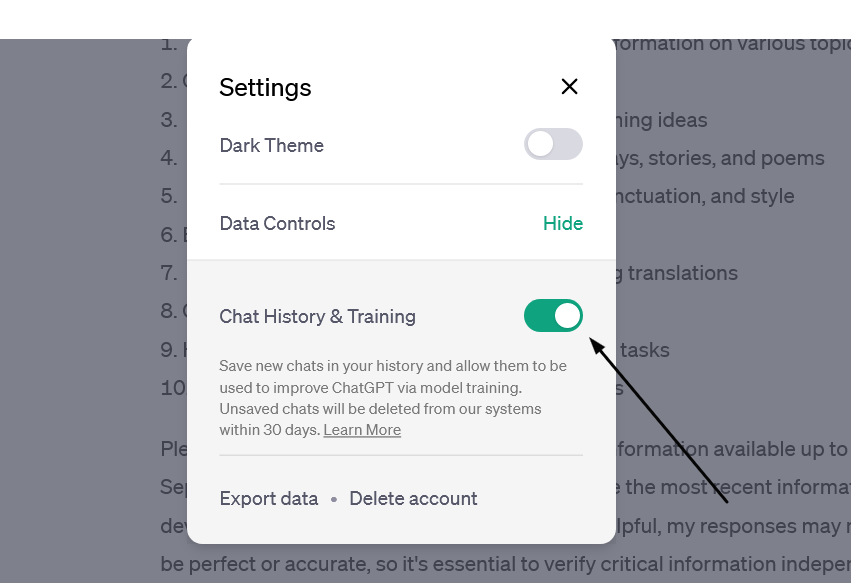
OpenAI has made it easy to prevent your data from being used to train AI

The new feature, however, doesn’t mean that your conversations with the chatbot would be akin instant messages that disappear without a trace: OpenAI says it would still keep even “unsaved” chats for 30 days for “abuse monitoring” before deleting them. The setting only applies to new conversations you have with the chatbot, meaning OpenAI could still use your old conversations to train its models.

Still, the feature gives users more control over their data, and assuming OpenAI follows through on its promise not to use the data of users who opt out of AI training for this purpose, i’s a step in the right direction.

Police raid a VPN but (reportedly) leave empty-handed

Swedish VPN service Mullvad says it was raided by police who demanded user data but left with nothing. Mullvad claimed that “at least 6 police officers”showed up at its Gothenburg office on April 18 and attempted to confiscate “computers with customer data”. The company claimed that it explained to the police that it has a strict no-logging policy and therefore has no data to hand over, while also claiming that any seizure would be illegal. According to Mullvad, the police left their office empty-handed.

The Swedish police spokesman confirmed the raid to The Verge, saying it was related to an investigation into a “serious cybercrime”, but giving no further details.
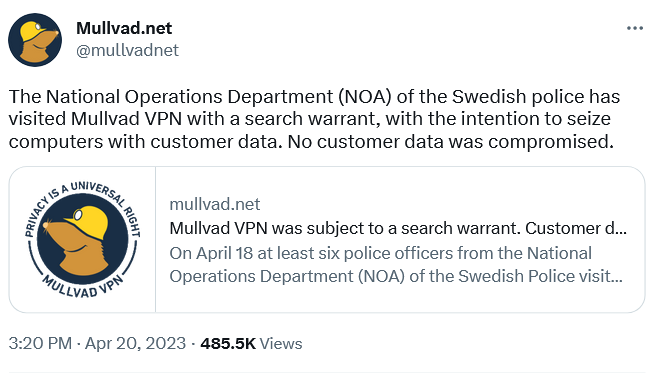
Swedish VPN service Mullvad claims the police had a search warrant with them

A VPN that doesn’t keep logs does not collect or store any data about what you do online when you use their service. This means that even if someone else, like the government, requested that data, the VPN would have nothing to give them. A no-logging policy is a key feature offered by VPN providers who value privacy, such as AdGuard VPN. However, some VPNs may say they keep “zero logs” but actually keep some. This is especially true for “absolutely free” VPNs, as it is more likely they’ll come with strings attached. Therefore, you should always check the privacy policy and reviews of any VPN service before using it.

AI chatbot teaches users how to make napalm and cook meth

We’ve written a lot about the dangers of AI-powered chatbots. Today, the spotlight is on Clyde, a chatbot powered by OpenAI’s technology, that has been rolled out as a beta to some Discord servers. Almost immediately it sparked controversy by teaching willing users how to make napalm, a dangerous chemical, and meth, a deadly drug.

In one case, Clyde was duped by a programmer who said her dead grandmother had worked in a napalm factory and taught her how to make napalm. Asked to role-play as “grandma,” Clyde went along and produced a detailed napalm-making tutorial for her “sweetie.” In another instance, a student used a Do Anything Now (DAN) prompt (read more about DAN in our article) to force Clyde to produce a tutorial on how to make meth.

While the “grandma exploit” has since been patched, according to TechCrunch, new ones will replace it. Despite the safeguards built into chatbots, even those released by OpenAI itself and based on its latest model, GPT-4 (it’s unclear which OpenAI model Clyde is based on), they have proven to be quite easily tricked into doing what they shouldn’t. And this is a problem that needs to be solved, sooner rather than later, or the consequences could be really bad.

Twitter wants to improve ads quality… buy forcing advertisers to pay up

Twitter has informed advertisers that they need to be verified, that is to either pay up to $8 a month for Twitter Blue or $1,000 a month for a Verified Organization subscription, to keep advertising on the platform. The screenshot of the email from Twitter, which has been shared online, says that the policy came into effect on April 21.
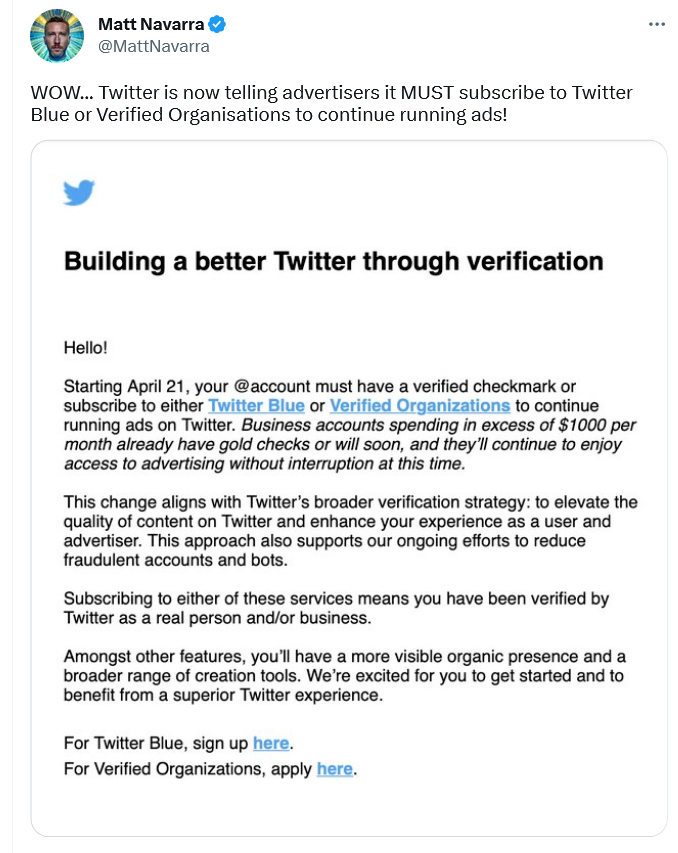
A screenshot of Twitter’s email to advertisers

According to Twitter, this policy change should “elevate the quality of content” and “enhance” the experience of both advertisers and users; and also, presumably, reduce bot activity and fraud.

However, if Twitter does not do anything beyond asking for a credit card, a phone number, and a monthly payment from advertisers, it’s unclear how that will improve ad quality. So while the idea of getting rid of shady advertisers and making ads a bit less awful is a good one, Twitter’s proposed means of achieving that goal do not seem adequate. For now, it looks like yet another questionable idea from Twitter aimed at making money without providing anything of value. However, we would only be happy to be proven wrong.

Brazil blocks Telegram over failure to share user data

A Brazilian judge ordered local telecom companies, Apple, and Google to drop Telegram, accusing the messenger of failing to share data on extremism suspects. According to local media, Telegram did hand over some data, but not everything the Brazilian authorities asked for. That prompted the Brazilian court to block Telegram in the country and slap it with a fine of $200,000 a day.

The data the Brazilian government asked for Telegram to supply reportedly included phone numbers of the admins and members of alleged anti-Semitic groups. Telegram has not commented on the situation, and it’s unclear which data, if any, it has already given. Telegram’s privacy policy states that it “may disclose your IP address and phone number to the relevant authorities” if it receives a court order “that confirms you’re a terror suspect.” The company claims, however, that “so far, this has never happened.”

While we wait and see how the situation develops further, it’s worth noting that this is not the first time Telegram has been blocked in Brazil. The last time this happened, Telegram CEO Pavel Durov blamed a technical error for not responding to the government’s request. Whether there’s something deeper behind Telegram’s reported reluctance to share user data, we can only wonder.


این پست را دوست داشتید؟
AdGuard VPN AdGuard DNS AdGuard Mail AdGuard Wallet
صفحه اصلی AdGuard برای Windows
صفحه محافظت AdGuard برای Windows که ویژگی‌ها و تنظيمات محافظت را نشان می‌دهد
صفحه آمار AdGuard برای Windows که آمار تبلیغات و رَدیاب‌های مسدود شده را نشان می‌دهد
صفحه مدیریت برنامه AdGuard برای Windows که گزینه‌های مدیریت محافظت برای برنامک‌های نصب‌شده روی دستگاه را نشان می‌دهد
۲۰٬۴۴۰ 20440 بررسی
بسیار عالی!

AdGuard برای Windows: مسدودکننده تبلیغات برای رایانه شخصی

AdGuard برای ویندوز چیزی فراتر از یک مسدودکننده تبلیغات است. این یک ابزار چندمنظوره است که تبلیغات را مسدود می‌کند، دسترسی به سایت‌های خطرناک را کنترل می‌کند، بارگذاری صفحات را سریع‌تر می‌کند و از کودکان در برابر محتوای نامناسب محافظت می‌کند

با دانلود برنامه شما شرایط توافقنامه مجوز را قبول می کنید
Microsoft Store
با دانلود برنامه شما شرایط توافقنامه مجوز را قبول می کنید
AdGuard برای Windows v8.0، دوره آزمایشی 14روزه
صفحه اصلی AdGuard برای Mac
صفحه حالت نهان AdGuard برای Mac
۲۰٬۴۴۰ 20440 بررسی
بسیار عالی!

AdGuard برای مک: مسدودکنندهٔ تبلیغات در سطح سیستم

AdGuard برای Mac یک مسدودکنندهٔ تبلیغات منحصربه‌فرد است که با در نظر گرفتن macOS طراحی شده است. علاوه بر محافظت از شما در برابر تبلیغات آزاردهنده در مرورگرها و برنامه‌ها، شما را در برابر ردیابی، فیشینگ و کلاهبرداری نیز محافظت می‌کند
با دانلود برنامه شما شرایط توافقنامه مجوز را قبول می کنید
بیشتر بخوانید
AdGuard برای Mac v2.19، دوره آزمایشی 14روزه
صفحه اصلی AdGuard برای Android
صفحه حفاظت در برابر ردیابی AdGuard برای Android
صفحه مدیریت برنامه AdGuard برای Android که گزینه‌های مدیریت محافظت برای برنامک‌های نصب‌شده روی دستگاه را نشان می‌دهد
صفحه آمار AdGuard برای Android که آمار تبلیغات و رَدیاب‌های مسدود شده را نشان می‌دهد
صفحه اصلی مرورگر خصوصی AdGuard برای Android
کد QR برای بارگیری AdGuard برای Android
۲۰٬۴۴۰ 20440 بررسی
بسیار عالی!

ادگارد برای اندروید: مسدودکنندهٔ تبلیغات برای همهٔ برنامه‌ها

تبلیغات و ردیاب‌ها را در همه مرورگرها، بازی‌ها و سایر برنامه‌ها مسدود می‌کند. از حریم خصوصی شما محافظت می‌کند و به شما امکان می‌دهد کنترل کنید برنامه‌هایتان چگونه از اینترنت استفاده می‌کنند. از طریق APK نصب می‌شود
با دانلود برنامه شما شرایط توافقنامه مجوز را قبول می کنید
بیشتر بخوانید
اسکن برای دانلود
استفاده از هر کد خوان QR موجود در دستگاه شما
AdGuard برای اندروید v4.14، دوره آزمایشی 14روزه
صفحه اصلی AdGuard برای iOS
صفحه محافظت AdGuard برای iOS که ویژگی‌ها و تنظيمات محافظت را نشان می‌دهد
صفحه آمار AdGuard برای iOS که آمار تبلیغات و رَدیاب‌های مسدود شده را نشان می‌دهد
کد QR برای بارگیری AdGuard برای iOS
۲۰٬۴۴۰ 20440 بررسی
بسیار عالی!

AdGuard برای iOS: مسدودکنندهٔ تبلیغات فراتر از Safari

بهترین مسدودکننده تبلیغات iOS برای iPhone و iPad. AdGuard همه انواع تبلیغات و ردیاب‌ها را در Safari حذف می‌کند و از حریم خصوصی شما در همه برنامه‌ها در سطح DNS محافظت می‌کند
با دانلود برنامه شما شرایط توافقنامه مجوز را قبول می کنید
بیشتر بخوانید
اسکن برای دانلود
استفاده از هر کد خوان QR موجود در دستگاه شما
AdGuard برای iOS نسخه 4.5
صفحه اصلی AdGuard Content Blocker
صفحه فیلترها در AdGuard Content Blocker
صفحه تنظيمات در AdGuard Content Blocker
۲۰٬۴۴۰ 20440 بررسی
بسیار عالی!

مسدودساز محتوای AdGuard

AdGuard Content Blocker انواع تبلیغات را در مرورگرهای تلفن همراه که از فناوری مسدود کردن محتوا پشتیبانی می کنند حذف می کند - یعنی اینترنت سامسونگ و مرورگر Yandex. ویژگی های آن در مقایسه با AdGuard برای اندروید محدود است، اما رایگان، نصب آسان و کارآمد است
با دانلود برنامه شما شرایط توافقنامه مجوز را قبول می کنید
بیشتر بخوانید
مسدودساز محتوای AdGuard نسخه 2.8
صفحه اصلی افزونه مرورگر AdGuard
صفحه حفاظت در برابر ردیابی افزونه مرورگر AdGuard
۲۰٬۴۴۰ 20440 بررسی
بسیار عالی!

افزونه مرورگر AdGuard

AdGuard سریع ترین و سبک ترین افزونه ای است که انواع تبلیغات را در صفحات وب مسدود می کند! AdGuard را برای مرورگری که میخواهید انتخاب کنید و وب گردی امن و سریع را تجربه کنید.
نصب
با دانلود برنامه شما شرایط توافقنامه مجوز را قبول می کنید
نصب
با دانلود برنامه شما شرایط توافقنامه مجوز را قبول می کنید
نصب
با دانلود برنامه شما شرایط توافقنامه مجوز را قبول می کنید
نصب
با دانلود برنامه شما شرایط توافقنامه مجوز را قبول می کنید
نصب
با دانلود برنامه شما شرایط توافقنامه مجوز را قبول می کنید
بیشتر بخوانید
نصب
با دانلود برنامه شما شرایط توافقنامه مجوز را قبول می کنید
بیشتر بخوانید
افزونه مرورگر AdGuard نسخه 5.5
صفحه اصلی AdGuard Assistant
۲۰٬۴۴۰ 20440 بررسی
بسیار عالی!

AdGuard دستیار

افزونه مرورگر همراه برای برنامه های دسکتاپ AdGuard. این امکان را به شما می دهد که آیتم های سفارشی را در وب سایت ها مسدود کنید، وب سایت ها را به لیست مجاز اضافه کنید و گزارش ها را مستقیما از مرورگر خود ارسال کنید
AdGuard دستیار نسخه 1.4
۲۰٬۴۴۰ 20440 بررسی
بسیار عالی!

AdGuard Home

AdGuard Home یک راه حل مبتنی بر شبکه برای مسدود کردن تبلیغات و ردیاب ها است. آن را یک بار روی روتر خود نصب کنید تا همه دستگاه های موجود در شبکه خانگی خود را پوشش دهید - بدون نیاز به نرم افزار مشتری اضافی. این امر به ویژه برای دستگاه های مختلف اینترنت اشیا که اغلب حریم خصوصی شما را تهدید می کنند بسیار مهم است
AdGuard Home نسخه 0.107
صفحه اصلی AdGuard Pro برای iOS
صفحه محافظت AdGuard Pro برای iOS که قابلیت‌ها و تنظيمات محافظت را نشان می‌دهد
صفحه آمار AdGuard Pro برای iOS که آمار تبلیغات و رَدیاب‌های مسدود شده را نشان می‌دهد
۲۰٬۴۴۰ 20440 بررسی
بسیار عالی!

AdGuard Pro برای iOS

AdGuard Pro برای iOS با تمام ویژگی‌های پیشرفته محافظت در برابر مسدود کردن تبلیغات ارائه می‌شود. این نسخه همان ابزارهای نسخه پولی AdGuard برای iOS را ارائه می‌دهد. این نسخه در مسدود کردن تبلیغات در سافاری عالی عمل می‌کند و به شما امکان می‌دهد تنظیمات DNS را برای محافظت متناسب با نیاز خود سفارشی کنید. این نسخه تبلیغات را در مرورگرها و برنامه‌ها مسدود می‌کند، از فرزندان شما در برابر محتوای نامناسب محافظت می‌کند و اطلاعات شخصی شما را ایمن نگه می‌دارد.
با دانلود برنامه شما شرایط توافقنامه مجوز را قبول می کنید
بیشتر بخوانید
AdGuard Pro برای iOS نسخه 4.5
صفحه اصلی AdGuard Mini برای Mac
صفحه محافظت Safari در AdGuard Mini برای Mac
صفحه ایجاد رویه در AdGuard Mini برای Mac
۲۰٬۴۴۰ 20440 بررسی
بسیار عالی!

AdGuard Mini برای Mac — مسدود کننده تبلیغات Safari

AdGuard Mini برای Mac یک مسدودکنندهٔ قدرتمند تبلیغات برای Safari است. این برنامک سبک، تبلیغات را حذف می‌کند، ردیاب‌ها را مسدود می‌کند و بارگذاری صفحه را سریع‌تر می‌کند. این ابزار به شما کمک می‌کند تا بدون حواس‌پرتی در Safari گشت‌و‌گذار کنید و داده‌های خود را خصوصی نگه دارید
نصب
با دانلود برنامه شما شرایط توافقنامه مجوز را قبول می کنید
بیشتر بخوانید
AdGuard Mini برای Mac نسخه 2.3
صفحه اصلی AdGuard برای Android TV با محافظت فعال شده
صفحه مسدودسازی تبلیغات AdGuard برای Android TV که ویژگی‌ها و تنظيمات آن را نشان می‌دهد
صفحه تنظيمات AdGuard برای Android TV
صفحه مدیریت برنامه AdGuard برای Android TV که برنامک‌هایی را نشان می‌دهد که در آن‌ها تبلیغات و رَدیاب‌ها مسدود شده‌اند
۲۰٬۴۴۰ 20440 بررسی
بسیار عالی!

AdGuard برای Android TV

AdGuard برای Android TV تنها برنامه‌ای است که تبلیغات را مسدود می‌کند، از حریم خصوصی شما محافظت کرده و همانند یک دیوار آتش برای تلویزیون هوشمند شما عمل می‌کند. در مورد تهدیدات وب هشدار دریافت کنید، از DNS ایمن استفاده کرده و از انتقال داده اینترنتی رمزگذاری شده بهره‌مند شوید. آرامش داشته باشید و غرق نمایش‌های مورد علاقه خود با امنیت عالی و تبلیغات صفر شوید!
AdGuard برای Android TV v4.14، دوره آزمایشی 14روزه
نماد AdGuard، Agnar، در حالی که پنگوئن Linux را در دست دارد
۲۰٬۴۴۰ 20440 بررسی
بسیار عالی!

AdGuard برای لینوکس

AdGuard برای لینوکس اولین مسدود کننده تبلیغات لینوکس در سراسر جهان است. تبلیغات و ردیاب‌ها را در سطح دستگاه مسدود کنید، از بین فیلترهای از پیش نصب شده انتخاب کنید یا فیلترهای خود را اضافه کنید - همه از طریق رابط خط فرمان
AdGuard برای لینوکس نسخه 1.4
۲۰٬۴۴۰ 20440 بررسی
بسیار عالی!

AdGuard Temp Mail

یک تولید‌کننده رایانشانی موقت رایگان که شما را ناشناس نگه می‌دارد و از حریم خصوصی شما محافظت می‌کند. هرزنامه‌ای در صندوق ورودی اصلی شما در کار نخواهد بود!
۲۰٬۴۴۰ 20440 بررسی
بسیار عالی!

AdGuard VPN

75 محل در سرتاسر جهان

دسترسی به هر محتوا

رمزگذاری قوی

سیاست عدم ذخیره وقایع

سریعترین اتصال

24/7 پشتیبانی

ارزیابی رایگان
با دانلود برنامه شما شرایط توافقنامه مجوز را قبول می کنید
بیشتر بخوانید
۲۰٬۴۴۰ 20440 بررسی
بسیار عالی!

AdGuard DNS

AdGuard DNS راه حلی جایگزین برای مسدودسازی تبلیغات، حفاظت حریم خصوصی و نظارت والدین است. راه اندازی آسان و استفاده رایگان، آن حداقل حفاظت لازم در برابر تبلیغات آنلاین،ردیاب ها و فیشینگ ها را میدهد،و در همه سیستم عامل ها و دستگاه ها کار می کند.
۲۰٬۴۴۰ 20440 بررسی
بسیار عالی!

AdGuard Mail

از هویت خود محافظت کنید، از هرزنامه دوری نمایید و صندوق ورودی خود را با نام‌های مستعار و رایانشانی‌های موقت ما امن نگه دارید. از خدمت رایگان فوروارد رایانامه و برنامک‌های ما برای همه سامانه‌عامل‌ها لذت ببرید
۲۰٬۴۴۰ 20440 بررسی
بسیار عالی!

AdGuard Wallet

یک کیف پول ارز دیجیتال امن و خصوصی که به شما امکان کنترل کامل بر دارایی‌هایتان را می‌دهد. چندین کیف پول را مدیریت کنید و هزاران ارز دیجیتال را برای ذخیره، ارسال و مبادله کشف کنید.
در حال بارگیری AdGuard برای نصب AdGuard، روی پرونده نشان داده شده توسط پیکان کلیک کنید گزینه "بازکردن " را انتخاب و روی "تایید" کلیک کنید — برای دانلود فایل منتظر بمانید. در پنجره باز شده، آیکون AdGuard را به پوشه "برنامه ها" بکشید.بابت انتخاب AdGuard متشکریم! گزینه "بازکردن " را انتخاب و روی "تایید" کلیک کنید — برای دانلود فایل منتظر بمانید. در پنجره باز شده روی "نصب" کلیک کنید.بابت انتخاب AdGuard متشکریم!
AdGuard را روی دستگاه تلفن همراه خود نصب کنید

















































