Fake Ad Blockers 2: Now with Cookies and Ad Fraud

— OK, Google, I use Chrome, and I'd like to get an ad blocker for it.
— Sure, head to Chrome Web Store, there are literally hundreds of ad blockers there!
— Hmm, hundreds you say? Is it safe? I heard that last year a lot of them appeared to be fake and malicious!
— No worries, we are going to limit the power of ad blockers soon, this will definitely help!
— Oh, really? That's cool, thank you! I'll grab one from the top of the search results. This "AdBlock" by "AdBlock, Inc" looks legit. It has a privacy policy, it has over 800,000 users, and it is from a German company. Or maybe I'll try this "uBlock" by "Charlie Lee"? Five stars rating, 850,000 users, it must be good as well.

Stop right there!

This "AdBlock" is fake and malicious, and the "uBlock" one is the same. And there are many more not so popular deceptive clones there. How do I know that? I spent quite some time inspecting their code trying to figure out what they do. The real question is, how could you (a casual user) know it?
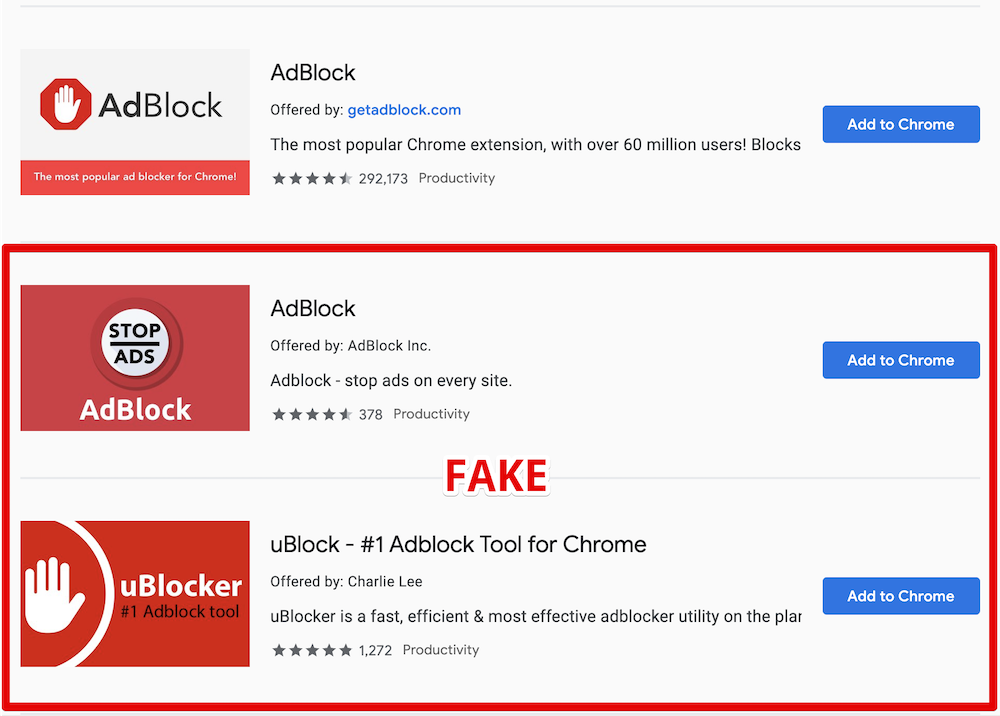
Here is the legit AdBlock extension followed by its clones

What's wrong with them?

For starters, they are using the names of two other very popular ad blockers, and this alone is deceitful and simply not right and should be enough. However, despite multiple reports, these extensions are still not removed.

Apparently, ethical issues and deception cannot be a reason for extension removal. Let's get to the next part then — malicious behavior.

Here goes the technical explanation. Skip to the next part if you're not a developer.

At first, these add-ons just do what they're supposed to do — they block ads. They both are based on the code of the original "AdBlock" extension so the quality is good enough.

Periodically, they send a request like this:

GET https://ublockerext.com/heartbeat/json/?action=config&&id=dgpfeomibahlpbobpnjpcobpechebadh&version=1.7&lt=199&uid=76f24bff-d831-aa47-7377-7ea195bf9cf8&r=1567540438520

At first glance, the server response looks innocent:

{"blockPopups":true,"statuses":[["synchronize_invalid_url","filters_subscription_lastDownload_invalidURL"],["synchronize_connection_error","filters_subscription_lastDownload_connectionError"],["synchronize_invalid_data","filters_subscription_lastDownload_invalidData"],["synchronize_checksum_mismatch","filters_subscription_lastDownload_checksumMismatch"]]}

However, about 55 hours after the installation, the response suddenly changes, and it does not look that innocent anymore.

This new response contains a list of commands for the extension to execute. After that the extensions' behavior changes, and they start doing a few more things besides ad blocking.

They now send a request to urldata.net for each new visited domain. For instance, if you visit teamviewer.com, they'll send a request like this:

http://urldata.net/api?key=4e4a7faf91b2bcda88a60e269e4d6208bfe8d3d6&out=https%3A%2F%2Fteamviewer.com&format=txt

The response to this request contains a special URL:

http://urldata.net/newapi/click/PvdHh16uGq6mLqmbUoT3AaUImj7ynsh0cVlCywkljEF19oBV0JH4jNYpn--xwIyEV36OMPPH1IrESEyclc7yxEbB3mYrfPMxnGqoV4SOmQ4MI9NYNHAQrPHwvJNE0W488ESUN1y7ONahVxwBZKnr4PZlZKI5gNi65DoIfYNwXAPoyFwh8Mgz1bX63V4PnjspvZa-DqjF5GTNxoIJqpHLC1_SwlFRYeoIvVGutkgfCSI4hMHa3z52VbL7VxbaQAhhqLC-uJUJO_s234VL3JDM01O-JE9PS6fXOH6z5XUojvotSQ5mZe7NFEsuMaeSK9rasy8MvaICWZpGDmgxIodzvMpJUv41ppkuqMBDDYpHptCEBb4Za_HffgaiKn-aY_COfan5P650B6ZTQsVqNKidMRRaHY4FxvM7VA79vX5_Oe0J0c9Wczw8VM9GrvzlGLdt4TjyBcF2JEtpcayh99JdL1wxrL_EoEHMml4LDy1JwT8LPxPG2vrlK5QSuoGrx-7tJLHD6Gq3SUeQj1XXEcENy77hkzU79TO9_hEs29Kq6ASdk6NKIZT8gOuJsNOAkU4i0Y9JvmEpdENyBL2ugmFNyitW2CfGzHrLsNex

The extensions will immediately open that URL in the background. A chain of redirects follows this request:

The last request in the chain is:

https://www.teamviewer.com/en/content/2019-cj-emea/?coupon=aff-19-en-10-1&utm_source=affiliate&utm_medium=cj&utm_campaign=dedc1dc5d58611e982c203670a180513&utm_content=2933854&PID=affiliate.cj.q1&s=1&cjevent=dedc1dc5d58611e982c203670a180513

What's going on here, you'd ask? Apparently, this address belongs to Teamviewer's affiliate program. In response, your browser receives a special "affiliate" cookie. Now if you make a purchase on teamviewer.com the extensions owner will be paid a comission by Teamviewer.

This technique is known as Cookie stuffing, and this is basically an ad fraud scheme.

There are many more affiliate links they are using for this. Here's just a small part I've been able to extract in 30 minutes. Here are some notable victims: microsoft.com, linkedin.com, aliexpress.com, booking.com, and many more.

Another interesting thing about this extension is that it contains some self-protection mechanisms. For instance, it detects if the developer console is open, it ceases all suspicious activity at once.

Summary

  • Both fake AdBlock and uBlock deceive users by using names of legitimate popular ad blockers.
  • They have not been taken down by Google despite multiple reports about deceptive naming.
  • The real purpose of these extensions is Cookie stuffing — an illegal ad fraud scheme.
  • The scale is unprecedented. These two add-ons have more than 1.6 Million "weekly active users", who were stuffed with cookies of over than 300 websites from Alexa Top 10000. It is difficult to estimate the damage, but I'd say that we are talking about millions of USD monthly.

Actually, there's a bright side to it. Now that this fraud scheme is uncovered, affiliate programs' owners can follow the money trail and find out who is behind this scheme. Sentences for cookie stuffing are real so there's a chance that the developers of these extensions will be held responsible.

The problem of fake extensions

This problem is not new, and similar cases were reported before. However, despite that, I see no effort from Google to resolve this. It seems that the situation is even worse now. At least fake blockers had to invent a new name before. Now, as you can see, they don't even bother to do that!

It's not only regular users who fall for their tricks. For instance, here is the fake "AdBlock" on the list of ad blockers recommended by androidcentral.com:

Excerpt from the review on Android Central

Is this problem unique to Chrome WebStore? Well, not really. For instance, an AdGuard rip-off has even got a "recommended" badge on Mozilla Add-ons despite multiple reports on the unethical behavior (1, 2). Well, at least it did not try to use our name.

How can this situation be improved?

You might have heard about the solution Google proposed called "Manifest V3". They say that limiting extensions capabilities will improve the overall performance, security and privacy.

Will it, though? While I kinda agree with the performance point, I don't see how it can help with the other two. For instance, it would do no harm to these two add-ons - cookie stuffing is still possible in this scenario.

In fact, I fully agree with what EFF proposes:

In order to truly protect users, Google needs to start properly enforcing existing Chrome Web Store policies.
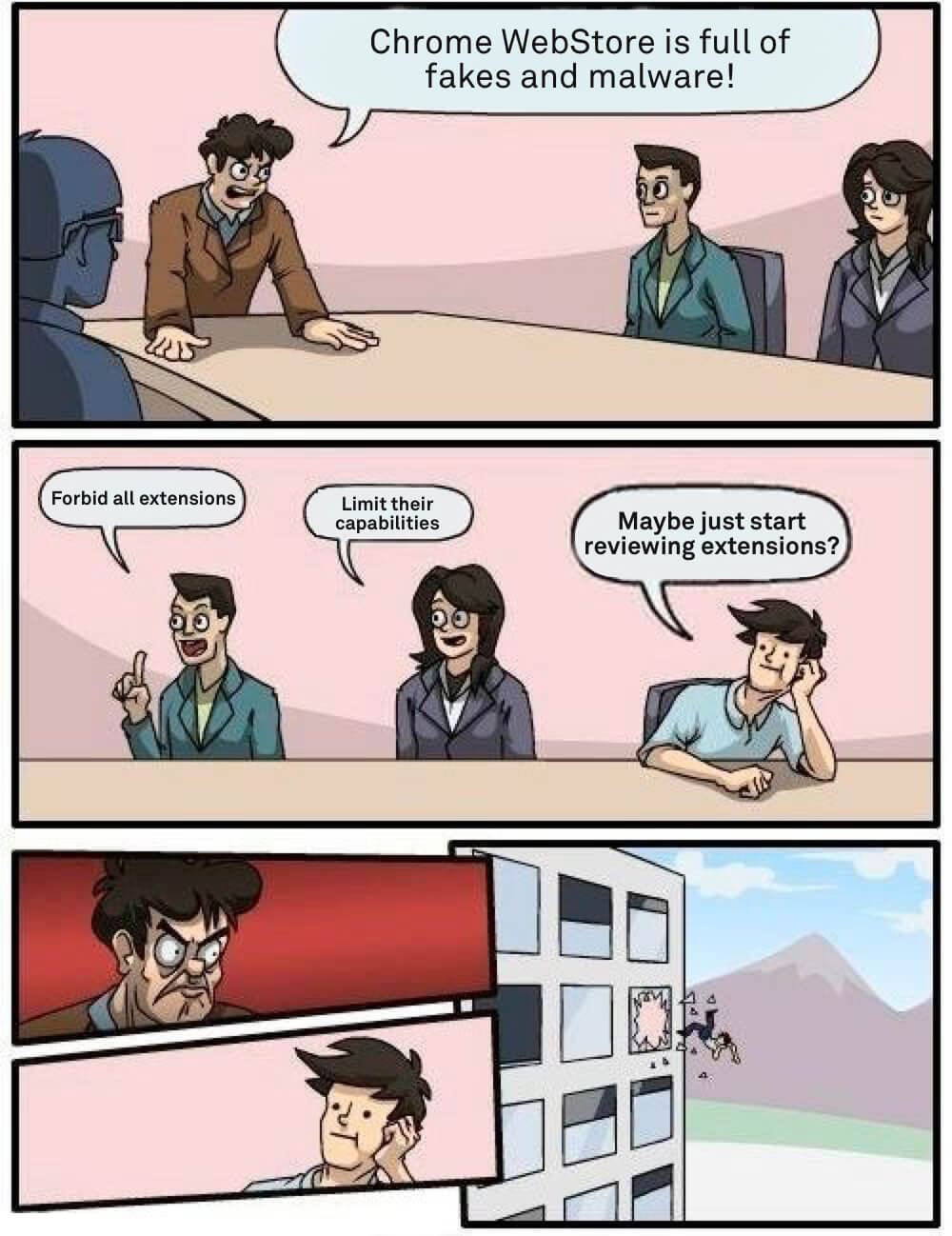
Somewhere at Google office

How can you protect yourself?

As you can see, even journalists sometimes fall for the fakes so this is a difficult question. A year ago I'd have said that the recipe is simple — install extensions only from the developers you trust.

The situation is now worse than before so I'd like to add a couple of things to the list of recommendations, at least until things somehow change:

  1. If you're going to install a browser extension, think again. Maybe you don't really need it?
  2. Don't believe what you read in the extension's description. Be aware that there's almost no review process, and this can easily be a fake.
  3. Reading the users' reviews won't help as well. These two extensions had excellent reviews and yet they were malicious.
  4. Don't use the WebStore internal search, install extensions from the trusted developers' websites directly.

UPD (Sep 18th):
Both malicious extensions we mentioned in this article are currently blocked in Chrome. While this is undoubtedly good news, Google needs to do much, much more to prove they really care about their users' safety.


این پست را دوست داشتید؟
AdGuard VPN AdGuard DNS AdGuard Mail AdGuard Wallet
صفحه اصلی AdGuard برای Windows
صفحه محافظت AdGuard برای Windows که ویژگی‌ها و تنظيمات محافظت را نشان می‌دهد
صفحه آمار AdGuard برای Windows که آمار تبلیغات و رَدیاب‌های مسدود شده را نشان می‌دهد
صفحه مدیریت برنامه AdGuard برای Windows که گزینه‌های مدیریت محافظت برای برنامک‌های نصب‌شده روی دستگاه را نشان می‌دهد
۲۰٬۴۴۳ 20443 بررسی
بسیار عالی!

AdGuard برای Windows: مسدودکننده تبلیغات برای رایانه شخصی

AdGuard برای ویندوز چیزی فراتر از یک مسدودکننده تبلیغات است. این یک ابزار چندمنظوره است که تبلیغات را مسدود می‌کند، دسترسی به سایت‌های خطرناک را کنترل می‌کند، بارگذاری صفحات را سریع‌تر می‌کند و از کودکان در برابر محتوای نامناسب محافظت می‌کند

با دانلود برنامه شما شرایط توافقنامه مجوز را قبول می کنید
Microsoft Store
با دانلود برنامه شما شرایط توافقنامه مجوز را قبول می کنید
AdGuard برای Windows v8.0، دوره آزمایشی 14روزه
صفحه اصلی AdGuard برای Mac
صفحه حالت نهان AdGuard برای Mac
۲۰٬۴۴۳ 20443 بررسی
بسیار عالی!

AdGuard برای مک: مسدودکنندهٔ تبلیغات در سطح سیستم

AdGuard برای Mac یک مسدودکنندهٔ تبلیغات منحصربه‌فرد است که با در نظر گرفتن macOS طراحی شده است. علاوه بر محافظت از شما در برابر تبلیغات آزاردهنده در مرورگرها و برنامه‌ها، شما را در برابر ردیابی، فیشینگ و کلاهبرداری نیز محافظت می‌کند
با دانلود برنامه شما شرایط توافقنامه مجوز را قبول می کنید
بیشتر بخوانید
AdGuard برای Mac v2.19، دوره آزمایشی 14روزه
صفحه اصلی AdGuard برای Android
صفحه حفاظت در برابر ردیابی AdGuard برای Android
صفحه مدیریت برنامه AdGuard برای Android که گزینه‌های مدیریت محافظت برای برنامک‌های نصب‌شده روی دستگاه را نشان می‌دهد
صفحه آمار AdGuard برای Android که آمار تبلیغات و رَدیاب‌های مسدود شده را نشان می‌دهد
صفحه اصلی مرورگر خصوصی AdGuard برای Android
کد QR برای بارگیری AdGuard برای Android
۲۰٬۴۴۳ 20443 بررسی
بسیار عالی!

ادگارد برای اندروید: مسدودکنندهٔ تبلیغات برای همهٔ برنامه‌ها

تبلیغات و ردیاب‌ها را در همه مرورگرها، بازی‌ها و سایر برنامه‌ها مسدود می‌کند. از حریم خصوصی شما محافظت می‌کند و به شما امکان می‌دهد کنترل کنید برنامه‌هایتان چگونه از اینترنت استفاده می‌کنند. از طریق APK نصب می‌شود
با دانلود برنامه شما شرایط توافقنامه مجوز را قبول می کنید
بیشتر بخوانید
اسکن برای دانلود
استفاده از هر کد خوان QR موجود در دستگاه شما
AdGuard برای اندروید v4.14، دوره آزمایشی 14روزه
صفحه اصلی AdGuard برای iOS
صفحه محافظت AdGuard برای iOS که ویژگی‌ها و تنظيمات محافظت را نشان می‌دهد
صفحه آمار AdGuard برای iOS که آمار تبلیغات و رَدیاب‌های مسدود شده را نشان می‌دهد
کد QR برای بارگیری AdGuard برای iOS
۲۰٬۴۴۳ 20443 بررسی
بسیار عالی!

AdGuard برای iOS: مسدودکنندهٔ تبلیغات فراتر از Safari

بهترین مسدودکننده تبلیغات iOS برای iPhone و iPad. AdGuard همه انواع تبلیغات و ردیاب‌ها را در Safari حذف می‌کند و از حریم خصوصی شما در همه برنامه‌ها در سطح DNS محافظت می‌کند
با دانلود برنامه شما شرایط توافقنامه مجوز را قبول می کنید
بیشتر بخوانید
اسکن برای دانلود
استفاده از هر کد خوان QR موجود در دستگاه شما
AdGuard برای iOS نسخه 4.5
صفحه اصلی AdGuard Content Blocker
صفحه فیلترها در AdGuard Content Blocker
صفحه تنظيمات در AdGuard Content Blocker
۲۰٬۴۴۳ 20443 بررسی
بسیار عالی!

مسدودساز محتوای AdGuard

AdGuard Content Blocker انواع تبلیغات را در مرورگرهای تلفن همراه که از فناوری مسدود کردن محتوا پشتیبانی می کنند حذف می کند - یعنی اینترنت سامسونگ و مرورگر Yandex. ویژگی های آن در مقایسه با AdGuard برای اندروید محدود است، اما رایگان، نصب آسان و کارآمد است
با دانلود برنامه شما شرایط توافقنامه مجوز را قبول می کنید
بیشتر بخوانید
مسدودساز محتوای AdGuard نسخه 2.8
صفحه اصلی افزونه مرورگر AdGuard
صفحه حفاظت در برابر ردیابی افزونه مرورگر AdGuard
۲۰٬۴۴۳ 20443 بررسی
بسیار عالی!

افزونه مرورگر AdGuard

AdGuard سریع ترین و سبک ترین افزونه ای است که انواع تبلیغات را در صفحات وب مسدود می کند! AdGuard را برای مرورگری که میخواهید انتخاب کنید و وب گردی امن و سریع را تجربه کنید.
نصب
با دانلود برنامه شما شرایط توافقنامه مجوز را قبول می کنید
نصب
با دانلود برنامه شما شرایط توافقنامه مجوز را قبول می کنید
نصب
با دانلود برنامه شما شرایط توافقنامه مجوز را قبول می کنید
نصب
با دانلود برنامه شما شرایط توافقنامه مجوز را قبول می کنید
نصب
با دانلود برنامه شما شرایط توافقنامه مجوز را قبول می کنید
بیشتر بخوانید
نصب
با دانلود برنامه شما شرایط توافقنامه مجوز را قبول می کنید
بیشتر بخوانید
افزونه مرورگر AdGuard نسخه 5.5
صفحه اصلی AdGuard Assistant
۲۰٬۴۴۳ 20443 بررسی
بسیار عالی!

AdGuard دستیار

افزونه مرورگر همراه برای برنامه های دسکتاپ AdGuard. این امکان را به شما می دهد که آیتم های سفارشی را در وب سایت ها مسدود کنید، وب سایت ها را به لیست مجاز اضافه کنید و گزارش ها را مستقیما از مرورگر خود ارسال کنید
AdGuard دستیار نسخه 1.4
۲۰٬۴۴۳ 20443 بررسی
بسیار عالی!

AdGuard Home

AdGuard Home یک راه حل مبتنی بر شبکه برای مسدود کردن تبلیغات و ردیاب ها است. آن را یک بار روی روتر خود نصب کنید تا همه دستگاه های موجود در شبکه خانگی خود را پوشش دهید - بدون نیاز به نرم افزار مشتری اضافی. این امر به ویژه برای دستگاه های مختلف اینترنت اشیا که اغلب حریم خصوصی شما را تهدید می کنند بسیار مهم است
AdGuard Home نسخه 0.107
صفحه اصلی AdGuard Pro برای iOS
صفحه محافظت AdGuard Pro برای iOS که قابلیت‌ها و تنظيمات محافظت را نشان می‌دهد
صفحه آمار AdGuard Pro برای iOS که آمار تبلیغات و رَدیاب‌های مسدود شده را نشان می‌دهد
۲۰٬۴۴۳ 20443 بررسی
بسیار عالی!

AdGuard Pro برای iOS

AdGuard Pro برای iOS با تمام ویژگی‌های پیشرفته محافظت در برابر مسدود کردن تبلیغات ارائه می‌شود. این نسخه همان ابزارهای نسخه پولی AdGuard برای iOS را ارائه می‌دهد. این نسخه در مسدود کردن تبلیغات در سافاری عالی عمل می‌کند و به شما امکان می‌دهد تنظیمات DNS را برای محافظت متناسب با نیاز خود سفارشی کنید. این نسخه تبلیغات را در مرورگرها و برنامه‌ها مسدود می‌کند، از فرزندان شما در برابر محتوای نامناسب محافظت می‌کند و اطلاعات شخصی شما را ایمن نگه می‌دارد.
با دانلود برنامه شما شرایط توافقنامه مجوز را قبول می کنید
بیشتر بخوانید
AdGuard Pro برای iOS نسخه 4.5
صفحه اصلی AdGuard Mini برای Mac
صفحه محافظت Safari در AdGuard Mini برای Mac
صفحه ایجاد رویه در AdGuard Mini برای Mac
۲۰٬۴۴۳ 20443 بررسی
بسیار عالی!

AdGuard Mini برای Mac — مسدود کننده تبلیغات Safari

AdGuard Mini برای Mac یک مسدودکنندهٔ قدرتمند تبلیغات برای Safari است. این برنامک سبک، تبلیغات را حذف می‌کند، ردیاب‌ها را مسدود می‌کند و بارگذاری صفحه را سریع‌تر می‌کند. این ابزار به شما کمک می‌کند تا بدون حواس‌پرتی در Safari گشت‌و‌گذار کنید و داده‌های خود را خصوصی نگه دارید
نصب
با دانلود برنامه شما شرایط توافقنامه مجوز را قبول می کنید
بیشتر بخوانید
AdGuard Mini برای Mac نسخه 2.3
صفحه اصلی AdGuard برای Android TV با محافظت فعال شده
صفحه مسدودسازی تبلیغات AdGuard برای Android TV که ویژگی‌ها و تنظيمات آن را نشان می‌دهد
صفحه تنظيمات AdGuard برای Android TV
صفحه مدیریت برنامه AdGuard برای Android TV که برنامک‌هایی را نشان می‌دهد که در آن‌ها تبلیغات و رَدیاب‌ها مسدود شده‌اند
۲۰٬۴۴۳ 20443 بررسی
بسیار عالی!

AdGuard برای Android TV

AdGuard برای Android TV تنها برنامه‌ای است که تبلیغات را مسدود می‌کند، از حریم خصوصی شما محافظت کرده و همانند یک دیوار آتش برای تلویزیون هوشمند شما عمل می‌کند. در مورد تهدیدات وب هشدار دریافت کنید، از DNS ایمن استفاده کرده و از انتقال داده اینترنتی رمزگذاری شده بهره‌مند شوید. آرامش داشته باشید و غرق نمایش‌های مورد علاقه خود با امنیت عالی و تبلیغات صفر شوید!
AdGuard برای Android TV v4.14، دوره آزمایشی 14روزه
نماد AdGuard، Agnar، در حالی که پنگوئن Linux را در دست دارد
۲۰٬۴۴۳ 20443 بررسی
بسیار عالی!

AdGuard برای لینوکس

AdGuard برای لینوکس اولین مسدود کننده تبلیغات لینوکس در سراسر جهان است. تبلیغات و ردیاب‌ها را در سطح دستگاه مسدود کنید، از بین فیلترهای از پیش نصب شده انتخاب کنید یا فیلترهای خود را اضافه کنید - همه از طریق رابط خط فرمان
AdGuard برای لینوکس نسخه 1.4
۲۰٬۴۴۳ 20443 بررسی
بسیار عالی!

AdGuard Temp Mail

یک تولید‌کننده رایانشانی موقت رایگان که شما را ناشناس نگه می‌دارد و از حریم خصوصی شما محافظت می‌کند. هرزنامه‌ای در صندوق ورودی اصلی شما در کار نخواهد بود!
۲۰٬۴۴۳ 20443 بررسی
بسیار عالی!

AdGuard VPN

75 محل در سرتاسر جهان

دسترسی به هر محتوا

رمزگذاری قوی

سیاست عدم ذخیره وقایع

سریعترین اتصال

24/7 پشتیبانی

ارزیابی رایگان
با دانلود برنامه شما شرایط توافقنامه مجوز را قبول می کنید
بیشتر بخوانید
۲۰٬۴۴۳ 20443 بررسی
بسیار عالی!

AdGuard DNS

AdGuard DNS راه حلی جایگزین برای مسدودسازی تبلیغات، حفاظت حریم خصوصی و نظارت والدین است. راه اندازی آسان و استفاده رایگان، آن حداقل حفاظت لازم در برابر تبلیغات آنلاین،ردیاب ها و فیشینگ ها را میدهد،و در همه سیستم عامل ها و دستگاه ها کار می کند.
۲۰٬۴۴۳ 20443 بررسی
بسیار عالی!

AdGuard Mail

از هویت خود محافظت کنید، از هرزنامه دوری نمایید و صندوق ورودی خود را با نام‌های مستعار و رایانشانی‌های موقت ما امن نگه دارید. از خدمت رایگان فوروارد رایانامه و برنامک‌های ما برای همه سامانه‌عامل‌ها لذت ببرید
۲۰٬۴۴۳ 20443 بررسی
بسیار عالی!

AdGuard Wallet

یک کیف پول ارز دیجیتال امن و خصوصی که به شما امکان کنترل کامل بر دارایی‌هایتان را می‌دهد. چندین کیف پول را مدیریت کنید و هزاران ارز دیجیتال را برای ذخیره، ارسال و مبادله کشف کنید.
در حال بارگیری AdGuard برای نصب AdGuard، روی پرونده نشان داده شده توسط پیکان کلیک کنید گزینه "بازکردن " را انتخاب و روی "تایید" کلیک کنید — برای دانلود فایل منتظر بمانید. در پنجره باز شده، آیکون AdGuard را به پوشه "برنامه ها" بکشید.بابت انتخاب AdGuard متشکریم! گزینه "بازکردن " را انتخاب و روی "تایید" کلیک کنید — برای دانلود فایل منتظر بمانید. در پنجره باز شده روی "نصب" کلیک کنید.بابت انتخاب AdGuard متشکریم!
AdGuard را روی دستگاه تلفن همراه خود نصب کنید

















































