Introducing AdGuard Home

As many of you probably know, AdGuard provides a lot of ways to block ads in form of various apps and browser extensions. Some even heard about AdGuard DNS, a way to block ads without installing anything on your device. And today we are announcing the official release of a completely new product — AdGuard Home, which carries a lot of cool new stuff with it.

The short version: AdGuard Home is a network-wide ad-and-tracker blocking DNS server. Its purpose is to let you control your entire network and all your devices, and it does not require using a client-side program. At the same, AdGuard Home features a web interface to easily manage the filtering process.


Where it started

The first step towards AdGuard Home was made two years ago, with the announcement of the AdGuard DNS beta. For the first time, we offered a way to block ads without having to install anything on your device, like a browser extension or an app. And while AdGuard Home is a standalone project, it took a lot from its spiritual predecessor.

In fact, we should probably "thank" Apple for speeding up the development of AdGuard Home. When Apple decided that you couldn't control the traffic on your own devices anymore, we sought ways to put users back in charge of their own gadgets. Naturally, the DNS approach looked the most promising. It's too bad Apple won't allow apps that manage DNS requests anywhere near the AppStore — well, what if you didn't need any apps? And this is the main strength of AdGuard Home: you can set it up anywhere, but I'm getting ahead of myself.

Honestly, I would be lying if I said that we implemented 100% of everything that we wanted. That is why we are calling this version of AdGuard Home "v0.9".

One of the main reasons is that the installation of AdGuard Home is currently not the easiest task for an unprepared user, simplifying it is one of the highest priority tasks as we move forward.

Don't get me wrong, it works perfectly fine in its current state, there's just even more we want to add — and we will, in the official v1.0 release that will be announced before you know it.

But we simply couldn't wait any longer, so meet AdGuard Home 0.9!

Why use it?

It is probably not news to you that ads and trackers follow you on the web wherever you go, not only on your computer, but also on your smartphone (in fact, probably even more on your smartphone!), and even in things like smart fridges, smart vacuums and — God help us all! — smart light bulbs!

Even if you have nothing against companies gathering data about you, tracking can be plain dangerous. Ads are no better — they have long become a gateway to all kinds of malware, viruses, crypto lockers, phishing and more trackers.

Given how densely we are surrounded by gadgets in our life, it can get really tiresome to find, install, configure and maintain an ad blocker app for each of them, and, as I've mentioned already, in case of "smart furniture" this is not possible at all. This is where AdGuard Home comes into play — and shines. It provides a unified solution for blocking ads and trackers on all devices within your network, most commonly your home Wi-Fi network, but nothing prevents you from setting it up in your workspace or anywhere else.

Features and advantages of AG Home

The first thing you will notice is the web interface. We think it looks neat and tidy:
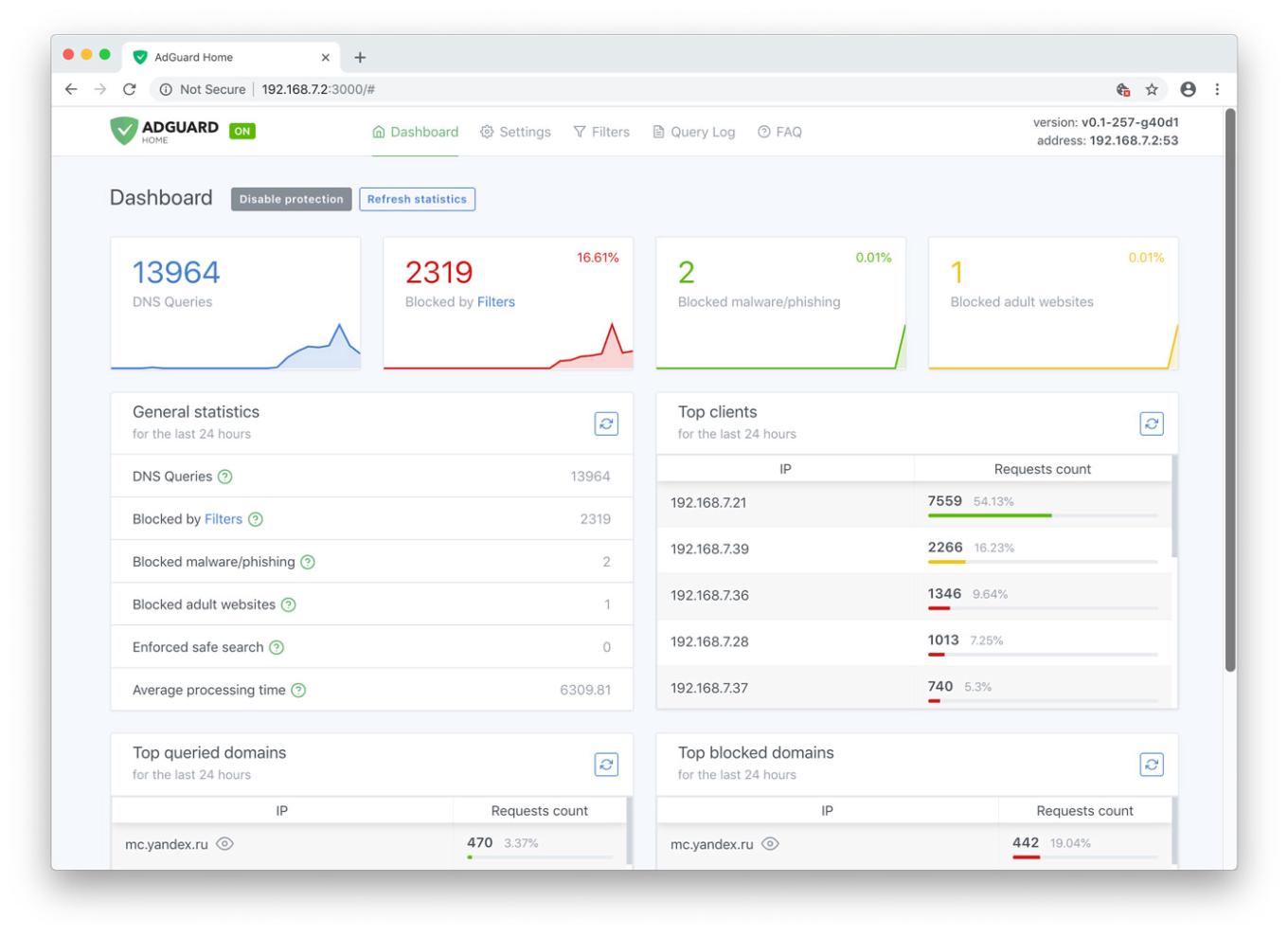
AdGuard Home Dashboard

Let's have a look at the main tab. Here you will find all kinds of statistics, including a vivid graphical representation. As you probably noticed, it looks just like a normal app, but you only need it alone to manage filtering on all your devices within the network.

Unlike application-based solutions for Android and iOS, AdGuard Home is not dependent on media giants like Google and Apple and their countless artificial limitations. Your personal preference is the only deciding factor

Now let's go to the "Settings" tab and look more closely at each of the options offered.
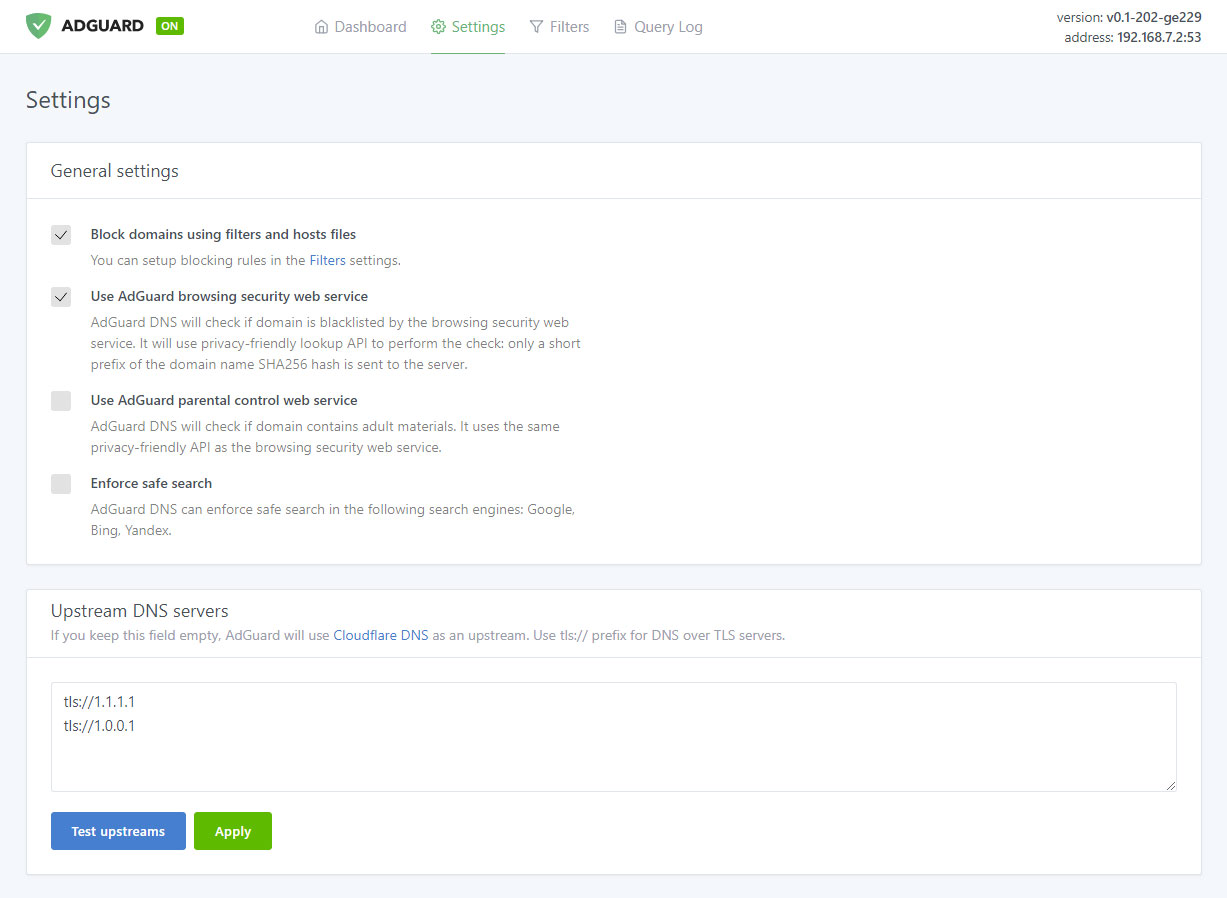
Manage filtering process

Ad blocking

The name speaks for itself. This is the main module, keep it enabled if you want AdGuard Home to block ads and tracking in your network — and it will block a lot. Just look at this comparison:
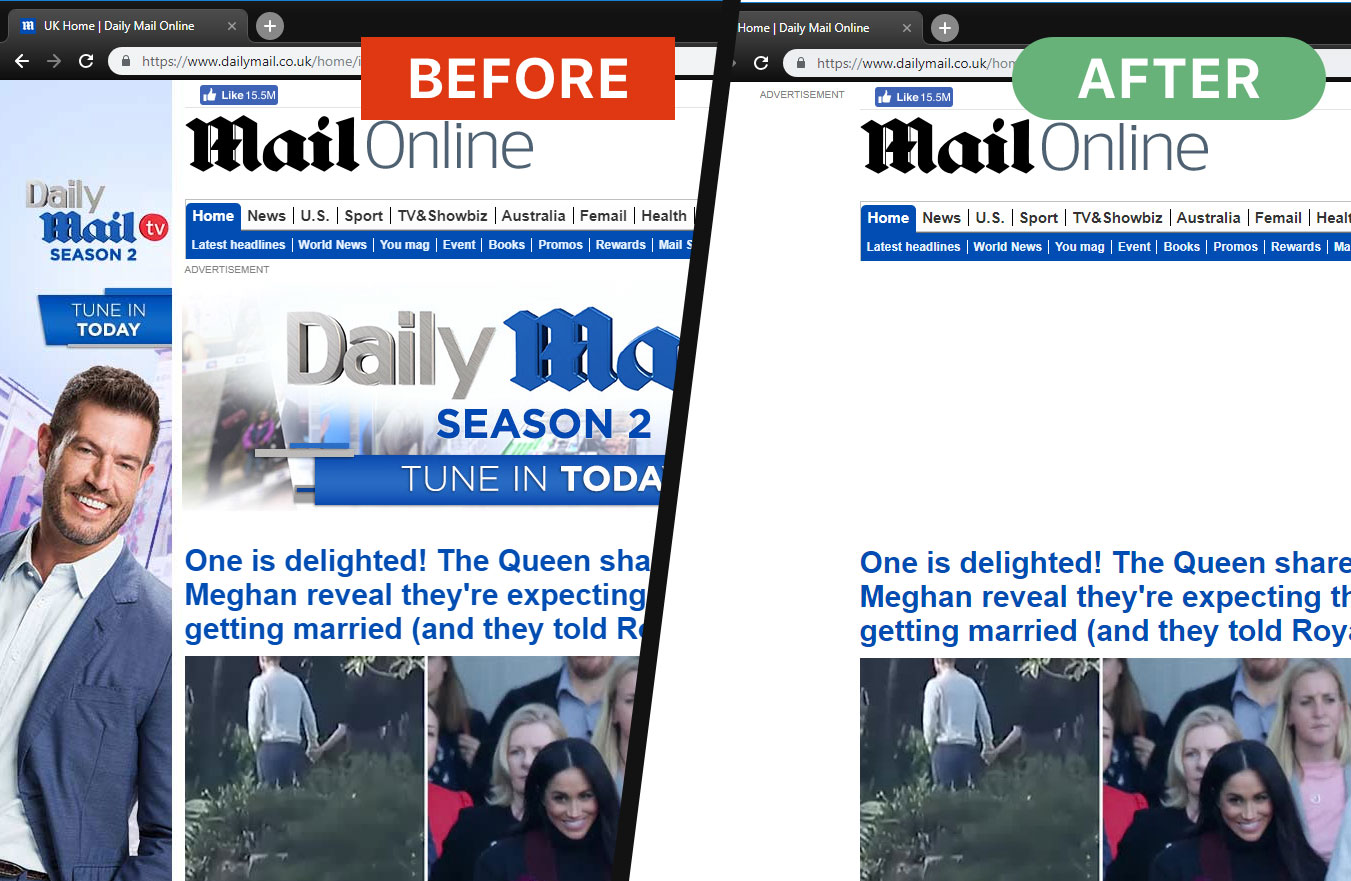
Ads are gone now

And this is not just aesthetics, look at the amount of saved traffic and load speed:
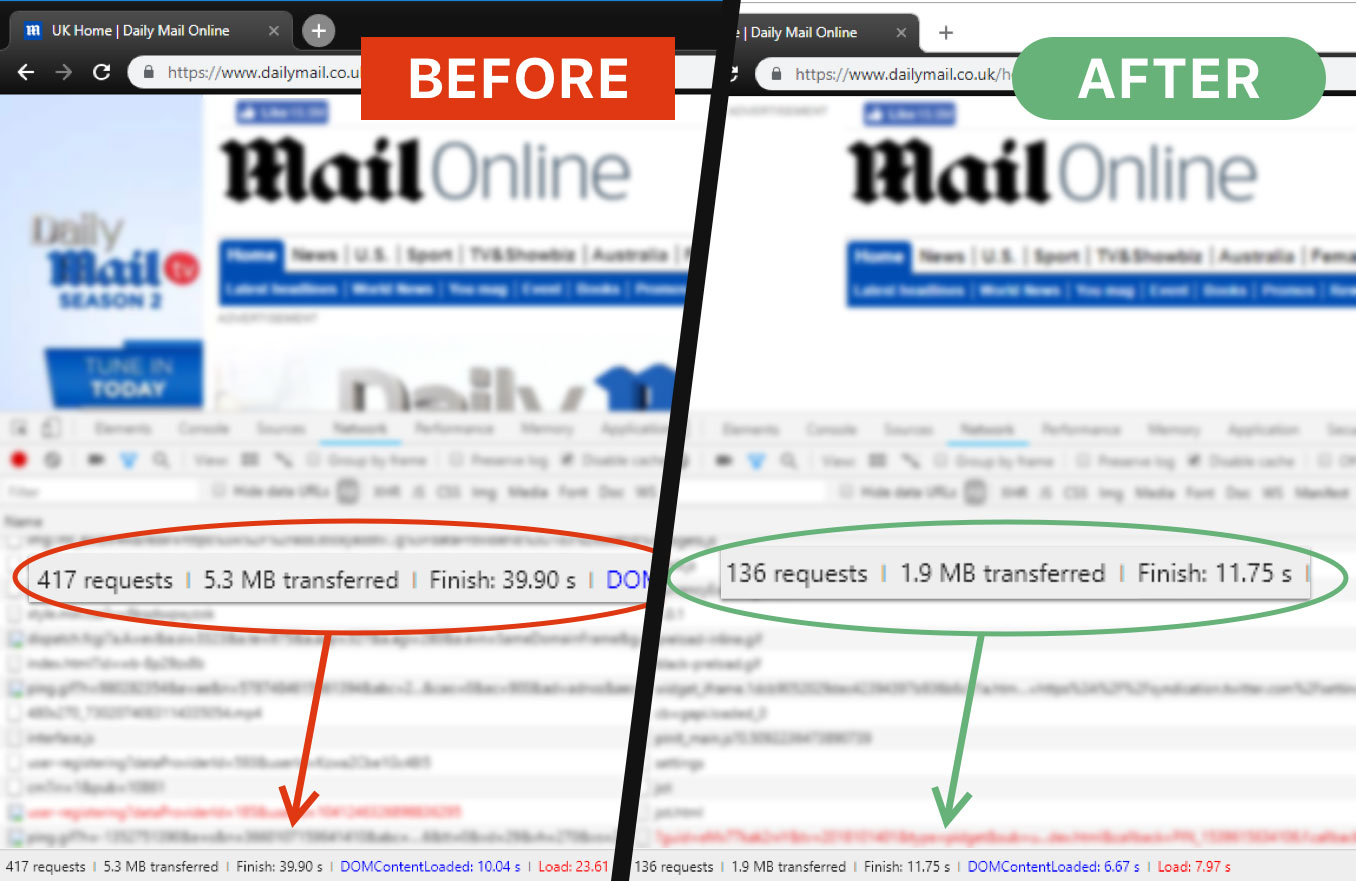
AG Home saves time and traffic

That is more than 3Mb of traffic and 15 seconds of load speed, and that's only one page.

Browsing Security
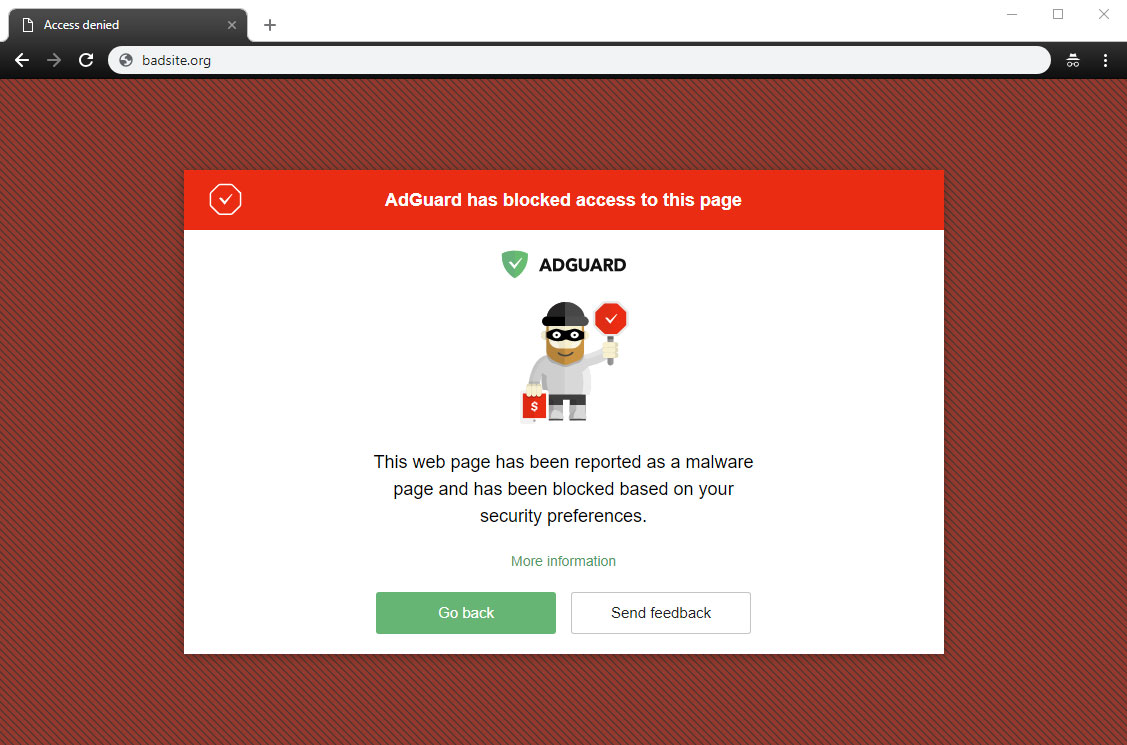
AG Home blocked a dangerous website

This stands for anti-malware and anti-phishing protection. AG Home will block all potentially dangerous requests to malicious and fraudulent websites, protecting you from online threats.

Parental control
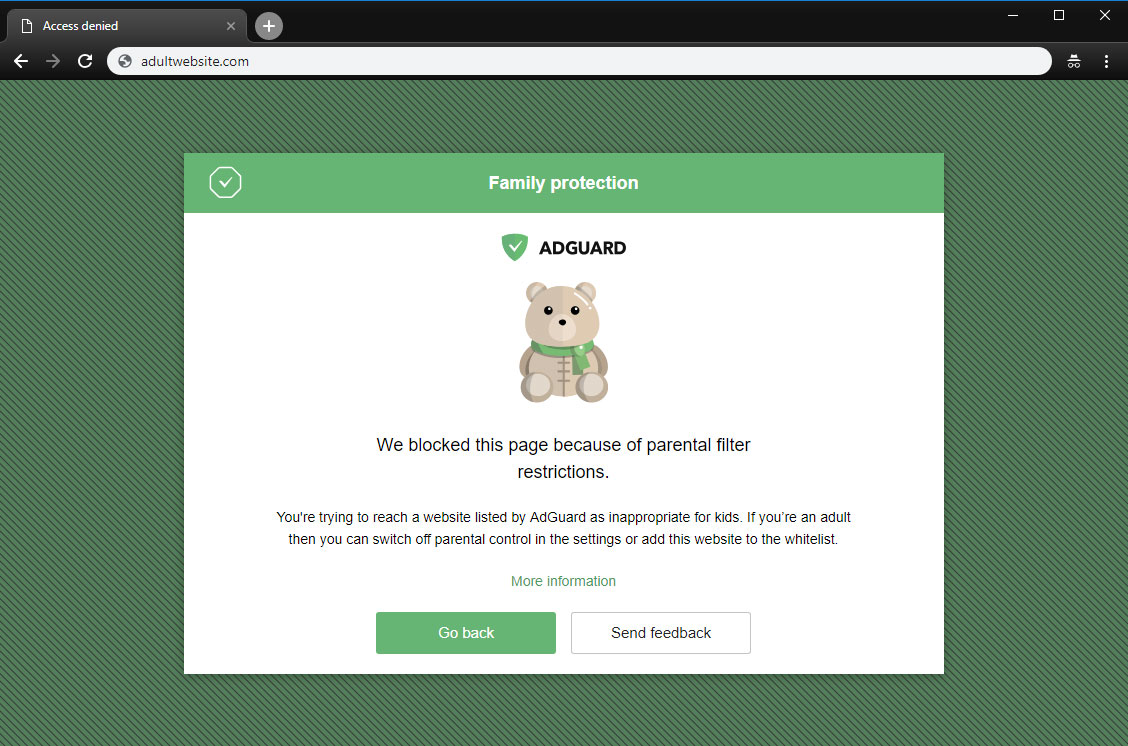
A page is blocked by Parental control

This is useful if you have kids and you don't want them to access websites with inappropriate content.

Safe search
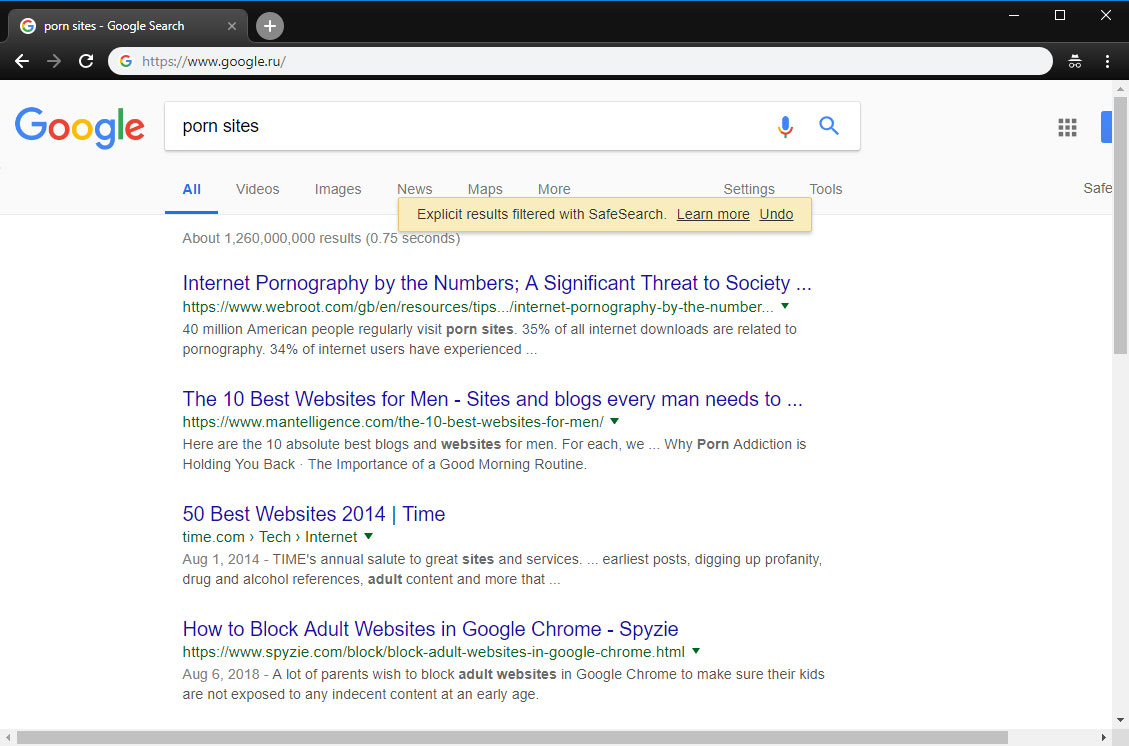
AG Home enforced "Safe search"

In the same vein, this option enforces "Safe search" mode in the most popular search engines (when enabled, it omits adult websites and pictures from being displayed in the search results)

Custom upstream servers

At the bottom of the "Settings" tab is a window to select a preferable upstream DNS server. Don't bother yourself with it unless you know what it means — this option is not essential to the quality filtering at all, but rather is a nice bonus.

AdGuard Home was developed based on the production-ready AdGuard DNS software, which has been used successfully by millions of users from around the globe for the last two years

Filter lists
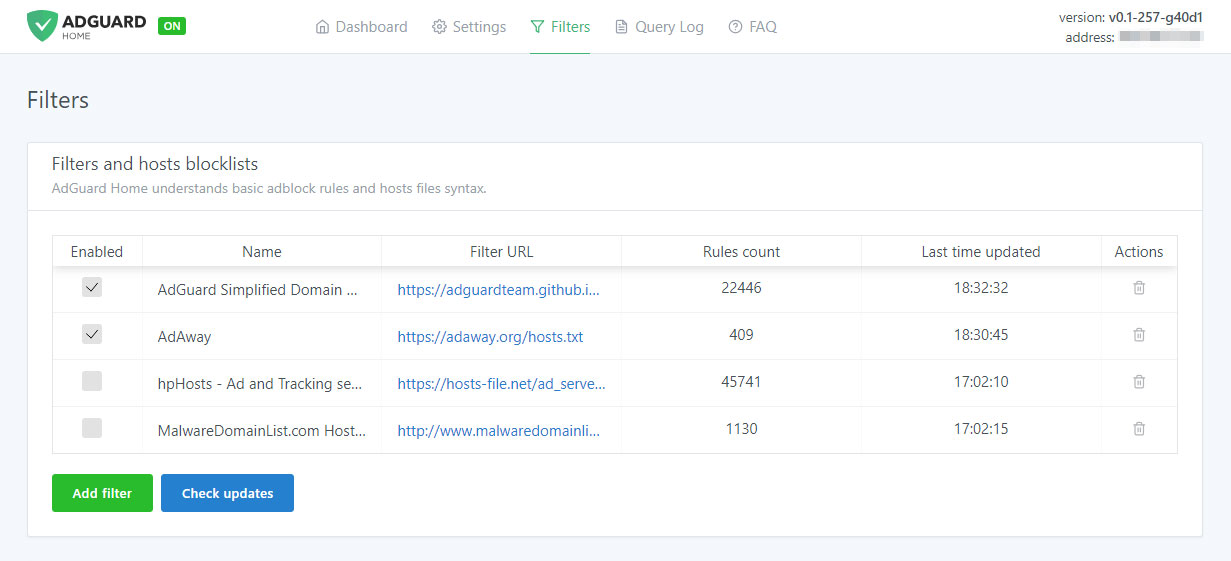
Add third-party filters

The third tab is devoted to filter settings. By default, ad blocking will be managed by the AdGuard SDN filter, but you have an option to add other filters and hosts-based blocking lists (basically, those are lists of rules that tell AG Home what exactly to block), or even create your own custom filtering rules. Multiple filters and hosts lists are available on the Internet.

AdGuard Home is developed by AdGuard — known experts in ad blocking and privacy protection. Over 25,000,000 users entrusted us with their online safety and never looked back

Query log
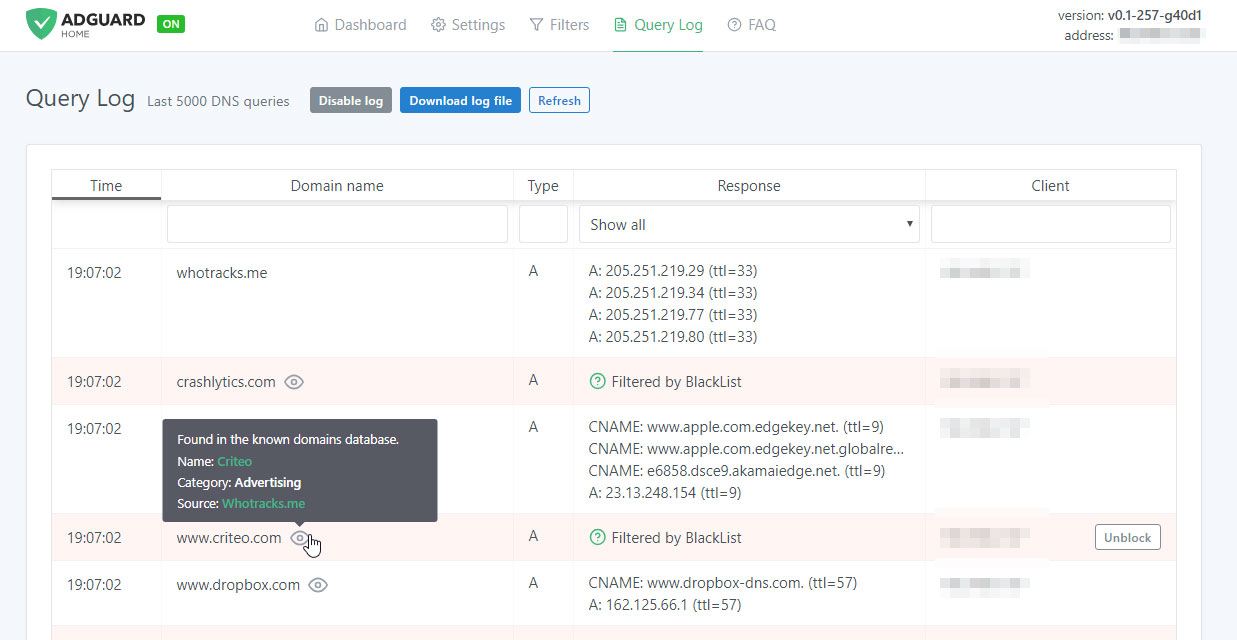
Monitor network activity

In the next tab there is a query log that offers everything you would expect from it — complete information on each and every request, all kinds of sorting. For each blocked request, there is a small tooltip telling you what rule it was filtered by, additional information about its origin and an "Unblock" button right next to it. Similarly, for unblocked requests there is a "Block" button. The log keeps track of the last 5000 queries and, of course, you can download the log file.

Open source

AdGuard Home is an open source project. We would be delighted to see any feedback, suggestions or other contribution from you. Whatever it is you have for us, the place to go to let us know about it is always the GitHub repository.

In summary, AdGuard Home gives you complete control over what is happening within your network.

How to set it up

Currently, you can install AdGuard Home on MacOS, Linux (x32 or x64), and Raspberry Pi. There is no need to go into technical details — we have the installation process described in the dedicated GitHub repository. Also, detailed guides on installing AG DNS to VPS and Raspberry Pi are available in our Wiki.

Further plans

We are not going to stop here: on the contrary, we have big plans regarding the future development of AdGuard Home. Here is a short list of what we are planning to do next:

  • One-click setup of your private VPN integrated with AdGuard Home
  • Improve the UI, make it better both functionally and aesthetically (send us your suggestions!)
  • Enhance the encryption options — DNSCrypt and DoH support, a possibility to run in the encrypted DNS server mode
  • Make it easier to use AdGuard Home with mobile devices (e.g. Mobileconfig for iOS)
  • Integrate AG Home with AdGuard applications

Being optimistic and looking a bit further, we would like AG Home to eventually become the privacy protection center for you and your devices, simple to use and easy to configure, where you can set up a personal proxy, VPN or encrypted DNS just in a couple of clicks.

Can I uninstall my ad blocker now?

The main advantage of AG Home lies in its ability to protect the whole network. When it comes to the sheer "filtering power", DNS-based ad blocking is inherently less potent and flexible than the approach taken by browser extensions and especially less so than dedicated tools. As an example, this article compares AG for Android and hosts-based ad blockers, and it gives a good impression of their relative capabilities. Whether you need this level of protection or not is a matter only you can decide.

And that's about it, hope you'll like AdGuard Home and will find a good use for it!

Do you have any questions or suggestions? We're answering everything on Product Hunt today!

این پست را دوست داشتید؟
AdGuard VPN AdGuard DNS AdGuard Mail AdGuard Wallet
صفحه اصلی AdGuard برای Windows
صفحه محافظت AdGuard برای Windows که ویژگی‌ها و تنظيمات محافظت را نشان می‌دهد
صفحه آمار AdGuard برای Windows که آمار تبلیغات و رَدیاب‌های مسدود شده را نشان می‌دهد
صفحه مدیریت برنامه AdGuard برای Windows که گزینه‌های مدیریت محافظت برای برنامک‌های نصب‌شده روی دستگاه را نشان می‌دهد
۲۰٬۴۴۲ 20442 بررسی
بسیار عالی!

AdGuard برای Windows: مسدودکننده تبلیغات برای رایانه شخصی

AdGuard برای ویندوز چیزی فراتر از یک مسدودکننده تبلیغات است. این یک ابزار چندمنظوره است که تبلیغات را مسدود می‌کند، دسترسی به سایت‌های خطرناک را کنترل می‌کند، بارگذاری صفحات را سریع‌تر می‌کند و از کودکان در برابر محتوای نامناسب محافظت می‌کند
با دانلود برنامه شما شرایط توافقنامه مجوز را قبول می کنید
Microsoft Store
با دانلود برنامه شما شرایط توافقنامه مجوز را قبول می کنید
AdGuard برای Windows v8.0، دوره آزمایشی 14روزه
صفحه اصلی AdGuard برای Mac
صفحه حالت نهان AdGuard برای Mac
۲۰٬۴۴۲ 20442 بررسی
بسیار عالی!

AdGuard برای مک: مسدودکنندهٔ تبلیغات در سطح سیستم

AdGuard برای Mac یک مسدودکنندهٔ تبلیغات منحصربه‌فرد است که با در نظر گرفتن macOS طراحی شده است. علاوه بر محافظت از شما در برابر تبلیغات آزاردهنده در مرورگرها و برنامه‌ها، شما را در برابر ردیابی، فیشینگ و کلاهبرداری نیز محافظت می‌کند
با دانلود برنامه شما شرایط توافقنامه مجوز را قبول می کنید
بیشتر بخوانید
AdGuard برای Mac v2.19، دوره آزمایشی 14روزه
صفحه اصلی AdGuard برای Android
صفحه حفاظت در برابر ردیابی AdGuard برای Android
صفحه مدیریت برنامه AdGuard برای Android که گزینه‌های مدیریت محافظت برای برنامک‌های نصب‌شده روی دستگاه را نشان می‌دهد
صفحه آمار AdGuard برای Android که آمار تبلیغات و رَدیاب‌های مسدود شده را نشان می‌دهد
صفحه اصلی مرورگر خصوصی AdGuard برای Android
کد QR برای بارگیری AdGuard برای Android
۲۰٬۴۴۲ 20442 بررسی
بسیار عالی!

ادگارد برای اندروید: مسدودکنندهٔ تبلیغات برای همهٔ برنامه‌ها

تبلیغات و ردیاب‌ها را در همه مرورگرها، بازی‌ها و سایر برنامه‌ها مسدود می‌کند. از حریم خصوصی شما محافظت می‌کند و به شما امکان می‌دهد کنترل کنید برنامه‌هایتان چگونه از اینترنت استفاده می‌کنند. از طریق APK نصب می‌شود
با دانلود برنامه شما شرایط توافقنامه مجوز را قبول می کنید
بیشتر بخوانید
اسکن برای دانلود
استفاده از هر کد خوان QR موجود در دستگاه شما
AdGuard برای اندروید v4.14، دوره آزمایشی 14روزه
صفحه اصلی AdGuard برای iOS
صفحه محافظت AdGuard برای iOS که ویژگی‌ها و تنظيمات محافظت را نشان می‌دهد
صفحه آمار AdGuard برای iOS که آمار تبلیغات و رَدیاب‌های مسدود شده را نشان می‌دهد
کد QR برای بارگیری AdGuard برای iOS
۲۰٬۴۴۲ 20442 بررسی
بسیار عالی!

AdGuard برای iOS: مسدودکنندهٔ تبلیغات فراتر از Safari

بهترین مسدودکننده تبلیغات iOS برای iPhone و iPad. AdGuard همه انواع تبلیغات و ردیاب‌ها را در Safari حذف می‌کند و از حریم خصوصی شما در همه برنامه‌ها در سطح DNS محافظت می‌کند
با دانلود برنامه شما شرایط توافقنامه مجوز را قبول می کنید
بیشتر بخوانید
اسکن برای دانلود
استفاده از هر کد خوان QR موجود در دستگاه شما
AdGuard برای iOS نسخه 4.5
صفحه اصلی AdGuard Content Blocker
صفحه فیلترها در AdGuard Content Blocker
صفحه تنظيمات در AdGuard Content Blocker
۲۰٬۴۴۲ 20442 بررسی
بسیار عالی!

مسدودساز محتوای AdGuard

AdGuard Content Blocker انواع تبلیغات را در مرورگرهای تلفن همراه که از فناوری مسدود کردن محتوا پشتیبانی می کنند حذف می کند - یعنی اینترنت سامسونگ و مرورگر Yandex. ویژگی های آن در مقایسه با AdGuard برای اندروید محدود است، اما رایگان، نصب آسان و کارآمد است
با دانلود برنامه شما شرایط توافقنامه مجوز را قبول می کنید
بیشتر بخوانید
مسدودساز محتوای AdGuard نسخه 2.8
صفحه اصلی افزونه مرورگر AdGuard
صفحه حفاظت در برابر ردیابی افزونه مرورگر AdGuard
۲۰٬۴۴۲ 20442 بررسی
بسیار عالی!

افزونه مرورگر AdGuard

AdGuard سریع ترین و سبک ترین افزونه ای است که انواع تبلیغات را در صفحات وب مسدود می کند! AdGuard را برای مرورگری که میخواهید انتخاب کنید و وب گردی امن و سریع را تجربه کنید.
نصب
با دانلود برنامه شما شرایط توافقنامه مجوز را قبول می کنید
نصب
با دانلود برنامه شما شرایط توافقنامه مجوز را قبول می کنید
نصب
با دانلود برنامه شما شرایط توافقنامه مجوز را قبول می کنید
نصب
با دانلود برنامه شما شرایط توافقنامه مجوز را قبول می کنید
نصب
با دانلود برنامه شما شرایط توافقنامه مجوز را قبول می کنید
بیشتر بخوانید
نصب
با دانلود برنامه شما شرایط توافقنامه مجوز را قبول می کنید
بیشتر بخوانید
افزونه مرورگر AdGuard نسخه 5.5
صفحه اصلی AdGuard Assistant
۲۰٬۴۴۲ 20442 بررسی
بسیار عالی!

AdGuard دستیار

افزونه مرورگر همراه برای برنامه های دسکتاپ AdGuard. این امکان را به شما می دهد که آیتم های سفارشی را در وب سایت ها مسدود کنید، وب سایت ها را به لیست مجاز اضافه کنید و گزارش ها را مستقیما از مرورگر خود ارسال کنید
AdGuard دستیار نسخه 1.4
۲۰٬۴۴۲ 20442 بررسی
بسیار عالی!

AdGuard Home

AdGuard Home یک راه حل مبتنی بر شبکه برای مسدود کردن تبلیغات و ردیاب ها است. آن را یک بار روی روتر خود نصب کنید تا همه دستگاه های موجود در شبکه خانگی خود را پوشش دهید - بدون نیاز به نرم افزار مشتری اضافی. این امر به ویژه برای دستگاه های مختلف اینترنت اشیا که اغلب حریم خصوصی شما را تهدید می کنند بسیار مهم است
AdGuard Home نسخه 0.107
صفحه اصلی AdGuard Pro برای iOS
صفحه محافظت AdGuard Pro برای iOS که قابلیت‌ها و تنظيمات محافظت را نشان می‌دهد
صفحه آمار AdGuard Pro برای iOS که آمار تبلیغات و رَدیاب‌های مسدود شده را نشان می‌دهد
۲۰٬۴۴۲ 20442 بررسی
بسیار عالی!

AdGuard Pro برای iOS

AdGuard Pro برای iOS با تمام ویژگی‌های پیشرفته محافظت در برابر مسدود کردن تبلیغات ارائه می‌شود. این نسخه همان ابزارهای نسخه پولی AdGuard برای iOS را ارائه می‌دهد. این نسخه در مسدود کردن تبلیغات در سافاری عالی عمل می‌کند و به شما امکان می‌دهد تنظیمات DNS را برای محافظت متناسب با نیاز خود سفارشی کنید. این نسخه تبلیغات را در مرورگرها و برنامه‌ها مسدود می‌کند، از فرزندان شما در برابر محتوای نامناسب محافظت می‌کند و اطلاعات شخصی شما را ایمن نگه می‌دارد.
با دانلود برنامه شما شرایط توافقنامه مجوز را قبول می کنید
بیشتر بخوانید
AdGuard Pro برای iOS نسخه 4.5
صفحه اصلی AdGuard Mini برای Mac
صفحه محافظت Safari در AdGuard Mini برای Mac
صفحه ایجاد رویه در AdGuard Mini برای Mac
۲۰٬۴۴۲ 20442 بررسی
بسیار عالی!

AdGuard Mini برای Mac — مسدود کننده تبلیغات Safari

AdGuard Mini برای Mac یک مسدودکنندهٔ قدرتمند تبلیغات برای Safari است. این برنامک سبک، تبلیغات را حذف می‌کند، ردیاب‌ها را مسدود می‌کند و بارگذاری صفحه را سریع‌تر می‌کند. این ابزار به شما کمک می‌کند تا بدون حواس‌پرتی در Safari گشت‌و‌گذار کنید و داده‌های خود را خصوصی نگه دارید
نصب
با دانلود برنامه شما شرایط توافقنامه مجوز را قبول می کنید
بیشتر بخوانید
AdGuard Mini برای Mac نسخه 2.3
صفحه اصلی AdGuard برای Android TV با محافظت فعال شده
صفحه مسدودسازی تبلیغات AdGuard برای Android TV که ویژگی‌ها و تنظيمات آن را نشان می‌دهد
صفحه تنظيمات AdGuard برای Android TV
صفحه مدیریت برنامه AdGuard برای Android TV که برنامک‌هایی را نشان می‌دهد که در آن‌ها تبلیغات و رَدیاب‌ها مسدود شده‌اند
۲۰٬۴۴۲ 20442 بررسی
بسیار عالی!

AdGuard برای Android TV

AdGuard برای Android TV تنها برنامه‌ای است که تبلیغات را مسدود می‌کند، از حریم خصوصی شما محافظت کرده و همانند یک دیوار آتش برای تلویزیون هوشمند شما عمل می‌کند. در مورد تهدیدات وب هشدار دریافت کنید، از DNS ایمن استفاده کرده و از انتقال داده اینترنتی رمزگذاری شده بهره‌مند شوید. آرامش داشته باشید و غرق نمایش‌های مورد علاقه خود با امنیت عالی و تبلیغات صفر شوید!
AdGuard برای Android TV v4.14، دوره آزمایشی 14روزه
نماد AdGuard، Agnar، در حالی که پنگوئن Linux را در دست دارد
۲۰٬۴۴۲ 20442 بررسی
بسیار عالی!

AdGuard برای لینوکس

AdGuard برای لینوکس اولین مسدود کننده تبلیغات لینوکس در سراسر جهان است. تبلیغات و ردیاب‌ها را در سطح دستگاه مسدود کنید، از بین فیلترهای از پیش نصب شده انتخاب کنید یا فیلترهای خود را اضافه کنید - همه از طریق رابط خط فرمان
AdGuard برای لینوکس نسخه 1.4
۲۰٬۴۴۲ 20442 بررسی
بسیار عالی!

AdGuard Temp Mail

یک تولید‌کننده رایانشانی موقت رایگان که شما را ناشناس نگه می‌دارد و از حریم خصوصی شما محافظت می‌کند. هرزنامه‌ای در صندوق ورودی اصلی شما در کار نخواهد بود!
۲۰٬۴۴۲ 20442 بررسی
بسیار عالی!

AdGuard VPN

75 محل در سرتاسر جهان

دسترسی به هر محتوا

رمزگذاری قوی

سیاست عدم ذخیره وقایع

سریعترین اتصال

24/7 پشتیبانی

ارزیابی رایگان
با دانلود برنامه شما شرایط توافقنامه مجوز را قبول می کنید
بیشتر بخوانید
۲۰٬۴۴۲ 20442 بررسی
بسیار عالی!

AdGuard DNS

AdGuard DNS راه حلی جایگزین برای مسدودسازی تبلیغات، حفاظت حریم خصوصی و نظارت والدین است. راه اندازی آسان و استفاده رایگان، آن حداقل حفاظت لازم در برابر تبلیغات آنلاین،ردیاب ها و فیشینگ ها را میدهد،و در همه سیستم عامل ها و دستگاه ها کار می کند.
۲۰٬۴۴۲ 20442 بررسی
بسیار عالی!

AdGuard Mail

از هویت خود محافظت کنید، از هرزنامه دوری نمایید و صندوق ورودی خود را با نام‌های مستعار و رایانشانی‌های موقت ما امن نگه دارید. از خدمت رایگان فوروارد رایانامه و برنامک‌های ما برای همه سامانه‌عامل‌ها لذت ببرید
۲۰٬۴۴۲ 20442 بررسی
بسیار عالی!

AdGuard Wallet

یک کیف پول ارز دیجیتال امن و خصوصی که به شما امکان کنترل کامل بر دارایی‌هایتان را می‌دهد. چندین کیف پول را مدیریت کنید و هزاران ارز دیجیتال را برای ذخیره، ارسال و مبادله کشف کنید.
در حال بارگیری AdGuard برای نصب AdGuard، روی پرونده نشان داده شده توسط پیکان کلیک کنید گزینه "بازکردن " را انتخاب و روی "تایید" کلیک کنید — برای دانلود فایل منتظر بمانید. در پنجره باز شده، آیکون AdGuard را به پوشه "برنامه ها" بکشید.بابت انتخاب AdGuard متشکریم! گزینه "بازکردن " را انتخاب و روی "تایید" کلیک کنید — برای دانلود فایل منتظر بمانید. در پنجره باز شده روی "نصب" کلیک کنید.بابت انتخاب AdGuard متشکریم!
AdGuard را روی دستگاه تلفن همراه خود نصب کنید


















































