Mozilla deletes promise to 'never sell' your data. Has it really backed out on its word?

Mozilla, the company behind the open-source Firefox browser, has long prided itself on standing apart from tech giants like Google. Unlike Google, which has a rich history of collecting user data even if you try to say ‘no’, Mozilla has consistently insisted — and generally followed through — that user controls in Firefox aren’t a smokescreen and that it puts privacy front and center. Mozilla’s Privacy FAQ still greets you with a subheading in bold: “We Stand for People over Profit.”

The promise that’s no longer there

In late February, Mozilla updated its Privacy FAQ, Firefox’s own Privacy FAQ and introduced Firefox TOU. All three documents raised a lot of eyebrows, sending the community into frenzy.

Let’s start with the TOU. The Firefox Terms of Use, released in late February, intially included the language that had many users scratching their heads. Specifically, it stated that “when you upload or input information through Firefox, you hereby grant us a nonexclusive, royalty-free, worldwide license to use that information to help you navigate, experience, and interact with online content as you indicate with your use of Firefox.”
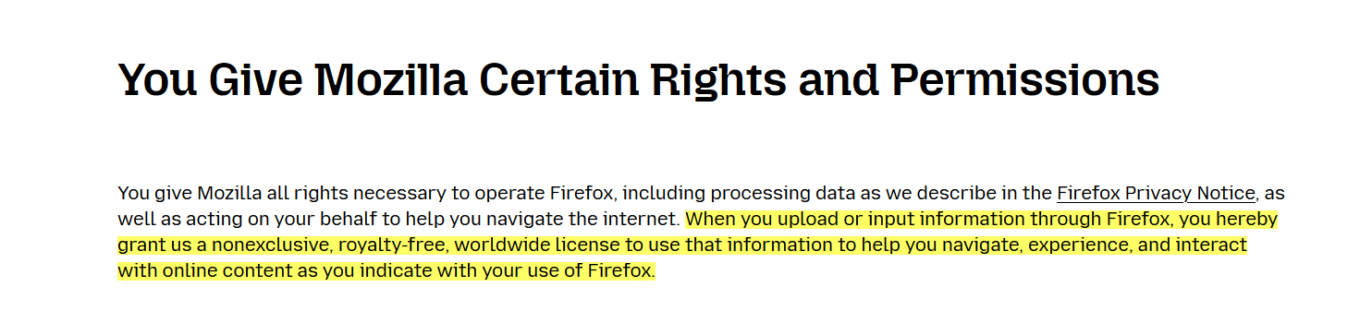
The promise

What appeared to be a new policy triggered a flood of comments on Reddit, with users taking exception to the wording. Some criticized the language for being too vague, while not inherently and necessarily nefarious. Others were ringing alarm bells, and rather loudly: “For frick's sake I don't want you to use information typed in to Firefox, Mozilla. Whatever I type into the browser window is between me and whatever service I'm sending the information to, not you, Mozilla,” one Redditor ranted.

Others were still more willing to give Mozilla the benefit of the doubt: “I believe the Mozilla Foundation is trying to do the right thing, but this kind of language in the terms is ripe for abuse. I hope they clarify it.”

In response to the backlash, Mozilla released a blog post to try and clear things up, saying:

We’ve seen a little confusion about the language regarding licenses, so we want to clear that up. We need a license to allow us to make some of the basic functionality of Firefox possible. Without it, we couldn’t use information typed into Firefox, for example. It does NOT give us ownership of your data or a right to use it for anything other than what is described in the Privacy Notice.

However, this attempt at clarification only seemed to stir the pot further. Mozilla claimed they needed the license to make basic Firefox features work, but didn’t explain why they needed access to what you type in.

A few days later, Mozilla made another attempt at setting the record straight (or at damage control, whichever you prefer).

In a seperate blog post on February 28, it announced that it had changed the TOU once again.

Now the paragraph, that has caused so much controversy, reads like this:

You give Mozilla the rights necessary to operate Firefox. This includes processing your data as we describe in the Firefox Privacy Notice. It also includes a nonexclusive, royalty-free, worldwide license for the purpose of doing as you request with the content you input in Firefox. This does not give Mozilla any ownership in that content.

The apparent goal of this change was to ease users' fears that Mozilla now claims ownership of their typed-in content. However, if anything, the wording is even more vague than before, as it simply directs users to check the Firefox Privacy Notice for details as to how exactly their data will be used.

The TOU was only a small part of the controversy. Mozilla's updated Privacy FAQ and Firefox Privacy FAQ were responsible for the other part.

Previously, Mozilla's Privacy FAQ proudly stated that they “don’t sell data about you,” nor do they buy data about you. Below is a screenshot of the FAQ from February 6:
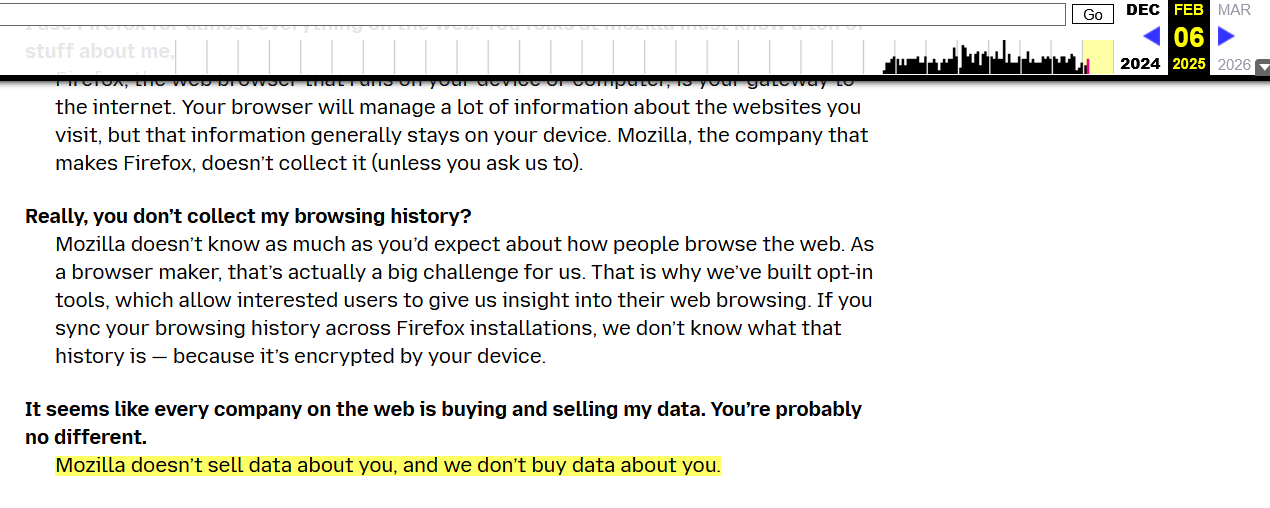
The promise2

The updated version now reads that Mozilla “does not sell data about you” but “in the way that most people think about “selling data”. This makes you wonder, whether you’re the ‘most people’ and what’s all this really supposed to mean.
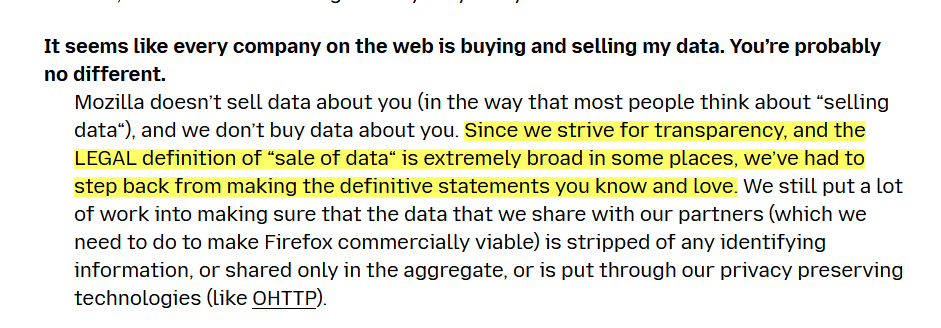
The promise
Current version of Mozilla’s Privacy FAQ

In its blog post from February 28, Mozilla justified the new, somewhat vague wording by stating that the current legal definition of what constitutes a sale of data is too "broad and evolving."

However, even more confusing — and arguably more disheartening for users — was the removal of Mozilla’s bold promise to “never sell your data” from its Firefox Privacy FAQ. Previously, the FAQ had answered the question “Does Firefox sell your personal data?” with a resounding “Nope. Never have, never will. And we protect you from many of the advertisers who do.”
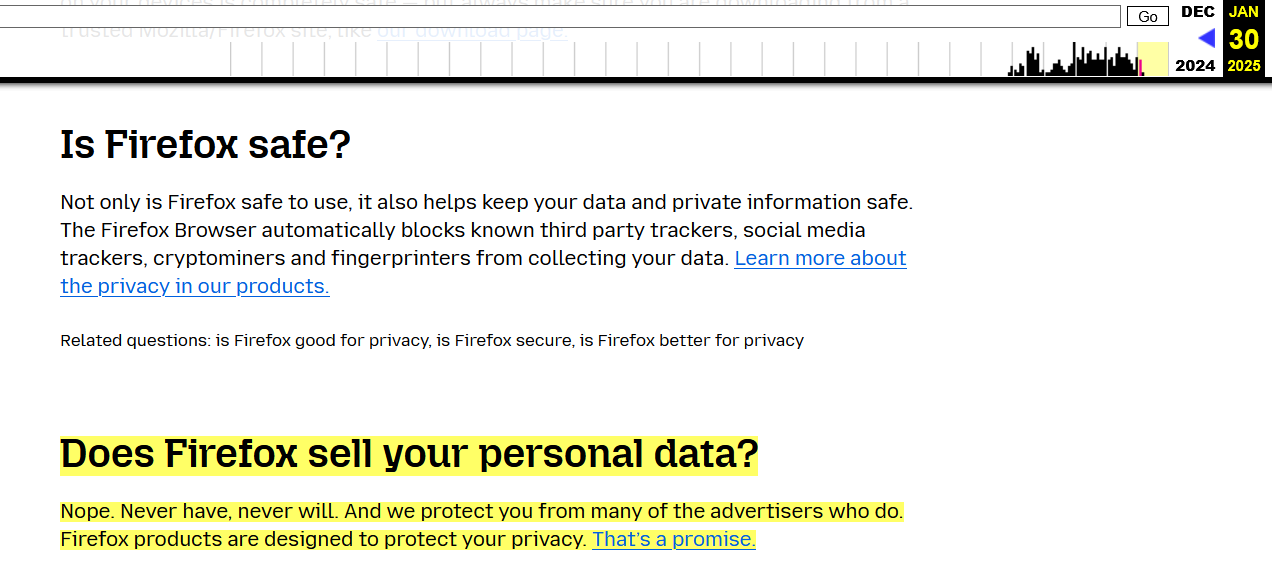
Mozilla's FAQ screenshot

Now (as of the time of writing), the section is missing completely from Firefox’s Privacy FAQ:
The promise

To be fair, the section appears to be under construction, and it’s likely we’ll soon see a replacement to the promise that had been dear to many of Firefox’s users.

And while some might have been taken off guard by an apparent change of heart on behalf of Mozilla, this new language isn't coming as a surprise to those who’ve been paying close attention to Mozilla lately. Here’s why.

Mozilla’s slow descent into ad tech

One of Mozilla’s core principles has always been its commitment to user privacy, with a foundational promise not to sell data. However, over the past few years, and more noticeably, months, that promise has started to fade, and the pillars supporting it have shown signs of crumbling.

Back in October, Mozilla made official what many had been predicting: its move into the ad-tech space. In a blog post, Mozilla president Mark Surman raised a question: “How do we ensure that privacy is not a privilege of the few, but a fundamental right available to everyone?” He went on to suggest that one part of the solution lies in “online advertising,” arguing that the system is “fundamentally broken.” Mozilla, according to Surman, is experimenting with advertising as a way to fix it.

For what it’s worth, Mozilla is following a well-worn path that many tech companies took before it. Much like Google and Microsoft, which have rolled out features like Google’s Protected Audience API and Microsoft’s Ad Selection API, Mozilla is now attempting to blend privacy with advertising. However, advertising has never been a major part of Mozilla’s DNA — until quite recently.

The shift has taken time to shape up, but it’s becoming much clearer now. Just last summer, Mozilla made waves by acquiring Anonym, an ad metrics company. The goal? They claim it will improve ad targeting while safeguarding user data. Not long after, Mozilla rolled out Privacy-Preserving Attribution (PPA), a feature designed to let advertisers track the effectiveness of their ads without crossing the line into intrusive tracking. PPA was enabled by default in Firefox.

Time to ditch Firefox?

The latest changes to Mozilla’s Terms of Service and Privacy FAQs seem to reflect its growing focus on advertising.

As the company becomes more deeply entangled in the ad-tech industry, its long-standing promises about privacy are starting to feel less clear-cut. What once seemed like an unwavering dedication to protecting user data is now being tested by the growing push to make privacy compatible with advertising. For many users, this raises the question: how much is Mozilla really willing to compromise? While the answer is not yet clear, bidding farewell to that bold, albeit idealistic, promise feels sad. It might mark the end of an era — and, even sadder, that end may be inevitable.


این پست را دوست داشتید؟
AdGuard VPN AdGuard DNS AdGuard Mail AdGuard Wallet
صفحه اصلی AdGuard برای Windows
صفحه محافظت AdGuard برای Windows که ویژگی‌ها و تنظيمات محافظت را نشان می‌دهد
صفحه آمار AdGuard برای Windows که آمار تبلیغات و رَدیاب‌های مسدود شده را نشان می‌دهد
صفحه مدیریت برنامه AdGuard برای Windows که گزینه‌های مدیریت محافظت برای برنامک‌های نصب‌شده روی دستگاه را نشان می‌دهد
۲۰٬۴۳۸ 20438 بررسی
بسیار عالی!

AdGuard برای Windows: مسدودکننده تبلیغات برای رایانه شخصی

AdGuard برای ویندوز چیزی فراتر از یک مسدودکننده تبلیغات است. این یک ابزار چندمنظوره است که تبلیغات را مسدود می‌کند، دسترسی به سایت‌های خطرناک را کنترل می‌کند، بارگذاری صفحات را سریع‌تر می‌کند و از کودکان در برابر محتوای نامناسب محافظت می‌کند

با دانلود برنامه شما شرایط توافقنامه مجوز را قبول می کنید
Microsoft Store
با دانلود برنامه شما شرایط توافقنامه مجوز را قبول می کنید
AdGuard برای Windows v8.0، دوره آزمایشی 14روزه
صفحه اصلی AdGuard برای Mac
صفحه حالت نهان AdGuard برای Mac
۲۰٬۴۳۸ 20438 بررسی
بسیار عالی!

AdGuard برای مک: مسدودکنندهٔ تبلیغات در سطح سیستم

AdGuard برای Mac یک مسدودکنندهٔ تبلیغات منحصربه‌فرد است که با در نظر گرفتن macOS طراحی شده است. علاوه بر محافظت از شما در برابر تبلیغات آزاردهنده در مرورگرها و برنامه‌ها، شما را در برابر ردیابی، فیشینگ و کلاهبرداری نیز محافظت می‌کند
با دانلود برنامه شما شرایط توافقنامه مجوز را قبول می کنید
بیشتر بخوانید
AdGuard برای Mac v2.19، دوره آزمایشی 14روزه
صفحه اصلی AdGuard برای Android
صفحه حفاظت در برابر ردیابی AdGuard برای Android
صفحه مدیریت برنامه AdGuard برای Android که گزینه‌های مدیریت محافظت برای برنامک‌های نصب‌شده روی دستگاه را نشان می‌دهد
صفحه آمار AdGuard برای Android که آمار تبلیغات و رَدیاب‌های مسدود شده را نشان می‌دهد
صفحه اصلی مرورگر خصوصی AdGuard برای Android
کد QR برای بارگیری AdGuard برای Android
۲۰٬۴۳۸ 20438 بررسی
بسیار عالی!

ادگارد برای اندروید: مسدودکنندهٔ تبلیغات برای همهٔ برنامه‌ها

تبلیغات و ردیاب‌ها را در همه مرورگرها، بازی‌ها و سایر برنامه‌ها مسدود می‌کند. از حریم خصوصی شما محافظت می‌کند و به شما امکان می‌دهد کنترل کنید برنامه‌هایتان چگونه از اینترنت استفاده می‌کنند. از طریق APK نصب می‌شود
با دانلود برنامه شما شرایط توافقنامه مجوز را قبول می کنید
بیشتر بخوانید
اسکن برای دانلود
استفاده از هر کد خوان QR موجود در دستگاه شما
AdGuard برای اندروید v4.14، دوره آزمایشی 14روزه
صفحه اصلی AdGuard برای iOS
صفحه محافظت AdGuard برای iOS که ویژگی‌ها و تنظيمات محافظت را نشان می‌دهد
صفحه آمار AdGuard برای iOS که آمار تبلیغات و رَدیاب‌های مسدود شده را نشان می‌دهد
کد QR برای بارگیری AdGuard برای iOS
۲۰٬۴۳۸ 20438 بررسی
بسیار عالی!

AdGuard برای iOS: مسدودکنندهٔ تبلیغات فراتر از Safari

بهترین مسدودکننده تبلیغات iOS برای iPhone و iPad. AdGuard همه انواع تبلیغات و ردیاب‌ها را در Safari حذف می‌کند و از حریم خصوصی شما در همه برنامه‌ها در سطح DNS محافظت می‌کند
با دانلود برنامه شما شرایط توافقنامه مجوز را قبول می کنید
بیشتر بخوانید
اسکن برای دانلود
استفاده از هر کد خوان QR موجود در دستگاه شما
AdGuard برای iOS نسخه 4.5
صفحه اصلی AdGuard Content Blocker
صفحه فیلترها در AdGuard Content Blocker
صفحه تنظيمات در AdGuard Content Blocker
۲۰٬۴۳۸ 20438 بررسی
بسیار عالی!

مسدودساز محتوای AdGuard

AdGuard Content Blocker انواع تبلیغات را در مرورگرهای تلفن همراه که از فناوری مسدود کردن محتوا پشتیبانی می کنند حذف می کند - یعنی اینترنت سامسونگ و مرورگر Yandex. ویژگی های آن در مقایسه با AdGuard برای اندروید محدود است، اما رایگان، نصب آسان و کارآمد است
با دانلود برنامه شما شرایط توافقنامه مجوز را قبول می کنید
بیشتر بخوانید
مسدودساز محتوای AdGuard نسخه 2.8
صفحه اصلی افزونه مرورگر AdGuard
صفحه حفاظت در برابر ردیابی افزونه مرورگر AdGuard
۲۰٬۴۳۸ 20438 بررسی
بسیار عالی!

افزونه مرورگر AdGuard

AdGuard سریع ترین و سبک ترین افزونه ای است که انواع تبلیغات را در صفحات وب مسدود می کند! AdGuard را برای مرورگری که میخواهید انتخاب کنید و وب گردی امن و سریع را تجربه کنید.
نصب
با دانلود برنامه شما شرایط توافقنامه مجوز را قبول می کنید
نصب
با دانلود برنامه شما شرایط توافقنامه مجوز را قبول می کنید
نصب
با دانلود برنامه شما شرایط توافقنامه مجوز را قبول می کنید
نصب
با دانلود برنامه شما شرایط توافقنامه مجوز را قبول می کنید
نصب
با دانلود برنامه شما شرایط توافقنامه مجوز را قبول می کنید
بیشتر بخوانید
نصب
با دانلود برنامه شما شرایط توافقنامه مجوز را قبول می کنید
بیشتر بخوانید
افزونه مرورگر AdGuard نسخه 5.5
صفحه اصلی AdGuard Assistant
۲۰٬۴۳۸ 20438 بررسی
بسیار عالی!

AdGuard دستیار

افزونه مرورگر همراه برای برنامه های دسکتاپ AdGuard. این امکان را به شما می دهد که آیتم های سفارشی را در وب سایت ها مسدود کنید، وب سایت ها را به لیست مجاز اضافه کنید و گزارش ها را مستقیما از مرورگر خود ارسال کنید
AdGuard دستیار نسخه 1.4
۲۰٬۴۳۸ 20438 بررسی
بسیار عالی!

AdGuard Home

AdGuard Home یک راه حل مبتنی بر شبکه برای مسدود کردن تبلیغات و ردیاب ها است. آن را یک بار روی روتر خود نصب کنید تا همه دستگاه های موجود در شبکه خانگی خود را پوشش دهید - بدون نیاز به نرم افزار مشتری اضافی. این امر به ویژه برای دستگاه های مختلف اینترنت اشیا که اغلب حریم خصوصی شما را تهدید می کنند بسیار مهم است
AdGuard Home نسخه 0.107
صفحه اصلی AdGuard Pro برای iOS
صفحه محافظت AdGuard Pro برای iOS که قابلیت‌ها و تنظيمات محافظت را نشان می‌دهد
صفحه آمار AdGuard Pro برای iOS که آمار تبلیغات و رَدیاب‌های مسدود شده را نشان می‌دهد
۲۰٬۴۳۸ 20438 بررسی
بسیار عالی!

AdGuard Pro برای iOS

AdGuard Pro برای iOS با تمام ویژگی‌های پیشرفته محافظت در برابر مسدود کردن تبلیغات ارائه می‌شود. این نسخه همان ابزارهای نسخه پولی AdGuard برای iOS را ارائه می‌دهد. این نسخه در مسدود کردن تبلیغات در سافاری عالی عمل می‌کند و به شما امکان می‌دهد تنظیمات DNS را برای محافظت متناسب با نیاز خود سفارشی کنید. این نسخه تبلیغات را در مرورگرها و برنامه‌ها مسدود می‌کند، از فرزندان شما در برابر محتوای نامناسب محافظت می‌کند و اطلاعات شخصی شما را ایمن نگه می‌دارد.
با دانلود برنامه شما شرایط توافقنامه مجوز را قبول می کنید
بیشتر بخوانید
AdGuard Pro برای iOS نسخه 4.5
صفحه اصلی AdGuard Mini برای Mac
صفحه محافظت Safari در AdGuard Mini برای Mac
صفحه ایجاد رویه در AdGuard Mini برای Mac
۲۰٬۴۳۸ 20438 بررسی
بسیار عالی!

AdGuard Mini برای Mac — مسدود کننده تبلیغات Safari

AdGuard Mini برای Mac یک مسدودکنندهٔ قدرتمند تبلیغات برای Safari است. این برنامک سبک، تبلیغات را حذف می‌کند، ردیاب‌ها را مسدود می‌کند و بارگذاری صفحه را سریع‌تر می‌کند. این ابزار به شما کمک می‌کند تا بدون حواس‌پرتی در Safari گشت‌و‌گذار کنید و داده‌های خود را خصوصی نگه دارید
نصب
با دانلود برنامه شما شرایط توافقنامه مجوز را قبول می کنید
بیشتر بخوانید
AdGuard Mini برای Mac نسخه 2.3
صفحه اصلی AdGuard برای Android TV با محافظت فعال شده
صفحه مسدودسازی تبلیغات AdGuard برای Android TV که ویژگی‌ها و تنظيمات آن را نشان می‌دهد
صفحه تنظيمات AdGuard برای Android TV
صفحه مدیریت برنامه AdGuard برای Android TV که برنامک‌هایی را نشان می‌دهد که در آن‌ها تبلیغات و رَدیاب‌ها مسدود شده‌اند
۲۰٬۴۳۸ 20438 بررسی
بسیار عالی!

AdGuard برای Android TV

AdGuard برای Android TV تنها برنامه‌ای است که تبلیغات را مسدود می‌کند، از حریم خصوصی شما محافظت کرده و همانند یک دیوار آتش برای تلویزیون هوشمند شما عمل می‌کند. در مورد تهدیدات وب هشدار دریافت کنید، از DNS ایمن استفاده کرده و از انتقال داده اینترنتی رمزگذاری شده بهره‌مند شوید. آرامش داشته باشید و غرق نمایش‌های مورد علاقه خود با امنیت عالی و تبلیغات صفر شوید!
AdGuard برای Android TV v4.14، دوره آزمایشی 14روزه
نماد AdGuard، Agnar، در حالی که پنگوئن Linux را در دست دارد
۲۰٬۴۳۸ 20438 بررسی
بسیار عالی!

AdGuard برای لینوکس

AdGuard برای لینوکس اولین مسدود کننده تبلیغات لینوکس در سراسر جهان است. تبلیغات و ردیاب‌ها را در سطح دستگاه مسدود کنید، از بین فیلترهای از پیش نصب شده انتخاب کنید یا فیلترهای خود را اضافه کنید - همه از طریق رابط خط فرمان
AdGuard برای لینوکس نسخه 1.4
۲۰٬۴۳۸ 20438 بررسی
بسیار عالی!

AdGuard Temp Mail

یک تولید‌کننده رایانشانی موقت رایگان که شما را ناشناس نگه می‌دارد و از حریم خصوصی شما محافظت می‌کند. هرزنامه‌ای در صندوق ورودی اصلی شما در کار نخواهد بود!
۲۰٬۴۳۸ 20438 بررسی
بسیار عالی!

AdGuard VPN

75 محل در سرتاسر جهان

دسترسی به هر محتوا

رمزگذاری قوی

سیاست عدم ذخیره وقایع

سریعترین اتصال

24/7 پشتیبانی

ارزیابی رایگان
با دانلود برنامه شما شرایط توافقنامه مجوز را قبول می کنید
بیشتر بخوانید
۲۰٬۴۳۸ 20438 بررسی
بسیار عالی!

AdGuard DNS

AdGuard DNS راه حلی جایگزین برای مسدودسازی تبلیغات، حفاظت حریم خصوصی و نظارت والدین است. راه اندازی آسان و استفاده رایگان، آن حداقل حفاظت لازم در برابر تبلیغات آنلاین،ردیاب ها و فیشینگ ها را میدهد،و در همه سیستم عامل ها و دستگاه ها کار می کند.
۲۰٬۴۳۸ 20438 بررسی
بسیار عالی!

AdGuard Mail

از هویت خود محافظت کنید، از هرزنامه دوری نمایید و صندوق ورودی خود را با نام‌های مستعار و رایانشانی‌های موقت ما امن نگه دارید. از خدمت رایگان فوروارد رایانامه و برنامک‌های ما برای همه سامانه‌عامل‌ها لذت ببرید
۲۰٬۴۳۸ 20438 بررسی
بسیار عالی!

AdGuard Wallet

یک کیف پول ارز دیجیتال امن و خصوصی که به شما امکان کنترل کامل بر دارایی‌هایتان را می‌دهد. چندین کیف پول را مدیریت کنید و هزاران ارز دیجیتال را برای ذخیره، ارسال و مبادله کشف کنید.
در حال بارگیری AdGuard برای نصب AdGuard، روی پرونده نشان داده شده توسط پیکان کلیک کنید گزینه "بازکردن " را انتخاب و روی "تایید" کلیک کنید — برای دانلود فایل منتظر بمانید. در پنجره باز شده، آیکون AdGuard را به پوشه "برنامه ها" بکشید.بابت انتخاب AdGuard متشکریم! گزینه "بازکردن " را انتخاب و روی "تایید" کلیک کنید — برای دانلود فایل منتظر بمانید. در پنجره باز شده روی "نصب" کلیک کنید.بابت انتخاب AdGuard متشکریم!
AdGuard را روی دستگاه تلفن همراه خود نصب کنید

















































