TechTok #4. Learning the basics about DNS filtering and DNS privacy

We’re continuing our TechTok series, where we answer your questions about ad blocking, VPNs, and technology in general. We’ve already covered several VPN- and ad blocking-related topics, so today let’s tackle some of your questions about DNS filtering and DNS privacy. It seems logical to kick things off with this question from Lenny:

How does AdGuard DNS work? What are some of the pros and cons of DNS filtering compared to the regular ad blocking and when is it best to use each of them?

DNS filtering is a very important tool in privacy protection and ad blocking, and to better understand it we should first brush up on what DNS is and how it works.

Let’s say you type something into your browser’s address bar or click on a link. How does the browser know where to take you? It only understands the language of IP addresses, and not human words like google.com. So in order to learn the website’s IP address the browser reaches a DNS server. DNS stands for “Domain Name System,” and this system exists to translate domain names (e. g. google.com) into IP addresses (e. g. 74.125.139.139). There are many DNS servers that can serve as translators, and you can use any one of them. Your Internet Service Provider (ISP) will provide you with a default DNS server, but you can go ahead and switch to any one that you prefer.
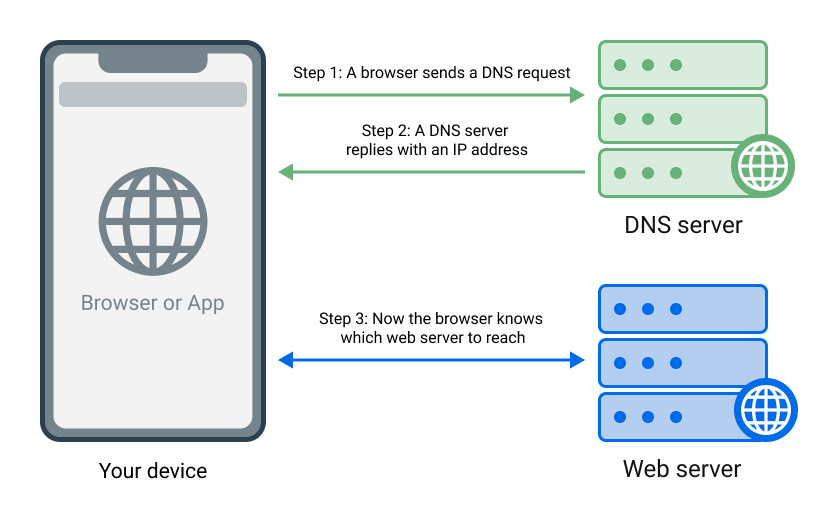
How DNS works
How DNS works

A ‘normal’ DNS server will simply return the IP address of the website you want to visit, without any ifs and buts. There are, however, DNS servers that under certain circumstances instead of giving the browser the correct IP address return 0.0.0.0, effectively pointing it to a ‘black hole.’ This is precisely how ad-blocking DNS servers, including AdGuard DNS, work.
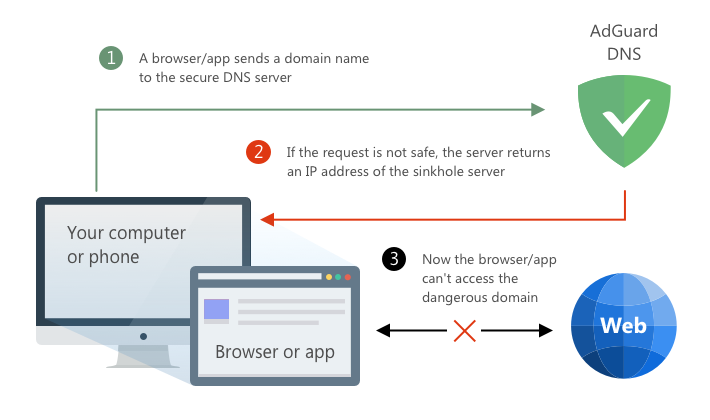
How DNS filtering works
The basic principle behind DNS filtering

Different servers may have different lists of domains they block — in case of AdGuard DNS it’s a long list of ad, tracking, and malicious domains.

💡
AdGuard DNS Family also blocks domains associated with adult content.

Now let’s compare DNS filtering with regular filtering. Its main drawback is apparent — with DNS filtering, you can only block entire domains. It lacks the finesse of the more nuanced web filtering, where you would be able to block specific requests, apply ‘cosmetic’ rules to make the page look better after blocking the ad, and do many more things. Nearly all other drawbacks of DNS blocking stem from this inability one way or another and can be described altogether as “much less flexible filtering.” But what about the advantages?

First and foremost, it’s the ability to easily set it up on virtually any device connected to the Internet — phones and tablets, smart TVs, even smart home appliances. While in order to do web filtering you’d need a browser extension or a standalone ad-blocking app, with DNS filtering you can literally change one line of text in your router’s settings, and all devices connected to your home Wi-Fi will be protected from ads and trackers.

💡
Some routers even come with pre-installed DNS solutions. For example, all ASUS Wi-Fi 7-compatible routers come integrated with AdGuard DNS out of the box.

Another distinct advantage of DNS filtering is that it is being applied at the earliest possible stage, so in a sense it’s the most efficient way to block ads and prevent tracking, especially on mobile devices where battery and traffic consumption may be of concern.

To sum it up and to answer the last part of Lenny’s question, ideally you would want to supplement network filtering with DNS filtering on all devices that support both. They complement each other, especially in terms of protecting you against tracking. If you have to choose, and if your device allows it, opt for regular web filtering — it is more flexible and will give you a better overall experience. And on devices like routers and smart TVs go for DNS protection, as it might be the only option available there.

💡
For more details on how DNS in general and DNS filtering in particular work, visit our Knowledge base.

Now that we know how DNS and DNS filtering work, it’s time to talk about how to keep your DNS connection safe and private. This simple question from xiulou will help us kickstart the conversation:

What do you think of the DNScrypt protocol?

Just like your regular web traffic needs to be secured to prevent bad actors from spoofing and tampering with it, your DNS traffic needs that too. DNSCrypt was one of the earliest attempts at encrypting DNS queries to protect them from surveillance. At the time, it was a serious breakthrough in DNS privacy, but mostly because the alternatives were virtually non-existent. DNSCrypt is still around today (and AdGuard DNS supports it to this day), but it’s been long surpassed and overshadowed by more modern protocols like DNS-over-HTTPS and DNS-over-TLS.

Speaking of those, Dmitry inquires:

Please explain “for dummies” how DNS-over-TLS and DNS-over-HTTPS work.

DNSCrypt, despite being the pioneer of DNS encryption protocols, is only responsible for less than 10% of all encrypted DNS requests today. Much more popular protocols are DNS-over-TLS (DoT) and especially DNS-over-HTTPS (DoH), which together take up close to 90% of all encrypted DNS traffic. Let’s try to dip a little into how they work.

With unencrypted DNS, when your browser requests the IP address of the website you’re connecting to, it sends the request with the domain name of that website to the DNS server in plain text. This means that anyone who ‘listens’ to your DNS traffic faces no hurdles and can easily see every single website that you’re trying to visit — this is not private at all.

With DoH, your DNS communication is encrypted with HTTPS — the known, go-to secure protocol that you see everywhere on the web (think green lock icons next to the address bar in your browser). Every DNS query your browser sends over DoH is encrypted by being ‘wrapped’ inside an HTTPS request. This not only provides protection in and of itself, but also makes your DNS traffic look like regular HTTPS traffic to outside observers. This way they might not even realize what they see is a DNS query, let alone look inside it.

DoT operates in a slightly different way to DoH. It uses TLS security protocol to create a direct, secure tunnel between your browser and the DNS server, over which the DNS queries can travel both ways. This makes your DNS traffic safe, but also much more trivial to detect for anyone watching, as it’s easily distinguished from regular HTTPS traffic. All in all, both protocols provide security but do it differently and each has its own uses.

There are more DNS-related questions left, but it’s impossible to pack all the answers in just one article. We will definitely get back to DNS filtering and DNS privacy later — send us more of your questions about DNS and on other topics over through this form, and you might see the answers already in the next TechTok edition!


این پست را دوست داشتید؟
AdGuard VPN AdGuard DNS AdGuard Mail AdGuard Wallet
صفحه اصلی AdGuard برای Windows
صفحه محافظت AdGuard برای Windows که ویژگی‌ها و تنظيمات محافظت را نشان می‌دهد
صفحه آمار AdGuard برای Windows که آمار تبلیغات و رَدیاب‌های مسدود شده را نشان می‌دهد
صفحه مدیریت برنامه AdGuard برای Windows که گزینه‌های مدیریت محافظت برای برنامک‌های نصب‌شده روی دستگاه را نشان می‌دهد
۲۰٬۴۳۸ 20438 بررسی
بسیار عالی!

AdGuard برای Windows: مسدودکننده تبلیغات برای رایانه شخصی

AdGuard برای ویندوز چیزی فراتر از یک مسدودکننده تبلیغات است. این یک ابزار چندمنظوره است که تبلیغات را مسدود می‌کند، دسترسی به سایت‌های خطرناک را کنترل می‌کند، بارگذاری صفحات را سریع‌تر می‌کند و از کودکان در برابر محتوای نامناسب محافظت می‌کند
با دانلود برنامه شما شرایط توافقنامه مجوز را قبول می کنید
Microsoft Store
با دانلود برنامه شما شرایط توافقنامه مجوز را قبول می کنید
AdGuard برای Windows v8.0، دوره آزمایشی 14روزه
صفحه اصلی AdGuard برای Mac
صفحه حالت نهان AdGuard برای Mac
۲۰٬۴۳۸ 20438 بررسی
بسیار عالی!

AdGuard برای مک: مسدودکنندهٔ تبلیغات در سطح سیستم

AdGuard برای Mac یک مسدودکنندهٔ تبلیغات منحصربه‌فرد است که با در نظر گرفتن macOS طراحی شده است. علاوه بر محافظت از شما در برابر تبلیغات آزاردهنده در مرورگرها و برنامه‌ها، شما را در برابر ردیابی، فیشینگ و کلاهبرداری نیز محافظت می‌کند
با دانلود برنامه شما شرایط توافقنامه مجوز را قبول می کنید
بیشتر بخوانید
AdGuard برای Mac v2.19، دوره آزمایشی 14روزه
صفحه اصلی AdGuard برای Android
صفحه حفاظت در برابر ردیابی AdGuard برای Android
صفحه مدیریت برنامه AdGuard برای Android که گزینه‌های مدیریت محافظت برای برنامک‌های نصب‌شده روی دستگاه را نشان می‌دهد
صفحه آمار AdGuard برای Android که آمار تبلیغات و رَدیاب‌های مسدود شده را نشان می‌دهد
صفحه اصلی مرورگر خصوصی AdGuard برای Android
کد QR برای بارگیری AdGuard برای Android
۲۰٬۴۳۸ 20438 بررسی
بسیار عالی!

ادگارد برای اندروید: مسدودکنندهٔ تبلیغات برای همهٔ برنامه‌ها

تبلیغات و ردیاب‌ها را در همه مرورگرها، بازی‌ها و سایر برنامه‌ها مسدود می‌کند. از حریم خصوصی شما محافظت می‌کند و به شما امکان می‌دهد کنترل کنید برنامه‌هایتان چگونه از اینترنت استفاده می‌کنند. از طریق APK نصب می‌شود
با دانلود برنامه شما شرایط توافقنامه مجوز را قبول می کنید
بیشتر بخوانید
اسکن برای دانلود
استفاده از هر کد خوان QR موجود در دستگاه شما
AdGuard برای اندروید v4.14، دوره آزمایشی 14روزه
صفحه اصلی AdGuard برای iOS
صفحه محافظت AdGuard برای iOS که ویژگی‌ها و تنظيمات محافظت را نشان می‌دهد
صفحه آمار AdGuard برای iOS که آمار تبلیغات و رَدیاب‌های مسدود شده را نشان می‌دهد
کد QR برای بارگیری AdGuard برای iOS
۲۰٬۴۳۸ 20438 بررسی
بسیار عالی!

AdGuard برای iOS: مسدودکنندهٔ تبلیغات فراتر از Safari

بهترین مسدودکننده تبلیغات iOS برای iPhone و iPad. AdGuard همه انواع تبلیغات و ردیاب‌ها را در Safari حذف می‌کند و از حریم خصوصی شما در همه برنامه‌ها در سطح DNS محافظت می‌کند
با دانلود برنامه شما شرایط توافقنامه مجوز را قبول می کنید
بیشتر بخوانید
اسکن برای دانلود
استفاده از هر کد خوان QR موجود در دستگاه شما
AdGuard برای iOS نسخه 4.5
صفحه اصلی AdGuard Content Blocker
صفحه فیلترها در AdGuard Content Blocker
صفحه تنظيمات در AdGuard Content Blocker
۲۰٬۴۳۸ 20438 بررسی
بسیار عالی!

مسدودساز محتوای AdGuard

AdGuard Content Blocker انواع تبلیغات را در مرورگرهای تلفن همراه که از فناوری مسدود کردن محتوا پشتیبانی می کنند حذف می کند - یعنی اینترنت سامسونگ و مرورگر Yandex. ویژگی های آن در مقایسه با AdGuard برای اندروید محدود است، اما رایگان، نصب آسان و کارآمد است
با دانلود برنامه شما شرایط توافقنامه مجوز را قبول می کنید
بیشتر بخوانید
مسدودساز محتوای AdGuard نسخه 2.8
صفحه اصلی افزونه مرورگر AdGuard
صفحه حفاظت در برابر ردیابی افزونه مرورگر AdGuard
۲۰٬۴۳۸ 20438 بررسی
بسیار عالی!

افزونه مرورگر AdGuard

AdGuard سریع ترین و سبک ترین افزونه ای است که انواع تبلیغات را در صفحات وب مسدود می کند! AdGuard را برای مرورگری که میخواهید انتخاب کنید و وب گردی امن و سریع را تجربه کنید.
نصب
با دانلود برنامه شما شرایط توافقنامه مجوز را قبول می کنید
نصب
با دانلود برنامه شما شرایط توافقنامه مجوز را قبول می کنید
نصب
با دانلود برنامه شما شرایط توافقنامه مجوز را قبول می کنید
نصب
با دانلود برنامه شما شرایط توافقنامه مجوز را قبول می کنید
نصب
با دانلود برنامه شما شرایط توافقنامه مجوز را قبول می کنید
بیشتر بخوانید
نصب
با دانلود برنامه شما شرایط توافقنامه مجوز را قبول می کنید
بیشتر بخوانید
افزونه مرورگر AdGuard نسخه 5.5
صفحه اصلی AdGuard Assistant
۲۰٬۴۳۸ 20438 بررسی
بسیار عالی!

AdGuard دستیار

افزونه مرورگر همراه برای برنامه های دسکتاپ AdGuard. این امکان را به شما می دهد که آیتم های سفارشی را در وب سایت ها مسدود کنید، وب سایت ها را به لیست مجاز اضافه کنید و گزارش ها را مستقیما از مرورگر خود ارسال کنید
AdGuard دستیار نسخه 1.4
۲۰٬۴۳۸ 20438 بررسی
بسیار عالی!

AdGuard Home

AdGuard Home یک راه حل مبتنی بر شبکه برای مسدود کردن تبلیغات و ردیاب ها است. آن را یک بار روی روتر خود نصب کنید تا همه دستگاه های موجود در شبکه خانگی خود را پوشش دهید - بدون نیاز به نرم افزار مشتری اضافی. این امر به ویژه برای دستگاه های مختلف اینترنت اشیا که اغلب حریم خصوصی شما را تهدید می کنند بسیار مهم است
AdGuard Home نسخه 0.107
صفحه اصلی AdGuard Pro برای iOS
صفحه محافظت AdGuard Pro برای iOS که قابلیت‌ها و تنظيمات محافظت را نشان می‌دهد
صفحه آمار AdGuard Pro برای iOS که آمار تبلیغات و رَدیاب‌های مسدود شده را نشان می‌دهد
۲۰٬۴۳۸ 20438 بررسی
بسیار عالی!

AdGuard Pro برای iOS

AdGuard Pro برای iOS با تمام ویژگی‌های پیشرفته محافظت در برابر مسدود کردن تبلیغات ارائه می‌شود. این نسخه همان ابزارهای نسخه پولی AdGuard برای iOS را ارائه می‌دهد. این نسخه در مسدود کردن تبلیغات در سافاری عالی عمل می‌کند و به شما امکان می‌دهد تنظیمات DNS را برای محافظت متناسب با نیاز خود سفارشی کنید. این نسخه تبلیغات را در مرورگرها و برنامه‌ها مسدود می‌کند، از فرزندان شما در برابر محتوای نامناسب محافظت می‌کند و اطلاعات شخصی شما را ایمن نگه می‌دارد.
با دانلود برنامه شما شرایط توافقنامه مجوز را قبول می کنید
بیشتر بخوانید
AdGuard Pro برای iOS نسخه 4.5
صفحه اصلی AdGuard Mini برای Mac
صفحه محافظت Safari در AdGuard Mini برای Mac
صفحه ایجاد رویه در AdGuard Mini برای Mac
۲۰٬۴۳۸ 20438 بررسی
بسیار عالی!

AdGuard Mini برای Mac — مسدود کننده تبلیغات Safari

AdGuard Mini برای Mac یک مسدودکنندهٔ قدرتمند تبلیغات برای Safari است. این برنامک سبک، تبلیغات را حذف می‌کند، ردیاب‌ها را مسدود می‌کند و بارگذاری صفحه را سریع‌تر می‌کند. این ابزار به شما کمک می‌کند تا بدون حواس‌پرتی در Safari گشت‌و‌گذار کنید و داده‌های خود را خصوصی نگه دارید
نصب
با دانلود برنامه شما شرایط توافقنامه مجوز را قبول می کنید
بیشتر بخوانید
AdGuard Mini برای Mac نسخه 2.3
صفحه اصلی AdGuard برای Android TV با محافظت فعال شده
صفحه مسدودسازی تبلیغات AdGuard برای Android TV که ویژگی‌ها و تنظيمات آن را نشان می‌دهد
صفحه تنظيمات AdGuard برای Android TV
صفحه مدیریت برنامه AdGuard برای Android TV که برنامک‌هایی را نشان می‌دهد که در آن‌ها تبلیغات و رَدیاب‌ها مسدود شده‌اند
۲۰٬۴۳۸ 20438 بررسی
بسیار عالی!

AdGuard برای Android TV

AdGuard برای Android TV تنها برنامه‌ای است که تبلیغات را مسدود می‌کند، از حریم خصوصی شما محافظت کرده و همانند یک دیوار آتش برای تلویزیون هوشمند شما عمل می‌کند. در مورد تهدیدات وب هشدار دریافت کنید، از DNS ایمن استفاده کرده و از انتقال داده اینترنتی رمزگذاری شده بهره‌مند شوید. آرامش داشته باشید و غرق نمایش‌های مورد علاقه خود با امنیت عالی و تبلیغات صفر شوید!
AdGuard برای Android TV v4.14، دوره آزمایشی 14روزه
نماد AdGuard، Agnar، در حالی که پنگوئن Linux را در دست دارد
۲۰٬۴۳۸ 20438 بررسی
بسیار عالی!

AdGuard برای لینوکس

AdGuard برای لینوکس اولین مسدود کننده تبلیغات لینوکس در سراسر جهان است. تبلیغات و ردیاب‌ها را در سطح دستگاه مسدود کنید، از بین فیلترهای از پیش نصب شده انتخاب کنید یا فیلترهای خود را اضافه کنید - همه از طریق رابط خط فرمان
AdGuard برای لینوکس نسخه 1.4
۲۰٬۴۳۸ 20438 بررسی
بسیار عالی!

AdGuard Temp Mail

یک تولید‌کننده رایانشانی موقت رایگان که شما را ناشناس نگه می‌دارد و از حریم خصوصی شما محافظت می‌کند. هرزنامه‌ای در صندوق ورودی اصلی شما در کار نخواهد بود!
۲۰٬۴۳۸ 20438 بررسی
بسیار عالی!

AdGuard VPN

75 محل در سرتاسر جهان

دسترسی به هر محتوا

رمزگذاری قوی

سیاست عدم ذخیره وقایع

سریعترین اتصال

24/7 پشتیبانی

ارزیابی رایگان
با دانلود برنامه شما شرایط توافقنامه مجوز را قبول می کنید
بیشتر بخوانید
۲۰٬۴۳۸ 20438 بررسی
بسیار عالی!

AdGuard DNS

AdGuard DNS راه حلی جایگزین برای مسدودسازی تبلیغات، حفاظت حریم خصوصی و نظارت والدین است. راه اندازی آسان و استفاده رایگان، آن حداقل حفاظت لازم در برابر تبلیغات آنلاین،ردیاب ها و فیشینگ ها را میدهد،و در همه سیستم عامل ها و دستگاه ها کار می کند.
۲۰٬۴۳۸ 20438 بررسی
بسیار عالی!

AdGuard Mail

از هویت خود محافظت کنید، از هرزنامه دوری نمایید و صندوق ورودی خود را با نام‌های مستعار و رایانشانی‌های موقت ما امن نگه دارید. از خدمت رایگان فوروارد رایانامه و برنامک‌های ما برای همه سامانه‌عامل‌ها لذت ببرید
۲۰٬۴۳۸ 20438 بررسی
بسیار عالی!

AdGuard Wallet

یک کیف پول ارز دیجیتال امن و خصوصی که به شما امکان کنترل کامل بر دارایی‌هایتان را می‌دهد. چندین کیف پول را مدیریت کنید و هزاران ارز دیجیتال را برای ذخیره، ارسال و مبادله کشف کنید.
در حال بارگیری AdGuard برای نصب AdGuard، روی پرونده نشان داده شده توسط پیکان کلیک کنید گزینه "بازکردن " را انتخاب و روی "تایید" کلیک کنید — برای دانلود فایل منتظر بمانید. در پنجره باز شده، آیکون AdGuard را به پوشه "برنامه ها" بکشید.بابت انتخاب AdGuard متشکریم! گزینه "بازکردن " را انتخاب و روی "تایید" کلیک کنید — برای دانلود فایل منتظر بمانید. در پنجره باز شده روی "نصب" کلیک کنید.بابت انتخاب AdGuard متشکریم!
AdGuard را روی دستگاه تلفن همراه خود نصب کنید

















































