Twitter’s love-hate relationship with ads, Google’s flop, dangerous search and a big data breach. AdGuard’s digest

In this edition of AdGuard’s Digest: Google comes under fire for its flawed attempt to reinvent ad targeting, Twitter makes a U-turn on third-party clients and criticizes its own ad policies, hackers continue to exploit search ads, while a telecoms giant runs into bad luck for the eighth time.

Google’s replacement for third-party cookies is put on blast

Google’s much-discussed Privacy Sandbox initiative has been dealt a stinging blow. The W3C Technical Architecture Group (TAG) has concluded that it did not meet its stated goal of enabling targeted advertising and protecting users from tracking and profiling at the same time.

The group took aim at one specific element of the proposal, the Topics API, envisioned as a replacement for third-party cookies. In its review of Topics, TAG notes that the technology still allows the browser to share information about the user’s online behavior. Moreover, the data is “gathered and sent behind the scenes,” while the user has no “fine-grained control” over what it reveals about them, the group said. The proposed alternative to third-party cookies appears to “maintain the status quo of inappropriate surveillance on the web,” TAG said, while recommending that Google not proceed with the technology. Google disagreed with the findings, insisting that Topics is a significant improvement over third-party cookies.

TAG is a special working group within the The World Wide Web Consortium, and includes the inventor of the Web Tim Berners-Lee.

We have long argued that Google is up to no good with its Topics API. In our own deep-dive review of the Privacy Sandbox we argued that Topics would still allow Big Tech to profile users and, if anything, would only cement Google’s advertising monopoly.

‘End of an era’: Twitter bans third-party clients

Twitter’s embattled CEO Elon Musk may be busy in court, but that does not mean a pause in Twitter-related news.

Recently, Twitter updated its developer terms to outlaw third-party apps, breaking away from its long-held policy. When asked about the change, Twitter said it was simply “enforcing long-standing API rules.” Twitter’s oldest third-party client, Twitterriffic, which came to iOS even before Twitter itself, was forced to pull its apps from the iOS and Mac app stores as well. In a blog post, Twitterrific said that app’s “sudden and undignified demise” was brought about by an unannounced policy change from an “increasingly capricious Twitter”.

The ban represents a U-turn in Twitter’s treatment of third-party clients — the platform previously tolerated them. The move also signals that Musk’s Twitter is willing to go to great lengths to increase the tech giant’s advertising revenue. Users of third-party clients don’t see Twitter’s ads.

The fact that Twitter is betting heavily on advertising and leaving users with no alternatives in the form of third-party clients makes sense from a business perspective, but is worrying from a user’s point of view. The rumors that Twitter is planning to force non-paying users to share their location and phone numbers for targeted advertising only adds fuel to the concerns.

Musk vows to tackle icky ads, teases ad-free Twitter plan

As if to assuage some of these fears, Musk took to Twitter to state the obvious: “Ads are too frequent and too big on Twitter,” the still-CEO wrote. He then promised to take steps to address the issue “in the coming weeks”, as well as release a higher-priced subscription tier with “zero ads”.

Musk teases ad-free subscription tier for Twitter

This is not the first time Musk has teased an ad-free tier. Last month, the Twitter CEO said that the new plan sans ads would arrive already that year. Currently, Twitter Blue subscribers pay $11 a month (if they buy the subscription through Android or iOS) or $8 (if they buy it through a web browser) to see half as many ads as regular, non-paying users.

Twitter’s introduction of an ad-free tier is a welcome step and a cause for celebration for those who have grown tired of ad-cluttered feeds, but not enough to give up on Twitter. A lot will depend on the pricing, though. We can see that Twitter is trying to walk a fine line between pleasing advertisers and users, and we can only hope that the balance doesn’t tip too heavily towards the former.

Google search is infested with malicious ads, researchers find

Cybercriminals increasingly rely on Google Search ads to lure users to bogus websites laced with malware, BleepingComputer has found. These fake websites often resemble those of legitimate companies, known for open-source software.

BleepingComputer conducted the research after a popular influencer saw all his crypto assets stolen as result of the scheme. The researchers found that in some cases, hackers outbid legitimate developers so the malicious ad appeared at the top of search results, above the legitimate company’s paid ad. Such was the case with CCleaner, a utility used to clean unwanted files. The fake CCLeaner website directed users to download Redline malware, which allowed criminals to steal sensitive personal information such as passwords, credit card details and crypto assets from unsuspecting victims. Together with other security researchers, BleepingComputer uncovered a dozen malicious ads leading to fake websites. In response, Google said it has “robust policies” against ads that impersonate brands and enforces them “vigorously”.

Well, apparently not vigorously enough, because the problem of malicious ads in Google search seems to persist. Last month the FBI even issued an alert about dangerous search ads, urging the public to use ad blockers. Indeed, ad blockers, including the AdGuard Browser extension and the AdGuard app, help protect against the threat of ads placed by cybercriminals. To block most search ads, you’ll need to enable the “block search ads” setting in your extension.
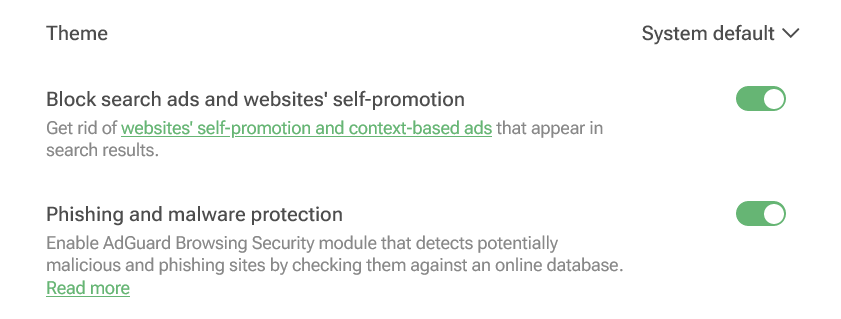
You can enable blocking search ads in your AdGuard Browser extension

Screenshot: AdGuard Browser extension

Not again... Personal data of 37 million T-Mobile customers stolen

Telecoms giant T-Mobile has revealed that it has suffered another data breach, with hackers stealing personal data of some 37 million of its customers. The bad actor apparently exploited a flaw in one of the company’s APIs to retrieve the data.

The breach occurred in early January and was immediately contained, T-Mobile said. The telecoms provider noted that hackers gained access to a “limited set of account information”, including its customers’ names, billing addresses, email addresses, dates of birth and T-Mobile account numbers. No payment information or government ID numbers were exposed, it claimed.

Still, the breach represents a very worrying pattern, as this is the eighth time T-Mobile has been hacked in five years, according to TechCrunch. T-Mobile also famously fell victim to the Lapsus$ hackers, who stole its source code in a series of hacks in March 2022. The new hack, as well as T-Mobile’s history of data breaches, shows that large companies are just as vulnerable to attack as smaller ones. The bigger the company, the more customer data it has at its disposal, the more attractive it is as a target. What this means for us as users is that we need to be very selective about what data we share, with whom, and how much control we have over it.


این پست را دوست داشتید؟
AdGuard VPN AdGuard DNS AdGuard Mail AdGuard Wallet
صفحه اصلی AdGuard برای Windows
صفحه محافظت AdGuard برای Windows که ویژگی‌ها و تنظيمات محافظت را نشان می‌دهد
صفحه آمار AdGuard برای Windows که آمار تبلیغات و رَدیاب‌های مسدود شده را نشان می‌دهد
صفحه مدیریت برنامه AdGuard برای Windows که گزینه‌های مدیریت محافظت برای برنامک‌های نصب‌شده روی دستگاه را نشان می‌دهد
۲۰٬۴۴۰ 20440 بررسی
بسیار عالی!

AdGuard برای Windows: مسدودکننده تبلیغات برای رایانه شخصی

AdGuard برای ویندوز چیزی فراتر از یک مسدودکننده تبلیغات است. این یک ابزار چندمنظوره است که تبلیغات را مسدود می‌کند، دسترسی به سایت‌های خطرناک را کنترل می‌کند، بارگذاری صفحات را سریع‌تر می‌کند و از کودکان در برابر محتوای نامناسب محافظت می‌کند

با دانلود برنامه شما شرایط توافقنامه مجوز را قبول می کنید
Microsoft Store
با دانلود برنامه شما شرایط توافقنامه مجوز را قبول می کنید
AdGuard برای Windows v8.0، دوره آزمایشی 14روزه
صفحه اصلی AdGuard برای Mac
صفحه حالت نهان AdGuard برای Mac
۲۰٬۴۴۰ 20440 بررسی
بسیار عالی!

AdGuard برای مک: مسدودکنندهٔ تبلیغات در سطح سیستم

AdGuard برای Mac یک مسدودکنندهٔ تبلیغات منحصربه‌فرد است که با در نظر گرفتن macOS طراحی شده است. علاوه بر محافظت از شما در برابر تبلیغات آزاردهنده در مرورگرها و برنامه‌ها، شما را در برابر ردیابی، فیشینگ و کلاهبرداری نیز محافظت می‌کند
با دانلود برنامه شما شرایط توافقنامه مجوز را قبول می کنید
بیشتر بخوانید
AdGuard برای Mac v2.19، دوره آزمایشی 14روزه
صفحه اصلی AdGuard برای Android
صفحه حفاظت در برابر ردیابی AdGuard برای Android
صفحه مدیریت برنامه AdGuard برای Android که گزینه‌های مدیریت محافظت برای برنامک‌های نصب‌شده روی دستگاه را نشان می‌دهد
صفحه آمار AdGuard برای Android که آمار تبلیغات و رَدیاب‌های مسدود شده را نشان می‌دهد
صفحه اصلی مرورگر خصوصی AdGuard برای Android
کد QR برای بارگیری AdGuard برای Android
۲۰٬۴۴۰ 20440 بررسی
بسیار عالی!

ادگارد برای اندروید: مسدودکنندهٔ تبلیغات برای همهٔ برنامه‌ها

تبلیغات و ردیاب‌ها را در همه مرورگرها، بازی‌ها و سایر برنامه‌ها مسدود می‌کند. از حریم خصوصی شما محافظت می‌کند و به شما امکان می‌دهد کنترل کنید برنامه‌هایتان چگونه از اینترنت استفاده می‌کنند. از طریق APK نصب می‌شود
با دانلود برنامه شما شرایط توافقنامه مجوز را قبول می کنید
بیشتر بخوانید
اسکن برای دانلود
استفاده از هر کد خوان QR موجود در دستگاه شما
AdGuard برای اندروید v4.14، دوره آزمایشی 14روزه
صفحه اصلی AdGuard برای iOS
صفحه محافظت AdGuard برای iOS که ویژگی‌ها و تنظيمات محافظت را نشان می‌دهد
صفحه آمار AdGuard برای iOS که آمار تبلیغات و رَدیاب‌های مسدود شده را نشان می‌دهد
کد QR برای بارگیری AdGuard برای iOS
۲۰٬۴۴۰ 20440 بررسی
بسیار عالی!

AdGuard برای iOS: مسدودکنندهٔ تبلیغات فراتر از Safari

بهترین مسدودکننده تبلیغات iOS برای iPhone و iPad. AdGuard همه انواع تبلیغات و ردیاب‌ها را در Safari حذف می‌کند و از حریم خصوصی شما در همه برنامه‌ها در سطح DNS محافظت می‌کند
با دانلود برنامه شما شرایط توافقنامه مجوز را قبول می کنید
بیشتر بخوانید
اسکن برای دانلود
استفاده از هر کد خوان QR موجود در دستگاه شما
AdGuard برای iOS نسخه 4.5
صفحه اصلی AdGuard Content Blocker
صفحه فیلترها در AdGuard Content Blocker
صفحه تنظيمات در AdGuard Content Blocker
۲۰٬۴۴۰ 20440 بررسی
بسیار عالی!

مسدودساز محتوای AdGuard

AdGuard Content Blocker انواع تبلیغات را در مرورگرهای تلفن همراه که از فناوری مسدود کردن محتوا پشتیبانی می کنند حذف می کند - یعنی اینترنت سامسونگ و مرورگر Yandex. ویژگی های آن در مقایسه با AdGuard برای اندروید محدود است، اما رایگان، نصب آسان و کارآمد است
با دانلود برنامه شما شرایط توافقنامه مجوز را قبول می کنید
بیشتر بخوانید
مسدودساز محتوای AdGuard نسخه 2.8
صفحه اصلی افزونه مرورگر AdGuard
صفحه حفاظت در برابر ردیابی افزونه مرورگر AdGuard
۲۰٬۴۴۰ 20440 بررسی
بسیار عالی!

افزونه مرورگر AdGuard

AdGuard سریع ترین و سبک ترین افزونه ای است که انواع تبلیغات را در صفحات وب مسدود می کند! AdGuard را برای مرورگری که میخواهید انتخاب کنید و وب گردی امن و سریع را تجربه کنید.
نصب
با دانلود برنامه شما شرایط توافقنامه مجوز را قبول می کنید
نصب
با دانلود برنامه شما شرایط توافقنامه مجوز را قبول می کنید
نصب
با دانلود برنامه شما شرایط توافقنامه مجوز را قبول می کنید
نصب
با دانلود برنامه شما شرایط توافقنامه مجوز را قبول می کنید
نصب
با دانلود برنامه شما شرایط توافقنامه مجوز را قبول می کنید
بیشتر بخوانید
نصب
با دانلود برنامه شما شرایط توافقنامه مجوز را قبول می کنید
بیشتر بخوانید
افزونه مرورگر AdGuard نسخه 5.5
صفحه اصلی AdGuard Assistant
۲۰٬۴۴۰ 20440 بررسی
بسیار عالی!

AdGuard دستیار

افزونه مرورگر همراه برای برنامه های دسکتاپ AdGuard. این امکان را به شما می دهد که آیتم های سفارشی را در وب سایت ها مسدود کنید، وب سایت ها را به لیست مجاز اضافه کنید و گزارش ها را مستقیما از مرورگر خود ارسال کنید
AdGuard دستیار نسخه 1.4
۲۰٬۴۴۰ 20440 بررسی
بسیار عالی!

AdGuard Home

AdGuard Home یک راه حل مبتنی بر شبکه برای مسدود کردن تبلیغات و ردیاب ها است. آن را یک بار روی روتر خود نصب کنید تا همه دستگاه های موجود در شبکه خانگی خود را پوشش دهید - بدون نیاز به نرم افزار مشتری اضافی. این امر به ویژه برای دستگاه های مختلف اینترنت اشیا که اغلب حریم خصوصی شما را تهدید می کنند بسیار مهم است
AdGuard Home نسخه 0.107
صفحه اصلی AdGuard Pro برای iOS
صفحه محافظت AdGuard Pro برای iOS که قابلیت‌ها و تنظيمات محافظت را نشان می‌دهد
صفحه آمار AdGuard Pro برای iOS که آمار تبلیغات و رَدیاب‌های مسدود شده را نشان می‌دهد
۲۰٬۴۴۰ 20440 بررسی
بسیار عالی!

AdGuard Pro برای iOS

AdGuard Pro برای iOS با تمام ویژگی‌های پیشرفته محافظت در برابر مسدود کردن تبلیغات ارائه می‌شود. این نسخه همان ابزارهای نسخه پولی AdGuard برای iOS را ارائه می‌دهد. این نسخه در مسدود کردن تبلیغات در سافاری عالی عمل می‌کند و به شما امکان می‌دهد تنظیمات DNS را برای محافظت متناسب با نیاز خود سفارشی کنید. این نسخه تبلیغات را در مرورگرها و برنامه‌ها مسدود می‌کند، از فرزندان شما در برابر محتوای نامناسب محافظت می‌کند و اطلاعات شخصی شما را ایمن نگه می‌دارد.
با دانلود برنامه شما شرایط توافقنامه مجوز را قبول می کنید
بیشتر بخوانید
AdGuard Pro برای iOS نسخه 4.5
صفحه اصلی AdGuard Mini برای Mac
صفحه محافظت Safari در AdGuard Mini برای Mac
صفحه ایجاد رویه در AdGuard Mini برای Mac
۲۰٬۴۴۰ 20440 بررسی
بسیار عالی!

AdGuard Mini برای Mac — مسدود کننده تبلیغات Safari

AdGuard Mini برای Mac یک مسدودکنندهٔ قدرتمند تبلیغات برای Safari است. این برنامک سبک، تبلیغات را حذف می‌کند، ردیاب‌ها را مسدود می‌کند و بارگذاری صفحه را سریع‌تر می‌کند. این ابزار به شما کمک می‌کند تا بدون حواس‌پرتی در Safari گشت‌و‌گذار کنید و داده‌های خود را خصوصی نگه دارید
نصب
با دانلود برنامه شما شرایط توافقنامه مجوز را قبول می کنید
بیشتر بخوانید
AdGuard Mini برای Mac نسخه 2.3
صفحه اصلی AdGuard برای Android TV با محافظت فعال شده
صفحه مسدودسازی تبلیغات AdGuard برای Android TV که ویژگی‌ها و تنظيمات آن را نشان می‌دهد
صفحه تنظيمات AdGuard برای Android TV
صفحه مدیریت برنامه AdGuard برای Android TV که برنامک‌هایی را نشان می‌دهد که در آن‌ها تبلیغات و رَدیاب‌ها مسدود شده‌اند
۲۰٬۴۴۰ 20440 بررسی
بسیار عالی!

AdGuard برای Android TV

AdGuard برای Android TV تنها برنامه‌ای است که تبلیغات را مسدود می‌کند، از حریم خصوصی شما محافظت کرده و همانند یک دیوار آتش برای تلویزیون هوشمند شما عمل می‌کند. در مورد تهدیدات وب هشدار دریافت کنید، از DNS ایمن استفاده کرده و از انتقال داده اینترنتی رمزگذاری شده بهره‌مند شوید. آرامش داشته باشید و غرق نمایش‌های مورد علاقه خود با امنیت عالی و تبلیغات صفر شوید!
AdGuard برای Android TV v4.14، دوره آزمایشی 14روزه
نماد AdGuard، Agnar، در حالی که پنگوئن Linux را در دست دارد
۲۰٬۴۴۰ 20440 بررسی
بسیار عالی!

AdGuard برای لینوکس

AdGuard برای لینوکس اولین مسدود کننده تبلیغات لینوکس در سراسر جهان است. تبلیغات و ردیاب‌ها را در سطح دستگاه مسدود کنید، از بین فیلترهای از پیش نصب شده انتخاب کنید یا فیلترهای خود را اضافه کنید - همه از طریق رابط خط فرمان
AdGuard برای لینوکس نسخه 1.4
۲۰٬۴۴۰ 20440 بررسی
بسیار عالی!

AdGuard Temp Mail

یک تولید‌کننده رایانشانی موقت رایگان که شما را ناشناس نگه می‌دارد و از حریم خصوصی شما محافظت می‌کند. هرزنامه‌ای در صندوق ورودی اصلی شما در کار نخواهد بود!
۲۰٬۴۴۰ 20440 بررسی
بسیار عالی!

AdGuard VPN

75 محل در سرتاسر جهان

دسترسی به هر محتوا

رمزگذاری قوی

سیاست عدم ذخیره وقایع

سریعترین اتصال

24/7 پشتیبانی

ارزیابی رایگان
با دانلود برنامه شما شرایط توافقنامه مجوز را قبول می کنید
بیشتر بخوانید
۲۰٬۴۴۰ 20440 بررسی
بسیار عالی!

AdGuard DNS

AdGuard DNS راه حلی جایگزین برای مسدودسازی تبلیغات، حفاظت حریم خصوصی و نظارت والدین است. راه اندازی آسان و استفاده رایگان، آن حداقل حفاظت لازم در برابر تبلیغات آنلاین،ردیاب ها و فیشینگ ها را میدهد،و در همه سیستم عامل ها و دستگاه ها کار می کند.
۲۰٬۴۴۰ 20440 بررسی
بسیار عالی!

AdGuard Mail

از هویت خود محافظت کنید، از هرزنامه دوری نمایید و صندوق ورودی خود را با نام‌های مستعار و رایانشانی‌های موقت ما امن نگه دارید. از خدمت رایگان فوروارد رایانامه و برنامک‌های ما برای همه سامانه‌عامل‌ها لذت ببرید
۲۰٬۴۴۰ 20440 بررسی
بسیار عالی!

AdGuard Wallet

یک کیف پول ارز دیجیتال امن و خصوصی که به شما امکان کنترل کامل بر دارایی‌هایتان را می‌دهد. چندین کیف پول را مدیریت کنید و هزاران ارز دیجیتال را برای ذخیره، ارسال و مبادله کشف کنید.
در حال بارگیری AdGuard برای نصب AdGuard، روی پرونده نشان داده شده توسط پیکان کلیک کنید گزینه "بازکردن " را انتخاب و روی "تایید" کلیک کنید — برای دانلود فایل منتظر بمانید. در پنجره باز شده، آیکون AdGuard را به پوشه "برنامه ها" بکشید.بابت انتخاب AdGuard متشکریم! گزینه "بازکردن " را انتخاب و روی "تایید" کلیک کنید — برای دانلود فایل منتظر بمانید. در پنجره باز شده روی "نصب" کلیک کنید.بابت انتخاب AdGuard متشکریم!
AdGuard را روی دستگاه تلفن همراه خود نصب کنید

















































