Musk taking over Twitter has created chaos. Will he make order out of it?

Some thought that this day would never come, but on October 27 billionaire entreprenuer Elon Musk officially closed the deal with Twitter, acquiring the social media company for $44 billion. Musk took the reins in rather dramatic fashion, showing the entire Twitter board of directors the door and making himself its sole director and CEO (presumably temporarily).

After becoming the Chief Twit, Musk unveiled his plan to change the platform’s monetization model via premium subscriptions. About 90% of Twitter’s revenue currently comes from advertising, and Twitter’s overreliance on ad money along with its spam bots have always been one of Musk’s biggest pet peeves.

Faced with the irreversable fact of Musk’s takeover, the Twittersphere descended into chaos. Users have envisaged doomsday scenarios in which Twitter would become a “cesspool of vitriol and hatred”, free of any regulation, and accused Musk of trying to turn it into “a money grabbing cash machine.”

With Musk taking his first steps at Twitter, only time will tell whether he breathes new life into the platform or indeed puts the final nail into its coffin. Musk himself declared that he added Twitter to his already extensive portfolio of assets not to make more money, but to “try to help humanity” and that he does not rule out that he fails in this quest. There is “a very real possibility” of that, according to the entrepreneur himself.

Still, Musk’s vision for Twitter’s future as a freemium service is spot-on. However, there are just too many variables that one has to take into account to bet on his success.

Moving away from ad-based monetization model

Musk had been talking about how he would change Twitter at length even before he bought the company. But the only proposal the auto tycon has given specific details about so far is how he plans to steer Twitter away from its ad-driven monetization model.
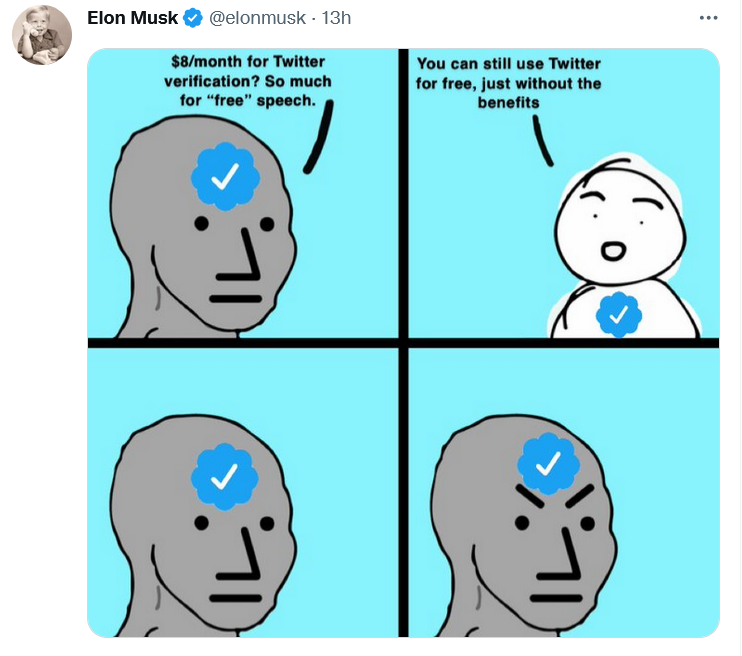
Musk explained Twitter’s freemium model in his favorite way — with a meme

In a series of tweets on November 1, Musk blasted the Twitter verification system as unfair. “Twitter’s current lords & peasants system for who has or doesn’t have a blue checkmark is bullshit,” the billionaire wrote.

To open up verification to all users, Musk suggested making the blue checkmark part of a paid Twitter Blue subscription. Launched last June, Twitter Blue is so far only available in the US, Canada, Australia, and New Zealand. Subscribers pay a monthly fee adjusted for the region. In the US, the fee amounts to $4.99/month.

As of now, Twitter requires an account to be “authentic,”“notable,” and “active” for a blue tick to be bestowed upon it. The allocation of verification badges and their removal is solely at Twitter’s discretion. The practice sparked controversy in the past: in 2016 Twitter “unverified” the account of right-wing personality Milo Yiannopoulos, fuelling the debate about censorship on the platform.

Good value for money finally or a rip-off?

Although Twitter Blue went live more than a year ago, the revenue stream from the company’s original attempt to diversify its monetization model has been more of a trickle. Sensor Tower estimated that Twitter Blue generated only $6.4 million in global spending to date, a drop in the ocean compared to Twitter’s annual revenue of $5.08 billion in 2021. Now Musk, apparently, wants to turn Twitter Blue into something worth paying for. Whether he succeeds in doing so or kills Twitter while trying, is a very big question.

Twitter Blue currently does offer a number of useful features, but they have failed to win over power users. Subscribers can already save tweets to bookmarks, undo a tweet within up to 60 seconds of sending it, read long threads as a single page of text, customize the navigation bar, and get instant access to the most-shared articles from people they follow. Most recently, Twitter Blue allowed subscribers in Australia, Canada, and New Zealand to edit tweets up to five times in 30 minutes after posting.

Musk proposed increasing the Twitter Blue fee from $4.5 to $8 a month in the US, but he also touted additional features that should turn things around for the paid service.

Apart from the blue tick, subscribers will get priority in replies, mentions and search. They will also be able to post longer videos and audios, as well as gain access to paywalled content from publishers willing to partner with Twitter.
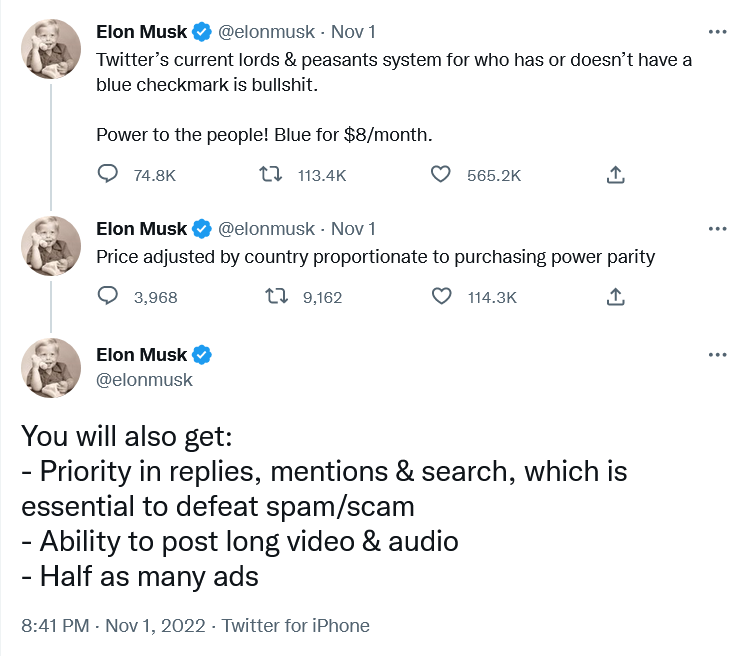
Musk unveiled his plan for Twitter monetization…on Twitter

According to different estimates, there are from 300,000 up to 400,000 verified accounts on Twitter. In the second quarter of 2022, Twitter reported 237 million monetizable daily users. It’s unclear how many of them will buy into the Musk vision, and will be ready to pay for it from their own pockets.

Under Musk’s plan, public figures should remain recognizable even if they do not pay for the subscription. Twitter would add “a secondary tag” below their names, “which is already the case for politicians,” according to Musk. Apparently, the Twitter CEO referred to the labels for government and state-affiliated media accounts Twitter introduced back in 2020.

Fewer ads for subscribers

Most interesting for regular users, perhaps, is that subscribers will see fewer distractions, namely, “half as many ads.”

Some may consider this as a letdown from a man who once said that he “hates advertising.”. In a since deleted Twitter thread from April, Musk proposed essentially the same model, but suggested that those who sign up for Twitter Blue should see no ads at all.

“The power of corporations to dictate policy is greatly enhanced if Twitter depends on advertising money to survive,” Musk tweeted at the time.
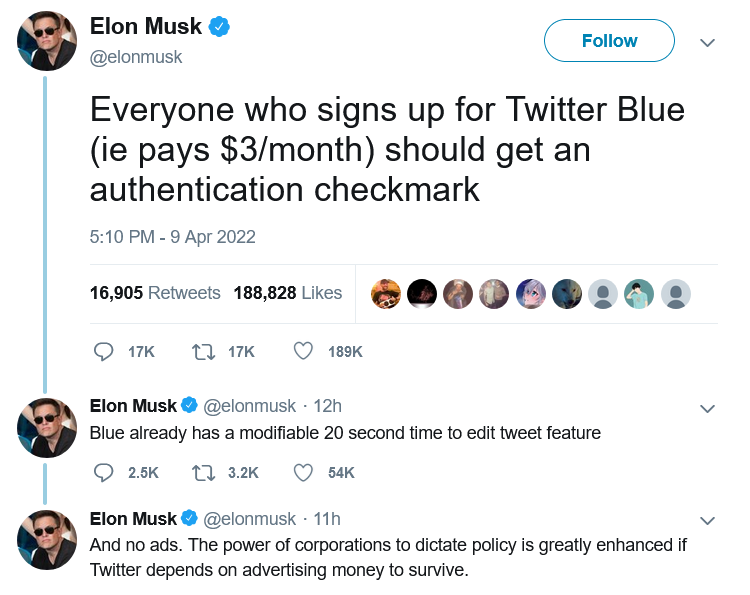
Half a year before becoming Twitter CEO, Musk suggested disabling ads for Twitter Blue subscribers

At the moment, though, Twitter Blue subscribers are being bombarded with the same amount of ads as non-subscribers. So, Musk’s decision can be seen as a step in the right direction.

According to Musk, the new system should enable Twitter to “defeat spam/scam on the platform”, as well as provide it with a “revenue stream to reward content creators.”

Ads will not go away, so won’t content moderation

After ascending to the Twitter throne, Musk has softened his stance towards advertisers. On the same day the Twitter deal was officially done and dusted, Musk addressed the advertising industry in a Twitter post titled “Dear Twitter Advertisers.”

“There has been much speculation about why I bought Twitter and what I think about advertising. Most of it has been wrong,”Musk wrote. The billionaire, who is known as a vocal advocate of the freedom of speech, added that while he wants the platform to be “warm and welcoming to all,” it won’t be completely free of regulation. “Twitter obviously cannot become a free-for-all hellspace, where anything can be said for no consequences!”

Musk then made it clear that advertisers will stay on the platform, but hinted that the rules for how they conduct their business can change. “It is essentially to show Twitter users advertising that is as relevant as possible to their needs. Low relevancy ads are spam, but highly relevant ads are actually content!” Musk went on to write.

The post was too sketchy on details as far as the future of ads on Twitter is concerned. Musk said that he wants to make Twitter “the most respected advertising platform in the world,” and judging by his previous rhetoric it is unlikely to mean harvesting more personal data without user consent. Hopefully, quite the opposite.

Meanwhile, individual companies, such as automaker GM (which, incidentally, is a Tesla competitor), have decided to suspend advertising on Twitter. It is unclear how many advertisers will decide to stick with the platform when the dust settles.

What to expect next?

It remains to be seen if Musk comes back to various proposals he’d made while still not at the helm of Twitter. One of them is to introduce end-to-end encryption for Twitter DMs like in the privacy-first Signal messanger. Another is to make Twitter algorithms open source. If Musk brings these ideas of his to life, Twitter would become more private and secure.

Given that Musk, however successful his other business ventures may be, is rather unpredictable, it’s difficult to gauge what will come out of his great Twitter gamble.

But a pivot from an ad-based revenue model to a model based on paid subscriptions is also pivot to more privacy. If Twitter’s revenue no longer fully depends on advertising, big corporations will have less sway over the company, and Twitter — fewer incentives to sell user data.
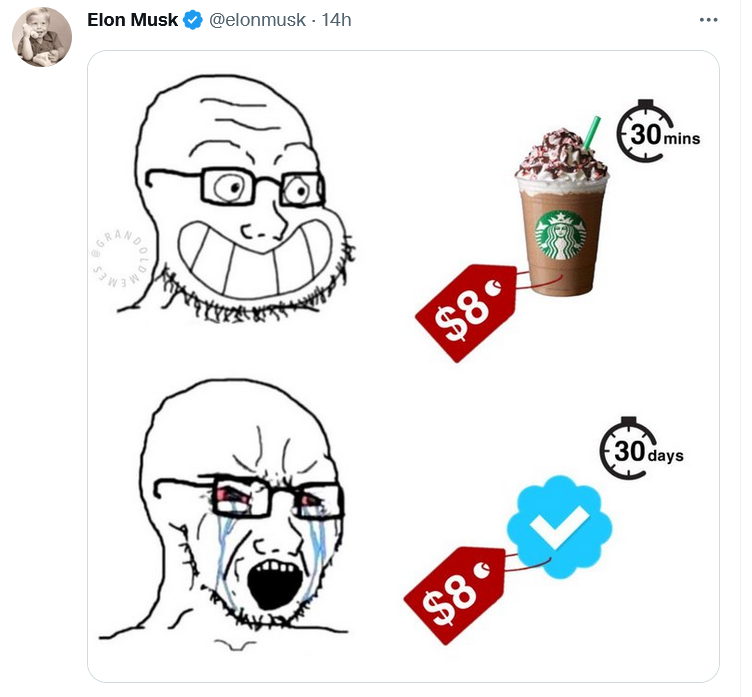
Musk compared the proposed Twitter subscription fee to a price of one cup of coffee

Whether the new model takes off, and what shape it will take in the end, one can only guess. Right now the odds are not in Musk’s favor, but no one becomes the richest man in the world for nothing. Much will depend on how Musk uses his personal marketing appeal to sell Twitter Blue to users, whether and how quickly he adds new features, and how well he listens to feedback. For now, everything is still up in the air. For example, it’s unclear how many ads are “half as many ads” exactly, and whether all the new proposed features would be enough to convince users to pay for a subscription.

As for the price tag, $8 is less than the cost of a few cups of coffee. It’s more about whether Musk will be able to sweeten the deal up enough.


این پست را دوست داشتید؟
AdGuard VPN AdGuard DNS AdGuard Mail AdGuard Wallet
صفحه اصلی AdGuard برای Windows
صفحه محافظت AdGuard برای Windows که ویژگی‌ها و تنظيمات محافظت را نشان می‌دهد
صفحه آمار AdGuard برای Windows که آمار تبلیغات و رَدیاب‌های مسدود شده را نشان می‌دهد
صفحه مدیریت برنامه AdGuard برای Windows که گزینه‌های مدیریت محافظت برای برنامک‌های نصب‌شده روی دستگاه را نشان می‌دهد
۲۰٬۴۴۰ 20440 بررسی
بسیار عالی!

AdGuard برای Windows: مسدودکننده تبلیغات برای رایانه شخصی

AdGuard برای ویندوز چیزی فراتر از یک مسدودکننده تبلیغات است. این یک ابزار چندمنظوره است که تبلیغات را مسدود می‌کند، دسترسی به سایت‌های خطرناک را کنترل می‌کند، بارگذاری صفحات را سریع‌تر می‌کند و از کودکان در برابر محتوای نامناسب محافظت می‌کند

با دانلود برنامه شما شرایط توافقنامه مجوز را قبول می کنید
Microsoft Store
با دانلود برنامه شما شرایط توافقنامه مجوز را قبول می کنید
AdGuard برای Windows v8.0، دوره آزمایشی 14روزه
صفحه اصلی AdGuard برای Mac
صفحه حالت نهان AdGuard برای Mac
۲۰٬۴۴۰ 20440 بررسی
بسیار عالی!

AdGuard برای مک: مسدودکنندهٔ تبلیغات در سطح سیستم

AdGuard برای Mac یک مسدودکنندهٔ تبلیغات منحصربه‌فرد است که با در نظر گرفتن macOS طراحی شده است. علاوه بر محافظت از شما در برابر تبلیغات آزاردهنده در مرورگرها و برنامه‌ها، شما را در برابر ردیابی، فیشینگ و کلاهبرداری نیز محافظت می‌کند
با دانلود برنامه شما شرایط توافقنامه مجوز را قبول می کنید
بیشتر بخوانید
AdGuard برای Mac v2.19، دوره آزمایشی 14روزه
صفحه اصلی AdGuard برای Android
صفحه حفاظت در برابر ردیابی AdGuard برای Android
صفحه مدیریت برنامه AdGuard برای Android که گزینه‌های مدیریت محافظت برای برنامک‌های نصب‌شده روی دستگاه را نشان می‌دهد
صفحه آمار AdGuard برای Android که آمار تبلیغات و رَدیاب‌های مسدود شده را نشان می‌دهد
صفحه اصلی مرورگر خصوصی AdGuard برای Android
کد QR برای بارگیری AdGuard برای Android
۲۰٬۴۴۰ 20440 بررسی
بسیار عالی!

ادگارد برای اندروید: مسدودکنندهٔ تبلیغات برای همهٔ برنامه‌ها

تبلیغات و ردیاب‌ها را در همه مرورگرها، بازی‌ها و سایر برنامه‌ها مسدود می‌کند. از حریم خصوصی شما محافظت می‌کند و به شما امکان می‌دهد کنترل کنید برنامه‌هایتان چگونه از اینترنت استفاده می‌کنند. از طریق APK نصب می‌شود
با دانلود برنامه شما شرایط توافقنامه مجوز را قبول می کنید
بیشتر بخوانید
اسکن برای دانلود
استفاده از هر کد خوان QR موجود در دستگاه شما
AdGuard برای اندروید v4.14، دوره آزمایشی 14روزه
صفحه اصلی AdGuard برای iOS
صفحه محافظت AdGuard برای iOS که ویژگی‌ها و تنظيمات محافظت را نشان می‌دهد
صفحه آمار AdGuard برای iOS که آمار تبلیغات و رَدیاب‌های مسدود شده را نشان می‌دهد
کد QR برای بارگیری AdGuard برای iOS
۲۰٬۴۴۰ 20440 بررسی
بسیار عالی!

AdGuard برای iOS: مسدودکنندهٔ تبلیغات فراتر از Safari

بهترین مسدودکننده تبلیغات iOS برای iPhone و iPad. AdGuard همه انواع تبلیغات و ردیاب‌ها را در Safari حذف می‌کند و از حریم خصوصی شما در همه برنامه‌ها در سطح DNS محافظت می‌کند
با دانلود برنامه شما شرایط توافقنامه مجوز را قبول می کنید
بیشتر بخوانید
اسکن برای دانلود
استفاده از هر کد خوان QR موجود در دستگاه شما
AdGuard برای iOS نسخه 4.5
صفحه اصلی AdGuard Content Blocker
صفحه فیلترها در AdGuard Content Blocker
صفحه تنظيمات در AdGuard Content Blocker
۲۰٬۴۴۰ 20440 بررسی
بسیار عالی!

مسدودساز محتوای AdGuard

AdGuard Content Blocker انواع تبلیغات را در مرورگرهای تلفن همراه که از فناوری مسدود کردن محتوا پشتیبانی می کنند حذف می کند - یعنی اینترنت سامسونگ و مرورگر Yandex. ویژگی های آن در مقایسه با AdGuard برای اندروید محدود است، اما رایگان، نصب آسان و کارآمد است
با دانلود برنامه شما شرایط توافقنامه مجوز را قبول می کنید
بیشتر بخوانید
مسدودساز محتوای AdGuard نسخه 2.8
صفحه اصلی افزونه مرورگر AdGuard
صفحه حفاظت در برابر ردیابی افزونه مرورگر AdGuard
۲۰٬۴۴۰ 20440 بررسی
بسیار عالی!

افزونه مرورگر AdGuard

AdGuard سریع ترین و سبک ترین افزونه ای است که انواع تبلیغات را در صفحات وب مسدود می کند! AdGuard را برای مرورگری که میخواهید انتخاب کنید و وب گردی امن و سریع را تجربه کنید.
نصب
با دانلود برنامه شما شرایط توافقنامه مجوز را قبول می کنید
نصب
با دانلود برنامه شما شرایط توافقنامه مجوز را قبول می کنید
نصب
با دانلود برنامه شما شرایط توافقنامه مجوز را قبول می کنید
نصب
با دانلود برنامه شما شرایط توافقنامه مجوز را قبول می کنید
نصب
با دانلود برنامه شما شرایط توافقنامه مجوز را قبول می کنید
بیشتر بخوانید
نصب
با دانلود برنامه شما شرایط توافقنامه مجوز را قبول می کنید
بیشتر بخوانید
افزونه مرورگر AdGuard نسخه 5.5
صفحه اصلی AdGuard Assistant
۲۰٬۴۴۰ 20440 بررسی
بسیار عالی!

AdGuard دستیار

افزونه مرورگر همراه برای برنامه های دسکتاپ AdGuard. این امکان را به شما می دهد که آیتم های سفارشی را در وب سایت ها مسدود کنید، وب سایت ها را به لیست مجاز اضافه کنید و گزارش ها را مستقیما از مرورگر خود ارسال کنید
AdGuard دستیار نسخه 1.4
۲۰٬۴۴۰ 20440 بررسی
بسیار عالی!

AdGuard Home

AdGuard Home یک راه حل مبتنی بر شبکه برای مسدود کردن تبلیغات و ردیاب ها است. آن را یک بار روی روتر خود نصب کنید تا همه دستگاه های موجود در شبکه خانگی خود را پوشش دهید - بدون نیاز به نرم افزار مشتری اضافی. این امر به ویژه برای دستگاه های مختلف اینترنت اشیا که اغلب حریم خصوصی شما را تهدید می کنند بسیار مهم است
AdGuard Home نسخه 0.107
صفحه اصلی AdGuard Pro برای iOS
صفحه محافظت AdGuard Pro برای iOS که قابلیت‌ها و تنظيمات محافظت را نشان می‌دهد
صفحه آمار AdGuard Pro برای iOS که آمار تبلیغات و رَدیاب‌های مسدود شده را نشان می‌دهد
۲۰٬۴۴۰ 20440 بررسی
بسیار عالی!

AdGuard Pro برای iOS

AdGuard Pro برای iOS با تمام ویژگی‌های پیشرفته محافظت در برابر مسدود کردن تبلیغات ارائه می‌شود. این نسخه همان ابزارهای نسخه پولی AdGuard برای iOS را ارائه می‌دهد. این نسخه در مسدود کردن تبلیغات در سافاری عالی عمل می‌کند و به شما امکان می‌دهد تنظیمات DNS را برای محافظت متناسب با نیاز خود سفارشی کنید. این نسخه تبلیغات را در مرورگرها و برنامه‌ها مسدود می‌کند، از فرزندان شما در برابر محتوای نامناسب محافظت می‌کند و اطلاعات شخصی شما را ایمن نگه می‌دارد.
با دانلود برنامه شما شرایط توافقنامه مجوز را قبول می کنید
بیشتر بخوانید
AdGuard Pro برای iOS نسخه 4.5
صفحه اصلی AdGuard Mini برای Mac
صفحه محافظت Safari در AdGuard Mini برای Mac
صفحه ایجاد رویه در AdGuard Mini برای Mac
۲۰٬۴۴۰ 20440 بررسی
بسیار عالی!

AdGuard Mini برای Mac — مسدود کننده تبلیغات Safari

AdGuard Mini برای Mac یک مسدودکنندهٔ قدرتمند تبلیغات برای Safari است. این برنامک سبک، تبلیغات را حذف می‌کند، ردیاب‌ها را مسدود می‌کند و بارگذاری صفحه را سریع‌تر می‌کند. این ابزار به شما کمک می‌کند تا بدون حواس‌پرتی در Safari گشت‌و‌گذار کنید و داده‌های خود را خصوصی نگه دارید
نصب
با دانلود برنامه شما شرایط توافقنامه مجوز را قبول می کنید
بیشتر بخوانید
AdGuard Mini برای Mac نسخه 2.3
صفحه اصلی AdGuard برای Android TV با محافظت فعال شده
صفحه مسدودسازی تبلیغات AdGuard برای Android TV که ویژگی‌ها و تنظيمات آن را نشان می‌دهد
صفحه تنظيمات AdGuard برای Android TV
صفحه مدیریت برنامه AdGuard برای Android TV که برنامک‌هایی را نشان می‌دهد که در آن‌ها تبلیغات و رَدیاب‌ها مسدود شده‌اند
۲۰٬۴۴۰ 20440 بررسی
بسیار عالی!

AdGuard برای Android TV

AdGuard برای Android TV تنها برنامه‌ای است که تبلیغات را مسدود می‌کند، از حریم خصوصی شما محافظت کرده و همانند یک دیوار آتش برای تلویزیون هوشمند شما عمل می‌کند. در مورد تهدیدات وب هشدار دریافت کنید، از DNS ایمن استفاده کرده و از انتقال داده اینترنتی رمزگذاری شده بهره‌مند شوید. آرامش داشته باشید و غرق نمایش‌های مورد علاقه خود با امنیت عالی و تبلیغات صفر شوید!
AdGuard برای Android TV v4.14، دوره آزمایشی 14روزه
نماد AdGuard، Agnar، در حالی که پنگوئن Linux را در دست دارد
۲۰٬۴۴۰ 20440 بررسی
بسیار عالی!

AdGuard برای لینوکس

AdGuard برای لینوکس اولین مسدود کننده تبلیغات لینوکس در سراسر جهان است. تبلیغات و ردیاب‌ها را در سطح دستگاه مسدود کنید، از بین فیلترهای از پیش نصب شده انتخاب کنید یا فیلترهای خود را اضافه کنید - همه از طریق رابط خط فرمان
AdGuard برای لینوکس نسخه 1.4
۲۰٬۴۴۰ 20440 بررسی
بسیار عالی!

AdGuard Temp Mail

یک تولید‌کننده رایانشانی موقت رایگان که شما را ناشناس نگه می‌دارد و از حریم خصوصی شما محافظت می‌کند. هرزنامه‌ای در صندوق ورودی اصلی شما در کار نخواهد بود!
۲۰٬۴۴۰ 20440 بررسی
بسیار عالی!

AdGuard VPN

75 محل در سرتاسر جهان

دسترسی به هر محتوا

رمزگذاری قوی

سیاست عدم ذخیره وقایع

سریعترین اتصال

24/7 پشتیبانی

ارزیابی رایگان
با دانلود برنامه شما شرایط توافقنامه مجوز را قبول می کنید
بیشتر بخوانید
۲۰٬۴۴۰ 20440 بررسی
بسیار عالی!

AdGuard DNS

AdGuard DNS راه حلی جایگزین برای مسدودسازی تبلیغات، حفاظت حریم خصوصی و نظارت والدین است. راه اندازی آسان و استفاده رایگان، آن حداقل حفاظت لازم در برابر تبلیغات آنلاین،ردیاب ها و فیشینگ ها را میدهد،و در همه سیستم عامل ها و دستگاه ها کار می کند.
۲۰٬۴۴۰ 20440 بررسی
بسیار عالی!

AdGuard Mail

از هویت خود محافظت کنید، از هرزنامه دوری نمایید و صندوق ورودی خود را با نام‌های مستعار و رایانشانی‌های موقت ما امن نگه دارید. از خدمت رایگان فوروارد رایانامه و برنامک‌های ما برای همه سامانه‌عامل‌ها لذت ببرید
۲۰٬۴۴۰ 20440 بررسی
بسیار عالی!

AdGuard Wallet

یک کیف پول ارز دیجیتال امن و خصوصی که به شما امکان کنترل کامل بر دارایی‌هایتان را می‌دهد. چندین کیف پول را مدیریت کنید و هزاران ارز دیجیتال را برای ذخیره، ارسال و مبادله کشف کنید.
در حال بارگیری AdGuard برای نصب AdGuard، روی پرونده نشان داده شده توسط پیکان کلیک کنید گزینه "بازکردن " را انتخاب و روی "تایید" کلیک کنید — برای دانلود فایل منتظر بمانید. در پنجره باز شده، آیکون AdGuard را به پوشه "برنامه ها" بکشید.بابت انتخاب AdGuard متشکریم! گزینه "بازکردن " را انتخاب و روی "تایید" کلیک کنید — برای دانلود فایل منتظر بمانید. در پنجره باز شده روی "نصب" کلیک کنید.بابت انتخاب AdGuard متشکریم!
AdGuard را روی دستگاه تلفن همراه خود نصب کنید

















































